
- 1力扣初级算法(数组篇)_力扣 初级算法 答案
- 2Gitee进行版本管理
- 3【愚公系列】2023年12月 HarmonyOS教学课程 019-ArkUI组件(TextInput/TextArea)_arkui自定义输入框
- 4基于Python的全国主要城市天气数据可视化大屏系统
- 53.springboot开发篇
- 6Nginx 配置gzip,压缩js\css_nginx 压缩js后缀名称
- 7蓝色版PTCMS仿蜻蜓听书小说站源码+带采集规则/安装教程_有声小说采集规则
- 8若依配置教程(五)数据权限的使用及配置_若依 数据权限的使用
- 9centos文件和目录权限(umask)_centos umask
- 10基于python的网络聊天室论文_基于python的聊天室(2),实现,二
RealSense二次开发
赞
踩
转载:librealsense2查看相机设备信息 - JavaShuo
文章目录
1. librealsense2设备信息读取
librealsense2提供的接口可以检测连接到系统的所有realsense设备,如sr300,并可以读取每个设备的编号、彩色相机和深度相机的内参(相机内参矩阵参数和畸变系数及其畸变模型)、彩色相机和深度相机坐标系间的变换矩阵。
接口调用如下:
- #include <librealsense2/rs.hpp> // Include RealSense Cross Platform API
- #include<iostream>
- #include<opencv2/opencv.hpp>
-
- int main(int argc, char * argv[]) try
- {
- rs2::log_to_console(RS2_LOG_SEVERITY_ERROR);
-
- /// Create librealsense context for managing devices
- rs2::context ctx;
- auto devs = ctx.query_devices(); ///获取设备列表
- int device_num = devs.size();
- std::cout<<"device num: "<<device_num<<std::endl;///设备数量
-
- ///我只连了一个设备,因此我查看第0个设备的信息
- /// 当无设备连接时此处抛出rs2::error异常
- rs2::device dev = devs[0];
- ///设备编号,每个设备都有一个不同的编号, 如果连接了多个设备,便可根据此编号找到你希望启动的设备
- char serial_number[100] = {0};
- strcpy(serial_number, dev.get_info(RS2_CAMERA_INFO_SERIAL_NUMBER));
- printf("serial_number: %s\n",serial_number);
-
- ///设置从设备管道获取的深度图和彩色图的配置对象
- rs2::config cfg;
- ///配置彩色图像流:分辨率640*480,图像格式:BGR, 帧率:30帧/秒
- ///默认配置任意一个设备,若要配置指定的设备可以根据设备在设备列表里的序列号进行制定:
- ///int indx = 0; ///表示第0个设备
- ///cfg.enable_stream(RS2_STREAM_COLOR,indx, 640, 480, RS2_FORMAT_BGR8, 30);
- cfg.enable_stream(RS2_STREAM_COLOR,640, 480, RS2_FORMAT_BGR8, 30);
- ///配置深度图像流:分辨率640*480,图像格式:Z16, 帧率:30帧/秒
- cfg.enable_stream(RS2_STREAM_DEPTH, 640, 480, RS2_FORMAT_Z16, 30);
-
- ///生成Realsense管道,用来封装实际的相机设备
- rs2::pipeline pipe;
- pipe.start(cfg); ///根据给定的配置启动相机管道
-
- rs2::frameset data;
- data = pipe.wait_for_frames();///等待一帧数据,默认等待5s
-
- rs2::depth_frame depth = data.get_depth_frame(); ///获取深度图像数据
- rs2::video_frame color = data.get_color_frame(); ///获取彩色图像数据
- rs2::stream_profile dprofile = depth.get_profile();
- rs2::stream_profile cprofile = color.get_profile();
-
- ///获取彩色相机内参
- rs2::video_stream_profile cvsprofile(cprofile);
- rs2_intrinsics color_intrin = cvsprofile.get_intrinsics();
- std::cout<<"\ncolor intrinsics: ";
- std::cout<<color_intrin.width<<" "<<color_intrin.height<<" ";
- std::cout<<color_intrin.ppx<<" "<<color_intrin.ppy<<" ";
- std::cout<<color_intrin.fx<<" "<<color_intrin.fy<<std::endl;
- std::cout<<"coeffs: ";
- for(auto value : color_intrin.coeffs)
- std::cout<<value<<" ";
- std::cout<<std::endl;
- std::cout<<"distortion model: "<<color_intrin.model<<std::endl;///畸变模型
-
- ///获取深度相机内参
- rs2::video_stream_profile dvsprofile(dprofile);
- rs2_intrinsics depth_intrin = dvsprofile.get_intrinsics();
- std::cout<<"\ndepth intrinsics: ";
- std::cout<<depth_intrin.width<<" "<<depth_intrin.height<<" ";
- std::cout<<depth_intrin.ppx<<" "<<depth_intrin.ppy<<" ";
- std::cout<<depth_intrin.fx<<" "<<depth_intrin.fy<<std::endl;
- std::cout<<"coeffs: ";
- for(auto value : depth_intrin.coeffs)
- std::cout<<value<<" ";
- std::cout<<std::endl;
- std::cout<<"distortion model: "<<depth_intrin.model<<std::endl;///畸变模型
-
- ///获取深度相机相对于彩色相机的外参,即变换矩阵: P_color = R * P_depth + T
- rs2_extrinsics extrin = dprofile.get_extrinsics_to(cprofile);
- std::cout<<"\nextrinsics of depth camera to color camera: \nrotaion: "<<std::endl;
- for(int i = 0; i < 3; ++i){
- for(int j = 0; j < 3; ++j){
- float value = extrin.rotation[3*i + j];
- std::cout<<value<<" ";
- }
- std::cout<<std::endl;
- }
- std::cout<<std::endl;
-
- std::cout<<"translation: ";
- for(auto value : extrin.translation)
- std::cout<<value<<" ";
- std::cout<<std::endl;
-
- while(1)
- {
- ///等待一帧数据,默认等待5s
- data = pipe.wait_for_frames();
-
- rs2::depth_frame depth = data.get_depth_frame(); ///获取深度图像数据
- rs2::video_frame color = data.get_color_frame(); ///获取彩色图像数据
- int color_width = color.get_width();
- int color_height = color.get_height();
-
- int depth_width = depth.get_width();
- int depth_height = depth.get_height();
-
- if (!color || !depth) break; ///如果获取不到数据则退出
-
- ///将彩色图像和深度图像转换为Opencv格式
- cv::Mat image(cv::Size(color_width, color_height), CV_8UC3, (void*)color.get_data(), cv::Mat::AUTO_STEP);
- cv::Mat depthmat(cv::Size(depth_width, depth_height), CV_16U, (void*)depth.get_data(), cv::Mat::AUTO_STEP);
-
- ///显示
- cv::imshow("image",image);
- cv::imshow("depth",depthmat);
- cv::waitKey(1);
- }
- return EXIT_SUCCESS;
- }
- catch (const rs2::error & e)
- {
- ///捕获相机设备的异常
- std::cerr << "RealSense error calling " << e.get_failed_function() << "(" << e.get_failed_args() << "):\n " << e.what() << std::endl;
- return EXIT_FAILURE;
- }
- catch (const std::exception& e)
- {
- std::cerr<<"Other error : " << e.what() << std::endl;
- return EXIT_FAILURE;
- }

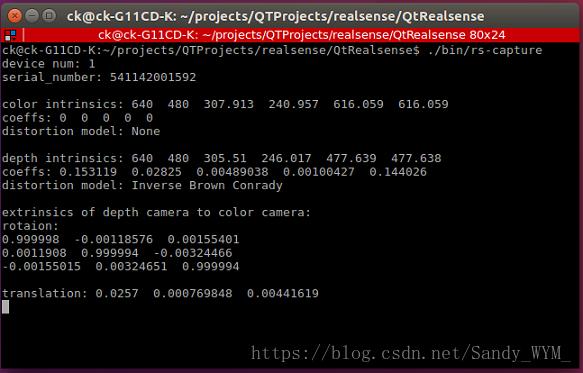
可以看到我连接了一个设备,设备编号为541142001592,同时也可以看到彩色相机和深度相机的内参和畸变系数及其畸变模型,彩色相机畸变模型为:None, 并且畸变系数都为0,表示彩色相机无畸变;而深度相机畸变模型为:Inverse Brown Conrady,并且畸变系数不为0,表示深度相机存在畸变。畸变系数从左到右分别是:k1, k2, p1, p2, k3。在librealsense2安装路径下的rsutil.h文件可以看到将3d坐标点投影到2d图像平面的函数 rs2_project_point_to_pixel 写着“ //assert(intrin->model != RS2_DISTORTION_INVERSE_BROWN_CONRADY); // Cannot project to an inverse-distorted image”,也就是说我使用的设备的深度相机无法将3d坐标图像直接投影到2d图像平面,有关相机内参和畸变模型参考另一篇博客相机内参与畸变模型
2.realsense 投影函数和反投影函数
在librealsense2安装路径下的rsutil.h文件里可以找到相机的投影函数和反投影函数,投影函数即将相机坐标系下的一个3d点投影到2d图像平面上的像素坐标,反投影函数即已知相机2d图像平面上像素点对应的深度值可以计算出该点在相机坐标系下的3d坐标值,下面粘贴这两个函数出来:
投影函数:
- /* Given a point in 3D space, compute the corresponding pixel coordinates in an image with no distortion or forward distortion coefficients produced by the same camera */
- static void rs2_project_point_to_pixel(float pixel[2], const struct rs2_intrinsics * intrin, const float point[3])
- {
- //assert(intrin->model != RS2_DISTORTION_INVERSE_BROWN_CONRADY); // Cannot project to an inverse-distorted image
-
- float x = point[0] / point[2], y = point[1] / point[2];
-
- if(intrin->model == RS2_DISTORTION_MODIFIED_BROWN_CONRADY)
- {
-
- float r2 = x*x + y*y;
- float f = 1 + intrin->coeffs[0]*r2 + intrin->coeffs[1]*r2*r2 + intrin->coeffs[4]*r2*r2*r2;
- x *= f;
- y *= f;
- float dx = x + 2*intrin->coeffs[2]*x*y + intrin->coeffs[3]*(r2 + 2*x*x);
- float dy = y + 2*intrin->coeffs[3]*x*y + intrin->coeffs[2]*(r2 + 2*y*y);
- x = dx;
- y = dy;
- }
- if (intrin->model == RS2_DISTORTION_FTHETA)
- {
- float r = sqrt(x*x + y*y);
- auto rd = (1.0f / intrin->coeffs[0] * atan(2 * r* tan(intrin->coeffs[0] / 2.0f)));
- x *= rd / r;
- y *= rd / r;
- }
-
- pixel[0] = x * intrin->fx + intrin->ppx;
- pixel[1] = y * intrin->fy + intrin->ppy;
- }
反投影函数:
- /* Given pixel coordinates and depth in an image with no distortion or inverse distortion coefficients, compute the corresponding point in 3D space relative to the same camera */
- static void rs2_deproject_pixel_to_point(float point[3], const struct rs2_intrinsics * intrin, const float pixel[2], float depth)
- {
- assert(intrin->model != RS2_DISTORTION_MODIFIED_BROWN_CONRADY); // Cannot deproject from a forward-distorted image
- assert(intrin->model != RS2_DISTORTION_FTHETA); // Cannot deproject to an ftheta image
- //assert(intrin->model != RS2_DISTORTION_BROWN_CONRADY); // Cannot deproject to an brown conrady model
-
- float x = (pixel[0] - intrin->ppx) / intrin->fx;
- float y = (pixel[1] - intrin->ppy) / intrin->fy;
- if(intrin->model == RS2_DISTORTION_INVERSE_BROWN_CONRADY)
- {
- float r2 = x*x + y*y;
- float f = 1 + intrin->coeffs[0]*r2 + intrin->coeffs[1]*r2*r2 + intrin->coeffs[4]*r2*r2*r2;
- float ux = x*f + 2*intrin->coeffs[2]*x*y + intrin->coeffs[3]*(r2 + 2*x*x);
- float uy = y*f + 2*intrin->coeffs[3]*x*y + intrin->coeffs[2]*(r2 + 2*y*y);
- x = ux;
- y = uy;
- }
- point[0] = depth * x;
- point[1] = depth * y;
- point[2] = depth;
- }
3.深度相机与彩色相机的坐标变换
第一节中我们获取了深度相机到彩色相机的坐标变换矩阵,下列realsense函数将深度相机坐标系下的一个坐标点转换到彩色相机坐标系下的坐标值,同理也可以计算彩色相机坐标系下的坐标值在深度相机坐标系下的坐标值:
- /* Transform 3D coordinates relative to one sensor to 3D coordinates relative to another viewpoint */
- static void rs2_transform_point_to_point(float to_point[3], const struct rs2_extrinsics * extrin, const float from_point[3])
- {
- to_point[0] = extrin->rotation[0] * from_point[0] + extrin->rotation[3] * from_point[1] + extrin->rotation[6] * from_point[2] + extrin->translation[0];
- to_point[1] = extrin->rotation[1] * from_point[0] + extrin->rotation[4] * from_point[1] + extrin->rotation[7] * from_point[2] + extrin->translation[1];
- to_point[2] = extrin->rotation[2] * from_point[0] + extrin->rotation[5] * from_point[1] + extrin->rotation[8] * from_point[2] + extrin->translation[2];
- }

