
热门标签
热门文章
- 1Android 13 - Media框架(4)- MediaPlayerService_android media
- 2成功解决RuntimeError: [enforce fail at C:\actions-runner\_work\pytorch\pytorch\builder\windows\pytorch\c
- 3重看Mysql联想到数据库连接池DruidDataSource_druid datasource keeplive
- 4OkHttp3源码详解
- 5大数据从入门到实战-HDFS-JAVA接口之删除文件_liststatus( )方法
- 6Linux 安装 MySQL_linux安装mysql
- 7Nmap超详细使用指南_nmap扫描域名
- 8【环境配置】出现:Microsoft Visual C++ 14.0 is required 的解决方案_error microsoft visual c++ 14.
- 9Android 知识点 110 —— PowerManagerService 进入屏保 updateUserActivitySummaryLocked
- 10YOLOV8增加head部分模块-BasicRFB
当前位置: article > 正文
pyhton微博爬虫(2)——获取微博用户关注列表_微博爬虫 用户关注兴趣领域
作者:笔尖舞者 | 2024-02-03 14:21:51
赞
踩
微博爬虫 用户关注兴趣领域
本文的主要目标是获取微博用户关注列表以及关注列表中各微博用户的ID、昵称、详情链接、粉丝数、关注数等关键信息。
实现代码如下所示:
# -*- coding: utf-8 -*-
"""
Created on Thu Aug  3 20:59:53 2017

@author: Administrator
"""

import requests
import json
import time
import random
import pymysql.cursors


def crawlDetailPage(url,page):
    #读取微博网页的JSON信息
    req = requests.get(url)
    jsondata = req.text
    data = json.loads(jsondata)

    #获取每一条页的数据
    content = data['cards']
    #print(content)

    #循环输出每一页的关注者各项信息
    for i in content:
        followingId = i['user']['id']
        followingName = i['user']['screen_name']
        followingUrl = i['user']['profile_url']
        followersCount = i['user']['followers_count']
        followCount = i['user']['follow_count']

        print("---------------------------------")
        print("用户ID为:{}".format(followingId))
        print("用户昵称为:{}".format(followingName))
        print("用户详情链接为:{}".format(followingUrl))
        print("用户粉丝数:{}".format(followersCount))
        print("用户关注数:{}".format(followCount))


        '''
        数据库操作
        '''

        #获取数据库链接
        connection  = pymysql.connect(host = 'localhost',
                                  user = 'root',
                                  password = '123456',
                                  db = 'weibo',
                                  charset = 'utf8mb4')
        try:
            #获取会话指针
            with connection.cursor() as cursor:
                #创建sql语句
                sql = "insert into `following` (`followingId`,`followingName`,`followingUrl`,`followersCount`,`followCount`) values (%s,%s,%s,%s,%s)"

                #执行sql语句
                cursor.execute(sql,(followingId,followingName,followingUrl,followersCount,followCount))

                #提交数据库
                connection.commit()
        finally:
            connection.close()


for i in range(1,11):
    print("正在获取第{}页的关注列表:".format(i))
    #微博用户关注列表JSON链接
    url = "https://m.weibo.cn/api/container/getSecond?containerid=1005052164843961_-_FOLLOWERS&page=" + str(i)
    crawlDetailPage(url,i)
    #设置休眠时间
    t = random.randint(31,33)
    print("休眠时间为:{}s".format(t))
    time.sleep(t)

- 1
- 2
- 3
- 4
- 5
- 6
- 7
- 8
- 9
- 10
- 11
- 12
- 13
- 14
- 15
- 16
- 17
- 18
- 19
- 20
- 21
- 22
- 23
- 24
- 25
- 26
- 27
- 28
- 29
- 30
- 31
- 32
- 33
- 34
- 35
- 36
- 37
- 38
- 39
- 40
- 41
- 42
- 43
- 44
- 45
- 46
- 47
- 48
- 49
- 50
- 51
- 52
- 53
- 54
- 55
- 56
- 57
- 58
- 59
- 60
- 61
- 62
- 63
- 64
- 65
- 66
- 67
- 68
- 69
- 70
- 71
- 72
- 73
- 74
- 75
- 76
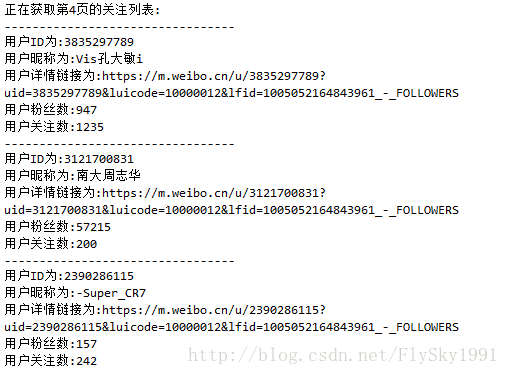
运行结果如下图所示:
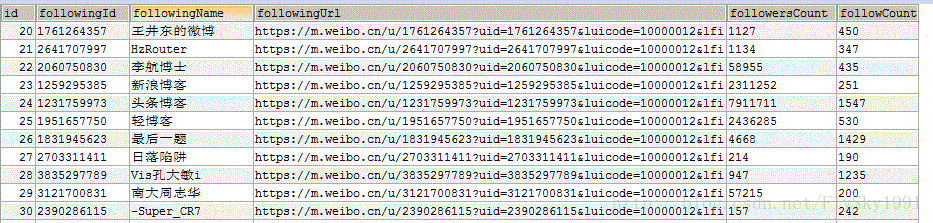
mysql数据库中的数据存储如下图所示:
声明:本文内容由网友自发贡献,不代表【wpsshop博客】立场,版权归原作者所有,本站不承担相应法律责任。如您发现有侵权的内容,请联系我们。转载请注明出处:https://www.wpsshop.cn/article/detail/56774?site
推荐阅读
相关标签

