
- 1python怎么实现输入多行文字_5行Python代码实现批量打水印技巧,值得收藏
- 2第十届蓝桥杯国赛 C/C++ B组 题目 + 部分题解(或真或假)_篮桥杯c++国赛题目分布
- 3python 之 web3 与智能合约的交互、编译等使用_python web3
- 4面板数据的门槛|门限效应检验、阈值确定、回归结果解释_门槛效应结果怎么看
- 5MySQL(二)高性能优化及规范_优化mysql5.7数据库
- 6【Tensorflow+自然语言处理+RNN】实现中文译英文的智能聊天机器人实战(附源码和数据集 超详细)
- 7学生信息管理系统(JAVA+MYSQL)
- 8Linux之shell脚本_linux执行sh脚本文件命令
- 9阿里云高性能云服务器_云主机_云服务器详解
- 10三.MongoDB入门-Mongodb的CRUD_mdown dblace
python3下的webpy运行详解——webpy,session,cookie_- 如果要运行web程序: `python3 web.py`
赞
踩
因为自己对python 中webpy的运行机制还不是特别的了解,所以写下这篇博客帮助理解。现在网上有关于python3 webpy的讲解少之又少,希望这篇文章可以为大家解惑。
1.安装webpy模块:
pip install web.py==0.40.dev
另外将:
C:\Python34\Lib\site-packages\web.py-0.40.dev0-py3.4.egg\web\template.py
中约1022行return Template(open(path).read(), filename=path, **self._keywords)
修改为:
return Template(open(path,encoding='utf-8').read(), filename=path, **self._keywords)
不然会引发编码error。
2.设置urls.
- import web
- urls=('/index','index','/login','login')
有网友写到,urls是一个元组变量,成员必须成对出现,下标为奇数的元素表示url,其后的元素表示对应的处理类。其实想想就相当于vuejs中的路由。那么下面就必须对index和login两个类加以定义(注意,类的大小写不要错,还有,请注意,/之后的网站后缀名一定要是html,htm是不行的。)
3.设置类。
代码标准的框架为
- class index:
- def GET(self):
- return render.index()
当然,return或者raise这种函数是必须要写的,但可以写多种内容,比如 return render.index()的含义就是在客户端显示出index.html这个页面。但是如果index页面本身就是一个空页面,我想返回文字该怎么办呢?那么可以改成:
- class index():
- def GET(self):
- return '<h1>hello world!</h1>'
当然,现在基本很多稍微复杂一些的网站会有登录和注册页面。这就需要去设置session了,记录登录的状态。比如这个python代码。
- #!/usr/bin/env python
- #coding=utf-8
- import web
- from web import form
- urls = (
- '/','Index',
- '/login','Login',
- )
- render =web.template.render("templates")
- '''为什么一定要把这些html
- 放在与py文件同一目录下的templates文件夹中?
- 其实不放在这个文件夹中也是可以实现的,
- 但是在有引入css,jQuery的时候必须保证html放在templates文件夹,
- 而且还要把css,jQuery放在跟templates文件夹相同目录的static文件夹下,
- 文件夹名都是不允许变动的,不要问我为什么,webpy就是这样不善解人意。'''
- web.config.debug = False
- #非调试模式,不加这行代码会经常报错的。
- app = web.application(urls, locals())
- session=web.session.Session(app,web.session.DiskStore('sessions'))
- #建立sessions文件夹

下面就到了写“类”的环节了。
先看一下完整代码:(一开始写了一个不用cookie计时的代码,不太规范,下面还有一个使用cookie,不用import time的代码)
- #!/usr/bin/env python
- #coding=utf-8
- import web
- from web import form
- import time
- urls = (
- '/','Index',
- '/login','Login',
- )
-
- render = web.template.render("templates")
- allowed = (
- ('admin','123123'),('111111','111111'),
- )
- web.config.debug = False
- app = web.application(urls, locals())
- Time1=0
- Time2=0
- session = web.session.Session(app, web.session.DiskStore('sessions'))
- a=session.get('logged_in',False)
- class Index:
- def GET(self):
- global a,Time2,Time1
- if a==True:
- Time2=time.time()/60
- changeTime=Time2-Time1
- if changeTime<=1:
- return '<h1>Login Success!!!</h1>'
- else:
- raise web.seeother('/login')
- else:
- raise web.seeother('/login')
- class Login:
- def GET(self):
- return render.login()
- def POST(self):
- global a,Time1
- message = web.input()
- username = message.get('username')
- passwd = message.get('passwd')
- if (username,passwd) in allowed:
- a = True
- Time1=time.time()/60
- raise web.seeother('/')
- else:
- return '<h1>Login Error!!!</h1></br><a href="/login">Login</a>'
-
-
- if __name__ == '__main__':
- app.run()
我会在此说一下我对session.get()的理解,相信有很多人对此还不是很明白。首先,要知道的一点是session.get("logged_in",False)和session.get("logged_in",True)的含义。
session是用户请求得到页面时产生的,这个session是类似于字典的一个东西,大家可能会问,这个logged_in是从哪来的?实际上,这个logged_in根本不存在,换句话说,我把logged_in换成任何一个自己定义的变量都可以。
测试一下
a=session.get('logged_in',True)
print(a)
结果是True
a=session.get('logged_in',False)
print(a)
结果是False
通俗来讲session.get("logged_in",False)就是在session里面找logged_in,如果找不到就返回后面的参数。
- if express:
- 语句1
- else:
- 语句2
我们可以想象成express=session.get("logged_in",False) ,session里找不到logged_in,所以返回False,
对于express=session.get("logged_in",True) 的解释大概相同,从session里面找logged_in, 不能找到,所以返回True。并执行语句1。
总的来讲,session.get('xxx',xxxx)有两个参数,第一个是表明在session中查找xxx,第二个参数为false/true,表明的是如果没找到,返回的默认值为False or True。
我们再来看一下,设置成if session.get("logged_in",False) :和设置成if session.get("logged_in",True) :的区别。
if session.get("logged_in",False) :
- a=session.get('logged_in',False)
- class Index:
- def GET(self):
- global a
- if a==False:
- raise web.seeother('/login')
- return '<h1>Login Success!!!</h1>'
- class Login:
- def GET(self):
- return render.login()
- def POST(self):
- global a
- message = web.input()
- username = message.get('username')
- passwd = message.get('passwd')
- if (username,passwd) in allowed:
- a = True
- raise web.seeother('/')
- else:
- return '<h1>Login Error!!!</h1></br><a href="/login">Login</a>'
if session.get("logged_in",True) : 这种写法亲测有效,后文会讲一下如果发现错误的解决方式。
顺便提醒一句,raise web.seeother()是标准写法,raise一般是排除错误用的,返回错误信息。这里可以理解成返回了一个303异常。但是raise不是必须有的,我可以写成return web.seeother()或者前面啥都不写,直接web.seeother()都是可行的,但加上raise的写法是最标准的。
- a=session.get('logged_in',True)
- class Index:
- def GET(self):
- global a
- if a==True:
- raise web.seeother('/login')
- return '<h1>Login Success!!!</h1>'
- class Login:
- def GET(self):
- return render.login()
- def POST(self):
- global a
- message = web.input()
- username = message.get('username')
- passwd = message.get('passwd')
- if (username,passwd) in allowed:
- a = False
- raise web.seeother('/')
- else:
- return '<h1>Login Error!!!</h1></br><a href="/login">Login</a>'
做到这步想再深入地研究一下,session是什么时候产生的呢?
session = web.session.Session(app, web.session.DiskStore('sessions'))这一步只能生成一个名叫sessions的文件夹
那么session是什么时候产生的?经检验,session是用户输入localhost:8080去get网页内容时产生的。并且输入一次localhost:8080,只能得到一个session文件,截图为证:
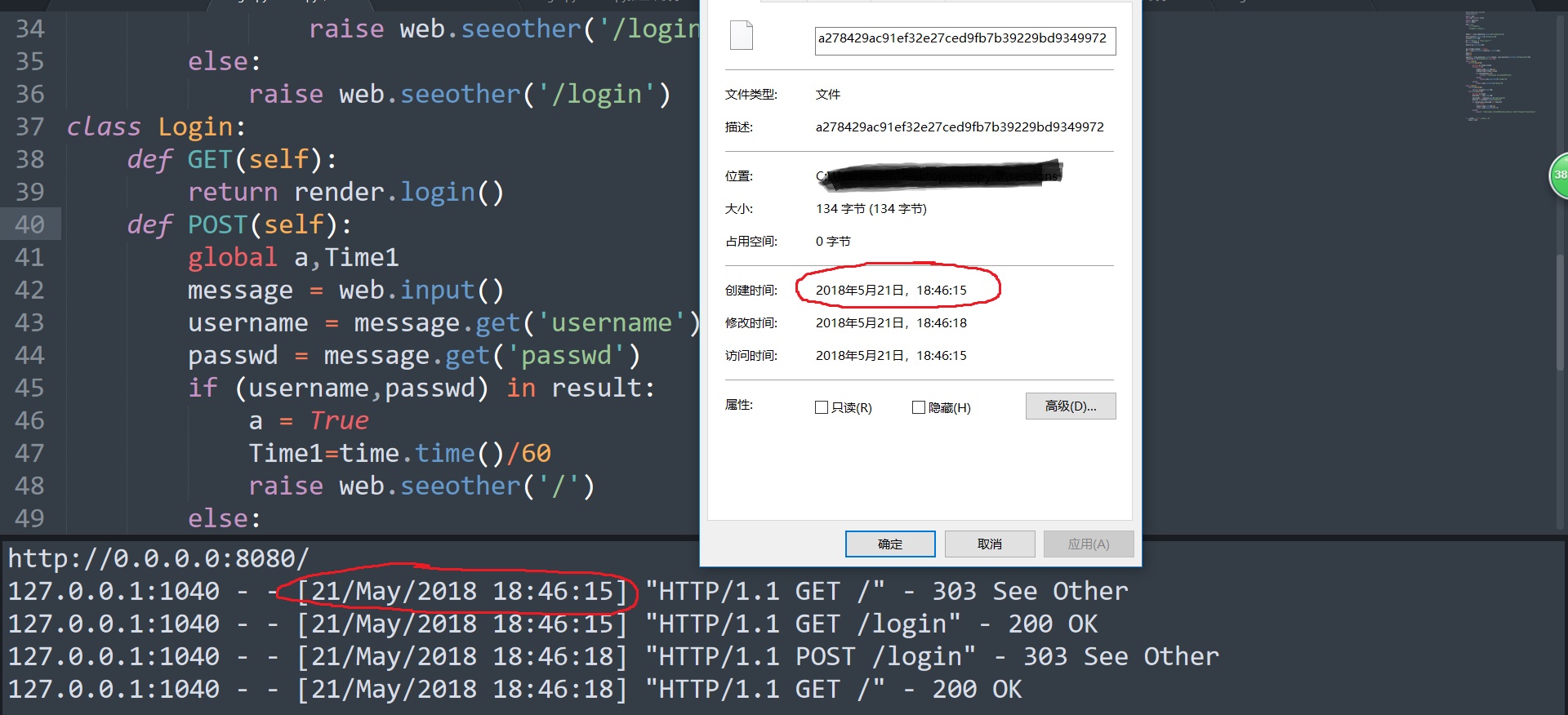
至于为什么get网站时会自动生成session的原理就希望大家百度解决了。
其实这里头的session没什么用,完全可以一开始设置a=False,通过改a的值实现网页跳转,session只有在里面存储值的时候才能发挥它真正的作用。比如存个用户名密码啥的。
还有一件事情要提一下吧,看上面的截图,你会发现总会有什么:
"HTTP/1.1 GET /favicon.ico" - 404 Not Found
可是index login html代码中也没有设置这个啊!这是从哪来的呢?看完这个解释你们可能不会觉得奇怪了,favicon.ico就是那个显示在你网页的title文字左面的那个小图片,比如CSDN左面的那个红白相间的图案C, 每次用户请求页面时,webpy都会自动查找有没有这个小图片。这个东西不是必须需要的,如果你自己想添加自行百度。
讲完了session,看一下我还用了python中的time模块,是为了让用户可以在1分钟内保持登录状态,不用重新输入用户名和密码。time.time()是获取1970年到现在的秒数,以秒为单位。
还有用cookie设置过期时间的方式。如下:(先设置一个过期时间为60s的cookie,获取这个cookie,如果这个cookie不存在,是获取不到的,用这个原理设置用于登录状态。)
- #!/usr/bin/env python
- #coding=utf-8
- import web
- from web import form
- import sqlite3
- import time
- urls = (
- '/','Index',
- '/login','Login',
- )
-
- render = web.template.render("templates")
- result=(('admin','123123'),('111111','111111'),)
- web.config.debug = False
- app = web.application(urls, locals())
- class Index:
- def GET(self):
- if web.cookies().get("hellocookie")==None:
- raise web.seeother('/login')
- else:
- return '<h1>Login Success!!!</h1>'
- class Login:
- def GET(self):
- return render.login()
- def POST(self):
- message = web.input()
- username = message.get('username')
- passwd = message.get('passwd')
- if (username,passwd) in result:
- web.setcookie("hellocookie","",30)
- raise web.seeother('/')
- else:
- return '<h1>Login Error!!!</h1></br><a href="/login">Login</a>'
-
-
- if __name__ == '__main__':
- app.run()
然后附上index.html和login.html的代码。
index.html
- <!DOCTYPE html PUBLIC "-//W3C//DTD XHTML 1.0 Transitional//EN" "http://www.w3.org/TR/xhtml1/DTD/xhtml1-transitional.dtd">
- <html xmlns="http://www.w3.org/1999/xhtml">
- <head>
- <meta http-equiv="Content-Type" content="text/html; charset=utf-8" />
- <title></title>
- </head>
- <body>
-
- </body>
- </html>
login.html
- <html>
- <head>
- <title></title>
- </head>
-
- <h1>Login</h1>
- <FORM method=POST>
- <table id="login">
- <tr>
- <td>User: </td>
- <td><input type=text name='username'></td>
- </tr>
- <tr>
- <td>Password: </td>
- <td><input type="password" name=passwd></td>
- </tr>
- <tr>
- <td></td>
- <td><input type=submit></td>
- </tr>
- </table>
- </form>
- </html>
最后的最后,尽量不要复制上面的这些代码,因为很容易就会发生syntax error,因为本人为了简单也是反复复制了一些代码,tab和space混用,这些用眼睛看是看不出来的,但是一运行就标红,最好的解决办法是下载一个notepad++,点击“视图”——“显示符号”——“显示空格和制表符”,看到有不一样的空格改掉就好了
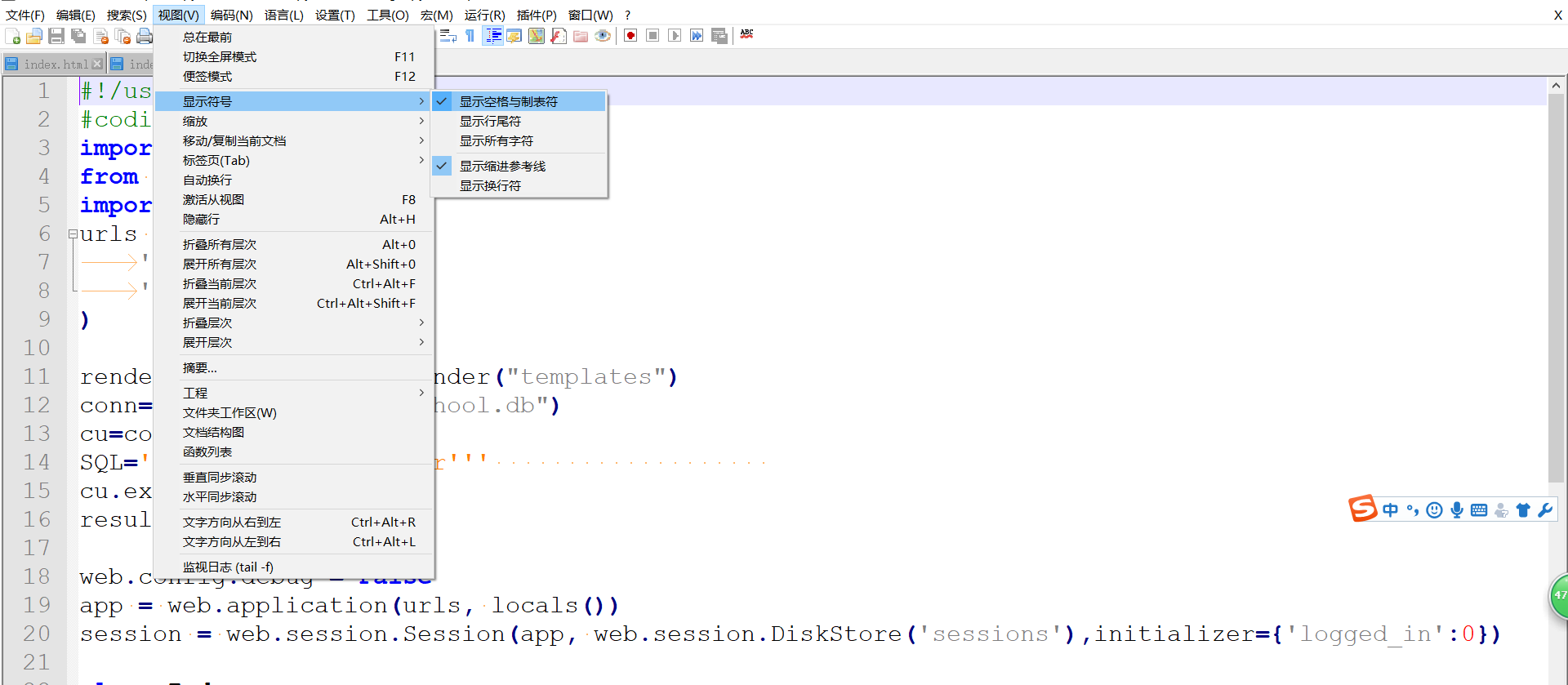
最后就没有什么需要强调的了,希望大家看完这篇文章能有所收获,在编程道路上越走越远。如果有什么写的不对的地方,希望大家在下面给我评论,我会关注评论的。


