
- 1python实现随机森林_随机森林 python
- 2人工智能之Python基础(一)控制语句|循环|常用数据类型
- 3Spring Cloud Alibaba 最新版本(基于Spring Boot 3.1.0)整合完整使用及与各中间件集成_springcloudalibaba集成spring security
- 4【Linux】Linux基本指令
- 5图解LeetCode——24. 两两交换链表中的节点
- 6Python爬虫学习之requests库
- 7好无聊啊~ 来试试用Python采集下载漫画【附原码哟~】
- 8cc2530 Zstack NV操作类似EEPROM 掉电不丢失(flash)_cc2530 eeprom
- 9系统开发常用需求收集_系统开发怎么去找需求
- 10驱动程序无法通过使用安全套接字层(SSL)加密与 SQL Server 建立安全连接。_encrypt=false
python3 使用writerows写入csv时有多余空行的处理办法
赞
踩
python3 使用writerows写入csv时有多余空行的处理办法
使用writerows函数,可一次性将元组/列表的内容导出到文本文件,但会存在一行数据间隔一行空白行的现象,类似下图:
解决方法:
在打开文件时,手工指定newline参数为""即可避免空行。
修改后的代码如下:
- List1=['a', 'a', 'a', 'a', 'a', 'a', 'a', 'a', 'a', 'a']
- List2=['b', 'b', 'b', 'b', 'b', 'b', 'b', 'b', 'b', 'b']
- List3=['c', 'c', 'c', 'c', 'c', 'c', 'c', 'c', 'c', 'c']
-
- csvfile = open("D:/test.csv", 'w' ,encoding="UTF8",newline='')
- writer=csv.writer(csvfile, delimiter=",")
- writer.writerows(zip(List1,List2,List3))
- csvfile.close()
-
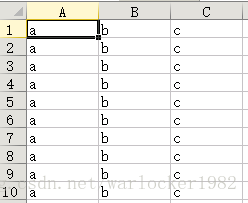
执行后的csv文件如下图,达到预期效果:
参考资料如下(摘自: https://stackoverflow.com/questions/3348460/csv-file-written-with-python-has-blank-lines-between-each-row):
In Python 2, open outfile with mode ‘wb’ instead of ‘w’. The csv.writer writes \r\n into the file directly. If you don’t open the file in binary mode, it will write \r\r\n because on Windows text mode will translate each \n into \r\n.
In Python 3 the required syntax changed, so open outfile with the additional parameter newline=’’ instead.
Examples:
Python 2
with open(’/pythonwork/thefile_subset11.csv’, ‘wb’) as outfile:
writer = csv.writer(outfile)
Python 3
with open(’/pythonwork/thefile_subset11.csv’, ‘w’, newline=’’) as outfile:
writer = csv.writer(outfile)
转自:https://blog.csdn.net/warlocker1982/article/details/83058526

