- 1【期中考试-整数反转】_给出一个32位的有符号整数n,请将该数进行反转(正负符号不变,其余数字反转)。 反转
- 2【实验】交换机及VLAN的三层配置_一个vlan10的数据帧从sw1进sw3出,请分别简述两交换机连接端口为access与trunk状况
- 3c#与java的区别_c# java对比
- 4字节跳动技术支持面试小记
- 5基于Python的HTTP隧道安全性分析:魔法背后的锁与钥匙
- 6NOIP/CSP算法竞赛对拍四步曲(windows + NOILinux2.0环境)详细举例_csp 对拍
- 7码云Pages搭建个人静态网站之旅_码云托管静态网页
- 8Git切换远程仓库地址三种方法_git 切换 origin
- 9daily-question-02(前端每日一题02)
- 10情感分类之数据处理_情感分类输出 de csv
OkHttp3源码详解
赞
踩
一、概述
OKHttp是一个非常优秀的网络请求框架,已经被谷歌加入到Android源码中,目前比较流行的Retrofit底层也是使用OKHttp的,OKHttp的使用是要掌握的,有不懂得可以参考博客OKHttp3的使用和详解
在早期版本中,OKHttp支持http1.0,1.1,SPDY协议,但是http2的协议问世也导致了OKHttp做出了改变,OKHttp鼓励开发者使用http2,不再对SPDY协议给予支持,另外,新版的okhttp还支持WebScoket,这样就可以非常方便地建立长连接了。

作为非常优秀的网络请求框架,okhttp也支持网络缓存,okhttp的缓存基于DiskLruCache,DiskLruCache虽然没有被加入到Android源码中,但是也是一个非常优秀的缓存框架,有时间可以学习一下。在安全方面,okhttp支持如上图所示的TLS版本,以确保一个安全的Scoket链接,此外还支持网络链接失败的重试以及重定向。
二、源码分析
2.1 okhttp的使用
         OkHttpClient okHttpClient = new OkHttpClient();

        //通过Builder辅助类构建请求对象
        Request request = new Request.Builder()
                .get()//get请求
                .url("https://www.baidu.com")//请求地址
                .build();//构建

        //通过mOkHttpClient调用请求得到Call
        final Call call = mOkHttpClient.newCall(request);

        //执行同步请求,获取Response对象
        Response response = call.execute();
        String string = response.body().string();
        Log.e(TAG, "get同步请求success==" + string);

        //异步执行
        call.enqueue(new Callback() {
            @Override
            public void onFailure(@NotNull Call call, @NotNull IOException e) {
                Log.e(TAG, "get异步请求failure==" + e.getMessage());
            }

            @Override
            public void onResponse(@NotNull Call call, @NotNull Response response) throws IOException {
                String string = response.body().string();
                Log.e(TAG, "get异步请求success==" + string);
            }
        });

- 1
- 2
- 3
- 4
- 5
- 6
- 7
- 8
- 9
- 10
- 11
- 12
- 13
- 14
- 15
- 16
- 17
- 18
- 19
- 20
- 21
- 22
- 23
- 24
- 25
- 26
- 27
- 28
- 29
2.2 同步Request的请求流程

在开始流程讲解前先来了解三个概念(注释来自于源码):
Connections:链接远程服务器的无理链接
Streams:基于Connection的逻辑Http请求/响应对。一个链接可以承载多个Stream都是有限制的,http1.0、1.1只支持承载一个Stream,http2支持承载多个Stream(支持并发请求,并发请求共用一个Connection)
Calls:逻辑Stream序列,典型的例子是一个初始请求以及后续的请求。对于同步和异步请求,唯一的区别就是异步请求会放到线程池(ThreadPoolExecutor)中执行,而同步请求会在当前线程执行,会阻塞当前线程。
call:最终的请求对象
Interceptors:这个是okhttp最核心的部分,一个请求会经过okhttp若干个拦截器的处理,每一个拦截器都完成一个功能模块,一个Request经过拦截器的处理后,最终会得到Response。拦截器里面包含的东西很多,这里将重点讲解。
2.3 OkHttpClient
首先,我们构造OkHttpClient对象实例,OkHttpClient创建实例的方式有两种,第一种是使用默认构造函数直接new一个实例,另一种就是,通过建造者(Builder)模式new OkHttpClient().Builder().build,这两种方式有什么区别呢?其实第二种默认的设置和第一种相同,但是我们可以利用建造者模式来设置每一种属性。
我们先来看第一种方式:OkHttpClient okHttpClient = new OkHttpClient();
 public OkHttpClient() {
    this(new Builder());
  }

 public Builder() {
      dispatcher = new Dispatcher();
      protocols = DEFAULT_PROTOCOLS;
      connectionSpecs = DEFAULT_CONNECTION_SPECS;
      eventListenerFactory = EventListener.factory(EventListener.NONE);
      proxySelector = ProxySelector.getDefault();
      cookieJar = CookieJar.NO_COOKIES;
      socketFactory = SocketFactory.getDefault();
      hostnameVerifier = OkHostnameVerifier.INSTANCE;
      certificatePinner = CertificatePinner.DEFAULT;
      proxyAuthenticator = Authenticator.NONE;
      authenticator = Authenticator.NONE;
      connectionPool = new ConnectionPool();
      dns = Dns.SYSTEM;
      followSslRedirects = true;
      followRedirects = true;
      retryOnConnectionFailure = true;
      connectTimeout = 10_000;
      readTimeout = 10_000;
      writeTimeout = 10_000;
      pingInterval = 0;
    }
- 1
- 2
- 3
- 4
- 5
- 6
- 7
- 8
- 9
- 10
- 11
- 12
- 13
- 14
- 15
- 16
- 17
- 18
- 19
- 20
- 21
- 22
- 23
- 24
- 25
- 26
可以看到简单的一句new OkHttpClient(),Okhttp就为我们做了很多工作,很多需要使用到的参数在这里获得默认值,我们来分析一下他们的含义:
- dispatcher :调度器的意识,主要作用通过双端队列保存Calls(同步/异步call),同时在线程池中执行异步请求;
- protocols:默认支持的Http协议版本,Protocol.HTTP_2/Protocol.HTTP_1_1;
- connectionSpecs :Okhttp的链接(Connection)配置,ConnectionSpec.MODERN_TLS, ConnectionSpec.CLEARTEXT,一个针对TLS链接的配置,一个针对普通的http链接配置;
- eventListenerFactory:一个Call状态的监听器,这个是OKHttp新添加的功能,这个还不是最终版本,最后还会改变;
- proxySelector:使用默认的代理选择器;
- cookieJar:默认是没有Cookie的;
- socketFactory:使用默认的Socket工厂生产Socket;
- hostnameVerifier、certificatePinner、proxyAuthenticator、authenticator:安全相关的配置;
- connectionPool:连接池;
- dns:域名解析系统,domain name -> ip address;
- followSslRedirects、followRedirects、retryOnConnectionFailure:起始状态;
- connectTimeout、readTimeout 、writeTimeout:分别为:链接超时时间、读取超时时间、写入超时时间;
- pingInterval:这个就和WebSocket有关了,为了保证长连接,必须每隔一段时间发送一个ping指令进行保活。
注意事项:OkHttpClient强烈建议全局单例使用,因为每一个OkHttpClient都有自己单独的线程池和连接池,复用连接池和线程池能够减少延迟和节省内存。
2.4 RealCall(生成一个Call)
在我们定义了请求对象Request之后,通过okHttpClient.newCall()生成一个Call,该对象代表一个执行的请求,Call是可以被取消的,Call对象代表一个request/response 对(Stream),一个Call只能被执行一次,执行同步请求(call.execute()):
 /**
   * Prepares the {@code request} to be executed at some point in the future.
   */
  @Override public Call newCall(Request request) {
    return RealCall.newRealCall(this, request, false /* for web socket */);
  }

static RealCall newRealCall(OkHttpClient client, Request originalRequest, boolean forWebSocket) {
    // Safely publish the Call instance to the EventListener.
    RealCall call = new RealCall(client, originalRequest, forWebSocket);
    call.eventListener = client.eventListenerFactory().create(call);
    return call;
  }

 @Override public Response execute() throws IOException {
    synchronized (this) {
      if (executed) throw new IllegalStateException("Already Executed");
      executed = true;
    }
    captureCallStackTrace();
    eventListener.callStart(this);
    try {
      client.dispatcher().executed(this);
      Response result = getResponseWithInterceptorChain();
      if (result == null) throw new IOException("Canceled");
      return result;
    } catch (IOException e) {
      eventListener.callFailed(this, e);
      throw e;
    } finally {
      client.dispatcher().finished(this);
    }
  }
- 1
- 2
- 3
- 4
- 5
- 6
- 7
- 8
- 9
- 10
- 11
- 12
- 13
- 14
- 15
- 16
- 17
- 18
- 19
- 20
- 21
- 22
- 23
- 24
- 25
- 26
- 27
- 28
- 29
- 30
- 31
- 32
- 33
若果executed = true说明已经执行了,如果再次调用就会抛出异常,这里说明一个Call只能被执行一次,注意同步执行请求和异步执行请求的区别:异步执行请求(call.equeue(CallBack callback))
 @Override public void enqueue(Callback responseCallback) {
    synchronized (this) {
      if (executed) throw new IllegalStateException("Already Executed");
      executed = true;
    }
    captureCallStackTrace();
    eventListener.callStart(this);
    client.dispatcher().enqueue(new AsyncCall(responseCallback));
  }
- 1
- 2
- 3
- 4
- 5
- 6
- 7
- 8
- 9
可以看到同步执行请求生成的是RealCall,而异步执行请求生成的是AsyncCall,AsyncCall其实就是Runnable的子类,如果可以执行则对当前添加监听操作,然后将Call对象放入调度器(dispatcher)中,最后由拦截器中的各个拦截器对该请求进行处理,最终返回Response。
2.5 调度器(dispatcher)
在上面同步执行请求中看到client.dispatcher().executed(this)后由Response result = getResponseWithInterceptorChain()返回结果,最后执行finished()方法,我们先来看看client.dispatcher().executed(this)。
调度器(dispatcher)是保存同步和异步Call的地方,并负责执行异步AsyncCall。我们来看看维护的变量含义:
- int maxRequests = 64:最大并发请求数为64
- int maxRequestsPerHost = 5:每个主机的最大请求数为5
- Runnable idleCallback:Runnable对象,在删除请求时执行
- ExecutorService executorService:线程池
- Deque<AsyncCall> readyAsyncCalls:缓存异步调用准备的任务
- Deque<AsyncCall> runningAsyncCalls:缓存正在运行的异步任务,包括取消尚未完成的任务
- Deque<RealCall> runningSyncCalls:缓存正在运行的同步任务,包括取消尚未完成的任务
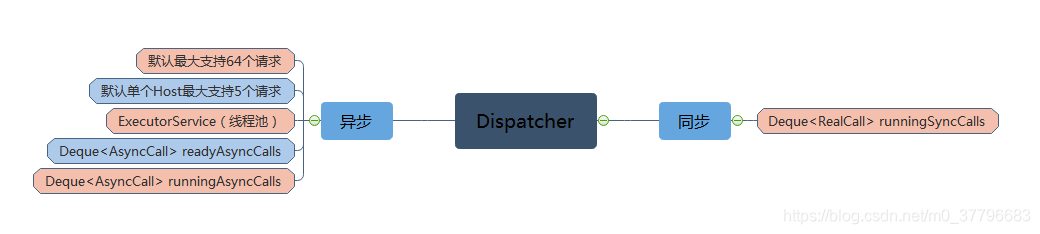
如上图,针对同步请求Dispatcher使用一个Deque保存了同步请求任务;针对异步Dispacher使用了两个Deque保存任务,一个保存准备执行的请求,一个保存正在执行的请求,为什么要两个呢?因为Dispatch默认支持并发请求是64个,单个Host最多执行5个并发请求,如果超过,则call会被放入readyAsyncCalls中,当出现空闲线程时,再讲readyAsyncCalls中的线程移到runningAsyncCalls中,执行请求。

那么client.dispatcher().executed(this)里面做了什么呢?
  @Override public Response execute() throws IOException {
    ······
      client.dispatcher().executed(this);
      Response result = getResponseWithInterceptorChain();
      return result;
    } catch (IOException e) {
     ·····
    } finally {
      client.dispatcher().finished(this);
    }
  }
- 1
- 2
- 3
- 4
- 5
- 6
- 7
- 8
- 9
- 10
- 11
  /** Used by {@code Call#execute} to signal it is in-flight. */
  synchronized void executed(RealCall call) {
    runningSyncCalls.add(call);
  }
- 1
- 2
- 3
- 4
里面只是将同步任务加入到runningSyncCalls中,由Response result = getResponseWithInterceptorChain()拦截器拦截后返回Response 结果,最后执行finished()方法。
  /** Used by {@code Call#execute} to signal completion. */
  void finished(RealCall call) {
    finished(runningSyncCalls, call, false);
  }

  private <T> void finished(Deque<T> calls, T call, boolean promoteCalls) {
    int runningCallsCount;
    Runnable idleCallback;
    synchronized (this) {
      if (!calls.remove(call)) throw new AssertionError("Call wasn't in-flight!");//移除集合中的请求
      if (promoteCalls) promoteCalls();
      runningCallsCount = runningCallsCount();
      idleCallback = this.idleCallback;
    }

    if (runningCallsCount == 0 && idleCallback != null) {
      idleCallback.run();
    }
  }
- 1
- 2
- 3
- 4
- 5
- 6
- 7
- 8
- 9
- 10
- 11
- 12
- 13
- 14
- 15
- 16
- 17
- 18
- 19
对于同步请求,只是简单地在runningSyncCalls集合中移除请求,promoteCalls为false,因此不会执行promoteCalls()中的方法,promoteCalls()里面主要是遍历并执行异步请求待执行合集中的请求。下面来看看异步执行中的方法:
  synchronized void enqueue(AsyncCall call) {
    if (runningAsyncCalls.size() < maxRequests && runningCallsForHost(call) < maxRequestsPerHost) {
      runningAsyncCalls.add(call);
      executorService().execute(call);
    } else {
      readyAsyncCalls.add(call);
    }
  }
- 1
- 2
- 3
- 4
- 5
- 6
- 7
- 8
可以看到当“正在执行的请求总数<64 && 单个Host真正执行的请求<5”则将请求加入到runningAsyncCalls执行中的集合中,然后利用线程池执行该请求,否则就直接加入到readyAsyncCalls准备执行的集合中。因为AsyncCall 是Runnable的子类,在线程池中最终会调用AsyncCall.execute()方法执行异步请求。
   @Override protected void execute() {
      boolean signalledCallback = false;
      try {
        Response response = getResponseWithInterceptorChain();//拦截器
        if (retryAndFollowUpInterceptor.isCanceled()) {//如果拦截失败回调onFailure方法
          signalledCallback = true;
          responseCallback.onFailure(RealCall.this, new IOException("Canceled"));
        } else {
          signalledCallback = true;
          responseCallback.onResponse(RealCall.this, response);
        }
      } catch (IOException e) {
        if (signalledCallback) {
          // Do not signal the callback twice!
          Platform.get().log(INFO, "Callback failure for " + toLoggableString(), e);
        } else {
          eventListener.callFailed(RealCall.this, e);
          responseCallback.onFailure(RealCall.this, e);
        }
      } finally {
        client.dispatcher().finished(this);//结束
      }
    }
  }
- 1
- 2
- 3
- 4
- 5
- 6
- 7
- 8
- 9
- 10
- 11
- 12
- 13
- 14
- 15
- 16
- 17
- 18
- 19
- 20
- 21
- 22
- 23
- 24
此处的执行逻辑跟同步的大致相同,只是client.dispatcher().finished(this)不一样,这是一个异步任务,会回调另外一个finish()方法:
  /** Used by {@code AsyncCall#run} to signal completion. */
  void finished(AsyncCall call) {
    finished(runningAsyncCalls, call, true);
  }

 private <T> void finished(Deque<T> calls, T call, boolean promoteCalls) {
    ·····
    synchronized (this) {
      if (!calls.remove(call)) throw new AssertionError("Call wasn't in-flight!");//移除出请求集合
      if (promoteCalls) promoteCalls();
      runningCallsCount = runningCallsCount();
      idleCallback = this.idleCallback;
    }
    ·····
  }
- 1
- 2
- 3
- 4
- 5
- 6
- 7
- 8
- 9
- 10
- 11
- 12
- 13
- 14
- 15
可以看到promoteCalls为true,所以会执行promoteCalls()方法,
  private void promoteCalls() {
    if (runningAsyncCalls.size() >= maxRequests) return; // Already running max capacity.
    if (readyAsyncCalls.isEmpty()) return; // No ready calls to promote.

    for (Iterator<AsyncCall> i = readyAsyncCalls.iterator(); i.hasNext(); ) {
      AsyncCall call = i.next();

      if (runningCallsForHost(call) < maxRequestsPerHost) {
        i.remove();
        runningAsyncCalls.add(call);
        executorService().execute(call);
      }

      if (runningAsyncCalls.size() >= maxRequests) return; // Reached max capacity.
    }
  }
- 1
- 2
- 3
- 4
- 5
- 6
- 7
- 8
- 9
- 10
- 11
- 12
- 13
- 14
- 15
- 16
这个方法主要是遍历readyAsyncCalls集合中待执行请求,如果runningAsyncCalls的任务数<64并且readyAsyncCalls不为空,将readyAsyncCalls准备执行的集合请求加入到runningAsyncCalls中并且执行请求。如果runningAsyncCalls的任务数>=64,则说明正在执行的任务池已经满了,暂时无法加入;如果readyAsyncCalls集合为空,说明请求都已经执行了,没有还没执行的请求。放入readyAsyncCalls集合的请求会继续走上述的流程,直至到所有的请求被执行。
2.6 拦截器Intercepoter
我们回到最重要的地方拦截器部分:
Response response = getResponseWithInterceptorChain();
- 1
  Response getResponseWithInterceptorChain() throws IOException {
    // Build a full stack of interceptors.
    List<Interceptor> interceptors = new ArrayList<>();
    interceptors.addAll(client.interceptors());
    interceptors.add(retryAndFollowUpInterceptor);
    interceptors.add(new BridgeInterceptor(client.cookieJar()));
    interceptors.add(new CacheInterceptor(client.internalCache()));
    interceptors.add(new ConnectInterceptor(client));
    if (!forWebSocket) {
      interceptors.addAll(client.networkInterceptors());
    }
    interceptors.add(new CallServerInterceptor(forWebSocket));

    Interceptor.Chain chain = new RealInterceptorChain(interceptors, null, null, null, 0,
        originalRequest, this, eventListener, client.connectTimeoutMillis(),
        client.readTimeoutMillis(), client.writeTimeoutMillis());

    return chain.proceed(originalRequest);
  }
- 1
- 2
- 3
- 4
- 5
- 6
- 7
- 8
- 9
- 10
- 11
- 12
- 13
- 14
- 15
- 16
- 17
- 18
- 19
这里先介绍一个比较重要的类:RealInterceptorChain,拦截器链,所有拦截器的合集,网络的核心也是最后的调用者。
可以看到上面依次添加interceptors,retryAndFollowUpInterceptor,BridgeInterceptor,CacheInterceptor,ConnectInterceptor到RealInterceptorChain中,拦截器之所以可以依次调用,并最终从后先前返回Response,都是依赖chain.proceed(originalRequest)这个方法,
 @Override public Response proceed(Request request) throws IOException {
    return proceed(request, streamAllocation, httpCodec, connection);
  }

  public Response proceed(Request request, StreamAllocation streamAllocation, HttpCodec httpCodec,
     ·····
    // Call the next interceptor in the chain.
    RealInterceptorChain next = new RealInterceptorChain(interceptors, streamAllocation, httpCodec,
        connection, index + 1, request, call, eventListener, connectTimeout, readTimeout,
        writeTimeout);
    Interceptor interceptor = interceptors.get(index);
    Response response = interceptor.intercept(next);

     ······
    return response;
  }
- 1
- 2
- 3
- 4
- 5
- 6
- 7
- 8
- 9
- 10
- 11
- 12
- 13
- 14
- 15
- 16
执行当前的拦截器intercept(RealInterceptorChain next)方法,并且调用下一个(index+1)拦截器,下一个拦截器的调用依赖于当前拦截器的intercept()方法中,对RealInterceptorChain的proceed()方法的调用:
response = realChain.proceed(request, streamAllocation, null, null);
- 1
可以看到当前拦截器的Response依赖于一下一个拦截器的Response,因此沿着这条拦截器链会依次调用下一个拦截器,执行到最后一哥拦截器的时候,就会沿着相反方向依次返回Response,得到最终的Response。
2.7 RetryAndFollowUpInterceptor:重试及重定向拦截器
拦截器类都是继承Interceptor类,并重写intercept(Chain chain)方法:
@Override
public Response intercept(Chain chain) throws IOException {
    Request request = chain.request();//获取Request对象
    RealInterceptorChain realChain = (RealInterceptorChain) chain;//获取拦截器对象,用于调用下一个proceed()
    Call call = realChain.call();
    EventListener eventListener = realChain.eventListener();

    streamAllocation = new StreamAllocation(client.connectionPool(), createAddress(request.url()),
        call, eventListener, callStackTrace);

    int followUpCount = 0;
    Response priorResponse = null;
    while (true) {//循环
      if (canceled) {
        streamAllocation.release();
        throw new IOException("Canceled");
      }

      Response response;
      boolean releaseConnection = true;
      try {
        response = realChain.proceed(request, streamAllocation, null, null);//调用下一个拦截器
        releaseConnection = false;
      } catch (RouteException e) {
        // The attempt to connect via a route failed. The request will not have been sent.
        if (!recover(e.getLastConnectException(), false, request)) {//路由异常,尝试恢复,如果再失败就跑出异常
          throw e.getLastConnectException();
        }
        releaseConnection = false;
        continue;//继续重试
      } catch (IOException e) {
        // An attempt to communicate with a server failed. The request may have been sent.
        boolean requestSendStarted = !(e instanceof ConnectionShutdownException);
        if (!recover(e, requestSendStarted, request)) throw e;//链接关闭异常,尝试恢复
        releaseConnection = false;
        continue;//继续重试
      } finally {
        // We're throwing an unchecked exception. Release any resources.
        if (releaseConnection) {
          streamAllocation.streamFailed(null);
          streamAllocation.release();
        }
      }

      // Attach the prior response if it exists. Such responses never have a body.
      if (priorResponse != null) {//前一个重试得到的response
        response = response.newBuilder()
            .priorResponse(priorResponse.newBuilder()
                    .body(null)
                    .build())
            .build();
      }

      //主要为了新的重试Request添加验证头等内容
      Request followUp = followUpRequest(response);

      if (followUp == null) {//如果一个响应的到的code是200,那么followUp==null
        if (!forWebSocket) {
          streamAllocation.release();
        }
        return response;
      }

        //----------------异常处理----------------------
      closeQuietly(response.body());

      if (++followUpCount > MAX_FOLLOW_UPS) {//超出最大次数,抛出异常
        streamAllocation.release();
        throw new ProtocolException("Too many follow-up requests: " + followUpCount);
      }

      if (followUp.body() instanceof UnrepeatableRequestBody) {
        streamAllocation.release();
        throw new HttpRetryException("Cannot retry streamed HTTP body", response.code());
      }

      if (!sameConnection(response, followUp.url())) {
        streamAllocation.release();
        streamAllocation = new StreamAllocation(client.connectionPool(),
            createAddress(followUp.url()), call, eventListener, callStackTrace);
      } else if (streamAllocation.codec() != null) {
        throw new IllegalStateException("Closing the body of " + response
            + " didn't close its backing stream. Bad interceptor?");
      }

      request = followUp;//得到处理后的Request,沿着拦截链继续请求
      priorResponse = response;
    }
  }
- 1
- 2
- 3
- 4
- 5
- 6
- 7
- 8
- 9
- 10
- 11
- 12
- 13
- 14
- 15
- 16
- 17
- 18
- 19
- 20
- 21
- 22
- 23
- 24
- 25
- 26
- 27
- 28
- 29
- 30
- 31
- 32
- 33
- 34
- 35
- 36
- 37
- 38
- 39
- 40
- 41
- 42
- 43
- 44
- 45
- 46
- 47
- 48
- 49
- 50
- 51
- 52
- 53
- 54
- 55
- 56
- 57
- 58
- 59
- 60
- 61
- 62
- 63
- 64
- 65
- 66
- 67
- 68
- 69
- 70
- 71
- 72
- 73
- 74
- 75
- 76
- 77
- 78
- 79
- 80
- 81
- 82
- 83
- 84
- 85
- 86
- 87
- 88
- 89
该拦截器的作用就是重试以及重定向,当一个请求由于各种原因失败,或者路由异常,则尝试恢复,否则根据响应码ResponseCode在followUpRequest(response)方法中对Request进行再处理得到行的Request,然后沿着拦截器继续新的请求,如果ResponseCode==200,那么这些过程就结束了。
2.8 BridgeInterceptor:桥拦截器
BridgeInterceptor的主要作用是为请求Request添加请求头,为响应Response添加响应头:
 @Override
public Response intercept(Chain chain) throws IOException {
    Request userRequest = chain.request();
    Request.Builder requestBuilder = userRequest.newBuilder();
    //----------------Request---------------------
    RequestBody body = userRequest.body();
    if (body != null) {
      MediaType contentType = body.contentType();
      if (contentType != null) {//添加Content-Type请求头
        requestBuilder.header("Content-Type", contentType.toString());
      }

      long contentLength = body.contentLength();
      if (contentLength != -1) {
        requestBuilder.header("Content-Length", Long.toString(contentLength));
        requestBuilder.removeHeader("Transfer-Encoding");
      } else {
        requestBuilder.header("Transfer-Encoding", "chunked");//分块传输
        requestBuilder.removeHeader("Content-Length");
      }
    }

    if (userRequest.header("Host") == null) {
      requestBuilder.header("Host", hostHeader(userRequest.url(), false));
    }

    if (userRequest.header("Connection") == null) {
      requestBuilder.header("Connection", "Keep-Alive");
    }

    // If we add an "Accept-Encoding: gzip" header field we're responsible for also decompressing
    // the transfer stream.
    boolean transparentGzip = false;
    if (userRequest.header("Accept-Encoding") == null && userRequest.header("Range") == null) {
      transparentGzip = true;
      requestBuilder.header("Accept-Encoding", "gzip");
    }

    List<Cookie> cookies = cookieJar.loadForRequest(userRequest.url());
    if (!cookies.isEmpty()) {
      requestBuilder.header("Cookie", cookieHeader(cookies));
    }

    if (userRequest.header("User-Agent") == null) {
      requestBuilder.header("User-Agent", Version.userAgent());
    }

    Response networkResponse = chain.proceed(requestBuilder.build());

    //----------------Response---------------------
    HttpHeaders.receiveHeaders(cookieJar, userRequest.url(), networkResponse.headers());//保存cookie

    Response.Builder responseBuilder = networkResponse.newBuilder()
        .request(userRequest);

    if (transparentGzip
        && "gzip".equalsIgnoreCase(networkResponse.header("Content-Encoding"))
        && HttpHeaders.hasBody(networkResponse)) {
      GzipSource responseBody = new GzipSource(networkResponse.body().source());
      Headers strippedHeaders = networkResponse.headers().newBuilder()
          .removeAll("Content-Encoding")
          .removeAll("Content-Length")//Content-Encoding和Content-Length不能用于gzip解压
          .build();
      responseBuilder.headers(strippedHeaders);
      String contentType = networkResponse.header("Content-Type");
      responseBuilder.body(new RealResponseBody(contentType, -1L, Okio.buffer(responseBody)));
    }

    return responseBuilder.build();
  }
- 1
- 2
- 3
- 4
- 5
- 6
- 7
- 8
- 9
- 10
- 11
- 12
- 13
- 14
- 15
- 16
- 17
- 18
- 19
- 20
- 21
- 22
- 23
- 24
- 25
- 26
- 27
- 28
- 29
- 30
- 31
- 32
- 33
- 34
- 35
- 36
- 37
- 38
- 39
- 40
- 41
- 42
- 43
- 44
- 45
- 46
- 47
- 48
- 49
- 50
- 51
- 52
- 53
- 54
- 55
- 56
- 57
- 58
- 59
- 60
- 61
- 62
- 63
- 64
- 65
- 66
- 67
- 68
- 69
- 70
这个拦截器相对比较简单。
2.9 CacheInterceptor:缓存拦截器
我们先来看看缓存的响应头:

Cache-control:标明缓存最大的存活时常;
Date:服务器告诉客户端,该资源发送的时间;
Expires:表示过期时间(该字段是1.0的东西,与cache-control同时存在时,cache-control的优先级更高);
Last-Modified:服务器告诉客户端,资源最后的修改时间;
E-Tag:当前资源在服务器的唯一标识,用于判断资源是否被修改。
还有If-Modified-since和If-none-Match两个字段,这两个字段是配合Last-Modified和E-Tag使用的,大致流程如下:服务器收到请求时,会在200 OK中返回该资源的Last-Modified和ETag头(服务器支持缓存的时候才有这两个头),客户端将该资源保存在cache中,并且记录这两个属性,当客户端需要发送相同的请求时,根据Date + Cache-control来判断缓存是否过期,如果过期了则会在请求中携带If-Modified-Since和If-None-Match两个头,这两个头的值分别是Last-Modified和ETag头的值,服务器通过这两个头判断资源未发生变化,客户端重新加载,返回304响应。

先来看看CacheInterceptor几个比较重要的类:
CacheStrategy:缓存策略类,告诉CacheInterceptor是使用缓存还是使用网络请求;
Cache:封装了实际的缓存操作;
DiskLruCache:Cache基于DiskLruCache。
@Override public Response intercept(Chain chain) throws IOException {
    Response cacheCandidate = cache != null
        ? cache.get(chain.request())//以请求的URL作为可以来获取缓存
        : null;

    long now = System.currentTimeMillis();

    //缓存策略类,该类决定了是使用缓存还是网络请求
    CacheStrategy strategy = new CacheStrategy.Factory(now, chain.request(), cacheCandidate).get();
    Request networkRequest = strategy.networkRequest;//网络请求,如果为null则代表不适用网络请求
    Response cacheResponse = strategy.cacheResponse;//缓存响应,如果为null则表示不适用缓存

    if (cache != null) {//根据缓存策略,更新统计指标:请求次数,使用网络请求次数,缓存次数
      cache.trackResponse(strategy);
    }

    //缓存不可用,关闭
    if (cacheCandidate != null && cacheResponse == null) {
      closeQuietly(cacheCandidate.body()); // The cache candidate wasn't applicable. Close it.
    }

    //如果既无网络可用,也无缓存可用,则返回504错误
    // If we're forbidden from using the network and the cache is insufficient, fail.
    if (networkRequest == null && cacheResponse == null) {
      return new Response.Builder()
          .request(chain.request())
          .protocol(Protocol.HTTP_1_1)
          .code(504)
          .message("Unsatisfiable Request (only-if-cached)")
          .body(Util.EMPTY_RESPONSE)
          .sentRequestAtMillis(-1L)
          .receivedResponseAtMillis(System.currentTimeMillis())
          .build();
    }

    //缓存可用,直接使用缓存
    // If we don't need the network, we're done.
    if (networkRequest == null) {
      return cacheResponse.newBuilder()
          .cacheResponse(stripBody(cacheResponse))
          .build();
    }

    Response networkResponse = null;
    try {
      //进行网络请求,得到网络响应
      networkResponse = chain.proceed(networkRequest);
    } finally {
      // If we're crashing on I/O or otherwise, don't leak the cache body.
      if (networkResponse == null && cacheCandidate != null) {
        closeQuietly(cacheCandidate.body());
      }
    }

    //HTTP_NOT_MODIFIED缓存有效,合并网络请求和缓存
    // If we have a cache response too, then we're doing a conditional get.
    if (cacheResponse != null) {
      if (networkResponse.code() == HTTP_NOT_MODIFIED) {
        Response response = cacheResponse.newBuilder()
            .headers(combine(cacheResponse.headers(), networkResponse.headers()))
            .sentRequestAtMillis(networkResponse.sentRequestAtMillis())
            .receivedResponseAtMillis(networkResponse.receivedResponseAtMillis())
            .cacheResponse(stripBody(cacheResponse))
            .networkResponse(stripBody(networkResponse))
            .build();
        networkResponse.body().close();

        // Update the cache after combining headers but before stripping the
        // Content-Encoding header (as performed by initContentStream()).
        cache.trackConditionalCacheHit();
        cache.update(cacheResponse, response);//更新缓存
        return response;
      } else {
        closeQuietly(cacheResponse.body());
      }
    }

    Response response = networkResponse.newBuilder()
        .cacheResponse(stripBody(cacheResponse))
        .networkResponse(stripBody(networkResponse))
        .build();

    if (cache != null) {
      //有响应体并且可缓存
      if (HttpHeaders.hasBody(response) && CacheStrategy.isCacheable(response, networkRequest)) {
        // Offer this request to the cache.
        CacheRequest cacheRequest = cache.put(response);
        return cacheWritingResponse(cacheRequest, response);//写缓存
      }

      if (HttpMethod.invalidatesCache(networkRequest.method())) {//判断缓存的有效性
        try {
          cache.remove(networkRequest);
        } catch (IOException ignored) {
          // The cache cannot be written.
        }
      }
    }

    return response;
  }
- 1
- 2
- 3
- 4
- 5
- 6
- 7
- 8
- 9
- 10
- 11
- 12
- 13
- 14
- 15
- 16
- 17
- 18
- 19
- 20
- 21
- 22
- 23
- 24
- 25
- 26
- 27
- 28
- 29
- 30
- 31
- 32
- 33
- 34
- 35
- 36
- 37
- 38
- 39
- 40
- 41
- 42
- 43
- 44
- 45
- 46
- 47
- 48
- 49
- 50
- 51
- 52
- 53
- 54
- 55
- 56
- 57
- 58
- 59
- 60
- 61
- 62
- 63
- 64
- 65
- 66
- 67
- 68
- 69
- 70
- 71
- 72
- 73
- 74
- 75
- 76
- 77
- 78
- 79
- 80
- 81
- 82
- 83
- 84
- 85
- 86
- 87
- 88
- 89
- 90
- 91
- 92
- 93
- 94
- 95
- 96
- 97
- 98
- 99
- 100
- 101
再简单说一下流程:
1.如果网络不可用而且无可用的缓存,则返回504错误;
2.继续,如果不需要网络请求,则直接使用缓存;
3.继续,如果网络请求可用,则进行网络请求;
4.继续,如果有缓存,并且网络请求返回HTTP_NOT_MODIFIED,说明缓存还有效的,则合并网络响应和缓存的结果,同时更新缓存;
5.继续,如果没有缓存,则写入新的缓存。


CacheStrategy在CacheInterceptor中起到了很关键的作用,该类决定了是网络请求还是缓存,该类最关键的代码是getCandidate()方法:
 private CacheStrategy getCandidate() {
      // No cached response.
      //没有缓存,直接使用网络请求
      if (cacheResponse == null) {
        return new CacheStrategy(request, null);
      }

      //https, 但是没有握手,直接进行网络请求
      // Drop the cached response if it's missing a required handshake.
      if (request.isHttps() && cacheResponse.handshake() == null) {
        return new CacheStrategy(request, null);
      }

      // If this response shouldn't have been stored, it should never be used
      // as a response source. This check should be redundant as long as the
      // persistence store is well-behaved and the rules are constant.
      if (!isCacheable(cacheResponse, request)) {//不可以缓存,直接进行网络请求
        return new CacheStrategy(request, null);
      }

      CacheControl requestCaching = request.cacheControl();
      if (requestCaching.noCache() || hasConditions(request)) {
        //请求头nocache或者请求头包含If-Modified-Since或者If-None-Match
        //请求头包含If-Modified-Since或者If-None-Match意味着本地缓存过期,需要服务器验证
        //本地缓存是不是还能继续使用
        return new CacheStrategy(request, null);
      }

      CacheControl responseCaching = cacheResponse.cacheControl();
      if (responseCaching.immutable()) {//强制使用缓存
        return new CacheStrategy(null, cacheResponse);
      }

      long ageMillis = cacheResponseAge();
      long freshMillis = computeFreshnessLifetime();

      if (requestCaching.maxAgeSeconds() != -1) {
        freshMillis = Math.min(freshMillis, SECONDS.toMillis(requestCaching.maxAgeSeconds()));
      }

      long minFreshMillis = 0;
      if (requestCaching.minFreshSeconds() != -1) {
        minFreshMillis = SECONDS.toMillis(requestCaching.minFreshSeconds());
      }

      long maxStaleMillis = 0;
      if (!responseCaching.mustRevalidate() && requestCaching.maxStaleSeconds() != -1) {
        maxStaleMillis = SECONDS.toMillis(requestCaching.maxStaleSeconds());
      }

      //可缓存,并且ageMillis + minFreshMillis < freshMillis + maxStaleMillis
      //意味着虽过期,但是可用,在请求头添加“warning”
      if (!responseCaching.noCache() && ageMillis + minFreshMillis < freshMillis + maxStaleMillis) {
        Response.Builder builder = cacheResponse.newBuilder();
        if (ageMillis + minFreshMillis >= freshMillis) {
          builder.addHeader("Warning", "110 HttpURLConnection \"Response is stale\"");
        }
        long oneDayMillis = 24 * 60 * 60 * 1000L;
        if (ageMillis > oneDayMillis && isFreshnessLifetimeHeuristic()) {
          builder.addHeader("Warning", "113 HttpURLConnection \"Heuristic expiration\"");
        }
        return new CacheStrategy(null, builder.build());//使用缓存
      }

      // Find a condition to add to the request. If the condition is satisfied, the response body
      // will not be transmitted.
      String conditionName;
      String conditionValue;
      //走到这里说明缓存已经过期
      //添加请求头:If-Modified-Since或者If-None-Match
      //etag与If-None-Match配合使用
      //lastModified与If-Modified-Since配合使用
      //前者和后者的值是相同的
      //区别在于前者是响应头,后者是请求头。
      //后者用于服务器进行资源比对,看看是资源是否改变了。
      // 如果没有,则本地的资源虽过期还是可以用的
      if (etag != null) {
        conditionName = "If-None-Match";
        conditionValue = etag;
      } else if (lastModified != null) {
        conditionName = "If-Modified-Since";
        conditionValue = lastModifiedString;
      } else if (servedDate != null) {
        conditionName = "If-Modified-Since";
        conditionValue = servedDateString;
      } else {
        return new CacheStrategy(request, null); // No condition! Make a regular request.
      }

      Headers.Builder conditionalRequestHeaders = request.headers().newBuilder();
      Internal.instance.addLenient(conditionalRequestHeaders, conditionName, conditionValue);

      Request conditionalRequest = request.newBuilder()
          .headers(conditionalRequestHeaders.build())
          .build();
      return new CacheStrategy(conditionalRequest, cacheResponse);
    }
- 1
- 2
- 3
- 4
- 5
- 6
- 7
- 8
- 9
- 10
- 11
- 12
- 13
- 14
- 15
- 16
- 17
- 18
- 19
- 20
- 21
- 22
- 23
- 24
- 25
- 26
- 27
- 28
- 29
- 30
- 31
- 32
- 33
- 34
- 35
- 36
- 37
- 38
- 39
- 40
- 41
- 42
- 43
- 44
- 45
- 46
- 47
- 48
- 49
- 50
- 51
- 52
- 53
- 54
- 55
- 56
- 57
- 58
- 59
- 60
- 61
- 62
- 63
- 64
- 65
- 66
- 67
- 68
- 69
- 70
- 71
- 72
- 73
- 74
- 75
- 76
- 77
- 78
- 79
- 80
- 81
- 82
- 83
- 84
- 85
- 86
- 87
- 88
- 89
- 90
- 91
- 92
- 93
- 94
- 95
- 96
- 97
大致的流程如下:(if-else的关系)
1.没有缓存,直接使用网络请求;
2.如果是https,但是没有握手,直接网络请求;
3.不可缓存,直接网络请求;
4.请求头nocache,或者请求头包含If-Modified-Since或者If-None-Match,则需要服务器验证本地缓存是否继续使用,直接网络请求;
5.可缓存,并且ageMillis + minFreshMillis < freshMillis + maxStaleMillis(意味着过期,但是可用,会在请求头添加warning),则使用缓存;
6.缓存过期,则添加请求头,If-Modified-Since或者If-None-Match,进行网络请求。
缓存拦截器流程图:

2.10 ConnectInterceptor(连接池拦截器)
ConnectInterceptor是一个链接相关的拦截器,这个拦截器的代码最少,但并不是最简单的,先来看看ConnectInterceptor中比较重要的相关类:

RouteDatabase:这是一个关于路由器白名单和黑名单类,处于黑名单的信息会避免不必要的尝试;
RealConnection:Connect子类,主要 实现链接的建立等工作;
ConnectionPool:连接池,实现链接的复用;
Connection和Stream的关系:Http1是1:1的关系,Http2是1对多的关系;就是说一个http1.x的链接只能被一个请求使用,而一个http2.x链接对应多个Stream,多个Stream的意思是Http2连接支持并发请求,即一个链接可以被多个请求使用。还有Http1.x的keep-alive机制的作用是保证链接使用完不关闭,当下一次请求与链接的Host相同的时候,连接可以直接使用,不用创建(节省资源,提高性能)。
StreamAllocation:流分配,流是什么呢?我们知道Connection是一个连接远程服务器的Socket连接,而Stream是基于Connection逻辑Http 请求/响应对,StreamAllocation会通过ConnectionPool获取或者新生成一个RealConnection来得到一个连接到server的Connection连接,同时会生成一个HttpCodec用于下一个CallServerInterceptor,以完成最终的请求。
HttpCodec:Encodes HTTP requests and decodes HTTP responses(源码注释),大意为编码Http请求,解码Http响应。针对不同的版本OKHttp为我们提供了HttpCodec1(Http1.x)和HttpCodec2(Http2.x)。
一句话概括就是:分配一个Connection和HttpCodec,为最终的请求做准备。
/** Opens a connection to the target server and proceeds to the next interceptor. */
public final class ConnectInterceptor implements Interceptor {
  public final OkHttpClient client;

  public ConnectInterceptor(OkHttpClient client) {
    this.client = client;
  }

  @Override public Response intercept(Chain chain) throws IOException {
    RealInterceptorChain realChain = (RealInterceptorChain) chain;
    Request request = realChain.request();
    StreamAllocation streamAllocation = realChain.streamAllocation();

    // We need the network to satisfy this request. Possibly for validating a conditional GET.
    //我们需要网络来满足这个请求,可能是为了验证一个条件GET请求(缓存验证等)
    boolean doExtensiveHealthChecks = !request.method().equals("GET");
    HttpCodec httpCodec = streamAllocation.newStream(client, chain, doExtensiveHealthChecks);
    RealConnection connection = streamAllocation.connection();

    return realChain.proceed(request, streamAllocation, httpCodec, connection);
  }
}
- 1
- 2
- 3
- 4
- 5
- 6
- 7
- 8
- 9
- 10
- 11
- 12
- 13
- 14
- 15
- 16
- 17
- 18
- 19
- 20
- 21
- 22
代码量表面看起来很少,但是大部分都已经封装好的了,这里仅仅是 调用,为了可读性和维护性,该封装的还是要封装。这里的核心代码就两行:
HttpCodec httpCodec = streamAllocation.newStream(client, chain, doExtensiveHealthChecks);
RealConnection connection = streamAllocation.connection();
- 1
- 2
可以看出,主要的工作由streamAllocation完成,我们来看看newStream()和connection()做了什么工作:
 public HttpCodec newStream(
      OkHttpClient client, Interceptor.Chain chain, boolean doExtensiveHealthChecks) {
    int connectTimeout = chain.connectTimeoutMillis();
    int readTimeout = chain.readTimeoutMillis();
    int writeTimeout = chain.writeTimeoutMillis();
    boolean connectionRetryEnabled = client.retryOnConnectionFailure();

    try {
      //找到一个可用链接
      RealConnection resultConnection = findHealthyConnection(connectTimeout, readTimeout,
          writeTimeout, connectionRetryEnabled, doExtensiveHealthChecks);
      HttpCodec resultCodec = resultConnection.newCodec(client, chain, this);

      synchronized (connectionPool) {
        codec = resultCodec;
        return resultCodec;
      }
    } catch (IOException e) {
      throw new RouteException(e);
    }
  }
- 1
- 2
- 3
- 4
- 5
- 6
- 7
- 8
- 9
- 10
- 11
- 12
- 13
- 14
- 15
- 16
- 17
- 18
- 19
- 20
- 21
可以看到最关键的一步是findHealthyConnection(),这个方法的主要作用是找到可用的链接,如果连接不可用,这个过程会一直持续哦。
  /**
   * Finds a connection and returns it if it is healthy. If it is unhealthy the process is repeated
   * until a healthy connection is found.
   */
  private RealConnection findHealthyConnection(int connectTimeout, int readTimeout,
      int writeTimeout, boolean connectionRetryEnabled, boolean doExtensiveHealthChecks)
      throws IOException {
    while (true) {
      RealConnection candidate = findConnection(connectTimeout, readTimeout, writeTimeout,
          connectionRetryEnabled);

      // If this is a brand new connection, we can skip the extensive health checks.如果是一个新链接,直接返回就好
      synchronized (connectionPool) {
        if (candidate.successCount == 0) {
          return candidate;
        }
      }

      // Do a (potentially slow) check to confirm that the pooled connection is still good. If it
      // isn't, take it out of the pool and start again.
      if (!candidate.isHealthy(doExtensiveHealthChecks)) {//判断连接是否还是好的
        noNewStreams();//不是好的就移除连接池
        continue;//不是好的就一直持续
      }

      return candidate;
    }
  }
- 1
- 2
- 3
- 4
- 5
- 6
- 7
- 8
- 9
- 10
- 11
- 12
- 13
- 14
- 15
- 16
- 17
- 18
- 19
- 20
- 21
- 22
- 23
- 24
- 25
- 26
- 27
- 28
我们来看看你noNewStreams()做了什么操作:
  /** Forbid new streams from being created on the connection that hosts this allocation. */
  public void noNewStreams() {
    Socket socket;
    Connection releasedConnection;
    synchronized (connectionPool) {
      releasedConnection = connection;
      socket = deallocate(true, false, false);//noNewStreams,released,streamFinished核心方法
      if (connection != null) releasedConnection = null;
    }
    closeQuietly(socket);//关闭Socket
    if (releasedConnection != null) {
      eventListener.connectionReleased(call, releasedConnection);//监听回调
    }
  }
- 1
- 2
- 3
- 4
- 5
- 6
- 7
- 8
- 9
- 10
- 11
- 12
- 13
- 14
上面的关键代码是deallocate():
 private Socket deallocate(boolean noNewStreams, boolean released, boolean streamFinished) {
    assert (Thread.holdsLock(connectionPool));

    //这里以noNewStreams为true,released为false,streamFinished为false为例
    if (streamFinished) {
      this.codec = null;
    }
    if (released) {
      this.released = true;
    }
    Socket socket = null;
    if (connection != null) {
      if (noNewStreams) {
        //noNewStreams是RealConnection的属性,如果为true则这个链接不会创建新的Stream,一但设置为true就一直为true
        //搜索整个源码,这个该属性设置地方如下:
        //evitAll:关闭和移除连接池中的所有链接,(如果连接空闲,即连接上的Stream数为0,则noNewStreams为true);
        //pruneAndGetAllocationCount:移除内存泄漏的连接,以及获取连接Stream的分配数;
        //streamFailed:Stream分配失败
        //综上所述,这个属性的作用是禁止无效连接创建新的Stream的
        connection.noNewStreams = true;
      }
      if (this.codec == null && (this.released || connection.noNewStreams)) {
        release(connection);//释放Connection承载的StreamAllocations资源(connection.allocations)
        if (connection.allocations.isEmpty()) {
          connection.idleAtNanos = System.nanoTime();
        //connectionBecameIdle:通知线程池该连接是空闲连接,可以作为移除或者待移除对象
          if (Internal.instance.connectionBecameIdle(connectionPool, connection)) {
            socket = connection.socket();
          }
        }
        connection = null;//
      }
    }
    return socket;//返回待关闭的Socket对象
  }
- 1
- 2
- 3
- 4
- 5
- 6
- 7
- 8
- 9
- 10
- 11
- 12
- 13
- 14
- 15
- 16
- 17
- 18
- 19
- 20
- 21
- 22
- 23
- 24
- 25
- 26
- 27
- 28
- 29
- 30
- 31
- 32
- 33
- 34
- 35
我们来看看findConnection()方法:
 /**
   * Returns a connection to host a new stream. This prefers the existing connection if it exists,
   * then the pool, finally building a new connection.
   */
  private RealConnection findConnection(int connectTimeout, int readTimeout, int writeTimeout,
      boolean connectionRetryEnabled) throws IOException {
    boolean foundPooledConnection = false;
    RealConnection result = null;
    Route selectedRoute = null;
    Connection releasedConnection;
    Socket toClose;
    synchronized (connectionPool) {
      //排除异常情况
      if (released) throw new IllegalStateException("released");
      if (codec != null) throw new IllegalStateException("codec != null");
      if (canceled) throw new IOException("Canceled");

      // Attempt to use an already-allocated connection. We need to be careful here because our
      // already-allocated connection may have been restricted from creating new streams.
      //这个方法与deallocate()方法作用一致
      //如果连接不能创建Stream,则释放资源,返回待关闭的close Socket
      releasedConnection = this.connection;
      toClose = releaseIfNoNewStreams();
      //经过releaseIfNoNewStreams(),如果connection不为null,则连接可用
      if (this.connection != null) {
        // We had an already-allocated connection and it's good.
        //存在可使用的已分配连接,
        result = this.connection;
        //为null值,说明这个连接是有效的
        releasedConnection = null;
      }
      if (!reportedAcquired) {
        // If the connection was never reported acquired, don't report it as released!
        releasedConnection = null;
      }

      //没有可用连接,去连接池中找
      if (result == null) {
        // Attempt to get a connection from the pool.
        //通过ConnectionPool,Address,StreamAllocation从连接池中获取连接
        Internal.instance.get(connectionPool, address, this, null);
        if (connection != null) {
          foundPooledConnection = true;
          result = connection;
        } else {
          selectedRoute = route;
        }
      }
    }
    closeQuietly(toClose);

    if (releasedConnection != null) {
      eventListener.connectionReleased(call, releasedConnection);
    }
    if (foundPooledConnection) {
      eventListener.connectionAcquired(call, result);
    }
    if (result != null) {
      // If we found an already-allocated or pooled connection, we're done.
      //找到一个已分配或者连接池中的连接,此过程结束,返回
      return result;
    }

     //否则我们需要一个路由信心,这是一个阻塞操作
    // If we need a route selection, make one. This is a blocking operation.
    boolean newRouteSelection = false;
    if (selectedRoute == null && (routeSelection == null || !routeSelection.hasNext())) {
      newRouteSelection = true;
      routeSelection = routeSelector.next();
    }

    synchronized (connectionPool) {
      if (canceled) throw new IOException("Canceled");

      if (newRouteSelection) {
        // Now that we have a set of IP addresses, make another attempt at getting a connection from
        // the pool. This could match due to connection coalescing.
        //提供更加全面的路由信息,再次从连接池中获取连接
        List<Route> routes = routeSelection.getAll();
        for (int i = 0, size = routes.size(); i < size; i++) {
          Route route = routes.get(i);
          Internal.instance.get(connectionPool, address, this, route);
          if (connection != null) {
            foundPooledConnection = true;
            result = connection;
            this.route = route;
            break;
          }
        }
      }

      //实在是没有找到,只能生成新的连接
      if (!foundPooledConnection) {
        if (selectedRoute == null) {
          selectedRoute = routeSelection.next();
        }

        // Create a connection and assign it to this allocation immediately. This makes it possible
        // for an asynchronous cancel() to interrupt the handshake we're about to do.
        route = selectedRoute;
        refusedStreamCount = 0;
        result = new RealConnection(connectionPool, selectedRoute);
        acquire(result, false);//添加Connection的StreamAllocation添加到connection.allocations集合中
      }
    }

    // If we found a pooled connection on the 2nd time around, we're done.
    //如果连接是从连接池中找到的,那么说明连接是可复用的,不是新生的,新生成的连接是需要连接服务器才能可用的
    if (foundPooledConnection) {
      eventListener.connectionAcquired(call, result);
      return result;
    }

    // Do TCP + TLS handshakes. This is a blocking operation.连接server
    result.connect(
        connectTimeout, readTimeout, writeTimeout, connectionRetryEnabled, call, eventListener);
    routeDatabase().connected(result.route());//将路由信息添加到routeDatabase中

    Socket socket = null;
    synchronized (connectionPool) {
      reportedAcquired = true;

      // Pool the connection.
      Internal.instance.put(connectionPool, result);//将新生成的连接放入连接池中

      // If another multiplexed connection to the same address was created concurrently, then
      // release this connection and acquire that one.
      //如果是HTTP2连接,由于HTTP2连接具有多路复用特性
      //因此,我们需要确保http2的多路复用特性
      if (result.isMultiplexed()) {
        //确保http2的多路复用特性,重复的连接将 被踢除
        socket = Internal.instance.deduplicate(connectionPool, address, this);
        result = connection;
      }
    }
    closeQuietly(socket);

    eventListener.connectionAcquired(call, result);
    return result;
  }
- 1
- 2
- 3
- 4
- 5
- 6
- 7
- 8
- 9
- 10
- 11
- 12
- 13
- 14
- 15
- 16
- 17
- 18
- 19
- 20
- 21
- 22
- 23
- 24
- 25
- 26
- 27
- 28
- 29
- 30
- 31
- 32
- 33
- 34
- 35
- 36
- 37
- 38
- 39
- 40
- 41
- 42
- 43
- 44
- 45
- 46
- 47
- 48
- 49
- 50
- 51
- 52
- 53
- 54
- 55
- 56
- 57
- 58
- 59
- 60
- 61
- 62
- 63
- 64
- 65
- 66
- 67
- 68
- 69
- 70
- 71
- 72
- 73
- 74
- 75
- 76
- 77
- 78
- 79
- 80
- 81
- 82
- 83
- 84
- 85
- 86
- 87
- 88
- 89
- 90
- 91
- 92
- 93
- 94
- 95
- 96
- 97
- 98
- 99
- 100
- 101
- 102
- 103
- 104
- 105
- 106
- 107
- 108
- 109
- 110
- 111
- 112
- 113
- 114
- 115
- 116
- 117
- 118
- 119
- 120
- 121
- 122
- 123
- 124
- 125
- 126
- 127
- 128
- 129
- 130
- 131
- 132
- 133
- 134
- 135
- 136
- 137
- 138
- 139
- 140
上面的源码比较长,加了注释。我们来看看流程图:
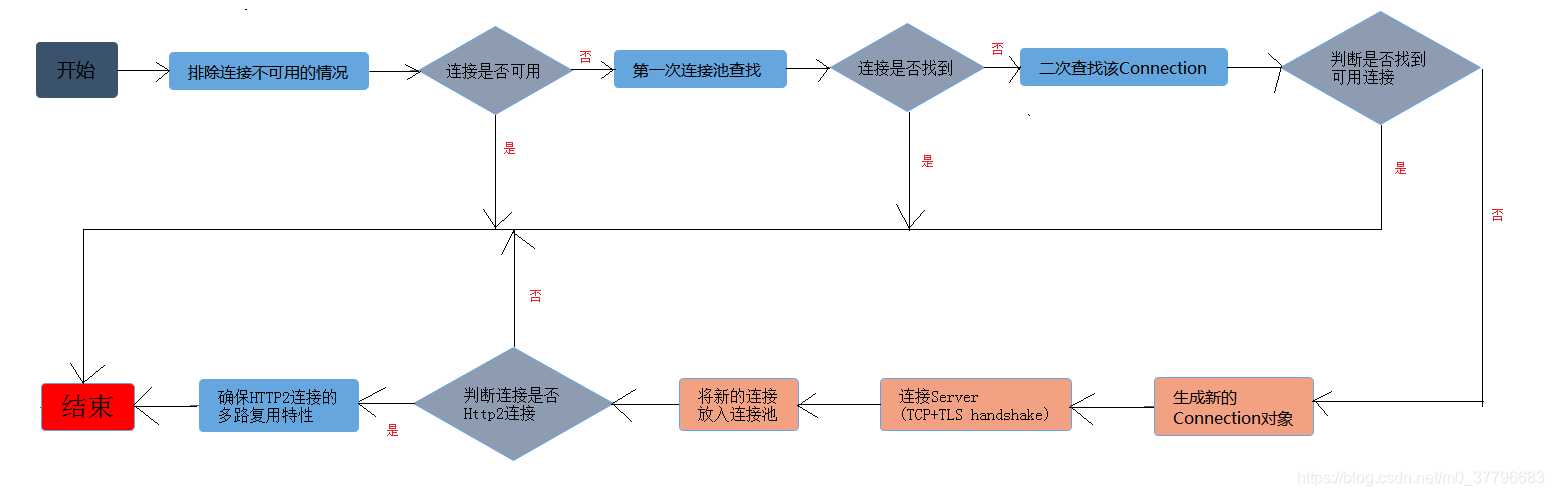
a)排除连接不可用的情况;
  private Socket releaseIfNoNewStreams() {
    assert (Thread.holdsLock(connectionPool));
    RealConnection allocatedConnection = this.connection;
    if (allocatedConnection != null && allocatedConnection.noNewStreams) {
      return deallocate(false, false, true);
    }
    return null;
  }
- 1
- 2
- 3
- 4
- 5
- 6
- 7
- 8
这个方法是说如果状态处于releaseIfNoNewStreams状态,释放该连接,否则,该连接可用
b)判断连接是否可用
//经过releaseIfNoNewStreams(),如果connection不为null,则连接可用
      if (this.connection != null) {
        // We had an already-allocated connection and it's good.
        //存在可使用的已分配连接,
        result = this.connection;
        //为null值,说明这个连接是有效的
        releasedConnection = null;
      }
- 1
- 2
- 3
- 4
- 5
- 6
- 7
- 8
经过releaseIfNoNewStreams()检查后,Connection不为空则连接可用
c)第一次连接池查找,没有提供路由信息
//通过ConnectionPool,Address,StreamAllocation从连接池中获取连接
        Internal.instance.get(connectionPool, address, this, null);
        if (connection != null) {
          foundPooledConnection = true;
          result = connection;
        }
- 1
- 2
- 3
- 4
- 5
- 6
如果找到,则将连接赋值给result
d)遍历路由器进行二次查找
 //提供更加全面的路由信息,再次从连接池中获取连接
        List<Route> routes = routeSelection.getAll();
        for (int i = 0, size = routes.size(); i < size; i++) {
          Route route = routes.get(i);
          Internal.instance.get(connectionPool, address, this, route);
          if (connection != null) {
            foundPooledConnection = true;
            result = connection;
            this.route = route;
            break;
          }
        }
- 1
- 2
- 3
- 4
- 5
- 6
- 7
- 8
- 9
- 10
- 11
- 12
e)如果还是没有找到,则只能创建新的连接了
 result = new RealConnection(connectionPool, selectedRoute);
        acquire(result, false);//添加Connection的StreamAllocation添加到connection.allocations集合中
- 1
- 2
f)新的连接,连接服务器
 // Do TCP + TLS handshakes. This is a blocking operation.连接server
    result.connect(
        connectTimeout, readTimeout, writeTimeout, connectionRetryEnabled, call, eventListener);
    routeDatabase().connected(result.route());//将路由信息添加到routeDatabase中
- 1
- 2
- 3
- 4
g)新的连接放入线程池
 // Pool the connection.
 Internal.instance.put(connectionPool, result);//将新生成的连接放入连接池中
- 1
- 2
h)如果连接是一个HTTP2连接,则需要确保多路复用的特性
     //如果是HTTP2连接,由于HTTP2连接具有多路复用特性
      //因此,我们需要确保http2的多路复用特性
      if (result.isMultiplexed()) {
        //确保http2的多路复用特性,重复的连接将 被踢除
        socket = Internal.instance.deduplicate(connectionPool, address, this);
        result = connection;
      }
- 1
- 2
- 3
- 4
- 5
- 6
- 7
在Connectinterceptor中起到关键作用的就是ConnectionPool,我们来看看ConnectionPool连接池的源码:

在目前版本,连接池是默认保持5个空闲连接的,这些空闲连接如果超过五分钟不被使用,则会被连接池移除,这个两个数值以后可能会改变,同时也是可以自定义修改的
- RouteDatabase:路由记录表,这是一个关于路由信息的白名单和黑名单类,处于黑名单的路由信息会被避免不必要的尝试;
- Deque:队列,存放待复用的连接
- ThreadPoolExecutor:线程池,用于支持线程池的clearup任务,清除idel线程
对于连接池我们联想到的是,存、去、清除:
1)存
  void put(RealConnection connection) {
    assert (Thread.holdsLock(this));
    if (!cleanupRunning) {
      cleanupRunning = true;
      executor.execute(cleanupRunnable);
    }
    connections.add(connection);
  }
- 1
- 2
- 3
- 4
- 5
- 6
- 7
- 8
可以看到,在存入连接池connections.add(connection)之前,可能需要执行连接池的清洁任务,连接存入连接池的操作很简单,主要看一下clearup做了什么:
  long cleanup(long now) {
    int inUseConnectionCount = 0;
    int idleConnectionCount = 0;
    RealConnection longestIdleConnection = null;
    long longestIdleDurationNs = Long.MIN_VALUE;

    // Find either a connection to evict, or the time that the next eviction is due.
    synchronized (this) {
      for (Iterator<RealConnection> i = connections.iterator(); i.hasNext(); ) {
        RealConnection connection = i.next();

        // If the connection is in use, keep searching.
        if (pruneAndGetAllocationCount(connection, now) > 0) {
          inUseConnectionCount++;//连接池中处于使用状态的连接数
          continue;
        }

        idleConnectionCount++;//处于空闲状态的连接数

        // If the connection is ready to be evicted, we're done.
        long idleDurationNs = now - connection.idleAtNanos;
        //寻找空闲最久的那个连接
        if (idleDurationNs > longestIdleDurationNs) {
          longestIdleDurationNs = idleDurationNs;
          longestIdleConnection = connection;
        }
      }

      //空闲最久的那个连接
      //如果空闲连接大于keepAliveDurationNs默认五分钟
      //如果空闲连接数大于maxIdleConnections默认五个
      //则执行移除操作
      if (longestIdleDurationNs >= this.keepAliveDurationNs
          || idleConnectionCount > this.maxIdleConnections) {
        // We've found a connection to evict. Remove it from the list, then close it below (outside
        // of the synchronized block).
        connections.remove(longestIdleConnection);
      } else if (idleConnectionCount > 0) {
        // A connection will be ready to evict soon.
        return keepAliveDurationNs - longestIdleDurationNs;
      } else if (inUseConnectionCount > 0) {
        // All connections are in use. It'll be at least the keep alive duration 'til we run again.
        return keepAliveDurationNs;
      } else {
        // No connections, idle or in use.
        cleanupRunning = false;
        return -1;
      }
    }

    closeQuietly(longestIdleConnection.socket());//关闭socket

    // Cleanup again immediately.
    return 0;
  }
- 1
- 2
- 3
- 4
- 5
- 6
- 7
- 8
- 9
- 10
- 11
- 12
- 13
- 14
- 15
- 16
- 17
- 18
- 19
- 20
- 21
- 22
- 23
- 24
- 25
- 26
- 27
- 28
- 29
- 30
- 31
- 32
- 33
- 34
- 35
- 36
- 37
- 38
- 39
- 40
- 41
- 42
- 43
- 44
- 45
- 46
- 47
- 48
- 49
- 50
- 51
- 52
- 53
- 54
- 55
这个方法根据两个指标判断是否移除空闲时间最长的连接,大于空闲值或者连接数超过最大值,则移除空闲时间最长的空闲连接,clearup方法的执行也依赖与另一个比较重要的方法:pruneAndGetAllocationCount(connection, now)该方法的作用是移除发生泄漏的StreamAllocation,统计连接中正在使用的StreamAllocation个数。
2)取
  @Nullable RealConnection get(Address address, StreamAllocation streamAllocation, Route route) {
    assert (Thread.holdsLock(this));
    for (RealConnection connection : connections) {
      //isEligible是判断一个连接是否还能携带一个StreamAllocation,如果能则说明这个连接可用
      if (connection.isEligible(address, route)) {
        //将StreamAllocation添加到connection.allocations中
        streamAllocation.acquire(connection, true);
        return connection;
      }
    }
    return null;
  }
- 1
- 2
- 3
- 4
- 5
- 6
- 7
- 8
- 9
- 10
- 11
- 12
首先,判断Address对应的Connection是否还能承载一个新的StreamAllocation,可以的话我们将这个StreamAllocation添加到connection.allocations中,最后返回这个Connection
3)移除
 public void evictAll() {
    List<RealConnection> evictedConnections = new ArrayList<>();
    synchronized (this) {
      for (Iterator<RealConnection> i = connections.iterator(); i.hasNext(); ) {
        RealConnection connection = i.next();
        if (connection.allocations.isEmpty()) {
          connection.noNewStreams = true;
          evictedConnections.add(connection);
          i.remove();
        }
      }
    }

    for (RealConnection connection : evictedConnections) {
      closeQuietly(connection.socket());
    }
  }
- 1
- 2
- 3
- 4
- 5
- 6
- 7
- 8
- 9
- 10
- 11
- 12
- 13
- 14
- 15
- 16
- 17
关闭并移除连接池中的空闲连接。
(11)CallServerInterceptor
拦截器链最后的拦截器,使用HttpCodec完成最后的请求发送。
三、总结
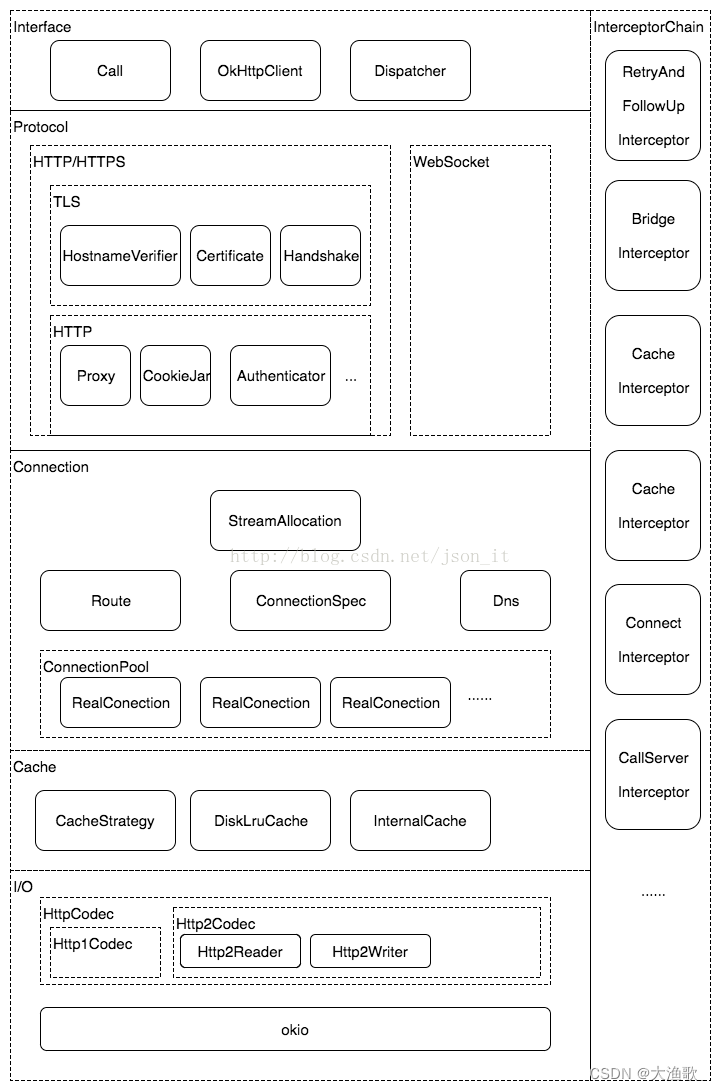
okhttp是一个http+http2的客户端,使用android+java的应用,整体分析完之后,再来看下面这个框架架构图就清晰很多了
转载:https://blog.csdn.net/m0_37796683/article/details/101306070