
热门标签
热门文章
- 1MATLAB-数学建模-求解线性规划-2-LINGO_动态规划问题matlab lingo代码
- 2C++后续:QT学习(Qt概述,创建QT项目)_c++ qt
- 3逻辑思维类面试题汇集(1)_有三个箱子,一个红色,一个蓝色,一个绿色。每个箱子都有一张说明的符号,分别是“金
- 4python timestamp转化为datetime对象_python timestamp转换成date
- 5r、s sm2签名值_1st CHARGEBACKS
- 6[Jvava] List的add底层实现原理_list保留数字add
- 7jq+css实现 进度条动画——从0到指定位置——基础积累_css进度条动画
- 8CrossOver2023虚拟机软件安装双系统教程_crosshai…2023
- 9零基础直观理解深度学习(零)_深度学习模型处理0到1的数字更加得心应手
- 10python中sample函数用法_在Pytorch中使用样本权重(sample_weight)的正确方法
当前位置: article > 正文
Java字符串操作的三个作业—考察JAVA字符串数组,字符串截取和集合的相关方法_java判断简历中姓名是否姓李
作者:编程谜题解决者 | 2024-01-29 23:11:40
赞
踩
java判断简历中姓名是否姓李
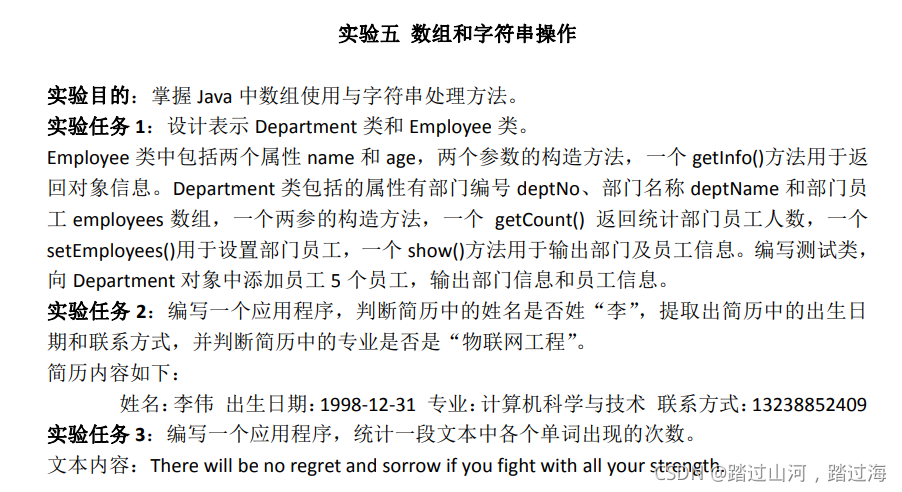
作业一:
代码:
Department类:
package xxx.xxx;//这里写自己的包名

public class Department {
   private String deptNo;
   private String deptName;
   private Employee[] employees;
   public Department(String deptNo, String deptName) {
       this.deptNo = deptNo;
       this.deptName = deptName;
   }

   public int getCount(){
       return this.employees.length;
   }


 public void  setEmployees(Employee[] employee){

	 this.employees=employee;
}

   public void show(){

       System.out.println("部门编号:"+this.deptNo);
       System.out.println("部门名称:"+this.deptName);
       System.out.println("员工信息(共" + getCount() + "人):");
       for(int i = 0; i < this.employees.length; i++){
    	   System.out.println((i+1)+","+employees[i].getInfo());
       }
   }

}

- 1
- 2
- 3
- 4
- 5
- 6
- 7
- 8
- 9
- 10
- 11
- 12
- 13
- 14
- 15
- 16
- 17
- 18
- 19
- 20
- 21
- 22
- 23
- 24
- 25
- 26
- 27
- 28
- 29
- 30
- 31
- 32
- 33
- 34
Employee类:
package xxx.xxx;//这里写自己的包名

public class Employee {
    private String name;
    private int age;
    public Employee(String name, int age) {
        this.name = name;
        this.age = age;
    }
    public String getName() {
        return name;
    }
    public void setName(String name) {
        this.name = name;
    }
    public int getAge() {
        return age;
    }
    public void setAge(int age) {
        this.age = age;
    }

    public String getInfo() {
        return "姓名:"+getName()+",年龄:"+getAge();
    }
}
- 1
- 2
- 3
- 4
- 5
- 6
- 7
- 8
- 9
- 10
- 11
- 12
- 13
- 14
- 15
- 16
- 17
- 18
- 19
- 20
- 21
- 22
- 23
- 24
- 25
- 26
Test测试类:
package xxx.xxx;//这里写自己的包名

public class Test {
    public static void main(String[] args) {
        Department department = new Department("B2004", "计算机与信息工程学院");
        Employee employee1 = new Employee("张三", 19);
        Employee employee2 = new Employee("赵四", 18);
        Employee employee3 = new Employee("王五", 17);
        Employee employee4 = new Employee("陈六", 16);
        Employee employee5 = new Employee("李七", 20);

        Employee[] employees = new Employee[]{employee1,employee2,
        		employee3,employee4,employee5};

        department.setEmployees(employees);


        department.show();

    }
}
- 1
- 2
- 3
- 4
- 5
- 6
- 7
- 8
- 9
- 10
- 11
- 12
- 13
- 14
- 15
- 16
- 17
- 18
- 19
- 20
- 21
- 22
- 23
作业二:
代码:
package xxx.xxx;//这里写自己的包名
/*
 * 判断简历中的姓名是否姓李,提取出简历中的出生日期与联系方式,
 * =>需要提取李伟=>姓名:        与                            空格
 * =>提取出生日期=>出生日期:     与                             空格
 * =>提取联系方式=>联系方式:     与                             空格
 *
 * 并判断简历中的专业是否是"物联网工程"=>使用string.conmtains=>如果包含就返回ture
 */
public class Test {
	public static void main(String[] args) {
		String str1 ="姓名:李伟 出生日期:1998-12-31 专业:计算计科学与技术 联系方式:13354653465";

		//第一次获取:和空格的索引
		int dot1 = str1.indexOf(":");
		int dot2 = str1.indexOf(" ");

		String str2 = str1.substring(dot1+1,dot2);
		System.out.println("第一次提取到的字符串为:"+str2);
		if(str2.startsWith("李")) {
			System.out.println("他姓李!");
		}else {
			System.out.println("他不姓李!");
		}

		System.out.println("==========================");

		//第二次获取:和空格的索引
		int dot3 = str1.indexOf(":",dot1+1);
		int dot4 = str1.indexOf(" ",dot2+1);

		String str3 = str1.substring(dot3+1,dot4);
		System.out.println("第二次提取到的字符串为:"+str3);
		System.out.println("出生日期:"+str3);

		System.out.println("==========================");

		//第三次获取:和空格的索引
		int dot5 = str1.indexOf(":",dot3+1);
		int dot6 = str1.indexOf(" ",dot4+1);

		String str4 = str1.substring(dot5+1,dot6);
		System.out.println("第三次提取到的字符串为:"+str4);
		if(str4.equals("物联网工程")) {
			System.out.println("他是物联网工程专业");
		}else {
			System.out.println("他不是物联网工程专业");
		}

		System.out.println("==========================");
		//第三次获取:和空格的索引
		int dot7 = str1.indexOf(":",dot5+1);

		String str5 = str1.substring(dot7+1);
		System.out.println("第四次提取到的字符串为:"+str5);
		System.out.println("他的联系方式是:"+str5);
	}
}
- 1
- 2
- 3
- 4
- 5
- 6
- 7
- 8
- 9
- 10
- 11
- 12
- 13
- 14
- 15
- 16
- 17
- 18
- 19
- 20
- 21
- 22
- 23
- 24
- 25
- 26
- 27
- 28
- 29
- 30
- 31
- 32
- 33
- 34
- 35
- 36
- 37
- 38
- 39
- 40
- 41
- 42
- 43
- 44
- 45
- 46
- 47
- 48
- 49
- 50
- 51
- 52
- 53
- 54
- 55
- 56
- 57
- 58
- 59
作业三:
补充:知识点:
集合:
集合包含collection与map.
list和set都继承自collection接口,所以大部分方法差不多.
另外,
ArrayList(相当于动态数组=>底层是用数组实现的)
LinkList(底层是用双向链表实现的)
list:
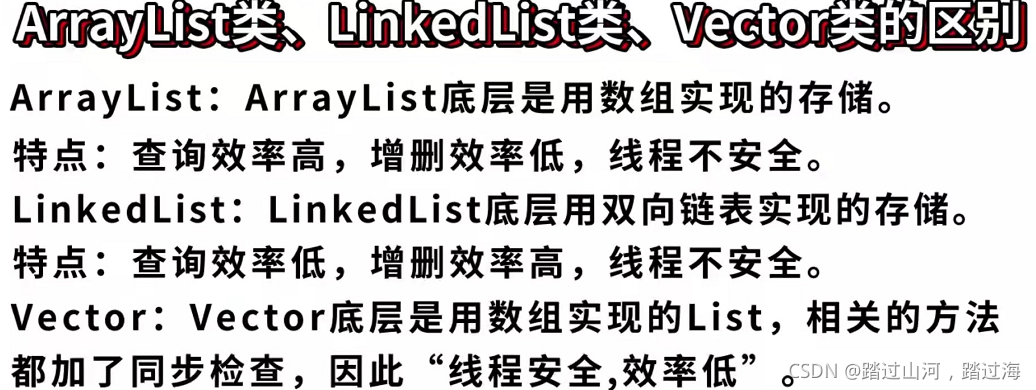
set:(list与set都继承collection接口,所以大多数方法一样,所以,用到那个方法就去课本查那个方法即可)
这里补充一下:
list与set的区别:

map:

map是存储键(key)->值(value)对的.
map是使用键(key),来寻找值的(value)
=>
理解:这里的键(key)有点类似"索引",
只不过,这个"索引"是由自己来定义的,并没有按照一定顺序.
这个键(key)由自己定义,可以是Integer类型,也可以是String类型.
当然,我们也可以用泛型来规范键和值的类型
		//用泛型来规范
        HashMap<String, Integer> hashMap = new HashMap<>();//前边那个<>里写了,后边这个<>就不用写了

        //不用泛型来规范
        HashMap hashMap1 = new HashMap();
- 1
- 2
- 3
- 4
- 5
代码:
package xxx.xxx;//这里写自己的包名

import java.util.HashMap;

public class Test {

    public static  void main(String[] args) {

		/*(1)统计每个单词出现的次数
		(2)有如下字符串"There will be no regret and sorrow if
				you fight with all your strength"(用空格间隔)
		(3)打印格式:
			There=3
			will=1
			your=2
			//........
		*/

        String str1 = "There will be no regret and sorrow if "
                + "you fight with all your strength";

        //一个或者多个空格作为分割,分割每个单词装进字符串数组;
        //通过正则表达式将这个英文句子的每个单词分割开来,再将分割开的单词依次存入字符串数组single_word中
        String[] single_word = str1.split("\\s+");
//注"Java中的 split函数是用于按指定字符(串)或正则去分割某个字符串,结果以字符串数组形式返回;
//所以,上面个句代码也可以写成: String[] single_word = str1.split(" ");

        //创建map对象=>通过泛型:表示键key的类型只能是String类型,值(value)的类型只能是Integer类型
        //这样做的原因是:用键=>来存储单词     用值=>来存储该单词出现的次数    (众所周知,键与值是成对出现的,对吧)
        HashMap<String, Integer> hashMap = new HashMap<>();//前边那个<>里写了,后边这个<>就不用写了


        for (int i = 0; i < single_word.length; i++) {

            //判断集合中是否有该单词
            if(!hashMap.containsKey(single_word[i])) {
                //一开始集合肯定什么都没有
                //在第一次循环中,也就是遍历第一个单词的过程中
                //集合中肯定没有该单词,值定义为1=>表示这个单词有一个了
                hashMap.put(single_word[i], 1);
                //在每次遍历的过程中,第一次遇见这个单词,就把这个单词放入map中,并定义对应的值为1(也就是定义这个单词出现的次数)

            }else {//如果这个单词已经存过了一次及以上,就进入else{}中
                //能进入到else里,说明=>该次循环,正在遍历的那个单词,又一次出现了,那我们就想办法,在这个键下,将对应的值+1

                //定义一个临时变量,来存储,此刻,这个单词已经出现的次数
                int b = hashMap.get(single_word[i]);

                hashMap.put(single_word[i], b + 1);//再在这个键下,将对应的值加1
            }
        }

        System.out.println("打印格式:");
        System.out.println("单词=出现的次数");
        System.out.println(hashMap);


    }

}
- 1
- 2
- 3
- 4
- 5
- 6
- 7
- 8
- 9
- 10
- 11
- 12
- 13
- 14
- 15
- 16
- 17
- 18
- 19
- 20
- 21
- 22
- 23
- 24
- 25
- 26
- 27
- 28
- 29
- 30
- 31
- 32
- 33
- 34
- 35
- 36
- 37
- 38
- 39
- 40
- 41
- 42
- 43
- 44
- 45
- 46
- 47
- 48
- 49
- 50
- 51
- 52
- 53
- 54
- 55
- 56
- 57
- 58
- 59
- 60
- 61
- 62
- 63
声明:本文内容由网友自发贡献,不代表【wpsshop博客】立场,版权归原作者所有,本站不承担相应法律责任。如您发现有侵权的内容,请联系我们。转载请注明出处:https://www.wpsshop.cn/article/detail/45577
推荐阅读
![[ 云计算 | AWS 实践 ] 使用 Java 更新现有 Amazon S3 对象](https://img-blog.csdnimg.cn/direct/f6b4b45ef01445aa9a147e7c5f1a8f15.png?x-oss-process=image/resize,m_fixed,h_300,image/format,png)



相关标签

