
- 1springboot3.0的新特性_springboot3.0新特性
- 2解决 three.js 模型颜色偏差问题_three 模型加载墙面颜色变了
- 3L1-036 A乘以B-java
- 4http://与www.开头的网站有什么区别
- 5C++ 指针与作用域_c++ 指针定义的作用域
- 6获取机器内存的三种方法_asmwbinvd
- 7win服务器系统2019和2016区别,Windows Server 2019和Windows Server, Version 1909的区别是什么?...
- 8Python中time模块详解[转]
- 9props与state的区别_state和props的区别
- 10JAVA获取当前进程的内存占用数和CPU利用率以及读写字节数并计算统计信息_java获取cpu使用率
Gerrit管理员手记(1): Gerrit Code Review使用指南
赞
踩
最近团队因为种种原因,舍弃了之前的BitBucket,而决定使用Gerrit来管理代码仓库。我在网上看了下,一个流量很高的评论是:安装简单,使用复杂。当然,对于这样的评价,我们往往就会觉得不好用,但是,我认为能够有这样的评价,至少说明,Gerrit功能上还是会比较强大的,可能团队的过渡学习成本会高一些。
| 名称 | 功能 | 免费 |
|---|---|---|
| BitBucket | 功能强大 | 收费 |
| Gerrit | 功能强大 | 免费 |
| Gitlab | ? | 免费 |
| Github | ? | 免费 |
不知道用如上表格,进行这种简单的对比,是否合适。至少来说,Gerrit作为开源免费的代码仓库管理软件,能够满足大型项目需要。无论如何,让我们开始吧,大部分内容,可能都会来源于对相关文档的翻译,理解和总结,在我记录完这些文章后,希望我已经成为一个Gerrit管理员。
官网手记
看啥不如看官网:https://www.gerritcodereview.com/
Gerrit的三大功能
看了官网,Gerrit的三大部分功能如下,那就分别看一眼:
Discuss code(代码review&verify)
支持版本之间的高亮显示或不同颜色显示,方便代码review以便正确修改。
Manage and Serve Git(管理Git仓库)
集成SSH和HTTP的Gerrit,兼容所有Git客户端,通过把所有代码仓库托管在一起,实现简化管理。
Manage workflows(管理代码生产工作流)
工作流向来都要有具体管理的思维才能管理,工具只是提供了方便和设计者基本的思想,在认可这种管理思想的前提下,还需要更多规范和选择,来适应项目的需要。
其他方面:
Gerrit支持服务器端插件安装。
通过地理备份以进行容灾和地理镜像以减少地域访问之间的延迟,也是大型项目,尤其是开发人员分布在不同地区的项目,需要考虑的。
社区支持和培训ppt。
版本选择
3.3.X
3.4.0还在开发中,目前官网release的最新版本是3.3.X,重要的注意事项:
(1)Default support for Java 11,默认支持java 11。
(2)相对于以往版本而言,Non-Interactive Users被改名成Service Users了,这主要在做自动化流程的时候涉及,应该也只是改个名字。
(3)新增支持了ChangePluginDefinedInfoFactory来替代ChangeAttributeFactory。
(4)自动配置了JGit,关闭receive.autogc选项,打开git wire protocol version 2选项。
特性变化上,还有New logs timestamp format和Attention Set。
3.2.X
(1)Polymer 3,前端UI版本升级到3。
(2)File Uploads in frontend,支持前端文件上传。
(3)Performance improvements on mergeability check and accounts caching,提升性能。
(4)Support for Java 11,除了Java 8,正式支持了Java 11。2.16.13,3.0.4,V3.1.0也支持,只是没有进行CI验证,所以没有正式宣布支持,看来3.2.0开始是进行过CI验证了。
3.1.X
(1)Support for git protocol V2,默认打开git protocol V2。
(2)Polymer 2,前段UI版本更新。
(3)Mandatory plugins强制插件,通过plugins.mandatory配置。
(4)Performance logging and tracing,提升日志性能。
3.0.X
3.0及以前的项目已经EOL。
(1)The GWT UI is removed and PolyGerrit is now the only UI,归一了前端UI组件。
(2)The database backend for changes, accounts, groups and projects (“ReviewDb”) is removed and all metadata is now stored in git (“NoteDb”),归一了后端数据库组件。
(3)New quota enforcer extension point.
(4)Support for signed push with GPG subkeys.
(5)New core plugins: delete-project, gitiles, plugin-manager and webhooks,核心插件。
项目IT在centos系统上安装的是V3.1.X版本,并对接到公司邮箱进行认证。有可能主要考虑的是和另一个site的仓库版本保持一致。我在自己家用电脑的ubuntu20.04上安装了V3.3.3版本,暂未作复杂的认证,用于学习了解一下新的版本。
安装
系统和相关依赖的版本做一个记录。
Ubuntu20.04
cat /etc/os-release
NAME=“Ubuntu”
VERSION=“20.04.1 LTS (Focal Fossa)”
ID=ubuntu
ID_LIKE=debian
PRETTY_NAME=“Ubuntu 20.04.1 LTS”
VERSION_ID=“20.04”
HOME_URL=“https://www.ubuntu.com/”
SUPPORT_URL=“https://help.ubuntu.com/”
BUG_REPORT_URL=“https://bugs.launchpad.net/ubuntu/”
PRIVACY_POLICY_URL=“https://www.ubuntu.com/legal/terms-and-policies/privacy-policy”
VERSION_CODENAME=focal
UBUNTU_CODENAME=focal
Git 2
git --version
git version 2.25.1
JDK 11
没去下载Oracle官方版本了,直接安装了开源版本:
sudo apt install openjdk-11-jre-headless # version 11.0.10+9-0ubuntu1~20.04
或
sudo apt-get install openjdk-11-jdk
安装JDK后:
java --version
openjdk 11.0.10 2021-01-19
OpenJDK Runtime Environment (build 11.0.10+9-Ubuntu-0ubuntu1.20.04)
OpenJDK 64-Bit Server VM (build 11.0.10+9-Ubuntu-0ubuntu1.20.04, mixed mode, sharing)
MySQL8
sudo apt-get install mysql-server
mysql --version
mysql Ver 8.0.23-0ubuntu0.20.04.1 for Linux on x86_64 ((Ubuntu))
sudo mysql
mysql> CREATE USER 'gerrit'@'localhost' IDENTIFIED BY 'gerrit';
mysql> CREATE DATABASE reviewdb DEFAULT CHARACTER SET 'utf8';
mysql> GRANT ALL ON reviewdb.* TO 'gerrit'@'localhost';
mysql> FLUSH PRIVILEGES;
mysql> SHOW DATABASES LIKE 'reviewdb';
- 1
- 2
- 3
- 4
- 5
±--------------------+
| Database (reviewdb) |
±--------------------+
| reviewdb |
±--------------------+
1 row in set (0.00 sec)
mysql> \q
检查创建的数据库及用户权限:
sudo mysql -u gerrit -p
password:gerrit
mysql> SELECT USER();
±-----------------+
| USER() |
±-----------------+
| gerrit@localhost |
±-----------------+
1 row in set (0.00 sec)
mysql> SHOW DATABASES;
±-------------------+
| Database |
±-------------------+
| information_schema |
| reviewdb |
±-------------------+
2 rows in set (0.00 sec)
Gerrit V3.3.3
java -jar gerrit-3.3.3.war init -d ~/review_site(安装放到的本地路径)
WARNING: An illegal reflective access operation has occurred
WARNING: Illegal reflective access by com.google.inject.assistedinject.FactoryProvider2 (file:/home/gerrit/.gerritcodereview/tmp/gerrit_8090637543725181094_app/guice-assistedinject-4.2.3.jar) to constructor java.lang.invoke.MethodHandles$Lookup(java.lang.Class,int)
WARNING: Please consider reporting this to the maintainers of com.google.inject.assistedinject.FactoryProvider2
WARNING: Use --illegal-access=warn to enable warnings of further illegal reflective access operations
WARNING: All illegal access operations will be denied in a future release
Using secure store: com.google.gerrit.server.securestore.DefaultSecureStore
[2021-04-17 20:26:06,626] [main] INFO com.google.gerrit.server.config.GerritServerConfigProvider : No /home/gerrit/review_site/etc/gerrit.config; assuming defaults
*** Gerrit Code Review 3.3.3
Create ‘/home/gerrit/review_site’ [Y/n]? Y
*** Git Repositories
Location of Git repositories [git]:
*** JGit Configuration
Auto-configured “receive.autogc = false” to disable auto-gc after git-receive-pack.
Auto-configured “protocol.version = 2” to activate git wire protocol version 2.
*** Index
Type [lucene]:
*** User Authentication
Authentication method [openid/?]: development_become_any_account
Enable signed push support [y/N]? y
*** Review Labels
Install Verified label [y/N]? y
*** Email Delivery
SMTP server hostname [localhost]:
SMTP server port [(default)]:
SMTP encryption [none/?]:
SMTP username :
*** Container Process
Run as [gerrit]:
Java runtime [/usr/lib/jvm/java-11-openjdk-amd64]:
Copy gerrit-3.3.3.war to /home/gerrit/review_site/bin/gerrit.war [Y/n]? Y
Copying gerrit-3.3.3.war to /home/gerrit/review_site/bin/gerrit.war
*** SSH Daemon
Listen on address [*]:
Listen on port [29418]:
Generating SSH host key … rsa… ed25519… ecdsa 256… ecdsa 384… ecdsa 521… done
*** HTTP Daemon
Behind reverse proxy [y/N]? N
Use SSL (https://) [y/N]? N
Listen on address [*]:
Listen on port [8080]:
Canonical URL [http://localhost:8080/]:
*** Cache
*** Plugins
Installing plugins.
Install plugin codemirror-editor version v3.3.3 [y/N]? Y
Installed codemirror-editor v3.3.3
Install plugin commit-message-length-validator version v3.3.3 [y/N]? Y
Installed commit-message-length-validator v3.3.3
Install plugin delete-project version v3.3.3 [y/N]? Y
Installed delete-project v3.3.3
Install plugin download-commands version v3.3.3 [y/N]? Y
Installed download-commands v3.3.3
Install plugin gitiles version v3.3.3 [y/N]? Y
Installed gitiles v3.3.3
Install plugin hooks version v3.3.3 [y/N]? Y
Installed hooks v3.3.3
Install plugin plugin-manager version v3.3.3 [y/N]? y
Installed plugin-manager v3.3.3
Install plugin replication version v3.3.3 [y/N]? y
Installed replication v3.3.3
Install plugin reviewnotes version v3.3.3 [y/N]? y
Installed reviewnotes v3.3.3
Install plugin singleusergroup version v3.3.3 [y/N]? y
Installed singleusergroup v3.3.3
Install plugin webhooks version v3.3.3 [y/N]? y
Installed webhooks v3.3.3
Initializing plugins.
*** Gerrit Administrator
Create administrator user [Y/n]? y
username [admin]:
name [Administrator]:
HTTP password [secret]: 123456
public SSH key file []:
email [admin@example.com]:
Initialized /home/gerrit/review_site
Collecting accounts: 1 accounts with: reindex --site-path /home/gerrit/review_site --threads 1 --index accounts
Reindexing accounts: 100% (1/1)
Reindexed 1 documents in accounts index in 0.3s (3.0/s)
Index accounts in version 11 is ready
Collecting projects: 2 changes with: reindex --site-path /home/gerrit/review_site --threads 1 --index changes
Reindexing changes: project-slices: 100% (2/2), done
Reindexed 0 documents in changes index in 0.0s (0.0/s)
Index changes in version 60 is ready
Reindexing groups: 100% (2/2)ith: reindex --site-path /home/gerrit/review_site --threads 1 --index groups
Reindexed 2 documents in groups index in 0.0s (71.4/s)
Index groups in version 8 is ready
Reindexing projects: 100% (2/2) with: reindex --site-path /home/gerrit/review_site --threads 1 --index projects
Reindexed 2 documents in projects index in 2.3s (0.9/s)
Index projects in version 4 is ready
Executing /home/gerrit/review_site/bin/gerrit.sh start
Starting Gerrit Code Review: WARNING: Could not adjust Gerrit’s process for the kernel’s out-of-memory killer.
This may be caused by /home/gerrit/review_site/bin/gerrit.sh not being run as root.
Consider changing the OOM score adjustment manually for Gerrit’s PID=24321 with e.g.:
echo ‘-1000’ | sudo tee /proc/24321/oom_score_adj
OK
Waiting for server on localhost:8080 … OK
Opening http://localhost:8080/#/admin/projects/ …No protocol specified
OK
netstat -ltnp | grep Gerrit
tcp6       0      0 :::8080                 :::*                    LISTEN      24321/GerritCodeRev
tcp6       0      0 :::29418                :::*                    LISTEN      24321/GerritCodeRev
- 1
- 2
- 3
这样,表明Gerrit服务已经启动,在浏览器输入本机地址在8080端口就可以使用Gerrit了。
http://localhost:8080/
用admin账户登陆上去,体验一下吧
gerrit的配置文件: /home/gerrit/review_site/etc/gerrit.config
启动/关闭gerrit服务的命令:
sudo /home/gerrit/review_site/bin/gerrit.sh start
sudo /home/gerrit/review_site/bin/gerrit.sh stop
使用文档
确定版本安装了以后,就不用去官网上了,可以直接从Gerrit仓库界面上去看文档了。那么,开始吧。其实DOCUMENTATION大部分文档是UI的使用文档,最后一个才是管理员的手册(我是这么觉得,所以大致看下前面几个)
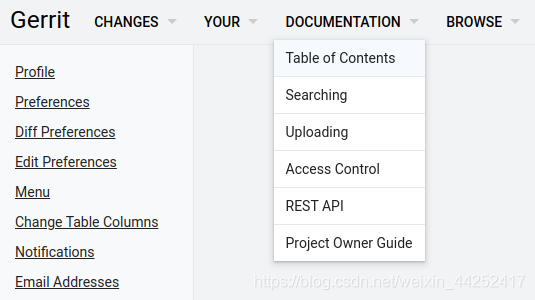
Table of Contents
Quickstarts
先来个快速安装教程Quickstart for Installing Gerrit on Linux(就像我上面这样),但是想要适合产品级使用的安装步骤,用于项目长期代码维护,那么就要参考Standalone Daemon Installation Guide这个页面来安装。
About Gerrit
这里主要分几个方面来介绍Gerrit,很多文档写的幽默风趣,非常符合开源人士们的胸襟,跟公司体制下诞生出来的那种板砖式文档,具有截然不同的风格,也让阅读文档产生了一些乐趣。
Why Code Review? 使用Gerrit成为一个明星码农吧!然而码农就像作曲家一样,要写出好的曲子,需要不断的打磨和修改以及润色等过程,谓之迭代!同时,一个web化的code review方式,对于代码生产过程中高效的交流,是一大利器,而review后如果需要修订你的提交,注意git commit --amend的使用。再举个message-hook的高级功能勾引一下你。
Product Overview 除了再强调一下review的好处和review应该关心的主要问题,这里指出了一个分叉,新手并且想探知一下为什么Gerrit能提高我的工作效能(比如我),继续看How Works和Walk through,老手,直接根据角色了解对应的用户文档吧:User Guide/Project Owner Guide/Default Android Workflow (external)
How Gerrit Works 本质上是在传统的中央代码仓库基础上,引入了一个概念:a store of Pending Changes.把一个修改暂时挂起并临时存储(以便对它进行review,测试,修正,决策是否合入)。这里点了一句权限管理的入口,那是Gerrit管理员很重要的一项工作。
Basic Gerrit Walkthrough 演示了一个开发者和其reviewer,完成一次向分支提交修改,所需要经历的完整过程。Making the change./Creating the review./Reviewing the change./Reworking the change./Verifying the change./Submitting the change.作为一个开发者,如果你写的代码足够完美,一次review通过且verify通过,就可以没有rework的过程,但是这里展示的rework过程非常重要,标明了对于一个change的rework更新,不需要另外生成一个change,而是通过git commit --amend去追加更新就可以了。
Gerrit Community(Contributor Guide) 这个暂时先不看了。
User Guide
这里主要明白change和patch set是两个不同的概念,每一个patch set都可以是对一次change的迭代反馈和修改,冒烟验证也主要基于patch set的产生而进行verify,而且他可以不断跟随开发分支进行rebase,只要还没有commit到repo里去,都仍然是最初提交的那个change(这个change事实上就是refs/for/XXX这个临时分支)。因此一个change就完全可以发挥出bitbucket里面的一个临时分支的作用。
如果只是在一个正在修改的change上更新patch set,最简便的方式就是,提交的时候用git commit --amend。如果你已经不确定当前的本地代码是正在修改的change,那就从change的DOWNLOAD链接上重新fetch一下了。
否则,如果要新建一个change,往往意味着你要做一件新的事情,最简单的办法是重新clone代码,或者新建commit-msg hook。

