- 1GIT提交规范-范式和示例_git提交类型规范
- 2软考网络工程师-2023年5月上午-真题合集(已完结)_软考网络工程师 真题
- 3Unity中,图片 替换 光标 —— 疑问解答_unity textmeshpro - input field 如何替换光标图片
- 4x123.fun/gl.php,Linux-kernel mailing list archive 2002-39,: [PATCH] 2.5.40: lkcd (9/9): dump driver ...
- 5利用GPU训练的配置方法(Keras)_keras使用gpu训练
- 6Win11 25179.1000补丁推送了!
- 7关于Spring Boot 2.x升3.x的那些事_springboot2升级到3
- 8C语言 基本输入输出函数_c语言中输出函数有几种
- 9回归预测 | MATLAB实现BO-CNN贝叶斯算法优化卷积神经网络多输入单输出
- 10如何将Python项目部署到新电脑上运行?_怎么把pycharm的文件迁移部署
Java 爬取BiliBili Up视频_java 批量爬取bilibili视频 下载高清
赞
踩
爬视频找了好久都没有找到接口,后面百度半天不行,就在谷歌找到了这文章:
写的非常详细,感兴趣 的可以去看看。
我就大概描述记录一下过程
准备
一、创建普通的maven工程
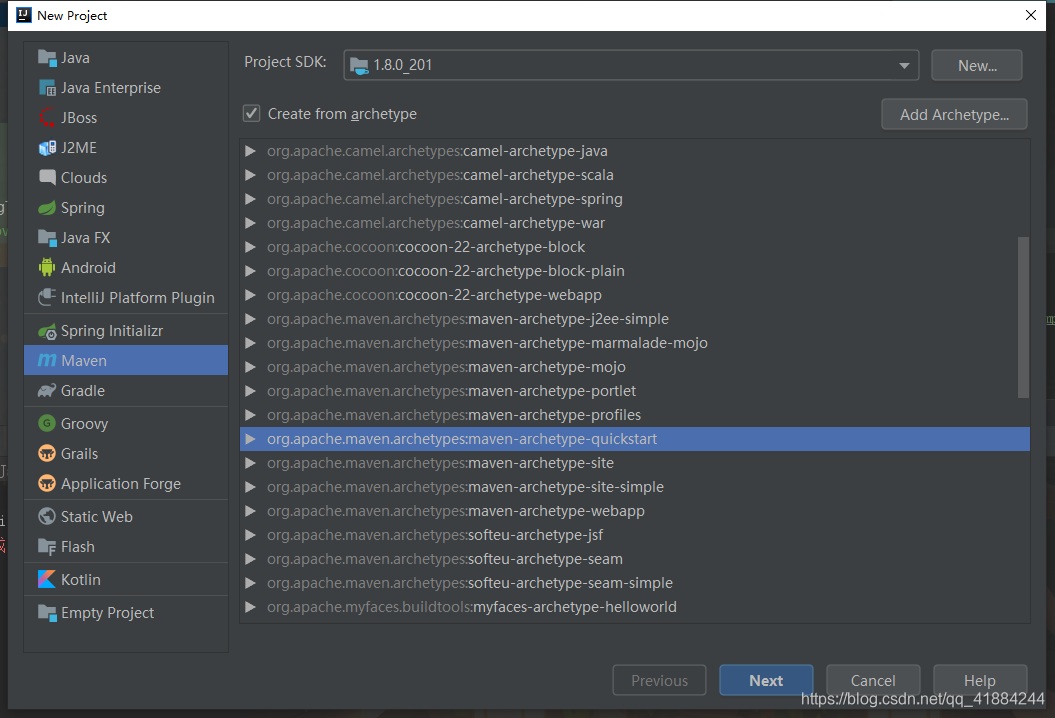
二、pom依赖
<dependency>
	<groupId>org.jsoup</groupId>
	<artifactId>jsoup</artifactId>
	<version>1.12.1</version>
</dependency>

<dependency>
	<groupId>com.alibaba</groupId>
	<artifactId>fastjson</artifactId>
	<version>1.2.47</version>
</dependency>
- 1
- 2
- 3
- 4
- 5
- 6
- 7
- 8
- 9
- 10
- 11
找到你要爬取的视频
这里我以非常喜欢的up暗猫的视频为例子。
https://www.bilibili.com/video/av58906853
- 1

目前的获取方式
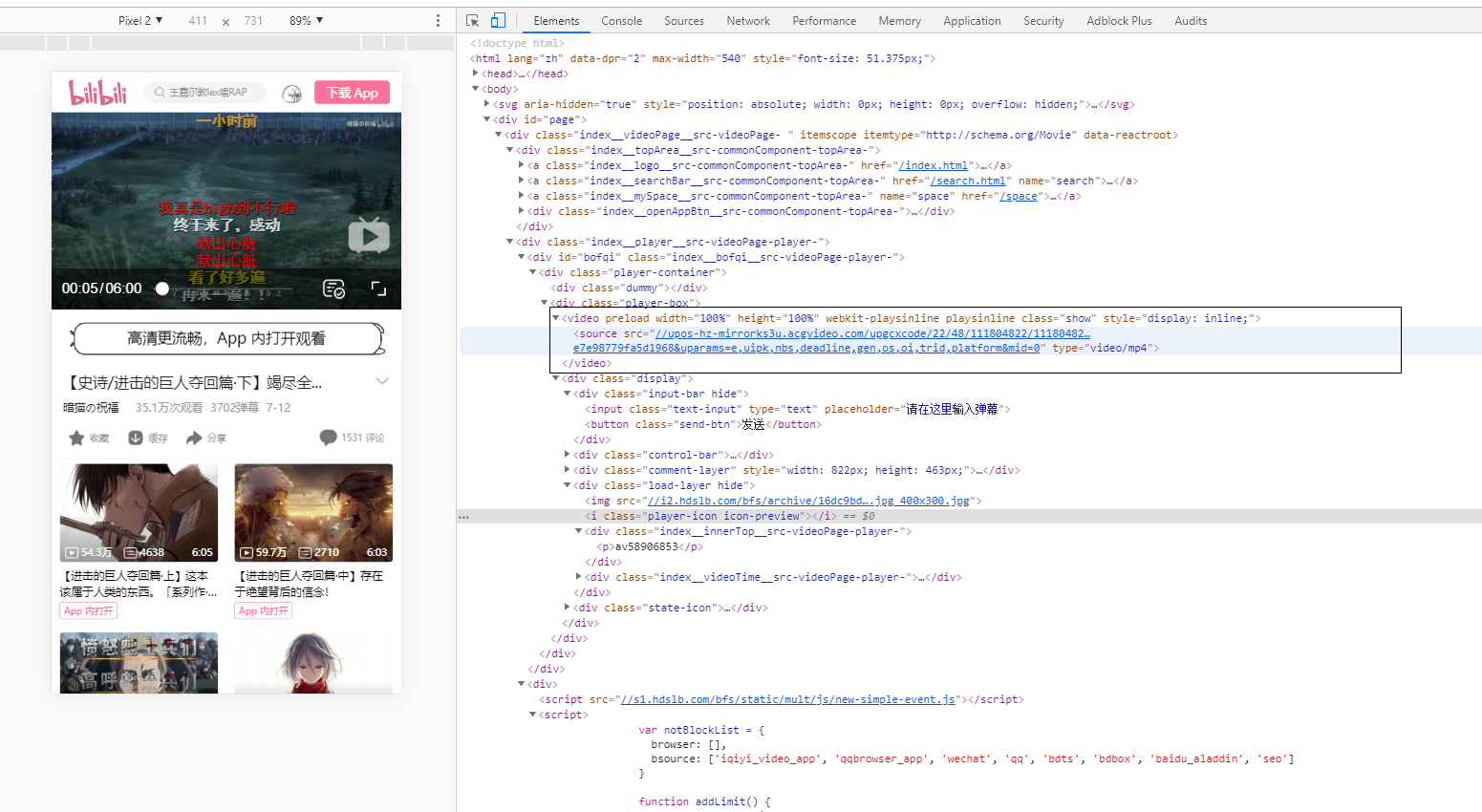
一、把网页改成移动端,直接获取到视频地址,但画质非常的差
二、 Web端H5播放器更改为 FLASH播放器(详细请看上面的文章)
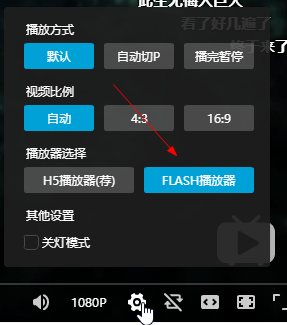
我们就采用第二种
先打开浏览器的 Network
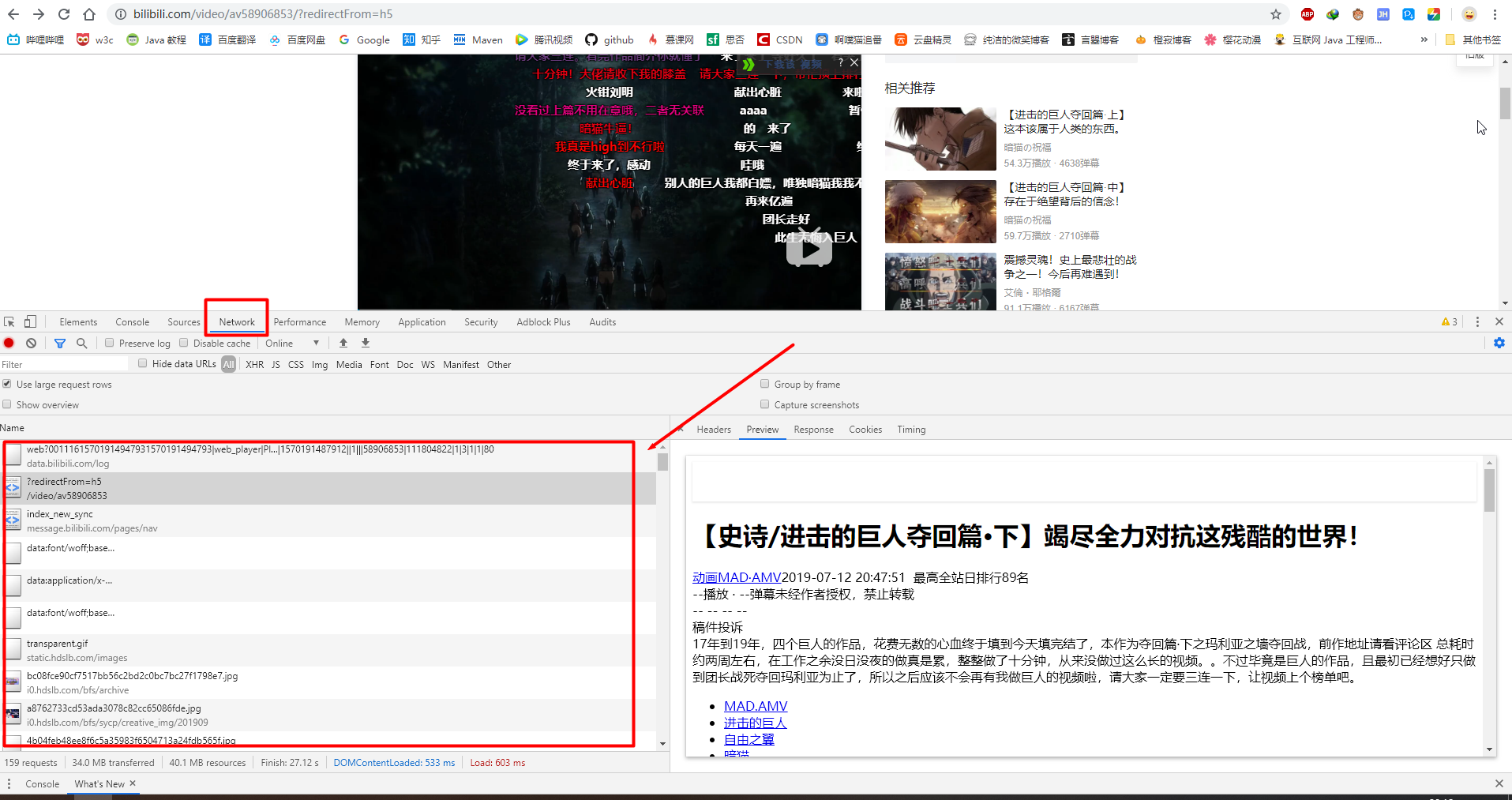
然后找到json

或者就直接在 Filter框中输入 url
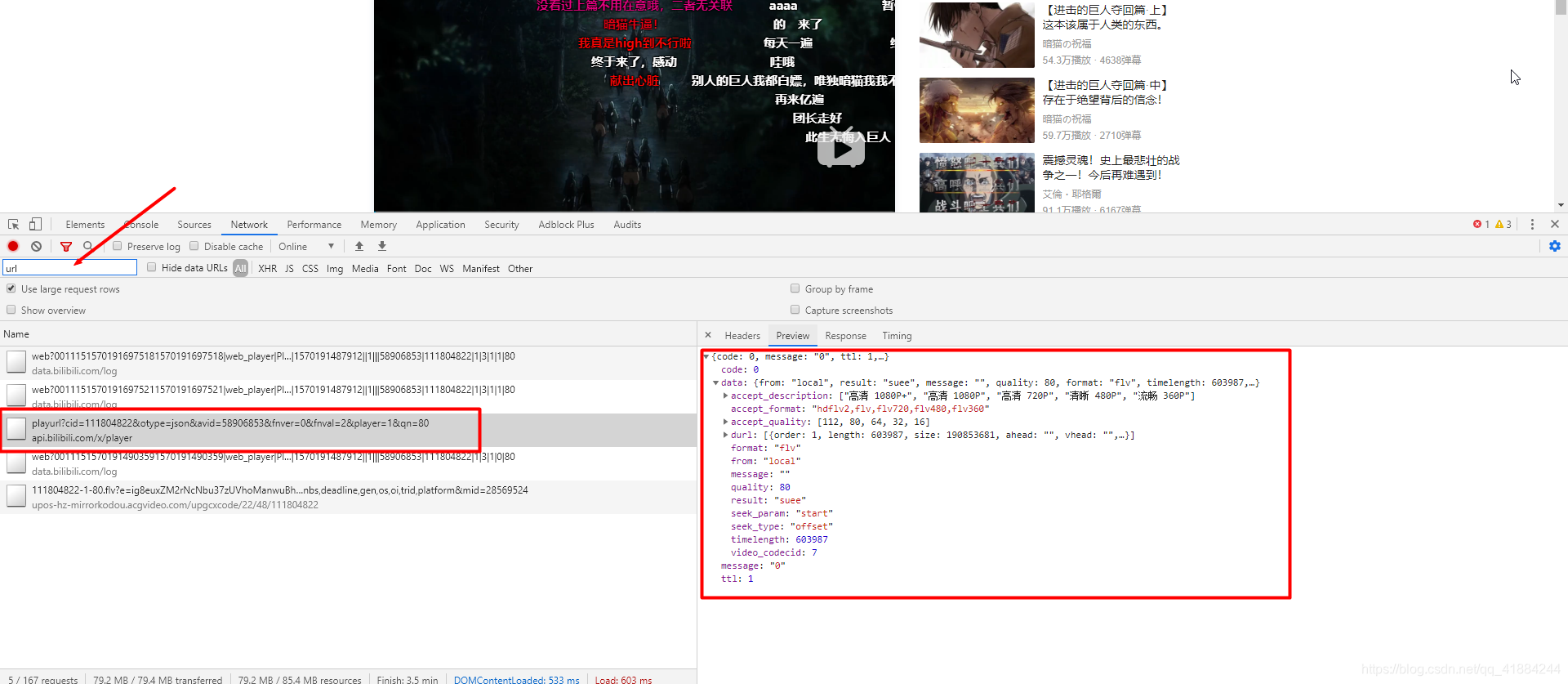
选择headers,访问url

https://api.bilibili.com/x/player/playurl?cid=111804822&otype=json&avid=58906853&fnver=0&fnval=2&player=1&qn=80
- 1
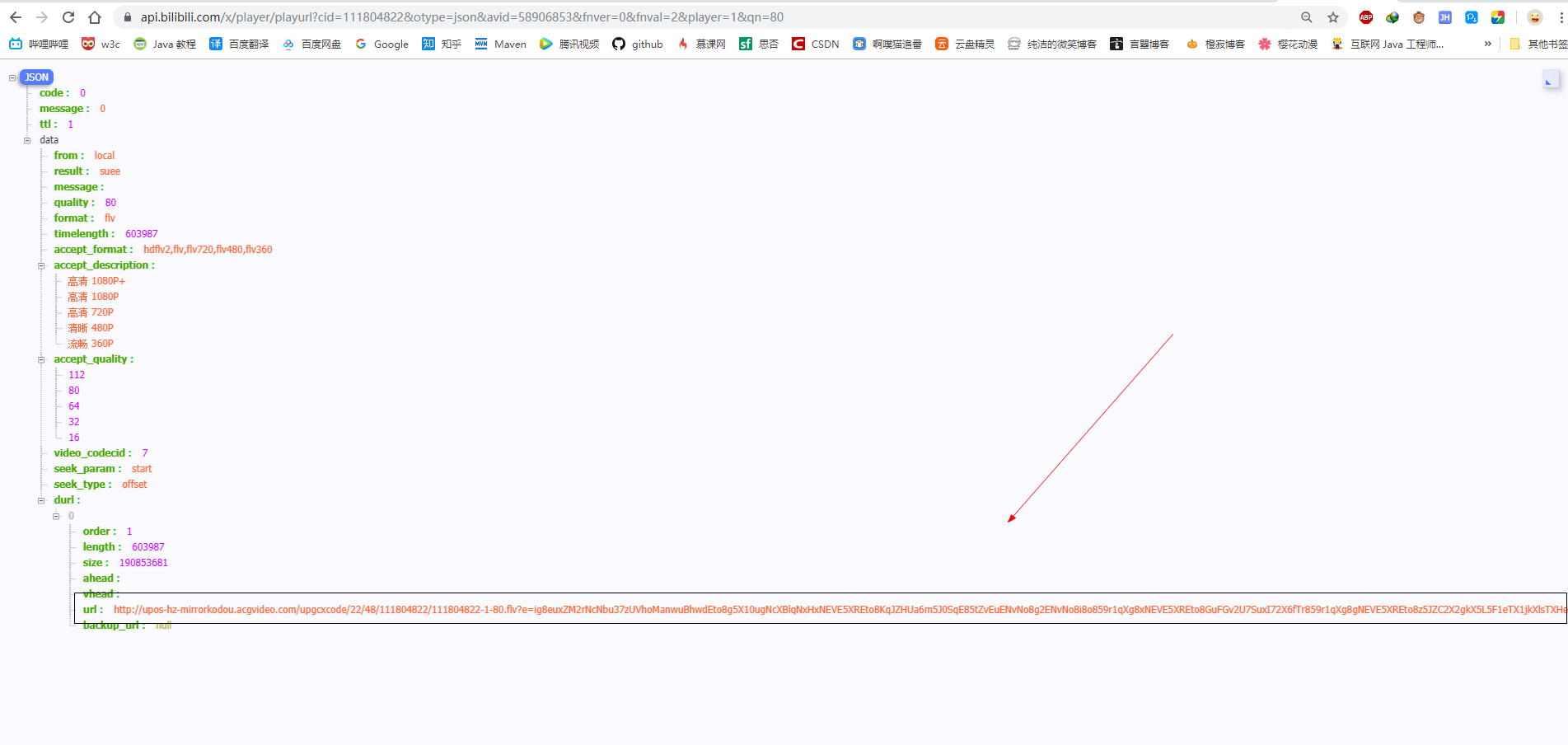
视频资源url
"http://upos-hz-mirrorkodou.acgvideo.com/upgcxcode/22/48/111804822/111804822-1-80.flv?e=ig8euxZM2rNcNbu37zUVhoManwuBhwdEto8g5X10ugNcXBlqNxHxNEVE5XREto8KqJZHUa6m5J0SqE85tZvEuENvNo8g2ENvNo8i8o859r1qXg8xNEVE5XREto8GuFGv2U7SuxI72X6fTr859r1qXg8gNEVE5XREto8z5JZC2X2gkX5L5F1eTX1jkXlsTXHeux_f2o859IB_&uipk=5&nbs=1&deadline=1570199335&gen=playurl&os=kodou&oi=1033761651&trid=8cae3615fba742a1b109d0ad3786a65cu&platform=pc&upsig=e32e2d092fcda0d364c50a541d2aa0c2&uparams=e,uipk,nbs,deadline,gen,os,oi,trid,platform&mid=28569524"
- 1
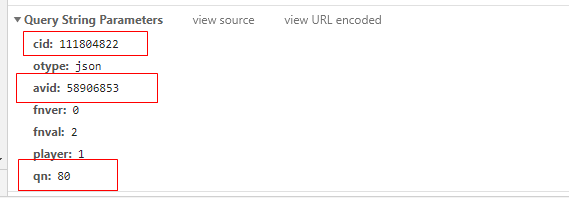
参数列表
-
qn:视频质量
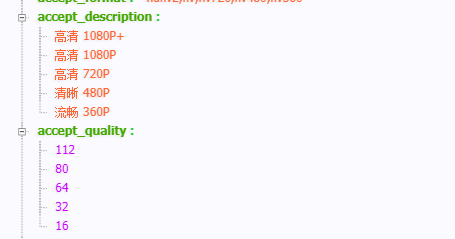
对应:16 ----流畅360P,32 ----清晰480P , 类推(最大80,112对应的1080P+,是下载不了的) -
avid :视频av号
-
cid:必须携带视频的cid,不然请求视频404
那么到这我们已经找到了视频的url地址
一、采用手动获取url方式
开始爬取
(注意是否有这个路径,我的是G盘,还有设置 Referer,av号)
public class AppUrlMovie {
    public static void main(String[] args) {
        System.out.println("开始");
        long start = System.currentTimeMillis();
        /**
         *  从json中获取到的 url
         *  请获取后手动填写
         */
        String lastUrl = "http://upos-hz-mirrorkodou.acgvideo.com/upgcxcode/22/48/111804822/111804822-1-80.flv?e=ig8euxZM2rNcNbu37zUVhoManwuBhwdEto8g5X10ugNcXBlqNxHxNEVE5XREto8KqJZHUa6m5J0SqE85tZvEuENvNo8g2ENvNo8i8o859r1qXg8xNEVE5XREto8GuFGv2U7SuxI72X6fTr859r1qXg8gNEVE5XREto8z5JZC2X2gkX5L5F1eTX1jkXlsTXHeux_f2o859IB_&uipk=5&nbs=1&deadline=1570200690&gen=playurl&os=kodou&oi=1033761651&trid=c05e1a0ff69a47a08dbb4b39210cbd49u&platform=pc&upsig=03d0df9f30c814d21e70d4e2e1be2e17&uparams=e,uipk,nbs,deadline,gen,os,oi,trid,platform&mid=28569524";
        //自定义文件名称
        String fileName = "a.mp4";
        downloadMovie(lastUrl, fileName);

        long end = System.currentTimeMillis();
        System.out.println("完成 ");
        System.err.println("总共耗时:" + (end - start) / 1000 + "s");
    }

    public static void downloadMovie(String BLUrl, String fileName) {
        InputStream inputStream = null;
        try {
            URL url = new URL(BLUrl);
            URLConnection urlConnection = url.openConnection();
             // 填需要爬取的av号
            urlConnection.setRequestProperty("Referer", "https://www.bilibili.com/video/av69924947");
            urlConnection.setRequestProperty("Sec-Fetch-Mode", "no-cors");
            urlConnection.setRequestProperty("User-Agent", "Mozilla/5.0 (Windows NT 10.0; Win64; x64) AppleWebKit/537.36 (KHTML, like Gecko) Chrome/77.0.3865.90 Safari/537.36");
            urlConnection.setConnectTimeout(10 * 1000);
            inputStream = urlConnection.getInputStream();
        } catch (IOException e) {
            e.printStackTrace();
        }
        //定义路径
        String path = "G:\\app\\" + fileName;
        File file = new File(path);
        int i = 1;
        try {
            BufferedInputStream bis = new BufferedInputStream(inputStream);
            BufferedOutputStream bos = new BufferedOutputStream(new FileOutputStream(file));
            byte[] bys = new byte[1024];
            int len = 0;
            while ((len = bis.read(bys)) != -1) {
                bos.write(bys, 0, len);
                System.out.println("写入第 " + i++ + "次");
            }
            bis.close();
            bos.close();
        } catch (Exception e) {
            e.printStackTrace();
        }

    }
}

- 1
- 2
- 3
- 4
- 5
- 6
- 7
- 8
- 9
- 10
- 11
- 12
- 13
- 14
- 15
- 16
- 17
- 18
- 19
- 20
- 21
- 22
- 23
- 24
- 25
- 26
- 27
- 28
- 29
- 30
- 31
- 32
- 33
- 34
- 35
- 36
- 37
- 38
- 39
- 40
- 41
- 42
- 43
- 44
- 45
- 46
- 47
- 48
- 49
- 50
- 51
- 52
- 53
- 54

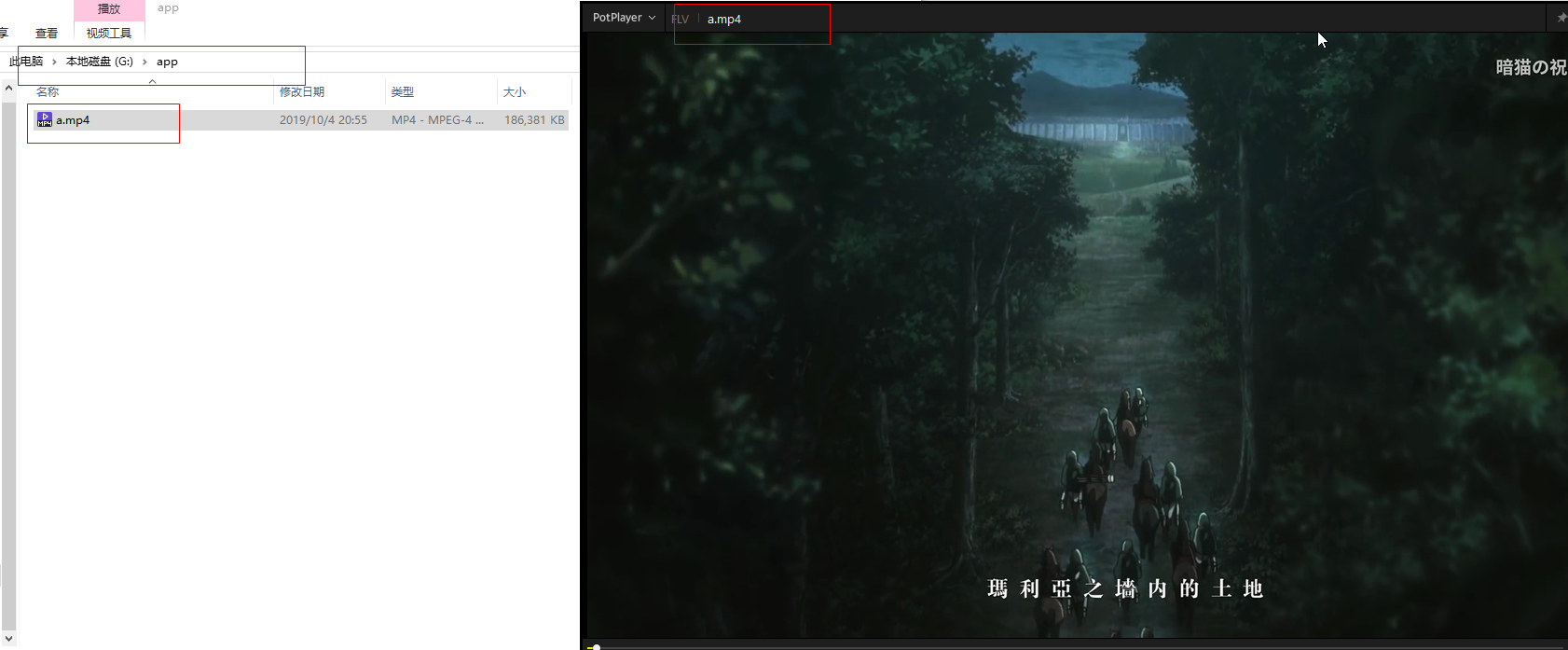
完全 没问题,能看。
但每次都去找url太麻烦了,那我们采用另一种
二、输入avid,填写Cookie的方式
我们再次访问之前从Network获取的url
https://api.bilibili.com/x/player/playurl?cid=111804822&otype=json&avid=58906853&fnver=0&fnval=2&player=1&qn=80
- 1
更改avid,进行访问(随便找个就好了)
 404 说明我们传入参数不对,这里我们 就需要用到了cid,那 cid又在哪里获取呢?
我们再次回到控制的Network
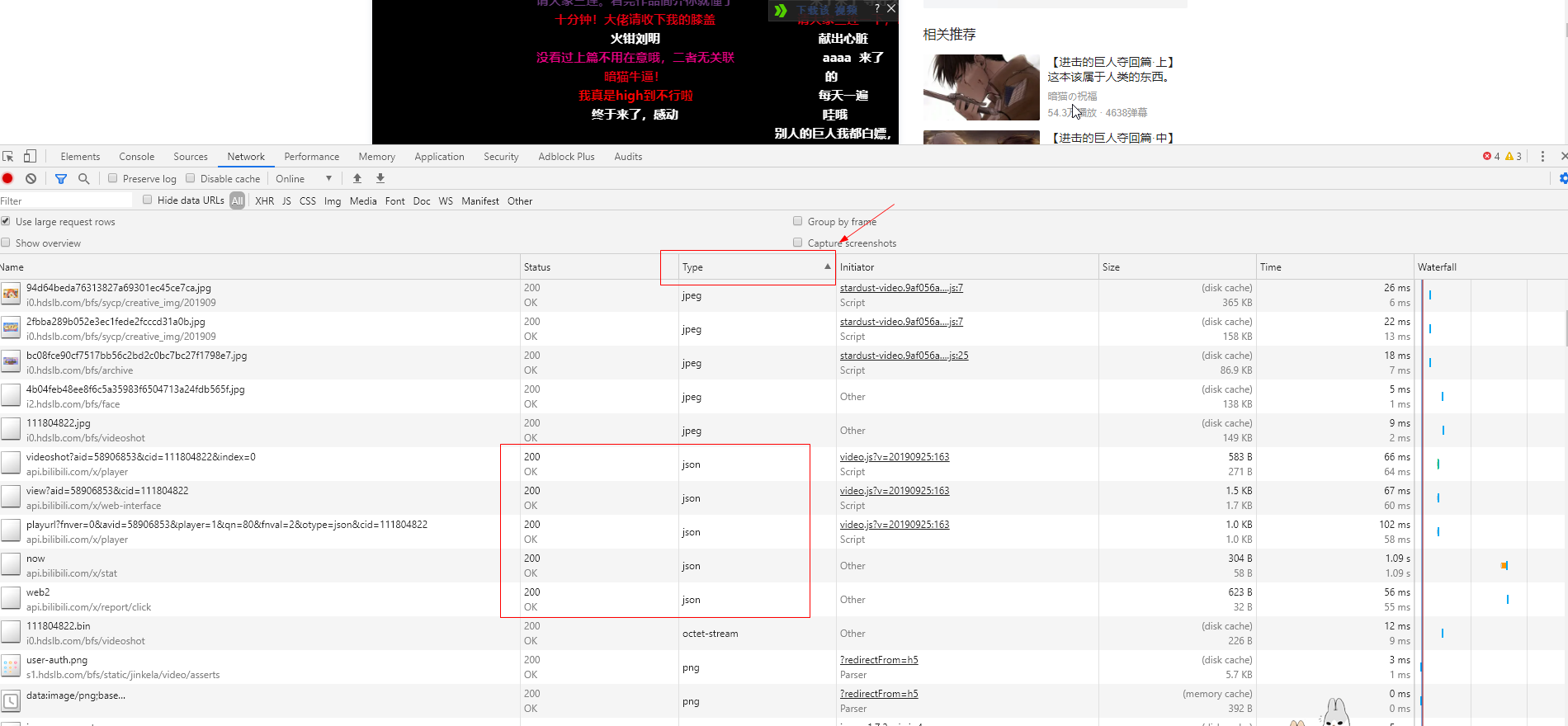
找到这个json
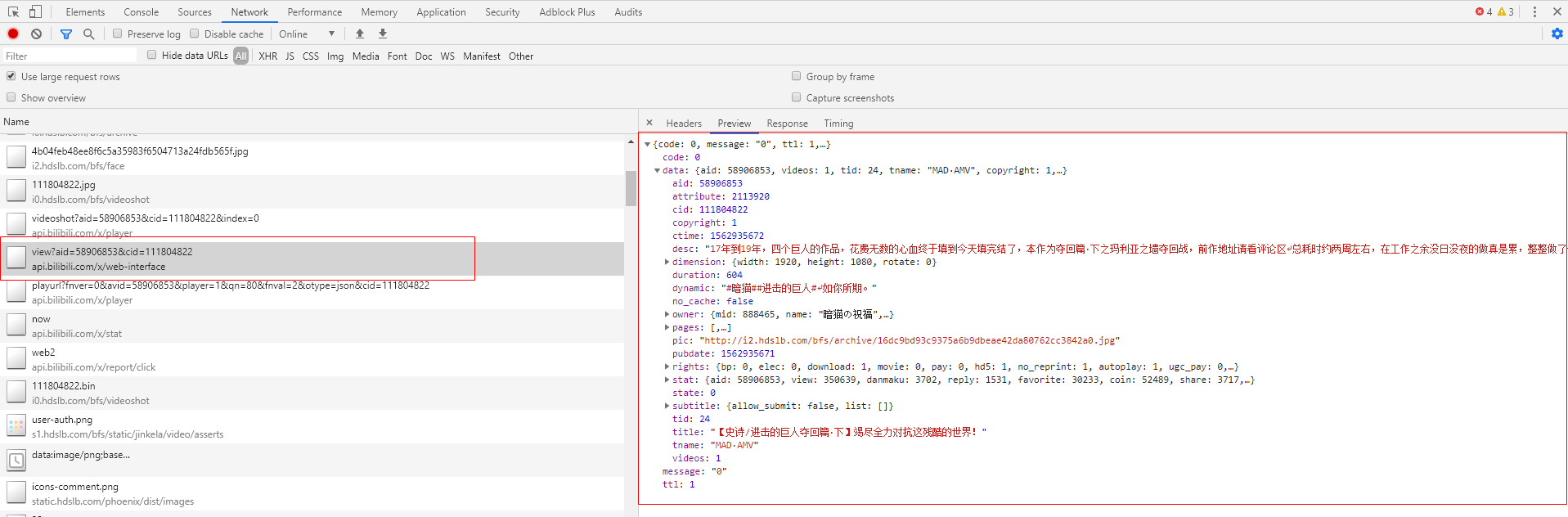
访问url
https://api.bilibili.com/x/web-interface/view?aid=58906853&cid=111804822
- 1
我们拿到了视频相关的信息,信息里面就有cid
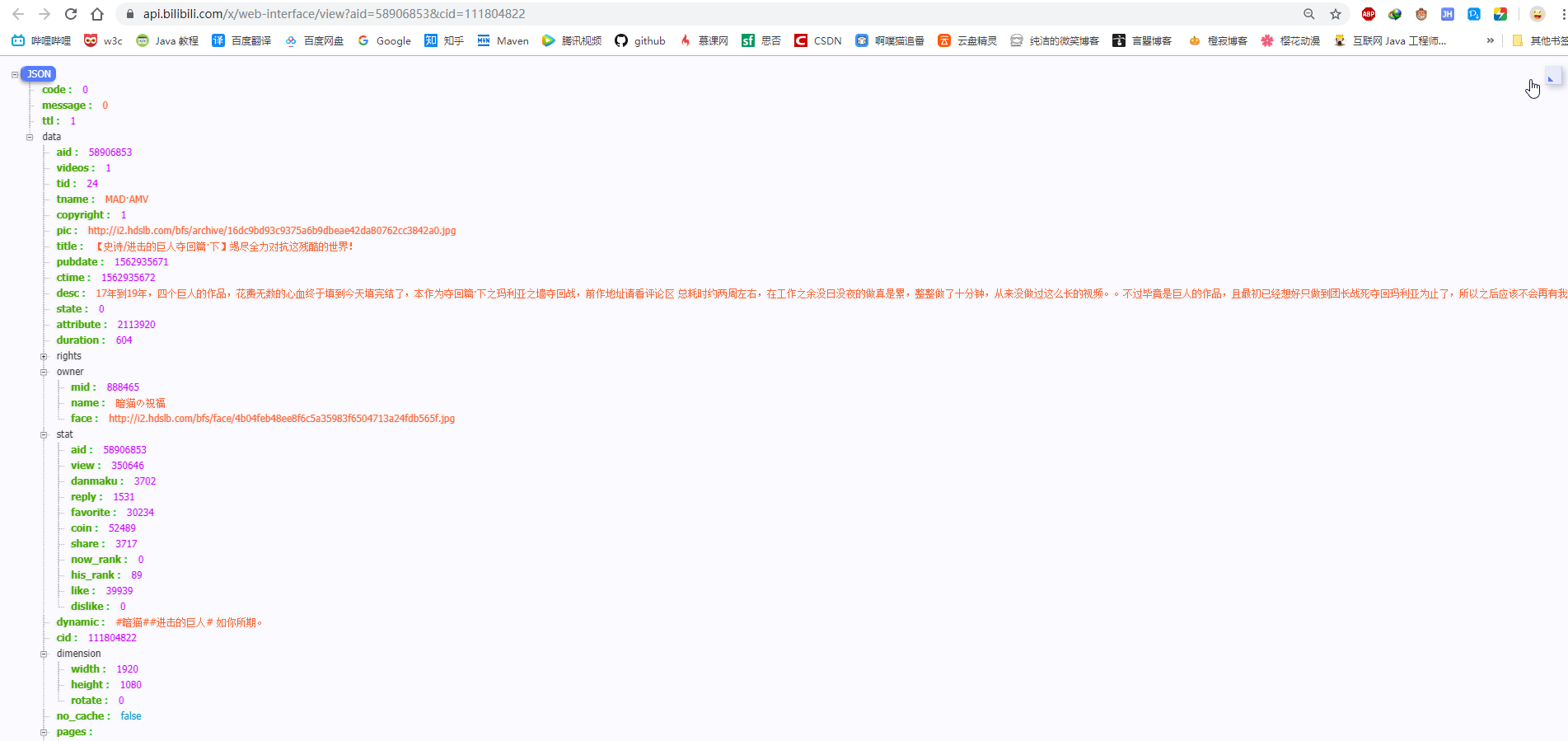
经过发现,该url中不携带cid参数,也可以进行访问
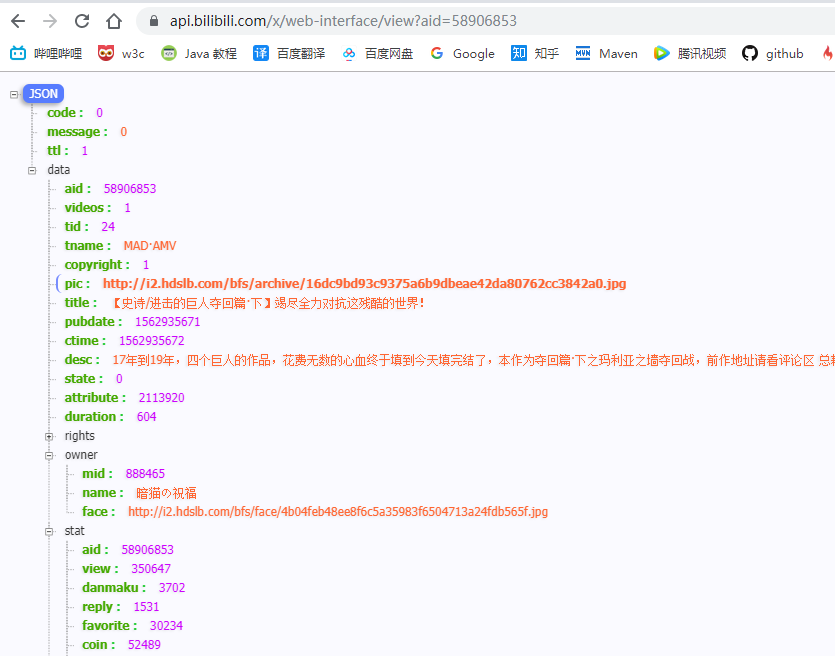
那我们就从这获取cid,然后传递给之前需要cid的url中
具体思路:
1. 通过传入avid访问后面的url(https://api.bilibili.com/x/web-interface/view?aid=58906853),从而在json中获取到cid
2. 把cid传递给需要的cid的url(https://api.bilibili.com/x/player/playurl?avid=69924947&cid=121159755&fnver=0&qn=16&player=1&fnval=2&otype=json)中拿到json中的视频地址
3. 建立请求以流的形式下载。
获取登录后的cookid
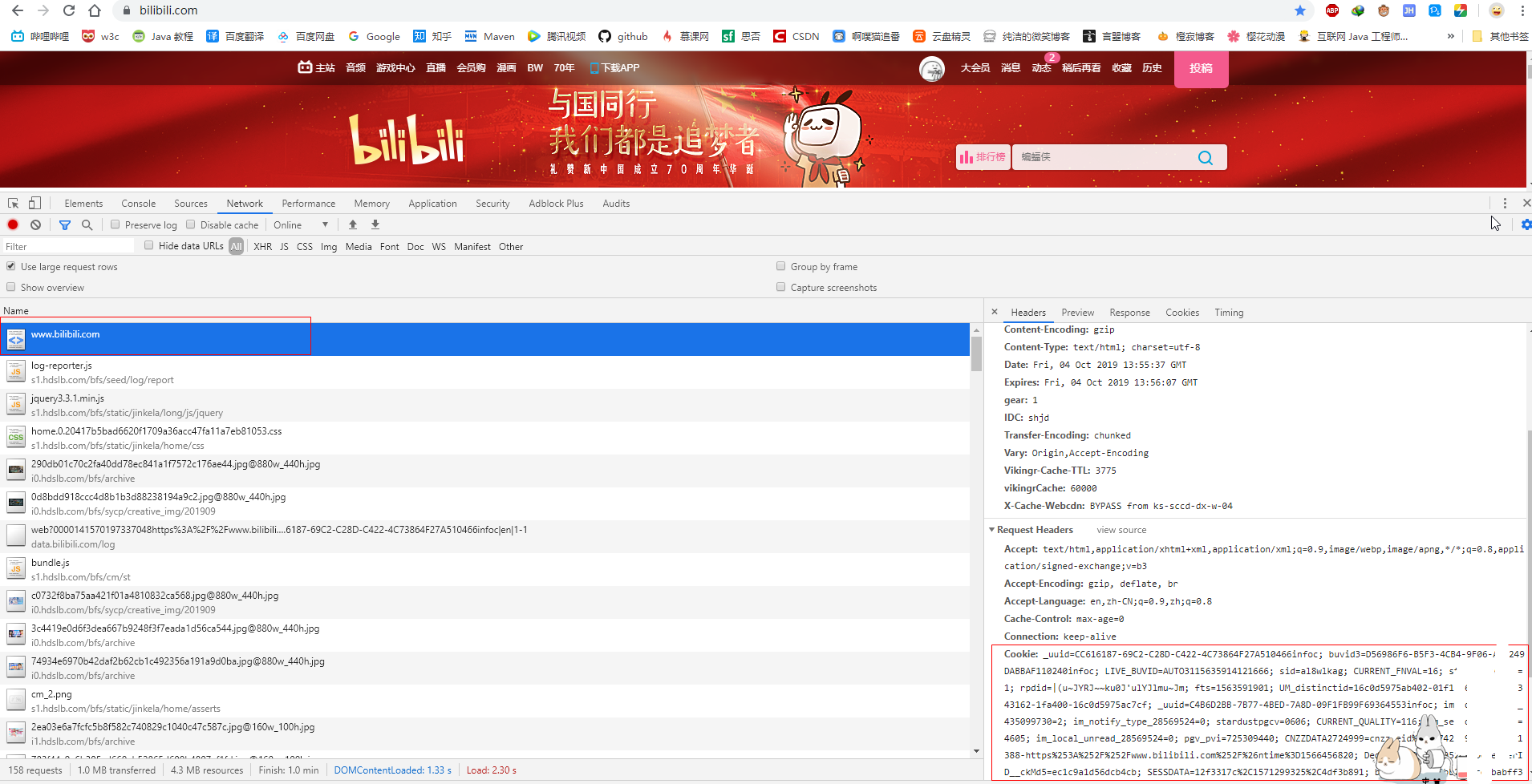
代码
IOTransUtil
public class IOTransUtil {

    public static void inputStreamToFile(InputStream inputStream, String imagePath) {
        int i = 1;
        try {
            BufferedInputStream bis = new BufferedInputStream(inputStream);
            BufferedOutputStream bos = new BufferedOutputStream(new FileOutputStream(imagePath));
            byte[] bytes = new byte[1024];
            int len = 0;
            while ((len = bis.read(bytes)) != -1) {
                bos.write(bytes, 0, len);
                System.out.println("写入第 " + i++ + "次" );
            }
            bis.close();
            bos.close();
        } catch (Exception e) {
            e.printStackTrace();
            System.err.println("inputStream转换异常");
        }

    }
}
- 1
- 2
- 3
- 4
- 5
- 6
- 7
- 8
- 9
- 10
- 11
- 12
- 13
- 14
- 15
- 16
- 17
- 18
- 19
- 20
- 21
- 22
PathUtil (我这是的G盘,没有的话请进行更改)
public class PathUtil {
    // 创建视频路径
    public static String createMoviePath(String title) {
        System.out.println("开始创建视频路径");
        //图片名称
        String movieName = title + ".mp4";
        //创建路径
        String path = "G://BiliBili//movie";
        File dir = new File(path);
        if (!dir.exists()) {
            dir.mkdirs();
        }
        String fileName = dir + File.separator + movieName;
        System.out.println("视频路径:" + fileName);
        return fileName;
    }
}
- 1
- 2
- 3
- 4
- 5
- 6
- 7
- 8
- 9
- 10
- 11
- 12
- 13
- 14
- 15
- 16
- 17
AppMovie (填写自己的cookie)
/**
 * 请在下createConnection()方填写自己 的cookie;
 */
public class AppMovie {
    //文件名称
    private static String title;
    public static void main(String[] args) {
        long start = System.currentTimeMillis();
        //输入av号
        Integer avid = 58906853;
        //建立连接,先获取到 cid
        String cidJson = createConnectionToJson(avid);
        Integer cid = JsonGetCid(cidJson);
        // 根据cid拼接成完整的请求参数,并执行下载操作
        downloadMovie(avid, cid);
        long end = System.currentTimeMillis();
        System.err.println("总共耗时:" + (end - start) / 1000 + "s");
    }

    // 3-2  建立URL连接请求
    private static InputStream createInputStream(String movieUrl,Integer avid) {
        InputStream inputStream = null;
        long start = System.currentTimeMillis();
        try {
            URL url = new URL(movieUrl);
            URLConnection urlConnection = url.openConnection();
            String refererUrl = "https://www.bilibili.com/video/av" + avid;
            urlConnection.setRequestProperty("Referer",refererUrl );
            urlConnection.setRequestProperty("Sec-Fetch-Mode", "no-cors");
            urlConnection.setRequestProperty("User-Agent", "Mozilla/5.0 (Windows NT 10.0; Win64; x64) AppleWebKit/537.36 (KHTML, like Gecko) Chrome/77.0.3865.90 Safari/537.36");
            urlConnection.setConnectTimeout(10 * 1000);

            inputStream = urlConnection.getInputStream();
        } catch (IOException e) {
            e.printStackTrace();
            System.err.println("获取inputStream失败");
        }
        return inputStream;
    }

    public static void downloadMovie(Integer avid, Integer cid) {
        //qn : 视频质量         112 -> 高清 1080P+,   80 -> 高清 1080P,   64 -> 高清 720P,  32  -> 清晰 480P,  16 -> 流畅 360P
        // 最高支持 1080p,  1080P+是不支持的
        Integer qn = 80;
        String paraUrl = "https://api.bilibili.com/x/player/playurl?cid=" + cid + "&fnver=0&qn=" + qn + "&otype=json&avid=" + avid + "&fnval=2&player=1";
        System.out.println("构建的url为:" + paraUrl);
        // 获取到的是json,然后筛选出里面的视频资源:url
        String jsonText = createConnection(paraUrl);

        JSONObject jsonObject = JSON.parseObject(jsonText);
        JSONArray jsonArray = jsonObject.getJSONObject("data").getJSONArray("durl");

        Map<String, String> dUrlMap = (Map) jsonArray.get(0);
        String movieUrl = dUrlMap.get("url");

        System.out.println("视频资源url为:" + movieUrl);
        // 根据获取的title 创建文件
        String moviePath = PathUtil.createMoviePath(title);
        //建立连接
        InputStream inputStream = createInputStream(movieUrl,avid);
        //开始流转换
        IOTransUtil.inputStreamToFile(inputStream, moviePath);
    }
    // 2. 获取到的json选择出cid,只能选择出一个cid,还有标题
    public static Integer JsonGetCid(String cidJson) {
        //转换成json
        JSONObject jsonObject = JSON.parseObject(cidJson);
        //cid
        JSONObject jsonData = jsonObject.getJSONObject("data");

        JSONArray jsonArray = jsonData.getJSONArray("pages");
        Map<String, Object> pageMap = (Map) jsonArray.get(0);
        Integer cid = (Integer) pageMap.get("cid");
        System.out.println("cid: " + cid);
        //title
        title = jsonData.getString("title");
        System.out.println("title:" + title);
        return cid;
    }

    // 1. 建立连接拿到 json 数据
    public static String createConnectionToJson(Integer avid) {
        String cidUrl = "https://api.bilibili.com/x/web-interface/view?aid=" + avid;
        //放完 movie地址
        String cidJson = createConnection(cidUrl);
        return cidJson;
    }

    //0. 建立连接,返回页面中的json
    public static String createConnection(String url) {
        String jsonText = null;
        Connection connection = Jsoup.connect(url).timeout(3000).ignoreContentType(true);
        Map<String, String> heads = new HashMap<>();
        heads.put("Accept", "text/html,application/xhtml+xml,application/xml;q=0.9,image/webp,image/apng,*/*;q=0.8,application/signed-exchange;v=b3");
        heads.put("Accept-Encoding", "gzip, deflate, br");
        heads.put("Accept-Language", "en,zh-CN;q=0.9,zh;q=0.8");
        heads.put("Cache-Control", "max-age=0");
        heads.put("Connection", "keep-alive");

        //TODO 请在这里填写自己的cookie,没有cookid将会请求不到
        heads.put("Cookie", "填写自己的cookie");

        heads.put("Host", "api.bilibili.com");
        heads.put("Sec-Fetch-Mode", "navigate");
        heads.put("Sec-Fetch-Site", "none");
        heads.put("Sec-Fetch-User", "?1");
        heads.put("Upgrade-Insecure-Requests", "1");
        heads.put("User-Agent", "Mozilla/5.0 (Windows NT 10.0; Win64; x64) AppleWebKit/537.36 (KHTML, like Gecko) Chrome/77.0.3865.90 Safari/537.36");
        connection.headers(heads);
        try {
            jsonText = connection.get().text();
        } catch (IOException e) {
            e.printStackTrace();
            System.err.println("建立获取cid连接失败");
        }
        return jsonText;
    }
}
- 1
- 2
- 3
- 4
- 5
- 6
- 7
- 8
- 9
- 10
- 11
- 12
- 13
- 14
- 15
- 16
- 17
- 18
- 19
- 20
- 21
- 22
- 23
- 24
- 25
- 26
- 27
- 28
- 29
- 30
- 31
- 32
- 33
- 34
- 35
- 36
- 37
- 38
- 39
- 40
- 41
- 42
- 43
- 44
- 45
- 46
- 47
- 48
- 49
- 50
- 51
- 52
- 53
- 54
- 55
- 56
- 57
- 58
- 59
- 60
- 61
- 62
- 63
- 64
- 65
- 66
- 67
- 68
- 69
- 70
- 71
- 72
- 73
- 74
- 75
- 76
- 77
- 78
- 79
- 80
- 81
- 82
- 83
- 84
- 85
- 86
- 87
- 88
- 89
- 90
- 91
- 92
- 93
- 94
- 95
- 96
- 97
- 98
- 99
- 100
- 101
- 102
- 103
- 104
- 105
- 106
- 107
- 108
- 109
- 110
- 111
- 112
- 113
- 114
- 115
- 116
- 117
- 118
运行:

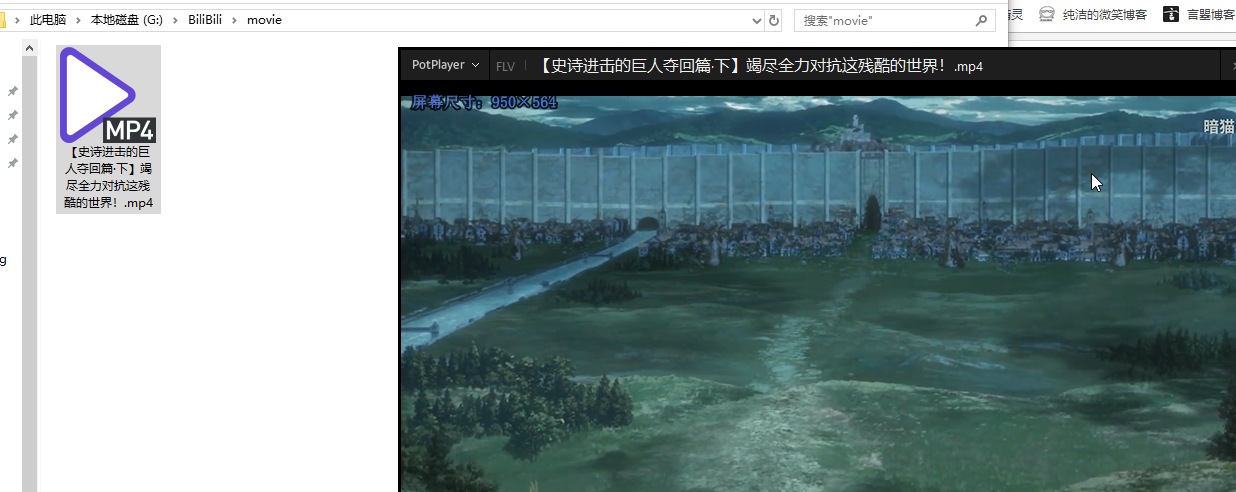
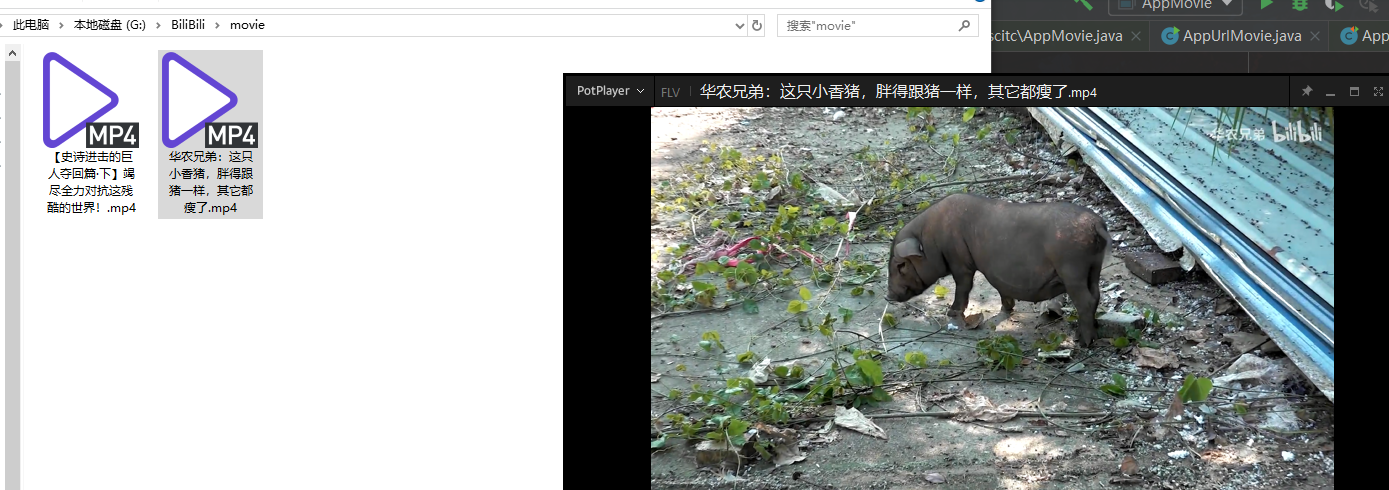
完成,在换一个视频试试

总结
主要是搞清楚业务流程在进行相应的操作。
可以跟着开始给出的文章过一遍。