
热门标签
热门文章
- 1.Net微服务负载均衡1_net高并发处理方案
- 2springboot依赖注入的三种方式
- 3解决QT中无边框窗口播放视频时调用showMinimized最小化恢复后冻结窗口_qt5最小化窗口恢复后要一点按钮才有反应
- 4printf格式控制(你所不知道的printf妙用)_printf语句格式控制后面可以是
- 5服务治理中间件-Eureka
- 6显示隐藏会根据长短变化的tooltip组件(自用留档)_el-tooltip根据内容显示隐藏
- 72024年跨年倒计时代码祝福!_2024年跨年代码
- 8机器学习 vs 深度学习:了解两者的异同_机器学习 深度学习
- 9flume的安装与配置_flume安装步骤
- 10优化VMware虚拟机里的MacOS系统_vm装macos不流畅
当前位置: article > 正文
数据库课程大作业:课程管理系统——java实现、图形化,我写了MySQL和SQL两个版本_数据库课设sql java
作者:思考机器5 | 2024-01-16 13:44:01
赞
踩
数据库课设sql java
项目源码、文档、数据库脚本下载地址:https://github.com/Chaim16/CurseManager.git
一、描述
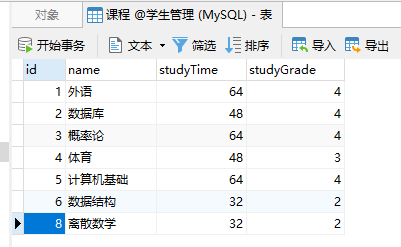
1. 数据库“学生管理”中“课程”表如下:
-
用java设计一个应用程序,实现对“课程”表的增、删、改、查。
-
说明文档中有java连接数据库的关键代码说明。
要求:可以运行,实现对学生课程数据库的操作。
二、实现过程及运行结果
-
确定实验操作工具,实验采用java语言,使用Intellij Idea作为编译器,MYSQL来存储数据库,c3p0作为连接池
-
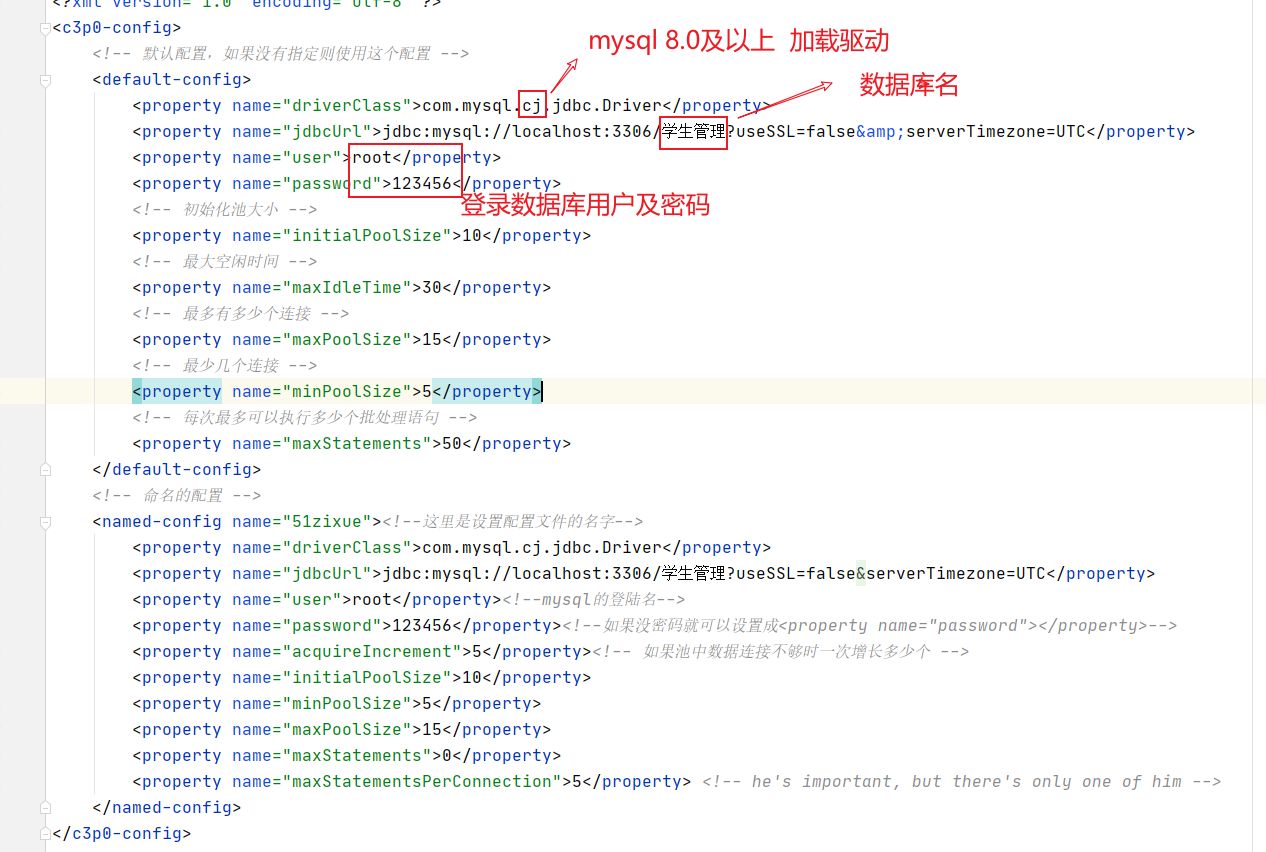
配置c3p0-config.xml文件,设置要访问的数据库名和登录用户以及密码
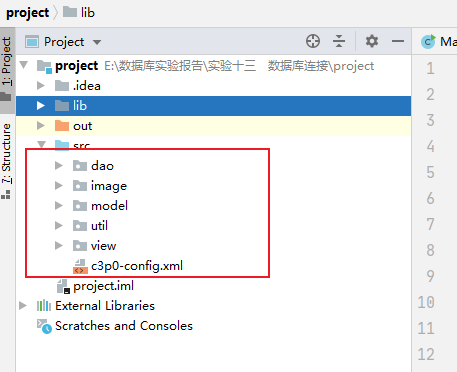
3. 构造大致框架
(1)dao层:访问数据库
(2)util层:连接数据库
(3)image文件夹:存放窗口背景图片
(4)model层:存放对象类
(5)view层:使用面板,展现结果
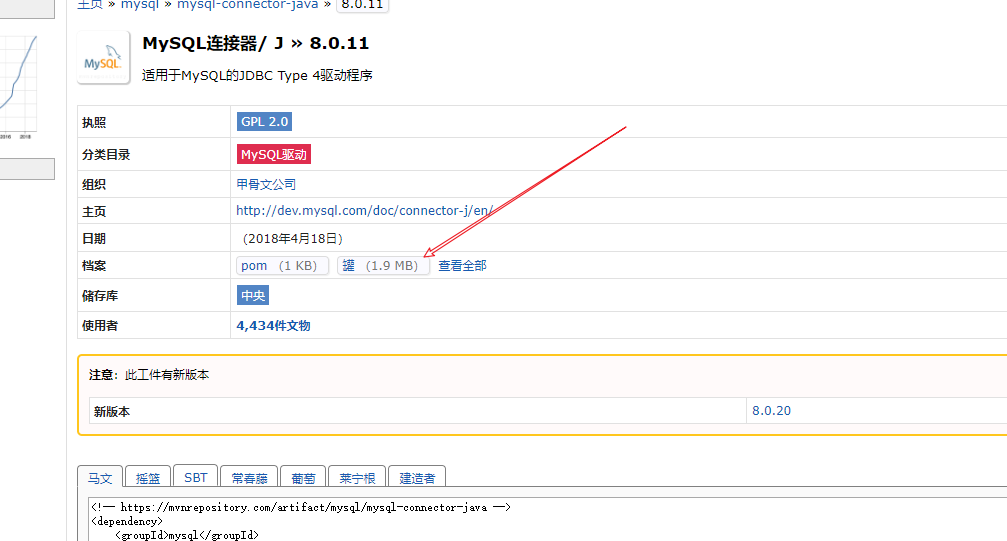
4. 下载jar包,并导入到项目的lib文件夹中
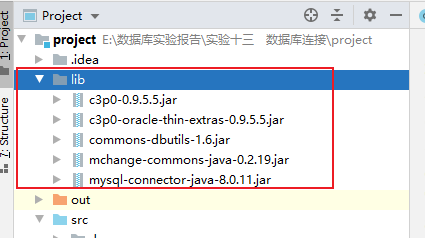
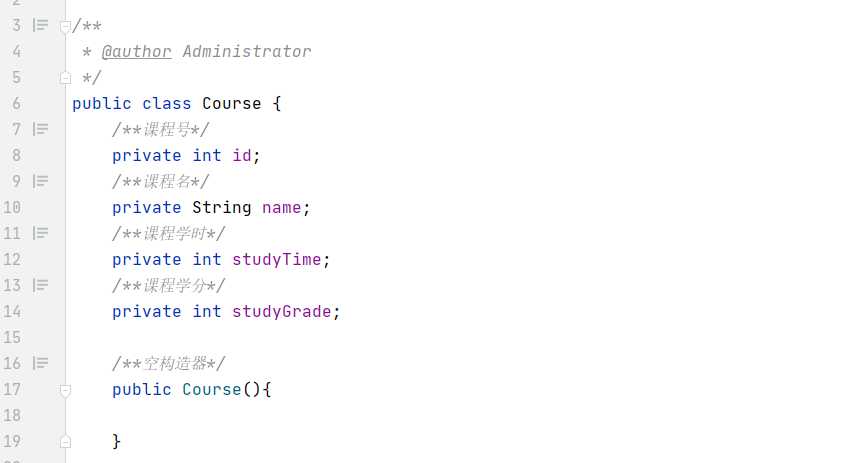
5. 在model中创建Course类,有“课程号”、“课程名”、“学分”、“学时”四个成员变量,并生成getter和setter方法
6. 编写JdbcUtils类以及关闭方式等,方便在Dao层获取数据源

- 编写dao层代码,实现从数据库抓取、更改记录等操作。根据课程名查询、根据课程号查询、根据课程名删除、根据课程号删除、修改课程信息、添加课程、查询所有课程
源代码及注解:
package dao;
import com.mchange.v2.c3p0.ComboPooledDataSource;
import model.Course;
import org.apache.commons.dbutils.handlers.BeanHandler;
import org.apache.commons.dbutils.handlers.BeanListHandler;
import util.JdbcUtils;
import org.apache.commons.dbutils.QueryRunner;
import java.sql.SQLException;
import java.util.List;
/** @author Administrator */
public class CourseDao {
  /** 获取连接池dataSource */
  ComboPooledDataSource comboPooledDataSource = JdbcUtils.dataSource;
  /** 创建queryRunner */
  QueryRunner queryRunner = new QueryRunner(comboPooledDataSource);
  /** 根据课程名搜索 */
  public Course search(String name) throws SQLException {
    Course course = null;
    String sql = "select * from 课程 where name = ?";
    // SQL查询  返回一个Bean对象
    course = queryRunner.query(sql, new BeanHandler<Course>(Course.class), name);
    return course;
  }
  /** 根据课程号搜索 */
  public Course search(int id) throws SQLException {
    Course course = null;
    String sql = "select * from 课程 where id = ?";
    // SQL查询  返回一个Bean对象
    course = queryRunner.query(sql, new BeanHandler<Course>(Course.class), id);
    return course;
  }
  /** 查询所有的课程记录 */
  public List<Course> searchAll() throws SQLException {
    List<Course> courses;
    String sql = "select * from 课程";
    // SQL查询  返回List容器
    courses = queryRunner.query(sql, new BeanListHandler<Course>(Course.class));
    return courses;
  }
  /** 增加一条课程记录 */
  public boolean addCourse(Course course) throws SQLException {
    String sql = "insert into 课程(id,name,studyTime, studyGrade) values(?,?,?,?)";
    // SQL查询  返回受影响的行数
    int row =
        queryRunner.update(
            sql, course.getId(), course.getName(), course.getStudyTime(), course.getStudyGrade());
    // 如果受影响的行数为正整数,那么添加记录成功
    if (row > 0) {
      return true;
    } else {
      return false;
    }
  }
  /** 根据id删除一条课程记录 */
  public boolean deleteCourse(int id) throws SQLException {
    String sql = "delete from 课程 where id = ?";
    // SQL查询  返回受影响的行数
    int row = queryRunner.update(sql, id);
    // 如果受影响的行数为正整数,那么删除记录成功
    if (row > 0) {
      return true;
    } else {
      return false;
    }
  }
  /** 根据课程名删除一条记录 */
  public boolean deleteCourse(String string) throws SQLException {
    String sql = "delete from 课程 where name = ?";
    // SQL查询  返回受影响的行数
    int row = queryRunner.update(sql, string);
    // 如果受影响的行数为正整数,那么删除记录成功
    if (row > 0) {
      return true;
    } else {
      return false;
    }
  }
  /** 更改一条记录 */
  public boolean updateCourse(int id, Course course) throws SQLException {
    String sql = "update 课程 set id = ? ,name = ? ,studyTime = ?, studyGrade = ? where id = ?";
    // SQL查询  返回受影响的行数
    int row =
        queryRunner.update(
            sql,
            course.getId(),
            course.getName(),
            course.getStudyTime(),
            course.getStudyGrade(),
            id);
    // 如果受影响的行数为正整数,那么更改记录成功
    if (row > 0) {
      return true;
    } else {
      return false;
    }
  }
}

- 1
- 2
- 3
- 4
- 5
- 6
- 7
- 8
- 9
- 10
- 11
- 12
- 13
- 14
- 15
- 16
- 17
- 18
- 19
- 20
- 21
- 22
- 23
- 24
- 25
- 26
- 27
- 28
- 29
- 30
- 31
- 32
- 33
- 34
- 35
- 36
- 37
- 38
- 39
- 40
- 41
- 42
- 43
- 44
- 45
- 46
- 47
- 48
- 49
- 50
- 51
- 52
- 53
- 54
- 55
- 56
- 57
- 58
- 59
- 60
- 61
- 62
- 63
- 64
- 65
- 66
- 67
- 68
- 69
- 70
- 71
- 72
- 73
- 74
- 75
- 76
- 77
- 78
- 79
- 80
- 81
- 82
- 83
- 84
- 85
- 86
- 87
- 88
- 89
- 90
- 91
- 92
- 93
- 94
- 95
- 96
- 97
8. 导入图片到image文件夹,方便后续代码获取主界面背景
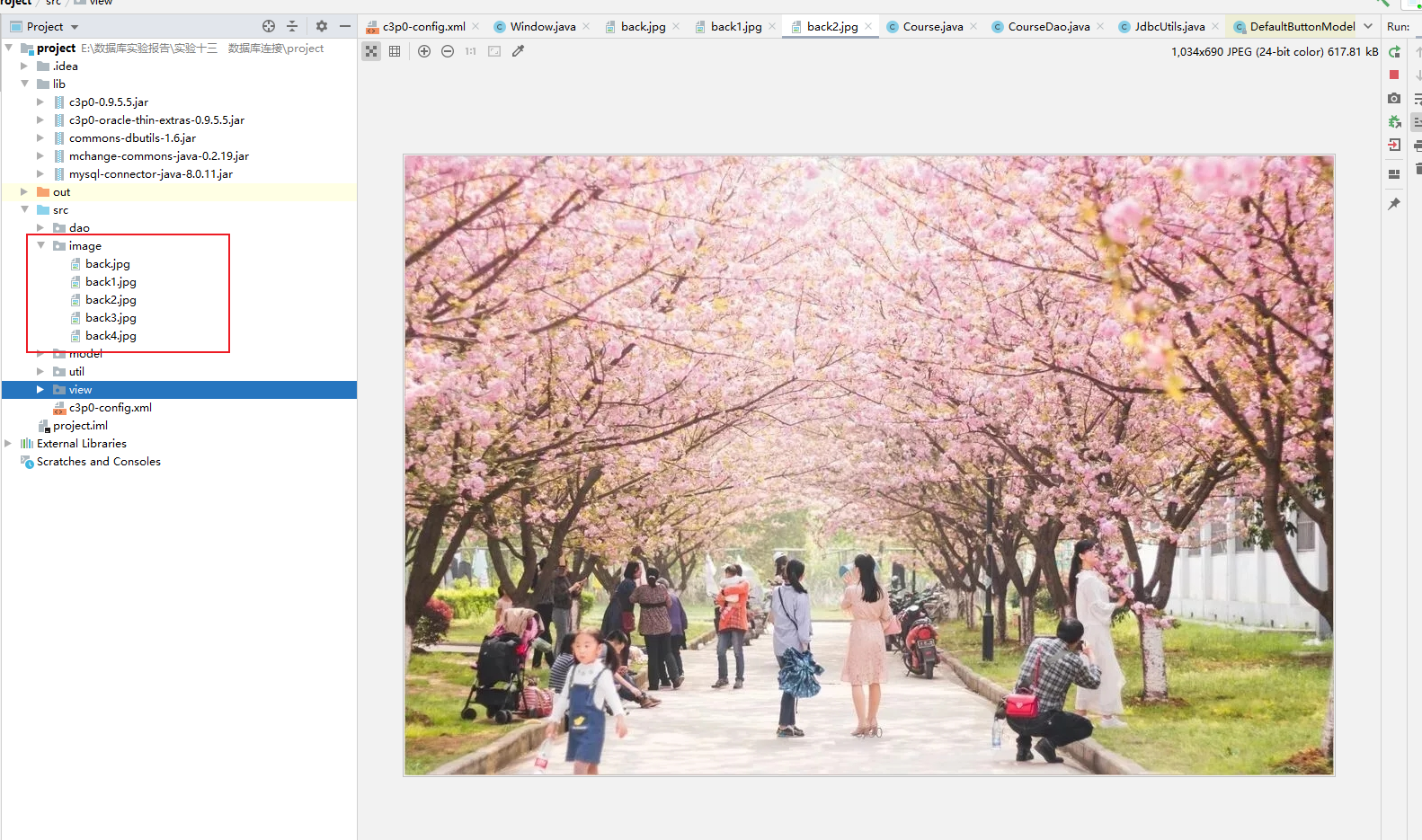
9. 设计主界面Window类,继承JFrame类
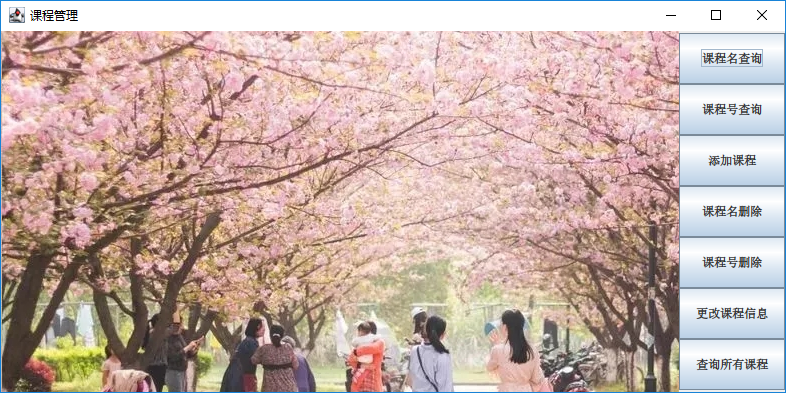
package view;
import dao.CourseDao;
import model.Course;
import javax.swing.*;
import java.awt.*;
import java.awt.event.ActionEvent;
import java.awt.event.ActionListener;
import java.sql.SQLException;
/**
 * @author Administrator
 *     <p>窗口:程序主界面
 */
public class Window extends JFrame {
  CourseDao courseDao = new CourseDao();
  public Window() throws HeadlessException {
    // 设置主界面标题
    this.setTitle("课程管理");
    // 设置窗口弹出居中
    this.setLocationRelativeTo(null);
    // 设置窗口大小
    this.setSize(800, 400);
    // 设置关闭方式为程序退出
    this.setDefaultCloseOperation(JFrame.EXIT_ON_CLOSE);
    // 窗口布局
    this.setLayout(new BorderLayout());
    // 新建面板,并设置网格布局
    JPanel jPanel = new JPanel();
    jPanel.setLayout(new GridLayout(0, 1));
    // 在窗口左侧添加图片
    JLabel label = new JLabel();
    ImageIcon imageIcon = new ImageIcon("src/image/back2.jpg");
    label.setIcon(imageIcon);
    // 新建操作按钮
    JButton searchAllButton = new JButton("查询所有课程");
    JButton searchIdButton = new JButton("课程号查询");
    JButton searchNameButton = new JButton("课程名查询");
    JButton addButton = new JButton("添加课程");
    JButton deleteIdButton = new JButton("课程号删除");
    JButton deleteNameButton = new JButton("课程名删除");
    JButton updateButton = new JButton("更改课程信息");
    // 设置按钮的大小
    searchAllButton.setSize(50, 30);
    searchIdButton.setSize(50, 30);
    searchNameButton.setSize(50, 30);
    addButton.setSize(500, 30);
    deleteIdButton.setSize(50, 30);
    deleteNameButton.setSize(50, 30);
    updateButton.setSize(50, 30);
    // 查询所有课程 按钮 添加动作监听
    searchAllButton.addActionListener(
        new ActionListener() {
          @Override
          public void actionPerformed(ActionEvent e) {
            try {
              // 弹出一个新的查询结果界面
              new SearchAll();
            } catch (SQLException throwables) {
              throwables.printStackTrace();
            }
          }
        });
    // 为根据Id搜索课程 按钮添加动作监听
    searchIdButton.addActionListener(
        new ActionListener() {
          @Override
          public void actionPerformed(ActionEvent e) {
            // 直到点击取消按钮或者叉,关闭窗口
            while (true) {
              // 弹出输入框,输入id,类型为String
              String id = JOptionPane.showInputDialog(null, "请输入课程号");
              // 如果没有输入,直接点击取消或者叉
              if (id == null) {
                // 弹出正在取消按钮
                JOptionPane.showMessageDialog(null, "正在取消……", "提示", JOptionPane.WARNING_MESSAGE);
                // 跳出循环,不再弹出窗口
                break;
              }
              // 如果没有输入而点击确认按钮
              else if (id.equals("")) {
                // 弹出提示框:请输入课程号
                JOptionPane.showMessageDialog(null, "未输入课程号!", "提示", JOptionPane.WARNING_MESSAGE);
                // 继续循环
                continue;
              }
              // 有信息输入
              else {
                // 如果输入的是数字串
                if (isDigital(id)) {
                  Course result = null;
                  try {
                    // 将字符串转换成整形数字,查询数据库
                    result = courseDao.search(Integer.parseInt(id));
                  } catch (SQLException throwables) {
                    throwables.printStackTrace();
                  }
                  // 成功查询
                  if (result != null) {
                    // 弹出提示框,展示查询据俄国
                    JOptionPane.showMessageDialog(
                        null, result.getInfo(), "查询结果", JOptionPane.WARNING_MESSAGE);
                  } else {
                    // 没有查询到相关课程
                    JOptionPane.showMessageDialog(
                        null, "未查询到该课程", "查询结果", JOptionPane.WARNING_MESSAGE);
                  }
                }
                // 如果字符串不是数字串
                else {
                  // 弹出提示:输入的不是整型课程号
                  JOptionPane.showMessageDialog(
                      null, "输入的不是整形课程号,请重新输入!", "提示", JOptionPane.WARNING_MESSAGE);
                  continue;
                }
              }
            }
          }
        });
    // 为根据课程名查询 按钮添加动作监听
    searchNameButton.addActionListener(
        new ActionListener() {
          @Override
          public void actionPerformed(ActionEvent e) {
            while (true) {
              // 弹出输入框,输入课程名
              String name = JOptionPane.showInputDialog(null, "请输入课程名");
              // 如果点击取消或者叉,弹出正在取消窗口,并退出
              if (name == null) {
                JOptionPane.showMessageDialog(null, "正在取消……", "提示", JOptionPane.WARNING_MESSAGE);
                break;
              }
              // 如果没有输入,点击了确定
              else if (name.equals("")) {
                // 弹出提示框,没有输入课程名
                JOptionPane.showMessageDialog(null, "未输入课程名!", "提示", JOptionPane.WARNING_MESSAGE);
                continue;
              }
              // 如果有输入信息
              else {
                Course result = null;
                try {
                  // 根据课程名查询
                  result = courseDao.search(name);
                } catch (SQLException throwables) {
                  throwables.printStackTrace();
                }
                // 查询成功
                if (result != null) {
                  // 弹出窗口,展示查询结果
                  JOptionPane.showMessageDialog(
                      null, result.getInfo(), "查询结果", JOptionPane.WARNING_MESSAGE);
                } else {
                  // 查询失败,弹出提示框
                  JOptionPane.showMessageDialog(
                      null, "未查询到该课程", "查询结果", JOptionPane.WARNING_MESSAGE);
                }
              }
            }
          }
        });
    // 为新增按钮添加动作监听
    addButton.addActionListener(
        new ActionListener() {
          @Override
          public void actionPerformed(ActionEvent e) {
            new AddCourse();
          }
        });
    // 为根据课程号删除  按钮  添加动作监听
    deleteIdButton.addActionListener(
        new ActionListener() {
          @Override
          public void actionPerformed(ActionEvent e) {
            while (true) {
              // 弹出窗口,输入课程号
              String id = JOptionPane.showInputDialog(null, "请输入要删除的课程号");
              // 如果点击取消按钮或者叉,弹出正在取消界面
              if (id == null) {
                JOptionPane.showMessageDialog(null, "正在取消……", "提示", JOptionPane.WARNING_MESSAGE);
                break;
              }
              // 如果没有输入而点击确定,弹出提示框
              else if (id.equals("")) {
                JOptionPane.showMessageDialog(null, "未输入课程号!", "提示", JOptionPane.WARNING_MESSAGE);
                continue;
              }
              // 如果有信息输入
              else {
                // 输入的字符串是数字串
                if (isDigital(id)) {
                  boolean result = false;
                  try {
                    // 根据课程号删除课程记录
                    result = courseDao.deleteCourse(Integer.parseInt(id));
                  } catch (SQLException throwables) {
                    throwables.printStackTrace();
                  }
                  // 删除成功
                  if (result) {
                    // 弹出提示框
                    JOptionPane.showMessageDialog(
                        null, "已查询到该课程,删除成功!", "查询结果", JOptionPane.WARNING_MESSAGE);
                  } else {
                    // 没有找到相应的课程  删除失败
                    JOptionPane.showMessageDialog(
                        null, "未查询到该课程,删除失败!", "查询结果", JOptionPane.WARNING_MESSAGE);
                  }
                } else {
                  // 如果输入的不是整形数字串 弹出提示窗口
                  JOptionPane.showMessageDialog(
                      null, "输入的不是整形课程号,请重新输入!", "提示", JOptionPane.WARNING_MESSAGE);
                  continue;
                }
              }
            }
          }
        });
    // 为根据课程名删除添加动作监听
    deleteNameButton.addActionListener(
        new ActionListener() {
          @Override
          public void actionPerformed(ActionEvent e) {
            while (true) {
              // 弹出窗口   输入课程名
              String name = JOptionPane.showInputDialog(null, "请输入要删除的课程名");
              // 如果点击取消或者叉
              if (name == null) {
                // 弹出正在取消窗口
                JOptionPane.showMessageDialog(null, "正在取消……", "提示", JOptionPane.WARNING_MESSAGE);
                break;
              }
              // 如果没有输入  而点击了确认
              else if (name.equals("")) {
                // 弹出  输入课程名提示框
                JOptionPane.showMessageDialog(null, "未输入课程名!", "提示", JOptionPane.WARNING_MESSAGE);
                continue;
              }
              // 有信息输入
              else {
                boolean result = false;
                try {
                  // 根据课程名删除课程记录
                  result = courseDao.deleteCourse(name);
                } catch (SQLException throwables) {
                  throwables.printStackTrace();
                }
                // 删除成功
                if (result) {
                  // 成功提示框
                  JOptionPane.showMessageDialog(
                      null, "已查询到该课程,删除成功!", "查询结果", JOptionPane.WARNING_MESSAGE);
                } else {
                  // 没有找到相应课程    删除课程失败
                  JOptionPane.showMessageDialog(
                      null, "未查询到该课程,删除失败!", "查询结果", JOptionPane.WARNING_MESSAGE);
                }
              }
            }
          }
        });
    // 为  更改课程信息  添加动作监听
    updateButton.addActionListener(
        new ActionListener() {
          @Override
          public void actionPerformed(ActionEvent e) {
            // 弹出一个新的窗口
            new UpdateCourse();
          }
        });
    // 将各个按钮添加到面板中
    jPanel.add(searchNameButton);
    jPanel.add(searchIdButton);
    jPanel.add(addButton);
    jPanel.add(deleteNameButton);
    jPanel.add(deleteIdButton);
    jPanel.add(updateButton);
    jPanel.add(searchAllButton);
    // 将图片标签添加到窗口
    this.add(label);
    // 将面板添加到窗口的右侧
    this.add(jPanel, BorderLayout.EAST);
    // 设置窗口可见
    this.setVisible(true);
  }
  /** 判断字符串是否为整形数字串 */
  public static boolean isDigital(String string) {
    for (int i = 0; i < string.length(); i++) {
      // 如果不是'0'-'9',则不是数字串,返回false
      if (!(string.charAt(i) >= 48 && string.charAt(i) <= 57)) {
        return false;
      }
    }
    return true;
  }
}
- 1
- 2
- 3
- 4
- 5
- 6
- 7
- 8
- 9
- 10
- 11
- 12
- 13
- 14
- 15
- 16
- 17
- 18
- 19
- 20
- 21
- 22
- 23
- 24
- 25
- 26
- 27
- 28
- 29
- 30
- 31
- 32
- 33
- 34
- 35
- 36
- 37
- 38
- 39
- 40
- 41
- 42
- 43
- 44
- 45
- 46
- 47
- 48
- 49
- 50
- 51
- 52
- 53
- 54
- 55
- 56
- 57
- 58
- 59
- 60
- 61
- 62
- 63
- 64
- 65
- 66
- 67
- 68
- 69
- 70
- 71
- 72
- 73
- 74
- 75
- 76
- 77
- 78
- 79
- 80
- 81
- 82
- 83
- 84
- 85
- 86
- 87
- 88
- 89
- 90
- 91
- 92
- 93
- 94
- 95
- 96
- 97
- 98
- 99
- 100
- 101
- 102
- 103
- 104
- 105
- 106
- 107
- 108
- 109
- 110
- 111
- 112
- 113
- 114
- 115
- 116
- 117
- 118
- 119
- 120
- 121
- 122
- 123
- 124
- 125
- 126
- 127
- 128
- 129
- 130
- 131
- 132
- 133
- 134
- 135
- 136
- 137
- 138
- 139
- 140
- 141
- 142
- 143
- 144
- 145
- 146
- 147
- 148
- 149
- 150
- 151
- 152
- 153
- 154
- 155
- 156
- 157
- 158
- 159
- 160
- 161
- 162
- 163
- 164
- 165
- 166
- 167
- 168
- 169
- 170
- 171
- 172
- 173
- 174
- 175
- 176
- 177
- 178
- 179
- 180
- 181
- 182
- 183
- 184
- 185
- 186
- 187
- 188
- 189
- 190
- 191
- 192
- 193
- 194
- 195
- 196
- 197
- 198
- 199
- 200
- 201
- 202
- 203
- 204
- 205
- 206
- 207
- 208
- 209
- 210
- 211
- 212
- 213
- 214
- 215
- 216
- 217
- 218
- 219
- 220
- 221
- 222
- 223
- 224
- 225
- 226
- 227
- 228
- 229
- 230
- 231
- 232
- 233
- 234
- 235
- 236
- 237
- 238
- 239
- 240
- 241
- 242
- 243
- 244
- 245
- 246
- 247
- 248
- 249
- 250
- 251
- 252
- 253
- 254
- 255
- 256
- 257
- 258
- 259
- 260
- 261
- 262
- 263
- 264
- 265
- 266
- 267
- 268
- 269
- 270
- 271
- 272
- 273
- 274
- 275
- 276
- 277
- 278
- 279
- 280
- 281
- 282
- 283
- 284
- 285
- 286
- 287
- 288
- 289
- 290
- 291
- 292
- 293
- 294
10. 实现课程名查询
// 为根据课程名查询 按钮添加动作监听
searchNameButton.addActionListener(
    new ActionListener() {
      @Override
      public void actionPerformed(ActionEvent e) {
        while (true) {
          // 弹出输入框,输入课程名
          String name = JOptionPane.showInputDialog(null, "请输入课程名");
          // 如果点击取消或者叉,弹出正在取消窗口,并退出
          if (name == null) {
            JOptionPane.showMessageDialog(null, "正在取消……", "提示", JOptionPane.WARNING_MESSAGE);
            break;
          }
          // 如果没有输入,点击了确定
          else if (name.equals("")) {
            // 弹出提示框,没有输入课程名
            JOptionPane.showMessageDialog(null, "未输入课程名!", "提示", JOptionPane.WARNING_MESSAGE);
            continue;
          }
          // 如果有输入信息
          else {
            Course result = null;
            try {
              // 根据课程名查询
              result = courseDao.search(name);
            } catch (SQLException throwables) {
              throwables.printStackTrace();
            }
            // 查询成功
            if (result != null) {
              // 弹出窗口,展示查询结果
              JOptionPane.showMessageDialog(
                  null, result.getInfo(), "查询结果", JOptionPane.WARNING_MESSAGE);
            } else {
              // 查询失败,弹出提示框
              JOptionPane.showMessageDialog(
                  null, "未查询到该课程", "查询结果", JOptionPane.WARNING_MESSAGE);
            }
          }
        }
      }
    });
- 1
- 2
- 3
- 4
- 5
- 6
- 7
- 8
- 9
- 10
- 11
- 12
- 13
- 14
- 15
- 16
- 17
- 18
- 19
- 20
- 21
- 22
- 23
- 24
- 25
- 26
- 27
- 28
- 29
- 30
- 31
- 32
- 33
- 34
- 35
- 36
- 37
- 38
- 39
- 40
- 41
- 42
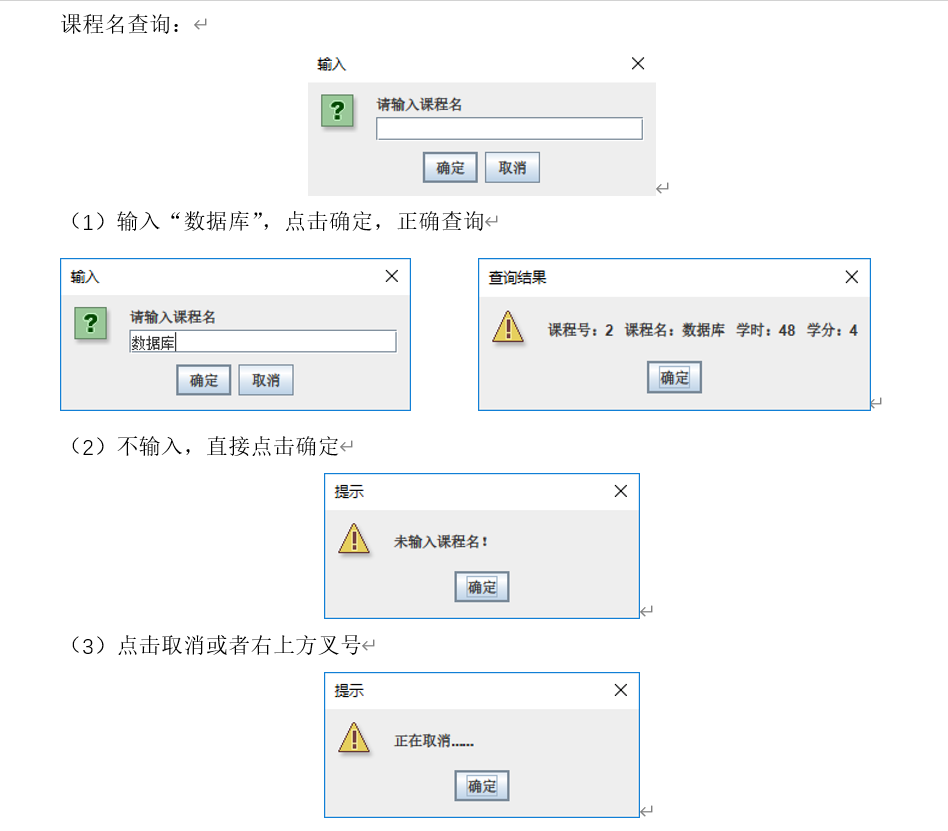
注:文中出现 string.equals("")代码是一种不规范的写法,在编写过程中没有注意到,但对程序运行没有影响,因为程序代码不可能使string为null
声明:本文内容由网友自发贡献,不代表【wpsshop博客】立场,版权归原作者所有,本站不承担相应法律责任。如您发现有侵权的内容,请联系我们。转载请注明出处:https://www.wpsshop.cn/article/detail/40008
推荐阅读
![[ 云计算 | AWS 实践 ] 使用 Java 更新现有 Amazon S3 对象](https://img-blog.csdnimg.cn/direct/f6b4b45ef01445aa9a147e7c5f1a8f15.png?x-oss-process=image/resize,m_fixed,h_300,image/format,png)



相关标签

