
热门标签
热门文章
- 1chatgpt3.5和chatgpt4.0的区别、对比感受
- 2幻兽帕鲁社区服务器搭建架设开服教程(LINUX)
- 3【PyTorch框架】GPU的使用_pytorch gpu
- 4DEAP:使用生理信号进行情绪分析的数据库(一、背景介绍与刺激选择)_音乐情绪效价和情绪唤醒
- 5TCP 和 UDP的区别
- 6gerrit提交代码有冲突或其他原因导致的cannot merge以及提交代码流程_gerrit cannot merge
- 7阿里云ECS-搭建环境(jdk8+tomcat8+nginx1.9.5)
- 8[YOLO] YOLO介绍,YOLOv1~YOLOv8版本变更,每个版本的特点介绍_yolo算法更新到第几代了
- 9【Linux】权限管理
- 10保姆级教程:R-Studio数据恢复软件的使用
当前位置: article > 正文
Unity中,图片 替换 光标 —— 疑问解答_unity textmeshpro - input field 如何替换光标图片
作者:编程领航者 | 2024-01-30 19:43:41
赞
踩
unity textmeshpro - input field 如何替换光标图片
Ⅰ设置替换光标的图片、光标相对图片中心的偏移
法一、 PlayerSetting里设置
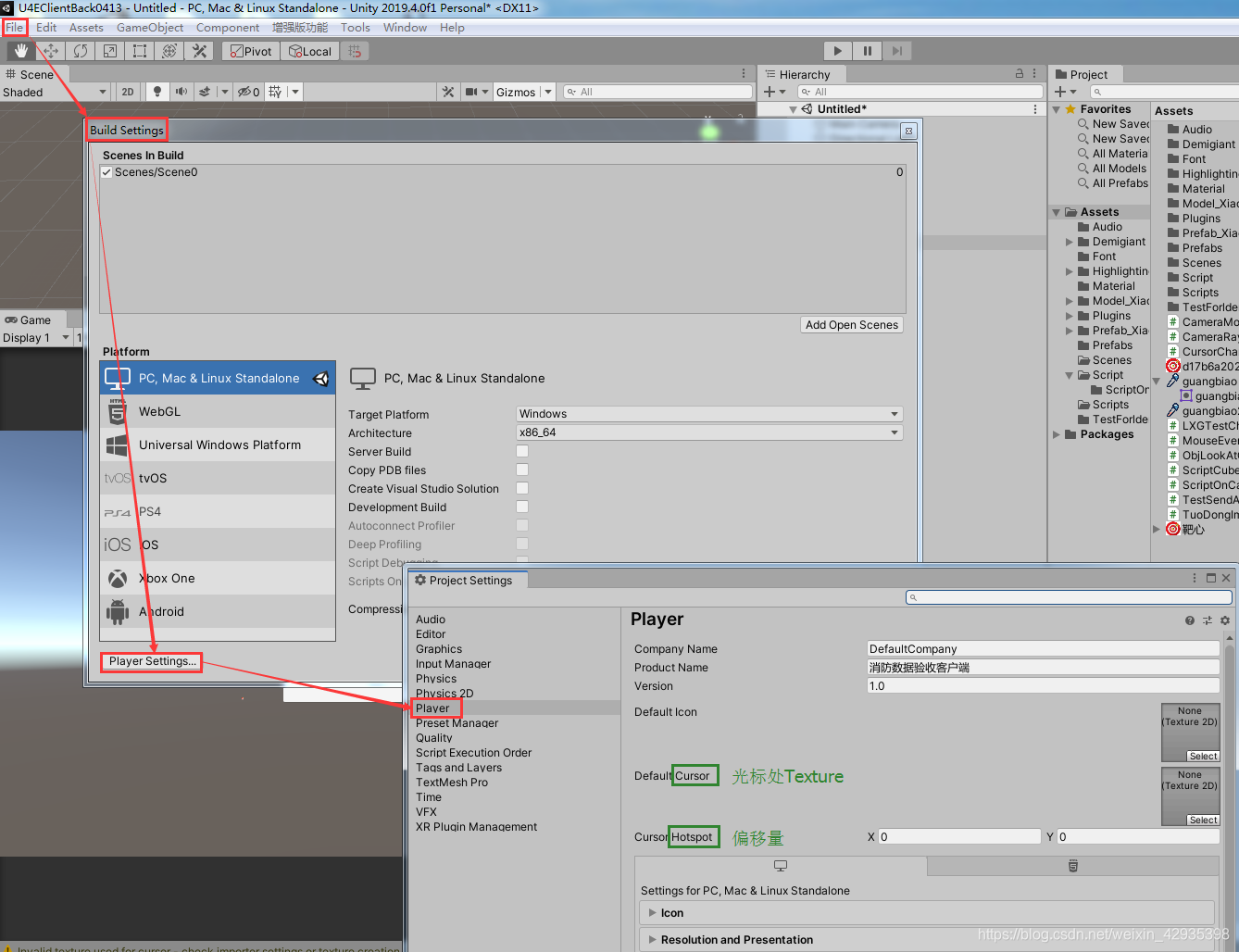
File——BuildSetting——PlayerSetting——Player——Default Cursor、Cursor Hotspot
法二、用代码设置
如果用只是想改变一下光标,用Start里语句就可以了;如果想鼠标按下时,光标切换成另一张图片,用Update里的语句即可。
public class CursorChange : MonoBehaviour
{
    public Texture2D cursorTexture_Normal;
    public Texture2D cursorTexture_MouseDown;
    //public float x;
    //public float y;
    void Start()
    {
        Cursor.SetCursor(cursorTexture_Normal, Vector2.zero, CursorMode.Auto);
    }
    void Update()
    {


        if(Input.GetMouseButton(0))
        {
            Cursor.SetCursor(cursorTexture_MouseDown, Vector2.zero, CursorMode.Auto);
        }
        else
        {
            Cursor.SetCursor(cursorTexture_Normal, Vector2.zero, CursorMode.Auto);
        }
    }

}

- 1
- 2
- 3
- 4
- 5
- 6
- 7
- 8
- 9
- 10
- 11
- 12
- 13
- 14
- 15
- 16
- 17
- 18
- 19
- 20
- 21
- 22
- 23
- 24
- 25
Ⅱ 核心:怎么设置Vector2偏移量
以上两法,直接赋图片,常常出现点击不精确的情况——可以看到它们都有偏移量的设置(代码中用二维向量Vector2设置)
光标的有效点,是光标尖端,而下面两张图,滴管起作用的点是左下角吸口,靶子起作用的点是靶心
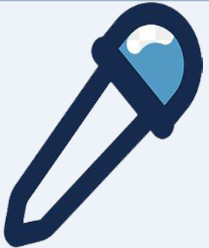

GUI坐标系:
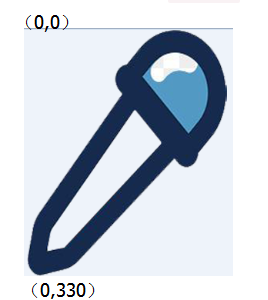
Texture图片是用GUI坐标系绘制的,左上角是图片(0,0)原点,向下Y值增加,向右X值增加。
函数解析:

该函数的意思是,把光标放到图片的什么位置
滴管得把光标放到图片的左下角,假设滴管图片尺寸是260x330,那么光标在图片中的坐标就是(0,330)——吸口处new Vector2(0,330)
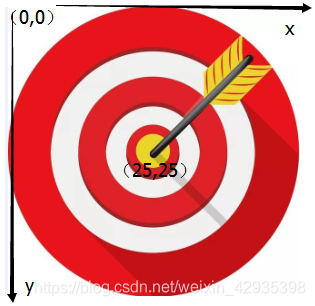
靶子得把光标放到图片的正中心,假设靶子图片的尺寸是50x50,那么光标在图片中的坐标就是(25,25)——靶心处new Vector2(25,25)
PlayerSetting里的偏移原理,和代码中是相同的
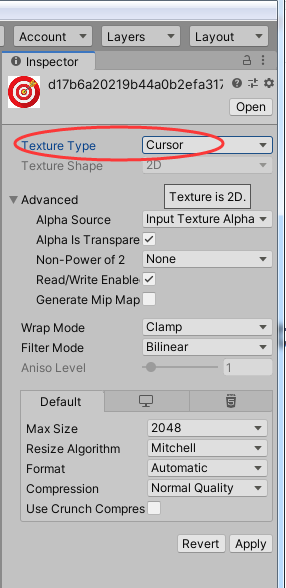
Ⅲ注意:替代光标的图片导入后,格式的修改
声明:本文内容由网友自发贡献,不代表【wpsshop博客】立场,版权归原作者所有,本站不承担相应法律责任。如您发现有侵权的内容,请联系我们。转载请注明出处:https://www.wpsshop.cn/article/detail/48764
推荐阅读
相关标签

