
热门标签
热门文章
- 1【愚公系列】2023年12月 HarmonyOS教学课程 049-Stage模型(AbilityStage组件容器)
- 2注意力机制详解系列(三):空间注意力机制_空间注意力机制解释
- 3【Linux】nohup命令使用记录
- 4【避坑】paddlepaddle-gpu安装报错:The GPU architecture in your current machine is Pascal, which is not
- 5git : 无法将“git”项识别为 cmdlet、函数、脚本文件或可运行程序的名称。请检查名称的拼写,如果包括路径,请确保路径正确,然后再试一次。所在位置 行:1 字符: 1+ git+ ~~
- 6【物联网】液滴即信息:雨滴探测传感器实验解析降雨的密码_ps2操作杆实验目的
- 7由于被认为是客户端对错误(例如:畸形的请求语法、无效的请求信息帧或者虚拟的请求路由),服务器无法或不会处理当前请求。_由于被认为是客户端对错误(例如:畸形的请求语法、无效的请求信息帧或者虚拟的请求
- 8Android 13 - Media框架(15)- OpenMax(三)_安卓13可以用的框架
- 9【毕业季|进击的技术er】作为一个职场人,我想对你们说_纵是世间万象,道却万变不离其
- 10Linux最狠命令sudo rm -rf /* 详细解释_删库代码rm-rf
当前位置: article > 正文
win10安装tensorflow-gpu-1.15_tensorflow1.15 cuda版本
作者:思考机器2 | 2024-02-01 12:12:48
赞
踩
tensorflow1.15 cuda版本
因课程要求,需要安装tensorflow1.15。我是使用conda来管理不同环境的。
总的步骤为:
- 查看tensorflow1.15对应python, cuda, cudnn版本
- 安装python, cuda, cudnn
- 安装tensorflow
查看对应版本
查看tensorflow1.15对应python版本:从源代码构建 | TensorFlow
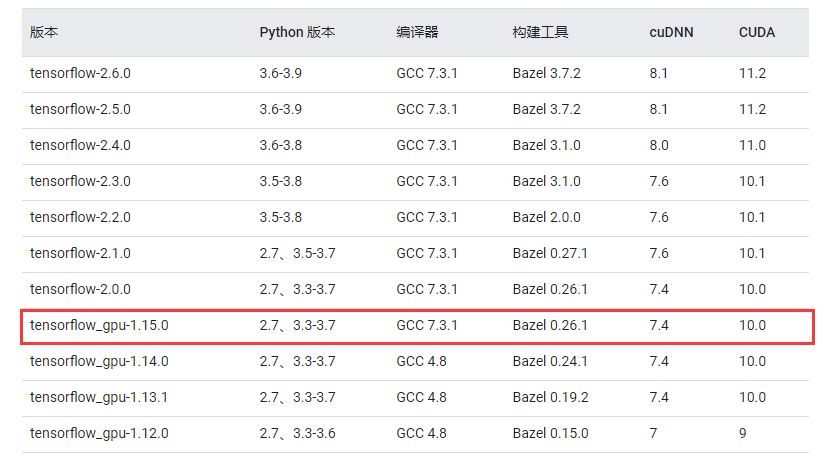
可以看出我需要python3.7, cuda10.0, cudnn7.4
安装python, cuda, cudnn
conda创建名为tf1的python3.7环境
conda create --prefix=D:\Anaconda3\envs\tf1 python=3.7
进入tf1环境
conda activate tf1
在conda源中搜索cudatoolkit
conda search cudatoolkit --info
找到对应cudatoolkit
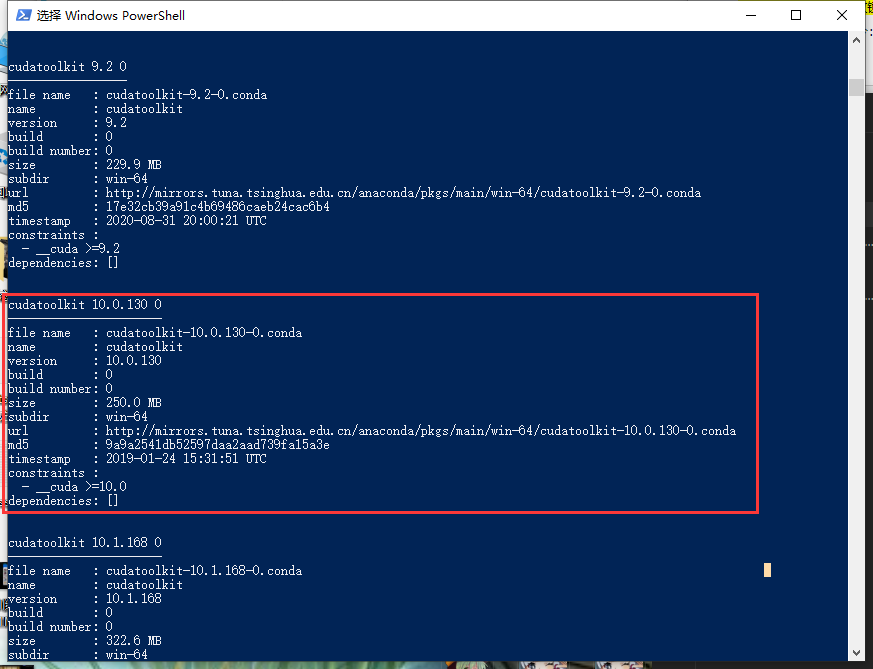
复制其url并下载文件
在conda源中搜索cudnn
conda search cudnn --info
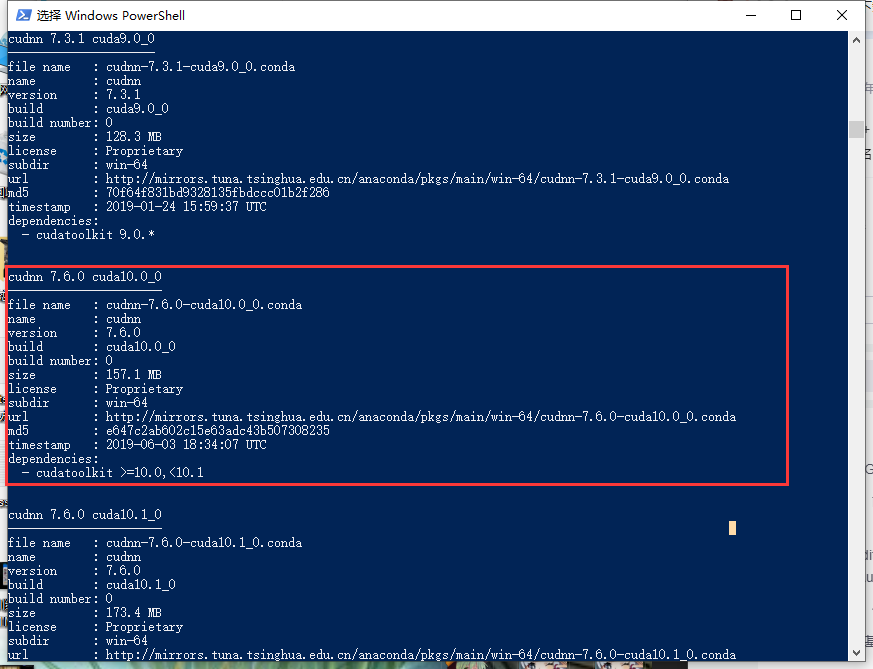
没有看到cudnn7.4,但是这个cudnn7.6也与cuda10.0相容的样子,于是下载这个(事实证明,确实可以)
复制其url并下载文件
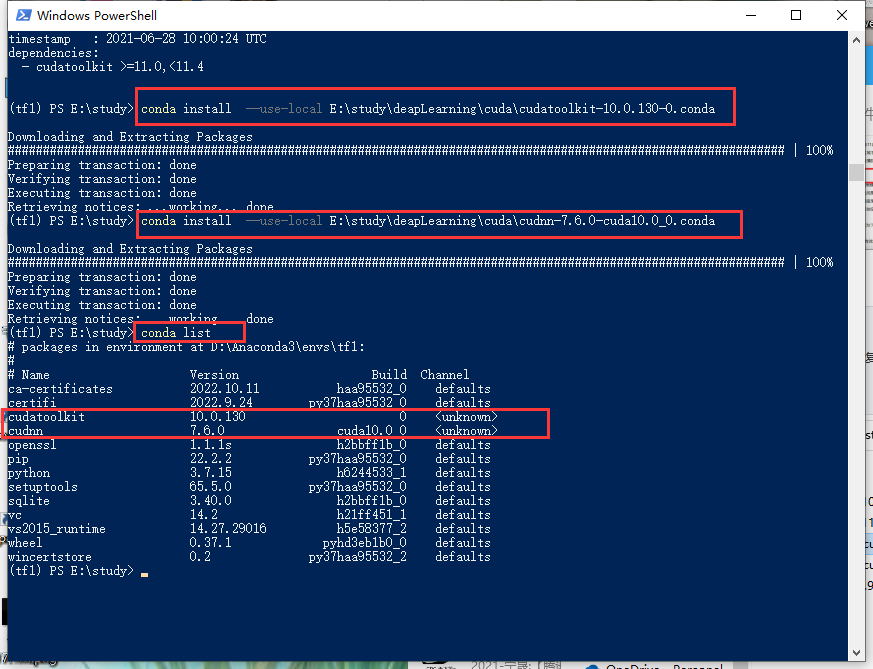
在tf1环境中安装上面两个文件
- conda install --use-local E:\study\deapLearning\cuda\cudatoolkit-10.0.130-0.conda
- conda install --use-local E:\study\deapLearning\cuda\cudnn-7.6.0-cuda10.0_0.conda
安装好后,执行conda list命令可以看到这两个的信息,说明安装成功
安装tensorflow1.15
可以查阅官网 GPU 支持 | TensorFlow
使用pip安装gpu版tensorflow1.15,注意,这里我忘了换pip源,导致tensorflow下载了好几个小时,读者在这里记得换源
pip install tensorflow-gpu==1.15
安装好后,打开python试一试:
import tensorflow as tf
出现错误:
- >>> import tensorflow as tf
- 2022-11-25 23:28:12.772433: I tensorflow/stream_executor/platform/default/dso_loader.cc:44] Successfully opened dynamic library cudart64_100.dll
- Traceback (most recent call last):
- File "<stdin>", line 1, in <module>
- File "D:\Anaconda3\envs\tf1\lib\site-packages\tensorflow\__init__.py", line 99, in <module>
- from tensorflow_core import *
- File "D:\Anaconda3\envs\tf1\lib\site-packages\tensorflow_core\__init__.py", line 28, in <module>
- from tensorflow.python import pywrap_tensorflow # pylint: disable=unused-import
- File "<frozen importlib._bootstrap>", line 1019, in _handle_fromlist
- File "D:\Anaconda3\envs\tf1\lib\site-packages\tensorflow\__init__.py", line 50, in __getattr__
- module = self._load()
- File "D:\Anaconda3\envs\tf1\lib\site-packages\tensorflow\__init__.py", line 44, in _load
- module = _importlib.import_module(self.__name__)
- File "D:\Anaconda3\envs\tf1\lib\importlib\__init__.py", line 127, in import_module
- return _bootstrap._gcd_import(name[level:], package, level)
- File "D:\Anaconda3\envs\tf1\lib\site-packages\tensorflow_core\python\__init__.py", line 52, in <module>
- from tensorflow.core.framework.graph_pb2 import *
- File "D:\Anaconda3\envs\tf1\lib\site-packages\tensorflow_core\core\framework\graph_pb2.py", line 16, in <module>
- from tensorflow.core.framework import node_def_pb2 as tensorflow_dot_core_dot_framework_dot_node__def__pb2
- File "D:\Anaconda3\envs\tf1\lib\site-packages\tensorflow_core\core\framework\node_def_pb2.py", line 16, in <module>
- from tensorflow.core.framework import attr_value_pb2 as tensorflow_dot_core_dot_framework_dot_attr__value__pb2
- File "D:\Anaconda3\envs\tf1\lib\site-packages\tensorflow_core\core\framework\attr_value_pb2.py", line 16, in <module>
- from tensorflow.core.framework import tensor_pb2 as tensorflow_dot_core_dot_framework_dot_tensor__pb2
- File "D:\Anaconda3\envs\tf1\lib\site-packages\tensorflow_core\core\framework\tensor_pb2.py", line 16, in <module>
- from tensorflow.core.framework import resource_handle_pb2 as tensorflow_dot_core_dot_framework_dot_resource__handle__pb2
- File "D:\Anaconda3\envs\tf1\lib\site-packages\tensorflow_core\core\framework\resource_handle_pb2.py", line 16, in <module>
- from tensorflow.core.framework import tensor_shape_pb2 as tensorflow_dot_core_dot_framework_dot_tensor__shape__pb2
- File "D:\Anaconda3\envs\tf1\lib\site-packages\tensorflow_core\core\framework\tensor_shape_pb2.py", line 42, in <module>
- serialized_options=None, file=DESCRIPTOR),
- File "D:\Anaconda3\envs\tf1\lib\site-packages\google\protobuf\descriptor.py", line 560, in __new__
- _message.Message._CheckCalledFromGeneratedFile()
- TypeError: Descriptors cannot not be created directly.
- If this call came from a _pb2.py file, your generated code is out of date and must be regenerated with protoc >= 3.19.0.
- If you cannot immediately regenerate your protos, some other possible workarounds are:
- 1. Downgrade the protobuf package to 3.20.x or lower.
- 2. Set PROTOCOL_BUFFERS_PYTHON_IMPLEMENTATION=python (but this will use pure-Python parsing and will be much slower).
-
- More information: https://developers.google.com/protocol-buffers/docs/news/2022-05-06#python-updates
- >>>

这是由于我们用pip安装tensorflow的时候,安装依赖包protobuf的版本过高造成的。新装的pytorch也会有这样的问题。[1]
卸掉原来的,再重新装一个指定版本的就行了。
- pip uninstall protobuf
- pip install protobuf==3.20.0
再次试一试:
- import tensorflow as tf
- tf.test.is_gpu_available()
可以了:
- >>> import tensorflow as tf
- 2022-11-25 23:32:36.477625: I tensorflow/stream_executor/platform/default/dso_loader.cc:44] Successfully opened dynamic library cudart64_100.dll
- >>> tf.test.is_gpu_available()
- 2022-11-25 23:33:02.299820: I tensorflow/core/platform/cpu_feature_guard.cc:142] Your CPU supports instructions that this TensorFlow binary was not compiled to use: AVX2
- 2022-11-25 23:33:02.304514: I tensorflow/stream_executor/platform/default/dso_loader.cc:44] Successfully opened dynamic library nvcuda.dll
- 2022-11-25 23:33:02.343180: I tensorflow/core/common_runtime/gpu/gpu_device.cc:1618] Found device 0 with properties:
- name: NVIDIA GeForce GTX 1650 major: 7 minor: 5 memoryClockRate(GHz): 1.755
- pciBusID: 0000:01:00.0
- 2022-11-25 23:33:02.343310: I tensorflow/stream_executor/platform/default/dso_loader.cc:44] Successfully opened dynamic library cudart64_100.dll
- 2022-11-25 23:33:02.436275: I tensorflow/stream_executor/platform/default/dso_loader.cc:44] Successfully opened dynamic library cublas64_100.dll
- 2022-11-25 23:33:02.553674: I tensorflow/stream_executor/platform/default/dso_loader.cc:44] Successfully opened dynamic library cufft64_100.dll
- 2022-11-25 23:33:02.626239: I tensorflow/stream_executor/platform/default/dso_loader.cc:44] Successfully opened dynamic library curand64_100.dll
- 2022-11-25 23:33:02.715330: I tensorflow/stream_executor/platform/default/dso_loader.cc:44] Successfully opened dynamic library cusolver64_100.dll
- 2022-11-25 23:33:02.785996: I tensorflow/stream_executor/platform/default/dso_loader.cc:44] Successfully opened dynamic library cusparse64_100.dll
- 2022-11-25 23:33:03.022703: I tensorflow/stream_executor/platform/default/dso_loader.cc:44] Successfully opened dynamic library cudnn64_7.dll
- 2022-11-25 23:33:03.022866: I tensorflow/core/common_runtime/gpu/gpu_device.cc:1746] Adding visible gpu devices: 0
- 2022-11-25 23:33:03.502224: I tensorflow/core/common_runtime/gpu/gpu_device.cc:1159] Device interconnect StreamExecutor with strength 1 edge matrix:
- 2022-11-25 23:33:03.502344: I tensorflow/core/common_runtime/gpu/gpu_device.cc:1165] 0
- 2022-11-25 23:33:03.502842: I tensorflow/core/common_runtime/gpu/gpu_device.cc:1178] 0: N
- 2022-11-25 23:33:03.503103: I tensorflow/core/common_runtime/gpu/gpu_device.cc:1304] Created TensorFlow device (/device:GPU:0 with 2903 MB memory) -> physical GPU (device: 0, name: NVIDIA GeForce GTX 1650, pci bus id: 0000:01:00.0, compute capability: 7.5)
- True
- >>>
-
新装的TensorFlow出现protobuf相关错误_星辰辰大海的博客-CSDN博客 "新装的TensorFlow出现protobuf相关错误" ↩︎
声明:本文内容由网友自发贡献,不代表【wpsshop博客】立场,版权归原作者所有,本站不承担相应法律责任。如您发现有侵权的内容,请联系我们。转载请注明出处:https://www.wpsshop.cn/article/detail/53738?site
推荐阅读

相关标签

