
- 1python做应用程序错误_pythonw.exe应用程序错误
- 2APT攻击、加密方式_防apt系统通过什么方式实现自身数据的加密
- 3wsl不动了,wsl2不动了。不响应_wsl 切换到 wsl2之后无法使用
- 4Gitee使用详解_gitee怎么用
- 5超详细 Ubuntu安装PyTorch步骤_ubuntu pytorch
- 6红包动画_nxgn100%viebos
- 7Web开发day1:使用flask快速搭建网站_flask搭建网站
- 8Python十大排序算法(亲自实现代码超详细描述)_python列表排序算法
- 9【交通运输与新基建(三)】交通基础设施数字化智能化发展_应用车联网与技术可实现车车通信、车路通信,增强驾驶员感知能力及系统泛在控制能
- 10Linux parallel 命令使用手册
pytorch-v2.0.1 cuda arm64 aarch64 torch 2.0.1+cu118 源码编译笔记【2】验证cuda安装 成功_编译pytorch arm库
赞
踩
接上篇
pytorch-v2.0.1 cuda arm64 aarch64 torch 2.0.1+cu118 源码编译笔记_hkNaruto的博客-CSDN博客
由于采用/usr/local/bin/gcc编译,先设置LD_LIBRARY_PATH,再启动python3
- export LD_LIBRARY_PATH=/usr/local/lib64:/usr/local/lib:/usr/lib64:/usr/lib
- /usr/local/Python-3.10.12/bin/python3
import torch报错
# /usr/local/Python-3.10.12/bin/python3
Python 3.10.12 (main, Sep 4 2023, 10:01:29) [GCC 9.2.0] on linux
Type "help", "copyright", "credits" or "license" for more information.
>>> import torch
No sympy found
Traceback (most recent call last):
File "<stdin>", line 1, in <module>
File "/usr/local/Python-3.10.12/lib/python3.10/site-packages/torch/__init__.py", line 1465, in <module>
from . import _meta_registrations
File "/usr/local/Python-3.10.12/lib/python3.10/site-packages/torch/_meta_registrations.py", line 7, in <module>
from torch._decomp import _add_op_to_registry, global_decomposition_table, meta_table
File "/usr/local/Python-3.10.12/lib/python3.10/site-packages/torch/_decomp/__init__.py", line 169, in <module>
import torch._decomp.decompositions
File "/usr/local/Python-3.10.12/lib/python3.10/site-packages/torch/_decomp/decompositions.py", line 10, in <module>
import torch._prims as prims
File "/usr/local/Python-3.10.12/lib/python3.10/site-packages/torch/_prims/__init__.py", line 33, in <module>
from torch._subclasses.fake_tensor import FakeTensor, FakeTensorMode
File "/usr/local/Python-3.10.12/lib/python3.10/site-packages/torch/_subclasses/__init__.py", line 3, in <module>
from torch._subclasses.fake_tensor import (
File "/usr/local/Python-3.10.12/lib/python3.10/site-packages/torch/_subclasses/fake_tensor.py", line 13, in <module>
from torch._guards import Source
File "/usr/local/Python-3.10.12/lib/python3.10/site-packages/torch/_guards.py", line 78, in <module>
class ShapeGuard(NamedTuple):
File "/usr/local/Python-3.10.12/lib/python3.10/site-packages/torch/_guards.py", line 79, in ShapeGuard
expr: sympy.Expr
NameError: name 'sympy' is not defined
安装sympy
在线
/usr/local/Python-3.10.12/bin/python3 -m pip install sympy离线
- [root@ceph3 pytorch-libs]# /usr/local/Python-3.10.12/bin/python3 -m pip install *.whl
- Processing ./filelock-3.12.3-py3-none-any.whl
- Processing ./Jinja2-3.1.2-py3-none-any.whl
- Processing ./MarkupSafe-2.1.3-cp310-cp310-manylinux_2_17_aarch64.manylinux2014_aarch64.whl
- Processing ./mpmath-1.3.0-py3-none-any.whl
- Processing ./networkx-3.1-py3-none-any.whl
- Processing ./sympy-1.12-py3-none-any.whl
- Requirement already satisfied: typing-extensions>=4.7.1 in /usr/local/Python-3.10.12/lib/python3.10/site-packages (from filelock==3.12.3) (4.7.1)
- mpmath is already installed with the same version as the provided wheel. Use --force-reinstall to force an installation of the wheel.
- sympy is already installed with the same version as the provided wheel. Use --force-reinstall to force an installation of the wheel.
- Installing collected packages: networkx, MarkupSafe, filelock, Jinja2
- Successfully installed Jinja2-3.1.2 MarkupSafe-2.1.3 filelock-3.12.3 networkx-3.1
- WARNING: Running pip as the 'root' user can result in broken permissions and conflicting behaviour with the system package manager. It is recommended to use a virtual environment instead: https://pip.pypa.io/warnings/venv
-
- [notice] A new release of pip is available: 23.0.1 -> 23.2.1
- [notice] To update, run: /usr/local/Python-3.10.12/bin/python3 -m pip install --upgrade pip

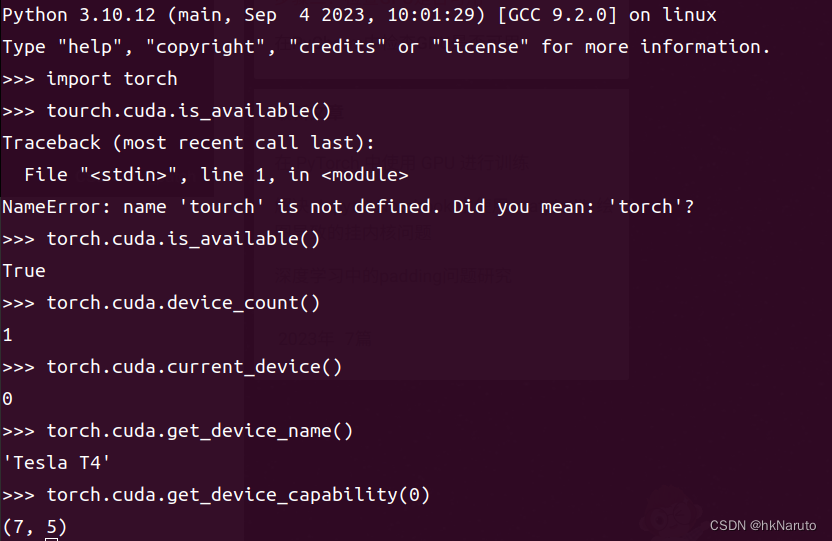
import torch成功,测试cuda是否可用
参考:

