
热门标签
热门文章
- 1Python tkinter (6) —— Listbox控件
- 2CVAE(条件自编码) Condition GAN (条件GAN) 和 VAE-GAN模型之间的区别之CVAE_vae与cvae区别
- 3Antdesign-Vue中抽屉的使用_getcontainer 指定dom
- 4数值分析期末总结三_求积公式的代数精度
- 5QT进度条控件封装(QML)
- 6【Git】解决fatal: unable to access..Failure when receiving data from the peer或者OpenSSL SSL_read: Connect
- 7Git 的基本概念和使用方式
- 8项目管理:如何利用工具做好工作汇报?
- 9AIGC专栏1——Pytorch搭建DDPM实现图片生成_diffusion pytorch
- 10【Vue.js】Vue3全局配置Axios并解决跨域请求问题_前端vue3请求跨域如何解决
当前位置: article > 正文
C# Cad2016二次开发选择文本信息导出(六)
作者:程序质量控制师 | 2024-01-16 14:36:37
赞
踩
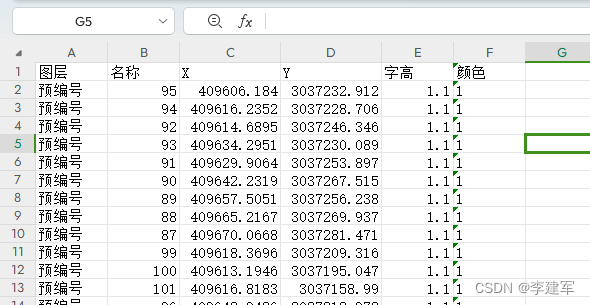
C# Cad2016二次开发选择文本信息导出(六)
- //选文本信息导出
- [CommandMethod("getdata")]
- public void getdata()
- {
- // 获取当前文档和数据库
- Document doc = Autodesk.AutoCAD.ApplicationServices.Application.DocumentManager.MdiActiveDocument;
- Database db = doc.Database;
- Editor ed = doc.Editor;
- // 获取当前图形数据库的路径
- string path = db.Filename;
-
- // 提示用户选择文本
- PromptSelectionResult selectionResult = doc.Editor.GetSelection(new SelectionFilter(new TypedValue[] { new TypedValue((int)DxfCode.Start, "TEXT") }));
- if (selectionResult.Status == PromptStatus.OK)
- {
- using (Transaction trans = db.TransactionManager.StartTransaction())
- {
- SelectionSet selection = selectionResult.Value;
- StreamWriter mydata = new StreamWriter(path + "文字信息.csv", append: true, Encoding.Default);
- string value = "图层,名称,X,Y,字高,颜色\t,";
- mydata.WriteLine(value);
-
- // 遍历选择集中的文本对象
- foreach (ObjectId id in selection.GetObjectIds())
- {
- DBText text = trans.GetObject(id, OpenMode.ForRead) as DBText;
-
- if (text != null)
- {
- // 获取图层名称
- string layerName = text.Layer;
- //文本信息
- string textContent = text.TextString;
- // 获取文本坐标
- double xPos = text.Position.X;
- double yPos = text.Position.Y;
- // 获取文本颜色
- int colorIndex = text.Color.ColorIndex;
- // 获取文本字高
- double textHeight = text.Height;
- //拼接CSV字符串
- value = layerName + "," + textContent + "," + xPos + "," + yPos + "," + textHeight + "," + colorIndex + "\t,";
- // 打印输入输出
- ed.WriteMessage("\n" + value);
-
- mydata.WriteLine(value);
- }
- }
- mydata.Close();
- // 打印输入输出
- ed.WriteMessage("\n导出完成");
- trans.Commit();
- }
- }
- }


声明:本文内容由网友自发贡献,不代表【wpsshop博客】立场,版权归原作者所有,本站不承担相应法律责任。如您发现有侵权的内容,请联系我们。转载请注明出处:https://www.wpsshop.cn/article/detail/40334
推荐阅读
相关标签

