
热门标签
热门文章
- 1华为云云耀云服务器L实例评测|Python Selenium加Chrome Driver构建UI自动化测试实践_华为浏览器driver
- 2使用Flutter的image_picker插件实现设备的相册的访问和拍照
- 3[点云学习] 一、点云相关知识了解
- 4HarmonyOS云开发基础认证【最新题库 满分答案】
- 5aigc修复美颜学习笔记
- 6Java 算法篇-深入了解单链表的反转(实现:用 5 种方式来具体实现)
- 7华为 ensp SSL VPN 史诗级配置
- 8如何解决大模型的「幻觉」问题
- 9【动态规划】【广度优先搜索】LeetCode:2617 网格图中最少访问的格子数
- 10视觉机械臂自主抓取全流程_机械臂视觉抓取
当前位置: article > 正文
QT进度条控件封装(QML)
作者:思考机器4 | 2024-01-29 09:13:47
赞
踩
qt进度条控件
演示效果,可指定大小,前景色,背景色
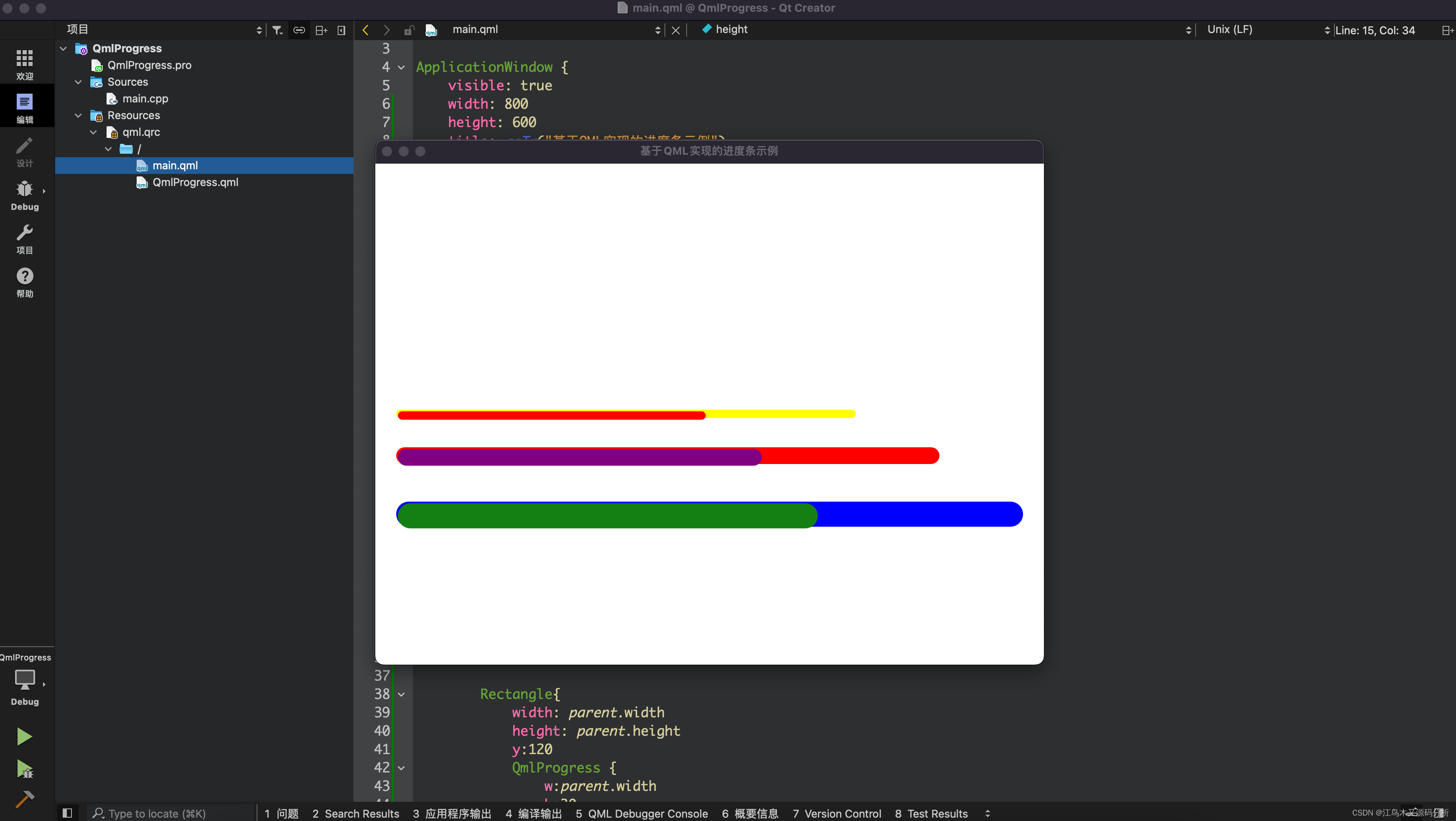
1.背景色
- //进度背景色
- background: Rectangle {
- implicitWidth: w
- implicitHeight: h
- color: cProgress.proBackgroundColor
- radius: cProgress.proRadius
- }
2.前景色
- //当前进度色
- contentItem: Item {
- implicitWidth: w
- implicitHeight: h
- Rectangle {
- width: cProgress.visualPosition * w
- height: h
- radius: cProgress.proRadius
- color: cProgress.proColor
- }
- }
3.更新进度的计时器
- Timer{
- id: timer
- running: run //默认不启动
- repeat: true //重复使用
- interval: 50 //每50毫秒响应一次
- onTriggered:{
- cProgress.progress++;//响应进度
- if (cProgress.progress > 100){
- cProgress.onStop();
- return;
- }
- }
- }
4.调用
- QmlProgress {
- w:parent.width
- h:10
- progress: 68
- proBackgroundColor: "yellow"
- proColor: "red"
- }
5.完整进度条控件代码与主界面qml代码
进度条控件
- import QtQuick 2.7
- import QtQuick.Controls 2.2
-
- ProgressBar {
- property color proColor: "#148014"
- property color proBackgroundColor: "#AAAAAA"
- property int proWidth: 2
- property real progress: 0
- property real proRadius: 50
- property alias interval: timer.interval
- property int w: 500
- property int h: 50
- property bool run: true
-
- //取计时器状态
- function isRunning(){
- return(timer.running)
- }
-
- //启动计时器来更新进度值
- function onStart(){
- cProgress.progress = 0;
- timer.running = true;//通知计时器
- }
-
- //进度已满,停止计时器
- function onStop(){
- timer.running = false;
- //停止后重置进度,重新开始跑进度
- cProgress.progress=0;
- cProgress.onStart()
- }
-
- id: cProgress
- anchors.centerIn: parent
- value: (progress/100) //进度条默认值
- padding: 2
- width: w;
- height:h;
-
- //进度背景色
- background: Rectangle {
- implicitWidth: w
- implicitHeight: h
- color: cProgress.proBackgroundColor
- radius: cProgress.proRadius
- }
-
- //当前进度色
- contentItem: Item {
- implicitWidth: w
- implicitHeight: h
- Rectangle {
- width: cProgress.visualPosition * w
- height: h
- radius: cProgress.proRadius
- color: cProgress.proColor
- }
- }
-
- Timer{
- id: timer
- running: run //默认不启动
- repeat: true //重复使用
- interval: 50 //每50毫秒响应一次
- onTriggered:{
- cProgress.progress++;//响应进度
- if (cProgress.progress > 100){
- cProgress.onStop();
- return;
- }
- }
- }
- }
主界面
- import QtQuick 2.7
- import QtQuick.Controls 2.2
-
- ApplicationWindow {
- visible: true
- width: 800
- height: 600
- title: qsTr("基于QML实现的进度条示例")
-
- Column{
- width:parent.width-50
- anchors.centerIn: parent
- Rectangle{
- width: parent.width - 200
- height: parent.height
- QmlProgress {
- w:parent.width
- h:10
- progress: 68
- proBackgroundColor: "yellow"
- proColor: "red"
- }
- }
-
- Rectangle{
- width: parent.width - 100
- height: parent.height
- y:50
- QmlProgress {
- w:parent.width
- h:20
- progress: 68
- proBackgroundColor: "red"
- proColor: "purple"
- }
- }
-
- Rectangle{
- width: parent.width
- height: parent.height
- y:120
- QmlProgress {
- w:parent.width
- h:30
- progress: 68
- proBackgroundColor: "blue"
- }
- }
- }
-
- }
推荐阅读
相关标签

