
热门标签
热门文章
- 1在Docker中设置Redis的密码_docker redis 设置密码
- 2使用DockerUI结合内网穿透工具轻松实现公网访问和管理docker容器
- 3UE4(虚幻4)预算上的纹理流送池(texture streaming poor over)报警解决方法
- 4【毕业设计/课程设计】基于微信小程序的在线学习系统设计与实现(源码+文章) 含Java Web管理端_微信小程序 毕业设计 csdn
- 5jetson nano tensorrt部署yolov5_tensorrtx部署yolov5
- 6linux、centOS虚拟机出现entering emergency mode解决方案
- 7Jmeter安装教程【5.5】【Windows】jmeter详细安装配置教程,装不好你打我
- 8Go语言中使用正则提取匹配的字符串
- 9【Python】pyecharts 模块 ② ( 命令行安装 pyecharts 模块 | PyCharm 安装 pyecharts 模块 )
- 10Python中yield详解_yield(x,y)函数
当前位置: article > 正文
Python翻页爬取B站视频_69re小视频
作者:代码吟游诗人 | 2024-02-04 20:20:52
赞
踩
69re小视频
记录学习笔记之翻页爬取B站视频

- import re
- import time
- import requests
- from lxml import etree
- from moviepy.editor import *
- from lxml import etree
-
-
- if __name__ == '__main__':
- data_ = input("请输入你要搜索的内容:")
-
- pages = int(input("请输入你要爬取的页数:"))
-
- # 定义一个空列表,用于保存爬取到的每页20个视频url
- list_ = []
-
- for page in range(pages): # 5 0,1,2,3,4
- # 列表页的url
- url_ = f"https://search.bilibili.com/all?keyword={data_}&page={page + 1}"
-
- # 用户代理的设置
- headers__ = {
- "cookie": "_uuid=8E9986D8-D2B1-AE0F-9F4E-057B59DDE7B113399infoc; buvid3=B715F603-8F69-491D-9E9D-C6AD5F30E32C167628infoc; CURRENT_BLACKGAP=1; CURRENT_FNVAL=80; CURRENT_QUALITY=0; rpdid=|(kmJYYJJm~~0J'uYk~kmukuY; blackside_state=1; PVID=2; bsource=search_baidu; arrange=matrix; fingerprint=a19d6bac6f65a05c1eda15587959c900; buvid_fp=B715F603-8F69-491D-9E9D-C6AD5F30E32C167628infoc; buvid_fp_plain=88B631D5-026B-4E30-8AB4-32F3D649846518783infoc; sid=6ehvc2cf",
- 'User-Agent': 'Mozilla/5.0 (Windows NT 10.0; Win64; x64) AppleWebKit/537.36 (KHTML, like Gecko) Chrome/86.0.4240.111 Safari/537.36',
- }
-
- response = requests.get(url_, headers=headers__)
-
- str_data = response.text
-
- # 保存视频主页的url,就代表着下载视频
- # 提取出20个视频的详情页url
- html_obj = etree.HTML(str_data)
- url_list = html_obj.xpath('//a[@class="img-anchor"]/@href')
-
- for url_ in url_list:
- url_ = "https:" + url_
-
- list_.append(url_)
-
- time.sleep(2)
-
- # print(len(list_))
- list2 = list(set(list_))
- print(len(list2))
- print(list2)
- for i in range (len(list2)):
- url = list2[i]
- # headers_ = {
-
- headers__ = {
- 'User-Agent': 'Mozilla/5.0 (Windows NT 10.0; Win64; x64) AppleWebKit/537.36 (KHTML, like Gecko) Chrome/86.0.4240.111 Safari/537.36',
- 'Cookie': "INTVER=1; _uuid=09E58359-9210-BAEE-1A60-4EE46A2B82C655513infoc; sid=5ytmp0pi; LIVE_BUVID=AUTO6515760552512495; stardustvideo=1; laboratory=1-1; rpdid=|(umuum~uku|0J'ul~Y|llkl); buvid3=684E90B9-B796-4512-AE61-CED715ED0D2B53931infoc; stardustpgcv=0606; finger=158939783; DedeUserID=246639322; DedeUserID__ckMd5=0de51babcf36bfe1; SESSDATA=0453e7c3%2C1613286482%2C848b7*81; bili_jct=05a501d5099630a42cb271cebdbc3470; blackside_state=1; CURRENT_FNVAL=80; CURRENT_QUALITY=80; bsource=search_baidu; PVID=4"
- }
-
- # # 发送请求,得到响应对象
- response_ = requests.get(url, headers=headers__)
-
- str_data = response_.text # 视频主页的html代码,类型是字符串
-
- # 使用xpath解析html代码,,得到想要的url
- html_obj = etree.HTML(str_data) # 转换格式类型
-
- # 获取视频的名称
- res_ = html_obj.xpath('//title/text()')[0] #
-
- # 视频名称的获取
- title_ = re.findall(r'(.*?)_哔哩哔哩', res_)[0]
- # 影响视频合成的特殊字符的处理
- title_ = title_.replace('/', '')
- title_ = title_.replace('-', '')
- title_ = title_.replace('|', '')
- title_ = title_.replace(' ', '')
- title_ = title_.replace('&', '')
-
- # 使用xpath语法获取数据,取到数据为列表,索引[0]取值取出里面的字符串,即包含视频音频文件的url字符串
- url_list_str = html_obj.xpath('//script[contains(text(),"window.__playinfo__")]/text()')[0]
-
- # 纯视频的url
- video_url = re.findall(r'"video":\[{"id":\d+,"baseUrl":"(.*?)"', url_list_str)[0]
-
- # 纯音频的url
- audio_url = re.findall(r'"audio":\[{"id":\d+,"baseUrl":"(.*?)"', url_list_str)[0]
-
- # 设置跳转字段的headers
- headers_ = {
- 'User-Agent': 'Mozilla/5.0 (Windows NT 10.0; Win64; x64) AppleWebKit/537.36 (KHTML, like Gecko) Chrome/86.0.4240.111 Safari/537.36',
- 'Referer': url_
- }
-
- # 获取纯视频的数据
- response_video = requests.get(video_url, headers=headers_, stream=True)
- bytes_video = response_video.content
- # 获取纯音频的数据
- response_audio = requests.get(audio_url, headers=headers_, stream=True)
- bytes_audio = response_audio.content
-
- # 获取文件大小, 单位为KB
- video_size = int(int(response_video.headers['content-length']) / 1024)
- audio_size = int(int(response_audio.headers['content-length']) / 1024)
-
- # 保存纯视频的文件
- title_1 = title_ + '!' # 名称进行修改,避免重名
- with open(f'{title_1}.mp4', 'wb') as f:
- f.write(bytes_video)
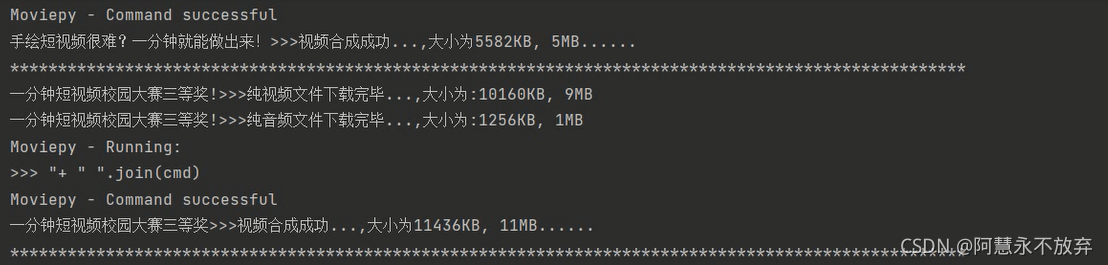
- print(f'{title_1}>>>纯视频文件下载完毕...,大小为:{video_size}KB, {int(video_size/1024)}MB')
-
- with open(f'{title_1}.mp3', 'wb') as f:
- f.write(bytes_audio)
- print(f'{title_1}>>>纯音频文件下载完毕...,大小为:{audio_size}KB, {int(audio_size/1024)}MB')
-
- ffmpeg_tools.ffmpeg_merge_video_audio(f'{title_1}.mp4', f'{title_1}.mp3', f'{title_}.mp4')
-
- # 显示合成文件的大小
- res_ = int(os.stat(f'{title_}.mp4').st_size / 1024)
- print(f'{title_}>>>视频合成成功...,大小为{res_}KB, {int(res_/1024)}MB......')
-
- # 移除纯视频文件,
- os.remove(f'{title_1}.mp4')
- # 移除纯音频文件,
- os.remove(f'{title_1}.mp3')
-
- # 手动降低请求频率,,避免被反爬
- # time.sleep(3)
- # 隔开每一个视频的信息
- print('*' * 100)
-
- print('视频全部抓取完毕......')

声明:本文内容由网友自发贡献,不代表【wpsshop博客】立场,版权归原作者所有,本站不承担相应法律责任。如您发现有侵权的内容,请联系我们。转载请注明出处:https://www.wpsshop.cn/article/detail/59809
推荐阅读


相关标签

