
热门标签
热门文章
- 1uniapp打包安卓app,获取app的权限数据,并弹窗提示设置app权限_uniapp 权限提示框上的内容安卓
- 2muduo库base源码分析二 (原子性操作AtomicIntegerT类封装)_#if !defined(ndebug) && !defined(google_protobuf_n
- 3Python对中国电信消费者特征预测:随机森林、朴素贝叶斯、神经网络、最近邻分类、逻辑回归、支持向量回归(SVR)...
- 4Fontawesome字体使用说明及其常用效果语法
- 5常见凭证获取方法_kiwi获取密码
- 6玩转k8s:yaml介绍
- 7什么是AB实验?能解决什么问题?终于有人讲明白了
- 8selenium之qq邮箱登录-发邮件_selenium登录qq邮箱
- 9Leetcode刷题 - task2 - 字符串与字符串匹配(5 天)_任意给定一个模式字符串pattern,和一个字符串str,返回str中被pattern匹配的部分,
- 102023年十篇具有影响力的人工智能研究论文
当前位置: article > 正文
vue-element-admin动态路由权限、菜单_vue动态路由导航菜单权限管理
作者:思考机器3 | 2024-02-04 14:13:48
赞
踩
vue动态路由导航菜单权限管理
前言
首先我对于vue和语法糖不熟练,使用的应该是vue3,但具体并不明白vue2和vue3的区别;在此分享我的package.json
- {
- "name": "vue3_cli_default",
- "version": "0.0.0",
- "scripts": {
- "dev": "vite",
- "build": "vite build",
- "serve": "vite preview"
- },
- "dependencies": {
- "2": "^3.0.0",
- "axios": "^1.3.2",
- "element-plus": "^2.2.29",
- "fast-glob": "^3.2.12",
- "qs": "^6.11.0",
- "vue": "^3.2.8",
- "vue-router": "^4.1.6",
- "vue-wechat-title": "^2.0.7",
- "vuex": "^4.0.2"
- },
- "devDependencies": {
- "@vitejs/plugin-vue": "^1.6.0",
- "@vue/compiler-sfc": "^3.2.6",
- "vite": "^2.5.2",
- "vite-plugin-svg-icons": "^2.0.1"
- }
- }

1、router/index.js
在此配置不需要验证的路由:如login、404;将不需要验证的路由放在constRouter中
- import {
- createRouter,
- createWebHashHistory
- } from 'vue-router' //引入vue-router
-
- import store from '../store/index.js'
-
- // 通用页面,这里的配置不需要权限
- export const constRouter = [{
- path: '/login',
- name: 'login',
- component: () =>
- import ('@/views/login/index.vue'),
- meta: {
- title: '登录'
- }
- }, {
- path: '/404',
- name: '404',
- component: () =>
- import ('../views/error/404.vue'),
- meta: { title: "404" }
- }, {
- path: '/*',
- redirect: '/404'
- }, {
- path: '/',
- redirect: '/home/index', //首页
- }]
-
-
- const router = createRouter({
- history: createWebHashHistory(),
- routes: constRouter
- })
-
-
- export default router
2、router/permission.js
在permission.js这个文件中处理前置路由守卫的功能。
(如果文字逻辑不清晰请忽略,仅为初步的个人理解)
此时的主要逻辑为:缓存中有token等数据时-->判断store中是否有从后端调起的路由信息数据(addRoutes)-->store中addRoutes没有数据;调用store中的函数去处理从后端调起的路由信息数据
未登录时的逻辑:进入login页面;进行登录操作
输入密码后的逻辑:通过store的user.js处理从后端获取的token、动态路由数据;并进行处理操作(后续有详细代码
- // 路由的全局首位
-
- // 权限控制逻辑
- import router from './index'
- import store from '../store/index'
-
- import { ElMessage } from 'element-plus' //导入消息提示
- import { getUser, getRoutes } from '@/utils/auth' // 从cookie获取令牌
-
- const whiteList = ['/login'] //排除的路径
-
- router.beforeEach(async(to, from, next) => {
- if (to.path === '/login' && !getRoutes()) {
- // 没有菜单权限数据&去登录页-->路由放行
- // 清空store的路由数据
- await store.dispatch('permission/generateRoutes', [])
- next()
- } else {
- // 判断用户是否已登录
- const hasToken = getUser()
- if (hasToken) {
- try {
- if (!store.getters.user) {
- store.dispatch('user/setInfo', hasToken)
- }
- // 判断是否进行路由过滤
- if (store.getters.addRoutes.length <= 0) {
- const roles_routes_lo = getRoutes()
-
- // 获取动态路由数据
- const accessRoutes = await store.dispatch('permission/generateRoutes', roles_routes_lo)
- console.log(accessRoutes, "accessRoutes-获取动态路由数据", store.getters.addRoutes)
-
- // 添加这些路由至路由器
- router.addRoute(accessRoutes)
-
- next({...to, replace: true })
- } else {
- // 已经进行路由过滤-->放行
- next() //继续即可
- }
- } catch (error) {
- // 捕获异常-->主要是获取用户信息的异常,此处是必要的,返回数据异常极容易造成路由过滤问题,
- console.log('add permission error', error)
-
- // // 出错需要重置令牌并重新登陆(令牌过期,网络错误等原因)
- await store.dispatch('user/resetToken')
- ElMessage({
- showClose: true,
- message: error || "网络错误-beforeEach",
- type: 'error',
- })
- next(`/login?redirect=${to.path}`)
- }
- } else {
- // 用户无令牌
- if (whiteList.indexOf(to.path) !== -1) {
- //白名单路由放过
- next()
- } else {
- // 重定向至登录页
- next(`/login?redirect=${to.path}`)
- }
- }
-
- }
- })
3、main.js
在此处增加路由前置守卫文件,重点是:import './router/permission'
- import { createApp } from 'vue'
- import App from './App.vue'
-
- const app = createApp(App)
-
- // router路由
- import router from './router/index.js'
- app.use(router)
-
- // 路由标题
- import VueWebchatTitle from 'vue-wechat-title'
- app.use(VueWebchatTitle)
-
- // elementUi
- import ElementPlus from 'element-plus'
- import 'element-plus/dist/index.css'
- app.use(ElementPlus)
-
- // vux
- import Vuex from 'vuex'
- app.use(Vuex)
-
- // // axios
- // import axios from 'axios'
- // app.use(axios)
-
- // store
- import store from './store/index.js'
- app.use(store)
-
- // 全局路由守卫
- import './router/permission'
-
- // 导入svg图片插件,可以在页面上显示svg图片
- import 'virtual:svg-icons-register'
- import SvgIcon from './components/SvgIcon.vue'
- app.component('svg-icon', SvgIcon)
-
- app.mount('#app')
4、utils/auth.js
这里处理的是获取缓存中的user、routes等信息
- const UserKey = 'user';
- const RoutesKey = 'anxinRoutes'
- const BtnKey = 'anxinBtn'
-
- // 获取用户信息
- export function getUser() {
- return JSON.parse(window.localStorage.getItem(UserKey))
- }
- // 添加用户信息
- export function setUser(userInfo) {
- return window.localStorage.setItem(UserKey, JSON.stringify(userInfo))
- }
-
- export function removeStorage(key) {
- // 清除特定键值对
- return window.localStorage.removeItem(key);
- }
-
- // 获取菜单权限
- export function getRoutes() {
- return JSON.parse(window.localStorage.getItem(RoutesKey))
- }
- // 添加菜单权限
- export function setRoutes(routes) {
- return window.localStorage.setItem(RoutesKey, JSON.stringify(routes))
- }
5、store/index.js
- import { createStore } from 'vuex'
-
- import permission from './modules/permission'
- import user from './modules/user'
-
- export default createStore({
- state: {},
- mutations: {},
- actions: {},
- modules: {
- permission,
- user
- },
- // 定义全局getters 方便访问user 模块的数据
- getters: {
- user: state => state.user.user,
- addRoutes: state => state.permission.addRoutes,//仅需要加权限设置的路由数据
- roles_routes: state => state.permission.roles_routes,//所有路由数据
- menuRoutes: state => state.permission.menuRoutes,//在页面中渲染显示的菜单数据
- }
- })
6、store/modules/permission.js
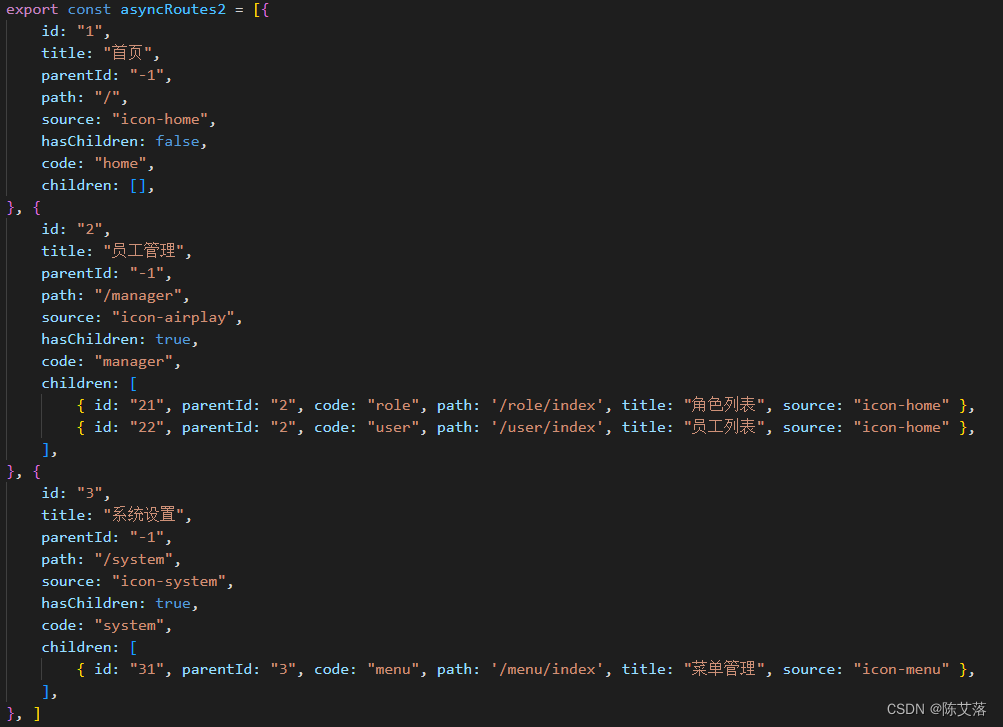
在此处把路由数据处理为自己需要的数据格式,
从后端获取的路由数据:
我需要的数据格式为:
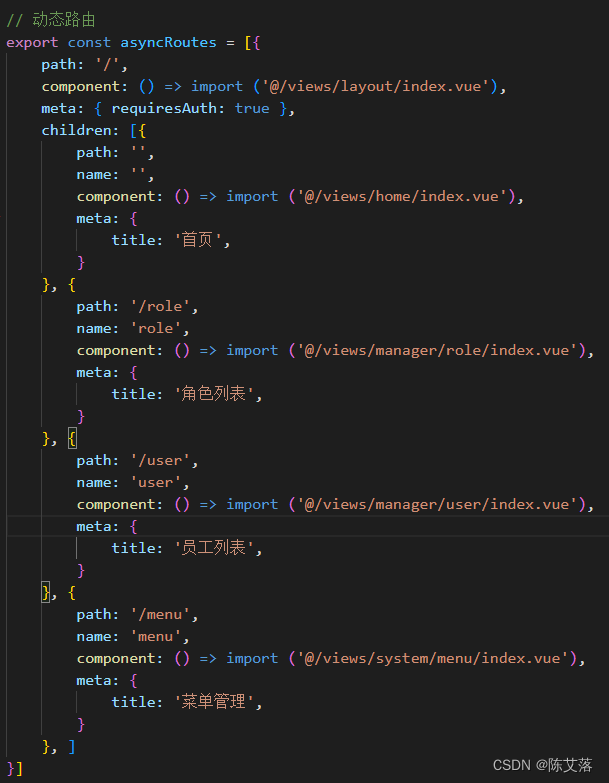
store/modules/permission.js处理数据格式
- // 权限管理模块
- import { constRouter } from '@/router'
- import { getBtn } from '@/utils/auth'
-
-
- const state = {
- roles_routes: [], //完整路由表
- addRoutes: [], //用户可访问路由表
- menuRoutes: [], //菜单数据
- }
-
- const mutations = {
- SET_ROUTES: (state, routes) => {
- // routes 用户可以访问的权限
- state.addRoutes = routes
-
- // 完整的路由表
- state.roles_routes = constRouter.concat(routes)
- },
- SET_MENU_ROUTES: (state, routes) => {
- // 菜单数据
- state.menuRoutes = routes
- },
- }
-
- const actions = {
- generateRoutes({ commit }, asyncRoutes) {
- return new Promise(resolve => {
- let accessedRoutes;
- accessedRoutes = asyncRoutes || []
-
- // 需要处理路由数据,在此加函数处理
- var last_routes = []
- if (accessedRoutes.length != 0) {
- last_routes = arrToMenu(accessedRoutes)
- }
-
- commit('SET_ROUTES', last_routes) //添加用户可访问的路由表
- commit('SET_MENU_ROUTES', accessedRoutes) //添加菜单数据
-
- resolve(last_routes)
- })
- }
- }
-
- // 处理菜单数据
- export function arrToMenu(routes) {
- var nodes = {
- path: '/',
- component: eval(`() => import('../../views/layout/index.vue')`),
- children: [],
- }
- var res = []
- for (var i = 0; i < routes.length; i++) {
- const row = routes[i]
- var child = {}
- if (!row.children) {
- child = {
- path: row.path,
- name: row.name,
- component: eval(`() => import('../../views${row.path}.vue')`),
- meta: {
- title: row.name,
- icon: row.source
- },
- }
- res.push(child)
-
- } else {
- for (var j = 0; j < row.children.length; j++) {
- var row_child = row.children[j]
- child = {
- path: row_child.path,
- name: row_child.name,
- component: eval(`() => import('../../views${row.path}${row_child.path}.vue')`),
- meta: {
- title: row_child.name,
- icon: row_child.source
- },
- }
- res.push(child)
- }
- }
- }
- nodes.children = res
- // console.log(nodes, 'nodes')
- return nodes;
- }
-
- export default {
- namespaced: true,
- state,
- mutations,
- actions
- }
7、login.vue
- <template>
- <div class="login-main">
- <div class="login-box">
- <div class="login-header">
- <img src="../../assets/logo.png" class="login-logo">
- </div>
- <el-form
- ref="ruleFormRef"
- :rules="formRule"
- :model="formVal"
- >
- <el-form-item label="账号" prop="account">
- <el-input v-model="formVal.account" placeholder="请输入账号" />
- </el-form-item>
- <el-form-item label="密码" prop="password">
- <el-input v-model="formVal.password" placeholder="请输入密码" />
- </el-form-item>
- <el-form-item>
- <el-button type="primary" @click="onSumbit" :loading="loading">登录</el-button>
- </el-form-item>
- </el-form>
- </div>
- </div>
- </template>
-
- <script>
- import { login,menutreeList } from '@/utils/api/user.js'
- export default{
- data(){
- return {
- formVal:{account:'',password:'',},
- formRule:{
- account: [
- { required: true, message: '请输入账号', trigger: 'blur' },
- ],
- password: [
- { required: true, message: '请输入密码', trigger: 'blur' },
- ],
- },
- loading: false, //登陆状态
- }
- },
- methods: {
- // 登录功能
- async onSumbit () {
- var _this = this
- try {
- // 1、表单验证
- await this.$refs.ruleFormRef.validate()
- this.loading = true
- // 2、请求
- const { data } = await login(_this.formVal)
- // 处理菜单栏数据
- _this.login(data)
- _this.$message.success(data.msg)
- } catch (err) {
- this.loading = false
- console.log('验证失败', err)
- }
- },
- login(data){
- // 在此处理数据
- this.$store
- .dispatch('user/login',data)
- .then(()=>{
- this.loading = true
- // 登陆成功后重定向
- this.$router.push({
- path: this.$route.query.redirect || '/'
- })
- })
- .catch(err=>{
- this.loading = true
- console.log(err)
- })
- }
- }
- }
- </script>
-
- <style scoped>
- .login-main{
- width: 100vw;
- height: 100vh;
- display: flex;
- align-items: center;
- justify-content: center;
- background-image: url('../../assets/bg1.jpg');
- background-position: right bottom;
- background-repeat: no-repeat;
- background-size: cover;
- }
- .login-box{
- width: 300px;
- height: 200px;
- border-radius: 5px;
- box-shadow: 10px 10px 5px rgba(0, 0, 0, 0.3);
- background-color: #fff;
- display: flex;
- flex-direction: column;
- padding: 2rem;
- align-items: center;
- justify-content: center;
-
- }
- .login-header{
- padding-bottom: 20px;
- }
- .login-logo{
- width: 70px;
- height: 70px;
- border-radius: 50%;
- box-shadow: 5px 5px 5px rgba(0, 0, 0, 0.3);
- }
- .el-button{
- width: 100%;
- }
- </style>
8、store/modules/user.js
在此处理登陆后获取的数据,将其存入缓存中;然后跳转页面会自动触发路由守卫
- import { setUser, removeStorage, setRoutes, setBtn } from '@/utils/auth'
-
- // 村赤用户令牌和角色信息
- const state = {
- user: {}, //用户名、token等
- }
-
- const mutations = {
- SET_USERINFO: (state, userInfo) => {
- state.user = userInfo;
- }
- };
-
- const actions = {
- // 用户登录
- login({ commit }, userInfo) {
- const { data } = userInfo;
- return new Promise((resolve, reject) => {
- var userInfo = {
- accessToken: data.accessToken,
- refreshToken: data.refreshToken,
- userId: data.userId
- }
-
- // 保存状态
- commit('SET_USERINFO', userInfo)
-
- // 写入cookie(token等、user,anxinRoles)
- setUser(userInfo)
- setRoutes(data.menuVoList)
-
- resolve()
- })
- },
- // 获取用户角色信息
- setInfo({ commit }, user) {
- return new Promise((resolve) => {
- commit('SET_USERINFO', user)
- resolve(user)
- })
- },
- // 重置令牌
- resetToken({ commit }) {
- return new Promise(resolve => {
- commit('SET_USERINFO', {})
- removeStorage('user')
- removeStorage('anxinRoutes')
- resolve()
- })
- }
- }
-
- export default {
- namespaced: true,
- state,
- mutations,
- actions
- }
声明:本文内容由网友自发贡献,不代表【wpsshop博客】立场,版权归原作者所有,本站不承担相应法律责任。如您发现有侵权的内容,请联系我们。转载请注明出处:https://www.wpsshop.cn/article/detail/58964
推荐阅读


相关标签

