- 1数据预处理笔记_根据数据源的多少以及问题所属层次,将数据质量问题分为哪4类?
- 2yolov--11--YOLO v3各种版本的训练记录、mAP、AP、recall、precision、time等评价指标计算_yolov11
- 3Baichuan2模型+Windows CPU部署_baichuan2 cpu
- 4oracle:shutdown与startup命令及其参数
- 5C语言连续生成多个随机数(可限制范围)
- 6OpenCV将两张图片拼接成一张图片_opencv 图片拼接
- 7HTML实现烟花,鼠标点击爆炸,免费提供源码,复制就可运行_html鼠标点击特效代码
- 8机器学习 凝聚态物理_机器学习遇到了凝聚的问题
- 9【PyTorch框架】GPU的使用_pytorch gpu
- 10语义分割系列7-Attention Unet(pytorch实现)
Element-UI快速入门_element ui
赞
踩
什么是Element UI
- Element,一套为开发者、设计师和产品经理准备的基于 Vue 2.0 的桌面端组件库
- Element UI是基于Vue 2.0的
- Element UI 提供一组组件
- Element UI 提供组件的参考实例, 直接复制
- 官方网站:
https://element.eleme.cn/#/zh-CN/component/installation
搭建环境
创建项目
步骤一: 通过 vue-cli创建项目
vue create eui01
步骤二:运行项目

整合1:插件
安装好vue项目后,进入到项目目录,执行命令
vue add element
整合步骤1:确定引入方式(全部引入、按需引入)

整合
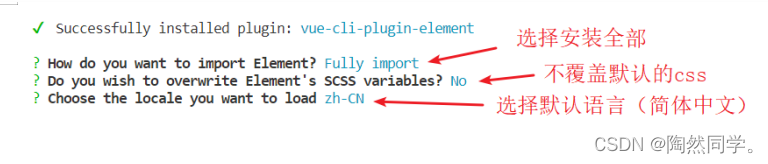
整合2:安装element-ui插件
npm i element-ui --save

整合:element-ui引入
- 官方提供了2种引入方式:完整引入、按需引入
- 完整引入:引入了eui所有的组件,学习时/开发时常用
- 按需引入:引入需要的组件,生产环境下使用。
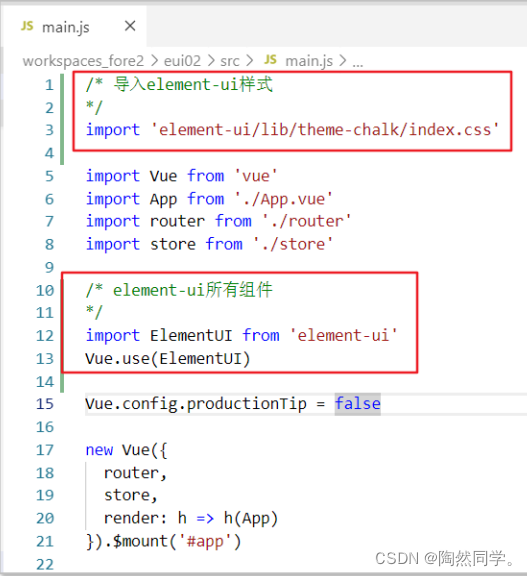
- 完整引入
- 1. 导入 element ui 组件库
- 2. 导入 element ui css样式
- 3. 并将element ui 注册给vue
- /* 导入element-ui样式
- */
- import 'element-ui/lib/theme-chalk/index.css'
-
- import Vue from 'vue'
- import App from './App.vue'
- import router from './router'
- import store from './store'
-
- /* element-ui所有组件
- */
- import ElementUI from 'element-ui'
- Vue.use(ElementUI)
-
- Vue.config.productionTip = false
-
- new Vue({
- router,
- store,
- render: h => h(App)
- }).$mount('#app')
3.布局容器
布局容器
- 使用element-ui的布局容器(Container) 进行页面布局。对页面进行划分(上、下、左、中)
- 官方文档 : https://element.eleme.cn/#/zh-CN/component/container
用于布局的容器组件,方便快速搭建页面的基本结构:
<el-container>:外层容器。当子元素中包含 <el-header> 或 <el-footer> 时,全部子元素会垂直上下排列,否则会水平左右排列。
<el-header>:顶栏容器。
<el-aside>:侧边栏容器。
<el-main>:主要区域容器。
<el-footer>:底栏容器。
以上组件采用了 flex 布局,使用前请确定目标浏览器是否兼容。此外,
<el-container>的子元素只能是后四者,后四者的父元素也只能是<el-container>。
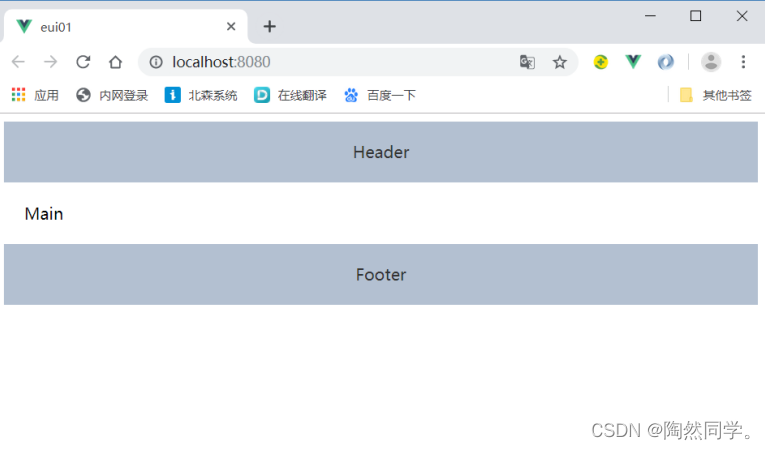
步骤一: 修改src/main.js 导入 element-ui 样式和组件
- /* 导入element-ui样式
- */
- import 'element-ui/lib/theme-chalk/index.css'
-
- import Vue from 'vue'
- import App from './App.vue'
- import router from './router'
- import store from './store'
-
- /* element-ui所有组件
- */
- import ElementUI from 'element-ui'
- Vue.use(ElementUI)
-
- Vue.config.productionTip = false
-
- new Vue({
- router,
- store,
- render: h => h(App)
- }).$mount('#app')
步骤二: 删除 src/App.vue所有内容, 拷贝布局模板和样式
- <template>
- <div id="app">
- <el-container>
- <el-header>Header</el-header>
- <el-main>Main</el-main>
- <el-footer>Footer</el-footer>
- </el-container>
- </div>
- </template>
-
- <script>
- export default {
-
- }
- </script>
-
- <style>
- /* 稍后删除 */
- .el-header, .el-footer {
- background-color: #B3C0D1;
- color: #333;
- text-align: center;
- line-height: 60px;
- }
- </style>
reset.css
布局页面完成后, 整个body会存在一圈空白, 开发中一般选择重新设置页面样式
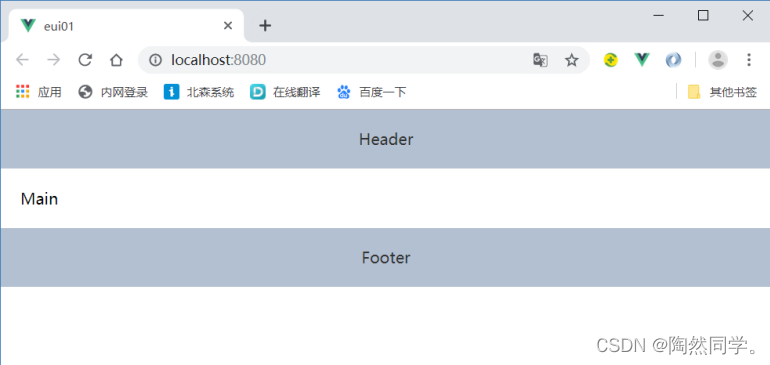
步骤一: 百度搜索”reset.css” , 并创建 assets/app.css ,拷贝样式 (复制下面样式即可)

- body,div,dl,dt,dd,ul,ol,li,h1,h2,h3,h4,h5,h6,pre,form,fieldset,input,textarea,p,th,td {
- margin: 0;
- padding: 0;
- }
-
- table {
- border-collapse: collapse;
- border-spacing: 0;
- }
-
- fieldset,img {
- border: 0;
- }
-
- address,caption,cite,code,dfn,em,strong,th,var {
- font-style: normal;
- font-weight: normal;
- }
-
- ol,ul {
- list-style: none;
- }
-
- caption,th {
- text-align: left;
- }
-
- h1,h2,h3,h4,h5,h6 {
- font-size: 100%;
- font-weight: normal;
-
- }
满屏填充
在App.vue中,添加样式
- html, body, .el-container {
- height: 100%;
- }
4.导航条
需求
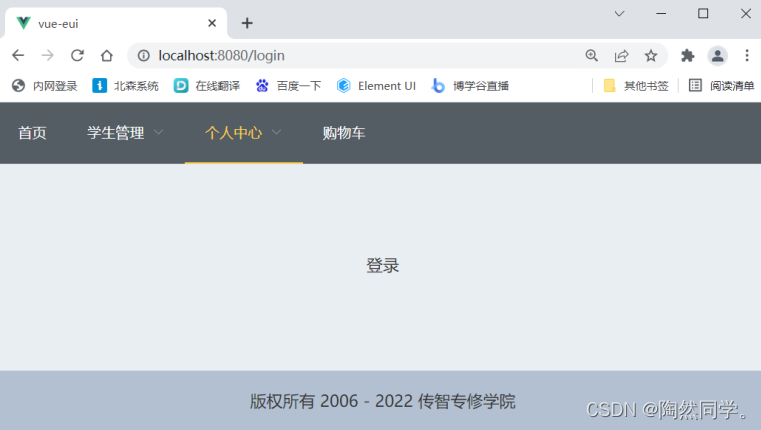
导航条
使用导航菜单(NavMenu) 完成导航条效果
官方文档 : https://element.eleme.cn/#/zh-CN/component/menu
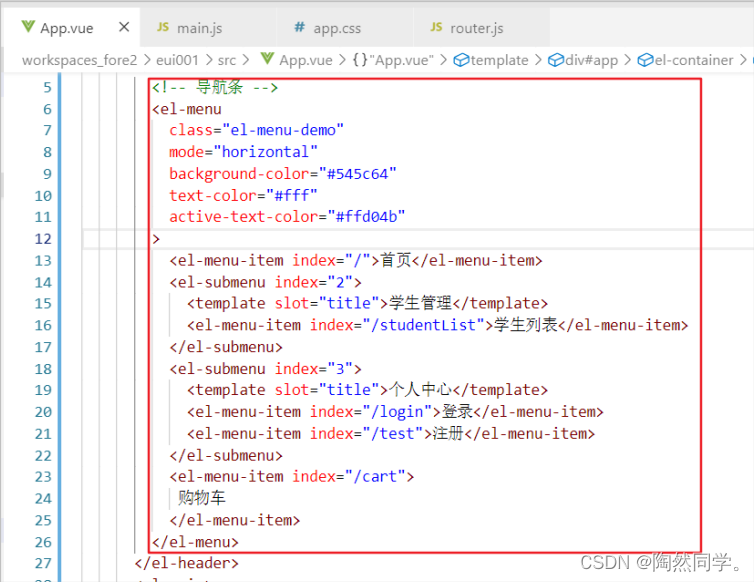
- <template>
- <div id="app">
- <el-container>
- <el-header>
- <!-- 导航条 -->
- <el-menu
- :default-active="$route.path"
- class="el-menu-demo"
- mode="horizontal"
- background-color="#545c64"
- text-color="#fff"
- active-text-color="#ffd04b"
- >
- <el-menu-item index="/">首页</el-menu-item>
- <el-submenu index="2">
- <template slot="title">学生管理</template>
- <el-menu-item index="/studentList">学生列表</el-menu-item>
- </el-submenu>
- <el-submenu index="3">
- <template slot="title">个人中心</template>
- <el-menu-item index="/login">登录</el-menu-item>
- <el-menu-item index="/register">注册</el-menu-item>
- </el-submenu>
- <el-menu-item index="/cart">
- 购物车
- </el-menu-item>
- </el-menu>
- </el-header>
- <el-main>
- <router-view></router-view>
- </el-main>
- <el-footer>
- 版权所有 2006 - 2022 传智专修学院
- </el-footer>
- </el-container>
- </div>
- </template>
-
- <script>
- export default {
- }
- </script>
-
- <style>
- .el-header, .el-footer {
- background-color: #B3C0D1;
- color: #333;
- text-align: center;
- line-height: 60px;
- padding: 0;
- }
- </style>
路由
点击”首页” 和 “购物车” 可以调整页面
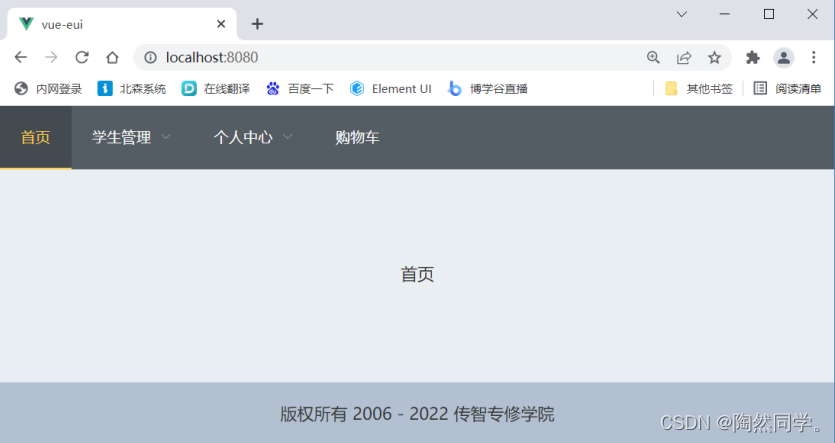
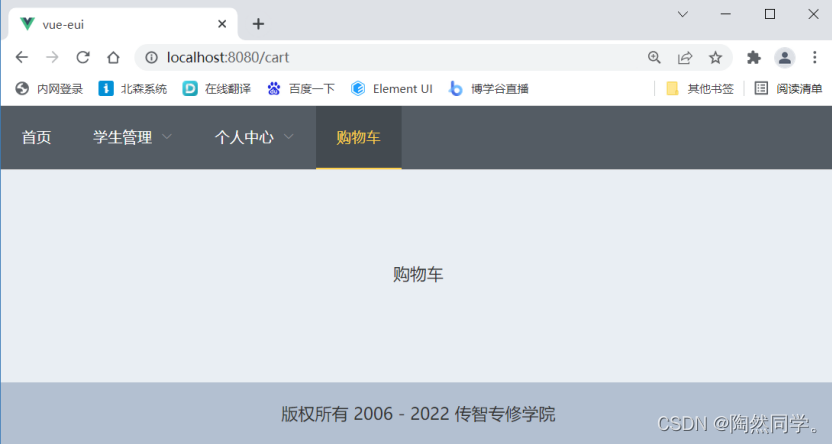
步骤一: 修改 src/App.vue 设置路由视图
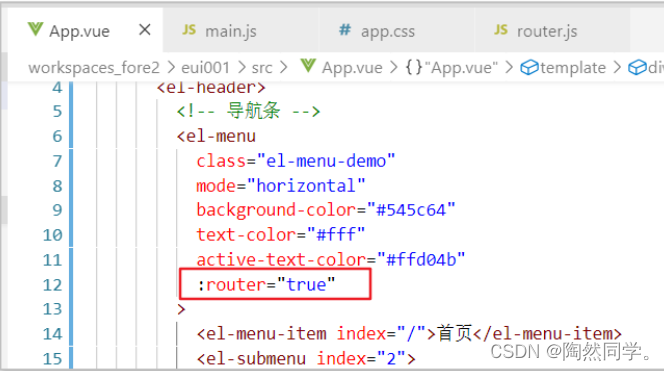
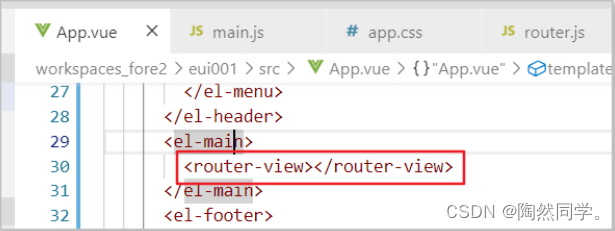
- <template>
- <div id="app">
- <el-container>
- <el-header>
- <!-- 导航条 -->
- <el-menu
- class="el-menu-demo"
- mode="horizontal"
- background-color="#545c64"
- text-color="#fff"
- active-text-color="#ffd04b"
- :router="true"
- >
- <el-menu-item index="/">首页</el-menu-item>
- <el-submenu index="2">
- <template slot="title">学生管理</template>
- <el-menu-item index="/studentList">学生列表</el-menu-item>
- </el-submenu>
- <el-submenu index="3">
- <template slot="title">个人中心</template>
- <el-menu-item index="/login">登录</el-menu-item>
- <el-menu-item index="/register">注册</el-menu-item>
- </el-submenu>
- <el-menu-item index="/cart">
- 购物车
- </el-menu-item>
- </el-menu>
- </el-header>
- <el-main>
- <router-view></router-view>
- </el-main>
- <el-footer>
- 版权所有 2006 - 2020 传智专修学院
- </el-footer>
- </el-container>
- </div>
- </template>
-
- <script>
- export default {
- }
- </script>
-
- <style>
- .el-header, .el-footer {
- background-color: #B3C0D1;
- color: #333;
- text-align: center;
- line-height: 60px;
- padding: 0;
- }
- </style>

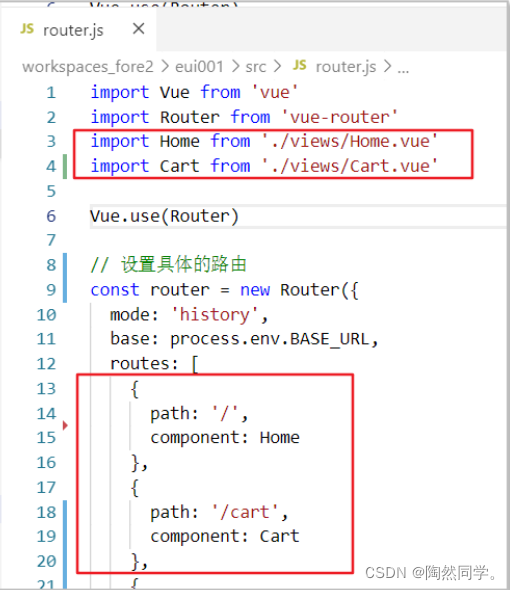
步骤二: 编写测试组件(Home.vue和Cart.vue)
页面刷新导航选择问题
默认情况:点击后的默认效果
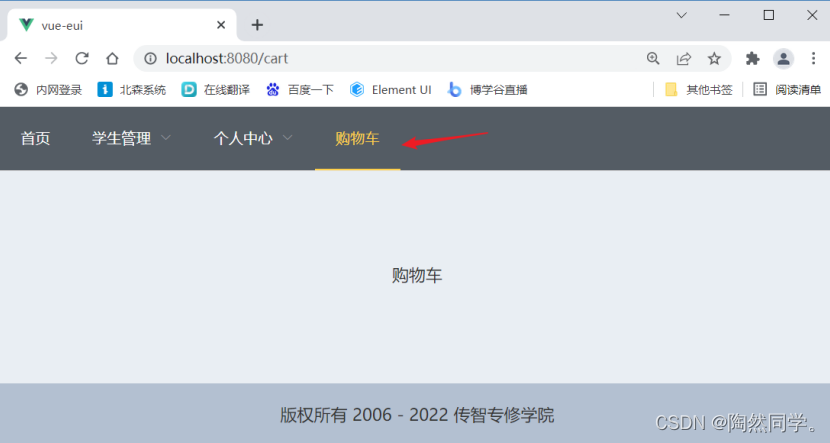
刷新页面, 导航条的选中状态消失
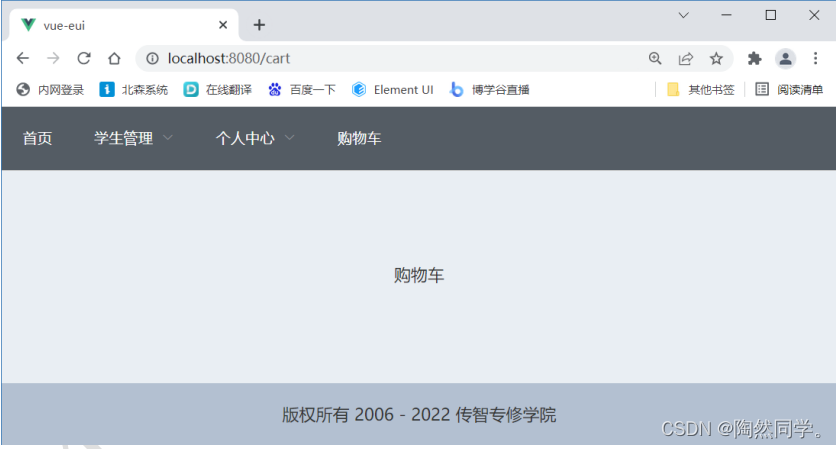
修复: 修改 App.vue页面
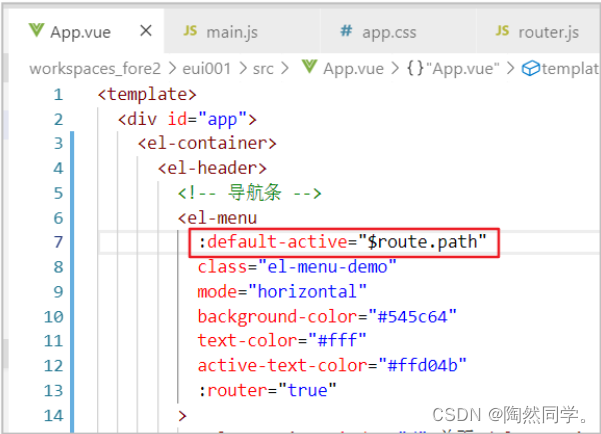
- <template>
- <div id="app">
- <el-container>
- <el-header>
- <!-- 导航条 -->
- <el-menu
- :default-active="$route.path"
- class="el-menu-demo"
- mode="horizontal"
- background-color="#545c64"
- text-color="#fff"
- active-text-color="#ffd04b"
- :router="true"
- >

页眉
- <el-footer>
- 版权所有 2006 - 2022 传智专修学院
- </el-footer>
5.表格:查询列表
测试页面
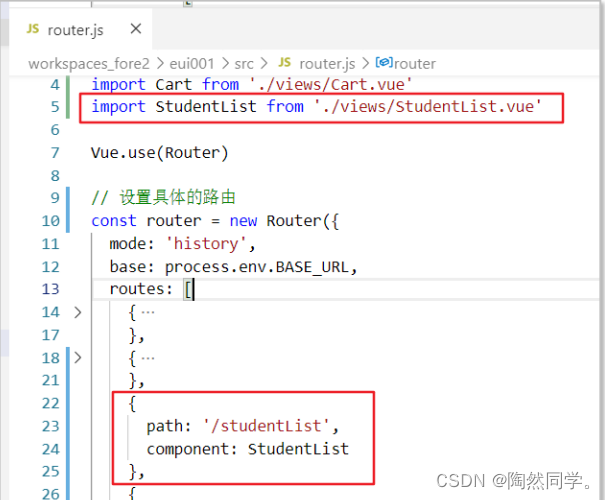
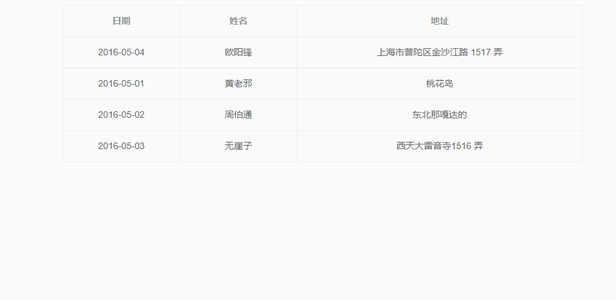
基本表格
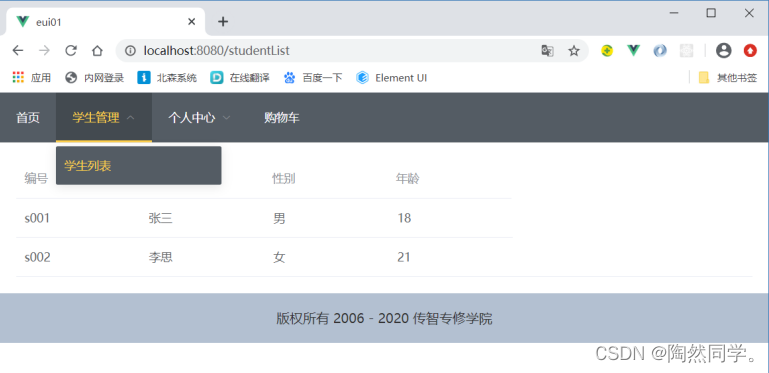
- <template>
- <div>
- <!-- 列表 -->
- <el-table :data="studentList" >
- <el-table-column prop="sid" label="编号" width="150"></el-table-column>
- <el-table-column prop="sname" label="姓名" width="150"></el-table-column>
- <el-table-column prop="gender" label="性别" width="150"></el-table-column>
- <el-table-column prop="age" label="年龄" width="150"></el-table-column>
- </el-table>
- </div>
- </template>
-
- <script>
- export default {
- data () {
- return {
- studentList: [
- {
- sid: 's001',
- sname: '张三',
- gender: '男',
- age: 18
- },
- {
- sid: 's002',
- sname: '李思',
- gender: '女',
- age: 21
- }
- ]
- }
- }
- }
- </script>
-
- <style>
-
- </style>
表格修饰
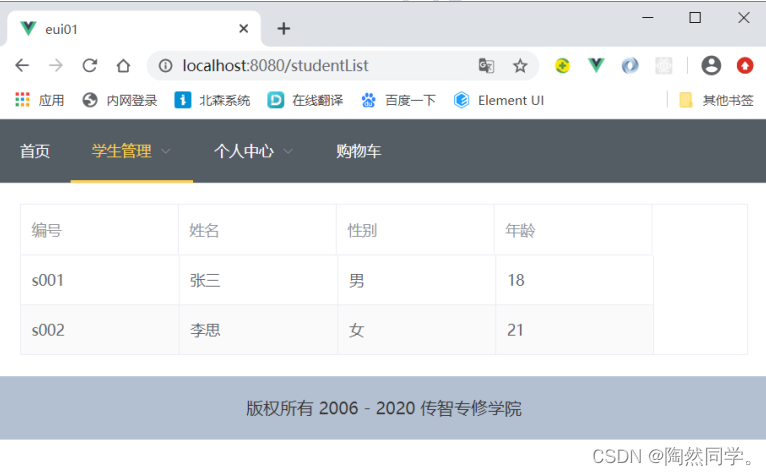
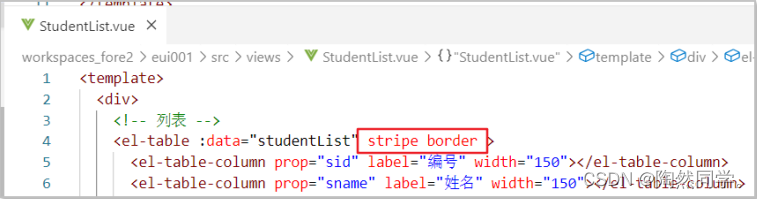
- <template>
- <div>
- <!-- 列表 -->
- <el-table :data="studentList" stripe border >
- <el-table-column prop="sid" label="编号" width="150"></el-table-column>
 多选
多选
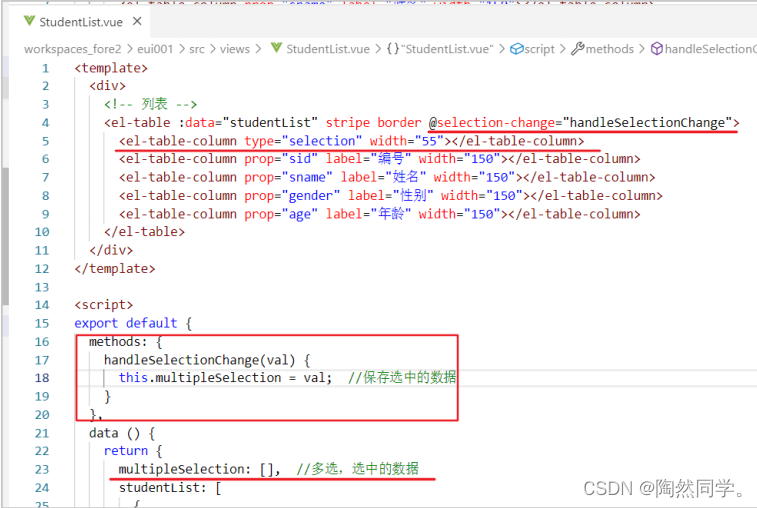
- <template>
- <div>
- <!-- 列表 -->
- <el-table :data="studentList" stripe border @selection-change="handleSelectionChange">
- <el-table-column type="selection" width="55"></el-table-column>
- <el-table-column prop="sid" label="编号" width="150"></el-table-column>
- <el-table-column prop="sname" label="姓名" width="150"></el-table-column>
- <el-table-column prop="gender" label="性别" width="150"></el-table-column>
- <el-table-column prop="age" label="年龄" width="150"></el-table-column>
- </el-table>
- </div>
- </template>
-
- <script>
- export default {
- methods: {
- handleSelectionChange(val) {
- this.multipleSelection = val; //保存选中的数据
- }
- },
- data () {
- return {
- multipleSelection: [], //多选,选中的数据
- studentList: [
- {
- sid: 's001',
- sname: '张三',
- gender: '男',
- age: 18
- },
- {
- sid: 's002',
- sname: '李思',
- gender: '女',
- age: 21
- }
- ]
- }
- }
- }
- </script>
-
- <style>
-
- </style>
自定义模板
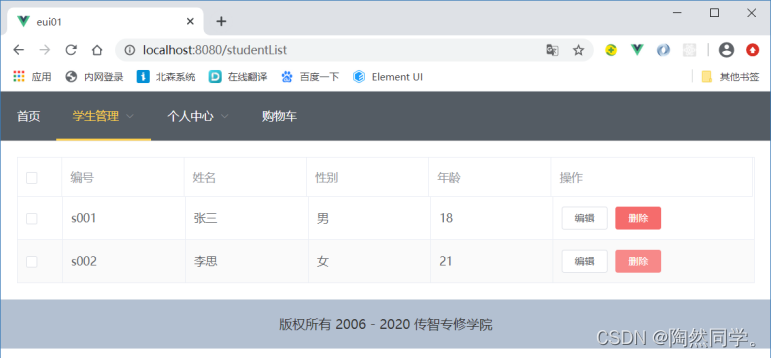
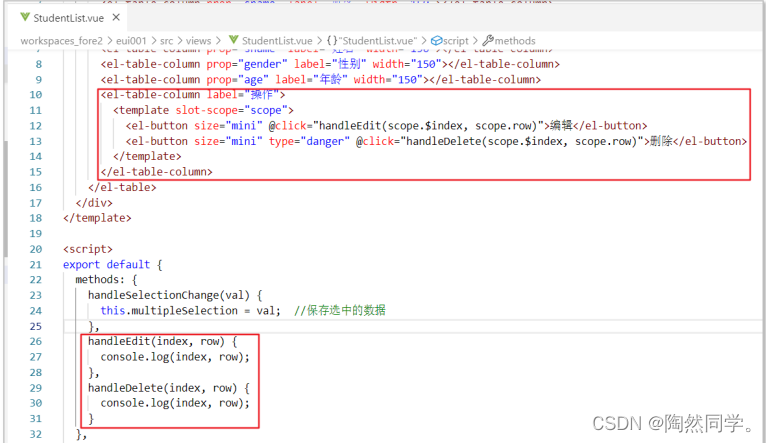
- <template>
- <div>
- <!-- 列表 -->
- <el-table :data="studentList" stripe border @selection-change="handleSelectionChange">
- <el-table-column type="selection" width="55"></el-table-column>
- <el-table-column prop="sid" label="编号" width="150"></el-table-column>
- <el-table-column prop="sname" label="姓名" width="150"></el-table-column>
- <el-table-column prop="gender" label="性别" width="150"></el-table-column>
- <el-table-column prop="age" label="年龄" width="150"></el-table-column>
- <el-table-column label="操作">
- <template slot-scope="scope">
- <el-button size="mini" @click="handleEdit(scope.$index, scope.row)">编辑</el-button>
- <el-button size="mini" type="danger" @click="handleDelete(scope.$index, scope.row)">删除</el-button>
- </template>
- </el-table-column>
- </el-table>
- </div>
- </template>
-
- <script>
- export default {
- methods: {
- handleSelectionChange(val) {
- this.multipleSelection = val; //保存选中的数据
- },
- handleEdit(index, row) {
- console.log(index, row);
- },
- handleDelete(index, row) {
- console.log(index, row);
- }
- },
- data () {
- return {
- multipleSelection: [], //多选,选中的数据
- studentList: [
- {
- sid: 's001',
- sname: '张三',
- gender: '男',
- age: 18
- },
- {
- sid: 's002',
- sname: '李思',
- gender: '女',
- age: 21
- }
- ]
- }
- }
- }
- </script>
-
- <style>
-
- </style>
- 练习:展示“爱好”信息
- studentList: [
- {
- sid: 's001',
- sname: '张三',
- gender: '男',
- age: 18,
- hobbies: ['抽烟','喝酒','烫头']
- },
- {
- sid: 's002',
- sname: '李思',
- gender: '女',
- age: 21,
- hobbies: ['抽烟','烫头']
- }
- ]
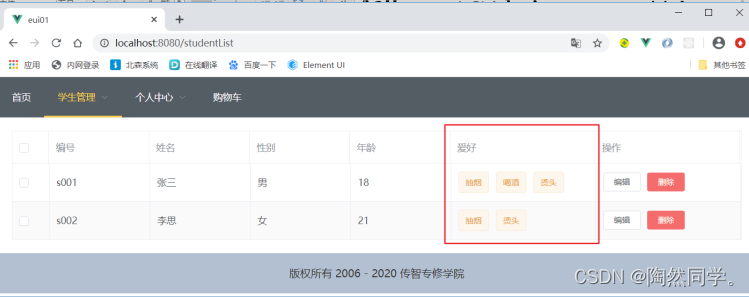
- <template>
- <div>
- <!-- 列表 -->
- <el-table :data="studentList" stripe border @selection-change="handleSelectionChange">
- <el-table-column type="selection" width="55"></el-table-column>
- <el-table-column prop="sid" label="编号" width="150"></el-table-column>
- <el-table-column prop="sname" label="姓名" width="150"></el-table-column>
- <el-table-column prop="gender" label="性别" width="150"></el-table-column>
- <el-table-column prop="age" label="年龄" width="150"></el-table-column>
- <el-table-column label="爱好" >
- <template slot-scope="scope">
- <el-tag type="warning" v-for="(hobby,index) in scope.row.hobbies" :key="index">{{hobby}}</el-tag>
- </template>
-
- </el-table-column>
- <el-table-column label="操作">
- <template slot-scope="scope">
- <el-button size="mini" @click="handleEdit(scope.$index, scope.row)">编辑</el-button>
- <el-button size="mini" type="danger" @click="handleDelete(scope.$index, scope.row)">删除</el-button>
- </template>
- </el-table-column>
- </el-table>
- </div>
- </template>
-
- <script>
- export default {
- methods: {
- handleSelectionChange(val) {
- this.multipleSelection = val; //保存选中的数据
- },
- handleEdit(index, row) {
- console.log(index, row);
- },
- handleDelete(index, row) {
- console.log(index, row);
- }
- },
- data () {
- return {
- multipleSelection: [], //多选,选中的数据
- studentList: [
- {
- sid: 's001',
- sname: '张三',
- gender: '男',
- age: 18,
- hobbies: ['抽烟','喝酒','烫头']
- },
- {
- sid: 's002',
- sname: '李思',
- gender: '女',
- age: 21,
- hobbies: ['抽烟','烫头']
- }
- ]
- }
- }
- }
- </script>
-
- <style>
- .el-tag + .el-tag {
- margin-left: 10px;
- }
- </style>
总结
| 标签 | 描述 | 属性 | 描述 |
| <el-table> | 用于绘制表格 | data | 需要显示的数据 |
| stripe | 创建带斑马纹的表格 | ||
| border | 带边框表格 | ||
| <el-table-column> | 用于设置表格的列 | label | 列名 |
| prop | 对应对象中的键名 | ||
| width | 列宽 | ||
| type | selection 多选框 | ||
| <template slot-scope="scope"> | 内容嵌入,scope |
条件查询
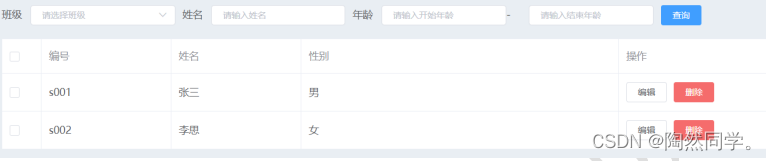
- <!-- 条件表单 start -->
- <el-form :inline="true" :model="studentVo" size="mini" class="demo-form-inline">
- <el-form-item label="班级">
- <el-select v-model="studentVo.cid" placeholder="请选择班级">
- <el-option label="Java12班" value="c001"></el-option>
- <el-option label="Java34班" value="c002"></el-option>
- </el-select>
- </el-form-item>
- <el-form-item label="姓名">
- <el-input v-model="studentVo.name" placeholder="请输入姓名"></el-input>
- </el-form-item>
- <el-form-item label="年龄">
- <el-col :span="11">
- <el-input v-model="studentVo.startAge" placeholder="请输入开始年龄"></el-input>
- </el-col>
- <el-col class="line" :span="2">-</el-col>
- <el-col :span="11">
- <el-input v-model="studentVo.endAge" placeholder="请输入结束年龄"></el-input>
- </el-col>
- </el-form-item>
-
- <el-form-item>
- <el-button type="primary" @click="onSubmit">查询</el-button>
- </el-form-item>
- </el-form>
- <!-- 条件表单 end -->
分页条
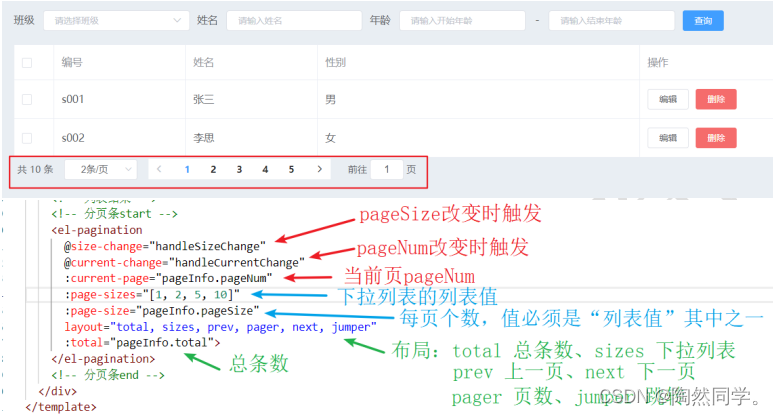
- <!-- 分页条start -->
- <el-pagination
- @size-change="handleSizeChange"
- @current-change="handleCurrentChange"
- :current-page="pageInfo.pageNum"
- :page-sizes="[1, 2, 5, 10]"
- :page-size="pageInfo.pageSize"
- layout="total, sizes, prev, pager, next, jumper"
- :total="pageInfo.total">
- </el-pagination>
- <!-- 分页条end -->
6.表单
简单表单:登录
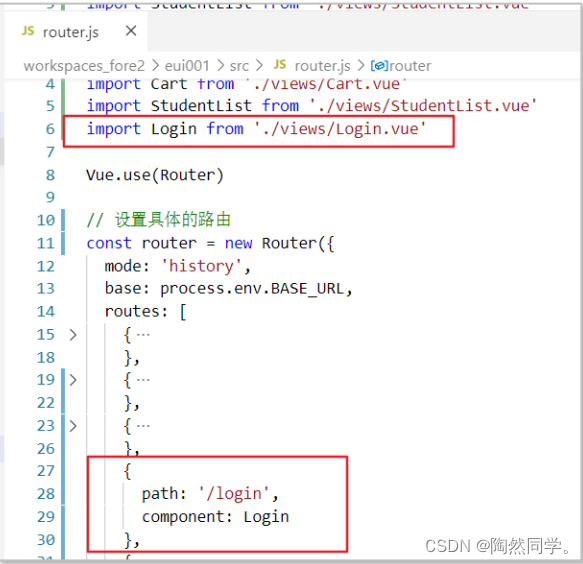
显示登录页面:Login.vue
登录表单效果
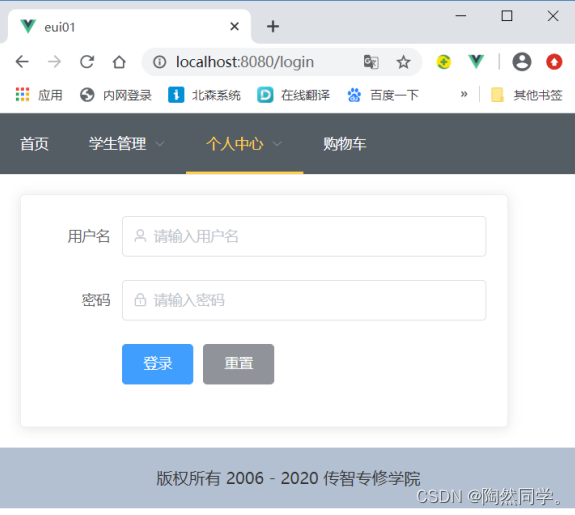
- <template>
- <el-card class="box-card">
- <el-form :model="user" label-width="80px" ref="loginFormRef">
- <el-form-item label="用户名">
- <el-input v-model="user.username" prefix-icon="el-icon-user" placeholder="请输入用户名"></el-input>
- </el-form-item>
- <el-form-item label="密码">
- <el-input v-model="user.password" prefix-icon="el-icon-lock" type="password" placeholder="请输入密码"></el-input>
- </el-form-item>
- <el-form-item>
- <el-button type="primary" @click="login">登录</el-button>
- <el-button type="info" @click="$refs.loginFormRef.resetFields()" >重置</el-button>
- </el-form-item>
- </el-form>
- </el-card>
- </template>
-
- <script>
- export default {
- data() {
- return {
- user: {
- username: '',
- password: ''
- }
- }
- },
- }
- </script>
-
- <style>
- .box-card {
- width: 480px;
- }
- </style>
复杂表单:注册
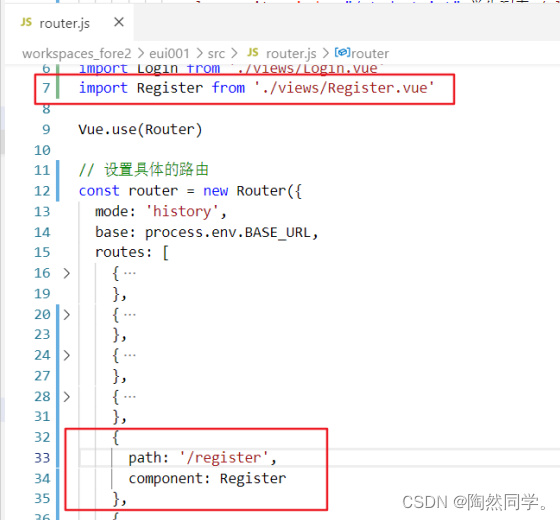
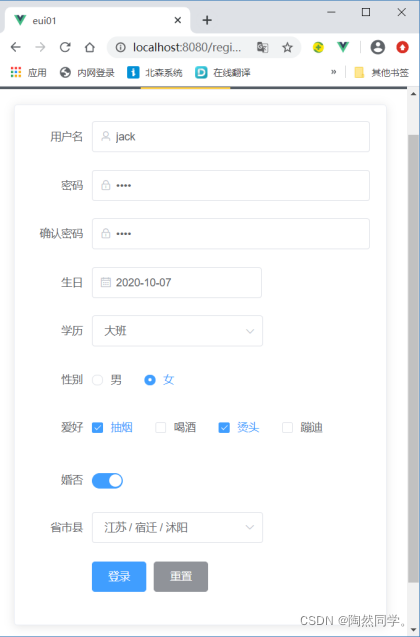
- <template>
- <el-card class="box-card">
- <el-form :model="user" label-width="80px" ref="loginFormRef">
- <el-form-item label="用户名">
- <el-input v-model="user.username" prefix-icon="el-icon-user" placeholder="请输入用户名"></el-input>
- </el-form-item>
- <el-form-item label="密码">
- <el-input v-model="user.password" prefix-icon="el-icon-lock" type="password" placeholder="请输入密码"></el-input>
- </el-form-item>
- <el-form-item label="确认密码">
- <el-input v-model="user.repassword" prefix-icon="el-icon-lock" type="password" placeholder="请再次输入密码"></el-input>
- </el-form-item>
- <el-form-item label="生日">
- <el-date-picker v-model="user.birthday" type="date" placeholder="选择日期">
- </el-date-picker>
- </el-form-item>
- <el-form-item label="学历">
- <el-select v-model="user.edu" placeholder="请选择你的学历">
- <el-option label="小班" value="xb"></el-option>
- <el-option label="中班" value="zb"></el-option>
- <el-option label="大班" value="db"></el-option>
- <el-option label="学前班" value="xqb"></el-option>
- </el-select>
- </el-form-item>
- <el-form-item label="性别">
- <el-radio-group v-model="user.gender">
- <el-radio label="男"></el-radio>
- <el-radio label="女"></el-radio>
- </el-radio-group>
- </el-form-item>
- <el-form-item label="爱好">
- <el-checkbox-group v-model="user.hobbies">
- <el-checkbox label="抽烟" name="type"></el-checkbox>
- <el-checkbox label="喝酒" name="type"></el-checkbox>
- <el-checkbox label="烫头" name="type"></el-checkbox>
- <el-checkbox label="蹦迪" name="type"></el-checkbox>
- </el-checkbox-group>
- </el-form-item>
- <el-form-item label="婚否">
- <el-switch v-model="user.marry"></el-switch>
- </el-form-item>
- <el-form-item label="省市县">
- <el-cascader
- v-model="user.city"
- :options="cityList"
- ></el-cascader>
- </el-form-item>
- <el-form-item>
- <el-button type="primary" @click="login">登录</el-button>
- <el-button type="info" @click="$refs.loginFormRef.resetFields()" >重置</el-button>
- </el-form-item>
- </el-form>
- </el-card>
- </template>
-
- <script>
- export default {
- data() {
- return {
- user: {
- username: 'jack',
- password: '1234',
- repassword: '1234',
- birthday: '2020-10-07',
- edu: 'db',
- gender: '女',
- hobbies: ['抽烟','烫头'],
- marry: true,
- city: ['jiangsu', 'suqian', 'shuyang'],
- },
- cityList: [
- {
- value: 'jiangsu',
- label: '江苏',
- children: [
- {
- value: 'suqian',
- label: '宿迁',
- children: [
- {
- value: 'shuyang',
- label: '沭阳',
- },
- {
- value: 'siyang',
- label: '泗阳',
- }
- ]
- },
- {
- value: 'lianyungang',
- label: '连云港',
- }
- ]
- }
- ]
-
- }
- },
- methods: {
- login() {
- alert('登录中...')
- }
- },
- }
- </script>
-
- <style>
- .box-card {
- width: 480px;
- }
- </style>
表单校验
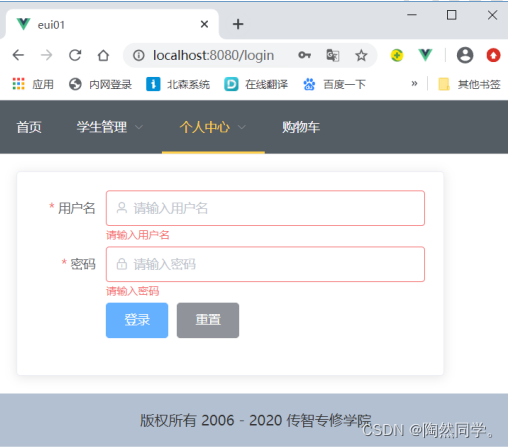
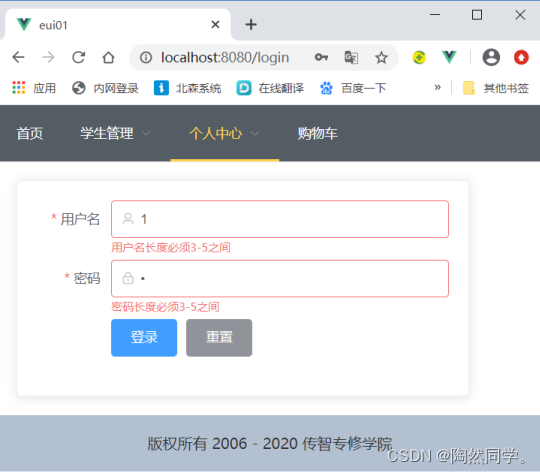
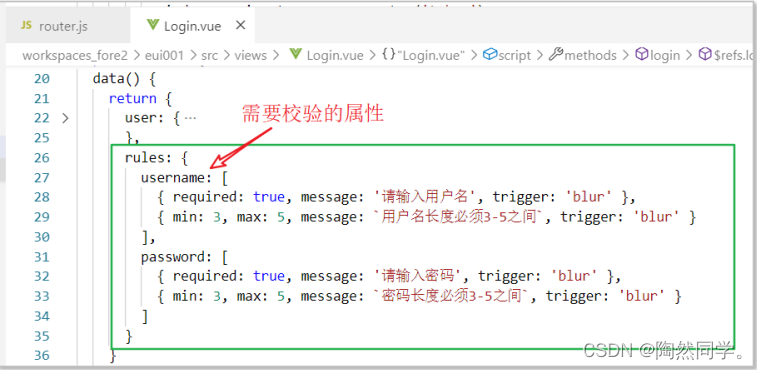
设置校验规则、确定校验属性
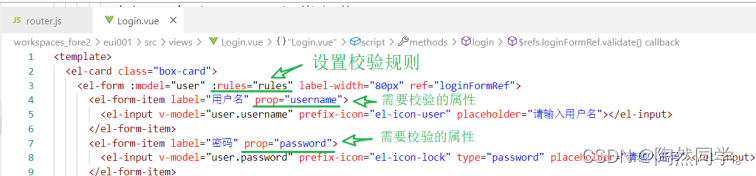
编写校验规则
- rules: {
- 校验属性: [ 规则1, 规则2, .... ]
- }
- { required: true, message: '请输入用户名', trigger: 'blur' },
- { min: 3, max: 5, message: `用户名长度必须3-5之间`, trigger: 'blur' }
提交表单时,校验
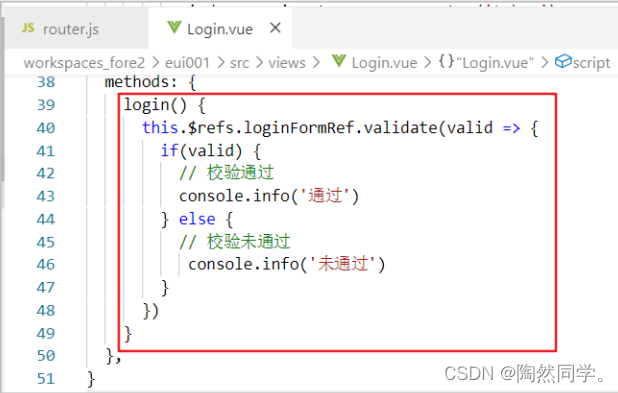
- <template>
- <el-card class="box-card">
- <el-form :model="user" :rules="rules" label-width="80px" ref="loginFormRef">
- <el-form-item label="用户名" prop="username">
- <el-input v-model="user.username" prefix-icon="el-icon-user" placeholder="请输入用户名"></el-input>
- </el-form-item>
- <el-form-item label="密码" prop="password">
- <el-input v-model="user.password" prefix-icon="el-icon-lock" type="password" placeholder="请输入密码"></el-input>
- </el-form-item>
- <el-form-item>
- <el-button type="primary" @click="login">登录</el-button>
- <el-button type="info" @click="$refs.loginFormRef.resetFields()" >重置</el-button>
- </el-form-item>
- </el-form>
- </el-card>
- </template>
-
- <script>
- export default {
- data() {
- return {
- user: {
- username: '',
- password: ''
- },
- rules: {
- username: [
- { required: true, message: '请输入用户名', trigger: 'blur' },
- { min: 3, max: 5, message: `用户名长度必须3-5之间`, trigger: 'blur' }
- ],
- password: [
- { required: true, message: '请输入密码', trigger: 'blur' },
- { min: 3, max: 5, message: `密码长度必须3-5之间`, trigger: 'blur' }
- ]
- }
- }
- },
- methods: {
- login() {
- this.$refs.loginFormRef.validate(valid => {
- if(valid) {
- // 校验通过
- console.info('通过')
- } else {
- // 校验未通过
- console.info('未通过')
- }
- })
- }
- },
- }
- </script>
-
- <style>
- .box-card {
- width: 480px;
- }
- </style>
自定义校验
- <template>
- <div>
- <h3>登录校验</h3>
- <el-card class="login-card">
- <!-- 登录表单start -->
- <el-form ref="loginForm" :model="user" :rules="rules" label-width="80px">
- <el-form-item label="用户名" prop="username">
- <el-input v-model="user.username" prefix-icon="el-icon-user" placeholder="请输入用户名" clearable></el-input>
- </el-form-item>
- <el-form-item label="密码" prop="password">
- <el-input v-model="user.password" prefix-icon="el-icon-lock" placeholder="请输入密码" show-password clearable></el-input>
- </el-form-item>
- <el-form-item label="确认密码" prop="repassword">
- <el-input v-model="user.repassword" prefix-icon="el-icon-lock" placeholder="请再次输入密码" show-password clearable></el-input>
- </el-form-item>
- <el-form-item>
- <el-button type="primary" @click="login()">登录</el-button>
- <el-button type="info">重置</el-button>
- </el-form-item>
- </el-form>
- <!-- 登录表单end -->
- </el-card>
- </div>
- </template>
-
- <script>
- export default {
- data() {
- //校验: 密码和确认密码一致
- var validatePass2 = (rule, value, callback) => {
- if (value !== this.user.password) {
- callback(new Error('两次输入密码不一致!'));
- } else {
- callback();
- }
- };
- return {
- user: {
- username: '',
- password: '',
- repassword: ''
- },
- rules: {
- username: [
- { required: true, message: '请输入用户名', trigger: 'blur' },
- { min: 3, max: 5, message: '用户名长度在 3 到 5 个字符', trigger: 'blur' }
- ],
- password: [
- { required: true, message: '请输入密码', trigger: 'blur' },
- { min: 3, max: 5, message: '密码长度在 3 到 5 个字符', trigger: 'blur' }
- ],
- repassword: [
- { required: true, message: '请再次输入密码', trigger: 'blur' },
- { validator: validatePass2, trigger: 'blur' }
- ]
- }
- }
- },
- methods: {
- login() {
- // js 对象调用有2种方式:this.user.username 或 this.user['username']
- this.$refs.loginForm.validate((valid) => {
- if (valid) {
- // 校验通过
- alert('submit!');
- } else {
- // 校验失败
- console.log('error submit!!');
- return false;
- }
- });
- }
- },
- }
- </script>
-
- <style>
- .login-card{
- width: 480px;
- }
- </style>
7.常见组件
按钮 Button
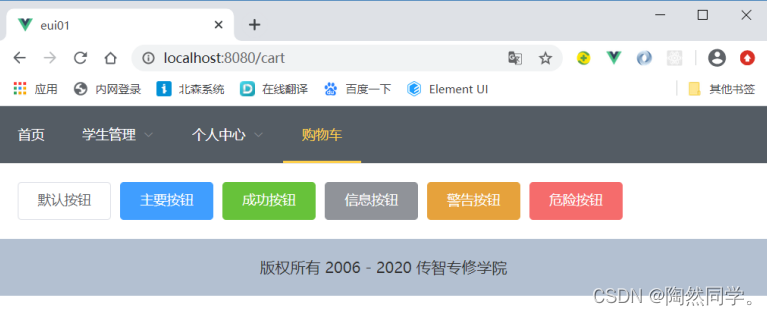
- <template>
- <div>
- <el-button>默认按钮</el-button>
- <el-button type="primary">主要按钮</el-button>
- <el-button type="success">成功按钮</el-button>
- <el-button type="info">信息按钮</el-button>
- <el-button type="warning">警告按钮</el-button>
- <el-button type="danger">危险按钮</el-button>
- </div>
- </template>
-
- <script>
- export default {
-
- }
- </script>
-
- <style>
-
- </style>
消息提示 Message
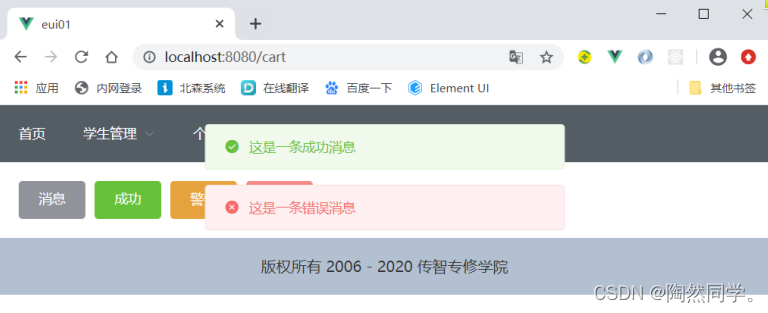
- this.$message.success('这是一条成功消息')
- this.$message.error('这是一条错误消息')
- <template>
- <div>
- <el-button type="info" @click="open1">消息</el-button>
- <el-button type="success" @click="open2">成功</el-button>
- <el-button type="warning" @click="open3">警告</el-button>
- <el-button type="danger" @click="open4">错误</el-button>
- </div>
- </template>
-
- <script>
- export default {
- methods: {
- open1() {
- this.$message.info('这是一条提示信息')
- },
- open2() {
- this.$message.success('这是一条成功消息')
- },
- open3() {
- this.$message.warning('这是一条警告消息')
- },
- open4() {
- this.$message.error('这是一条错误消息')
- },
- },
- }
- </script>
-
- <style>
-
- </style>
弹出框 MessageBox 确认消息
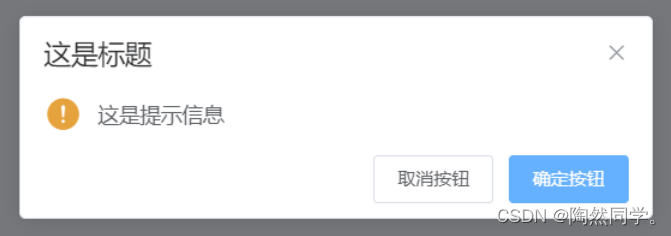
- this.$confirm('这是提示信息','这是标题',{confirmButtonText: '确定按钮',cancelButtonText: '取消按钮',type: 'warning'})
- .then(()=>{
- // 确定按钮回调
- this.$message.success('删除了')
- // ajax操作
- })
- .catch(()=>{
- // 取消按钮回调
- this.$message.error('取消了')
- })
弹出框
编写弹出层
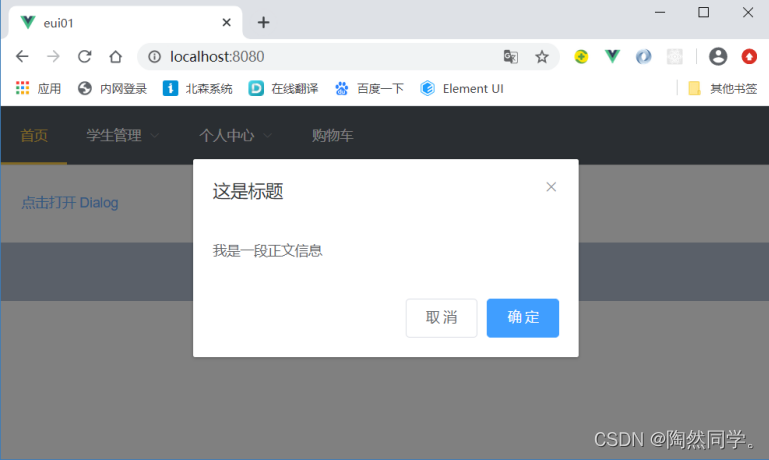
- <template>
- <div>
- <el-button type="text" @click="dialogVisible = true">点击打开 Dialog</el-button>
- <!-- 弹出层 -->
- <el-dialog title="这是标题" :visible.sync="dialogVisible" >
- 我是一段正文信息
- <!-- 操作按钮 -->
- <span slot="footer" class="dialog-footer">
- <el-button @click="dialogVisible = false">取 消</el-button>
- <el-button type="primary" @click="dialogVisible = false">确 定</el-button>
- </span>
- </el-dialog>
- </div>
- </template>
-
- <script>
- export default {
- data() {
- return {
- dialogVisible: false, //是否显示弹出层
- }
- },
- }
- </script>
-
- <style>
-
- </style>
抽屉
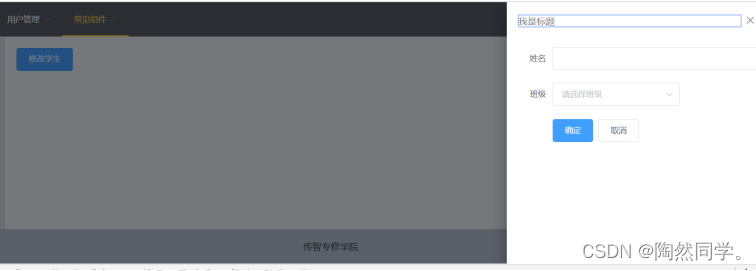
- <template>
- <div>
- <el-button type="primary" @click="drawerFormVisible = true">修改学生</el-button>
-
- <!-- 抽屉start -->
- <el-drawer
- title="我是标题"
- :visible.sync="drawerFormVisible"
- direction="rtl"
- :before-close="handleClose">
- <el-form :model="student" label-width="80px">
- <el-form-item label="姓名" >
- <el-input v-model="student.sname" autocomplete="off"></el-input>
- </el-form-item>
- <el-form-item label="班级" >
- <el-select v-model="student.cid" placeholder="请选择班级">
- <el-option label="Java12班" value="c001"></el-option>
- <el-option label="Java34班" value="c002"></el-option>
- </el-select>
- </el-form-item>
- <el-form-item>
- <el-button type="primary" @click="drawerFormVisible=false">确定</el-button>
- <el-button>取消</el-button>
- </el-form-item>
- </el-form>
- </el-drawer>
- <!-- 抽屉end -->
- </div>
- </template>
-
- <script>
- export default {
- data() {
- return {
- drawerFormVisible: false,
- student: {
-
- }
- }
- },
- methods: {
- handleClose(done) {
- this.$confirm('确认关闭?')
- .then(_ => {
- //确定按钮
- done(); //结束回调
- })
- .catch(_ => {
- //取消
- });
- }
- },
- }
- </script>
-
- <style>
- </style>
标签页
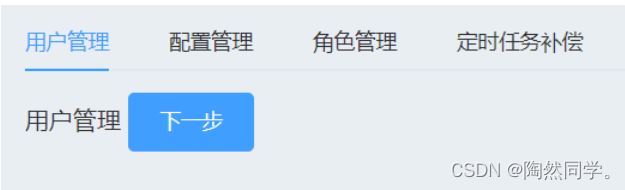
- <template>
- <div>
- <el-tabs v-model="activeName" >
- <el-tab-pane label="用户管理" name="first">
- 用户管理
- <el-button type="primary" @click="activeName = 'second'">下一步</el-button>
- </el-tab-pane>
- <el-tab-pane label="配置管理" name="second">
- 配置管理
- <el-button type="primary" @click="activeName = 'third'">下一步</el-button>
- </el-tab-pane>
- <el-tab-pane label="角色管理" name="third">
- 角色管理
- <el-button type="primary" @click="activeName = 'fourth'">下一步</el-button>
- </el-tab-pane>
- <el-tab-pane label="定时任务补偿" name="fourth">
- 定时任务补偿
- <el-button type="primary" @click="$message.success('成功了')">完成</el-button>
- </el-tab-pane>
- </el-tabs>
- </div>
- </template>
-
- <script>
- export default {
- data() {
- return {
- activeName: 'first'
- };
- }
- }
- </script>
-
- <style>
-
- </style>
8.Tree组件
表结构
- # 分类表
- CREATE TABLE t_category(
- tid VARCHAR(32) PRIMARY KEY COMMENT '分类ID',
- tname VARCHAR(50) COMMENT '分类名称',
- `status` INT DEFAULT '1' COMMENT '分类状态:0 禁用、1 启用',
- parent_id VARCHAR(32) COMMENT '父分类ID',
- priority INT COMMENT '优先级,越小,同级显示的时候越靠前',
- depth INT COMMENT '深度,从1递增'
- );
-
- INSERT INTO t_category(tid,tname,parent_id,priority,depth) VALUES('t1000','男装/运动户外', NULL ,1,1);
- INSERT INTO t_category(tid,tname,parent_id,priority,depth) VALUES('t2000','手机/数码', NULL ,2,1);
- INSERT INTO t_category(tid,tname,parent_id,priority,depth) VALUES('t3000','零食/生鲜', NULL ,3,1);
-
- #'t1000','男装/运动户外'
- INSERT INTO t_category(tid,tname,parent_id,priority,depth) VALUES('t1100','上装', 't1000' ,1,2);
- INSERT INTO t_category(tid,tname,parent_id,priority,depth) VALUES('t1200','裤子', 't1000' ,2,2);
- INSERT INTO t_category(tid,tname,parent_id,priority,depth) VALUES('t1300','流行趋势', 't1000' ,3,2);
-
- INSERT INTO t_category(tid,tname,parent_id,priority,depth) VALUES('t1110','羽绒服', 't1100' ,1,3);
- INSERT INTO t_category(tid,tname,parent_id,priority,depth) VALUES('t1120','棉衣', 't1100' ,2,3);
- INSERT INTO t_category(tid,tname,parent_id,priority,depth) VALUES('t1130','卫衣', 't1100' ,3,3);
-
- INSERT INTO t_category(tid,tname,parent_id,priority,depth) VALUES('t1210','休闲长裤', 't1200' ,1,3);
- INSERT INTO t_category(tid,tname,parent_id,priority,depth) VALUES('t1220','牛仔长裤', 't1200' ,2,3);
- INSERT INTO t_category(tid,tname,parent_id,priority,depth) VALUES('t1230','卫裤', 't1200' ,3,3);
-
- INSERT INTO t_category(tid,tname,parent_id,priority,depth) VALUES('t1310','伞兵裤', 't1300' ,1,3);
- INSERT INTO t_category(tid,tname,parent_id,priority,depth) VALUES('t1320','夜跑裤', 't1300' ,2,3);
- INSERT INTO t_category(tid,tname,parent_id,priority,depth) VALUES('t1330','冰感T恤', 't1300' ,3,3);
-
- # 't2000','手机/数码'
- INSERT INTO t_category(tid,tname,parent_id,priority,depth) VALUES('t2100','手机', 't2000' ,1,2);
- INSERT INTO t_category(tid,tname,parent_id,priority,depth) VALUES('t2200','手机配件', 't2000' ,2,2);
- INSERT INTO t_category(tid,tname,parent_id,priority,depth) VALUES('t2300','数码配件', 't2000' ,3,2);
-
- INSERT INTO t_category(tid,tname,parent_id,priority,depth) VALUES('t2110','华为手机', 't2100' ,1,3);
- INSERT INTO t_category(tid,tname,parent_id,priority,depth) VALUES('t2120','苹果手机', 't2100' ,2,3);
- INSERT INTO t_category(tid,tname,parent_id,priority,depth) VALUES('t2130','vivo手机', 't2100' ,3,3);
-
- INSERT INTO t_category(tid,tname,parent_id,priority,depth) VALUES('t2210','手机壳', 't2200' ,1,3);
- INSERT INTO t_category(tid,tname,parent_id,priority,depth) VALUES('t2220','手机耳机', 't2200' ,2,3);
- INSERT INTO t_category(tid,tname,parent_id,priority,depth) VALUES('t2230','手机支架', 't2200' ,3,3);
-
- INSERT INTO t_category(tid,tname,parent_id,priority,depth) VALUES('t2310','U盘', 't2300' ,1,3);
- INSERT INTO t_category(tid,tname,parent_id,priority,depth) VALUES('t2320','硬盘', 't2300' ,2,3);
- INSERT INTO t_category(tid,tname,parent_id,priority,depth) VALUES('t2330','电池', 't2300' ,3,3);
-
- # t2000','零食/生鲜
- INSERT INTO t_category(tid,tname,parent_id,priority,depth) VALUES('t3100','方便速食', 't3000' ,1,2);
- INSERT INTO t_category(tid,tname,parent_id,priority,depth) VALUES('t3200','零食', 't3000' ,2,2);
- INSERT INTO t_category(tid,tname,parent_id,priority,depth) VALUES('t3300','名酒', 't3000' ,3,2);
- INSERT INTO t_category(tid,tname,parent_id,priority,depth) VALUES('t3400','乳饮冰', 't3000' ,4,2);
-
- INSERT INTO t_category(tid,tname,parent_id,priority,depth) VALUES('t3110','方便面', 't3100' ,1,3);
- INSERT INTO t_category(tid,tname,parent_id,priority,depth) VALUES('t3120','火腿肠', 't3100' ,2,3);
- INSERT INTO t_category(tid,tname,parent_id,priority,depth) VALUES('t3130','甜品罐头', 't3100' ,3,3);
- INSERT INTO t_category(tid,tname,parent_id,priority,depth) VALUES('t3140','煎饼冷面', 't3100' ,4,3);
-
- INSERT INTO t_category(tid,tname,parent_id,priority,depth) VALUES('t3210','薯片', 't3200' ,1,3);
- INSERT INTO t_category(tid,tname,parent_id,priority,depth) VALUES('t3220','饼干', 't3200' ,2,3);
- INSERT INTO t_category(tid,tname,parent_id,priority,depth) VALUES('t3230','网红IP', 't3200' ,3,3);
- INSERT INTO t_category(tid,tname,parent_id,priority,depth) VALUES('t3240','海味', 't3200' ,4,3);
-
- INSERT INTO t_category(tid,tname,parent_id,priority,depth) VALUES('t3310','清爽啤酒', 't3300' ,1,3);
- INSERT INTO t_category(tid,tname,parent_id,priority,depth) VALUES('t3320','微醺红酒', 't3300' ,2,3);
- INSERT INTO t_category(tid,tname,parent_id,priority,depth) VALUES('t3330','养生黄酒', 't3300' ,3,3);
- INSERT INTO t_category(tid,tname,parent_id,priority,depth) VALUES('t3340','名优白酒', 't3300' ,4,3);
-
- INSERT INTO t_category(tid,tname,parent_id,priority,depth) VALUES('t3410','酸奶', 't3400' ,1,3);
- INSERT INTO t_category(tid,tname,parent_id,priority,depth) VALUES('t3420','纯牛奶', 't3400' ,2,3);
- INSERT INTO t_category(tid,tname,parent_id,priority,depth) VALUES('t3430','奶粉', 't3400' ,3,3);
- INSERT INTO t_category(tid,tname,parent_id,priority,depth) VALUES('t3440','奶酪', 't3400' ,4,3);
后端实现
JavaBean
- package com.czxy.entity;
-
- import com.baomidou.mybatisplus.annotation.TableField;
- import com.baomidou.mybatisplus.annotation.TableId;
- import com.baomidou.mybatisplus.annotation.TableName;
- import com.baomidou.mybatisplus.extension.activerecord.Model;
- import lombok.Data;
-
- import java.io.Serializable;
- import java.util.ArrayList;
- import java.util.List;
-
-
- @SuppressWarnings("serial")
- @TableName("t_category")
- @Data
- public class TCategory extends Model<TCategory> {
- //分类ID
- @TableId
- private String tid;
- //分类名称
- private String tname;
- //分类状态:0 禁用、1 启用
- private Integer status;
- //父分类ID
- private String parentId;
- //优先级,越小,同级显示的时候越靠前
- private Integer priority;
- //深度,从1递增
- private Integer depth;
-
- @TableField(exist = false)
- private List<TCategory> children = new ArrayList<>();
-
- }
Controller
- package com.czxy.controller;
-
-
- import com.baomidou.mybatisplus.core.conditions.query.QueryWrapper;
- import com.baomidou.mybatisplus.extension.api.ApiController;
- import com.baomidou.mybatisplus.extension.api.R;
- import com.baomidou.mybatisplus.extension.plugins.pagination.Page;
- import com.czxy.entity.TCategory;
- import com.czxy.service.TCategoryService;
- import com.czxy.vo.BaseResult;
- import org.springframework.web.bind.annotation.*;
-
- import javax.annotation.Resource;
- import java.io.Serializable;
- import java.util.ArrayList;
- import java.util.HashMap;
- import java.util.List;
- import java.util.Map;
-
-
- @RestController
- @RequestMapping("tCategory")
- public class TCategoryController extends ApiController {
- /**
- * 服务对象
- */
- @Resource
- private TCategoryService tCategoryService;
-
- @GetMapping
- public BaseResult<List<TCategory>> findAll() {
- // 1 查询所有,并按照parent_id排序
- QueryWrapper<TCategory> queryWrapper = new QueryWrapper<>();
- queryWrapper.orderByAsc("parent_id");
- List<TCategory> list = tCategoryService.list(queryWrapper);
-
- // 2 处理数据 父子关系
- List<TCategory> resultList = new ArrayList<>();
- Map<String,TCategory> cacheMap = new HashMap<>();
-
- list.forEach( tCategory -> {
- // 3.1 获得父分类
- TCategory parentCategory = cacheMap.get(tCategory.getParentId());
- // 3.2 如果没有父添加到resultList中,如果有父追加父内部
- if(parentCategory == null) {
- resultList.add(tCategory);
- } else {
- parentCategory.getChildren().add(tCategory);
- }
-
- // 3.3 缓存自己
- cacheMap.put(tCategory.getTid() , tCategory);
-
- });
-
- return BaseResult.ok("查询成功",resultList);
- }
-
-
- }
前端基本实现
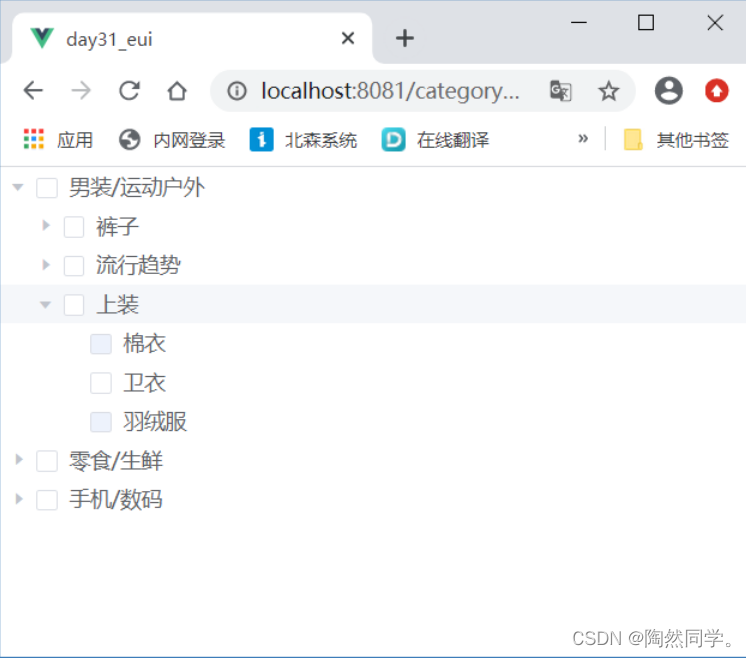
- <template>
- <div>
- <el-tree
- :data="categoryList"
- :props="defaultProps"
- show-checkbox
- @check-change="handleCheckChange">
- </el-tree>
- </div>
- </template>
-
- <script>
- export default {
- data() {
- return {
- categoryList: [],
- defaultProps: {
- children: 'children',
- label: 'tname',
- disabled: (data,node) => {
- return data.status == 0
- }
- }
- }
- },
- methods: {
- async findAllCategory() {
- let { data } = await this.$http.get('http://localhost:7777/tCategory')
- this.categoryList = data.data
- },
- handleCheckChange( data, checked, indeterminate ) {
- console.log(data, checked, indeterminate);
- }
- },
- mounted() {
- this.findAllCategory()
- },
- }
- </script>
-
- <style>
-
- </style>
修改状态
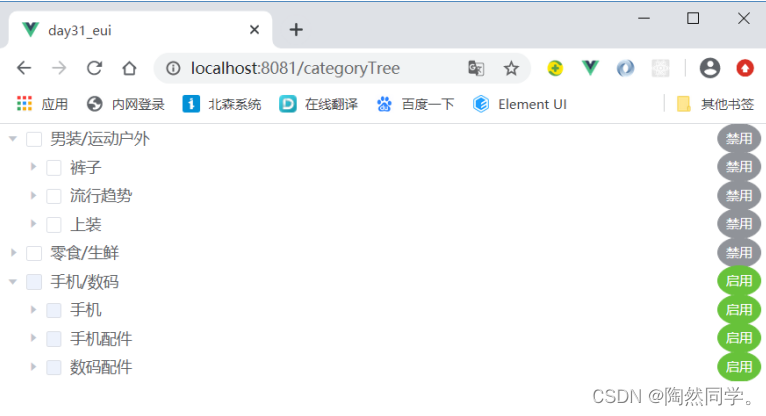
后端实现
- @PutMapping("/change")
- public BaseResult changeStatue(@RequestBody TCategory tCategory) {
- try {
- //1 查询
- TCategory findCategory = tCategoryService.getById(tCategory.getTid());
- Integer currentStatus = findCategory.getStatus();
- //2 需要修改成的状态
- Integer status = currentStatus == 1 ? 0 : 1;
-
- //3.1 修改当前
- Queue<TCategory> queue = new LinkedList<>();
- queue.add(findCategory);
-
- //3.2 遍历队列
- while(!queue.isEmpty()) {
- // 1) 获得队首
- TCategory currentCategory = queue.poll();
- // 2) 修改状态
- currentCategory.setStatus(status);
- tCategoryService.updateById(currentCategory);
-
- // 3) 获得所有的子节点
- QueryWrapper<TCategory> queryWrapper = new QueryWrapper<>();
- queryWrapper.eq("parent_id", currentCategory.getTid());
- List<TCategory> list = tCategoryService.list(queryWrapper);
- queue.addAll(list);
- }
-
- //4 成功
- return BaseResult.ok("修改成功");
- } catch (Exception e) {
- e.printStackTrace();
- return BaseResult.error(e.getMessage());
- }
- }
前端实现
- <template>
- <div>
- <el-tree
- :data="categoryList"
- :props="defaultProps"
- show-checkbox
- :expand-on-click-node="false"
- node-key="tid"
- :default-expanded-keys="expandedArr"
- @check-change="handleCheckChange">
- <span class="custom-tree-node" slot-scope="{ node, data }">
- <span>{{ node.label }}</span>
- <span>
- <el-button type="info" circle v-if="data.status == 1" size="mini" @click="() => changeCategoryStatus(data)">禁用</el-button>
- <el-button type="success" circle v-if="data.status == 0" size="mini" @click="() => changeCategoryStatus(data)">启用</el-button>
- </span>
- </span>
- </el-tree>
- </div>
- </template>
-
- <script>
- export default {
- data() {
- return {
- categoryList: [],
- defaultProps: {
- id: 'tid',
- children: 'children',
- label: 'tname',
- disabled: (data,node) => {
- return data.status == 0
- }
- },
- expandedArr: []
- }
- },
- methods: {
- async findAllCategory() {
- let { data } = await this.$http.get('http://localhost:7777/tCategory')
- this.categoryList = data.data
- },
- handleCheckChange( data, checked, indeterminate ) {
- console.log(data, checked, indeterminate);
- },
- async changeCategoryStatus( nodeData ) {
- let { data } = await this.$http.put(`http://localhost:7777/tCategory/change`, nodeData)
- if(data.code == 1){
- this.$message.success(data.message)
- this.findAllCategory()
- //设置展开内容
- this.expandedArr = []
- this.expandedArr.push(nodeData.tid)
- } else {
- this.$message.error(data.message)
- }
- }
- },
- mounted() {
- this.findAllCategory()
- },
- }
- </script>
-
- <style>
- .custom-tree-node {
- flex: 1;
- display: flex;
- align-items: center;
- justify-content: space-between;
- font-size: 14px;
- padding-right: 8px;
- }
- </style>
9.综合案例
弹出层回显学生信息
综合案例:点击学生“修改”按钮,显示弹出层
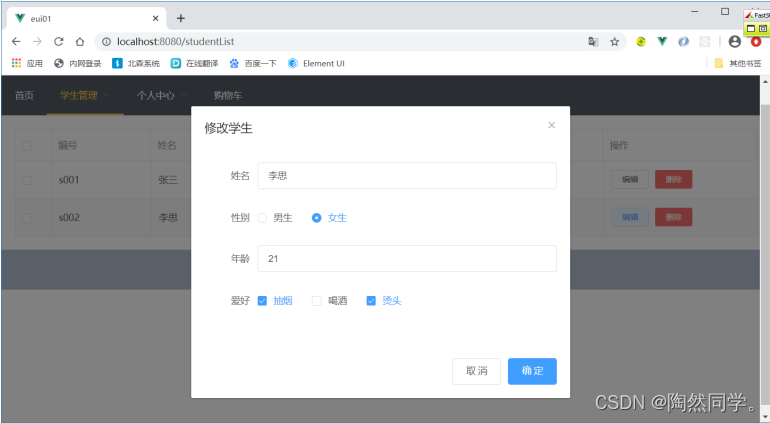
弹出层中编写表单
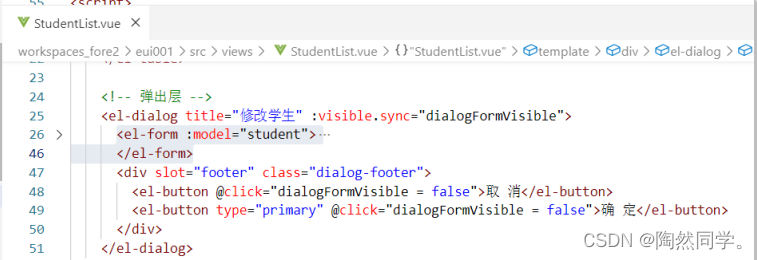
编写修改函数
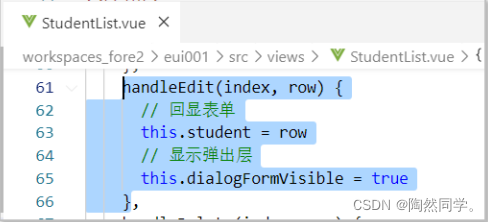
- <template>
- <div>
- <!-- 列表 -->
- <el-table :data="studentList" stripe border @selection-change="handleSelectionChange">
- <el-table-column type="selection" width="55"></el-table-column>
- <el-table-column prop="sid" label="编号" width="150"></el-table-column>
- <el-table-column prop="sname" label="姓名" width="150"></el-table-column>
- <el-table-column prop="gender" label="性别" width="150"></el-table-column>
- <el-table-column prop="age" label="年龄" width="150"></el-table-column>
- <el-table-column label="爱好" >
- <template slot-scope="scope">
- <el-tag type="warning" v-for="(hobby,index) in scope.row.hobbies" :key="index">{{hobby}}</el-tag>
- </template>
-
- </el-table-column>
- <el-table-column label="操作">
- <template slot-scope="scope">
- <el-button size="mini" @click="handleEdit(scope.$index, scope.row)">编辑</el-button>
- <el-button size="mini" type="danger" @click="handleDelete(scope.$index, scope.row)">删除</el-button>
- </template>
- </el-table-column>
- </el-table>
-
- <!-- 弹出层 -->
- <el-dialog title="修改学生" :visible.sync="dialogFormVisible">
- <el-form :model="student">
- <el-form-item label="姓名" label-width="80px">
- <el-input v-model="student.sname" ></el-input>
- </el-form-item>
- <el-form-item label="性别" label-width="80px">
- <el-radio-group v-model="student.gender">
- <el-radio label="男">男生</el-radio>
- <el-radio label="女">女生</el-radio>
- </el-radio-group>
- </el-form-item>
- <el-form-item label="年龄" label-width="80px">
- <el-input v-model="student.age" ></el-input>
- </el-form-item>
- <el-form-item label="爱好" label-width="80px">
- <el-checkbox-group v-model="student.hobbies">
- <el-checkbox label="抽烟" name="type"></el-checkbox>
- <el-checkbox label="喝酒" name="type"></el-checkbox>
- <el-checkbox label="烫头" name="type"></el-checkbox>
- </el-checkbox-group>
- </el-form-item>
- </el-form>
- <div slot="footer" class="dialog-footer">
- <el-button @click="dialogFormVisible = false">取 消</el-button>
- <el-button type="primary" @click="dialogFormVisible = false">确 定</el-button>
- </div>
- </el-dialog>
- </div>
- </template>
-
- <script>
- export default {
- methods: {
- handleSelectionChange(val) {
- this.multipleSelection = val; //保存选中的数据
- },
- handleEdit(index, row) {
- // 回显表单
- this.student = row
- // 显示弹出层
- this.dialogFormVisible = true
- },
- handleDelete(index, row) {
- console.log(index, row);
- }
- },
- data () {
- return {
- dialogFormVisible: false, // 表单弹出层是否显示
- multipleSelection: [], //多选,选中的数据
- studentList: [
- {
- sid: 's001',
- sname: '张三',
- gender: '男',
- age: 18,
- hobbies: ['抽烟','喝酒','烫头']
- },
- {
- sid: 's002',
- sname: '李思',
- gender: '女',
- age: 21,
- hobbies: ['抽烟','烫头']
- }
- ],
- student: {
-
- }
- }
- }
- }
- </script>
-
- <style>
- .el-tag + .el-tag {
- margin-left: 10px;
- }
- </style>
10.轮播图
轮播图
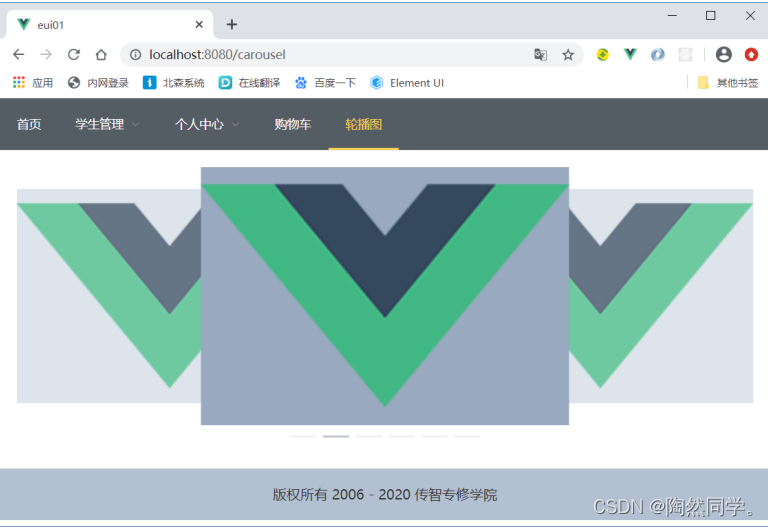
- <template>
- <div>
- <el-carousel :interval="4000" type="card" height="300px">
- <el-carousel-item v-for="item in 6" :key="item">
- <img src="@/assets/logo.png" alt="">
- </el-carousel-item>
- </el-carousel>
- </div>
- </template>
-
- <script>
- export default {
-
- }
- </script>
-
- <style>
- .el-carousel__item img {
- width: 100%;
- height: 100%;
- }
-
- .el-carousel__item:nth-child(2n) {
- background-color: #99a9bf;
- }
-
- .el-carousel__item:nth-child(2n+1) {
- background-color: #d3dce6;
- }
- </style>
切换多张图片
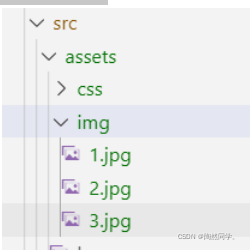
- <template>
- <div>
- <el-carousel :interval="1000" type="card" height="400px">
- <el-carousel-item v-for="item in 3" :key="item">
- <!-- <img src="@/assets/logo.png" alt="我是提示信息"> -->
- <!-- <img src="@/assets/img/1.jpg" alt="我是提示信息"> -->
- <img :src="require(`@/assets/img/${item}.jpg`)" alt="我是提示信息">
- </el-carousel-item>
- </el-carousel>
- </div>
- </template>
-
- <script>
- export default {
-
- }
- </script>
-
- <style>
- .el-carousel__item img {
- width: 100%;
- height: 100%;
- }
-
- /* 偶数的背景颜色 */
- .el-carousel__item:nth-child(2n) {
- background-color: #99a9bf;
- }
-
- /* 奇数的背景颜色 */
- .el-carousel__item:nth-child(2n+1) {
- background-color: #d3dce6;
- }
- </style>
复杂下拉列表
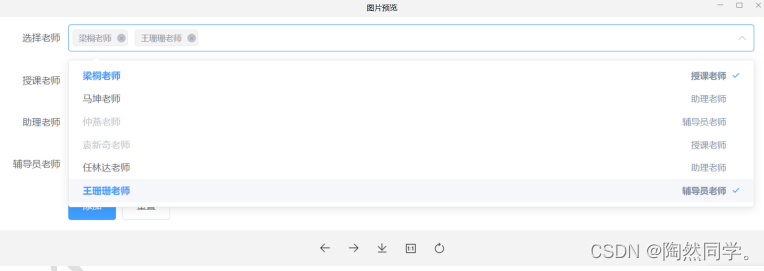
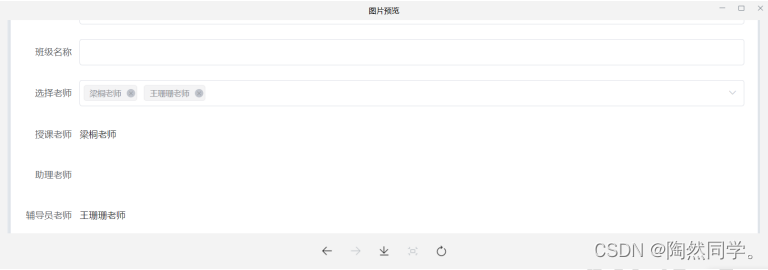 完整代码
完整代码
- <template>
- <div>
- <el-form ref="form" :model="classes" label-width="80px">
- <el-form-item label="选择老师">
- <el-select v-model="classes.teacherIds" @change="changeTeacher" multiple placeholder="请选择老师">
- <el-option
- v-for="(teacher,index) in teacherList" :key="index"
- :label="teacher.tname"
- :value="teacher.id"
- :disabled="teacher.disabled"
-
- >
- <span style="float: left">{{ teacher.tname }}</span>
- <span style="float: right;">{{ teacher.typeText }}</span>
- </el-option>
- </el-select>
- </el-form-item>
- </el-form>
-
- {{classes}}
- </div>
- </template>
-
- <script>
- export default {
- data() {
- return {
- classes: {
- teacherIds: []
- },
- teacherList: [
- {
- id: 't001',
- tname: '梁桐老师',
- type: '1',
- typeText: '授课老师',
- disabled: false
- },
- {
- id: 't002',
- tname: '马坤老师',
- type: '2',
- typeText: '助理老师',
- disabled: false
- },
- {
- id: 't003',
- tname: '仲燕老师',
- type: '3',
- typeText: '辅导员老师',
- disabled: false
- },
- {
- id: 't004',
- tname: '韩小娇老师',
- type: '1',
- typeText: '授课老师',
- disabled: false
- },
- {
- id: 't005',
- tname: '董洪超老师',
- type: '2',
- typeText: '助理老师',
- disabled: false
- },
- {
- id: 't006',
- tname: '韩新园老师',
- type: '3',
- typeText: '辅导员老师',
- disabled: false
- },
-
- ]
- }
- },
- methods: {
- changeTeacher(selectIds) { // 选中的老师id
- // 1 获得选中老师对应的类型
- let selectType = this.teacherList.map(teacher => {
- if(selectIds.includes(teacher.id)) {
- return teacher.type
- }
- });
-
- // 2 处理数据:相同类型,不是选中老师,的其他老师禁用
- this.teacherList.forEach(teacher => {
- if(selectType.includes(teacher.type) && !selectIds.includes(teacher.id)) {
- // 禁用
- teacher.disabled = true
- } else {
- // 启用
- teacher.disabled = false
- }
- })
- }
- },
- }
- </script>
-
- <style>
-
- </style>