
热门标签
热门文章
- 1案例33:基于Springboot名城小区物业管理系统开题报告设计_基于springboot智慧物业开题
- 2Mac M1/M2/M3 芯片环境配置以及常用软件安装-前端_mac m3芯片电脑安装citrix workplace
- 3QueryWrapper基本查询方法及or语句拼接_querywrapper或怎么拼接
- 4Git:Commit Message 规范和代码格式校验_allowbreakingchanges
- 5数据库原理实验三:使用SQL语言进行简单查询_在student、sc、course表输出软件工程系学生的学号、姓名、系别、课程名及成
- 6jetson nano 配置yolov5_jsetonn nano miniconda
- 7ipa签名工具(IPA Resign Tool)在windows和macos系统下对苹果ipa文件一键重签名
- 8Git快速入门(图文教程)_git 快速入门
- 9STM32之NB-IoT学习(一)——NB-IoT介绍_物联网lot学习
- 10[独有源码]springboot学生选课管理系统设计与实现9mm7k借鉴他人经验,找到适合自己的毕业设计
当前位置: article > 正文
vue2 + vue-element-admin动态路由权限详细教程_vue-element-admin动态路由 权限控制
作者:数据科学创新者 | 2024-02-04 14:04:13
赞
踩
vue-element-admin动态路由 权限控制
vue-element-admin动态路由(权限路由)
前言
如果有参考过本文的同学和粉丝请看第七步最新修改。修改了之前第五步中permission.js的代码,去掉了第七步中的代码。vue-element-admin权限路由,本人测试切换页面正常、刷新正常(不会404、不会空白页)、修改权限(store/user.js)下的roles正常回显。
一、router/index.js下路由定义
代码如下(示例):
/**
 * constantRoutes
 * 没有权限要求的基础页面
 * 所有角色都可访问,一半都是登录或者404页面
 */
export const constantRoutes = [
    {
        path: '/login',
        component: () => import('@/views/login/index'),
        hidden: true
    },
    {
        path: '/404',
        component: () => import('@/views/404'),
        hidden: true
    }
]

- 1
- 2
- 3
- 4
- 5
- 6
- 7
- 8
- 9
- 10
- 11
- 12
- 13
- 14
- 15
- 16
- 17
二.定义权限路由
代码如下(示例):
/**
 * constantRoutes
 * 用于权限动态生成的页面都在这里定义
 */
export const asyncRoutes = [
    {
        path: '/example',
        component: Layout,
        redirect: '/example/table',
        name: 'Example',
        meta: { title: 'Example', icon: 'el-icon-s-help' },
        alwaysShow: true, // 此参数用于带children的路由,如果只有一个子集是否为第一级
        children: [
            {
                path: 'table',
                name: 'Table',
                component: () => import('@/views/table/index'),
                meta: {
                    title: 'Table',
                    icon: 'table'
                }
            },
            {
                path: 'tree',
                name: 'Tree',
                component: () => import('@/views/tree/index'),
                meta: {
                    title: 'Tree',
                    icon: 'tree'
                }
            }
        ]
    },
    {
        path: '/form',
        component: Layout,
        children: [
            {
                path: 'index',
                name: 'Form',
                component: () => import('@/views/form/index'),
                meta: {
                    title: 'Form',
                    icon: 'form'
                }
            }
        ]
    },
    {
        path: '/nested',
        component: Layout,
        redirect: '/nested/menu1',
        name: 'Nested',
        alwaysShow: true,
        meta: {
            title: 'Nested',
            icon: 'nested'
        },
        children: [
            {
                path: 'menu1',
                component: () => import('@/views/nested/menu1/index'), // Parent router-view
                name: 'Menu1',
                meta: { title: 'Menu1' },
                alwaysShow: true,
                children: [
                    {
                        path: 'menu1-1',
                        component: () => import('@/views/nested/menu1/menu1-1'),
                        name: 'Menu1-1',
                        meta: { title: 'Menu1-1' }
                    },
                    {
                        path: 'menu1-2',
                        component: () => import('@/views/nested/menu1/menu1-2'),
                        name: 'Menu1-2',
                        meta: { title: 'Menu1-2' },
                        alwaysShow: true,
                        children: [
                            {
                                path: 'menu1-2-1',
                                component: () => import('@/views/nested/menu1/menu1-2/menu1-2-1'),
                                name: 'Menu1-2-1',
                                meta: { title: 'Menu1-2-1'}
                            },
                            {
                                path: 'menu1-2-2',
                                component: () => import('@/views/nested/menu1/menu1-2/menu1-2-2'),
                                name: 'Menu1-2-2',
                                meta: { title: 'Menu1-2-2' }
                            }
                        ]
                    },
                    {
                        path: 'menu1-3',
                        component: () => import('@/views/nested/menu1/menu1-3'),
                        name: 'Menu1-3',
                        meta: { title: 'Menu1-3' }
                    }
                ]
            },
            {
                path: 'menu2',
                component: () => import('@/views/nested/menu2/index'),
                name: 'Menu2',
                meta: { title: 'menu2' }
            }
        ]
    },
    {
        path: 'external-link',
        component: Layout,
        children: [
            {
                path: 'https://panjiachen.github.io/vue-element-admin-site/#/',
                meta: { title: 'External Link', icon: 'link' }
            }
        ]
    },
    {
        path: '/',
        component: Layout,
        redirect: '/dashboard',
        children: [{
        path: 'dashboard',
        name: 'Dashboard',
        component: () => import('@/views/dashboard/index'),
        meta: {
            title: 'Dashboard',
            icon: 'dashboard'
        }
        }]
    },
    // 404 page must be placed at the end !!!
    { path: '*', redirect: '/404', hidden: true }
]
- 1
- 2
- 3
- 4
- 5
- 6
- 7
- 8
- 9
- 10
- 11
- 12
- 13
- 14
- 15
- 16
- 17
- 18
- 19
- 20
- 21
- 22
- 23
- 24
- 25
- 26
- 27
- 28
- 29
- 30
- 31
- 32
- 33
- 34
- 35
- 36
- 37
- 38
- 39
- 40
- 41
- 42
- 43
- 44
- 45
- 46
- 47
- 48
- 49
- 50
- 51
- 52
- 53
- 54
- 55
- 56
- 57
- 58
- 59
- 60
- 61
- 62
- 63
- 64
- 65
- 66
- 67
- 68
- 69
- 70
- 71
- 72
- 73
- 74
- 75
- 76
- 77
- 78
- 79
- 80
- 81
- 82
- 83
- 84
- 85
- 86
- 87
- 88
- 89
- 90
- 91
- 92
- 93
- 94
- 95
- 96
- 97
- 98
- 99
- 100
- 101
- 102
- 103
- 104
- 105
- 106
- 107
- 108
- 109
- 110
- 111
- 112
- 113
- 114
- 115
- 116
- 117
- 118
- 119
- 120
- 121
- 122
- 123
- 124
- 125
- 126
- 127
- 128
- 129
- 130
- 131
- 132
- 133
- 134
- 135
- 136
至此我们的路由定义完毕
三.在store/modules下面创建permission.js,并在store/index.js中引入
提示:用于根据权限处理路由:
代码如下(示例):
/**
 * 权限生成路由模块
 */
import {asyncRoutes, constantRoutes} from "@/router/index";
/**
 * 判断路由路径是否相等
 * @param asyncRouterItem
 * @param userRouteItem
 */
function hasPath(asyncRouterItem, userRouteItem) {
    return asyncRouterItem.path === userRouteItem.path;
}

/**
 * 通过循环递归出符合用户权限的路由表
 * @param asyncRouterList
 * @param userRouterList
 * @returns {*[]}
 */
export function recursiveAsyncRoutes(asyncRouterList, userRouterList) {
let res = [];
asyncRouterList.forEach(route => {
    const tmp = {...route};
    if (tmp.path === '*' && !tmp.hasOwnProperty('children')) {
        // 这一步主要是为了添加404路由
        res.push(tmp)
    } else {
        userRouterList.forEach(uRoute => {
            if (hasPath(tmp, uRoute)) {
                if (tmp.children && uRoute.children) {
                    tmp.children = recursiveAsyncRoutes(tmp.children, uRoute.children)
                }
                res.push(tmp)
            }
        })
    }
})
    return res;
}
/**
 * 数据
 * @type {{routes: Array, addRoutes: Array}}
 */
const state = {
    hasUserRouter: false,
    routes: [],
    addRoutes: []
}
const mutations = {
    /**
     * 设置路由表
     * @param state 数据
     * @param routes 路由
     * @constructor
     */
    SET_ROUTES: (state, routes) => {
        state.addRoutes = routes
        state.routes = constantRoutes.concat(routes)
    },
    /**
     * 设置路由状态
     * @param state
     * @param states
     * @constructor
     */
    SET_ROUTER_STATE: (state, states) => {
        state.hasUserRouter = states;
    }
}
const actions = {
    /**
     * 根据用户路由权限递归路由表
     * @param commit
     * @param userRouterList 用户路由权限表
     * @returns {Promise}
     */
    recursiveRouter({commit}, userRouterList) {
        return new Promise(resolve => {
            let accessedRoutes = recursiveAsyncRoutes(asyncRoutes, userRouterList);
            commit('SET_ROUTES', accessedRoutes)
            commit('SET_ROUTER_STATE', true)
            resolve(accessedRoutes)
        })
    },
    removeRouterState({commit}) {
        commit('SET_ROUTER_STATE', false);
    }
}

export default {
    namespaced: true,
    state,
    mutations,
    actions
}
- 1
- 2
- 3
- 4
- 5
- 6
- 7
- 8
- 9
- 10
- 11
- 12
- 13
- 14
- 15
- 16
- 17
- 18
- 19
- 20
- 21
- 22
- 23
- 24
- 25
- 26
- 27
- 28
- 29
- 30
- 31
- 32
- 33
- 34
- 35
- 36
- 37
- 38
- 39
- 40
- 41
- 42
- 43
- 44
- 45
- 46
- 47
- 48
- 49
- 50
- 51
- 52
- 53
- 54
- 55
- 56
- 57
- 58
- 59
- 60
- 61
- 62
- 63
- 64
- 65
- 66
- 67
- 68
- 69
- 70
- 71
- 72
- 73
- 74
- 75
- 76
- 77
- 78
- 79
- 80
- 81
- 82
- 83
- 84
- 85
- 86
- 87
- 88
- 89
- 90
- 91
- 92
- 93
- 94
- 95
import Vue from 'vue'
import Vuex from 'vuex'
import getters from './getters'
import app from './modules/app'
import settings from './modules/settings'
import user from './modules/user'
//在store/index.js中引入
import permission from './modules/permission'

Vue.use(Vuex)

const store = new Vuex.Store({
    modules: {
        app,
        settings,
        user,
        permission
    },
    getters
})

export default store
- 1
- 2
- 3
- 4
- 5
- 6
- 7
- 8
- 9
- 10
- 11
- 12
- 13
- 14
- 15
- 16
- 17
- 18
- 19
- 20
- 21
- 22
四.找到store/modules下的user.js新增如下方法
代码如下(示例):
- state中新增字段roles,用于存放获取的权限列表
const getDefaultState = () => {
  return {
    token: getToken(),
    name: '',
    avatar: '',
    roles: [],
  }
}
- 1
- 2
- 3
- 4
- 5
- 6
- 7
- 8
- mutations中新增方法SET_MENUS,用于修改state中menus变量
const mutations = {
    RESET_STATE: (state) => {
        Object.assign(state, getDefaultState())
    },
    SET_TOKEN: (state, token) => {
        state.token = token
    },
    SET_NAME: (state, name) => {
        state.name = name
    },
    SET_AVATAR: (state, avatar) => {
        state.avatar = avatar
    },
    // 更新state
    SET_ROLES: (state,roles) => {
        state.roles= roles
    }
}
- 1
- 2
- 3
- 4
- 5
- 6
- 7
- 8
- 9
- 10
- 11
- 12
- 13
- 14
- 15
- 16
- 17
- 18
3.actions中新增getRoles方法,用于接口请求获取权限列表
// 获取权限列表
getRoles({commit, state}){
    return new Promise((resolve, reject)=>{
        // 请求权限列表,这里模拟请求已获取到的权限列表,跟路由表中的path一一对应,(需要树状数据!!!)
        const roles = [
            {
                path: '/example',
                children: [
                    { path: 'table', },
                    { path: 'tree', }
                ]
            },
            {
                path: '/form',
                children: [
                    { path: 'index', }
                ]
            },
            {
                path: '/nested',
                children: [
                    {
                        path: 'menu1',
                        children: [
                            { path: 'menu1-1' },
                            { path: 'menu1-2',
                                children: [
                                    { path: 'menu1-2-1' },
                                    { path: 'menu1-2-2' }
                                ]
                            },
                            { path: 'menu1-3' }
                        ]
                    },
                    { path: 'menu2' }
                ]
            },
            { path: 'external-link' },
            { path: '/' },
        ]
        // 这里我写了两个用于模拟不同用户权限列表
        // const roles = [{
        //     path: '/example',
        //     children: [{
        //         path: 'table',
        //     },
        //     {
        //         path: 'tree',
        //     }]
        // },
        // {
        //     path: '/form',
        //     children: [{
        //         path: 'index',
        //     }]
        // },{
        //      path: '/'
        // }]
        commit('SET_ROLES', roles)
        resolve(roles)
    })
},
- 1
- 2
- 3
- 4
- 5
- 6
- 7
- 8
- 9
- 10
- 11
- 12
- 13
- 14
- 15
- 16
- 17
- 18
- 19
- 20
- 21
- 22
- 23
- 24
- 25
- 26
- 27
- 28
- 29
- 30
- 31
- 32
- 33
- 34
- 35
- 36
- 37
- 38
- 39
- 40
- 41
- 42
- 43
- 44
- 45
- 46
- 47
- 48
- 49
- 50
- 51
- 52
- 53
- 54
- 55
- 56
- 57
- 58
- 59
- 60
- 61
- 62
五.找到src下面的permission.js文件修改try中的代码,如下
代码如下(示例):
if (to.path === '/login') {
    // if is logged in, redirect to the home page
    next({ path: '/' })
    NProgress.done()
} else {
    const hasGetUserInfo = store.getters.name
    if (hasGetUserInfo) {
        next()
    } else {
        try {
            // get user Roles
            if (store.getters.roles.length === 0) { // 判断当前用户是否已拉取完Roles信息
                 store.dispatch('user/getRoles').then(res => { // 拉取Roles
                     store.dispatch('permission/recursiveRouter', res).then(() => { // 生成可访问的路由表
                         router.addRoutes(store.getters.addRouters) // 动态添加可访问路由表
                         next({
                             ...to,
                             replace: true
                         }) // hack方法 确保addRoutes已完成 ,set the replace: true so the navigation will not leave a history record
                     })
                 }).catch(err => {
                     console.log(err);
                 });
             } else {
                 next() // hack方法 确保addRoutes已完成 ,set the replace: true so the navigation will not leave a history record
             }
        } catch (error) {
            // 如果出现异常 把token清空 roles清空 cookie清空
            await store.dispatch('user/resetToken')
            // 打印错误
            Message.error(error || 'Has Error')
            // 重定向到login 并带上上次访问的路由
            next(`/login?redirect=${to.path}`)
            NProgress.done()
        }
    }
}
- 1
- 2
- 3
- 4
- 5
- 6
- 7
- 8
- 9
- 10
- 11
- 12
- 13
- 14
- 15
- 16
- 17
- 18
- 19
- 20
- 21
- 22
- 23
- 24
- 25
- 26
- 27
- 28
- 29
- 30
- 31
- 32
- 33
- 34
- 35
- 36
- 37
六、找到src/layout/components/Sidebar下的index.vue修改routes属性
代码如下(示例):
routes() {
    return this.$store.state.permission.routes
},
- 1
- 2
- 3
七、本文修改内容(注意:仅供之前参考过本文的同学和粉丝参考!!!)
1、修改了之前博客的第五步
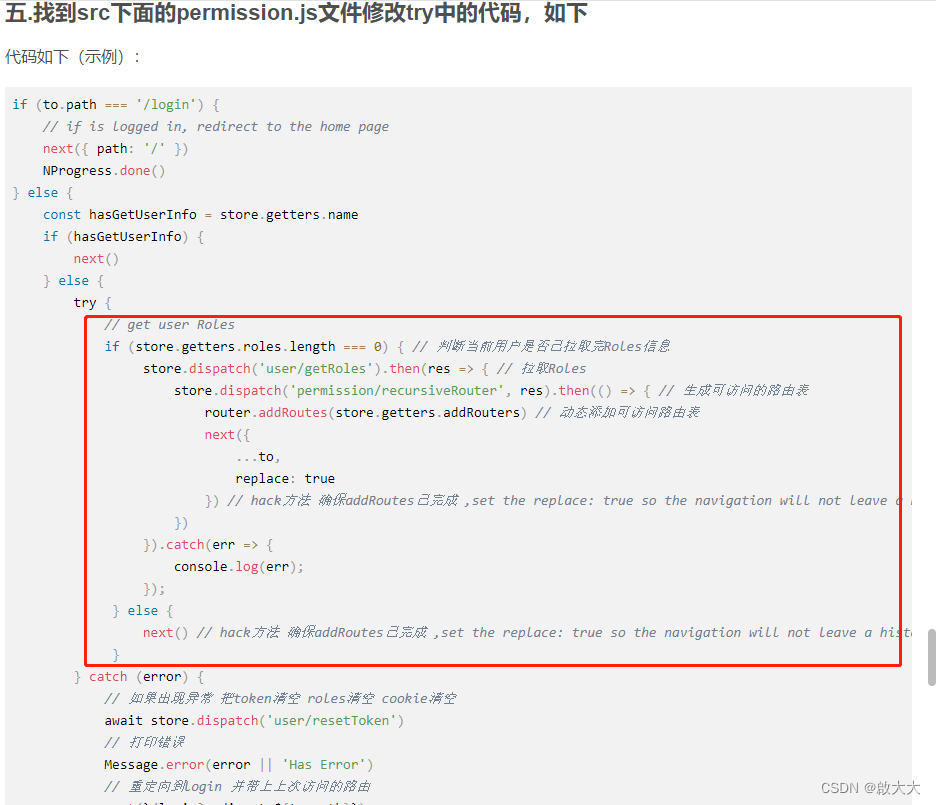
2、去掉了之前博客的第七步
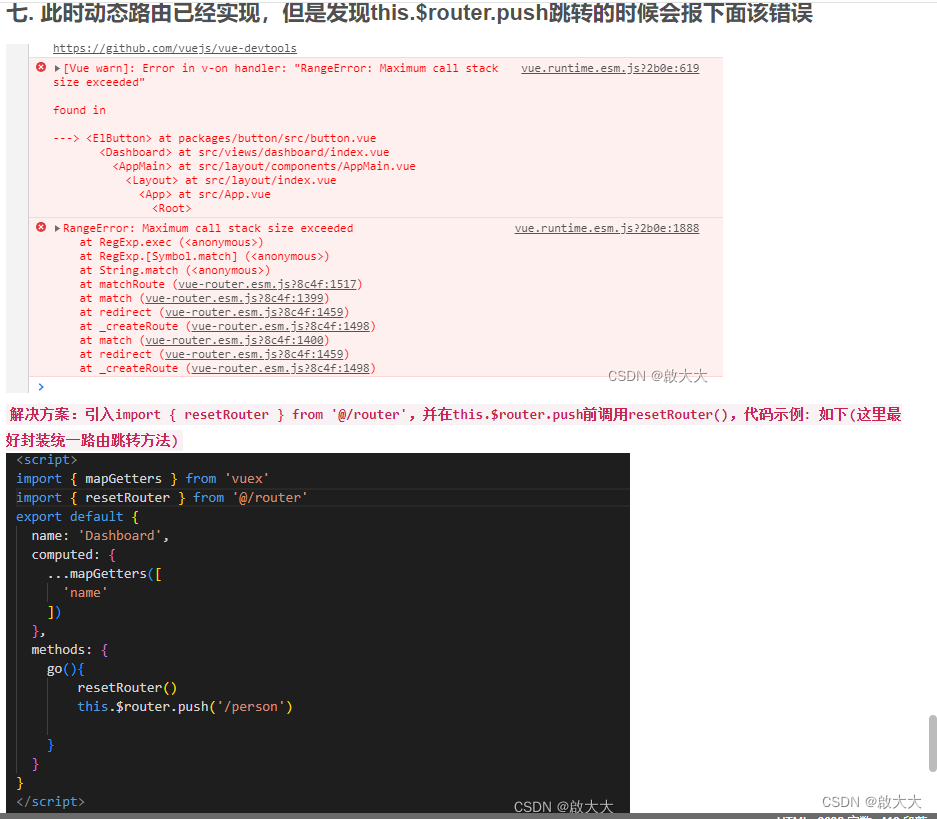
总结
至此vue2 + vue-element-admin动态路由权限完美实现!
本文为本人原创,转载请注明出处!!! 如果本文对你有帮助,请点个赞再走吧!
声明:本文内容由网友自发贡献,不代表【wpsshop博客】立场,版权归原作者所有,本站不承担相应法律责任。如您发现有侵权的内容,请联系我们。转载请注明出处:https://www.wpsshop.cn/article/detail/58921
推荐阅读


相关标签

