
热门标签
热门文章
- 1uniapp打包安卓app,获取app的权限数据,并弹窗提示设置app权限_uniapp 权限提示框上的内容安卓
- 2muduo库base源码分析二 (原子性操作AtomicIntegerT类封装)_#if !defined(ndebug) && !defined(google_protobuf_n
- 3Python对中国电信消费者特征预测:随机森林、朴素贝叶斯、神经网络、最近邻分类、逻辑回归、支持向量回归(SVR)...
- 4Fontawesome字体使用说明及其常用效果语法
- 5常见凭证获取方法_kiwi获取密码
- 6玩转k8s:yaml介绍
- 7什么是AB实验?能解决什么问题?终于有人讲明白了
- 8selenium之qq邮箱登录-发邮件_selenium登录qq邮箱
- 9Leetcode刷题 - task2 - 字符串与字符串匹配(5 天)_任意给定一个模式字符串pattern,和一个字符串str,返回str中被pattern匹配的部分,
- 102023年十篇具有影响力的人工智能研究论文
当前位置: article > 正文
02---vue+element+admin将本地路由修改为权限路由_vue3 静态路由 权限
作者:编程变革者 | 2024-02-04 13:54:06
赞
踩
vue3 静态路由 权限
1.修改路由导航守卫,判断何时获取路由数据,并处理获取数据的js,阻止通过网址想直接进入后台进行权限管理
路由导航守卫文件在scr/permission.js中,下面是修改好之后的代码
- import router from './router'
- import store from './store'
- import { Message } from 'element-ui'
- import NProgress from 'nprogress' // progress bar
- import 'nprogress/nprogress.css' // progress bar style
- import { getToken, getNickName } from '@/utils/auth' // get token from cookie
- import { resetRouter } from '@/router'
-
-
-
- import getPageTitle from '@/utils/get-page-title'
-
- NProgress.configure({ showSpinner: false }) // NProgress Configuration
-
- const whiteList = ['/login', '/auth-redirect'] // no redirect whitelist
-
- router.beforeEach(async(to, from, next) => {
- // start progress bar
- NProgress.start()
-
- // set page title
- document.title = getPageTitle(to.meta.title)
-
- // determine whether the user has logged in
- const hasToken = getToken() //获取登录token
- const nickName = getNickName(); //获取刚才在模块页使用cookie保存的模块名称
- // 判断是否有token
- if (hasToken) {
- // 判断当前路径是否为登录页
- if (to.path === '/login') {
- // 进入模块页
- next({ path: '/cache' })
- NProgress.done() // hack: https://github.com/PanJiaChen/vue-element-admin/pull/2939
-
- // 判断当前是否为根路径
- } else if (to.path === '/') {
- //进入模块页
- next({ path: '/cache' })
- // 判断当前是否为模块页
- } else if (to.path === '/cache') {
- // 清除cookie保存的模块名称
- await store.dispatch("user/cache");
- next();
- // 判断当前是否为重定项页,首页
- } else if (to.path === '/dashboard') {
- resetRouter() //重置路由
- if (nickName == undefined) { //判断名称是否为空
- //为空直接跳回模块页
- next({ path: '/cache' });
- NProgress.done()
- } else {
- // 获取路由
- const { roles } = await store.dispatch('user/getInfo')
- const accessRoutes = await store.dispatch('permission/generateRoutes', { roles, nickName });
- //动态添加
- router.addRoutes(accessRoutes);
- next();
- }
- // 解决动态页面,强制刷新,路径丢失,和退出登录,重新登录,路径丢失问题
- } else if (to.path != '/dashboard') {
- // 先放行
- next();
- // 判断动态路由是否有数据,没有重新动态添加
- if (store.getters.permission_routes.length == 0) {
- const { roles } = await store.dispatch('user/getInfo')
- const accessRoutes = await store.dispatch('permission/generateRoutes', { roles, nickName });
- router.addRoutes(accessRoutes)
- next();
- // 名称为空,直接跳转到模块页面
- } else if (nickName == undefined) {
- next({ path: '/cache' });
- NProgress.done()
- }
- } else {
- const hasRoles = store.getters.roles && store.getters.roles.length > 0
- if (hasRoles) {
- next()
- } else {
- try {
- // get user info
- // 注意:角色必须是对象数组!例如:['admin']或,['developer','editor']
- const { roles } = await store.dispatch('user/getInfo')
- const accessRoutes = await store.dispatch('permission/generateRoutes', { roles, nickName })
- router.addRoutes(accessRoutes);
- // 黑客方法,以确保addRoutes是完整的
- // 设置replace:true,这样导航就不会留下历史记录
- next({...to, replace: true })
- } catch (error) { // 获取用户信息失败,进入以下一级
- await store.dispatch('user/resetToken') // 获取用户信息失败后,就删除token
- Message.error(error || 'Has Error') // 提示相应的错误
- //next(`/login?redirect=${to.path}`) // 并跳转回登录界面,重新登录
- next('login')
- NProgress.done()
- }
- }
- }
- } else {
- /* 没有令牌*/
- if (whiteList.indexOf(to.path) !== -1) {
- // 在免费登录白名单中,直接进入
- next()
- } else {
- // 其他没有访问权限的页面将被重定向到登录页面。
- // next(`/login?redirect=${to.path}`)
- next('/login')
- NProgress.done()
- }
- }
- })
-
- router.afterEach(() => {
- // 完成进度条
- NProgress.done()
- })

判断当前路径为/cache时删除cookie中保存的模块名称,不然通过网址进入后台管理页面时就会出现导航守卫死循环bug,其中await store.dispatch(‘user/cache’);是使用vuex中的方法,这个方法在上一篇博客01---vue+element+admin将本地路由修改为动态路由_天尘不打野的博客-CSDN博客中的src/store/modules/user.js文件中已经定义了,这里就不贴代码了
判断当前路径为/dashboard,并且模块名称不能为空时,获取路由数据,并动态添加进去。其中await store.dispatch(‘permission/generateRoutes’, nickName);是使用vuex中的方法,给permission.js中的generateRoutes,传递一个模块名称。
2.在src/store/modules/permission.js文件中定义generateRoutes方法
定义方法之前先将scr/router/modules中的四个路由文件里面的路由数据改为数组对象形式,因为动态路由需要数组对象形式,否则报错
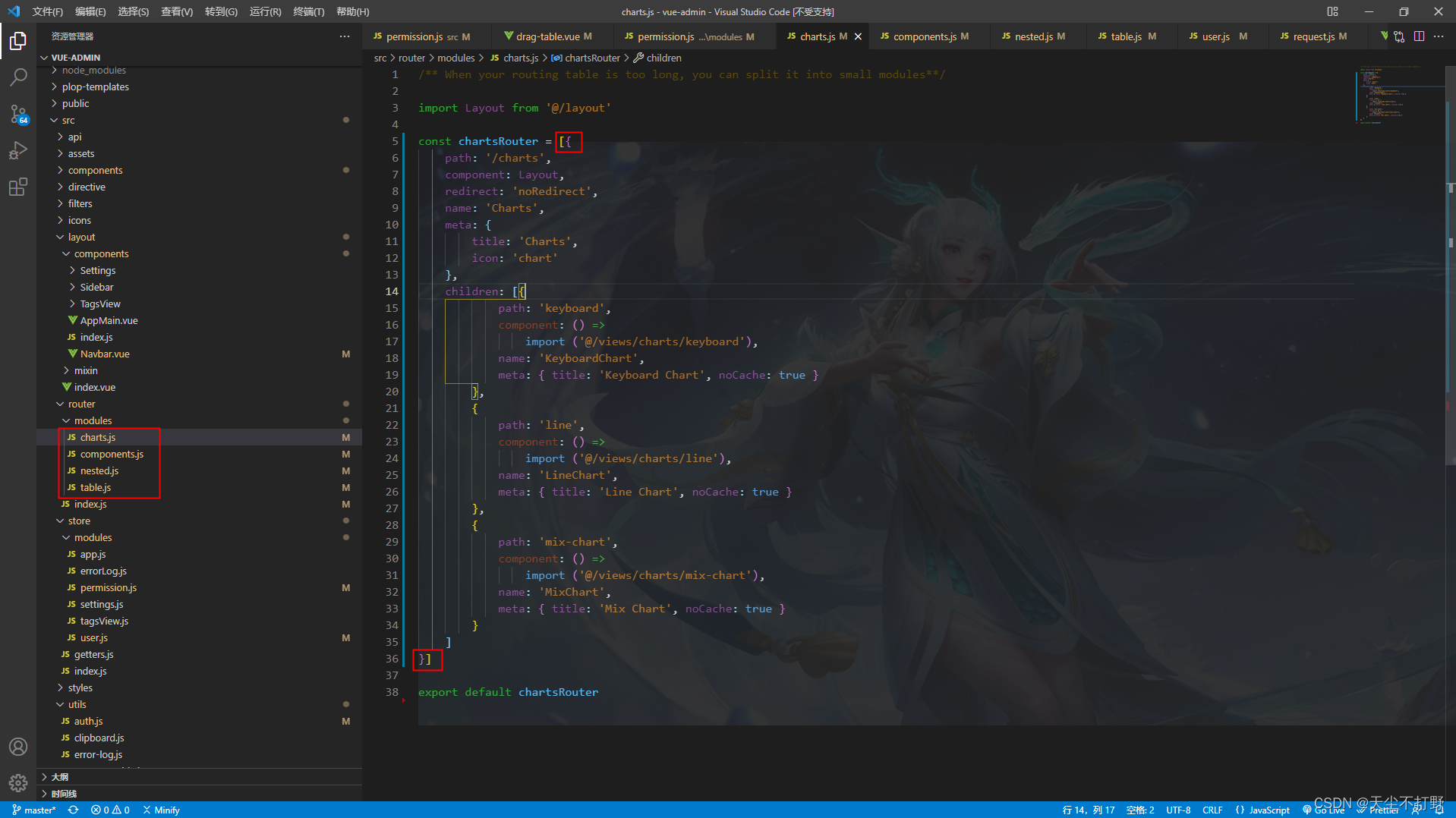
修改src/store/modules/permission.js文件
- import { asyncRoutes, constantRoutes } from '@/router'
- import Layout from '@/layout'
- // 引入刚才改好的四个路由文件
- import componentsRouter from '@/router/modules/components'
- import chartsRouter from '@/router/modules/charts'
- import tableRouter from '@/router/modules/table'
- import nestedRouter from '@/router/modules/nested'
-
-
- /**
- * Use meta.role to determine if the current user has permission
- * @param roles
- * @param route
- */
- function hasPermission(roles, route) {
- if (route.meta && route.meta.roles) {
- return roles.some(role => route.meta.roles.includes(role))
- } else {
- return true
- }
- }
-
- /**
- * Filter asynchronous routing tables by recursion
- * @param routes asyncRoutes
- * @param roles
- */
- export function filterAsyncRoutes(routes, roles) {
- const res = []
-
- routes.forEach(route => {
- const tmp = {...route }
- if (hasPermission(roles, tmp)) {
- if (tmp.children) {
- tmp.children = filterAsyncRoutes(tmp.children, roles)
- }
- res.push(tmp)
- }
- })
-
- return res
- }
-
- const state = {
- routes: [],
- addRoutes: []
- }
-
- const mutations = {
- SET_ROUTES: (state, routes) => {
- state.addRoutes = routes
- state.routes = constantRoutes.concat(routes)
- }
- }
-
- // 懒加载
- export const loadView = (view) => {
- return (resolve) => require([`@/views${view}`], resolve)
- }
-
- /**
- *
- * @param { * 后台查询的菜单数据拼装成路由格式的数据
- * @param routes} routes
- * @param {*} data
- */
- export function generaMenu(routes, data) {
- data.forEach(item => {
- const menu = {
- path: item.path === '#' ? item.menuId + '_key' : item.path,
- // component: item.component === '#' ? Layout : loadView(item.component),
- /**
- * 因为引入的路由文件里已经做了路由懒加载,这里就直接赋值就行
- * 如果是调用后台接口获取的数组对象,把下面的代码注释,上面的代码解开就可以了
- */
- component: item.component,
- hidden: item.hidden,
- children: [],
- //在4.4.0中路由父节点允许name属性存在值否则出现VUE之Router命令行警告:Named Route 'Home' has a default child route 警告
- name: item.component === '#' ? "" : item.name,
- meta: item.meta
- }
- if (item.children) {
- generaMenu(menu.children, item.children)
- }
- // 当存在单路由时要将children为空的属性删除否则无法在左侧菜单中展示独立的路由菜单
- if (menu.children.length <= 0) delete menu.children
- routes.push(menu)
- })
- }
-
- /**
- * 删除子节点children 为空数组
- * @param {*} data
- */
- export function deleteChildren(data) {
- let childs = data
- for (let i = childs.length; i--; i > 0) {
- //if(childs[i].meta != null){
- // childs[i].meta = (childs[i].meta).replace("\"","").replace("\"","");
- //}
- if (childs[i].children) {
- if (childs[i].children.length) {
- deleteChildren(childs[i].children)
- } else {
- delete childs[i].children
- }
- }
- }
- return data
- }
-
- const actions = {
- // 自己封装一个js
- //这个就为刚才在导航守卫,条件判断通过后,调用的获取数据的方法
- generateRoutes({ commit }, obj) {
- return new Promise(resolve => {
- const loadMenuData = [];
- let response = [];
- // 在这里可以调取后端接口,获取动态路由数组对象并把数据添加到路由
- if (obj.nickName === "组件系统") {
- response = deleteChildren(componentsRouter);
- } else if (obj.nickName === "图表系统") {
- response = deleteChildren(chartsRouter);
- } else if (obj.nickName === "表格系统") {
- response = deleteChildren(tableRouter);
- } else if (obj.nickName === "多级路由") {
- response = deleteChildren(nestedRouter);
- }
- Object.assign(loadMenuData, response)
- const tempAsyncRoutes = Object.assign([], asyncRoutes)
- generaMenu(tempAsyncRoutes, loadMenuData)
- let accessedRoutes
- if (obj.roles.includes('admin')) {
- accessedRoutes = tempAsyncRoutes || []
- } else {
- accessedRoutes = filterAsyncRoutes(tempAsyncRoutes, obj.roles)
- }
- commit('SET_ROUTES', accessedRoutes);
- //抛出路由,导航守卫获取数据要使用
- resolve(accessedRoutes)
- })
- }
- }
-
- export default {
- namespaced: true,
- state,
- mutations,
- actions
- }
注:因为内容太多,后面的内容在我另外的几个博客里:
声明:本文内容由网友自发贡献,不代表【wpsshop博客】立场,版权归原作者所有,本站不承担相应法律责任。如您发现有侵权的内容,请联系我们。转载请注明出处:https://www.wpsshop.cn/article/detail/58880
推荐阅读


相关标签

