- 1Simulink|光伏阵列模拟多类故障(开路/短路/阴影遮挡/老化)
- 2漏洞复现----5、Apache Solr远程命令执行漏洞(CVE-2019-0193)_solr漏洞利用
- 3从Java小白到收获BAT等offer,分享我这两年的经验和感悟_ssm登陆
- 4Docker安装部署(详细版)
- 5Leetcode 21. 合并两个有序链表
- 6PyTorch的ONNX结合MNIST手写数字数据集的应用(.pth和.onnx的转换与onnx运行时)_invalid_argument : invalid feed input name:input
- 7RuntimeError: element 0 of tensors does not require grad and does not have a grad_fn
- 8【itest 考试系统】线上考试,解决 鼠标选择 复制粘贴 右键菜单等限制_itest复制粘贴
- 9vscode配置C/C++笔记(硬要使用C++11)_vscode应输入声明
- 102022年平均工资揭晓!2022年IT行业平均工资超高!最赚钱的行业是......IT! 看看最赚钱的职位是什么?_2022 it各城市薪资
JDBC介绍_jdbc (server = dedicated)
赞
踩
一.它是什么?
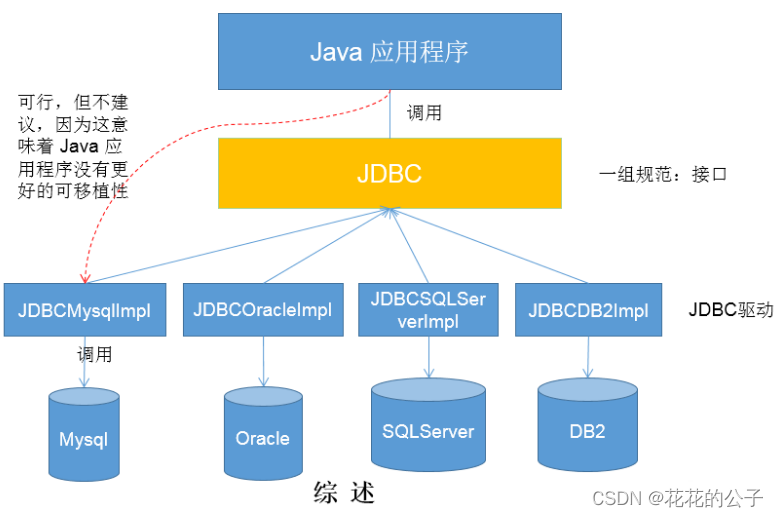
是一个独立于特定数据库管理系统、通用的SQL数据库存取和操作的公共接口(一组API),为访问不同的数据库提供了一种统一的途径,为开发者屏蔽了一些细节问题。JDBC的目标是使Java程序员使用JDBC可以连接任何提供了JDBC驱动程序的数据库系统,这样就使得程序员无需对特定的数据库系统的特点有过多的了解,从而大大简化和加快了开发过程。
简单理解为:JDBC,是SUN提供的一套 API,使用这套API可以实现对具体数据库的操作(获取连接、关闭连接、DML、DDL、DCL)
二.为什么要用?
使用它将是为了数据的持久化
数据持久化:将内存中的数据永久的保存在硬盘上,该过程则需要通过各种关系数据库来完成,主要应用是将内存中的数据存储在关系型数据库中,当然也可以存储在磁盘文件、XML数据文件中
三.好处
面向应用的API:Java API,抽象接口,供应用程序开发人员使用(连接数据库,执行SQL语句,获得结果)
面向数据库的API:Java Driver API,供开发商开发数据库驱动程序用
从开发程序员的角度:不需要关注具体的数据库的细节
数据库厂商:只需要提供标准的具体实现。
四.图示理解
五.编写步骤
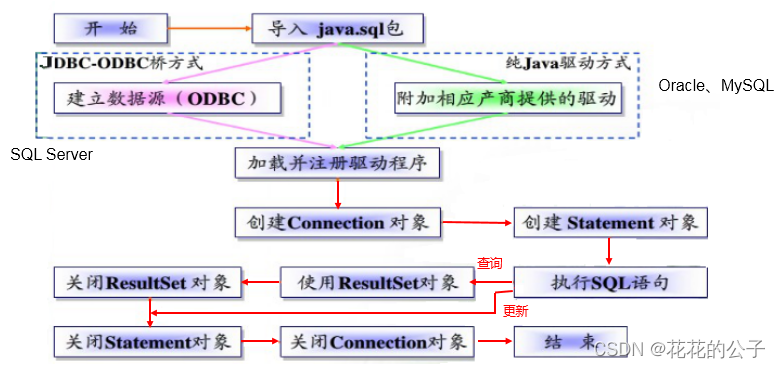
以下是我使用的版本
@Test
    public void test1() throws Exception {
        //获取到输入流
        //读取配置的四个信息
        //connection.class.getClassLoader()获取类的加载器 = ClassLoader.getSystemClassLoader()
        // getSystemClassLoader():返回用于委派的系统类加载器
        //getResourceAsStream(): 用于读取资源的输入流; null如果找不到该资源,该资源是在一个未被无条件打开的包中,或该资源的访问被安全管理器拒绝。
        InputStream inputStream = ClassLoader.getSystemClassLoader().getResourceAsStream("jdbc.properties");
        //使用Properties获取到其对应信息
        Properties pop = new Properties();
        //pop从什么里面拿取到
        pop.load(inputStream);
        //设置接收
        String user = pop.getProperty("user");
        String password = pop.getProperty("password");
        //相当于进入网页的链接 jdbc:mysql://localhost:3306/myemployees jdbc:mysql:相当于http localhost:端口号  3306:ip地址  myemployees:需要链接的数据库名
        String url = pop.getProperty("url");
        //设置驱动
        String driverclass = pop.getProperty("driverClass");
        //中间其实省略了加载驱动的过程
        //{
        //DriverManager:用于管理一组JDBC驱动程序的基本服务,初始化完成懒惰,并使用线程上下文类加载器查找服务提供程序。 加载并可用于应用程序的驱动程序将取决于通过,触发驱动程序初始化的线程的线程上下文类加载器。
        Class<?> aClass = Class.forName(driverclass);
        //通过类的暴力反射获取到驱动的对象再强转
        Driver driver = (Driver) aClass.newInstance();
        //registerDriver(Driver driver):新加载的驱动程序类应该调用方法registerDriver使其自己已知DriverManager 。 如果司机目前已注册,则不采取任何行动。
        DriverManager.registerDriver(driver);
        //}
        //加载完后就要开始链接
        //getConnection(String url, String user, String password):尝试建立与给定数据库URL的连接。 DriverManager尝试从一组已注册的JDBC驱动程序中选择适当的驱动程序。
        // url - 表单 jdbc:subprotocol:subname的数据库URL
        //user - 正在进行连接的数据库用户
        //password - 用户密码
        Connection connection = DriverManager.getConnection(url, user, password);
        System.out.println(connection);
    }

- 1
- 2
- 3
- 4
- 5
- 6
- 7
- 8
- 9
- 10
- 11
- 12
- 13
- 14
- 15
- 16
- 17
- 18
- 19
- 20
- 21
- 22
- 23
- 24
- 25
- 26
- 27
- 28
- 29
- 30
- 31
- 32
- 33
- 34
- 35
- 36
我使用的是maven项目
<?xml version="1.0" encoding="UTF-8"?>
<project xmlns="http://maven.apache.org/POM/4.0.0"
         xmlns:xsi="http://www.w3.org/2001/XMLSchema-instance"
         xsi:schemaLocation="http://maven.apache.org/POM/4.0.0 http://maven.apache.org/xsd/maven-4.0.0.xsd">
    <modelVersion>4.0.0</modelVersion>

    <groupId>org.example</groupId>
    <artifactId>pro2</artifactId>
    <version>1.0-SNAPSHOT</version>
    <dependencies>
        <dependency>
            <groupId>mysql</groupId>
            <artifactId>mysql-connector-java</artifactId>
            <version>8.0.29</version>
        </dependency>
        <dependency>
            <groupId>junit</groupId>
            <artifactId>junit</artifactId>
            <version>4.12</version>
            <scope>compile</scope>
        </dependency>
        <dependency>
            <groupId>com.alibaba</groupId>
            <artifactId>druid</artifactId>
            <version>1.1.12</version>
        </dependency>

    </dependencies>

    <properties>
        <maven.compiler.source>8</maven.compiler.source>
        <maven.compiler.target>8</maven.compiler.target>
    </properties>
</project>
- 1
- 2
- 3
- 4
- 5
- 6
- 7
- 8
- 9
- 10
- 11
- 12
- 13
- 14
- 15
- 16
- 17
- 18
- 19
- 20
- 21
- 22
- 23
- 24
- 25
- 26
- 27
- 28
- 29
- 30
- 31
- 32
- 33
- 34
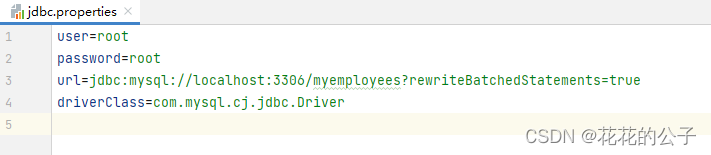
其配置文件为:
要素介绍:
Driver接口介绍:
- java.sql.Driver 接口是所有 JDBC 驱动程序需要实现的接口。这个接口是提供给数据库厂商使用的,不同数据库厂商提供不同的实现。
- 在程序中不需要直接去访问实现了 Driver 接口的类,而是由驱动程序管理器类(java.sql.DriverManager)去调用这些Driver实现。
- Oracle的驱动:oracle.jdbc.driver.OracleDriver
- mySql的驱动: com.mysql.jdbc.Driver
加载与注册JDBC驱动:
加载驱动:加载 JDBC 驱动需调用 Class 类的静态方法 forName(),向其传递要加载的 JDBC 驱动的类名
- Class.forName(“com.mysql.jdbc.Driver”);
注册驱动:DriverManager 类是驱动程序管理器类,负责管理驱动程序
- 使用DriverManager.registerDriver(com.mysql.jdbc.Driver)来注册驱动
- 通常不用显式调用 DriverManager 类的 registerDriver() 方法来注册驱动程序类的实例,因为 Driver 接口的驱动程序类都包含了静态代码块,在这个静态代码块中,会调用 DriverManager.registerDriver() 方法来注册自身的一个实例。下图是MySQL的Driver实现类的源码:
URL介绍:
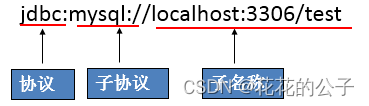
用于标识一个被注册的驱动程序,驱动程序管理器通过这个 URL 选择正确的驱动程序,从而建立到数据库的连接。
URL的标准由三部分组成,各部分间用冒号分隔。
用户名和密码:
user,password可以用“属性名=属性值”方式告诉数据库
可以调用 DriverManager 类的 getConnection() 方法建立到数据库的连接
六.使用PreparedStatement实现CRUD操作
1.简单来说,要实现对数据的CRUD,其根本就是我们java上编写相关语言,数据库接受其命令边反馈其相关语言操作的结果,其实一个数据库连接就是一个Socket连接。
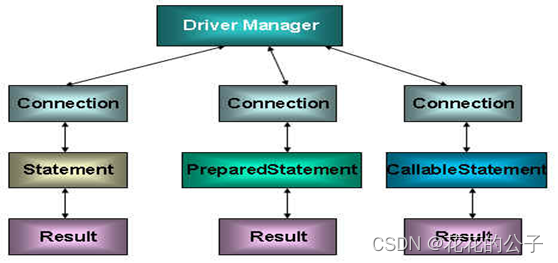
在 java.sql 包中有 3 个接口分别定义了对数据库的调用的不同方式:
- Statement:用于执行静态 SQL 语句并返回它所生成结果的对象。
- PrepatedStatement:SQL 语句被预编译并存储在此对象中,可以使用此对象多次高效地执行该语句。
- CallableStatement:用于执行 SQL 存储过程
2.使用Statement操作数据表的弊端:
存在拼串操作,繁琐:SQL 注入是利用某些系统没有对用户输入的数据进行充分的检查,而在用户输入数据中注入非法的 SQL 语句段或命令(如:SELECT user, password FROM user_table WHERE user=‘a’ OR 1 = ’ AND password = ’ OR ‘1’ = ‘1’) ,从而利用系统的 SQL 引擎完成恶意行为的做法。
存在SQL注入问题:Statement不会识别占位符,就从具体的某一个位置开始,只要用 PreparedStatement(从Statement扩展而来) 取代 Statement 就可以了。
3.PreparedStatement的使用
介绍:PreparedStatement 接口是 Statement 的子接口,它表示一条预编译过的 SQL 语句
PreparedStatement 对象所代表的 SQL 语句中的参数用问号(?)来表示,调用 PreparedStatement 对象的 setXxx() 方法来设置这些参数. setXxx() 方法有两个参数,第一个参数是要设置的 SQL 语句中的参数的索引(从 1 开始),第二个是设置的 SQL 语句中的参数的值
4.PreparedStatement vs Statement
代码的可读性和可维护性;
PreparedStatement 能最大可能提高性能:
DBServer会对预编译语句提供性能优化,固存在预编译的语句会被重复使用,使用PreparedStatement 语句会做到预编译,降低了系统的响应时间,并且会形成缓存,下次再执行的时候就不会都去再匹配一次;
而在statement语句中,即使是相同操作但因为数据内容不一样,所以整个语句本身不能匹配,没有缓存语句的意义.事实是没有数据库会对普通语句编译后的执行代码缓存。这样每执行一次都要对传入的语句编译一次,使系统响应时间增加,降低了效率。
5.ResultSet与ResultSetMetaData
ResultSet:
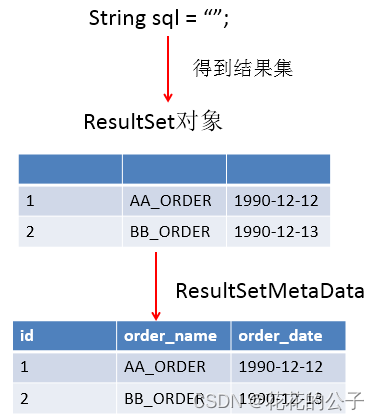
ResultSet 对象以逻辑表格的形式封装了执行数据库操作的结果集,ResultSet 接口由数据库厂商提供实现;
ResultSet 对象以逻辑表格的形式封装了执行数据库操作的结果集,ResultSet 接口由数据库厂商提供实现;
ResultSetMetaData:
可用于获取关于 ResultSet 对象中列的类型和属性信息的对象
- getColumnName(int column):获取指定列的名称
- getColumnLabel(int column):获取指定列的别名
- getColumnCount():返回当前 ResultSet 对象中的列数。
以下是一些通用的:
package Connections.Connections;

import org.junit.Test;
import util.JDBCUtils;

import java.lang.reflect.Field;
import java.sql.*;
import java.text.SimpleDateFormat;
import java.util.ArrayList;
import java.util.Date;
import java.util.List;

/**
 * @author BaBa
 * @Version 1/0
 * 操作数据库:
 * 1.链接
 * 2.操作
 * (1)传入操作语句(数据库的增删改查语句),这里必须使用占位符代替传入的值
 * (2)使用链接的方法prepareStatement(),写入具体操作的sql语句再创建对象
 * (3)使用上面创建的对象调用方法setObject(parameterLndex,x) parameterLndex:每列中位置,x:内容
 * (4)prepareStatement.execute 提交其数据
 * (5)最后释放资源(和io流一样,close())
 */
public class  connectionTest {
    //增加
    @Test
    public void Test() {
        Connection connection = null;
        PreparedStatement statement = null;
        try {
            connection = JDBCUtils.getConnection();
//        System.out.println(connection);
            //5.预编译sql语句,返回PreparedStatemen的实例
            String sql = "insert into customers(name,email,date)values(?,?,?)";//?占位符,解决Statement的弊端
            statement = connection.prepareStatement(sql);
            //填充占位符
            statement.setString(1, "傻逼");
            statement.setString(2, "1314520@qq.com");
            SimpleDateFormat simpleDateFormat = new SimpleDateFormat("yyyy-mm-dd");
            Date parse = simpleDateFormat.parse("2001-12-06");
            statement.setDate(3, new java.sql.Date(parse.getTime()));
//            statement.setDate(3,null);
            statement.execute();
        } catch (Exception e) {
            e.printStackTrace();
        } finally {
            JDBCUtils.closeResource(connection, statement);
        }

    }

    //修改
    @Test
    public void TsetUpdate() {
        Connection connection = null;
        PreparedStatement ps = null;
        try {
            //1.获取连接
            connection = JDBCUtils.getConnection();
            //2.预编译sql语句,返回PreparedStatement的实例
            String sql = "update customers set name =? where id =?";
            //3.填充占位符
            ps = connection.prepareStatement(sql);
            ps.setObject(1, "周强");
            ps.setObject(2, 2);
            //4.执行
            ps.execute();
        } catch (Exception e) {
            e.printStackTrace();
        } finally {
            //5.资源关闭
            JDBCUtils.closeResource(connection, ps);
        }
    }

    //通用
    public void updateDemo(String sql, Object... args) {//sql中占位符的个数与形参的长度一致
        Connection connection = null;
        PreparedStatement ps = null;
        try {
            //获取连接
            connection = JDBCUtils.getConnection();
            //预编译sql
            ps = connection.prepareStatement(sql);
            //填充占位符
            for (int i = 0; i < args.length; i++) {
                ps.setObject(i + 1, args[i]);
            }
            //提交
            ps.execute();
        } catch (Exception e) {
            e.printStackTrace();
        } finally {
            //释放资源
            JDBCUtils.closeResource(connection, ps);
        }
    }

    @Test
    public void testUpdate() {
        String sql = "delete from customers where id = ?";
        updateDemo(sql, 1);

        String sql1 = "update users set userid=? where id = ?";
        updateDemo(sql1, "王五", 3);
    }


    //查找
    @Test
    public void select() {
        Connection connection = null;
        PreparedStatement ps = null;
        ResultSet resultSet = null;
        try {
            connection = JDBCUtils.getConnection();
            String sql = "select id,userid,department_id from users where id = ?";
            ps = connection.prepareStatement(sql);
            ps.setObject(1, 1);
            //执行并返回结果集
            resultSet = ps.executeQuery();
            //处理结果集
            if (resultSet.next()) {//判断结果集得到下一条有没有数据,如果为true,就往下移动,如果是false,就不往下移
                int anInt = resultSet.getInt(1);
                String string = resultSet.getString(2);
                int anInt1 = resultSet.getInt(3);
                Uers uers = new Uers(anInt, string, anInt1);
                System.out.println(uers);
            }
        } catch (Exception e) {
            e.printStackTrace();
        } finally {
            JDBCUtils.closeResourceSelect(connection, ps, resultSet);
        }
    }


    @Test
    public void test() {
        String sql = "select id,userid,department_id from users where id < ?";
        List<Uers> uers = querUsers(Uers.class, sql, 3);
        uers.forEach(System.out::println);

    }
//    单个返回值对象
    public <T> T querUser(Class<T> tClass, String sql,Object...args)  {
        Connection connection = null;
        PreparedStatement ps = null;
        ResultSet resultSet = null;
        try {
            connection = JDBCUtils.getConnection();
            //预编译sql语句
            ps = connection.prepareStatement(sql);
            for (int i=0;i< args.length;i++){
                ps.setObject(i+1,args[i]);
            }
            //执行查询,返回结果集
            resultSet = ps.executeQuery();

            //获取结果集的元数据(封装在元数据中)
            ResultSetMetaData metaData = resultSet.getMetaData();

            //通过ResultSetMetaData获取结果集中列数(获取列数)
            int columnCount = metaData.getColumnCount();

            if (resultSet.next()){
                T t = tClass.newInstance();
                for (int i=0;i<columnCount;i++){
                    //值
                    Object values = resultSet.getObject(i + 1);

                    //获取每列的列名 ---不使用
//                    String catalogName = metaData.getColumnName(i + 1);
                    //表的字段名和类的属性名不相同的情况下:
                    // 必须声明sql时,使用类的属性名来命名字段的别名;使用ResultSetMetaData时,需要使用getColumnLabel()来替换getColumnName()方法来获取列的别名;
                    // 说明:如果sql中没有给字段起别名,getColumnLabel()获取的就是列名
                    //获取列的别名
                    String label = metaData.getColumnLabel(i + 1);
                    //给Uers对象指定的catalogName属性赋值为values,通过反射
                    Field field = Uers.class.getDeclaredField(label);
                    field.setAccessible(true);
                    field.set(t,values);
                }
                return t;
            }
        } catch (Exception e) {
            e.printStackTrace();
        }finally {
            JDBCUtils.closeResourceSelect(connection,ps,resultSet);
        }
        return null;
    }
    //多个返回值对象
    public <T>List<T> querUsers(Class<T> tClass, String sql, Object... args) {
        Connection connection = null;
        PreparedStatement ps = null;
        ResultSet resultSet = null;
        try {
            connection = JDBCUtils.getConnection();
            //预编译sql语句
            ps = connection.prepareStatement(sql);
            for (int i = 0; i < args.length; i++) {
                ps.setObject(i + 1, args[i]);
            }
            //执行查询,返回结果集
            resultSet = ps.executeQuery();

            //获取结果集的元数据(封装在元数据中)
            ResultSetMetaData metaData = resultSet.getMetaData();

            //通过ResultSetMetaData获取结果集中列数(获取列数)
            int columnCount = metaData.getColumnCount();

            //不同于一个返回值对象,这里使用了while,把多个满足条件的放入数组中返回
            //创建集合对象
            ArrayList<T> list = new ArrayList<T>();
            while (resultSet.next()) {
                T t = tClass.newInstance();
                for (int i = 0; i < columnCount; i++) {
                    //值
                    Object values = resultSet.getObject(i + 1);

                    //获取每列的列名 ---不使用
//                    String catalogName = metaData.getColumnName(i + 1);
                    //表的字段名和类的属性名不相同的情况下:
                    // 必须声明sql时,使用类的属性名来命名字段的别名;使用ResultSetMetaData时,需要使用getColumnLabel()来替换getColumnName()方法来获取列的别名;
                    // 说明:如果sql中没有给字段起别名,getColumnLabel()获取的就是列名
                    //获取列的别名
                    String label = metaData.getColumnLabel(i + 1);
                    //给Uers对象指定的catalogName属性赋值为values,通过反射
                    Field field = Uers.class.getDeclaredField(label);
                    field.setAccessible(true);
                    field.set(t, values);
                }
                list.add(t);
            }
            return list;
        } catch (Exception e) {
            e.printStackTrace();
        } finally {
            JDBCUtils.closeResourceSelect(connection, ps, resultSet);
        }
        return null;
    }
}
- 1
- 2
- 3
- 4
- 5
- 6
- 7
- 8
- 9
- 10
- 11
- 12
- 13
- 14
- 15
- 16
- 17
- 18
- 19
- 20
- 21
- 22
- 23
- 24
- 25
- 26
- 27
- 28
- 29
- 30
- 31
- 32
- 33
- 34
- 35
- 36
- 37
- 38
- 39
- 40
- 41
- 42
- 43
- 44
- 45
- 46
- 47
- 48
- 49
- 50
- 51
- 52
- 53
- 54
- 55
- 56
- 57
- 58
- 59
- 60
- 61
- 62
- 63
- 64
- 65
- 66
- 67
- 68
- 69
- 70
- 71
- 72
- 73
- 74
- 75
- 76
- 77
- 78
- 79
- 80
- 81
- 82
- 83
- 84
- 85
- 86
- 87
- 88
- 89
- 90
- 91
- 92
- 93
- 94
- 95
- 96
- 97
- 98
- 99
- 100
- 101
- 102
- 103
- 104
- 105
- 106
- 107
- 108
- 109
- 110
- 111
- 112
- 113
- 114
- 115
- 116
- 117
- 118
- 119
- 120
- 121
- 122
- 123
- 124
- 125
- 126
- 127
- 128
- 129
- 130
- 131
- 132
- 133
- 134
- 135
- 136
- 137
- 138
- 139
- 140
- 141
- 142
- 143
- 144
- 145
- 146
- 147
- 148
- 149
- 150
- 151
- 152
- 153
- 154
- 155
- 156
- 157
- 158
- 159
- 160
- 161
- 162
- 163
- 164
- 165
- 166
- 167
- 168
- 169
- 170
- 171
- 172
- 173
- 174
- 175
- 176
- 177
- 178
- 179
- 180
- 181
- 182
- 183
- 184
- 185
- 186
- 187
- 188
- 189
- 190
- 191
- 192
- 193
- 194
- 195
- 196
- 197
- 198
- 199
- 200
- 201
- 202
- 203
- 204
- 205
- 206
- 207
- 208
- 209
- 210
- 211
- 212
- 213
- 214
- 215
- 216
- 217
- 218
- 219
- 220
- 221
- 222
- 223
- 224
- 225
- 226
- 227
- 228
- 229
- 230
- 231
- 232
- 233
- 234
- 235
- 236
- 237
- 238
- 239
- 240
- 241
- 242
- 243
- 244
- 245
- 246
- 247
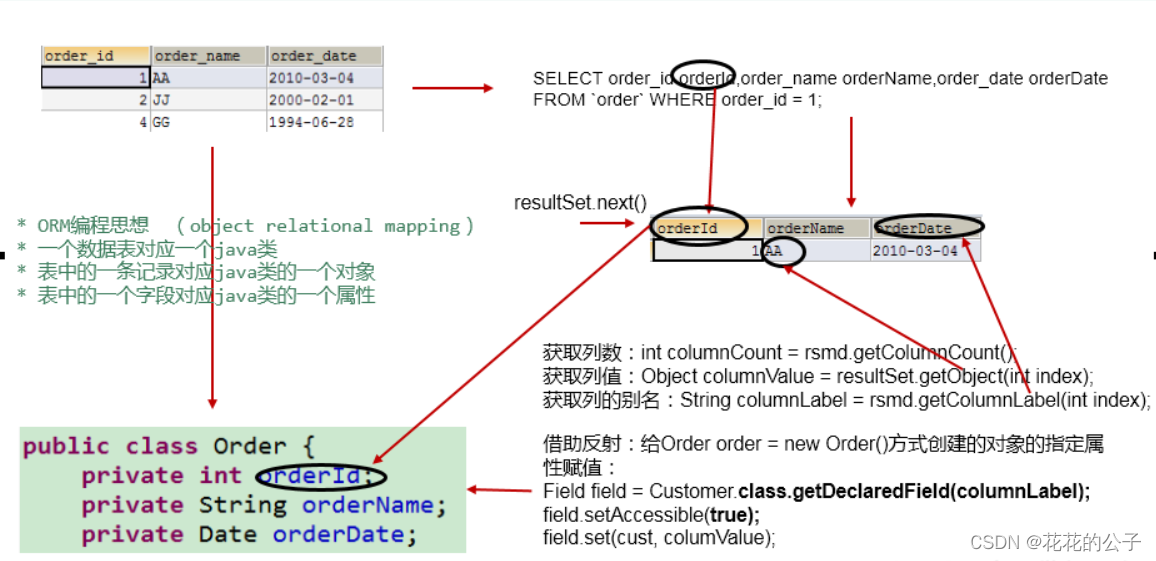
注意:使用了反射的技术,通过反射,创建指定类的对象,获取指定的属性并赋值
6.资源的释放
数据库连接(Connection)是非常稀有的资源,用完后必须马上释放,如果Connection不能及时正确的关闭将导致系统宕机。Connection的使用原则是尽量晚创建,尽量早的释放。
可以在finally中关闭,保证及时其他代码出现异常,资源也一定能被关闭。
六.操作BLOB类型字段
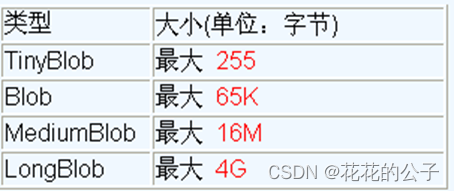
1.介绍:MySQL中,BLOB是一个二进制大型对象,是一个可以存储大量数据的容器,它能容纳不同大小的数据。
注意:
实际使用中根据需要存入的数据大小定义不同的BLOB类型。
需要注意的是:如果存储的文件过大,数据库的性能会下降。
如果在指定了相关的Blob类型以后,还报错:xxx too large,那么在mysql的安装目录下,找my.ini文件加上如下的配置参数: max_allowed_packet=16M。同时注意:修改了my.ini文件之后,需要重新启动mysql服务。
代码展示:
//插入Blob类型字段
    @Test
    public void insert() throws Exception {
        Connection connection = JDBCUtils.getConnection();
        String sql = "insert into customers(name,email,photo) values(?,?,?);";
        PreparedStatement ps = connection.prepareStatement(sql);
        ps.setObject(1,"王五");
        ps.setObject(2,"2751190438@qq.com");
        FileInputStream is = new FileInputStream(new File("aa.jpg"));
        ps.setBlob(3,is);
        ps.execute();
        JDBCUtils.closeResource(connection,ps);
    }
- 1
- 2
- 3
- 4
- 5
- 6
- 7
- 8
- 9
- 10
- 11
- 12
- 13
//查询图片
    @Test
    public void Query()  {
        Connection connection = null;
        PreparedStatement ps = null;
        ResultSet rs = null;
        InputStream is =null;
        FileOutputStream fos =null;
        try {
            connection = JDBCUtils.getConnection();
            String sql = "select id,name,email,photo from customers where id =?";
            ps = connection.prepareStatement(sql);
            ps.setObject(1,3);
            rs = ps.executeQuery();
            if (rs.next()){
                int id = rs.getInt(1);
                String name = rs.getString(2);
                String email = rs.getString(3);
                //接下来就是把值放到对象中XXX X = new xxx(id,name,email,photo);
                Blob photo = rs.getBlob(4);
                //将Blob字段下载下来保存到本地
                is = photo.getBinaryStream();
                fos = new FileOutputStream("zhangyuhao.jpg");
                byte[] bytes = new byte[1024];
                int len;
                while ((len=is.read(bytes))!=-1){
                    fos.write(bytes,0,len);
                }
            }
        } catch (Exception e) {
            e.printStackTrace();
        }
        finally {
            JDBCUtils.closeResourceSelect(connection,ps,rs);
            try {
                if (is!=null)
                is.close();
            } catch (IOException e) {
                e.printStackTrace();
            }
            try {
                if (fos!=null)
                fos.close();
            } catch (IOException e) {
                e.printStackTrace();
            }
        }
    }
- 1
- 2
- 3
- 4
- 5
- 6
- 7
- 8
- 9
- 10
- 11
- 12
- 13
- 14
- 15
- 16
- 17
- 18
- 19
- 20
- 21
- 22
- 23
- 24
- 25
- 26
- 27
- 28
- 29
- 30
- 31
- 32
- 33
- 34
- 35
- 36
- 37
- 38
- 39
- 40
- 41
- 42
- 43
- 44
- 45
- 46
- 47
- 48
七.批量插入
JDBC的批量处理语句包括下面三个方法:
- addBatch(String):添加需要批量处理的SQL语句或是参数;
- executeBatch():执行批量处理语句;
- clearBatch():清空缓存的数据
//进阶批量插入
    //修改1: 使用 addBatch() / executeBatch() / clearBatch()
    //修改2:mysql服务器默认是关闭批处理的,我们需要通过一个参数,让mysql开启批处理的支持。
    @Test
    public void insert3()  {
        Connection connection = null;
        PreparedStatement ps = null;
        try {
            long start = System.currentTimeMillis();
            connection = JDBCUtils.getConnection();

            //设置不允许自动提交
            connection.setAutoCommit(false);

            String sql = "insert into goods(name)values(?)";
            ps = connection.prepareStatement(sql);
            for (int i=1;i<=100;i++){
                ps.setObject(1,"name_"+i);

                //1.攒sql
                ps.addBatch();
                if (i%10==0){
                    //2.执行
                    ps.executeBatch();
                    //3.清空
                    ps.clearBatch();
                }
            }
            //提交
            connection.commit();
            long end = System.currentTimeMillis();
            System.out.println(end-start);
        } catch (Exception e) {
            e.printStackTrace();
        }finally {
            JDBCUtils.closeResource(connection,ps);
        }
    }
- 1
- 2
- 3
- 4
- 5
- 6
- 7
- 8
- 9
- 10
- 11
- 12
- 13
- 14
- 15
- 16
- 17
- 18
- 19
- 20
- 21
- 22
- 23
- 24
- 25
- 26
- 27
- 28
- 29
- 30
- 31
- 32
- 33
- 34
- 35
- 36
- 37
- 38
八.事务
1.介绍
一组逻辑操作单元,使数据从一种状态变换到另一种状态。
一组逻辑操作单元:一个或多个DML操作。
2.事务处理的原则:
保证所事务都作为一个工作单元来执行,即使出现了故障,都不能改变这种执行方式。当在一个事务中执行多个操作时,要么所有的事务都被提交(commit),那么这些修改就永久地保存下来;要么数据库管理系统将放弃所作的所有修改,整个事务回滚(rollback)到最初状态。
3.代码体现
考虑到事务以后,实现的通用的增删改操作:
//通用修改
    public void update(Connection connection, String sql, Object... args) {//sql中占位符的个数与形参的长度一致
        PreparedStatement ps = null;
        try {
            //预编译sql
            ps = connection.prepareStatement(sql);
            //填充占位符
            for (int i = 0; i < args.length; i++) {
                ps.setObject(i + 1, args[i]);
            }
            //提交
            ps.execute();
        } catch (Exception e) {
            e.printStackTrace();
        } finally {
            //释放资源
            JDBCUtils.closeResource(null, ps);
        }
    }
- 1
- 2
- 3
- 4
- 5
- 6
- 7
- 8
- 9
- 10
- 11
- 12
- 13
- 14
- 15
- 16
- 17
- 18
- 19
考虑到事务以后,实现的通用的查询:
//通用查询
    public <T> T querUser(Connection connection, Class<T> tClass, String sql,Object...args)  {
        PreparedStatement ps = null;
        ResultSet resultSet = null;
        try {
            connection = JDBCUtils.getConnection();
            //预编译sql语句
            ps = connection.prepareStatement(sql);
            for (int i=0;i< args.length;i++){
                ps.setObject(i+1,args[i]);
            }
            //执行查询,返回结果集
            resultSet = ps.executeQuery();

            //获取结果集的元数据(封装在元数据中)
            ResultSetMetaData metaData = resultSet.getMetaData();

            //通过ResultSetMetaData获取结果集中列数(获取列数)
            int columnCount = metaData.getColumnCount();

            if (resultSet.next()){
                T t = tClass.newInstance();
                for (int i=0;i<columnCount;i++){
                    //值
                    Object values = resultSet.getObject(i + 1);

                    //获取每列的列名 ---不使用
//                    String catalogName = metaData.getColumnName(i + 1);
                    //表的字段名和类的属性名不相同的情况下:
                    // 必须声明sql时,使用类的属性名来命名字段的别名;使用ResultSetMetaData时,需要使用getColumnLabel()来替换getColumnName()方法来获取列的别名;
                    // 说明:如果sql中没有给字段起别名,getColumnLabel()获取的就是列名
                    //获取列的别名
                    String label = metaData.getColumnLabel(i + 1);
                    //给Uers对象指定的catalogName属性赋值为values,通过反射
                    Field field = Uers.class.getDeclaredField(label);
                    field.setAccessible(true);
                    field.set(t,values);
                }
                return t;
            }
        } catch (Exception e) {
            e.printStackTrace();
        }finally {
            JDBCUtils.closeResourceSelect(null,ps,resultSet);
        }
        return null;
    }
- 1
- 2
- 3
- 4
- 5
- 6
- 7
- 8
- 9
- 10
- 11
- 12
- 13
- 14
- 15
- 16
- 17
- 18
- 19
- 20
- 21
- 22
- 23
- 24
- 25
- 26
- 27
- 28
- 29
- 30
- 31
- 32
- 33
- 34
- 35
- 36
- 37
- 38
- 39
- 40
- 41
- 42
- 43
- 44
- 45
- 46
- 47
4.属性以及会出现的问题
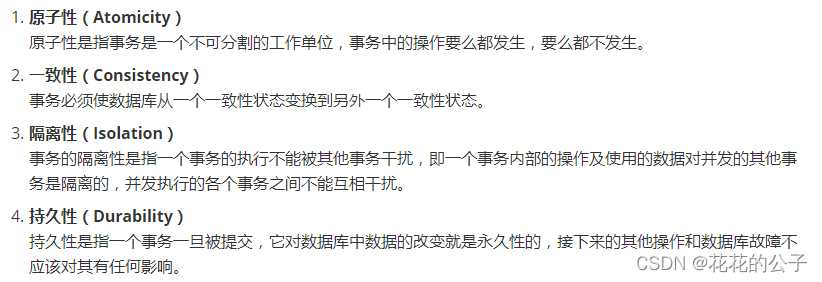
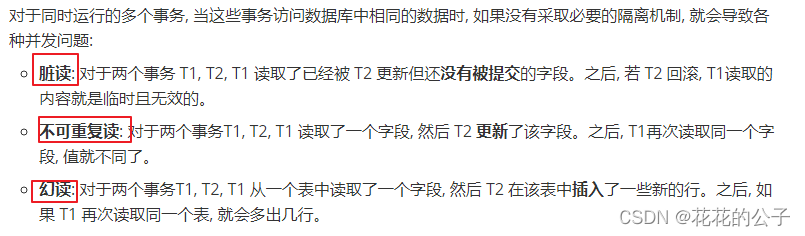
数据操作过程中可能出现的问题:(针对隔离性)
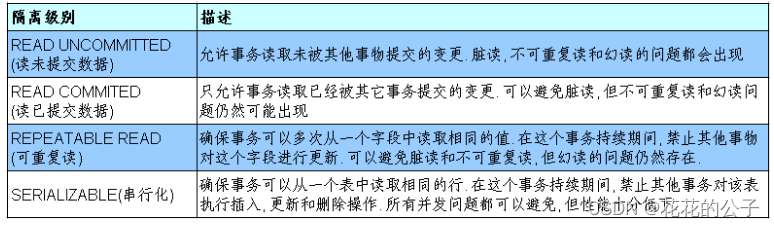
数据库的四种隔离级别:(一致性和并发性:一致性越好,并发性越差)
数据库事务的隔离性: 数据库系统必须具有隔离并发运行各个事务的能力, 使它们不会相互影响, 避免各种并发问题。
一个事务与其他事务隔离的程度称为隔离级别。数据库规定了多种事务隔离级别, 不同隔离级别对应不同的干扰程度, 隔离级别越高, 数据一致性就越好, 但并发性越弱。

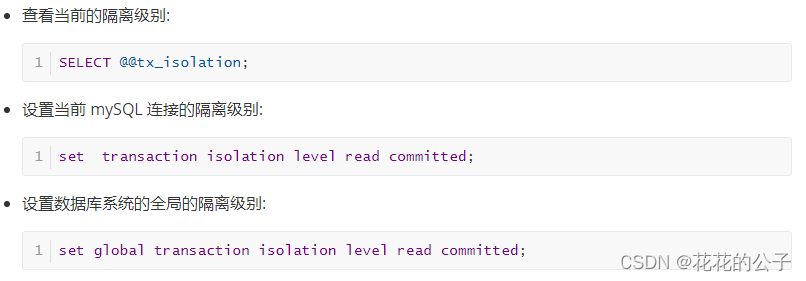
如何在Mysql中查看并设置隔离级别:
九.数据库连接池
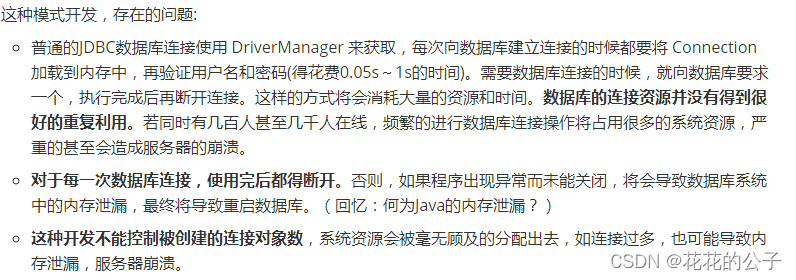
1.传统连接的问题:
2.如何解决传统开发中的数据库连接问题:使用数据库连接池
3.介绍
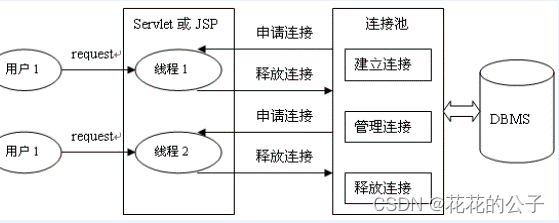
数据库连接池的基本思想:- 就是为数据库连接建立一个“缓冲池”。预先在缓冲池中放入一定数量的连接,当需要建立数据库连接时,只需从“缓冲池”中取出一个,使用完毕之后再放回去 。
数据库连接池负责分配、管理和释放数据库连接,它允许应用程序重复使用一个现有的数据库连接,而不是重新建立一个。
工作原理:
4.使用数据库连接池的好处
资源重用:有需要就从数据库连接池拿出来用,避免了频繁创建,释放连接引起的大量性能开销。
更快的系统反应速度:有备用的链接,初始化的工作已经完成,可以很快速的响应连接。
新的资源分配手段:可以对某一层的连接数量进行限制,避免了某一应用独占所有的数据库资源。
统一的连接管理,避免数据库连接泄漏:在较为完善的数据库连接池实现中,可根据预先的占用超时设定,强制回收被占用连接,从而避免了常规数据库连接操作中可能出现的资源泄露。
5.标准接口:DataSource
DataSource用来取代DriverManager来获取Connection,获取速度快,同时可以大幅度提高数据库访问速度
6.三种不同的使用连接池情况
C3P0
/**
	 *
	 * @Description 使用C3P0的数据库连接池技术
	 * @author shkstart
	 * @date 下午3:01:25
	 * @return
	 * @throws SQLException
	 */
	//数据库连接池只需提供一个即可。
	private static ComboPooledDataSource cpds = new ComboPooledDataSource("hellc3p0");
	public static Connection getConnection1() throws SQLException{
		Connection conn = cpds.getConnection();

		return conn;
	}
- 1
- 2
- 3
- 4
- 5
- 6
- 7
- 8
- 9
- 10
- 11
- 12
- 13
- 14
- 15
其中,配置文件定义在src下。名为:c3p0-config.xml
<?xml version="1.0" encoding="UTF-8"?>
<c3p0-config>

	<named-config name="hellc3p0">
		<!-- 提供获取连接的4个基本信息 -->
		<property name="driverClass">com.mysql.jdbc.Driver</property>
		<property name="jdbcUrl">jdbc:mysql:///test</property>
		<property name="user">root</property>
		<property name="password">abc123</property>

		<!-- 进行数据库连接池管理的基本信息 -->
		<!-- 当数据库连接池中的连接数不够时,c3p0一次性向数据库服务器申请的连接数 -->
		<property name="acquireIncrement">5</property>
		<!-- c3p0数据库连接池中初始化时的连接数 -->
		<property name="initialPoolSize">10</property>
		<!-- c3p0数据库连接池维护的最少连接数 -->
		<property name="minPoolSize">10</property>
		<!-- c3p0数据库连接池维护的最多的连接数 -->
		<property name="maxPoolSize">100</property>
		<!-- c3p0数据库连接池最多维护的Statement的个数 -->
		<property name="maxStatements">50</property>
		<!-- 每个连接中可以最多使用的Statement的个数 -->
		<property name="maxStatementsPerConnection">2</property>

	</named-config>
</c3p0-config>
- 1
- 2
- 3
- 4
- 5
- 6
- 7
- 8
- 9
- 10
- 11
- 12
- 13
- 14
- 15
- 16
- 17
- 18
- 19
- 20
- 21
- 22
- 23
- 24
- 25
- 26
DBCP
测试连接的代码:
/**
	 *
	 * @Description 使用DBCP数据库连接池技术获取数据库连接
	 * @author shkstart
	 * @date 下午3:35:25
	 * @return
	 * @throws Exception
	 */
	//创建一个DBCP数据库连接池
	private static DataSource source;
	static{
		try {
			Properties pros = new Properties();
			FileInputStream is = new FileInputStream(new File("src/dbcp.properties"));
			pros.load(is);
			source = BasicDataSourceFactory.createDataSource(pros);
		} catch (Exception e) {
			e.printStackTrace();
		}
	}
	public static Connection getConnection2() throws Exception{

		Connection conn = source.getConnection();

		return conn;
	}
- 1
- 2
- 3
- 4
- 5
- 6
- 7
- 8
- 9
- 10
- 11
- 12
- 13
- 14
- 15
- 16
- 17
- 18
- 19
- 20
- 21
- 22
- 23
- 24
- 25
- 26
其中,配置文件定义在src下:dbcp.properties
driverClassName=com.mysql.jdbc.Driver
url=jdbc:mysql:///test
username=root
password=abc123
initialSize=10
Druid
Druid是目前最好的数据库连接池。在功能、性能、扩展性方面,都超过其他数据库连接池,同时加入了日志监控,可以很好的监控DB池连接和SQL的执行情况。
/**
	 * 使用Druid数据库连接池技术
	 */
	private static DataSource source1;
	static{
		try {
			Properties pros = new Properties();

			InputStream is = ClassLoader.getSystemClassLoader().getResourceAsStream("druid.properties");

			pros.load(is);

			source1 = DruidDataSourceFactory.createDataSource(pros);
		} catch (Exception e) {
			e.printStackTrace();
		}
	}
	public static Connection getConnection3() throws SQLException{

		Connection conn = source1.getConnection();
		return conn;
	}
- 1
- 2
- 3
- 4
- 5
- 6
- 7
- 8
- 9
- 10
- 11
- 12
- 13
- 14
- 15
- 16
- 17
- 18
- 19
- 20
- 21
- 22
- 23
配置文件:
url=jdbc:mysql:///test
username=root
password=abc123
driverClassName=com.mysql.jdbc.Driver
initialSize=10
maxActive=10