
- 1ROS回调函数的类方法实现,both in Python 和 C++_ros 回调函数 怎么写
- 2【大模型系列 02】Diffusion For PyTorch 昇腾迁移_compvis/ldm-text2im-large-256下载
- 3Metasploit 漏洞利用(Exploit)详解_metasploit攻击漏洞脚本编写
- 4chatgpt赋能python:用Python进行量化交易的介绍_python量化交易
- 5基于STM32与TB6600的机械臂项目(代码开源)_stm32机械臂
- 6Python-Flask-ajax-接口无响应/跨域问题-(strict-origin-when-cross-origin)_flask strict-origin-when-cross-origin
- 7ubuntu使用shell脚本实现开机自启python程序_ubuntu开机自启python
- 8【Docker】未来已来 | Docker技术在云计算、边缘计算领域的应用前景
- 9python flask实现博客系统_Python Web开发基于flask的博客系统教程(3-2)模板渲染的更多操作...
- 10五种常见启发式算法求解TSP问题-总结篇_tsp问题可以用什么算法解决
SQL Server 数据查询 ①_查询班级为20软工1的学生的学号姓名
赞
踩
准备工作
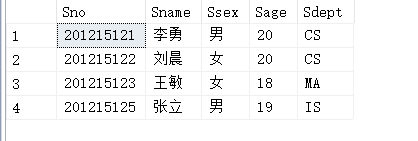
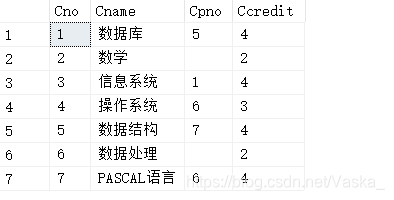
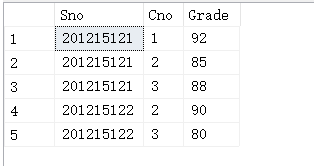
预先准备所用到的表
1、学生表 students
2、课程表 course
3、学生选课表
单表查询
查询的语句一般为
select //(distinct) 目标列表达式
from //表名或视图名
where //条件表达式
group by 列名 having条件表达式
order by ASC|DESC 升序|降序
- 1
- 2
- 3
- 4
- 5
1、选择表中的若干列
(1)查询指定列
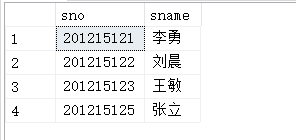
例 查询全体学生的学号与姓名
select sno,sname
from student;
- 1
- 2
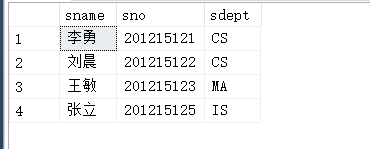
例 查询全体学生的姓名、学号、所在系
select sname,sno,sdept
from student;
- 1
- 2
(2)查询全部列
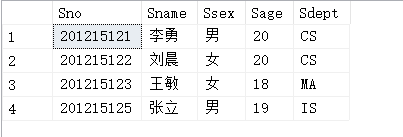
例 查询全体学生的详细信息
select *
from student
- 1
- 2
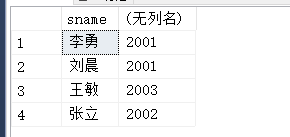
例 查询全体学生的姓名与出生年份(假定今年为2021年)
select sname,2021-sage
from student;
- 1
- 2
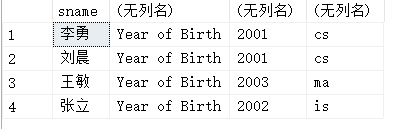
例 查询全体学生的姓名、出生年份和所在的院系,要求用小写字母表示系
select sname,'Year of Birth',2021-sage,LOWER(sdept)
from student;
- 1
- 2
用小写字母表示为LOWER() 大写字母表示为UPPER()
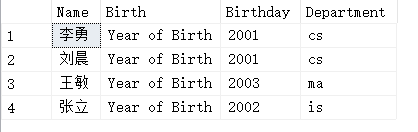
我们发现查询结果的后三列都没有列明,可以通过别名来改变查询结果的列标题
select sname Name,'Year of Birth' Birth,2021-sage Birthday,LOWER(sdept) Department
from student;
- 1
- 2
2、选择表中的若干元组
(1)消除取值重复的行
例 查询选修了课程的学生
select sno
from sc;
- 1
- 2
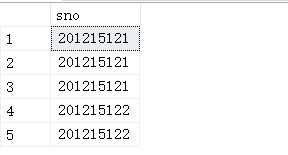
我们发现查询结果里面有重复的行,如想出去重复的行,可以使用distinct
select distinct sno
from sc;
- 1
- 2
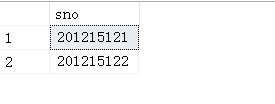
如果没有distinct关键词,则默认为all
select sno
from sc;

等价于

select all sno
from sc;
- 1
- 2
- 3
- 4
- 5
- 6
- 7
(2)查询满足条件的元组
常用的查询条件
| 查询条件 | 谓词 |
|---|---|
| 比较 | =,>,<,>=,<=,!=,<>,!>,!<;not+上述运算符 |
| 确定范围 | between and,not between and |
| 确定集合 | in,not in |
| 字符匹配 | like,not like |
| 空值 | is null,is not null |
| 多重条件(逻辑运算) | and,or,not |
①比较大小
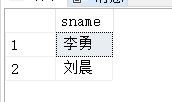
例 查询计算机科学系全体学生名单
select sname
from student
where sdept='cs';
- 1
- 2
- 3
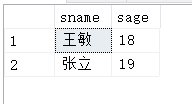
例 查询所有年龄在20岁以下的学生姓名及其年龄
select sname,sage
from student
where sage<20;
- 1
- 2
- 3
②却定范围
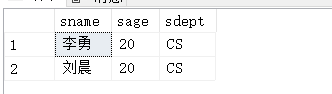
例 查询年龄在20~23岁之间的学生姓名、系别和年龄
select sname,sage,sdept
from student
where sage between 20 and 23;
- 1
- 2
- 3
③确定集合
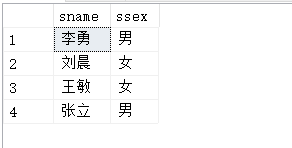
例 查询计算机科学系(cs)数学系(ma)和信息系(is)学生的姓名和性别
select sname,ssex
from student
where sdept in('cs','ma','is');
- 1
- 2
- 3
④字符匹配
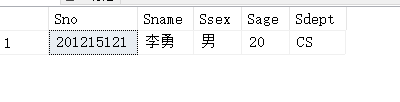
例 查询学号为201215121的学生的详细情况
select *
from student
where sno like'201215121';
//等价于
select *
from student
where sno='2012125121';
- 1
- 2
- 3
- 4
- 5
- 6
- 7
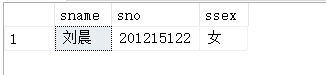
查询所有刘姓学生的姓名、学号和性别
select sname,sno,ssex
from student
where sname like'刘%'
- 1
- 2
- 3
⑤涉及空值的查询
例 查询缺少成绩的学生的学号和相应的课程号
select sno,cno
from sc
where grade is NULL; //分数是空值
- 1
- 2
- 3
注意这里的“is”不能用等号(=)代替
⑥多重条件查询
例 查询计算机科学系年龄在20岁以下的学生姓名
select sname
from student
where sdept='cs'and sage<20;
- 1
- 2
- 3
3、ORDER BY子句
用户可以用ORDER BY子句对查询结果按照一个或多个属性列的升序(ASC)或降序(DESC)排列,默认值为升序
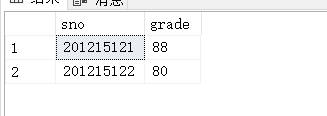
例 查询选修3号课程的学生的学号及其成绩,查询结果按分数的降序排列
select sno,grade
from sc
where cno='3'
order by grade desc;
- 1
- 2
- 3
- 4
4、聚集函数
①count()统计元组个数
例 查询学生总人数
select count(*)
from student;
- 1
- 2
②avg()计算一列值的平均值
例 计算选修1号课程的学生的平均成绩
select avg(grade)
from sc
where cno='1';
- 1
- 2
- 3
③max()求一列值中的最大值
例 查询选修1号课程的学生的最高分数
select max(grade)
from sc
where cno='1';
- 1
- 2
- 3

