
热门标签
热门文章
- 1一文搞懂大模型框架:LangChain
- 21、aigc图像相关
- 3C#正则表达式实例
- 4Android Activity启动模式及其区别_简述activity的四种启动模式及其区别。
- 5讯为IMX6UL开发板CAN接口测试学习笔记_flexcan 2090000.can can0: bit-timing not yet defin
- 6node的基础api
- 7GIS+=地理信息+大数据技术——GIS大数据可视化分析工具_gis大数据处理框架
- 8基于WebUploader实现大文件分片上传
- 9用Python发送通知到企业微信,实现消息推送_python 企业微信
- 10FastGPT,知识库AI !保姆级教程,5分钟上手
当前位置: article > 正文
Failed to obtain JDBC Connection; nested exception is java.sql.SQLException_failed to obtain jdbc connection; nested exception
作者:数据结构灵魂 | 2024-01-03 14:22:24
赞
踩
failed to obtain jdbc connection; nested exception is java.sql.sqlexception:
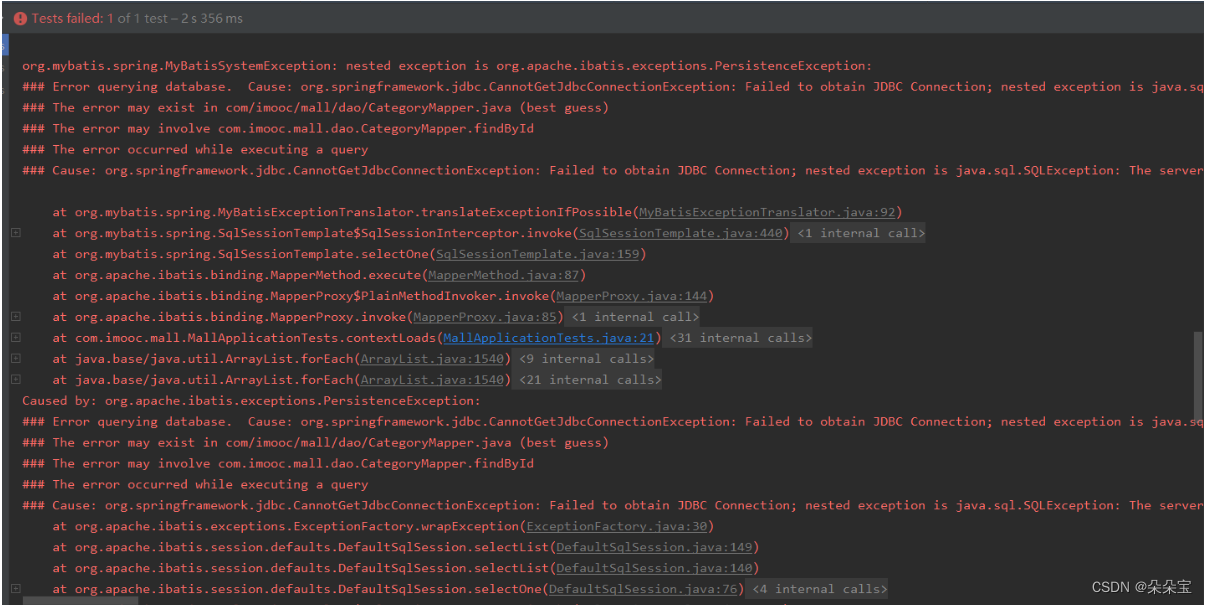
Failed to obtain JDBC Connection; nested exception is java.sql.SQLException: The server time zone value '�й���ʱ��' is unrecognized or represents more than one time zone. You must configure either the server or JDBC driver (via the 'serverTimezone' configuration property) to use a more specifc time zone value if you want to utilize time zone support.
Caused by: java.sql.SQLException: The server time zone value=问题解决,由于使用了新版mysql等数据库
解决:在jdbc连接的url后面添加serverTimezone=CST
例如:
jdbc:mysql://localhost:3306/demo改为
jdbc:mysql://localhost:3306/demo?serverTimezone=CST
原因:使用mysql的jdbc驱动最新版(6.0+)时,会遇到数据库和系统时区差异引起的问题。
注:CST代表的是中国上海时间(与北京时间,东八区相同)。
声明:本文内容由网友自发贡献,不代表【wpsshop博客】立场,版权归原作者所有,本站不承担相应法律责任。如您发现有侵权的内容,请联系我们。转载请注明出处:https://www.wpsshop.cn/article/detail/37810
推荐阅读
![[ 云计算 | AWS 实践 ] 使用 Java 更新现有 Amazon S3 对象](https://img-blog.csdnimg.cn/direct/f6b4b45ef01445aa9a147e7c5f1a8f15.png?x-oss-process=image/resize,m_fixed,h_300,image/format,png)


相关标签

