
热门标签
热门文章
- 1Mysql千万级别数据如何 做分页?_mysql千万级快速分页
- 2手把手教你基于 FastGPT 搭建个人知识库
- 3Git、GitHub、Gitee快速上手,看这篇就够了_github gitee
- 4Android sharepreference槽点及改进方案_sharedpreferences in credential encrypted storage
- 5Linux:使用systemd管理进程
- 6【代码段】动态生成页面heading_$adrethya@@remoya@@rnpoya@@aw@yp@ot@lo
- 7Win10安装docker_docker desktop搜索不到镜像
- 8图解 git 三种状态_git 跳绘某个状态
- 92020年第十一届蓝桥杯JavaC组(十月场)真题解析_2020蓝桥杯java c组
- 10最新修复版efucms聚合小说漫画动漫听书分销系统源码(附安装教程)_efucms发布教程
当前位置: article > 正文
【python3】pycharm selenium爬取微博内容(通过关键词_微博selenium爬取
作者:编程探索家 | 2024-02-03 14:41:43
赞
踩
微博selenium爬取
python(pycharm) 爬取微博内容
通过关键字,爬取微博内容,微博内容,时间,链接等
例如:(文本有些折叠了)
关键词:台风
- 1
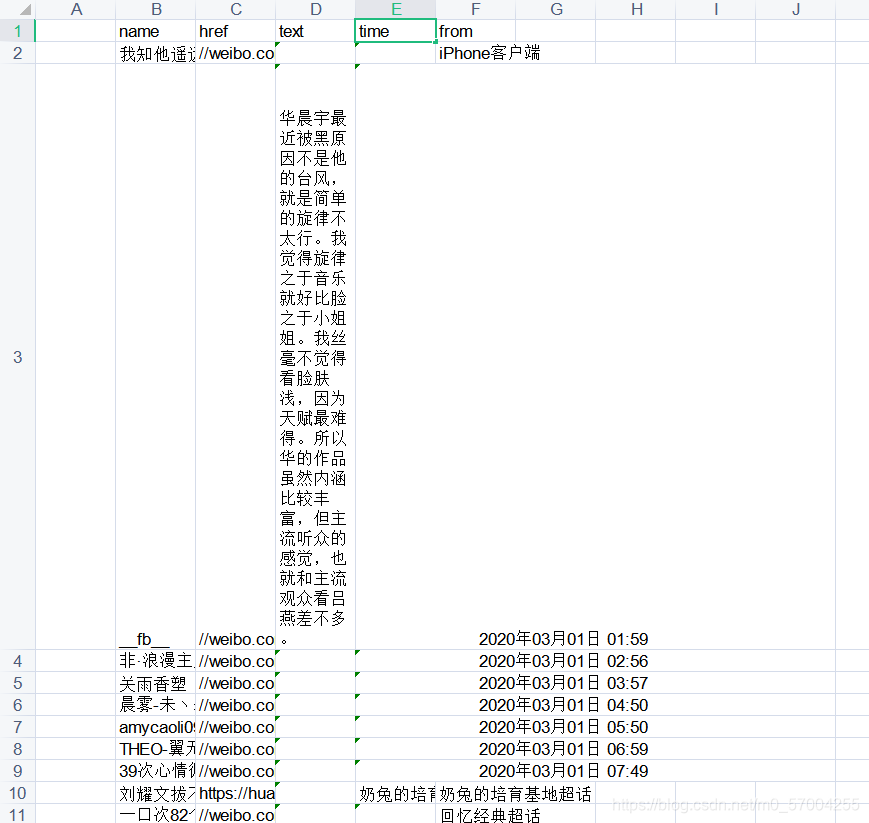
代码如下:
from selenium import webdriver from lxml import etree from urllib import parse from time import sleep import datetime from xlutils.copy import copy import xlrd import time keyword = '台风' # 爬取的关键词 y = 2020 # 起始年 m = 3 # 起始月 d = 10 # 起始日 days = 20 # 爬days天 url_keyword = parse.quote(keyword) # 将关键词转换成为网址可识别 def getday(y, m, d, n): # 封装日期 the_date = datetime.datetime(y, m, d) result_date = the_date + datetime.timedelta(days=n) d = result_date.strftime('%Y-%m-%d') return d def p(days, x): # 爬取解析存储 for i in range(days): data = getday(y, m, d, +i) for j in range(24): # 获取24小时的网址 if j == 23: data_add_hour = data + '-' + str(j) + ':' + getday(y, m, d, -(i - 1)) + '-' + str(0) else: data_add_hour = data + '-' + str(j) + ':' + data + '-' + str(j + 1) # selenium bro = webdriver.Chrome(executable_path=r'D:\python\chorm\chromedriver.exe') url = 'https://s.weibo.com/weibo?q=' + url_keyword + '&typeall=1&suball=1×cope=custom:' + data_add_hour print(url) bro.get(url) sleep(2) # 等待完整加载 page_text = bro.page_source # 完整页面 sleep(2) bro.quit() # 关闭网页 # 开始解析 tree = etree.HTML(page_text) print(tree) wb_list = tree.xpath("//div[@class='card-feed']") # # wb_list = tree.xpath(".// *[ @ id = 'pl_feedlist_index'] //div[@class='card-feed']") # # // *[ @ id = "pl_feedlist_index"] / div[2] / div[3] / div / div[1] # wb_list = tree.xpath("// *[ @ id = 'pl_feedlist_index'] / div[2] / div[3] / div / div[1]") wb_time = tree.xpath(".//*[@id='pl_feedlist_index']/div[2]/div[1]/div/div[1]/div[2]/p[2]/a[1]/text()") wb_name = tree.xpath( ".//*[@id='pl_feedlist_index']/div[2]/div[2]/div/div[1]/div[2]/div[1]/div[2]/a[1]/text()") wb_text = tree.xpath(".//*[@id='pl_feedlist_index']/div[2]/div[2]/div/div[1]/div[2]/p[1]//text() ") wb_from = tree.xpath(".//*[@id='pl_feedlist_index']/div[2]/div[5]/div/div[1]/div[2]/p[3]/a[2]/text()") wb_href = tree.xpath(".//*[@id='pl_feedlist_index']/div[2]/div[1]/div/div[1]/div[2]/p[2]/a[1]/@href") # print(wb_href) rb = xlrd.open_workbook('wb.xls') # 打开文件 wb = copy(rb) # 利用xlutils.copy下的copy函数复制 ws = wb.get_sheet(0) # 获取表单0 ws.write(x, 1, wb_name) print(wb_name) ws.write(x, 2, wb_href) print(wb_href) ws.write(x, 3, wb_text) print(wb_text) ws.write(x, 4, wb_time) print(wb_time) ws.write(x, 5, wb_from) print(wb_from) x = x + 1 print(x) wb.save('wb.xls') # 保存文件 if __name__ == '__main__': p(days, 1)

- 1
- 2
- 3
- 4
- 5
- 6
- 7
- 8
- 9
- 10
- 11
- 12
- 13
- 14
- 15
- 16
- 17
- 18
- 19
- 20
- 21
- 22
- 23
- 24
- 25
- 26
- 27
- 28
- 29
- 30
- 31
- 32
- 33
- 34
- 35
- 36
- 37
- 38
- 39
- 40
- 41
- 42
- 43
- 44
- 45
- 46
- 47
- 48
- 49
- 50
- 51
- 52
- 53
- 54
- 55
- 56
- 57
- 58
- 59
- 60
- 61
- 62
- 63
- 64
- 65
- 66
- 67
- 68
- 69
- 70
- 71
- 72
- 73
- 74
- 75
- 76
- 77
- 78
- 79
- 80
有几个问题还没完善
	使用selenium太慢了(考虑多线程同时
	获取的文本和时间有多余空格(正则
	可以在某个时间没有微博爬到空的(添加一个判断
- 1
- 2
- 3
声明:本文内容由网友自发贡献,不代表【wpsshop博客】立场,版权归原作者所有,本站不承担相应法律责任。如您发现有侵权的内容,请联系我们。转载请注明出处:https://www.wpsshop.cn/article/detail/56934
推荐阅读



相关标签

