
- 1如何在uni-app小程序端实现长按复制功能
- 2关于鸿蒙 ets 开发部署出现 Error while Deploying HAP 错误的问题解决方法
- 3CSAPP - 反编译 string_length
- 4Hugging Face Datasets文本质量分析,识别低质量内容、垃圾数据、偏见内容、识别毒性内容、检测重复文档、识别测试集污染数据、识别过短的内容
- 5软件工程项目学生管理系统_查询成绩协作图
- 6对比分析:软件测试和web前端哪个更有前景?_测试工程师和前端工程师谁前景大
- 7AI自动写代码:GitHub copilot插件在Idea的安装和使用教程_copilot idea
- 8人工神经网络简介_1949年,赫布出版的《行为的组织》一书中,描述了 hebb 学习规则并且提出权值的概念,这为为机器
- 9基于LVGL编写的windows串口工具: LCOM
- 10【HarmonyOS】HarmonyOS应用开发者高级认证96分_端云一体化当前支持最低的鸿蒙api版本是
探花交友03-MongoDB基础_探花交友mongodb数据
赞
踩
课程介绍
- MongoDB环境搭建
- MongoDB基本CRUD操作
- 通过JavaApi操作MongoDB
- SpringBoot整合MongoDB
1、通用设置
1.1 需求分析
1.1.1 需求分析
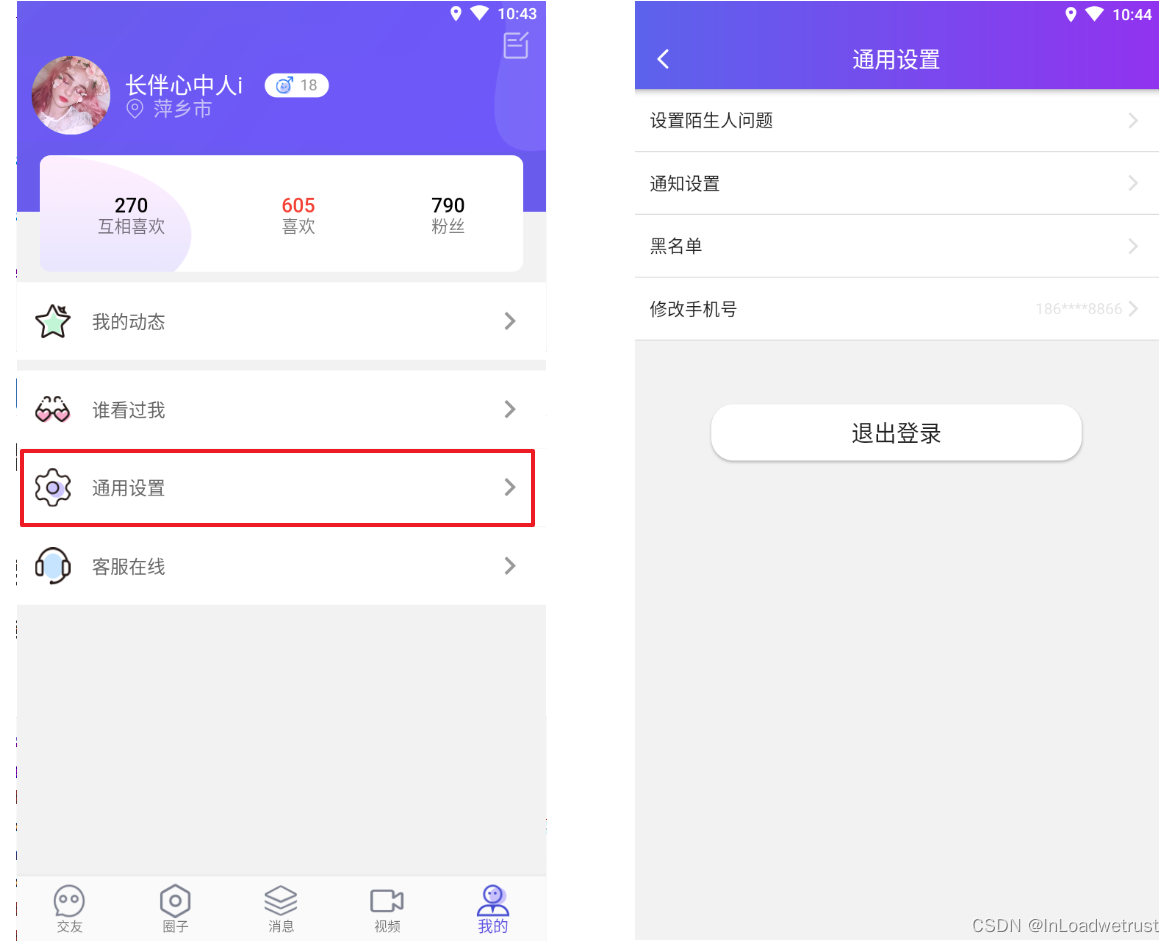
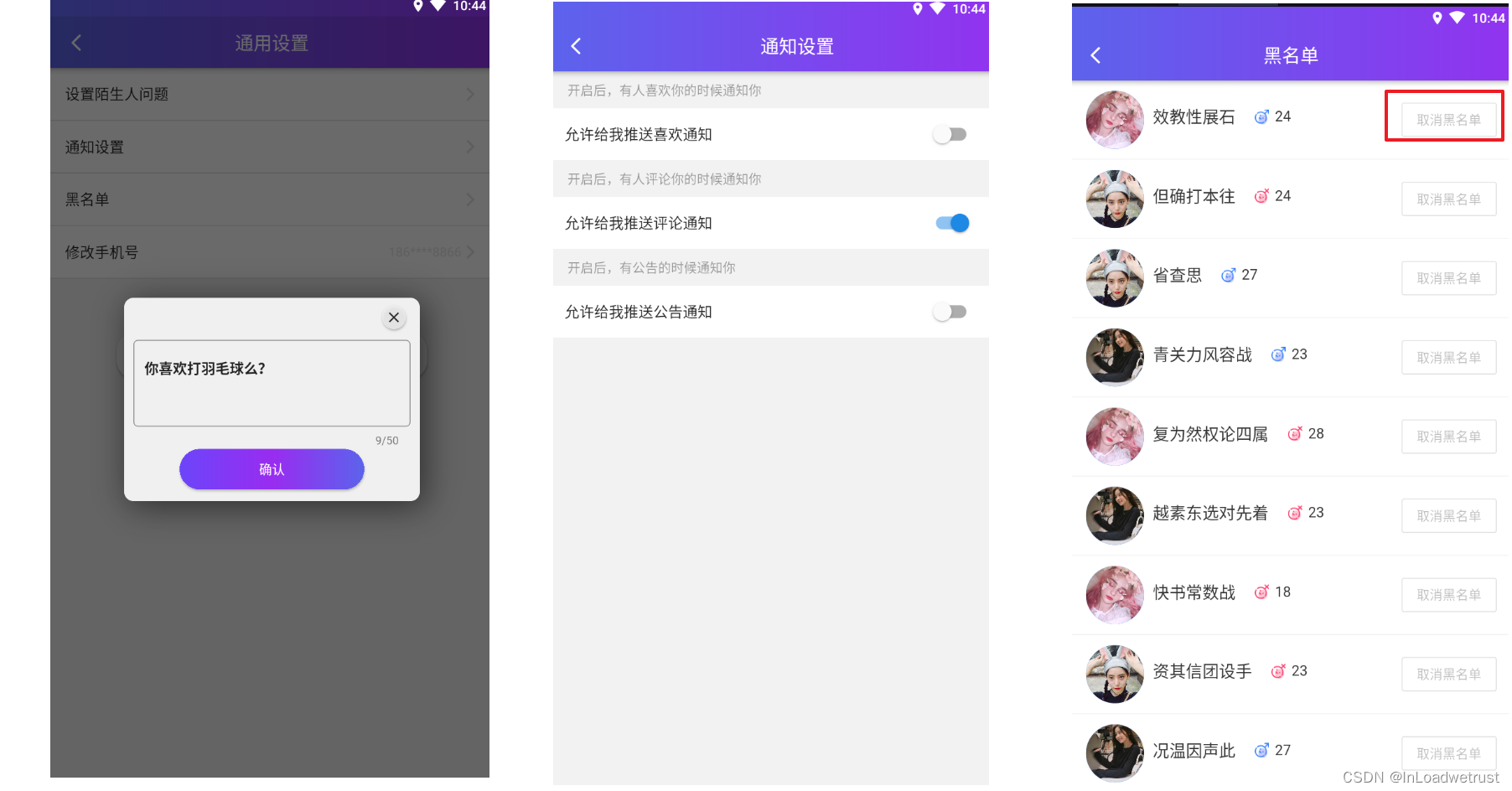
通用设置,包含探花交友APP基本的软件设置功能。包含:
设置陌生人问题:当平台其他用户想进行在线交流时需要回答陌生人问题。
通用设置:包含一些APP通知设置
黑名单:对于不感兴趣的用户设置黑名单屏蔽骚扰
1.1.2 数据库表
通用设置
CREATE TABLE `tb_settings` (
  `id` bigint(20) NOT NULL AUTO_INCREMENT,
  `user_id` bigint(20) DEFAULT NULL,
  `like_notification` tinyint(4) DEFAULT '1' COMMENT '推送喜欢通知',
  `pinglun_notification` tinyint(4) DEFAULT '1' COMMENT '推送评论通知',
  `gonggao_notification` tinyint(4) DEFAULT '1' COMMENT '推送公告通知',
  `created` datetime DEFAULT NULL,
  `updated` datetime DEFAULT NULL,
  PRIMARY KEY (`id`)
) ENGINE=InnoDB DEFAULT CHARSET=utf8 COMMENT='设置表';
- 1
- 2
- 3
- 4
- 5
- 6
- 7
- 8
- 9
- 10
问题表
CREATE TABLE `tb_question` (
  `id` bigint(20) NOT NULL AUTO_INCREMENT,
  `user_id` bigint(20) DEFAULT NULL COMMENT '用户id',
  `txt` varchar(200) DEFAULT NULL COMMENT '问题内容',
  `created` datetime DEFAULT NULL,
  `updated` datetime DEFAULT NULL,
  PRIMARY KEY (`id`),
  KEY `user_id` (`user_id`)
) ENGINE=InnoDB AUTO_INCREMENT=6 DEFAULT CHARSET=utf8
- 1
- 2
- 3
- 4
- 5
- 6
- 7
- 8
- 9
黑名单
CREATE TABLE `tb_black_list` (
  `id` bigint(20) NOT NULL AUTO_INCREMENT,
  `user_id` bigint(20) DEFAULT NULL,
  `black_user_id` bigint(20) DEFAULT NULL,
  `created` datetime DEFAULT NULL,
  `updated` datetime DEFAULT NULL,
  PRIMARY KEY (`id`),
  KEY `user_id` (`user_id`)
) ENGINE=InnoDB DEFAULT CHARSET=utf8 COMMENT='黑名单';
- 1
- 2
- 3
- 4
- 5
- 6
- 7
- 8
- 9
1.1.3 搭建提供者环境
实体类
(1) Settings
@Data
@NoArgsConstructor
@AllArgsConstructor
public class Settings extends BasePojo {

    private Long id;
    private Long userId;
    private Boolean likeNotification;
    private Boolean pinglunNotification;
    private Boolean gonggaoNotification;

}
- 1
- 2
- 3
- 4
- 5
- 6
- 7
- 8
- 9
- 10
- 11
- 12
(2)Question
@Data
@NoArgsConstructor
@AllArgsConstructor
public class Question extends BasePojo {

    private Long id;
    private Long userId;
    //问题内容
    private String txt;

}
- 1
- 2
- 3
- 4
- 5
- 6
- 7
- 8
- 9
- 10
- 11
(3)BlackList
@Data
@NoArgsConstructor
@AllArgsConstructor
public class BlackList extends BasePojo {

    private Long id;
    private Long userId;
    private Long blackUserId;
}
- 1
- 2
- 3
- 4
- 5
- 6
- 7
- 8
- 9
mapper接口
(1)SettingsMapper
public interface SettingsMapper extends BaseMapper<Settings> {
}
- 1
- 2
(2)QuestionMapper
public interface QuestionMapper extends BaseMapper<Question> {

}
- 1
- 2
- 3
(3)BlackListMapper
public interface BlackListMapper extends BaseMapper<BlackList> {

}
- 1
- 2
- 3
api接口
(1) SettingApi
package com.tanhua.dubbo.api;

import com.tanhua.domain.db.Settings;

public interface SettingsApi {

}
- 1
- 2
- 3
- 4
- 5
- 6
- 7
- 8
(2)QuestionApi
package com.tanhua.dubbo.api;

import com.tanhua.domain.db.Question;


public interface QuestionApi {

}
- 1
- 2
- 3
- 4
- 5
- 6
- 7
- 8
- 9
(3)BlackListApi
package com.tanhua.dubbo.api;

import com.baomidou.mybatisplus.core.metadata.IPage;
import com.tanhua.domain.db.UserInfo;

public interface BlackListApi {

}
- 1
- 2
- 3
- 4
- 5
- 6
- 7
- 8
- 9
api服务实现类
(1)SettingServiceImpl
package com.tanhua.dubbo.api;

import com.baomidou.mybatisplus.core.conditions.query.QueryWrapper;
import com.tanhua.domain.db.Settings;
import com.tanhua.dubbo.mapper.SettingsMapper;
import org.apache.dubbo.config.annotation.Service;
import org.springframework.beans.factory.annotation.Autowired;

@Service
public class SettingsApiImpl implements SettingsApi {

    @Autowired
    private SettingsMapper settingsMapper;

}

- 1
- 2
- 3
- 4
- 5
- 6
- 7
- 8
- 9
- 10
- 11
- 12
- 13
- 14
- 15
- 16
(2)QuestionServiceImpl
package com.tanhua.dubbo.api;

import com.baomidou.mybatisplus.core.conditions.query.QueryWrapper;
import com.tanhua.domain.db.Question;
import com.tanhua.dubbo.mapper.QuestionMapper;
import org.apache.dubbo.config.annotation.Service;
import org.springframework.beans.factory.annotation.Autowired;

@Service
public class QuestionApiImpl implements QuestionApi {

    @Autowired
    private QuestionMapper questionMapper;

}
- 1
- 2
- 3
- 4
- 5
- 6
- 7
- 8
- 9
- 10
- 11
- 12
- 13
- 14
- 15
- 16
(3)BlackListServiceImpl
package com.tanhua.dubbo.api;

import com.baomidou.mybatisplus.core.conditions.query.QueryWrapper;
import com.baomidou.mybatisplus.core.metadata.IPage;
import com.baomidou.mybatisplus.extension.plugins.pagination.Page;
import com.tanhua.domain.db.BlackList;
import com.tanhua.domain.db.UserInfo;
import com.tanhua.dubbo.mapper.BlackListMapper;
import com.tanhua.dubbo.mapper.UserInfoMapper;
import org.apache.dubbo.config.annotation.Service;
import org.springframework.beans.factory.annotation.Autowired;

@Service
public class BlackListApiImpl implements BlackListApi {

    @Autowired
    private BlackListMapper blackListMapper;
}
- 1
- 2
- 3
- 4
- 5
- 6
- 7
- 8
- 9
- 10
- 11
- 12
- 13
- 14
- 15
- 16
- 17
- 18
- 19
1.2 查询通用设置
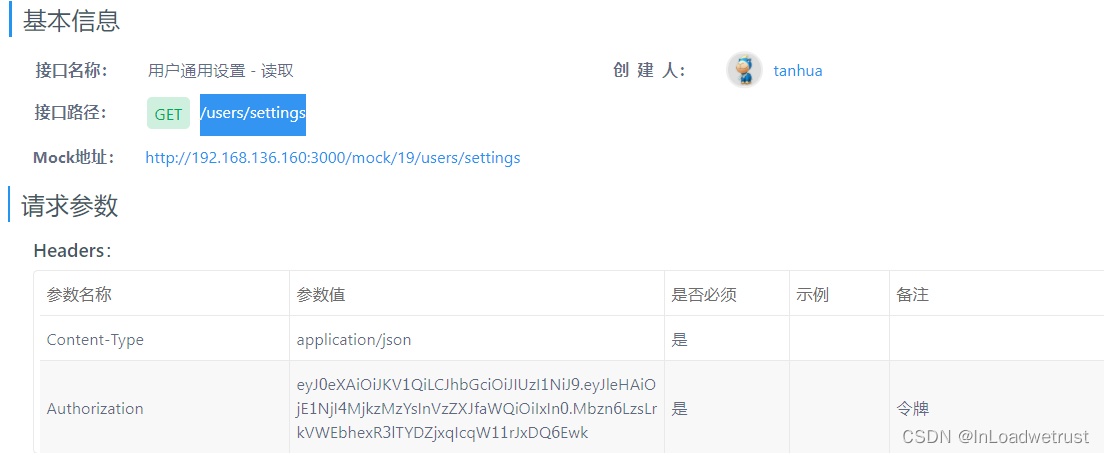
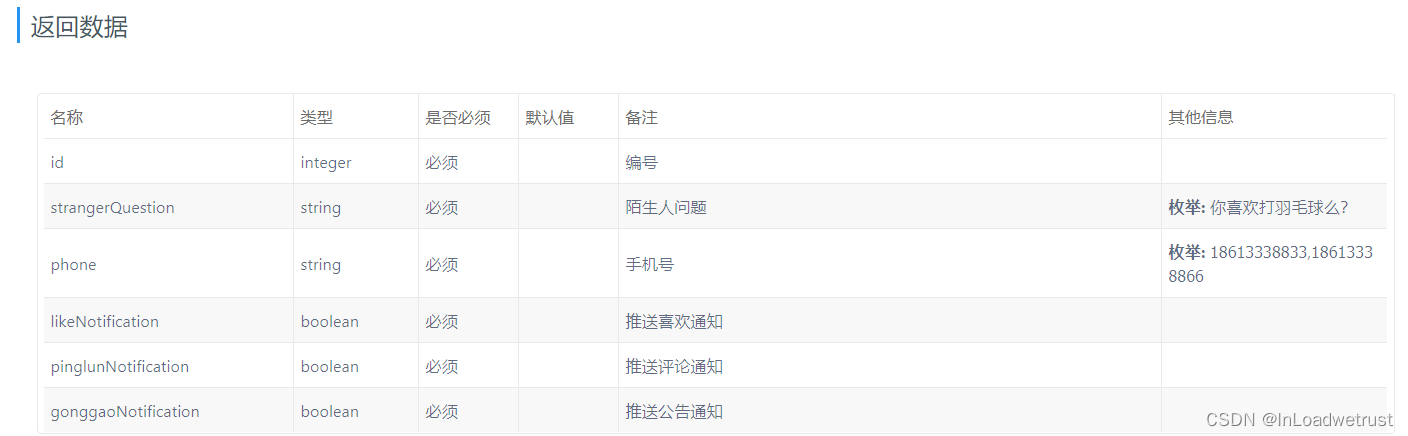
1.2.1 接口文档
1.2.2 代码实现
vo对象
@Data
@NoArgsConstructor
@AllArgsConstructor
public class SettingsVo implements Serializable {

    private Long id;
    private String strangerQuestion = "";
    private String phone;
    private Boolean likeNotification = true;
    private Boolean pinglunNotification = true;
    private Boolean gonggaoNotification = true;

}
- 1
- 2
- 3
- 4
- 5
- 6
- 7
- 8
- 9
- 10
- 11
- 12
- 13
SettingsController
在tanhua-server工程创建SettingsController完成代码编写
@RestController
@RequestMapping("/users")
public class SettingsController {

    @Autowired
    private SettingsService settingsService;

    /**
     * 查询通用设置
     */
    @GetMapping("/settings")
    public ResponseEntity settings() {
        SettingsVo vo = settingsService.settings();
        return ResponseEntity.ok(vo);
    }
}
- 1
- 2
- 3
- 4
- 5
- 6
- 7
- 8
- 9
- 10
- 11
- 12
- 13
- 14
- 15
- 16
SettingService
在tanhua-server工程创建SettingService完成代码编写
@Service
public class SettingsService {

    @DubboReference
    private QuestionApi questionApi;

    @DubboReference
    private SettingsApi settingsApi;

    @DubboReference
    private BlackListApi blackListApi;

    //查询通用设置
    public SettingsVo settings() {
        SettingsVo vo = new SettingsVo();
        //1、获取用户id
        Long userId = UserHolder.getUserId();
        vo.setId(userId);
        //2、获取用户的手机号码
        vo.setPhone(UserHolder.getMobile());
        //3、获取用户的陌生人问题
        Question question = questionApi.findByUserId(userId);
        String txt = question == null ? "你喜欢java吗?" : question.getTxt();
        vo.setStrangerQuestion(txt);
        //4、获取用户的APP通知开关数据
        Settings settings = settingsApi.findByUserId(userId);
        if(settings != null) {
            vo.setGonggaoNotification(settings.getGonggaoNotification());
            vo.setPinglunNotification(settings.getPinglunNotification());
            vo.setLikeNotification(settings.getLikeNotification());
        }
        return vo;
    }
}
- 1
- 2
- 3
- 4
- 5
- 6
- 7
- 8
- 9
- 10
- 11
- 12
- 13
- 14
- 15
- 16
- 17
- 18
- 19
- 20
- 21
- 22
- 23
- 24
- 25
- 26
- 27
- 28
- 29
- 30
- 31
- 32
- 33
- 34
QuestionApi
在tanhua-dubbo中的QuestionApi和QuestionApiImpl补充方法
@Override
public Question findByUserId(Long userId) {
    QueryWrapper<Question> qw = new QueryWrapper<>();
    qw.eq("user_id",userId);
    return questionMapper.selectOne(qw);
}
- 1
- 2
- 3
- 4
- 5
- 6
SettingApi
在tanhua-dubbo中的SettingApi和SettingApiImpl补充方法
//根据用户id查询
public Settings findByUserId(Long userId) {
    QueryWrapper<Settings> qw = new QueryWrapper<>();
    qw.eq("user_id",userId);
    return settingsMapper.selectOne(qw);
}
- 1
- 2
- 3
- 4
- 5
- 6
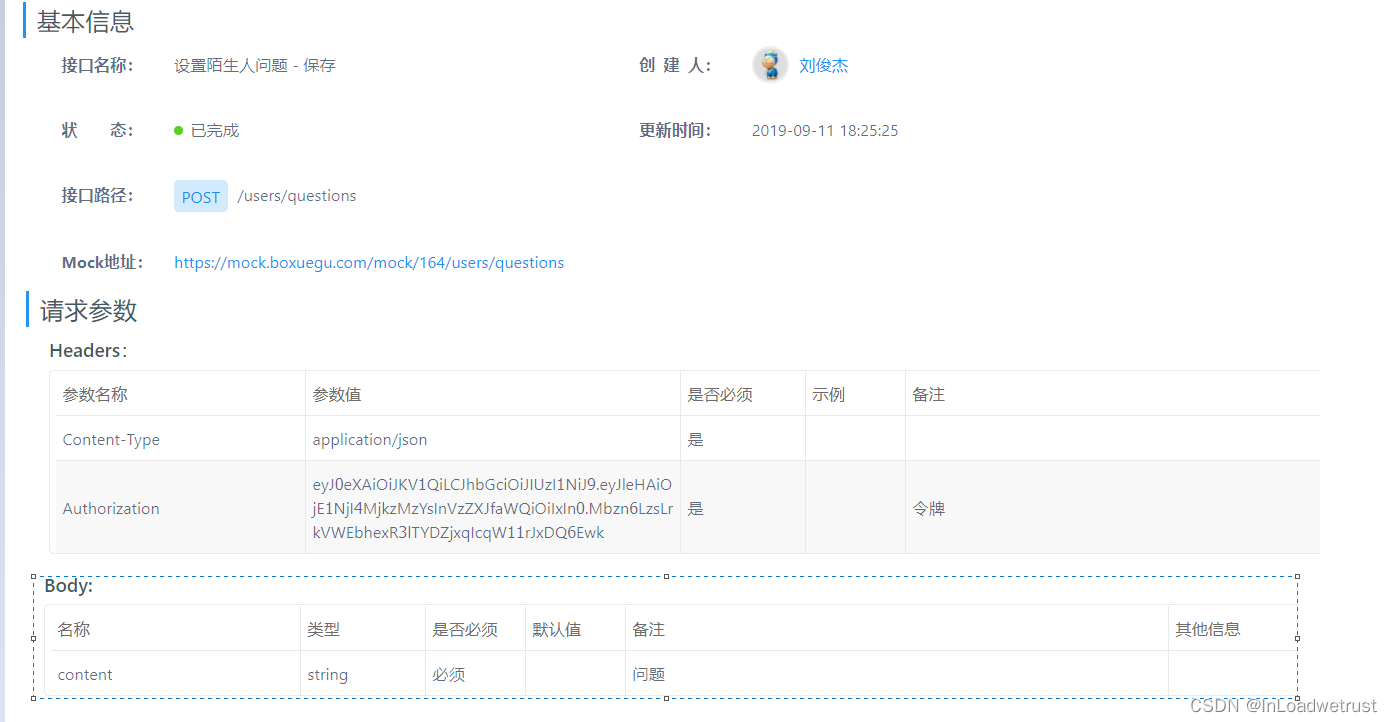
1.2 陌生人问题
对数据库表进行操作:如果存在数据,更新数据库。如果不存在数据,保存数据库表数据
1.2.1 接口文档
1.2.2 代码实现
SettingsController
/**
 * 设置陌生人问题
 */
@PostMapping("/questions")
public ResponseEntity questions(@RequestBody Map map) {
    //获取参数
    String content = (String) map.get("content");
    settingsService.saveQuestion(content);
    return ResponseEntity.ok(null);
}
- 1
- 2
- 3
- 4
- 5
- 6
- 7
- 8
- 9
- 10
SettingsService
//设置陌生人问题
public void saveQuestion(String content) {
    //1、获取当前用户id
    Long userId = UserHolder.getUserId();
    //2、调用api查询当前用户的陌生人问题
    Question question = questionApi.findByUserId(userId);
    //3、判断问题是否存在
    if(question == null) {
        //3.1 如果不存在,保存
        question = new Question();
        question.setUserId(userId);
        question.setTxt(content);
        questionApi.save(question);
    }else {
        //3.2 如果存在,更新
        question.setTxt(content);
        questionApi.update(question);
    }
}
- 1
- 2
- 3
- 4
- 5
- 6
- 7
- 8
- 9
- 10
- 11
- 12
- 13
- 14
- 15
- 16
- 17
- 18
- 19
QuestionApi
tanhua-dubbo工程中的QuestionApi和QuestionApiImpl中添加保存和更新方法
@Override
public void save(Question question) {
    questionMapper.insert(question);
}

@Override
public void update(Question question) {
    questionMapper.updateById(question);
}
- 1
- 2
- 3
- 4
- 5
- 6
- 7
- 8
- 9
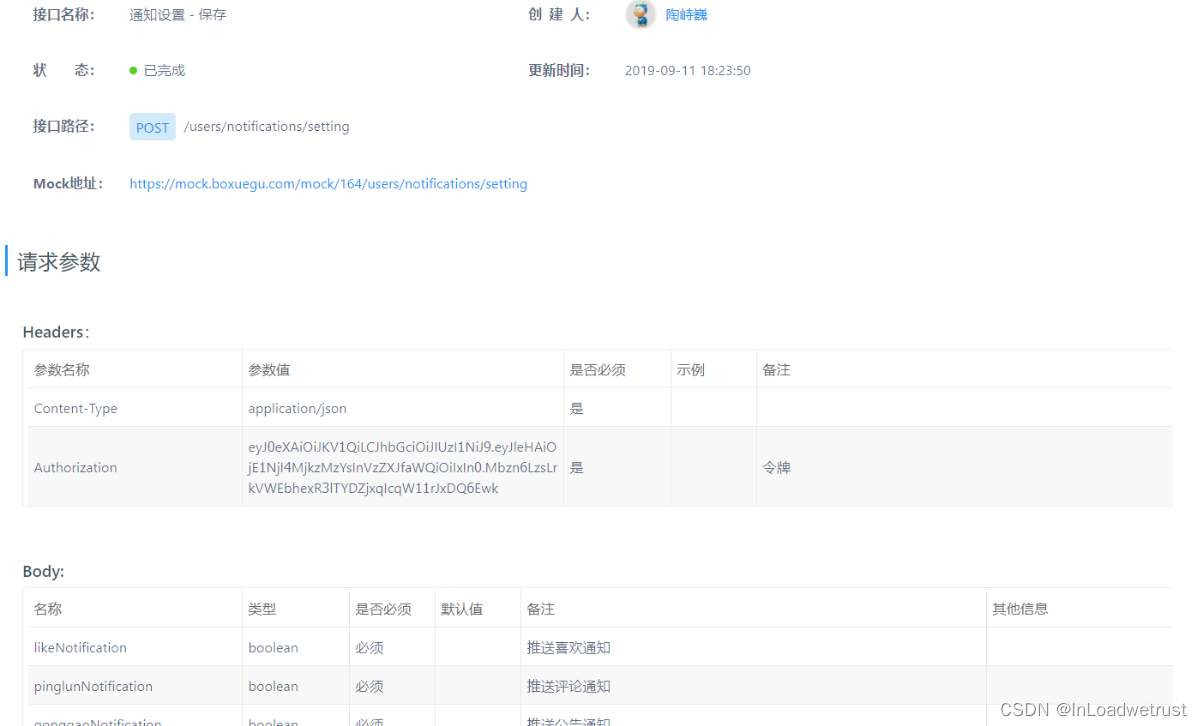
1.3 通知设置
1.3.1 接口文档
通知管理:对通知进行保存或者更新的操作
http://192.168.136.160:3000/project/19/interface/api/280
1.3.2 代码实现
SettingsController
/**
 * 通知设置
 */
@PostMapping("/notifications/setting")
public ResponseEntity notifications(@RequestBody Map map) {
    //获取参数
    settingsService.saveSettings(map);
    return ResponseEntity.ok(null);
}
- 1
- 2
- 3
- 4
- 5
- 6
- 7
- 8
- 9
SettingsService
//通知设置
public void saveSettings(Map map) {
    boolean likeNotification = (Boolean) map.get("likeNotification");
    boolean pinglunNotification = (Boolean) map.get("pinglunNotification");
    boolean gonggaoNotification = (Boolean)  map.get("gonggaoNotification");
    //1、获取当前用户id
    Long userId = UserHolder.getUserId();
    //2、根据用户id,查询用户的通知设置
    Settings settings = settingsApi.findByUserId(userId);
    //3、判断
    if(settings == null) {
        //保存
        settings = new Settings();
        settings.setUserId(userId);
        settings.setPinglunNotification(pinglunNotification);
        settings.setLikeNotification(likeNotification);
        settings.setGonggaoNotification(gonggaoNotification);
        settingsApi.save(settings);
    }else {
        settings.setPinglunNotification(pinglunNotification);
        settings.setLikeNotification(likeNotification);
        settings.setGonggaoNotification(gonggaoNotification);
        settingsApi.update(settings);
    }
}
- 1
- 2
- 3
- 4
- 5
- 6
- 7
- 8
- 9
- 10
- 11
- 12
- 13
- 14
- 15
- 16
- 17
- 18
- 19
- 20
- 21
- 22
- 23
- 24
- 25
SettingsApi
tanhua-dubbo工程中的SettingsApi和SettingsApiImpl中添加保存和更新方法
@Override
public void save(Settings settings) {
    settingsMapper.insert(settings);
}

@Override
public void update(Settings settings) {
    settingsMapper.updateById(settings);
}
- 1
- 2
- 3
- 4
- 5
- 6
- 7
- 8
- 9
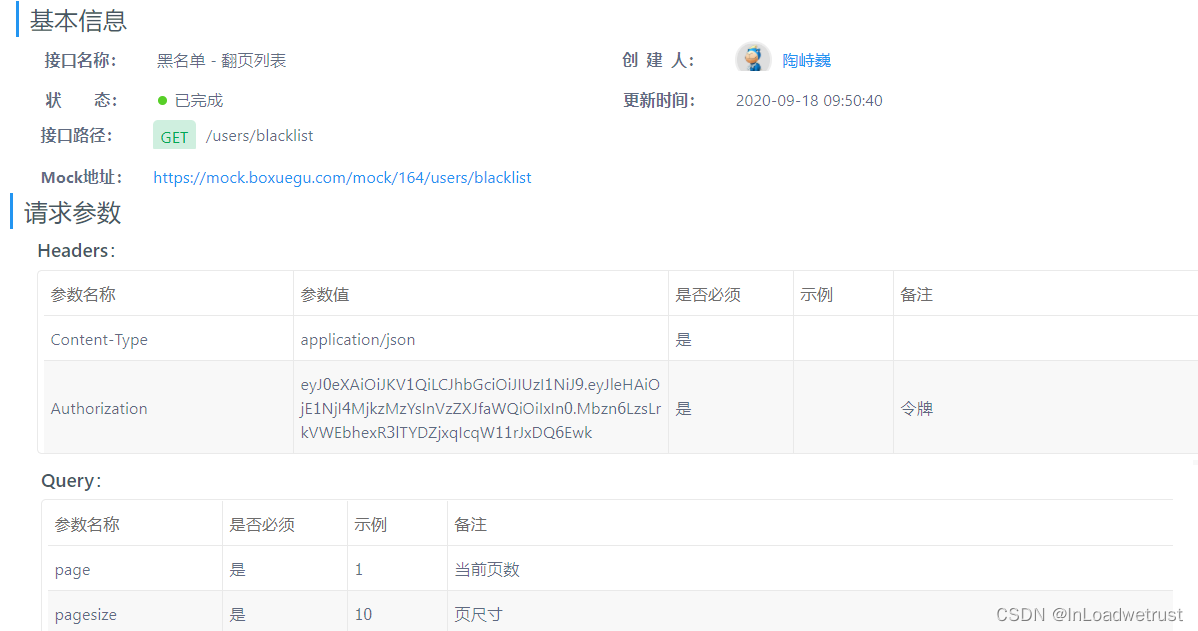
1.4 黑名单管理
1.3.1 接口文档
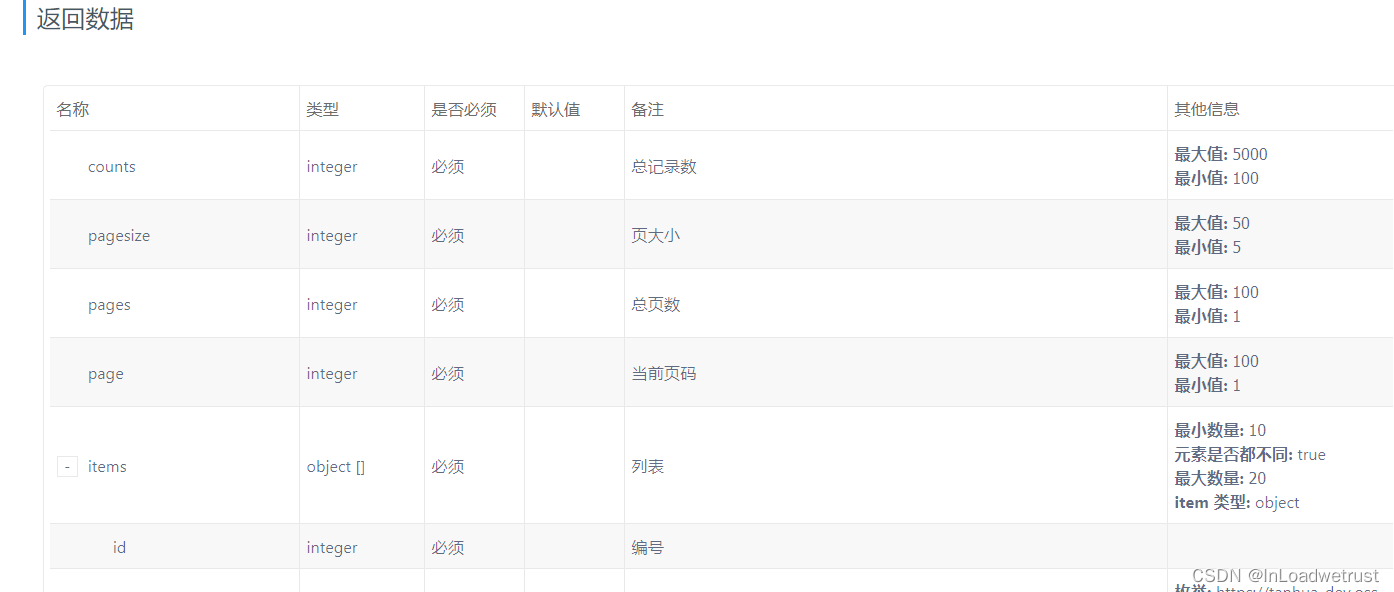
- 查询黑名单列表
- 移除黑名单
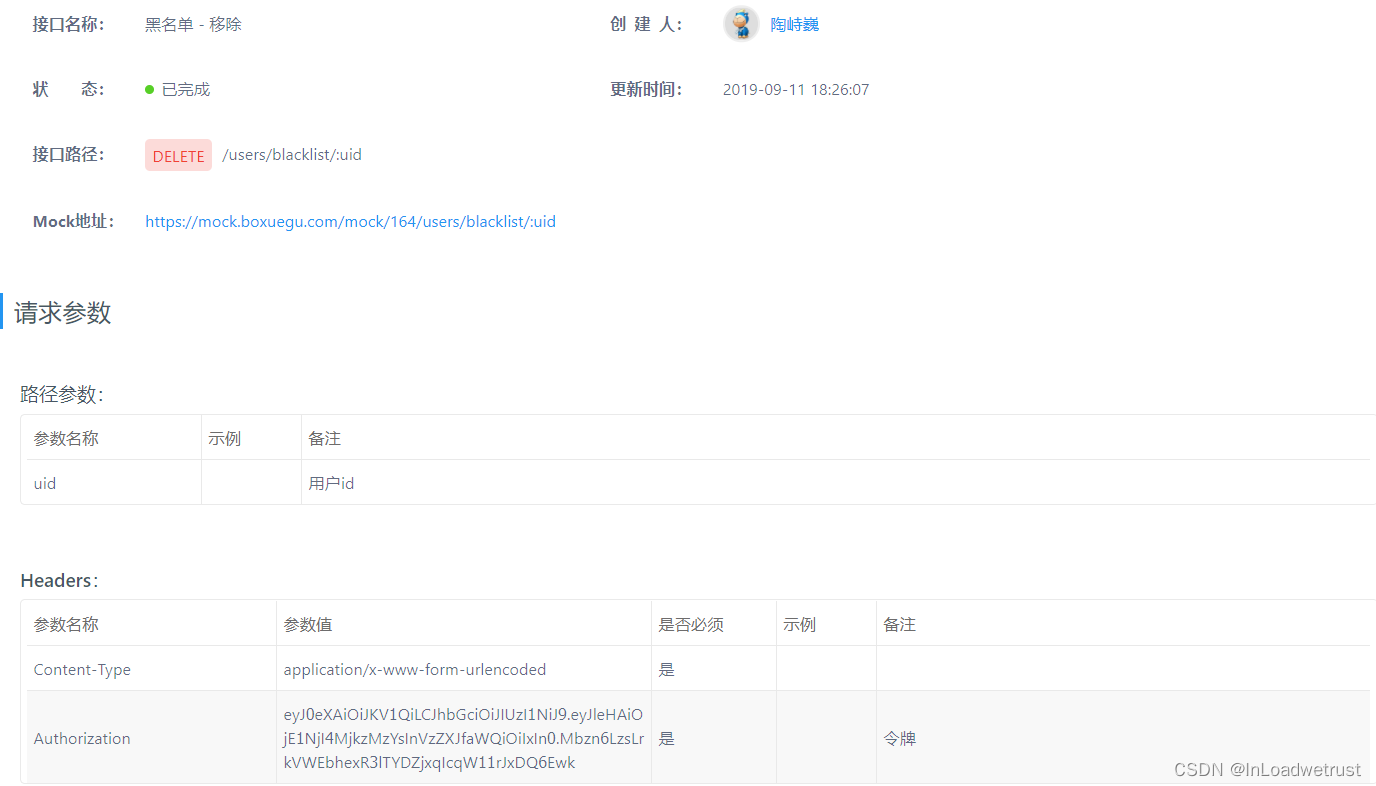
1.3.2 分页查询
vo对象
tanhua-domain工程的配置分页vo对象
package com.tanhua.domain.vo;

import lombok.AllArgsConstructor;
import lombok.Data;
import lombok.NoArgsConstructor;

import java.io.Serializable;
import java.util.Collections;
import java.util.List;

@Data
@AllArgsConstructor
@NoArgsConstructor
public class PageResult implements Serializable {

    private Integer counts = 0;//总记录数
    private Integer pagesize;//页大小
    private Integer pages = 0;//总页数
    private Integer page;//当前页码
    private List<?> items = Collections.emptyList(); //列表

    public PageResult(Integer page,Integer pagesize,
                      int counts,List list) {
        this.page = page;
        this.pagesize = pagesize;
        this.items = list;
        this.counts = counts;
        this.pages = counts % pagesize == 0 ? counts / pagesize : counts / pagesize + 1;
    }

}
- 1
- 2
- 3
- 4
- 5
- 6
- 7
- 8
- 9
- 10
- 11
- 12
- 13
- 14
- 15
- 16
- 17
- 18
- 19
- 20
- 21
- 22
- 23
- 24
- 25
- 26
- 27
- 28
- 29
- 30
- 31
SettingsController
/**
 * 分页查询黑名单列表
 */
@GetMapping("/blacklist")
public ResponseEntity blacklist(
        @RequestParam(defaultValue = "1") int page,
        @RequestParam(defaultValue = "10") int size) {
    //1、调用service查询
    PageResult pr = settingsService.blacklist(page,size);
    //2、构造返回
    return ResponseEntity.ok(pr);
}

/**
 * 取消黑名单
 */
@DeleteMapping("/blacklist/{uid}")
public ResponseEntity deleteBlackList(@PathVariable("uid") Long blackUserId) {
    settingsService.deleteBlackList(blackUserId);
    return ResponseEntity.ok(null);
}
- 1
- 2
- 3
- 4
- 5
- 6
- 7
- 8
- 9
- 10
- 11
- 12
- 13
- 14
- 15
- 16
- 17
- 18
- 19
- 20
- 21
SettingService
//分页查询黑名单列表
public PageResult blacklist(int page, int size) {
    //1、获取当前用户的id
    Long userId = UserHolder.getUserId();
    //2、调用API查询用户的黑名单分页列表  Ipage对象
    IPage<UserInfo> iPage = blackListApi.findByUserId(userId,page,size);
    //3、对象转化,将查询的Ipage对象的内容封装到PageResult中
    PageResult pr = new PageResult(page,size,iPage.getTotal(),iPage.getRecords());
    //4、返回
    return pr;
}

//取消黑名单
public void deleteBlackList(Long blackUserId) {
    //1、获取当前用户id
    Long userId = UserHolder.getUserId();
    //2、调用api删除
    blackListApi.delete(userId,blackUserId);
}
- 1
- 2
- 3
- 4
- 5
- 6
- 7
- 8
- 9
- 10
- 11
- 12
- 13
- 14
- 15
- 16
- 17
- 18
- 19
BlackListApi
@Override
public IPage<UserInfo> findByUserId(Long userId, int page, int size) {
    //1、构建分页参数对象Page
    Page pages = new Page(page,size);
    //2、调用方法分页(自定义编写 分页参数Page,sql条件参数)
    return userInfoMapper.findBlackList(pages,userId);
}

@Override
public void delete(Long userId, Long blackUserId) {
    QueryWrapper<BlackList> qw = new QueryWrapper<>();
    qw.eq("user_id",userId);
    qw.eq("black_user_id",blackUserId);
    blackListMapper.delete(qw);
}
- 1
- 2
- 3
- 4
- 5
- 6
- 7
- 8
- 9
- 10
- 11
- 12
- 13
- 14
- 15
UserInfoMapper
public interface UserInfoMapper extends BaseMapper<UserInfo> {

    @Select("select * from tb_user_info where id in (\n" +
            "  SELECT black_user_id FROM tb_black_list where user_id=#{userId}\n" +
            ")")
    IPage<UserInfo> findBlackList(@Param("pages") Page pages, @Param("userId") Long userId);
}
- 1
- 2
- 3
- 4
- 5
- 6
- 7
MybatisPlusConfig
tanhua-dubbo-db引导类开启mybatis-plus分页插件支持
@Bean
public MybatisPlusInterceptor mybatisPlusInterceptor() {
    MybatisPlusInterceptor interceptor = new MybatisPlusInterceptor();
    interceptor.addInnerInterceptor(new PaginationInnerInterceptor(DbType.MYSQL));
    return interceptor;
}
- 1
- 2
- 3
- 4
- 5
- 6
使用mybatis-plus的分页:
- 创建分页对象:Page,指定当前页和每页查询条数
- 基础查询:mapper.selectPage(page,查询条件)
- 自定义查询:Ipage 方法名称(Page对象,xxx查询条件)
2、MongoDB简介
对于社交类软件的功能,我们需要对它的功能特点做分析:
- 数据量会随着用户数增大而增大
- 读多写少
- 价值较低
- 非好友看不到其动态内容
- 地理位置的查询
- ……
针对以上特点,我们来分析一下:
- mysql:关系型数据库(效率低)
- redis:redis缓存(微博,效率高,数据格式不丰富)
- 对于数据量大而言,显然不能够使用关系型数据库进行存储,我们需要通过MongoDB进行存储
- 对于读多写少的应用,需要减少读取的成本
- 比如说,一条SQL语句,单张表查询一定比多张表查询要快
探花交友
- mongodb:存储业务数据(圈子,推荐的数据,小视频数据,点赞,评论等)
- redis:承担的角色是缓存层(提升查询效率)
- mysql:存储和核心业务数据,账户
1.1、MongoDB简介
MongoDB:是一个高效的非关系型数据库(不支持表关系:只能操作单表)
MongoDB是一个基于分布式文件存储的数据库。由C++语言编写。旨在为WEB应用提供可扩展的高性能数据存储解决方案。
MongoDB是一个介于关系数据库和非关系数据库之间的产品,是非关系数据库当中功能最丰富,最像关系数据库的,它支持的数据结构非常松散,是类似json的bson格式,因此可以存储比较复杂的数据类型。
MongoDB最大的特点是它支持的查询语言非常强大,其语法有点类似于面向对象的查询语言,几乎可以实现类似关系数据库单表查询的绝大部分功能,而且还支持对数据建立索引。
官网:https://www.mongodb.com
1.2、MongoDB的特点
MongoDB 最大的特点是他支持的查询语言非常强大,其语法有点类似于面向对象的查询语言,几乎可以实现类似关系数据库单表查询的绝大部分功能,而且还支持对数据建立索引。它是一个面向集合的,模式自由的文档型数据库。具体特点总结如下:
- 面向集合存储,易于存储对象类型的数据
- 模式自由
- 支持动态查询
- 支持完全索引,包含内部对象
- 支持复制和故障恢复
- 使用高效的二进制数据存储,包括大型对象(如视频等)
- 自动处理碎片,以支持云计算层次的扩展性
- 支持 Python,PHP,Ruby,Java,C,C#,Javascript,Perl及C++语言的驱动程 序, 社区中也提供了对Erlang及.NET 等平台的驱动程序
- 文件存储格式为 BSON(一种 JSON 的扩展)
1.2.1、通过docker安装MongoDB
在课程资料的虚拟机中已经提供了MongoDB的镜像和容器,我们只需要使用简单的命令即可启动
#进入base目录
cd /root/docker-file/base/
#批量创建启动容器,其中已经包含了redis,zookeeper,mongodb容器
docker-compose up -d
#查看容器
docker ps -a
- 1
- 2
- 3
- 4
- 5
- 6

可以看到mongoDB已经启动,对外暴露了27017的操作端口
1.2.2、MongoDB体系结构
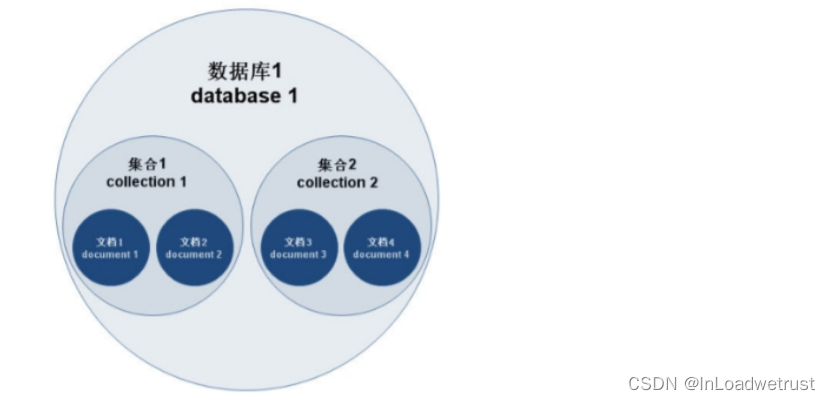
MongoDB 的逻辑结构是一种层次结构。主要由: 文档(document)、集合(collection)、数据库(database)这三部分组成的。逻辑结构是面 向用户的,用户使用 MongoDB 开发应用程序使用的就是逻辑结构。
- MongoDB 的文档(document),相当于关系数据库中的一行记录。
- 多个文档组成一个集合(collection),相当于关系数据库的表。
- 多个集合(collection),逻辑上组织在一起,就是数据库(database)。
- 一个 MongoDB 实例支持多个数据库(database)。 文档(document)、集合(collection)、数据库(database)的层次结构如下图:
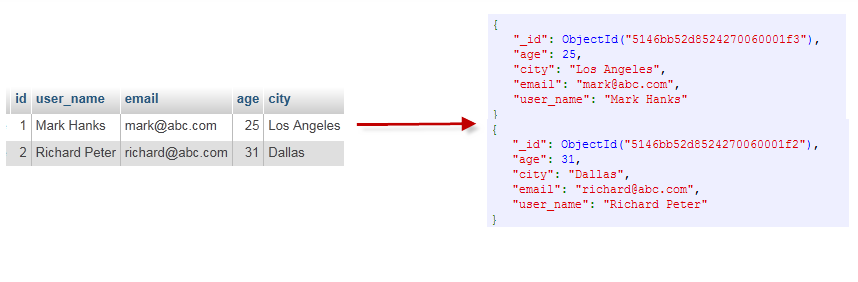
为了更好的理解,下面与SQL中的概念进行对比:
| SQL术语/概念 | MongoDB术语/概念 | 解释/说明 |
|---|---|---|
| database | database | 数据库 |
| table | collection | 数据库表/集合 |
| row | document | 表中的一条数据 |
| column | field | 数据字段/域 |
| index | index | 索引 |
| table joins | 表连接,MongoDB不支持 | |
| primary key | primary key | 主键,MongoDB自动将_id字段设置为主键 |
1.3 数据类型
- 数据格式:BSON {aa:bb}
- null:用于表示空值或者不存在的字段,{“x”:null}
- 布尔型:布尔类型有两个值true和false,{“x”:true}
- 数值:shell默认使用64为浮点型数值。{“x”:3.14}或{“x”:3}。对于整型值,可以使用 NumberInt(4字节符号整数)或NumberLong(8字节符号整数), {“x”:NumberInt(“3”)}{“x”:NumberLong(“3”)}
- 字符串:UTF-8字符串都可以表示为字符串类型的数据,{“x”:“呵呵”}
- 日期:日期被存储为自新纪元依赖经过的毫秒数,不存储时区,{“x”:new Date()}
- 正则表达式:查询时,使用正则表达式作为限定条件,语法与JavaScript的正则表达式相 同,{“x” 本文内容由网友自发贡献,转载请注明出处:【wpsshop博客】

Copyright © 2003-2013 www.wpsshop.cn 版权所有,并保留所有权利。

