- 1【Java基础系列】JDK21新特性
- 2为什么说C语言是面向过程的?
- 3解决vmware虚拟机和宿主机之间不能复制粘贴问题_vm复制不能粘贴到主机
- 4何为.sh文件?_.sh是什么脚本
- 5卸载 vmware-tools.pl和安装 vmware-tools.pl失败了,谁能解?_enter yes to proceed. [no] input: [no] default exe
- 6pl/sql编程(五)触发器_hghukfh
- 7初级通信工程师-职业道德
- 8Idea修改Git账号及密码的方法_idea修改git用户名和密码
- 9目标检测算法——YOLOv5/YOLOv7改进之结合SIoU_姿态损失 形状损失 运动估计损失
- 10docker网络
【Unity 14】Unity简单案例《见缝插针》开发源码_见缝插针unity成品下载
赞
踩
PS:本系列笔记将会记录我此次在北京学习Unity开发的总体过程,方便后期写总结,笔记为日更。
笔记内容均为 自己理解,不保证每个都对。
C#笔记未按照难度排列
工程项目下载地址:
https://download.csdn.net/download/zb756999355/11493236
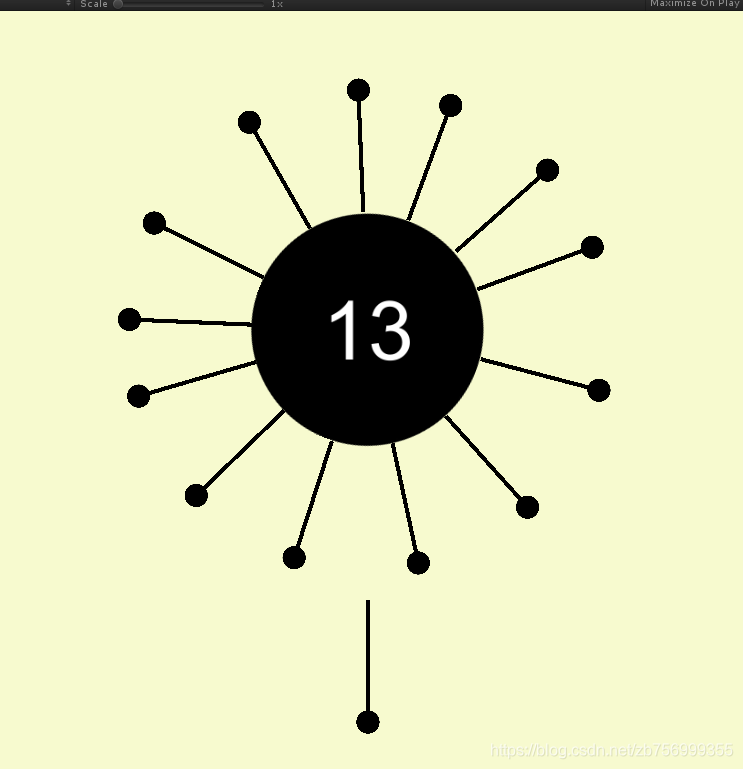
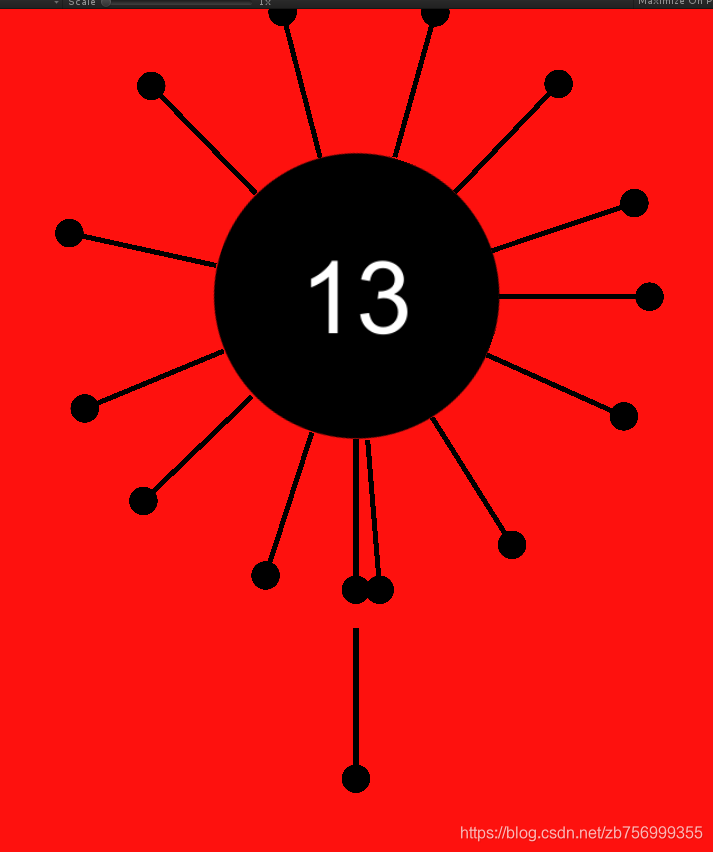
游戏效果:
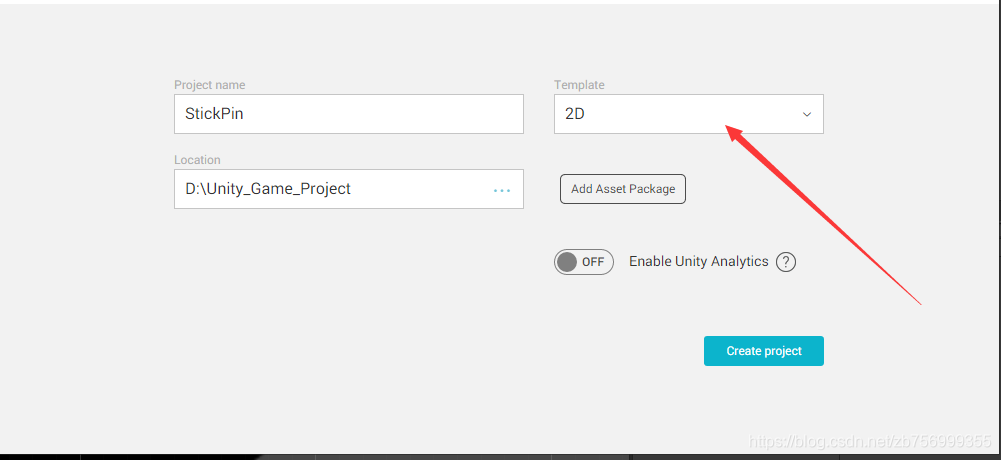
第一步:创建项目
在建立项目工程时选择建立2D项目
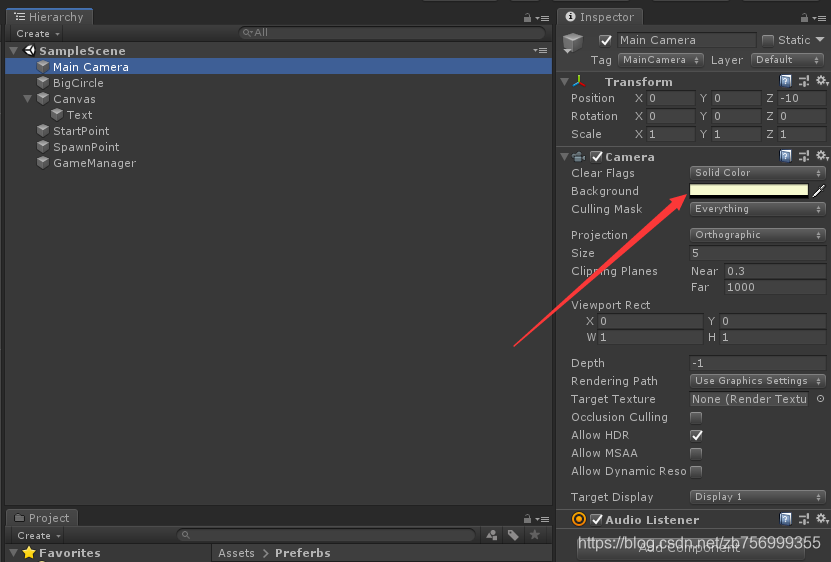
第二步:修改主色
根据个人喜好,画出圆面, 修改Camera的背景颜色
第三步:调整位置
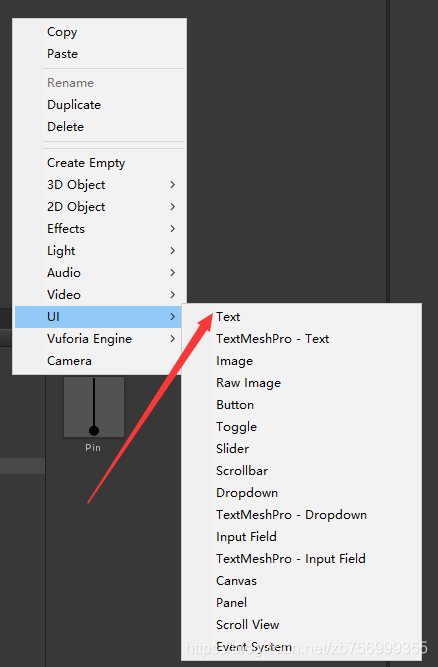
在组件窗口空白处 右键 创建UI - TEXT
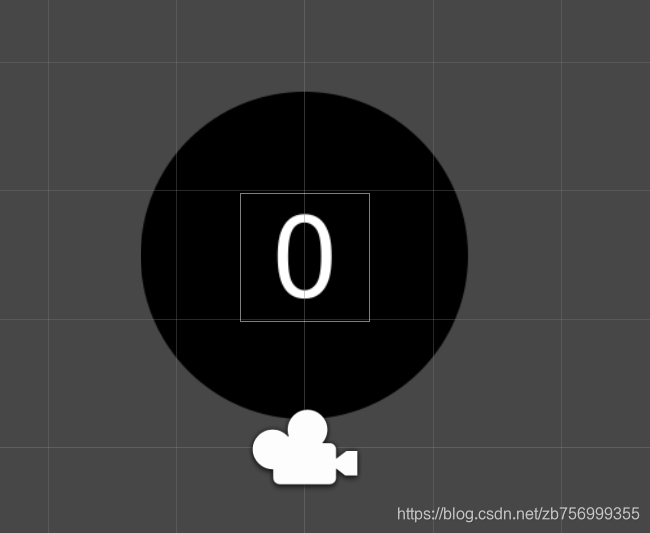
调整UI大小,字体大小到合适的值,于合适的位置,例如:
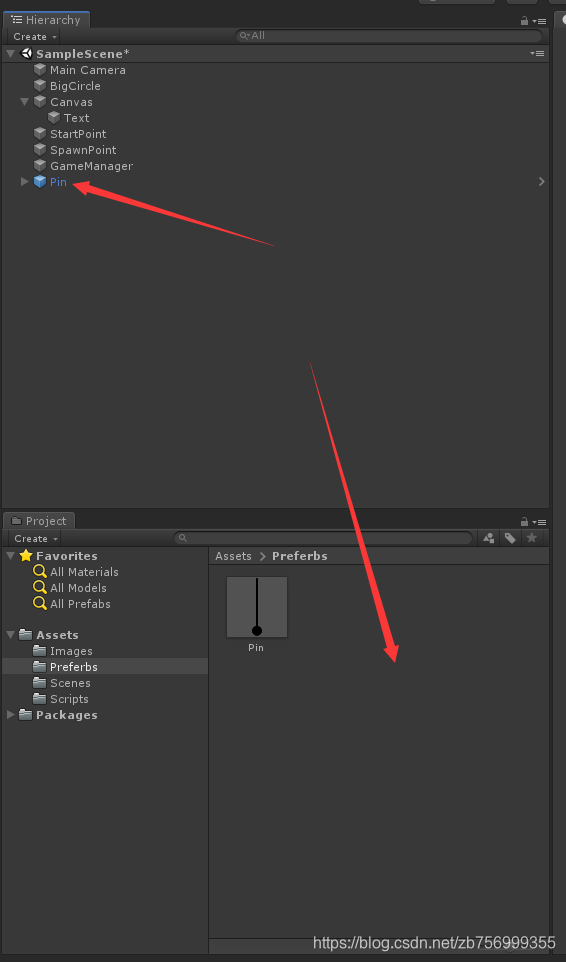
第四步:创建Preferbs
创建三个空组件,用来表示 针生成的位置,游戏开始位置,游戏控制组件

创建针的预制体:将组件拖进项目目录
第五步:实例化针
在游戏控制组件GameManager上创建C#脚本GameManager,实例化针
  //在Update方法中调用
  //SpawnPoint为针的实例化位置
  //Getcomponent为获得PinMovement组件

    public Transform StartPoint;        //标记游戏开始位置
    public Transform SpawnPoint;        //标记针的实例化位置
    public GameObject PinPreferb;       //获得针的预制体

    void Start()
    {
        SpawnPin();     //实例化针
    }
    void SpawnPin()
    {
       tmpPin =  GameObject.Instantiate(PinPreferb, SpawnPoint.position, PinPreferb.transform.rotation).GetComponent<PinMovement>();
    }

- 1
- 2
- 3
- 4
- 5
- 6
- 7
- 8
- 9
- 10
- 11
- 12
- 13
- 14
- 15
- 16
第六步:移动针
运行游戏后,我们会发现在刚刚设置的SpawnPoint地方实例化了一根针,此时我们想让针移动到游戏的起始位置,所以在Pin preferbs 上创建脚本 PinMovement
    private float speed = 30.0f;        //针的飞行速度
    private bool isFly = false;     //判断针是否在飞
    private bool isReach = false;       //判断针是否到达游戏开始位置
    private Transform StartPoint;   //标记游戏开始位置


    void Start()
    {
         StartPoint = GameObject.Find("StartPoint").transform;       //获得StartPoint的transform值
	}


    void Update()
    {
        if(isFly == false)
        {
            if(isReach == false)
            {
                transform.position = Vector3.MoveTowards(transform.position, StartPoint.position, speed * Time.deltaTime);      //从实例化位置移动至游戏位置

                if(StartPoint.transform.position.y - transform.position.y < 0.05f)  //判断是否到达
                {
                    isReach = true;
                }
            }
        }
      }
- 1
- 2
- 3
- 4
- 5
- 6
- 7
- 8
- 9
- 10
- 11
- 12
- 13
- 14
- 15
- 16
- 17
- 18
- 19
- 20
- 21
- 22
- 23
- 24
- 25
- 26
- 27
- 28
运行后发现针从实例化位置移动到了游戏的起始位置
第七步:控制圆面旋转
因为游戏需要圆面的持续旋转,所以我们在圆面上创建脚本RollTheBall,并且Update方法上添加控制旋转的代码
  private float speed = 150;      //圆面的旋转速度为150度

  void Update()
    {
        transform.Rotate(new Vector3(0, 0, speed * Time.deltaTime));        //控制圆面旋转
    }
- 1
- 2
- 3
- 4
- 5
- 6
运行后圆面即开始旋转,若看不出来可以切换至Scene窗口,然后选择移动,就会很明显看到坐标轴在旋转
第八步:控制针的发射
针发射的触发条件是 鼠标左键 按下, 并且针到达 游戏位置,目标为圆面的表面,关于针的移动我们都放在PinMovement中,所以现在Scene中移动至大致接触的地方,然后将圆心和针的坐标差求出,例如我的圆心是 (0, 1.5, 0) 针 (0, -1.26, 0)所以坐标差为 2.76;
    void Update()
    {
        if(isFly == false)
        {
            if(isReach == false)
            {
                transform.position = Vector3.MoveTowards(transform.position, StartPoint.position, speed * Time.deltaTime);      //从实例化位置移动至游戏位置

                if(StartPoint.transform.position.y - transform.position.y < 0.05f)  //判断是否到达
                {
                    isReach = true;
                }
            }
        }
   }
- 1
- 2
- 3
- 4
- 5
- 6
- 7
- 8
- 9
- 10
- 11
- 12
- 13
- 14
- 15
GameManager中的代码:
    void Update()
    {
        if (Input.GetMouseButton(0) && isDown == false && isOver == false)      //判断鼠标左键按下
        {
            tmpPin.Fly();       //调用发射针的函数
            isDown = true;      //标记鼠标左键已经按下
            SpawnPin();     //实例化针
        }
    }
- 1
- 2
- 3
- 4
- 5
- 6
- 7
- 8
- 9
运行后每次按鼠标左键都会发射出一跟针,在到达圆表面后停下
第九步:控制针与圆面一起旋转
游戏要求针到达圆后会随着圆旋转,所以继续在PinMovement中编辑
即在上面代码中加上  if(isFly == true)的情况


    public Transform CirclePoint;   //标记圆的位置
    public Vector3 TargetPoint;     //标记目标位置,即圆标面


    void Start()
    {

        StartPoint = GameObject.Find("StartPoint").transform;       //获得StartPoint的transform值
        CirclePoint = GameObject.Find("BigCircle").transform;       //获得CirclePoint的transform值

        TargetPoint = CirclePoint.transform.position;
        TargetPoint.y = TargetPoint.y - 2.76f;      //因为项目中 圆心坐标为 1.5   圆面坐标大致为 -1.26  所以相减即为目标坐标
    }


        if(isFly == true)			//即else
        {
            transform.position = Vector3.MoveTowards(transform.position, TargetPoint, speed * Time.deltaTime);      //将针发射出去

            if(TargetPoint.y - transform.position.y < 0.05f)
            {
                transform.parent = CirclePoint;     //让针随着圆一起旋转
                isFly = false;
            }
        }
- 1
- 2
- 3
- 4
- 5
- 6
- 7
- 8
- 9
- 10
- 11
- 12
- 13
- 14
- 15
- 16
- 17
- 18
- 19
- 20
- 21
- 22
- 23
- 24
- 25
- 26
- 27
- 28
- 29
第十步:添加针头的碰撞组件
因为游戏在针头碰撞时 游戏结束,所以在Pin preferbs中的 大头上上添加触发器,注意要 用2D刚体组件,重力为0,选择Is Trigger, 添加Tag标签为PinHead
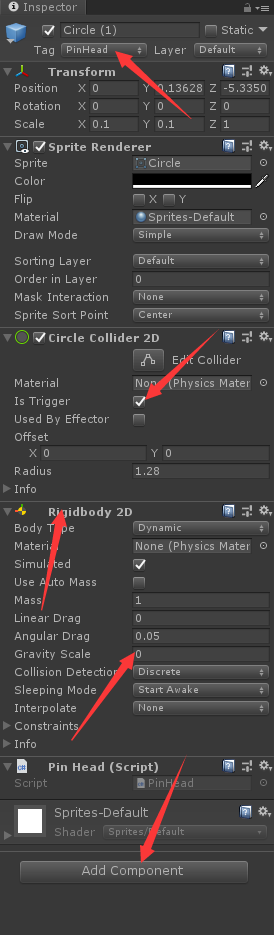
然后打开Assest中的PinHead脚本
    public void OnTriggerEnter2D(Collider2D collision)
    {
        if(collision.tag == "PinHead")
        {
            GameObject.Find("GameManager").GetComponent<GameManager>().GameOver();		//游戏结束
        }
    }
- 1
- 2
- 3
- 4
- 5
- 6
- 7
第十一步:控制分数的显示
每次松开鼠标后进行判断,若游戏没结束则分数+1,同样时游戏管理组件,所以在GameManager中的Update编写
    private int score = 0;      //标记游戏的分数
    public Text scoreText;      //获得UI的Text组件

	void update()
	{
	        if (Input.GetMouseButtonUp(0))      //判断鼠标左键松开
	        {
	            isDown = false;     //标记鼠标左键已经松开
	            if(isOver == false)
	            {
	                score++;        //分数 + 1
	                scoreText.text = score.ToString();      //跟新游戏分数

	            }
	        }
  	 }
- 1
- 2
- 3
- 4
- 5
- 6
- 7
- 8
- 9
- 10
- 11
- 12
- 13
- 14
- 15
- 16
第十二步:游戏结束动画
游戏结束,在GameManager脚本内添加
    private Camera mainCamera;      //获得相机组件
    private float speed = 3;        //设置动画的播放速度


    void Start()
    {
        mainCamera = Camera.main;       //获得相机组件
    }


    public void GameOver()      //游戏结束
    {
        if (isOver == false)    //判断游戏是否借宿
        {
            GameObject.Find("BigCircle").GetComponent<RollTheBall>().enabled = false;   //圆面禁止旋转
            StartCoroutine(GameOberAnimation());        //加载游戏结束动画
            isOver = true;
        }
    }


  IEnumerator GameOberAnimation()     //设置动画
    {
        while (true)
        {
            mainCamera.backgroundColor = Color.Lerp(mainCamera.backgroundColor, Color.red, speed * Time.deltaTime);     //设置背景颜色的转变,时间为speed * Time.deltaTime
            mainCamera.orthographicSize = Mathf.Lerp(mainCamera.orthographicSize, 4, speed * Time.deltaTime);       //设置相机大小的转变,时间为speed * Time.deltaTime

            if (Mathf.Abs(mainCamera.orthographicSize - 4) < 0.05f)     //加载退出循环条件
            {
                break;
            }

            yield return 0;     //暂停一帧
        }
        yield return new WaitForSeconds(1);     //设置停顿1秒
        SceneManager.LoadScene("SampleScene");      //重新加载游戏场景
    }
- 1
- 2
- 3
- 4
- 5
- 6
- 7
- 8
- 9
- 10
- 11
- 12
- 13
- 14
- 15
- 16
- 17
- 18
- 19
- 20
- 21
- 22
- 23
- 24
- 25
- 26
- 27
- 28
- 29
- 30
- 31
- 32
- 33
- 34
- 35
- 36
- 37
- 38
- 39
- 40
总代码
PinHead:
using System.Collections;
using System.Collections.Generic;
using UnityEngine;

public class PinHead : MonoBehaviour
{
    public void OnTriggerEnter2D(Collider2D collision)
    {
        if(collision.tag == "PinHead")
        {
            GameObject.Find("GameManager").GetComponent<GameManager>().GameOver();
        }
    }
}
- 1
- 2
- 3
- 4
- 5
- 6
- 7
- 8
- 9
- 10
- 11
- 12
- 13
- 14
- 15
PinMovement:
using System.Collections;
using System.Collections.Generic;
using UnityEngine;
using UnityEngine.UI;


public class PinMovement : MonoBehaviour
{

    private float speed = 30.0f;        //针的飞行速度

    private bool isFly = false;     //判断针是否在飞
    private bool isReach = false;       //判断针是否到达游戏开始位置
    private Transform StartPoint;   //标记游戏开始位置
    public Transform CirclePoint;   //标记圆的位置
    public Vector3 TargetPoint;     //标记目标位置,即圆标面
    private Text scoreText;     //用来更新游戏分数


    // Start is called before the first frame update
    void Start()
    {

        StartPoint = GameObject.Find("StartPoint").transform;       //获得StartPoint的transform值
        CirclePoint = GameObject.Find("BigCircle").transform;       //获得CirclePoint的transform值

        TargetPoint = CirclePoint.transform.position;
        TargetPoint.y = TargetPoint.y - 2.76f;      //因为项目中 圆心坐标为 1.5   圆面坐标大致为 -1.26  所以相减即为目标坐标
    }

    // Update is called once per frame
    void Update()
    {
        if(isFly == false)
        {
            if(isReach == false)
            {
                transform.position = Vector3.MoveTowards(transform.position, StartPoint.position, speed * Time.deltaTime);      //从实例化位置移动至游戏位置

                if(StartPoint.transform.position.y - transform.position.y < 0.05f)  //判断是否到达
                {
                    isReach = true;
                }
            }
        }
        else
        {
            transform.position = Vector3.MoveTowards(transform.position, TargetPoint, speed * Time.deltaTime);      //将针发射出去

            if(TargetPoint.y - transform.position.y < 0.05f)
            {
                transform.parent = CirclePoint;     //让针随着圆一起旋转
                isFly = false;
            }
        }
    }


    public void Fly()
    {
        isFly = true;
        isReach = true;
    }

}
- 1
- 2
- 3
- 4
- 5
- 6
- 7
- 8
- 9
- 10
- 11
- 12
- 13
- 14
- 15
- 16
- 17
- 18
- 19
- 20
- 21
- 22
- 23
- 24
- 25
- 26
- 27
- 28
- 29
- 30
- 31
- 32
- 33
- 34
- 35
- 36
- 37
- 38
- 39
- 40
- 41
- 42
- 43
- 44
- 45
- 46
- 47
- 48
- 49
- 50
- 51
- 52
- 53
- 54
- 55
- 56
- 57
- 58
- 59
- 60
- 61
- 62
- 63
- 64
- 65
- 66
- 67
- 68
- 69
GameManager:
using System.Collections;
using System.Collections.Generic;
using UnityEngine;
using UnityEngine.UI;
using UnityEngine.SceneManagement;

public class GameManager : MonoBehaviour
{

    public Transform StartPoint;        //标记游戏开始位置
    public Transform SpawnPoint;        //标记针的实例化位置
    public GameObject PinPreferb;       //获得针的预制体
    private PinMovement tmpPin;         //获得控制针移动脚本
    private bool isDown = false;        //判断鼠标是否按下
    private bool isOver = false;        //判断游戏是否结束
    private int score = 0;      //标记游戏的分数
    public Text scoreText;      //获得UI的Text组件
    private Camera mainCamera;      //获得相机组件
    private float speed = 3;        //设置动画的播放速度


    // Start is called before the first frame update
    void Start()
    {
        SpawnPin();     //实例化针
        mainCamera = Camera.main;       //获得相机组件
    }

    void Update()
    {
        if (Input.GetMouseButton(0) && isDown == false && isOver == false)      //判断鼠标左键按下
        {
            tmpPin.Fly();       //调用发射针的函数
            isDown = true;      //标记鼠标左键已经按下
            SpawnPin();     //实例化针
        }
        if (Input.GetMouseButtonUp(0))      //判断鼠标左键松开
        {
            isDown = false;     //标记鼠标左键已经松开
            if(isOver == false)
            {
                score++;        //分数 + 1
                scoreText.text = score.ToString();      //跟新游戏分数

            }
        }
    }

    void SpawnPin()     //实例化针
    {
       tmpPin =  GameObject.Instantiate(PinPreferb, SpawnPoint.position, PinPreferb.transform.rotation).GetComponent<PinMovement>();
    }

    public void GameOver()      //游戏结束
    {
        if (isOver == false)    //判断游戏是否借宿
        {
            GameObject.Find("BigCircle").GetComponent<RollTheBall>().enabled = false;   //圆面禁止旋转
            StartCoroutine(GameOberAnimation());        //加载游戏结束动画
            isOver = true;
        }
    }


    IEnumerator GameOberAnimation()     //设置动画
    {
        while (true)
        {
            mainCamera.backgroundColor = Color.Lerp(mainCamera.backgroundColor, Color.red, speed * Time.deltaTime);     //设置背景颜色的转变,时间为speed * Time.deltaTime
            mainCamera.orthographicSize = Mathf.Lerp(mainCamera.orthographicSize, 4, speed * Time.deltaTime);       //设置相机大小的转变,时间为speed * Time.deltaTime

            if (Mathf.Abs(mainCamera.orthographicSize - 4) < 0.05f)     //加载退出循环条件
            {
                break;
            }

            yield return 0;     //暂停一帧
        }
        yield return new WaitForSeconds(1);     //设置停顿1秒
        SceneManager.LoadScene("SampleScene");      //重新加载游戏场景
    }
}
- 1
- 2
- 3
- 4
- 5
- 6
- 7
- 8
- 9
- 10
- 11
- 12
- 13
- 14
- 15
- 16
- 17
- 18
- 19
- 20
- 21
- 22
- 23
- 24
- 25
- 26
- 27
- 28
- 29
- 30
- 31
- 32
- 33
- 34
- 35
- 36
- 37
- 38
- 39
- 40
- 41
- 42
- 43
- 44
- 45
- 46
- 47
- 48
- 49
- 50
- 51
- 52
- 53
- 54
- 55
- 56
- 57
- 58
- 59
- 60
- 61
- 62
- 63
- 64
- 65
- 66
- 67
- 68
- 69
- 70
- 71
- 72
- 73
- 74
- 75
- 76
- 77
- 78
- 79
- 80
- 81
- 82
- 83
- 84
- 85
RollTheBall:
using System.Collections;
using System.Collections.Generic;
using UnityEngine;

public class RollTheBall : MonoBehaviour
{

    private float speed = 150;      //圆面的旋转速度为150度


    // Start is called before the first frame update
    void Start()
    {

    }

    // Update is called once per frame
    void Update()
    {
        transform.Rotate(new Vector3(0, 0, speed * Time.deltaTime));        //控制圆面旋转
    }
}
- 1
- 2
- 3
- 4
- 5
- 6
- 7
- 8
- 9
- 10
- 11
- 12
- 13
- 14
- 15
- 16
- 17
- 18
- 19
- 20
- 21
- 22
- 23
- 24