
热门标签
热门文章
- 1python OSError: [Errno 24] Too many open files_scrapy to many open file
- 2C++变量的存储类别(动态存储、静态存储、自动变量、寄存器变量、外部变量)_c++动态变量和静态变量
- 3论文笔记:多任务学习模型:渐进式分层提取(PLE)含pytorch实现
- 4React中的虚拟DOM和diff算法_react dom diff
- 5自动化运维环境搭建过程_eipwork/etcd-host
- 6python中安装缺少Microsoft Visual C++ 环境解决方案_error: no microsoft visual c++ version found
- 7金融行业现场故障处理实录
- 8react hooks的useContext
- 9让python程序开机自启动(可自行扩展到其他程序)(附带取消控制台显示)_python bat写入软件自启动
- 10【网络安全 -> 防御与保护】信息安全概述
当前位置: article > 正文
vue超链接传值、查看页面以及父子传值
作者:算法创新者 | 2024-01-29 22:52:29
赞
踩
vue超链接传值、查看页面以及父子传值
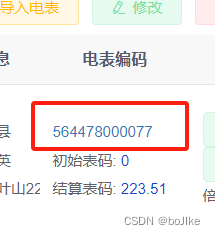
<el-table-column label="电表编码" align="center" width="120" prop="electricalNum" >
<template slot-scope="scope">
<div style="text-align: left">
<router-link :to="'/equipment/electrical-data/index/' + scope.row.electricalId" class="link-type">
<span>{{ scope.row.electricalNum }}</span>
</router-link>
<div style="white-space:nowrap">初始表码: <span style="color: #1348ce;">{{ scope.row.electricalInitNum}}</span> </div>
<div style="white-space:nowrap">结算表码: <span style="color: #1348ce;">{{ scope.row.electricalEndNum}}</span> </div>
</div>
</template>
</el-table-column>
- 1
- 2
- 3
- 4
- 5
- 6
- 7
- 8
- 9
- 10
- 11
router-link 这里需要去/src/router/index.js里面配置
  {
    path: '/equipment/electrical-data',
    component: Layout,
    hidden: true,
    permissions: ['equipment:electrical:list'],
    children: [
      {
        path: 'index/:electricalId(\\d+)',
        component: () => import('@/views/equipment/electrical/electri'),
        name: 'Data',
        meta: { title: '电表详情', activeMenu: '/equipment/electrical' }
      }
    ]
  },
- 1
- 2
- 3
- 4
- 5
- 6
- 7
- 8
- 9
- 10
- 11
- 12
- 13
- 14
跳转过来是这样的查看页面 :column 是对应的几列展示

<el-descriptions class="margin-top" title="电表详情" :column="3" :size="'mini'" border>
      <el-descriptions-item>
        <template slot="label">
          电表名称
        </template>
        {{form.electricalName}}
      </el-descriptions-item>
      <el-descriptions-item>
        <template slot="label">
          电表品牌
        </template>
        <dict-tag :options="dict.type.sys_meter_brand" :value="form.electricalBrand"/>
      </el-descriptions-item>

    </el-descriptions>
- 1
- 2
- 3
- 4
- 5
- 6
- 7
- 8
- 9
- 10
- 11
- 12
- 13
- 14
- 15
这里是获取$route路由传过来的值
  created() {
    const electricalId = this.$route.params && this.$route.params.electricalId;
  },
- 1
- 2
- 3
##父子传值
父:方法绑定按钮 传入队友的值 直接就携带值跳转到对应路由
    getBillInfo(row,type){
      const electricalId = row.electricalId || this.ids
      this.$router.push({ path: '/finance/bill', query: { electricalId: electricalId,proprietorPayType:type } }) // 跳转到B
    },
- 1
- 2
- 3
- 4
子:直接路由.query属性就能获取
  created() {
    console.log(this.$route.query);
    this.queryParams.proprietorPayType=this.$route.query.proprietorPayType;
    this.queryParams.electricalId=this.$route.query.electricalId;
    this.getList();
  },
- 1
- 2
- 3
- 4
- 5
- 6
声明:本文内容由网友自发贡献,不代表【wpsshop博客】立场,版权归原作者所有,本站不承担相应法律责任。如您发现有侵权的内容,请联系我们。转载请注明出处:https://www.wpsshop.cn/article/detail/45515
推荐阅读

相关标签

