- 1Microsoft Visual C++ 14.0 is required解决方法_microsoft visual c++ 14.0离线安装
- 2自学大语言模型的应用程序框架Langchain(初入门)_langchain应用框架
- 3vue自定义抽屉组件_vue 抽屉组件 适用手机端
- 4一文学会Axios的使用
- 5STM32F4存储器映射 和 寄存器映射_stm32f4重映射
- 6您知道用 Docker打包 Springboot有多少种方式?
- 7kail-添加静态路由_kali添加路由命令
- 8linux磁盘空间查看及空间满的处理,linux磁盘空间占满问题快速定位并解决
- 9C语言:对称二叉树_对称二叉树c语言
- 10AI之DL:人工智能领域—深度学习的发展历程之深度学习爆发的三大因素、探究DL为什么耗算力
Object-C之简单知识点——仅够unity接入iossdk用_object c unity
赞
踩
接iossdk的时候 接触了一点oc,下面记录一下oc的基本语法等,毕竟工作中也不常用,经常会忘记。
目录
实例方法(定义通过“-”标识,调用通过[ ]调用,前面需要写上实例对象)
类方法(定义通过“+”标识,,调用通过[ ]调用,前面需要写上类名)
1.基本“对象”类型
| NSString | 不可变字符串 | NSString *gameID = @"1111111"; |
| NSNumber | 数字对象。 把整型、单精度、双精度、字符型等基础类型存储为对象。 | NSNumber *number = [NSNumber numberWithInt:123]; |
| NSDictionary | 由键-对象对组成的数据集合 | NSDictionary *callbackDict = @{@"state_code":[NSNumber numberWithInt:400], 使用的特殊语法创建。
一般用于json处理,设置对象的时候要写对类型,相当于: state_code:int类型 message:string类型 具体看最后的mm例子。 |
| NSObject | 是objc中大多数类的基类,但并不是所有的类。 |
ps:上面介绍的是相对复杂的对象类型,其基础类型和C语言中的基础类型一样.主要有:int,long,float,double,char,void, bool等
类型转换
1.int 转 NSString
int roleLevel = 99;
NSString *stringRoleLevel = [NSString stringWithFormat:@"%d",roleLevel];
2.const char* 转 NSString
eventId 为 const char* 类型
NSString *stringEventId = [NSString stringWithUTF8String:eventId];
3.NSString 转 int
接2的例子 stringEventId 指向 NSString类型
int intEvnetId = [stringEventId intValue];
4.json字符串转NSDictionary字典
NSLog(@"stsdk_shareOversea: %@", [NSString stringWithUTF8String:jsonContent]);
NSData*jsonData = [[NSString stringWithUTF8String:jsonContent] dataUsingEncoding:NSUTF8StringEncoding];
NSLog(@"stsdk_shareOversea: %@", jsonData);
NSError* err;
NSDictionary*dic = [NSJSONSerialization JSONObjectWithData:jsonData options:NSJSONReadingMutableContainers error:&err];
NSLog(@"stsdk_shareOversea: %@", dic);
2. 类(区分实例方法和类方法):
@interface放在以 “.h”为后缀的头部文件中
@implementation放在以“.m”为后缀的执行文件中
1.@interface~@end
@interface接口为类提供特征描述,可以定义数据成员,属性,以及方法(vs C# C++中用的是class)。
例子:
如下面代码所示(首尾用 @interface 和 @end标识,跟c++ c#不太一样,只有数据成员在{}中,其他定义在@end之前就行了):
- @interface MyClass:NSObject{
- // 1.数据成员
- // 成员变量及成员变量的可见范围(访问范围)。
- @private // 私有的,只有自己可以访问,还有 @public @protect 和c++一样
- NSString *_name;
-
- @package // 在这个项目中都可以访问
- NSString *_number;
- }
- // 2.属性
- @property (nonatomic, strong) NSString *name;
-
- // 3.方法(实例方法)
- -(void)calculateAreaForRectangleWithLength:(CGfloat)length andBreadth:(CGfloat)breadth;
- -(void)sayHi;
-
- // 4.方法(类方法,静态方法)
- +(void)simpleClassMethod;
-
- // 5.单例
- // [[MyClass shareInstance] calculateAreaForRectangleWithLength:30 andBreadth:20];
- + (instancetype _Nullable )shareInstance;
- @end

属性
@property
定义在外面,默认实现了get和set方法。属性和数据成员的访问区别:
- 属性:
使用‘.’符号访问相当于 setter,getter方法。使用点语法。比如例子中用 self.name
- 数据成员:
可以使用指针访问 self->name
可以使用‘.’访问,但是需要添加对应的属性和@synthesize name = _name;
实例方法(定义通过“-”标识,调用通过[ ]调用,前面需要写上实例对象)
定义:
-(returnType)methodName:(type) variable1 paraName:(type)variable2;
-(void)calculateAreaForRectangleWithLength:(CGfloat)length andBreadth:(CGfloat)breadth;
“-”,减号开头
返回值类型和输入参数的类型都用()包住。
方法定义就像一个句子可读,看上去第一个参数名就跟函数名连接在一起了。
// 比如例子中的一个实例方法,用 [ ]包住。
// [self calculateAreaForRectangleWithLength:30 andBreadth:20];
类方法(定义通过“+”标识,,调用通过[ ]调用,前面需要写上类名)
定义形式如下(对比实例方法,就是-号变成+号):
+(returnType)simpleClassMethod:(typeName) variable1 paraName:(typeName)variable2;
调用类方法:
[MyClass simpleClassMethod];
2.@implementation~@end
- @implementation MyClass
- // 类方法定义
- - (void)sayHi{
- // 属性和数据成员的访问方式
- NSString *name = self.name;
- NSString *nameOne = self->_name;
- NSLog(@"Hello World!");
- }
- @end
ps:打印OC字符串只能用NSLog方法,打印C字符串只能用print函数。
- //定义一个字符串,str存放是内存地址
- NSString *str = "你好";
- NSLog(@"str的地址=%p,str的值=%@",str,str);
- //打印OC字符串要用@""
- NSLog(@"Hello OC");
- //用C语言打印字符串
- printf("Hello OC");
3.构造方法
1.创建对象方法
new 相当于 alloc分配空间 + 调用init构造函数初始化
Person *p=[Person new];
相当于
Person *p1=[Person alloc];
Person *p2=[p1 init];
相当于
Person *p=[[Person alloc] init];
2.自定义构造函数
采用new方式只能采用默认的init方法完成初始化
采用alloc的方式可以用自定义的构造方法完成初始化
默认的构造方法
- - (instancetype)init{
- if(slef = [super init]){
- //初始化
- }
- return self;
- }
一般构造方法都以init开头,这样并不是复写系统默认的构造方法,而是再添加一个构造方法
- - (instancetype)initWithDict:(NSDictionary *)dict{
- if(slef = [super init]){
- //初始化并赋值
- self.name = dict[@"name"];
- }
- return self;
- }
4.单例模式:STSdkWrappper类实现单例
.h文件:
- @interface STSdkWrapper : NSObject
- // 单例
- + (instancetype _Nullable )shareInstance;
-
- @end
.m文件:
- @implementation STSdkWrapper
-
- static STSdkWrapper *_singleInstance = nil;
- + (instancetype)shareInstance {
- static dispatch_once_t onceToken;
- dispatch_once(&onceToken, ^{
- if (_singleInstance == nil) {
- _singleInstance = [[self alloc] init];
- }
- });
- return _singleInstance;
- }
-
- + (instancetype)allocWithZone:(struct _NSZone *)zone {
- static dispatch_once_t onceToken;
- dispatch_once(&onceToken, ^{
- _singleInstance = [super allocWithZone:zone];
- });
- return _singleInstance;
- }
-
- // 自动登录
- - (void)login{
- [CYMGSDK startLoginWithCallBackDelegate:self];
- }
-
- @end
使用:
[[STSdkWrapper shareInstance] login];
3.Category——扩展已有的类
用来给原来的类 增加新行为或覆盖旧的行为,形式如下:
@interface Class名(Category名)
@end
例子:
比如对UIView类中的 touchesBegan 进行重写,category名取为VideoPlay
UIView+VideoPlay.h
- #import <UIKit/UIKit.h>
-
- @interface UIView (VideoPlay)
-
- @end
ps:import指令
- #include指令:单独使用会造成导入重复库文件,从而引起报错
- #import指令:#include增强版,有效处理重复导入问题,不会报错
UIView+VideoPlay.m
- #import "UIView+VideoPlay.h"
-
- // 在 m中需要调用别的文件中的函数,需要用extern进行声明该函数需要到外部去找。
- extern void UnityStopFullScreenVideoIfPlaying();
- extern int UnityIsFullScreenPlaying();
- @implementation UIView (VideoPlay)
- - (void)touchesBegan:(NSSet<UITouch*>*)touches withEvent: (UIEvent*)event
- {
- [super touchesBegan: touches withEvent: event];
- NSString *version = [UIDevice currentDevice].systemVersion;
- if(version.doubleValue >= 11 && UnityIsFullScreenPlaying())
- {
- UnityStopFullScreenVideoIfPlaying();
- }
- }
- @end
xcode中快速生成Category
如下配置,会自动生成上述的一个模版:
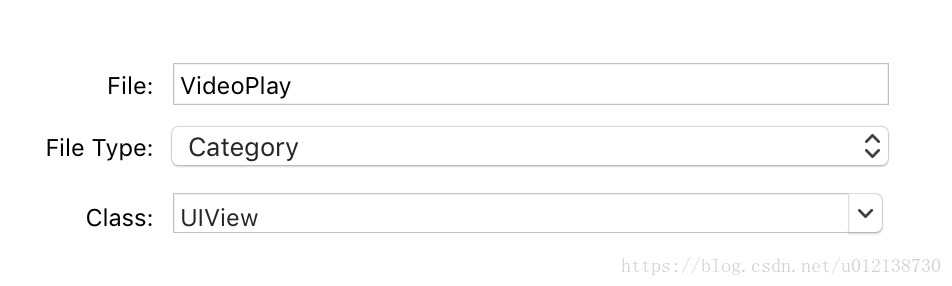
ps:如果要给类新增一个category,一般应该是新增一个文件夹。
4.Protocol——一堆方法的声明,没有实现
相当于java中的interface。Category即有声明又有实现
Protocol定义
@required表示使用这个协议必须要写的方法,@optional表示可选的方法,用不到可以不写。
- @protocol UserAccountDelegate <NSObject>
-
- @optional
- - (void)userLoginSuccessWithVerifyData:(NSDictionary *)verifyData;
- - (void)userLoginFailureWithError:(NSError *)error;
- - (void)userLogout;
-
- @optional
- - (void)userLoginCancelWithResult:(NSDictionary *)result;
- - (void)switchUser;
-
- @end
Protocol叫遵循,不叫继承,下面这个类STSdkWrapper 遵循UserAccountDelegate
1.遵循单个协议:
@interface STSdkWrapper () <UserAccountDelegate>
@end
2.遵循多个协议:
@interface STSdkWrapper () <UserAccountDelegate,ProtocolA,ProtocolB>
@end
3.Protocol又可以遵守其他Protocol,只要一个Protocol遵循了其他Protocol,那么这个Protocol就会自动包含其他Protocol的声明
4.父类遵守了某个类的Protocol,那么子类也会自动遵守这个Protocol
区别文件类型.h .m .mm
0.需要自己写一个unity与oc代码交互的mm文件
Unity使用C#作为开发语言,IOS使用Object-c作为开发语言
为了让C#调用OC代码,因为OC和Object-C都支持直接嵌入C/C++,所以使用C/C++作为桥梁。
所以在C#,调用OC代码的过程中,会使用mm。
需要先写一个unity与oc代码的交互的mm文件,定义4个用到的接口函数:
stsdk_init
stsdk_getHost
stsdk_login
stsdk_payWithOrderParams
1)区别
h :头文件。头文件包含一些声明。 .
m :源文件。可以包含Objective-C和C代码。(如上面的 UIView+VideoPlay.m )
.mm :源文件。除了可以包含Objective-C和C代码以外还可以包含C++代码。(.m 和.mm 的区别是告诉gcc 在编译时要加的一些参数。所以.mm也可以命名成.m,只不过在编译时要手动加参数(麻烦))
习惯:仅在你的Objective-C代码中确实需要使用C++类或者特性的时候才将源文件命名为.mm
2).mm 使用场景
Unity使用C#作为开发语言,IOS使用Object-c作为开发语言
为了让C#调用OC代码,因为OC和Object-C都支持直接嵌入C/C++,所以使用C/C++作为桥梁。
所以在C#,调用OC代码的过程中,会使用mm。
比如 接入一个第三方的sdk,给过来的.a 库中需要的函数接口,和项目已经写好的接口肯定是不一样的。
这时候,就可以写一个中间层用mm,项目中C#和.a中的都不用变,改变中间文件就行了,相当于一个中介。
3).mm例子
文件名:XXXSDKWrapper.mm 。
为了让Unity调用这个库中的函数,封装一个C接口。extern “C”就是C++代码,所以应该用mm。
- #import "XXXSdkWrapper.h"
- #import "UnityAppController.h"
- #import "UnityInterface.h"
- #import "XXXSDKManager.h"
- @implementation XXXSdkWrapper
- @end
-
- // 实现一个字符串拷贝的函数
- char* MakeStringCopy(const char* string)
- {
- if (string == NULL)
- return NULL;
-
- char* res = (char*)malloc(strlen(string) + 1);
- strcpy(res, string);
- return res;
- }
- extern "C" {
- void XXXsdk_init()
- {
- [[XXXSDKManager shareInstance] initWithGameID:@"1111111" channelID:@"111" aID:@"111111111111111" andRootVC:UnityGetGLViewController()];
- // 字典--》NSData--》NSString
- NSDictionary *callbackDict = @{@"state_code":[NSNumber numberWithInt:123],
- @"message":@"InitSuc"};
- NSData *callbackData = [NSJSONSerialization dataWithJSONObject:callbackDict options:NSJSONWritingPrettyPrinted error:nil];
- NSString *callbackString = [[NSString alloc] initWithData:callbackData encoding:NSUTF8StringEncoding];
- UnitySendMessage("xxxsdk_cb_obj", "onInitSucCallBackWithjsonParam", [callbackString UTF8String]);
-
- }
- char* XXXsdk_channelId()
- {
- return MakeStringCopy("111");
- }
- void XXXsdk_login()
- {
- [[XXXSDKManager shareInstance] loginWithCallBack:^(NSString * _Nullable session_id, NSString * _Nullable account_id) {
- NSDictionary *callbackDict = @{@"account_id":account_id,
- @"data":@{@"validateInfo":session_id,
- @"opcode":@"11111",
- @"channel_id":@"111"
- }
-
- };
- NSData *callbackData = [NSJSONSerialization dataWithJSONObject:callbackDict options:NSJSONWritingPrettyPrinted error:nil];
- NSString *callbackString = [[NSString alloc] initWithData:callbackData encoding:NSUTF8StringEncoding];
- UnitySendMessage("xxxsdk_cb_obj", "onLoginSucCallBackWithjsonParam", [callbackString UTF8String]);
- }];
- }
- void XXXsdk_payWithOrderParams(const char* serverId , const char* roleId, const char* roleName, const char* gameOrder, const char* sum, const char* productId , const char* extend_params)
- {
- NSDictionary *orderParams = @{
- @"server_id" : [NSString stringWithUTF8String:serverId],
- @"role_id" : [NSString stringWithUTF8String:roleId],
- @"role_name" : [NSString stringWithUTF8String:roleName],
- @"game_order" : [NSString stringWithUTF8String:gameOrder],
- @"real_price" : [NSString stringWithUTF8String:sum],
- @"product_id" : [NSString stringWithUTF8String:productId],
- @"ext" : [NSString stringWithUTF8String:extend_params]
- };
- [[XXXSDKManager shareInstance] payWithOrderParams:orderParams withPayCallBlock:^(NSInteger resultCode, NSString * _Nullable resultMsg) {
- if (resultCode == 1111) {
- NSLog(@"%@", resultMsg); // 内购成功
- } else if (resultCode == 1112) {
- NSLog(@"%@", resultMsg); // 网页支付成功(页面关闭)
- } else if (resultCode == 1113) {
- NSLog(@"%@", resultMsg); // 支付失败
- }
- }];
- }
- }
文件名: DistUtil.mm
实现函数:获取可用空间,获取总的磁盘空间,获取已用空间
- extern "C"
- {
- uint64_t _getAvailableDiskSpace (){
- uint64_t totalFreeSpace = 0;
- NSError *error = nil;
- NSArray *paths = NSSearchPathForDirectoriesInDomains(NSDocumentDirectory, NSUserDomainMask, YES);
- NSDictionary *dictionary = [[NSFileManager defaultManager] attributesOfFileSystemForPath:[paths lastObject] error: &error];
-
- if (dictionary) {
- NSNumber *fileSystemSizeInBytes = [dictionary objectForKey: NSFileSystemSize];
- NSNumber *freeFileSystemSizeInBytes = [dictionary objectForKey:NSFileSystemFreeSize];
- totalFreeSpace = [freeFileSystemSizeInBytes unsignedLongLongValue];
- } else {
- NSLog(@"Error Obtaining System Memory Info: Domain = %@, Code = %ld", [error domain], (long)[error code]);
- }
-
- return (uint64_t)(totalFreeSpace/1024ll)/1024ll;
- }
-
- uint64_t _getTotalDiskSpace (){
- uint64_t totalSpace = 0;
- NSError *error = nil;
- NSArray *paths = NSSearchPathForDirectoriesInDomains(NSDocumentDirectory, NSUserDomainMask, YES);
- NSDictionary *dictionary = [[NSFileManager defaultManager] attributesOfFileSystemForPath:[paths lastObject] error: &error];
-
- if (dictionary) {
- NSNumber *fileSystemSizeInBytes = [dictionary objectForKey: NSFileSystemSize];
- NSNumber *freeFileSystemSizeInBytes = [dictionary objectForKey:NSFileSystemFreeSize];
- totalSpace = [fileSystemSizeInBytes unsignedLongLongValue];
- } else {
- NSLog(@"Error Obtaining System Memory Info: Domain = %@, Code = %ld", [error domain], (long)[error code]);
- }
-
- return (uint64_t)(totalSpace/1024ll)/1024ll;
- }
-
- uint64_t _getBusyDiskSpace (){
- uint64_t totalSpace = 0;
- uint64_t totalFreeSpace = 0;
- NSError *error = nil;
- NSArray *paths = NSSearchPathForDirectoriesInDomains(NSDocumentDirectory, NSUserDomainMask, YES);
- NSDictionary *dictionary = [[NSFileManager defaultManager] attributesOfFileSystemForPath:[paths lastObject] error: &error];
-
- if (dictionary) {
- NSNumber *fileSystemSizeInBytes = [dictionary objectForKey: NSFileSystemSize];
- NSNumber *freeFileSystemSizeInBytes = [dictionary objectForKey:NSFileSystemFreeSize];
- totalSpace = [fileSystemSizeInBytes unsignedLongLongValue];
- totalFreeSpace = [freeFileSystemSizeInBytes unsignedLongLongValue];
- } else {
- NSLog(@"Error Obtaining System Memory Info: Domain = %@, Code = %ld", [error domain], (long)[error code]);
- }
-
- return (uint64_t)((totalSpace-totalFreeSpace)/1024ll)/1024ll;
- }
- }
常用
1.打印日志
1.)打印oc类型变量
NSLog(@"Hello World!");
2.)格式符号:%p 和 %@ (指针指向的用这个来打印)
NSString *str = "你好";
NSLog(@"str的地址=%p,str的值=%@",str,str);
NSDictionary *verifyData = balababla
NSLog(@"%@",verifyData);
2.显示toast(可以忽略)
.h文件 (实现没找到 在某个.a中实现的 )
- #import <Foundation/Foundation.h>
-
- @interface ToastUtils : NSObject
-
- + (void)showLoadingAnimationForView:(UIView *)view;
-
- + (void)showLoadingAnimationForView:(UIView *)view message:(NSString *)message;
-
- + (void)showToastViewWithMessage:(NSString *)message ForView:(UIView *)view forTimeInterval:(NSTimeInterval)timeInterval;
-
- + (void)hideLoadingAnimationForView:(UIView *)view;
-
- + (void)hideAllLoadingAnimationForView:(UIView *)view;
-
- @end
使用:(类方法)
[ToastUtils showToastViewWithMessage:@"登录失败" ForView:UnityGetGLViewController().view forTimeInterval:2];
3.UnityGetGLViewController
上述例子常用到的接口
unity游戏的viewcontroller接口。