
热门标签
热门文章
- 1微信小程序微信账号登录_getwxmaschemeservice
- 2vivo AI计算平台 Kubernetes集群Ingress网关实践
- 3避坑丨一次看懂软著软件著作权登记避免「补正」的“方法”……_软著重复登记或者虚假登记
- 4AI 绘画Stable Diffusion 研究(八)sd采样方法详解
- 5什么是虚函数
- 6最新最全的JavaScript入门视频,包含小程序和uniapp相关的JavaScript知识学习_uniapp注释代码快捷键
- 7【Linux】探索Linux进程优先级 | 环境变量 |本地变量 | 内建命令
- 8【EI会议征稿通知】第三届机器视觉、自动识别与检测国际学术会议(MVAID 2024)
- 9java并发编程好处_Java并发编程(2)-并发原理
- 10阿里云服务器linux切换到root 用户,修改root密码_ecs-assist-user
当前位置: article > 正文
vue自定义抽屉组件_vue 抽屉组件 适用手机端
作者:代码优化者 | 2024-01-29 14:24:00
赞
踩
vue 抽屉组件 适用手机端
前说
在项目开发中,有很多时候由于某某原因,很多UI组件不能被用,像移动端一个小的H5页面,引入一个大的antd-mobile显然也不合理,所以就有了很多形形色色的自定义组件了。
效果
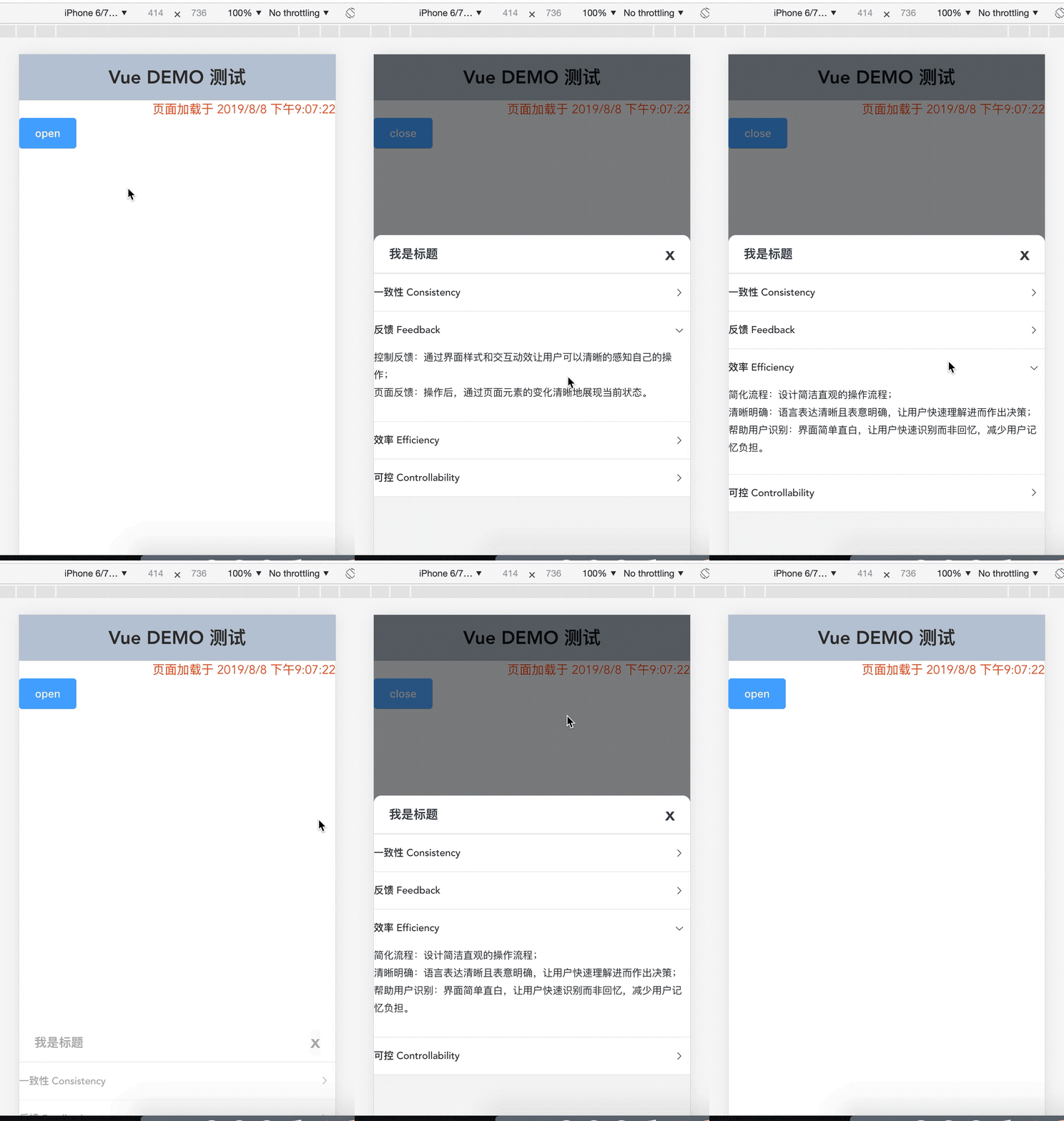
LIVE
代码
drawer.vue
<template>
  <div class="drawer">
    <div :class="maskClass" @click="closeByMask"></div>
    <div :class="mainClass" :style="mainStyle" class="main">
      <div class="drawer-head">
        <span>{{ title }}</span>
        <span
          v-show="closable"
          class="close-btn"
          @click="closeByButton"
        >x</span>
      </div>
      <div class="drawer-body" :style="bodyStyle">
        <slot />
      </div>
    </div>
  </div>
</template>
<script>
export default {
  props: {
    // 是否打开
    display: {
      type: Boolean
    },
    // 标题
    title: {
      type: String,
      default: "标题"
    },
    // 是否显示关闭按钮
    closable: {
      type: Boolean,
      default: true
    },
    // 是否显示遮罩
    mask: {
      type: Boolean,
      default: true
    },
    // 是否点击遮罩关闭
    maskClosable: {
      type: Boolean,
      default: true
    },
    // 宽度
    width: {
      type: String,
      default: "400px"
    },
    // 高度
    height: {
      type: String,
      default: "75%"
    },
    // 是否在父级元素中打开
    inner: {
      type: Boolean,
      default: false
    }
  },
  computed: {
    maskClass: function() {
      return {
        "mask-show": this.mask && this.display,
        "mask-hide": !(this.mask && this.display),
        inner: this.inner
      };
    },
    mainClass: function() {
      return {
        "main-show": this.display,
        "main-hide": !this.display,
        inner: this.inner
      };
    },
    mainStyle: function() {
      return {
        width: this.width,
        height: this.height,
        bottom: this.display ? "0" : `-${this.height}`,
        borderTop: this.mask ? "none" : "1px solid #eee"
      };
    },
    bodyStyle: function() {
      return {
        height: this.height
      };
    }
  },
  mounted() {
    if (this.inner) {
      let box = this.$el.parentNode;
      box.style.position = "relative";
    }
  },
  methods: {
    closeByMask() {
      this.maskClosable && this.$emit("update:display", false);
    },
    closeByButton() {
      this.$emit("update:display", false);
    }
  }
};
</script>
<style lang="less" scoped>
.drawer {
  .mask-show {
    position: fixed;
    top: 0;
    left: 0;
    width: 100%;
    height: 100%;
    z-index: 10;
    background-color: rgba(0, 0, 0, 0.5);
    opacity: 1;
    transition: opacity 0.5s;
  }
  .mask-hide {
    opacity: 0;
    transition: opacity 0.5s;
  }
  .main {
    position: fixed;
    z-index: 10;
    bottom: 0;
    height: 100%;
    border-top-left-radius: 10px;
    border-top-right-radius: 10px;
    background: #f7f7f7;
    transition: all 0.5s;
  }
  .main-show {
    opacity: 1;
  }
  .main-hide {
    opacity: 0;
  }
  .inner {
    position: absolute;
  }
  .drawer-head {
    display: flex;
    justify-content: space-between;
    align-items: center;
    height: 50px;
    padding: 20px;
    box-sizing: border-box;
    border-top-left-radius: 10px;
    border-top-right-radius: 10px;
    font-size: 16px;
    font-weight: bold;
    background: #fff;
    position: relative;
    border-bottom: 1px solid #eee;
    .close-btn {
      font-size: 24px;
      position: absolute;
      right: 20px;
      top: 50%;
      transform: translateY(-50%);
      display: inline-block;
      cursor: pointer;
    }
  }
  .drawer-body {
    // padding: 20px;
    font-size: 14px;
    overflow: auto;
  }
}
</style>

- 1
- 2
- 3
- 4
- 5
- 6
- 7
- 8
- 9
- 10
- 11
- 12
- 13
- 14
- 15
- 16
- 17
- 18
- 19
- 20
- 21
- 22
- 23
- 24
- 25
- 26
- 27
- 28
- 29
- 30
- 31
- 32
- 33
- 34
- 35
- 36
- 37
- 38
- 39
- 40
- 41
- 42
- 43
- 44
- 45
- 46
- 47
- 48
- 49
- 50
- 51
- 52
- 53
- 54
- 55
- 56
- 57
- 58
- 59
- 60
- 61
- 62
- 63
- 64
- 65
- 66
- 67
- 68
- 69
- 70
- 71
- 72
- 73
- 74
- 75
- 76
- 77
- 78
- 79
- 80
- 81
- 82
- 83
- 84
- 85
- 86
- 87
- 88
- 89
- 90
- 91
- 92
- 93
- 94
- 95
- 96
- 97
- 98
- 99
- 100
- 101
- 102
- 103
- 104
- 105
- 106
- 107
- 108
- 109
- 110
- 111
- 112
- 113
- 114
- 115
- 116
- 117
- 118
- 119
- 120
- 121
- 122
- 123
- 124
- 125
- 126
- 127
- 128
- 129
- 130
- 131
- 132
- 133
- 134
- 135
- 136
- 137
- 138
- 139
- 140
- 141
- 142
- 143
- 144
- 145
- 146
- 147
- 148
- 149
- 150
- 151
- 152
- 153
- 154
- 155
- 156
- 157
- 158
- 159
- 160
- 161
- 162
- 163
- 164
- 165
- 166
- 167
- 168
- 169
- 170
- 171
- 172
- 173
- 174
index.vue引用
<template>
  <div>
    <el-button type="primary" @click="display = !display">{{display?'close': 'open'}}</el-button>
    <drawer title="我是标题" :display.sync="display" :width="drawerWidth" :height="drawerHeight">
      <div>123</div>
    </drawer>
  </div>
</template>

<script>
import drawer from './../pages/drawer';
export default {
  components: { drawer },
  data() {
    return {
      activeName: '1',
      display: true,
      drawerWidth: '100%',
      drawerHeight: '500px',
    };
  },
};
</script>

<style>
</style>
- 1
- 2
- 3
- 4
- 5
- 6
- 7
- 8
- 9
- 10
- 11
- 12
- 13
- 14
- 15
- 16
- 17
- 18
- 19
- 20
- 21
- 22
- 23
- 24
- 25
- 26
- 27
声明:本文内容由网友自发贡献,不代表【wpsshop博客】立场,版权归原作者所有,本站不承担相应法律责任。如您发现有侵权的内容,请联系我们。转载请注明出处:https://www.wpsshop.cn/article/detail/43218
推荐阅读
相关标签
Copyright © 2003-2013 www.wpsshop.cn 版权所有,并保留所有权利。

