
热门标签
热门文章
- 1《尚硅谷数据结构》-归并排序_归并排序尚硅谷
- 2Windows如何后台运行bat文件(没有命令提示符框)
- 3Pytest插件pytest-selenium-让自动化测试更简洁
- 4Windows JAR包的启动脚本_windows jar包启动脚本
- 5windows 进程列表_imagename 表示进程的名称
- 6C++实现数字翻转算法及其应用_c++数字反转
- 7kafka tool下载安装和使用
- 8【HCIA】虚拟化技术介绍_全虚拟化 半虚拟化 硬件辅助虚拟化
- 9JS 小程序 Vue 2022年最全面试题!持续更新_用户交互的部分。 的技术,将 是负责应用程序中处理
- 10基于Python开发ChatGPT应用_chatgpt python
当前位置: article > 正文
跟着cherno手搓游戏引擎【7】Input轮询
作者:键盘狂人 | 2024-01-17 09:08:34
赞
踩
跟着cherno手搓游戏引擎【7】Input轮询
在引擎程序中任何时间,任何位置都能知道按键是否按下、鼠标的位置等等信息。
与事件系统的区别:事件系统是在按下时调用并传递按键状态;轮询是每时每刻都能获取按键状态
创建基类:
YOTO/Input.h:名如其意
- #pragma once
- #include"YOTO/Core.h"
- namespace YOTO {
- class YOTO_API Input {
- public:
- inline static bool IsKeyPressed(int keycode){
- return s_Instance->IsKeyPressedImpl(keycode);
- }
- inline static bool IsMouseButtonPressed(int button) {
- return s_Instance->IsMouseButtonPressedImpl(button);
- }
- inline static float GetMouseX() {
- return s_Instance->GetMouseXImpl();
- }
- inline static float GetMouseY() {
- return s_Instance->GetMouseYImpl();
- }
- inline static std::pair<float,float> GetMousePostion() {
- return s_Instance->GetMousePositionImpl();
- }
- protected:
- virtual bool IsKeyPressedImpl(int keycode )=0;
- virtual bool IsMouseButtonPressedImpl(int button) = 0;
- virtual float GetMouseXImpl() = 0;
- virtual float GetMouseYImpl() = 0;
- virtual std::pair<float, float> GetMousePositionImpl() = 0;
-
- private:
- static Input* s_Instance;
- };
- }

实现基类:
在Platform/Windows/下创建WindowsInput.h:
- #pragma once
- #include"YOTO/Input.h"
- namespace YOTO {
- class WindowsInput :public Input {
- protected:
- virtual bool IsKeyPressedImpl(int keycode) override;
- virtual bool IsMouseButtonPressedImpl(int button)override;
- virtual std::pair<float, float> GetMousePositionImpl()override;
- virtual float GetMouseXImpl()override;
- virtual float GetMouseYImpl() override;
- };
- }
WindowsInput.cpp:获取window然后用glfw自带的事件检测来
- #include"ytpch.h"
- #include"WindowsInput.h"
- #include<GLFW/glfw3.h>
- #include"YOTO/Application.h"
- namespace YOTO {
-
- Input* Input::s_Instance = new WindowsInput();
- bool WindowsInput::IsKeyPressedImpl(int keycode)
- {// 获取GLFW原生窗口void*,转为GLFWwindow*
- auto window =static_cast<GLFWwindow*>( Application::Get().GetWindow().GetNativeWindow());
- // 用已有的GLFW函数来获取按键状态
- auto state= glfwGetKey(window, keycode);
- return state==GLFW_PRESS|| state== GLFW_REPEAT;
- }
- bool WindowsInput::IsMouseButtonPressedImpl(int button)
- {
- auto window = static_cast<GLFWwindow*>(Application::Get().GetWindow().GetNativeWindow());
- auto state = glfwGetMouseButton(window, button);
- return state == GLFW_PRESS ;
- }
- std::pair<float, float> WindowsInput::GetMousePositionImpl()
- {
- auto window = static_cast<GLFWwindow*>(Application::Get().GetWindow().GetNativeWindow());
- double xpos, ypos;
- glfwGetCursorPos(window, &xpos, &ypos);
- return {(float)xpos,(float)ypos};
- }
- float WindowsInput::GetMouseXImpl()
- {
- auto [x, y] = GetMousePositionImpl();
-
- return x;
- }
- float WindowsInput::GetMouseYImpl()
- {
- auto [x, y] = GetMousePositionImpl();
-
- return y;
- }
- }
为了能在任何时候获取到GLFWwindow,在Window.h中创建方法获取Window
- #pragma once
-
- #include"ytpch.h"
- #include"YOTO/Core.h"
- #include"YOTO/Event/Event.h"
- namespace YOTO {
- struct WindowProps {
- std::string Title;
- unsigned int Width;
- unsigned int Height;
- WindowProps(const std::string &title="YOTO Engine",unsigned int width =1280, unsigned int height = 1280 )
- :Title(title),Width(width),Height(height){}
- };
- class YOTO_API Window {
- public:
- //用EventCallbackFn代替std::function<void(Event&)>:输入为Event&返回值为void 的函数
- using EventCallbackFn = std::function<void(Event&)>;
- virtual ~Window(){}
- //=0为纯虚函数
- virtual void OnUpdate() = 0;
- virtual unsigned int GetWidth() const = 0;
- virtual unsigned int GetHeight() const = 0;
-
- virtual void SetEventCallback(const EventCallbackFn& callback) = 0;
- virtual void SetVSync(bool enable)= 0;
- virtual bool IsVSync() const = 0;
- //返回当前窗口
- virtual void* GetNativeWindow() const=0;
-
- static Window* Creat(const WindowProps& props = WindowProps());
-
- };
- }
WindowsWindow.h :实现返回window的方法:
- #pragma once
- #include "YOTO/Window.h"
- #include<GLFW/glfw3.h>
- #include"YOTO/Log.h"
- struct GLFWwindow;
- namespace YOTO {
- class WindowsWindow :public Window
- {
- public :
- WindowsWindow(const WindowProps& props);
- virtual ~WindowsWindow();
- void OnUpdate() override;
-
- inline unsigned int GetWidth() const override { return m_Data.Width; };
- inline unsigned int GetHeight() const override { return m_Data.Height; };
-
- inline void SetEventCallback(const EventCallbackFn& callback)override
- { m_Data.EventCallback = callback; };
- void SetVSync(bool enable) ;
- bool IsVSync()const;
- //返回window
- inline virtual void* GetNativeWindow() const { return m_Window; }
- private:
- virtual void Init(const WindowProps& props);
- virtual void ShutDown();
- private:
- GLFWwindow* m_Window;
- struct WindowData {
- std::string Title;
- unsigned int Width, Height;
- bool VSync;
- EventCallbackFn EventCallback;
- };
- WindowData m_Data;
- };
- }
-
-
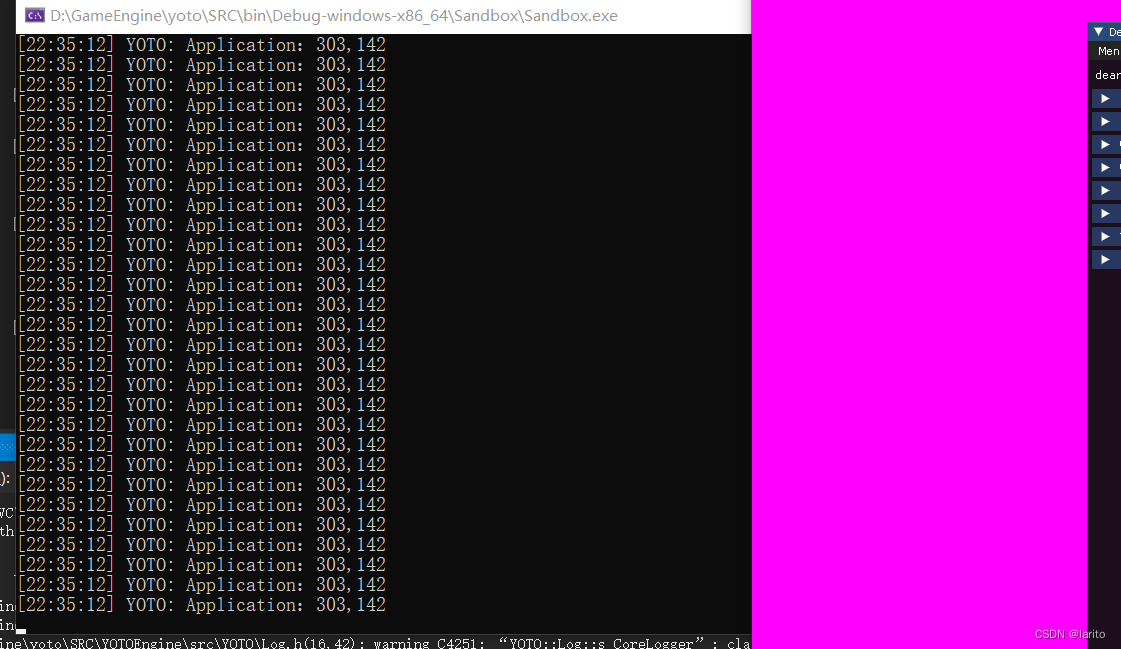
Application.cpp:在Run中获取鼠标位置:
- #include"ytpch.h"
- #include "Application.h"
-
- #include"Log.h"
- #include<glad/glad.h>
- #include"Input.h"
- namespace YOTO {
- #define BIND_EVENT_FN(x) std::bind(&x, this, std::placeholders::_1)
-
- Application* Application::s_Instance = nullptr;
-
- Application::Application() {
-
- YT_CORE_ASSERT(!s_Instance, "Application需要为空!")
- s_Instance = this;
- //智能指针
- m_Window = std::unique_ptr<Window>(Window::Creat());
- //设置回调函数
- m_Window->SetEventCallback(BIND_EVENT_FN(Application::OnEvent));
- unsigned int id;
- glGenBuffers(1, &id);
- }
- Application::~Application() {
-
- }
- /// <summary>
- /// 所有的Window事件都会在这触发,作为参数e
- /// </summary>
- /// <param name="e"></param>
- void Application::OnEvent(Event& e) {
- //根据事件类型绑定对应事件
- EventDispatcher dispatcher(e);
- dispatcher.Dispatch<WindowCloseEvent>(BIND_EVENT_FN(Application::OnWindowClosed));
- //输出事件信息
- YT_CORE_INFO("{0}",e);
- for (auto it = m_LayerStack.end(); it != m_LayerStack.begin();) {
- (*--it)->OnEvent(e);
- if (e.m_Handled)
- break;
- }
- }
-
- bool Application::OnWindowClosed(WindowCloseEvent& e) {
- m_Running = false;
- return true;
- }
- void Application::Run() {
- WindowResizeEvent e(1280, 720);
- if (e.IsInCategory(EventCategoryApplication)) {
- YT_CORE_TRACE(e);
- }
- if (e.IsInCategory(EventCategoryInput)) {
- YT_CORE_ERROR(e);
- }
-
- while (m_Running)
- {
- glClearColor(1,0,1,1);
- glClear(GL_COLOR_BUFFER_BIT);
-
- for (Layer* layer : m_LayerStack) {
- layer->OnUpdate();
- }
- auto [x, y] = Input::GetMousePostion();
- YT_CORE_TRACE("{0},{1}",x, y);
- m_Window->OnUpdate();
- }
- }
- void Application::PushLayer(Layer* layer) {
- m_LayerStack.PushLayer(layer);
- layer->OnAttach();
- }
- void Application::PushOverlay(Layer* layer) {
- m_LayerStack.PushOverlay(layer);
- layer->OnDetach();
- }
- }
测试:
小改动:
Core.h:
- #pragma once
- //用于dll的宏
- #ifdef YT_PLATFORM_WINDOWS
- #ifdef YT_BUILD_DLL
- #define YOTO_API __declspec(dllexport)
- #else
- #define YOTO_API __declspec(dllimport)
-
- #endif // DEBUG
- #else
- #error YOTO_ONLY_SUPPORT_WINDOWS
- #endif // YOTO_PLATFORM_WINDOWS
-
- #ifdef YT_DEBUG
- #define YT_ENABLE_ASSERTS
- #endif
-
- #ifdef YT_ENABLE_ASSERTS
- #define YT_CLIENT_ASSERT(x,...) {if(!(x)){YT_CLIENT_ERROR("断言错误:{0}",__VA_ARGS__);__debugbreak();}}
- #define YT_CORE_ASSERT(x,...) {if(!(x)){YT_CORE_ERROR("断言错误:{0}",__VA_ARGS__);__debugbreak();}}
- #else
- #define YT_CLIENT_ASSERT(x,...)
- #define YT_CORE_ASSERT(x,...)
-
- #endif // YT_ENABLE_ASSERTS
-
-
-
- #define BIT(x)(1<<x)
- //绑定事件定义
- #define YT_BIND_EVENT_FN(fn) std::bind(&fn, this, std::placeholders::_1)
SRC下的premake5.lua:
- workspace "YOTOEngine" -- sln文件名
- architecture "x64"
- configurations{
- "Debug",
- "Release",
- "Dist"
- }
- startproject "Sandbox"
- -- https://github.com/premake/premake-core/wiki/Tokens#value-tokens
- -- 组成输出目录:Debug-windows-x86_64
- outputdir = "%{cfg.buildcfg}-%{cfg.system}-%{cfg.architecture}"
- -- 包含相对解决方案的目录
- IncludeDir={}
- IncludeDir["GLFW"]="YOTOEngine/vendor/GLFW/include"
- IncludeDir["Glad"]="YOTOEngine/vendor/Glad/include"
- IncludeDir["ImGui"] ="YOTOEngine/vendor/imgui"
- --项目中包含某包
- include "YOTOEngine/vendor/GLFW"
- include "YOTOEngine/vendor/Glad"
- include "YOTOEngine/vendor/imgui"
-
- project "YOTOEngine" --YOTOEngine项目
- location "YOTOEngine"--在sln所属文件夹下的YOTOEngine文件夹
- kind "SharedLib"--dll动态库
- language "C++"
- targetdir ("bin/" .. outputdir .. "/%{prj.name}") -- 输出目录
- objdir ("bin-int/" .. outputdir .. "/%{prj.name}")-- 中间目录
-
- staticruntime "Off"
-
- pchheader "ytpch.h"
- pchsource "YOTOEngine/src/ytpch.cpp"
- -- 包含的所有h和cpp文件
- files{
- "%{prj.name}/src/**.h",
- "%{prj.name}/src/**.cpp"
- }
- -- 包含目录
- includedirs{
- "%{prj.name}/src",
- "%{prj.name}/vendor/spdlog-1.x/include",
- "%{IncludeDir.GLFW}",
- "%{IncludeDir.Glad}",
- "%{IncludeDir.ImGui}"
- }
- links{
- "GLFW",-- GLFW.lib库链接到YOTOEngine项目中
- "Glad",-- Glad.lib库链接到YOTOEngine项目中
- "ImGui",-- ImGui.lib库链接到YOTOEngine项目中
- "opengl32.lib"
- }
- -- 如果是window系统
- filter "system:windows"
- cppdialect "C++17"
- -- On:代码生成的运行库选项是MTD,静态链接MSVCRT.lib库;
- -- Off:代码生成的运行库选项是MDD,动态链接MSVCRT.dll库;打包后的exe放到另一台电脑上若无这个dll会报错
- systemversion "latest" -- windowSDK版本
- -- 预处理器定义
- defines{
- "YT_PLATFORM_WINDOWS",
- "YT_BUILD_DLL",
- -- "YT_ENABLE_ASSERTS",
- "GLFW_INCLUDE_NONE"-- 让GLFW不包含OpenGL
- }
- -- 编译好后移动Hazel.dll文件到Sandbox文件夹下
- postbuildcommands{
- ("{COPY} %{cfg.buildtarget.relpath} ../bin/" .. outputdir .. "/Sandbox")
- }
- -- 不同配置下的预定义不同
- filter "configurations:Debug"
- defines "YT_DEBUG"
- runtime "Debug"
- symbols "On"
-
- filter "configurations:Release"
- defines "YT_RELEASE"
- runtime "Release"
- optimize "On"
-
- filter "configurations:Dist"
- defines "YT_DIST"
- runtime "Release"
- optimize "On"
-
- project "Sandbox"
- location "Sandbox"
- kind "ConsoleApp"
- language "C++"
- staticruntime "Off"
- targetdir ("bin/" .. outputdir .. "/%{prj.name}")
- objdir ("bin-int/" .. outputdir .. "/%{prj.name}")
-
- files{
- "%{prj.name}/src/**.h",
- "%{prj.name}/src/**.cpp"
- }
- -- 同样包含spdlog头文件
- includedirs{
- "YOTOEngine/vendor/spdlog-1.x/include",
- "YOTOEngine/src"
- }
- -- 引用YOTOEngine
- links{
- "YOTOEngine",
- "GLFW",
- "opengl32.lib"
- }
-
- filter "system:windows"
- cppdialect "C++17"
- systemversion "latest"
-
- defines{
- "YT_PLATFORM_WINDOWS"
- }
-
- filter "configurations:Debug"
- defines "YT_DEBUG"
- runtime "Debug"
- symbols "On"
-
- filter "configurations:Release"
- defines "YT_RELEASE"
- runtime "Release"
- optimize "On"
-
- filter "configurations:Dist"
- defines "YT_DIST"
- runtime "Release"
- optimize "On"
声明:本文内容由网友自发贡献,不代表【wpsshop博客】立场,版权归原作者所有,本站不承担相应法律责任。如您发现有侵权的内容,请联系我们。转载请注明出处:https://www.wpsshop.cn/article/detail/40746?site
推荐阅读
相关标签

