
热门标签
热门文章
- 1stm32 SPI的从机中断接收_stm32f1 spi slave 中断接收 hal_nvic
- 2(18章)Python Flask 全流程全栈项目实战
- 3鸿蒙HarmonyOS-SDK管理使用指南_鸿蒙查看sdk
- 4【MySQL】学习如何通过DML更新数据库的数据
- 5.sh文件作用_.sh是什么脚本
- 6Docker 面试知识点_面试 docker
- 7python(django-vue3)项目win-win迁移_windows之间迁移python
- 8【RocketMQ】客户端报大量warn日志:No topic route info in name server for the topic:RMQ_SYS_TRACE_TOPIC、TBW102
- 9Ubuntu Linux 下安装和卸载cmake 3.28.2版本_cmake linux 卸载
- 10python实战项目电影推荐_7个Python实战项目代码,让你感受下大神是如何起飞的!...
当前位置: article > 正文
HDFS的API操作 (Eclipse版)
作者:pgrmghi | 2024-01-16 15:02:57
赞
踩
hdfs的api操作
目录
2. 需要在项目的src/main/resources目录下,新建一个文件,命名为“log4j.properties”,在文件中填入
在com.hadoop.hdfs包下,创建HdfsClient类,代码如下:
1.需求分析:要求将本地D盘的文件Test4.txt上传到HDFS根目录
1.需求分析:从HDFS上下载banzhang.txt到D盘上
1.需求:分块读取HDFS上的大文件,比如根目录下的/hadoop-2.7.2.tar.gz
一、环境准备
1.在windows上安装hadoop
已经准备好的hadoop jar包链接如下,要解压到非中文路径!!!
链接:https://pan.baidu.com/s/1BM4_O-HpDlB5xIgejadURg?pwd=9zuj
提取码:9zuj
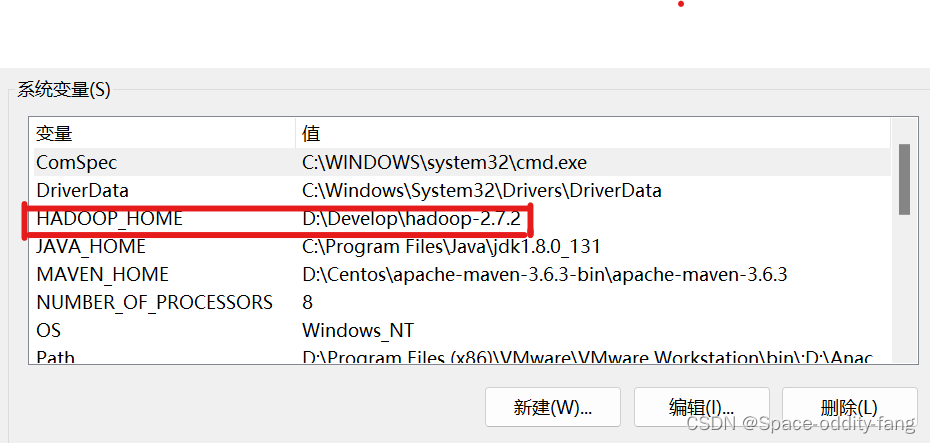
2.配置HADOOP_HOME环境变量
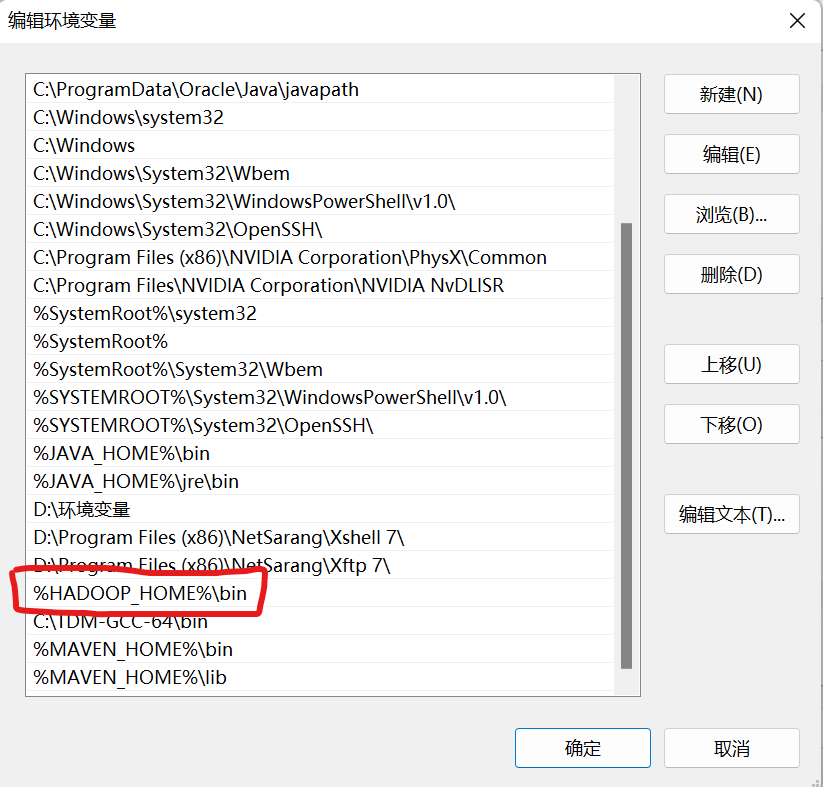
3.配置Path变量
编辑环境变量,将 %HADOOP_HOME%\bin 添加到Path中去
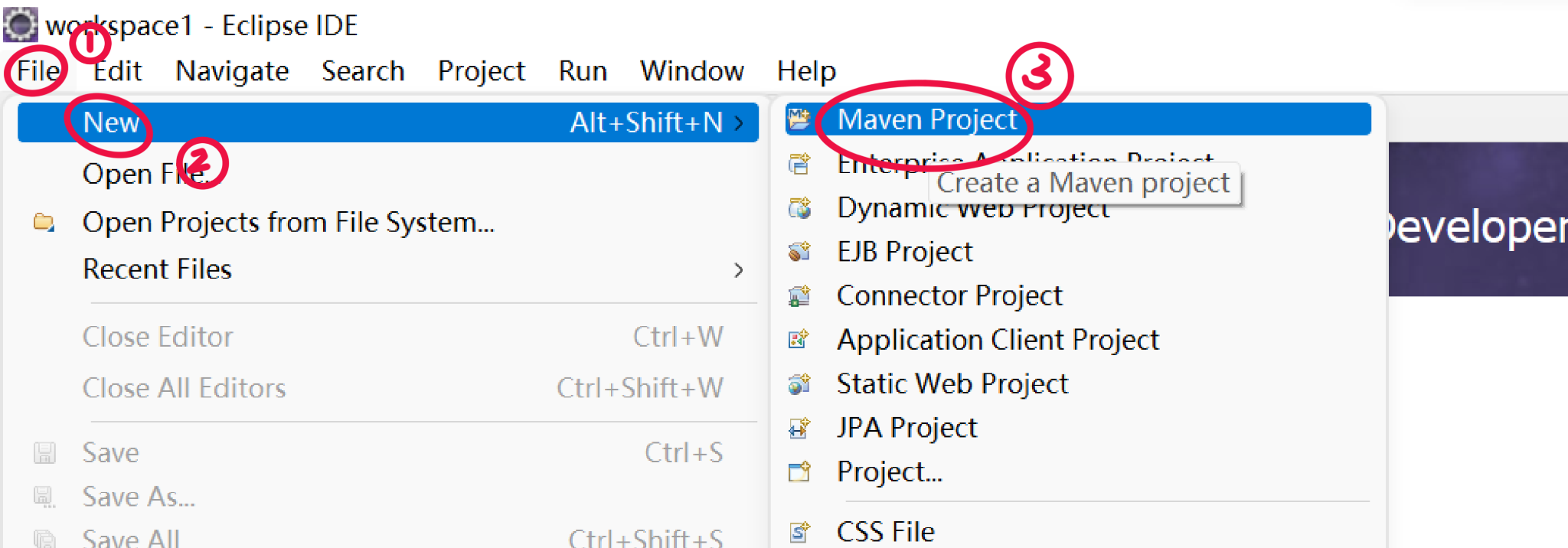
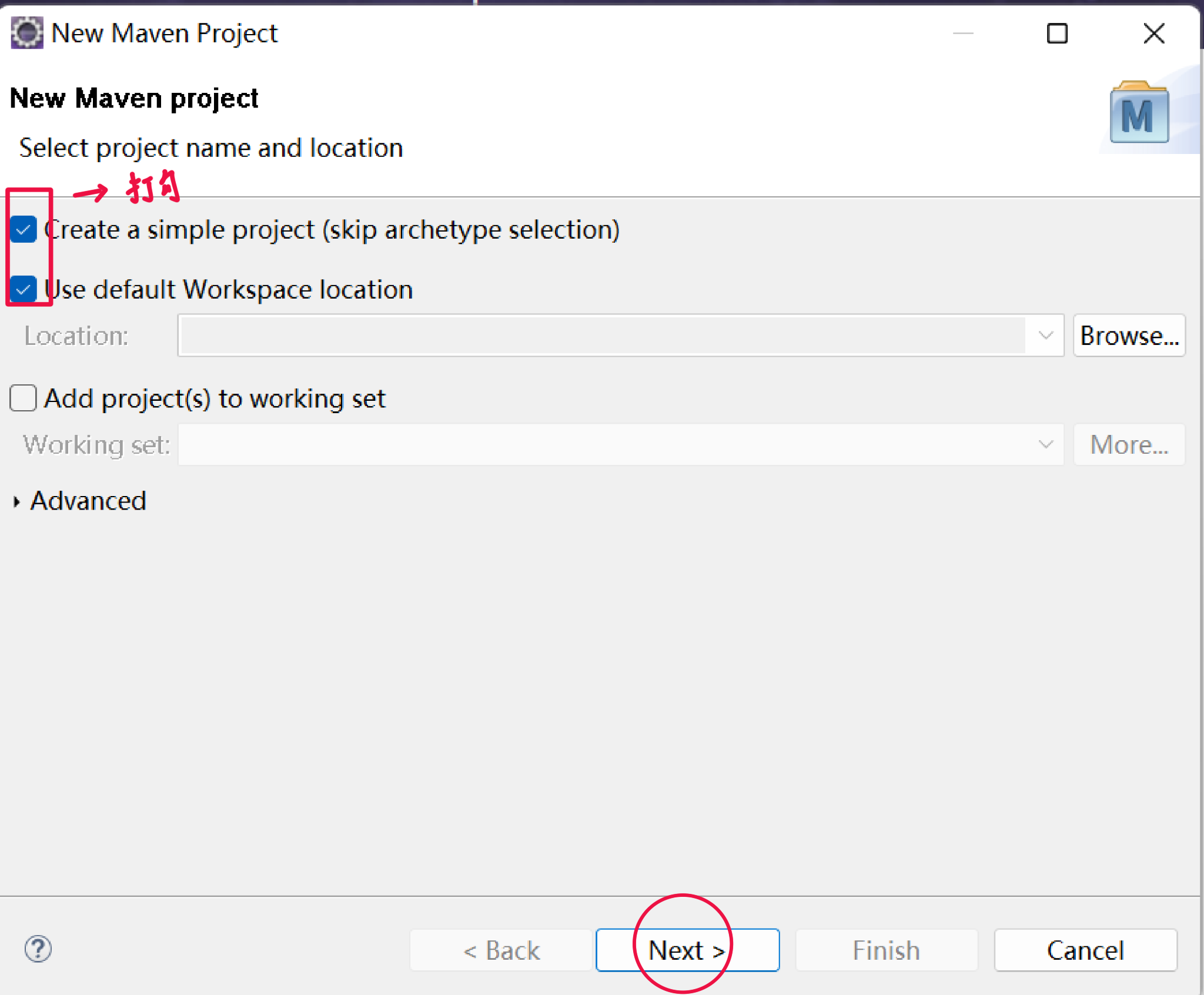
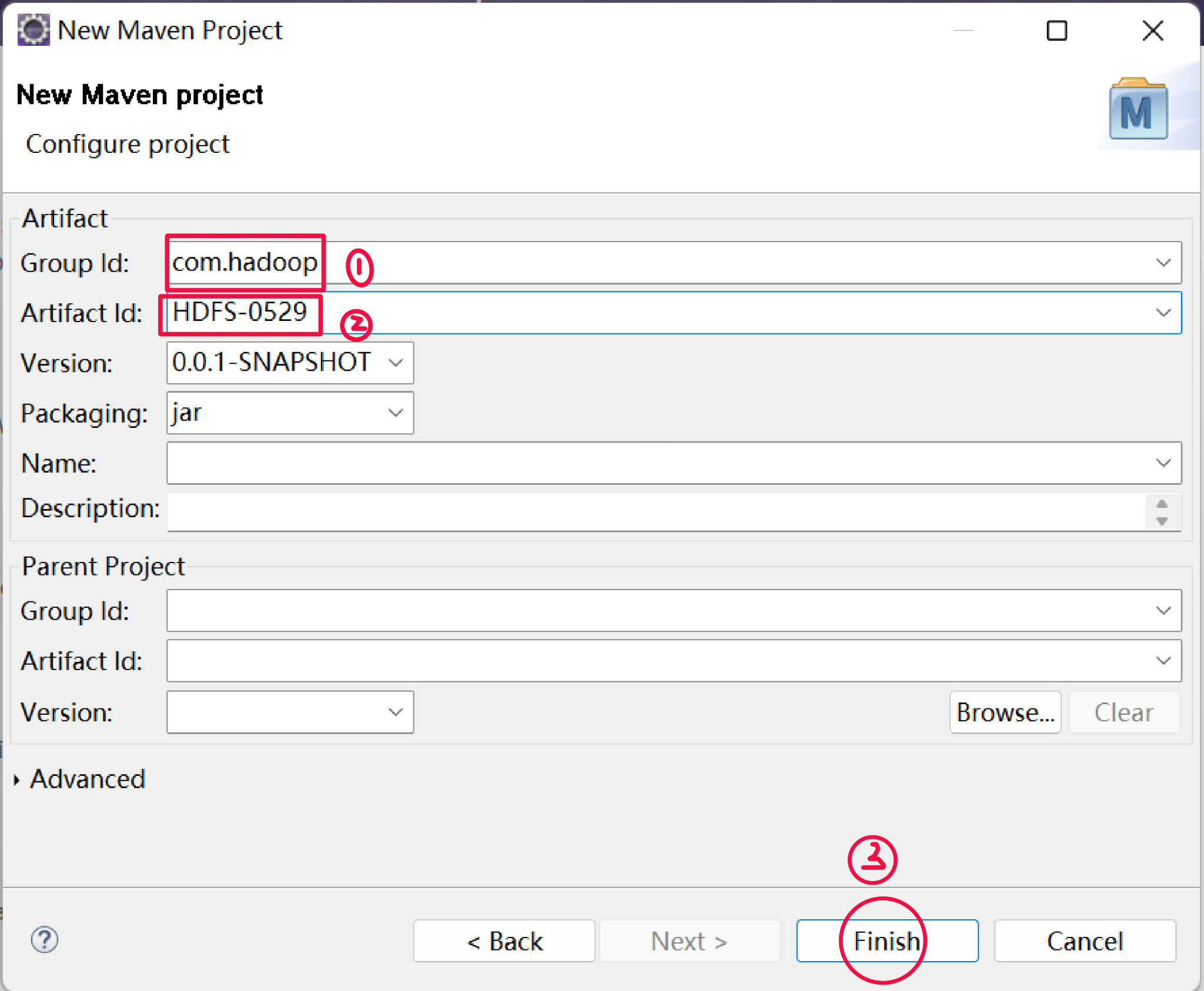
4.创建一个maven工程 HdfsClient
打开Eclipse,点击File >> New >> Maven Project
5.导入相应的依赖坐标
1.点击pom.xml,在里面添加相应的依赖<dependencies>...</dependencies>
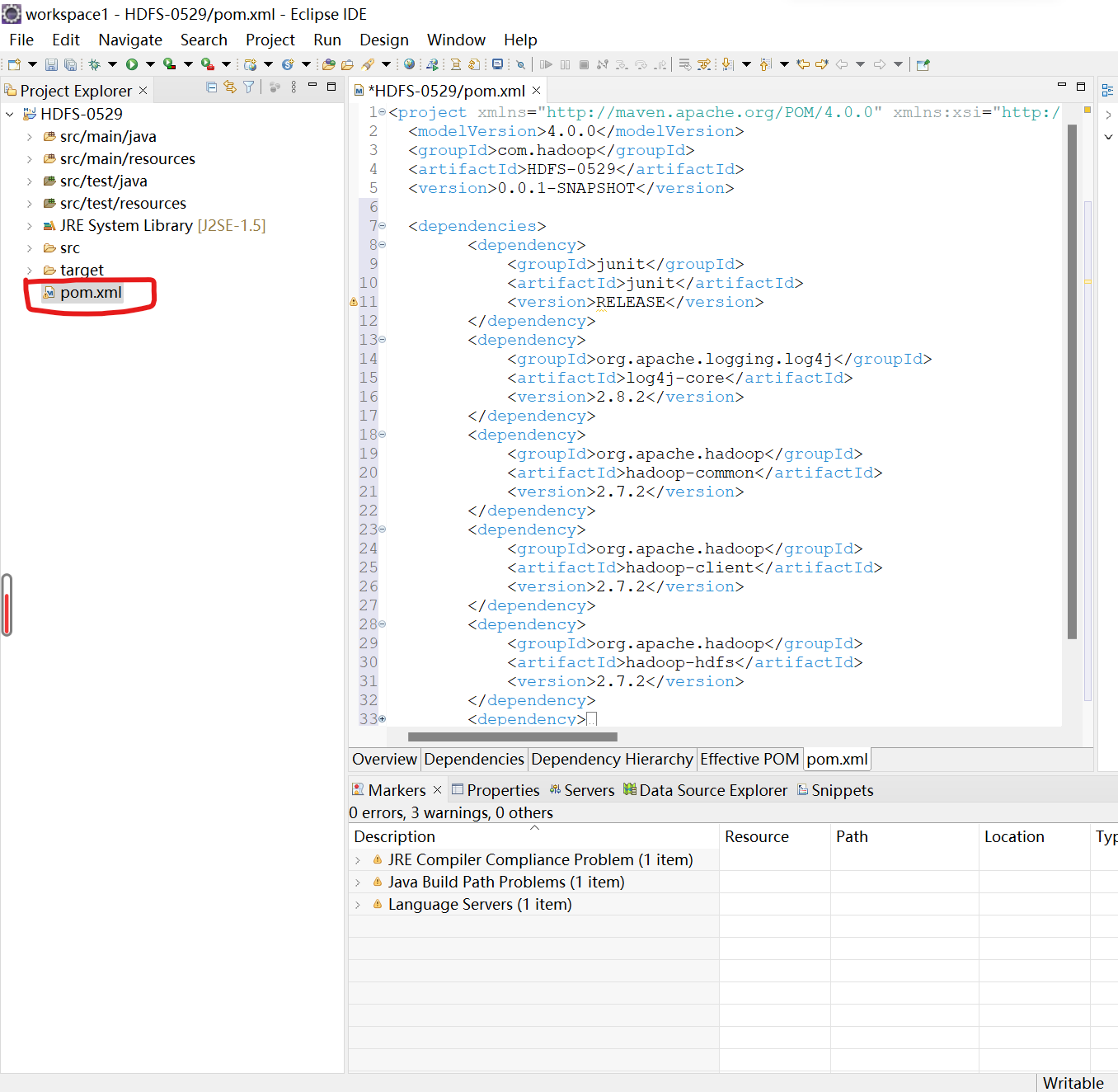
- <dependencies>
- <dependency>
- <groupId>junit</groupId>
- <artifactId>junit</artifactId>
- <version>RELEASE</version>
- </dependency>
- <dependency>
- <groupId>org.apache.logging.log4j</groupId>
- <artifactId>log4j-core</artifactId>
- <version>2.8.2</version>
- </dependency>
- <dependency>
- <groupId>org.apache.hadoop</groupId>
- <artifactId>hadoop-common</artifactId>
- <version>2.7.2</version>
- </dependency>
- <dependency>
- <groupId>org.apache.hadoop</groupId>
- <artifactId>hadoop-client</artifactId>
- <version>2.7.2</version>
- </dependency>
- <dependency>
- <groupId>org.apache.hadoop</groupId>
- <artifactId>hadoop-hdfs</artifactId>
- <version>2.7.2</version>
- </dependency>
- <dependency>
- <groupId>jdk.tools</groupId>
- <artifactId>jdk.tools</artifactId>
- <version>1.8</version>
- <scope>system</scope>
- <systemPath>${JAVA_HOME}/lib/tools.jar</systemPath>
- </dependency>
- </dependencies>

2. 需要在项目的src/main/resources目录下,新建一个文件,命名为“log4j.properties”,在文件中填入
- log4j.rootLogger=INFO, stdout
- log4j.appender.stdout=org.apache.log4j.ConsoleAppender
- log4j.appender.stdout.layout=org.apache.log4j.PatternLayout
- log4j.appender.stdout.layout.ConversionPattern=%d %p [%c] - %m%n
- log4j.appender.logfile=org.apache.log4j.FileAppender
- log4j.appender.logfile.File=target/spring.log
- log4j.appender.logfile.layout=org.apache.log4j.PatternLayout
- log4j.appender.logfile.layout.ConversionPattern=%d %p [%c] - %m%n

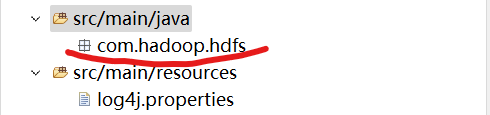
6.创建包名:com.hadoop.hdfs
在项目的src/main/java目录下,创建包名com.hadoop.hdfs
7.创建HdfsClient类
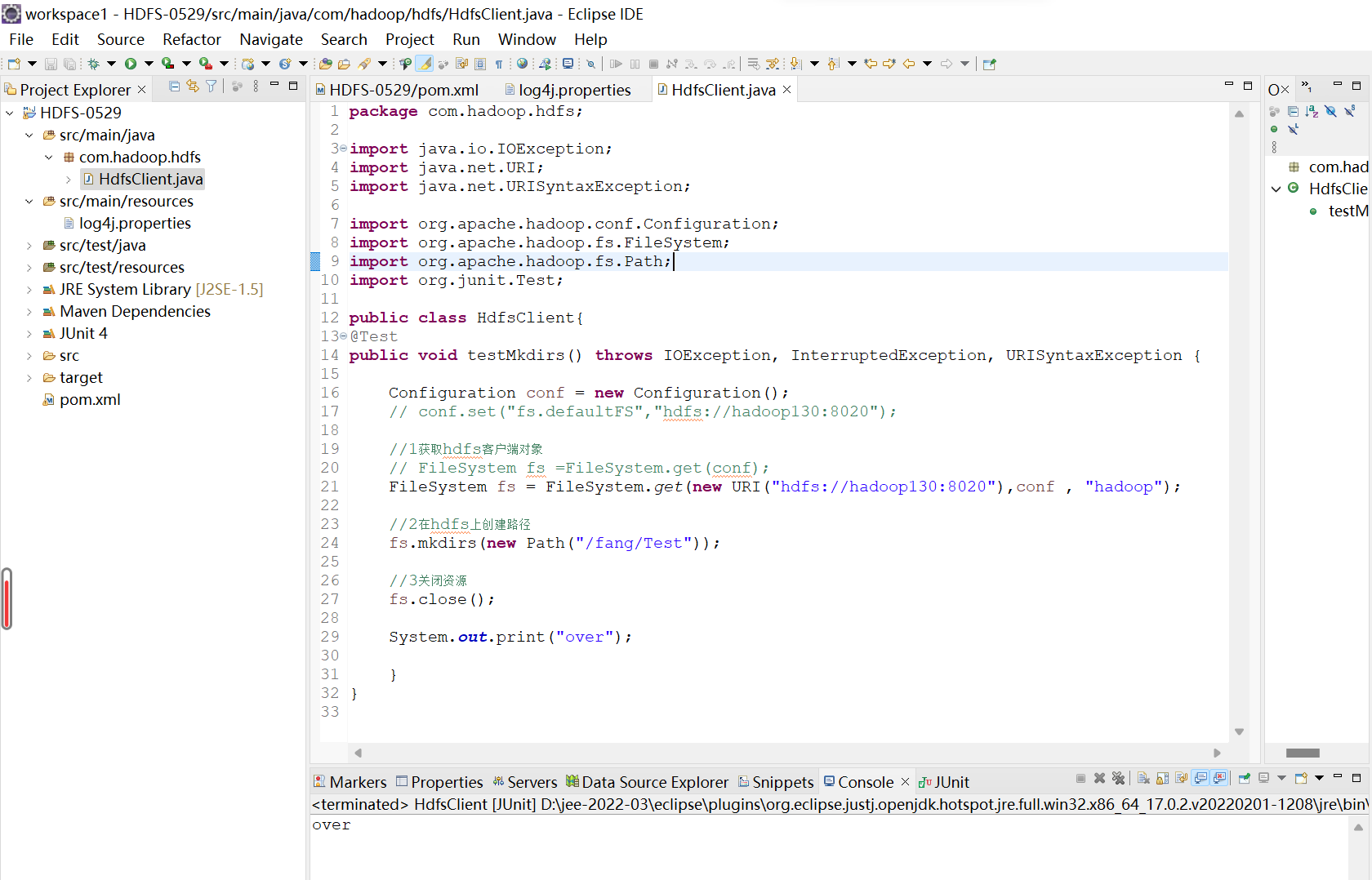
在com.hadoop.hdfs包下,创建HdfsClient类,代码如下:

- package com.hadoop.hdfs;
-
- import java.io.IOException;
- import java.net.URI;
- import java.net.URISyntaxException;
-
- import org.apache.hadoop.conf.Configuration;
- import org.apache.hadoop.fs.FileSystem;
- import org.apache.hadoop.fs.Path;
- import org.junit.Test;
-
- public class HdfsClient{
- @Test
- public void testMkdirs() throws IOException, InterruptedException, URISyntaxException {
-
- Configuration conf = new Configuration();
- // conf.set("fs.defaultFS","hdfs://hadoop130:8020");
-
- //1获取hdfs客户端对象
- // FileSystem fs =FileSystem.get(conf);
- FileSystem fs = FileSystem.get(new URI("hdfs://hadoop130:8020"),conf , "hadoop");
-
- //2在hdfs上创建路径
- fs.mkdirs(new Path("/fang/Test"));
-
- //3关闭资源
- fs.close();
-
- System.out.print("over");
-
- }
- }
注:hdfs://hadoop130:8020这里是我自己的端口号和主机名,后面“hadoop”是用户名,这些根据自己的来设置!!!这里要保证自己的集群是开启的
8.执行程序
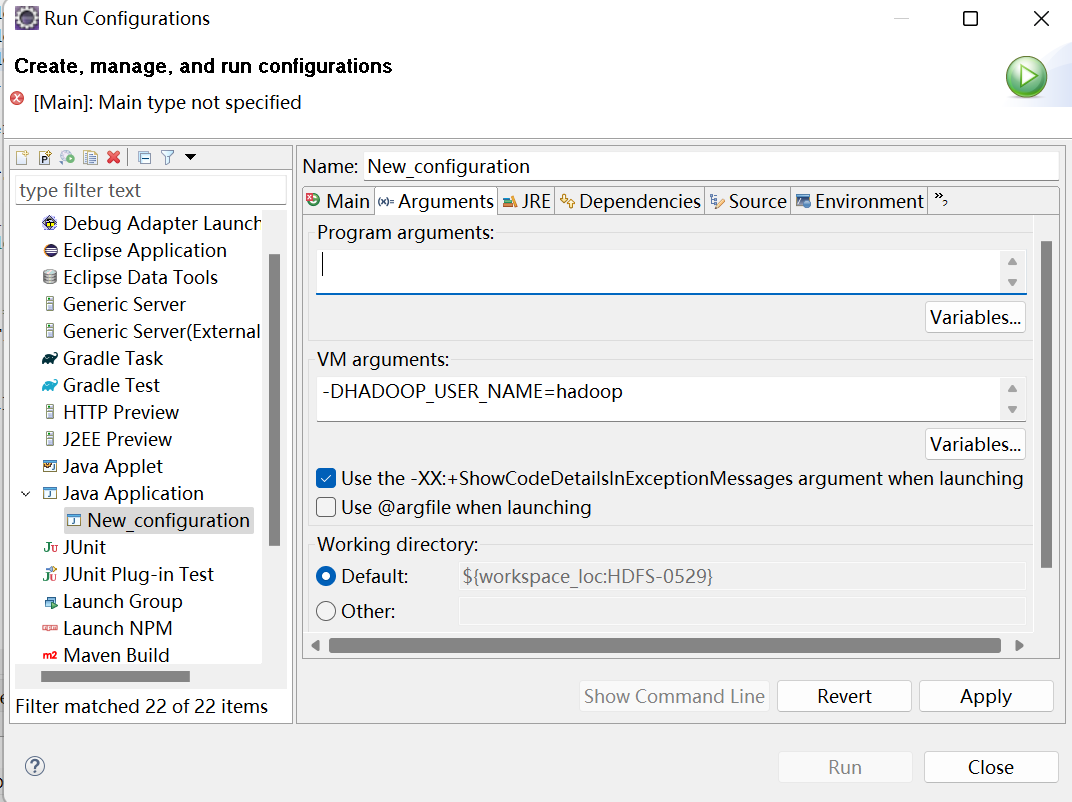
运行时需要配置用户名称
客户端去操作HDFS时,是有一个用户身份的。默认情况下,HDFS客户端API会从JVM中获取一个参数来作为自己的用户身份:-DHADOOP_USER_NAME=hadoop,hadoop为用户名称。
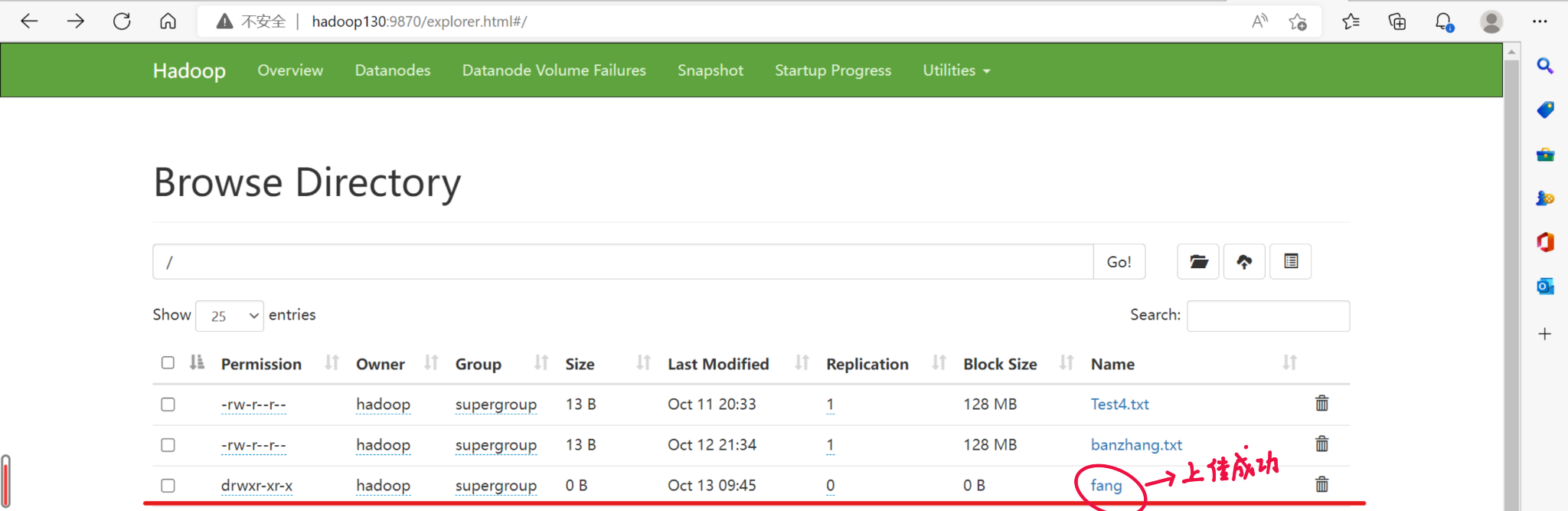
执行后的结果图:
二.HDFS的API操作
1.文件上传
- //1.文件上传
- @Test
- public void testCopyFromLocalFile() throws IOException, InterruptedException, URISyntaxException {
-
- //1获取fs对象
- Configuration conf = new Configuration();
- FileSystem fs = FileSystem.get(new URI("hdfs://hadoop130:8020"),conf,"hadoop");
-
- //2执行上传API
- fs.copyFromLocalFile(new Path("D:/Hadoop2.x/shiyan.txt"), new Path("/shiyan.txt"));
- //3关闭资源
- fs.close();
-
- System.out.print("执行完毕!");
-
-
- }
2.文件下载
- //2.文件下载
- @Test
- public void testCopyLocalFile() throws IOException, InterruptedException, URISyntaxException {
- //1.获取对象
- Configuration conf = new Configuration();
- FileSystem fs = FileSystem.get(new URI("hdfs://hadoop130:8020"), conf, "hadoop");
-
- //2执行下载操作
- fs.copyToLocalFile(new Path("/shiyan.txt"), new Path("D:/Hadoop2.x/shiyan.txt"));
- //fs.copyToLocalFile(false, null, null, false);
- //3关闭资源
- fs.close();
- System.out.print("下载完成!");
- }
3.文件删除
- //3.文件删除
- @Test
- public void testDelete() throws IOException, InterruptedException, URISyntaxException {
- //1.获取对象
- Configuration conf = new Configuration();
- FileSystem fs = FileSystem.get(new URI("hdfs://hadoop130:8020"), conf, "hadoop");
-
- //2文件删除
- fs.delete(new Path("/0529"), true);
-
- //3关闭资源
- fs.close();
- System.out.print("删除成功!");
- }
4.文件更名
- //4文件更名
- @Test
- public void testRename() throws IOException, InterruptedException, URISyntaxException {
-
- //1.获取对象
- Configuration conf = new Configuration();
- FileSystem fs = FileSystem.get(new URI("hdfs://hadoop130:8020"), conf, "hadoop");
-
- //2执行更名操作
- fs.rename(new Path("/shiyan.txt"), new Path("/Test4.txt"));
-
- //3关闭资源
- fs.close();
- System.out.print("文件更名成功!");
-
- }
5.文件详情查看
- //5文件详情查看
- @Test
- public void testListFiles() throws IOException, InterruptedException, URISyntaxException {
- //1.获取对象
- Configuration conf = new Configuration();
- FileSystem fs = FileSystem.get(new URI("hdfs://hadoop130:8020"), conf, "hadoop");
-
- //2查看文件详情
- RemoteIterator<LocatedFileStatus> listFiles = fs.listFiles(new Path("/"), true);
-
- while(listFiles.hasNext()) {
- LocatedFileStatus fileStatus =listFiles.next();
-
- //查看文件名称,权限,长度,块信息
- System.out.println(fileStatus.getPath().getName());//文件名称
- System.out.println(fileStatus.getPermission());//文件权限
- System.out.println(fileStatus.getLen());
-
- BlockLocation[] blockLocations = fileStatus.getBlockLocations();
-
- for (BlockLocation blockLocation : blockLocations) {
-
- String[] hosts = blockLocation.getHosts();
-
- for (String host : hosts) {
- System.out.println(host);
-
- }
- }
- System.out.println("--------分割线---------");
- }
- //3关闭资源
- fs.close();
- }
6.判断是文件还是文件夹
- //6判断是文件还是文件夹
- @Test
- public void testListStatus() throws IOException, InterruptedException, URISyntaxException {
- //1.获取对象
- Configuration conf = new Configuration();
- FileSystem fs = FileSystem.get(new URI("hdfs://hadoop130:8020"), conf, "hadoop");
-
- //2判断操作
- FileStatus[] listStatus = fs.listStatus(new Path("/"));
-
- for (FileStatus fileStatus : listStatus) {
- if(fileStatus.isFile()) {
- //文件
- System.out.println("f:"+fileStatus.getPath().getName());
- }else {
- //文件夹
- System.out.println("d:"+fileStatus.getPath().getName());
- }
- }
- //3关闭资源
- fs.close();
-
- }
三.HDFS的I/O流操作
(一)HDFS文件上传
1.需求分析:要求将本地D盘的文件Test4.txt上传到HDFS根目录
2.编写代码:
- public class HDFSIO {
-
- //把本地d盘上的Test4.txt文件上传到hdfs根目录
- @Test
- public void putFileToHDFS() throws IOException, InterruptedException, URISyntaxException{
-
- //1获取对象
- Configuration conf = new Configuration();
- FileSystem fs = FileSystem.get(new URI("hdfs://hadoop130:8020"), conf, "hadoop");
-
- //2获取输入流
- FileInputStream fis = new FileInputStream(new File("D:/Hadoop2.x/shiyan.txt"));
-
- //3获取输出流
- FSDataOutputStream fos = fs.create(new Path("/banzhang.txt"));
-
- //4流的对拷
- IOUtils.copyBytes(fis, fos, conf);
-
- //5关闭资源
- IOUtils.closeStream(fos);
- IOUtils.closeStream(fis);
- fs.close();
-
-
- }
(二)HDFS文件下载
1.需求分析:从HDFS上下载banzhang.txt到D盘上
2.编写代码:
- //从HDFS上下载banzhang.txt文件到本地d盘上
- @SuppressWarnings("unused")
- @Test
- public void getFileFormHDFS() throws IOException, InterruptedException, URISyntaxException{
-
- //1获取对象
- Configuration conf = new Configuration();
- FileSystem fs = FileSystem.get(new URI("hdfs://hadoop130:8020"), conf, "hadoop");
-
-
- //2获取输入流
- FSDataInputStream fis = fs.open(new Path("/banzhang.txt"));
-
- //3获取输出流
- FileOutputStream fos = new FileOutputStream(new File("d:/Hadoop2.x/banzhang.txt"));
-
- //4流的对拷
- IOUtils.copyBytes(fis, fos, conf);
-
- //5关闭资源
- IOUtils.closeStream(fos);
- IOUtils.closeStream(fis);
- fs.close();
-
- }
(三)定位文件读取
1.需求:分块读取HDFS上的大文件,比如根目录下的/hadoop-2.7.2.tar.gz
2.编写代码:
下载第一块:
- //下载第一块
- @Test
- public void readFileSeek1() throws IOException, InterruptedException, URISyntaxException {
-
- //1获取对象
- Configuration conf = new Configuration();
- FileSystem fs = FileSystem.get(new URI("hdfs://hadoop130:8020"), conf, "hadoop");
-
- //2获取输入流
- FSDataInputStream fis = fs.open(new Path("/hadoop-3.1.3.tar.gz"));
-
- //3获取输出流
- FileOutputStream fos = new FileOutputStream(new File("d:/hadoop-3.1.3.tar.gz.part1"));
-
- //4流的对拷(只拷贝128m)
- byte[] buf = new byte[1024];
- for (int i = 0; i < 1024*1024 ; i++) {
- fis.read(buf);
- fos.write(buf);
- }
-
- //5关闭资源
- IOUtils.closeStream(fos);
- IOUtils.closeStream(fis);
- fs.close();
- }
下载第二块:
- //下载第二块
- @Test
- public void readFileSeek2() throws IOException, InterruptedException, URISyntaxException {
-
- //1获取对象
- Configuration conf = new Configuration();
- FileSystem fs = FileSystem.get(new URI("hdfs://hadoop130:8020"), conf, "hadoop");
-
- //2获取输入法
- FSDataInputStream fis = fs.open(new Path("/hadoop-3.1.3.tar.gz"));
-
- //3设置指定读取起点
- //重点
- fis.seek(1024*1024*128);
- //4获取输出流
- FileOutputStream fos = new FileOutputStream(new File("d:/hadoop-3.1.3.tar.gz.part2"));
-
- //5流的对拷
- IOUtils.copyBytes(fis, fos, conf);
- //6关闭资源
- IOUtils.closeStream(fos);
- IOUtils.closeStream(fis);
- fs.close();
-
-
- }
声明:本文内容由网友自发贡献,不代表【wpsshop博客】立场,版权归原作者所有,本站不承担相应法律责任。如您发现有侵权的内容,请联系我们。转载请注明出处:https://www.wpsshop.cn/article/detail/40463
推荐阅读

相关标签

