- 1Linux中目录的操作和文件属性获取(opendir、readdir、close函数的使用)
- 2Transformer详解(附代码实现及翻译任务实现)
- 3本地部署 Whisper 及 WhisperDesktop
- 4第一次做项目经理总结_干货:项目结束后,哪些经验教训要总结?
- 5深入浅出Python量化交易实战--第1章 从零开始
- 6【MySQL】在 Centos7 环境下安装 MySQL
- 7Failed to load steamui.dll问题与解决方法详解,3分钟教你修复steamui.dll文件
- 8cvae-gan tensorflow实现_cvae-gan代码
- 9【华为OD机试真题 JAVA】篮球比赛_篮球(5v5)比赛中,每个球员拥有一个战斗力,每个队伍的所有球员战斗力之和为该队伍
- 10web3: 智能合约
NX+Ubuntu18.04+ROS Realsense(RealSenseD435i )的安装与使用_realsense安装
赞
踩
系统:Ubuntu18.04
硬件核心板:NX
相机:RealSenseD435i
一、Realsense SDK安装
由于之前尝试了很多版本没有成功,最后根据攻略上指导的版本进行安装
1.1 更新系统
- sudo apt-get update
- sudo apt-get upgrade
- sudo apt-get dist-upgrade
1.2 创建编译空间
- sudo mkdir librealsense_install
- cd librealsense_install
1.3 下载Realsense SDK
git clone -b v2.31.0 https://github.com/IntelRealSense/librealsense.git使用命令下载太慢,也可以直接下载,注意在TAG中寻找对应的版本
1.4 安装依赖包(切记一定要拔出相机,不要插相机)
- sudo apt-get install git libssl-dev libusb-1.0-0-dev pkg-config
- sudo install libgtk-3-dev
- sudo apt-get install libglfw3-dev
安装过程中遇到的问题有:
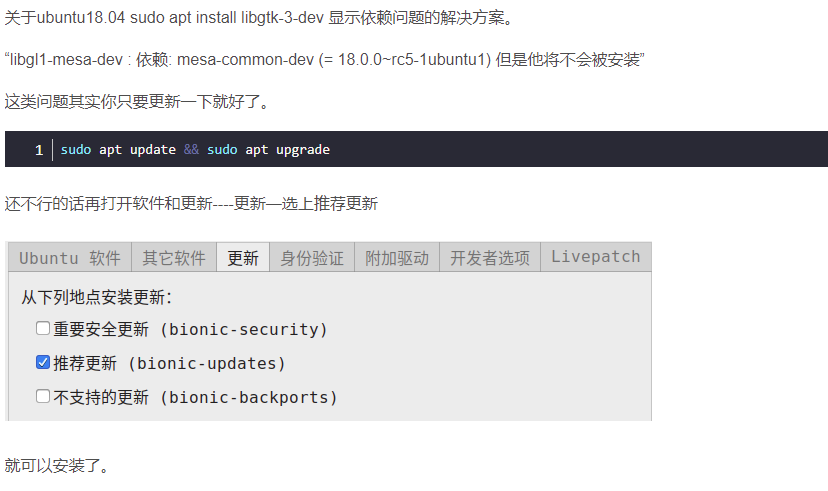
sudo install libgtk-3-dev 不能安装
1.5 编译
- cd librealsense_install/librealsense
-
- mkdir build
-
- cd build
-
- cmake ..
-
- make -j4
-
- sudo make install
1.6 测试安装
打开终端,插入相机
realsense-viewer
如果显示的不全,查看USB是否是3.0的接口,如果运行正确的话,出现的画面如图所示:

最新版本的安装方式:
- 2.2 源码编译方法
- 建议核心板使用源码编译的方法
-
-
-
- 1. 下载source
-
-
- git clone https://github.com/IntelRealSense/librealsense
- cd librealsense
-
-
-
- 2. 安装依赖项
-
- sudo apt-get install libudev-dev pkg-config libgtk-3-dev
- sudo apt-get install libusb-1.0-0-dev pkg-config
- sudo apt-get install libglfw3-dev
- sudo apt-get install libssl-dev
-
-
-
- 3. 安装权限脚本
-
- sudo cp config/99-realsense-libusb.rules /etc/udev/rules.d/
- sudo udevadm control --reload-rules && udevadm trigger
-
-
-
- 4. 编译安装
-
- mkdir build
- cd build
- cmake ../ -DBUILD_EXAMPLES=true
- make
- sudo make install
-
-
-
- 5. 测试
-
- 或直接使用realsense-viewer工具查看效果:
-
- realsense-viewer
-
- 卸载
- dpkg -l | grep "realsense" | cut -d " " -f 3 | xargs sudo dpkg --purge

二、Realsense ROS 安装
2.1 Realsense ROS编译

- 1,创建工作空间
- mkdir -p ~/catkin_ws/src
- cd ~/catkin_ws/src
- catkin_init_workspace
-
- 2.下载源码【由于版本问题,注意realsense-ros的版本对应】
- git clone -b 2.2.11 https://github.com/IntelRealSense/realsense-ros.git
- git clone https://github.com/pal-robotics/ddynamic_reconfigure.git
-
- 3,编译
- cd ~/catkin_ws
- catkin_make clean
- catkin_make -DCATKIN_ENABLE_TESTING=False -DCMAKE_BUILD_TYPE=Release
- catkin_make install
- echo "source ~/catkin_ws/devel/setup.bash" >> ~/.bashrc
- source ~/.bashrc
使用上面的命令不能下载,直接使用链接中的包编译,该包已经将后面编译中会出现的错误进行了更正:
NX+Ubuntu18.04+ROSRealsense(RealSenseD435i)的安装与使用-Linux文档类资源-CSDN下载
2.2 编译过程中的问题解决
编译过程中遇到的问题:
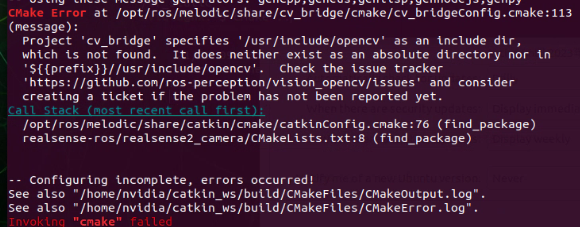
2.2.1 Project 'cv_bridge' specifies
CMake Error at /opt/ros/melodic/share/cv_bridge/cmake/cv_bridgeConfig.cmake:113 (message):
Project 'cv_bridge' specifies '/usr/include/opencv' as an include dir,
which is not found. It does neither exist as an absolute directory nor in
'${{prefix}}//usr/include/opencv'. Check the issue tracker
解决方法:
参考下面博文:
就是找到你自己在nx上安装的OPENCV的路径,然后将 /opt/ros/melodic/share/cv_bridge/cmake/cv_bridgeConfig.cmake下的cv_bridgeConfig.cmake的opencv路径更改为你自己安装的位置
1、根据这个报错的提示,可以看出是: “cv_bridge” 的路径问题;
2、找到cv_bridgeConfig.cmke文件,打开
选中的就是需要修改的路径;
3、在文件里面搜索**opencv,**路径如下图: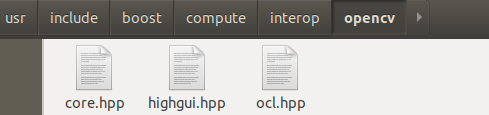
4、将2中需要修改的路径修改为3中查到的路径。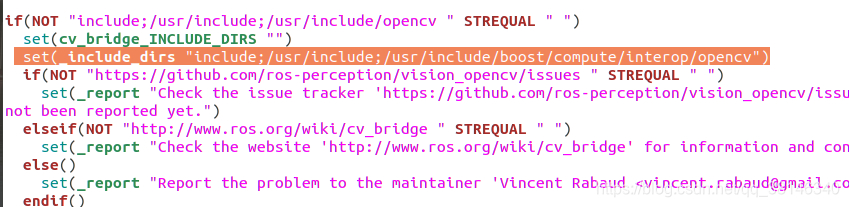
2.2.2 error find_if
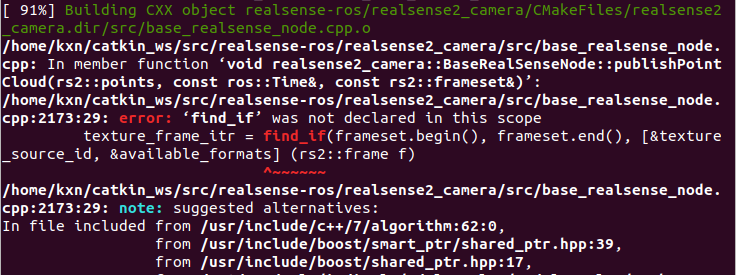
解决方法: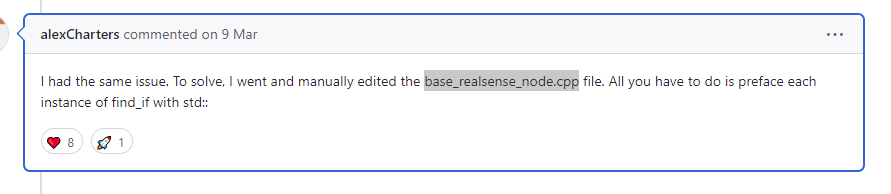
2.3 编译成功后话题的显示内容
编译成功后执行:
- roslaunch realsense2_camera rs_camera.launch
- rostopic list
- /camera/accel/imu_info
- /camera/accel/sample
- /camera/color/camera_info
- /camera/color/image_raw
- /camera/color/image_raw/compressed
- /camera/color/image_raw/compressed/parameter_descriptions
- /camera/color/image_raw/compressed/parameter_updates
- /camera/color/image_raw/compressedDepth
- /camera/color/image_raw/compressedDepth/parameter_descriptions
- /camera/color/image_raw/compressedDepth/parameter_updates
- /camera/color/image_raw/theora
- /camera/color/image_raw/theora/parameter_descriptions
- /camera/color/image_raw/theora/parameter_updates
- /camera/depth/camera_info
- /camera/depth/image_rect_raw
- /camera/depth/image_rect_raw/compressed
- /camera/depth/image_rect_raw/compressed/parameter_descriptions
- /camera/depth/image_rect_raw/compressed/parameter_updates
- /camera/depth/image_rect_raw/compressedDepth
- /camera/depth/image_rect_raw/compressedDepth/parameter_descriptions
- /camera/depth/image_rect_raw/compressedDepth/parameter_updates
- /camera/depth/image_rect_raw/theora
- /camera/depth/image_rect_raw/theora/parameter_descriptions
- /camera/depth/image_rect_raw/theora/parameter_updates
- /camera/extrinsics/depth_to_color
- /camera/extrinsics/depth_to_infra1
- /camera/extrinsics/depth_to_infra2
- /camera/infra1/camera_info
- /camera/infra1/image_rect_raw
- /camera/infra1/image_rect_raw/compressed
- /camera/infra1/image_rect_raw/compressed/parameter_descriptions
- /camera/infra1/image_rect_raw/compressed/parameter_updates
- /camera/infra1/image_rect_raw/compressedDepth
- /camera/infra1/image_rect_raw/compressedDepth/parameter_descriptions
- /camera/infra1/image_rect_raw/compressedDepth/parameter_updates
- /camera/infra1/image_rect_raw/theora
- /camera/infra1/image_rect_raw/theora/parameter_descriptions
- /camera/infra1/image_rect_raw/theora/parameter_updates
- /camera/infra2/camera_info
- /camera/infra2/image_rect_raw
- /camera/infra2/image_rect_raw/compressed
- /camera/infra2/image_rect_raw/compressed/parameter_descriptions
- /camera/infra2/image_rect_raw/compressed/parameter_updates
- /camera/infra2/image_rect_raw/compressedDepth
- /camera/infra2/image_rect_raw/compressedDepth/parameter_descriptions
- /camera/infra2/image_rect_raw/compressedDepth/parameter_updates
- /camera/infra2/image_rect_raw/theora
- /camera/infra2/image_rect_raw/theora/parameter_descriptions
- /camera/infra2/image_rect_raw/theora/parameter_updates
- /camera/motion_module/parameter_descriptions
- /camera/motion_module/parameter_updates
- /camera/realsense2_camera_manager/bond
- /camera/rgb_camera/auto_exposure_roi/parameter_descriptions
- /camera/rgb_camera/auto_exposure_roi/parameter_updates
- /camera/rgb_camera/parameter_descriptions
- /camera/rgb_camera/parameter_updates
- /camera/stereo_module/auto_exposure_roi/parameter_descriptions
- /camera/stereo_module/auto_exposure_roi/parameter_updates
- /camera/stereo_module/parameter_descriptions
- /camera/stereo_module/parameter_updates
- /diagnostics
- /rosout
- /rosout_agg
- /tf
- /tf_static
查看相关话题的内容
- $ rostopic echo /camera/accel/sample # Blank
-
- $ rostopic echo /camera/gyro/sample # Blank
-
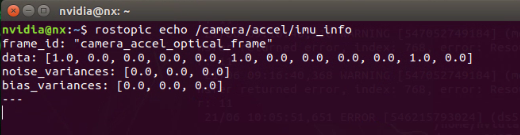
- $ rostopic echo /camera/accel/imu_info
- frame_id: "camera_accel_optical_frame"
- data: [1.0, 0.0, 0.0, 0.0, 0.0, 1.0, 0.0, 0.0, 0.0, 0.0, 1.0, 0.0]
- noise_variances: [0.0, 0.0, 0.0]
- bias_variances: [0.0, 0.0, 0.0]
- ---
-
- $ rostopic echo /camera/gyro/imu_info
- frame_id: "camera_gyro_optical_frame"
- data: [1.0, 0.0, 0.0, 0.0, 0.0, 1.0, 0.0, 0.0, 0.0, 0.0, 1.0, 0.0]
- noise_variances: [0.0, 0.0, 0.0]
- bias_variances: [0.0, 0.0, 0.0]