
- 1笔记_Ubuntu18.04安装Docker-Compose_ubuntn18.04 命令安装docker-compose
- 2知识图谱学习笔记——(一)知识图谱概论_图像知识图谱
- 3鸿蒙HarmonyOS4.0 -(ArkTs)_鸿蒙4.0 点击刷新text
- 4人工智能练习题 + 知识点汇总(期末复习版)_人工智能习题
- 5Java中常见的几种分布式锁介绍及实战应用
- 6mysql命令练习_mysql查询年龄大于18
- 7微信小程序wx.getRealtimeLogManager无法查看log内容_wx.getrealtimelogmanager 查不到日志数据
- 8大数据机器学习深度解读ROC曲线:技术解析与实战应用
- 9【python】使用aiohttp库编写一个简单的异步服务器
- 10多任务学习模型MTL: MMoE、PLE
Vue 权限控制(路由验证)转载_component: () => import
赞
踩
这篇文章简直精辟啊
原文 Vue 权限控制(路由验证) - 掘金 (juejin.cn)
下面介绍两种权限控制的方法:
- 路由元信息(meta)
- 动态加载菜单和路由(addRoutes)
路由元信息(meta)
如果一个网站有不同的角色,比如管理员和普通用户,要求不同的角色能访问的页面是不一样的
这个时候我们就可以把所有的页面都放在路由表里,只要在访问的时候判断一下角色权限。如果有权限就让访问,没有权限的话就拒绝访问,跳转到404页面
vue-router在构建路由时提供了元信息meta配置接口,我们可以在元信息中添加路由对应的权限,然后在路由守卫中检查相关权限,控制其路由跳转。
可以在每一个路由的 meta 属性里,将能访问该路由的角色添加到 roles 里。用户每次登陆后,将用户的角色返回。然后在访问页面时,把路由的 meta 属性和用户的角色进行对比,如果用户的角色在路由的 roles 里,那就是能访问,如果不在就拒绝访问。
代码示例1:
路由信息:
- routes: [
- {
- path: '/login',
- name: 'login',
- meta: {
- roles: ['admin', 'user']
- },
- component: () => import('../components/Login.vue')
- },
- {
- path: 'home',
- name: 'home',
- meta: {
- roles: ['admin']
- },
- component: () => import('../views/Home.vue')
- },
- ]

页面控制:
- //假设有两种角色:admin 和 user
- //从后台获取的用户角色
- const role = 'user'
- //当进入一个页面是会触发导航守卫 router.beforeEach 事件
- router.beforeEach((to,from,next)=>{
- if(to.meta.roles.includes(role)){
- next() //放行
- }esle{
- next({path:"/404"}) //跳到404页面
- }
- })
代码示例2
当然也可以用下面的一种方法:
- // router.js
- // 路由表元信息
- [
- {
- path: '',
- redirect: '/home'
- },
- {
- path: '/home',
- meta: {
- title: 'Home',
- icon: 'home'
- }
- },
- {
- path: '/userCenter',
- meta: {
- title: '个人中心',
- requireAuth: true // 在需要登录的路由的meta中添加响应的权限标识
- }
- }
- ]
-
- // 在守卫中访问元信息
- router.beforeEach (to, from, next) {
- let flag = to.matched.some(record=>record.meta.requireAuth);
- //console.log(flag); //可自己打印出来看一下
- }
-
可以在多个路由下面添加这个权限标识,达到控制的目的
只要一切换页面,就需要看有没有这个权限,所以可以在最大的路由下 main.js 中配置
存储信息
一般的,用户登录后会在本地存储用户的认证信息,可以用 token、cookie 等,这里我们用 token。
将用户的token保存到localStorage里,而用户信息则存在内存store中。这样可以在vuex中存储一个标记用户登录状态的属性auth,方便权限控制。
代码示例
- // store.js
- {
- state: {
- token: window.localStorage.getItem('token'),
- auth: false,
- userInfo: {}
- },
- mutations: {
- setToken (state, token) {
- state.token = token
- window.localStorage.setItem('token', token)
- },
- clearToken (state) {
- state.token = ''
- window.localStorage.setItem('token', '')
- },
- setUserInfo (state, userInfo) {
- state.userInfo = userInfo
- state.auth = true // 获取到用户信息的同时将auth标记为true,当然也可以直接判断userInfo
- }
- },
- actions: {
- async getUserInfo (ctx, token) {
- return fetchUserInfo(token).then(response => {
- if (response.code === 200) {
- ctx.commit('setUserInfo', response.data)
- }
- return response
- })
- },
- async login (ctx, account) {
- return login(account).then(response => {
- if (response.code === 200) {
- ctx.commit('setUserInfo', response.data.userInfo)
- ctx.commit('setToken', response.data.token)
- }
- })
- }
- }
- }
写好路由表和vuex之后,给所有路由设置一个全局守卫,在进入路由之前进行权限检查,并导航到对应的路由。
- // router.js
- router.beforeEach(async (to, from, next) => {
- if (to.matched.some(record => record.meta.requireAuth)) { // 检查是否需要登录权限
- if (!store.state.auth) { // 检查是否已登录
- if (store.state.token) { // 未登录,但是有token,获取用户信息
- try {
- const data = await store.dispatch('getUserInfo', store.state.token)
- if (data.code === 200) {
- next()
- } else {
- window.alert('请登录')
- store.commit('clearToken')
- next({ name: 'Login' })
- }
- } catch (err) {
- window.alert('请登录')
- store.commit('clearToken')
- next({ name: 'Login' })
- }
- } else {
- window.alert('请登录')
- next({ name: 'Login' })
- }
- } else {
- next()
- }
- } else {
- next()
- }
- })
上述的方法是基于jwt认证方式,本地不持久化用户信息,只保存token,当用户刷新或者重新打开网页时,进入需要登录的页面都会尝试去请求用户信息,该操作在整个访问过程中只进行一次,直到刷新或者重新打开,对于应用后期的开发维护和扩展支持都很好。
动态加载菜单和路由(addRoutes)
有时候为了安全,我们需要根据用户权限或者是用户属性去动态的添加菜单和路由表,可以实现对用户的功能进行定制。vue-router提供了addRoutes()方法,可以动态注册路由,需要注意的是,动态添加路由是在路由表中push路由,由于路由是按顺序匹配的,因此需要将诸如404页面这样的路由放在动态添加的最后。
代码示例
- // store.js
- // 将需要动态注册的路由提取到vuex中
- const dynamicRoutes = [
- {
- path: '/manage',
- name: 'Manage',
- meta: {
- requireAuth: true
- },
- component: () => import('./views/Manage')
- },
- {
- path: '/userCenter',
- name: 'UserCenter',
- meta: {
- requireAuth: true
- },
- component: () => import('./views/UserCenter')
- }
- ]
在vuex中添加userRoutes数组用于存储用户的定制菜单。在setUserInfo中根据后端返回的菜单生成用户的路由表。
- // store.js
- setUserInfo (state, userInfo) {
- state.userInfo = userInfo
- state.auth = true // 获取到用户信息的同时将auth标记为true,当然也可以直接判断userInfo
- // 生成用户路由表
- state.userRoutes = dynamicRoutes.filter(route => {
- return userInfo.menus.some(menu => menu.name === route.name)
- })
- router.addRoutes(state.userRoutes) // 注册路由
- }
修改菜单渲染
- // App.vue
- <div id="nav">
- <router-link to="/">主页</router-link>
- <router-link to="/login">登录</router-link>
- <template v-for="(menu, index) of $store.state.userInfo.menus">
- <router-link :to="{ name: menu.name }" :key="index">{{menu.title}}</router-link>
- </template>
- </div>
完整的 动态加载菜单和路由 案例
如果前面的看完了,觉得自己了解的可以了,其实就不需要往下面看了,当然,你也可以看一下这个案例,尝试自己写一下。
友情提示:这个案例可能会有点难,有些逻辑比较不好理解,最好亲自上手写一下,下去自己慢慢慢慢消化
那么就让我们开始吧:
新建一个项目,删去不需要的文件和代码
后端准备数据
在src同级目录下,新建一个server.js文件,如下:

代码:
其中涉及到跨域问题,具体参考我的文章《常见的跨域解决方案(全)》
- //Server.js
-
- let express = require('express');
- let app = express();
- //在后端配置,让所有人都可以访问api接口 其中设计到跨域问题,具体参考我的文章《常见的跨域解决方案(全)》
- app.use('*', function (req, res, next) {
- res.header('Access-Control-Allow-Origin', '*');
- //Access-Control-Allow-Headers ,可根据浏览器的F12查看,把对应的粘贴在这里就行
- res.header('Access-Control-Allow-Headers', 'Content-Type');
- res.header('Access-Control-Allow-Methods', '*');
- res.header('Content-Type', 'application/json;charset=utf-8');
- next();
- });
- app.get('/role',(req,res)=>{
- res.json({
- //假如这是后端给我们的JSON数据
- menuList:[
- {pid:-1,path:'/cart',name:'购物车',id:1,auth:'cart'},
- {pid:1,path:'/cart/cart-list',name:'购物车列表',id:4,auth:'cart-list'},
- {pid:4,path:'/cart/cart-list/lottery',auth:'lottery',id:5,name:'彩票'},
- {pid:4,path:'/cart/cart-list/product',auth:'product',id:6,name:'商品'},
- {pid:-1,path:'/shop',name:'商店',id:2,auth:'shop'},
- {pid:-1,path:'/profile',name:'个人中心',id:3,auth:'profile'},
- ],
- buttonAuth:{
- edit:true, // 可编辑
- }
- })
- })
- //监听3000端口
- app.listen(3000);
然后测试端口数据能不能获得(使用node指令):

使用浏览器访问3000端口下的/role
如果可以获得数据,则说明端口没问题
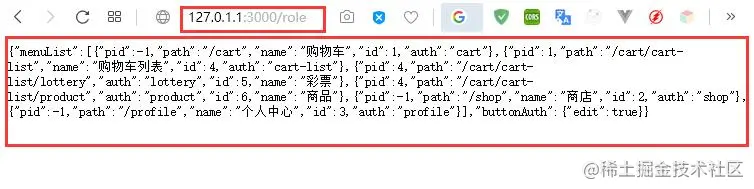
然后把下面这些对应的页面用vue的基本骨架写出来
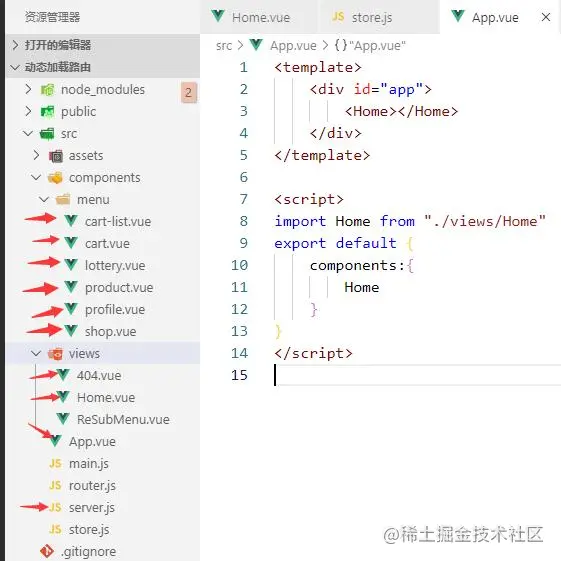
在router.js中配置路由
- import Vue from 'vue'
- import Router from 'vue-router'
- //引入组件
- import Home from "./views/Home.vue"
-
- Vue.use(Router)
-
- export default new Router({
- mode: 'history',
- base: process.env.BASE_URL,
- //配置路由
- routes: [
- {
- //访问'/'时,重定向到home页面
- path:'/',
- redirect:'/home'
- },
- {
- path:'/home',
- name:'home',
- component:Home
- },
- {
- path:'/cart',
- name:'cart',
- //使用懒加载,当使用这个组件的时候再加载资源,当组件资源较大时,不建议使用,可能会出现白屏现象
- //而且最好使用绝对路径,@是绝对路径的意思,相当于src下
- component:()=>import('@/components/menu/cart.vue'),
- //配置子路由
- children:[
- {
- //当配置子路由时,最好不要在前面加'/',比如:'/cart-list'
- path:'cart-list',
- name:'cart-list',
- component:()=>import('@/components/menu/cart-list.vue'),
- //配置子路由
- children:[
- {
- path:'lottery',
- name:'lottery',
- component:()=>import('@/components/menu/lottery.vue')
- },
- {
- path:'product',
- name:'product',
- component:()=>import('@/components/menu/product.vue')
- }
- ]
- }
- ]
- },
- {
- path:'/profile',
- name:'profile',
- component:()=>import('@/components/menu/profile.vue')
- },
- {
- path:'/shop',
- name:'shop',
- component:()=>import('@/components/menu/shop.vue')
- },
- {
- path:'*',
- component:()=>import('@/views/404.vue')
- }
- ]
- })
在浏览器地址栏中输入路由,测试,肯定是ok的,这里就不贴图了
路由配置完毕后,后端给我们返回的数据如图所示:
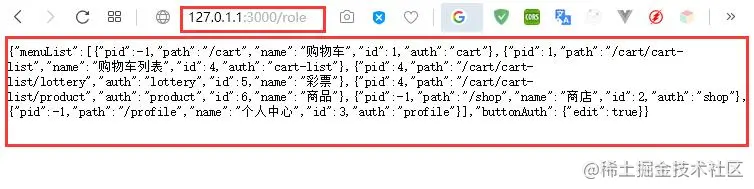
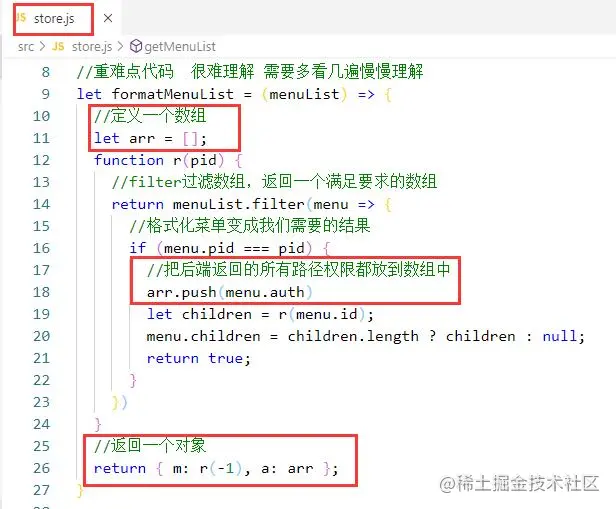
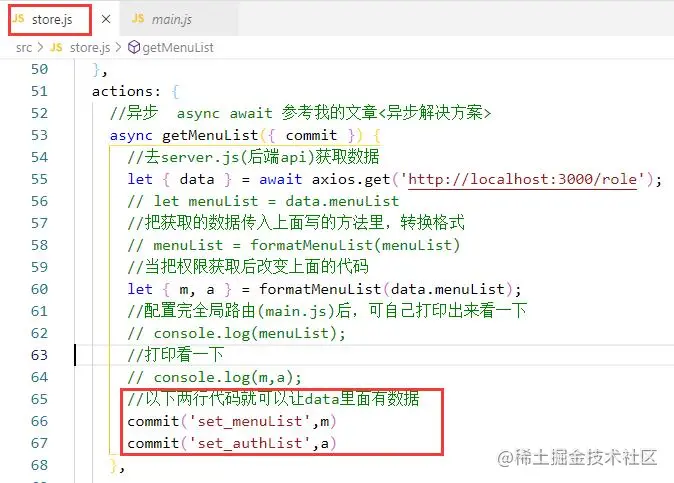
我们需要把上面的数据转换成我们需要的数据格式,并保存在vuex中,(其中涉及到异步问题,具体参考我的文章《JS中的异步解决方案》),如下:
- //store.js
- //重难点代码 很难理解 需要多看几遍慢慢理解
- let formatMenuList = (menuList) => {
- function r(pid) {
- //filter过滤数组,返回一个满足要求的数组
- return menuList.filter(menu => {
- //格式化菜单变成我们需要的结果
- if (menu.pid === pid) {
- let children = r(menu.id);
- menu.children = children.length ? children : null;
- return true;
- }
- })
- }
- return r(-1);
- }
-
- actions: {
- //异步 async await 参考我的文章<异步解决方案>
- async getMenuList({ commit }) {
- //去server.js(后端api)获取数据
- let { data } = await axios.get('http://localhost:3000/role');
-
- let menuList = data.menuList
- //把获取的数据传入上面写的方法里,转换格式
- menuList = formatMenuList(menuList)
- //配置完全局路由(main.js)后,可自己打印出来看一下
- // console.log(menuList);
- },
- }
-
需要保存成的数据格式,拿我之前写过的一个树形数据来让大家看看,只看结构就好,不用看数据:
- treeData: {
- title: "Web全栈架构师",
- children: [
- {
- title: "Java架构师"
- },
- {
- title: "JS高级",
- children: [
- {
- title: "ES6"
- },
- {
- title: "动效"
- }
- ]
- },
- {
- title: "Web全栈",
- children: [
- {
- title: "Vue训练营",
- expand: true,
- children: [
- {
- title: "组件化"
- },
- {
- title: "源码"
- },
- {
- title: "docker部署"
- }
- ]
- },
- {
- title: "React",
- children: [
- {
- title: "JSX"
- },
- {
- title: "虚拟DOM"
- }
- ]
- },
- {
- title: "Node"
- }
- ]
- }
- ]
- }
然后在main.js中添加路由 (涉及到导航守卫问题,请参考我的文章Vue 导航守卫(路由的生命周期)) 如下:
- //main.js
- //只要页面切换就执行的钩子
- //根据权限动态添加路由(我们的路由要分成两部分:一部分是有权限的,另一部分是没有权限的)
- router.beforeEach(async (to,from,next)=>{
- //判断当前有没有获取过权限,如果获取过了,就不要再获取了
- if(!store.state.hasRules){
- //获取权限,调用获取权限的接口,去action中获取数据
- await store.dispatch('getMenuList')
- }else{
- //如果已经获取了权限就可以访问页面了
- next()
- }
- })
然后访问主页面,效果如下:
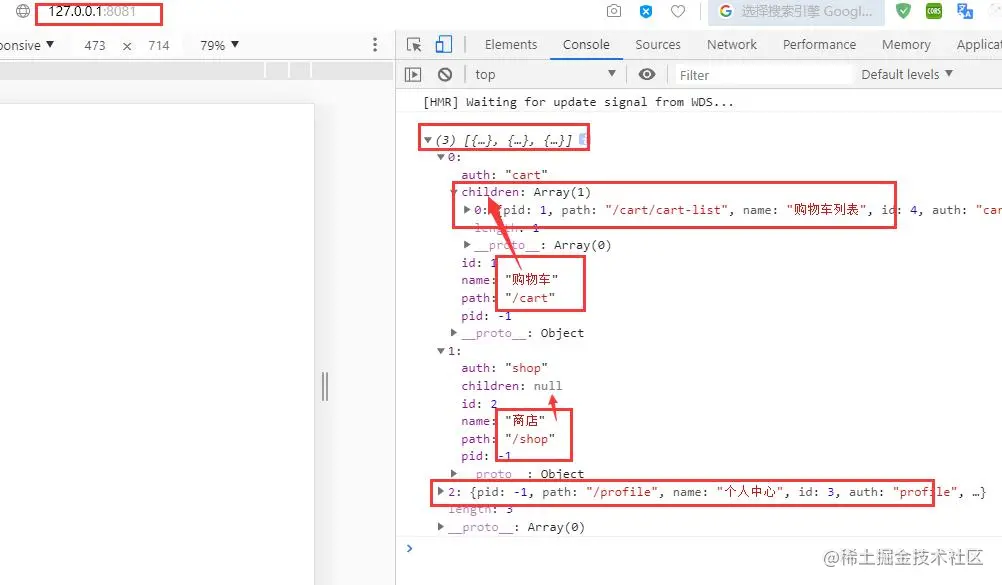
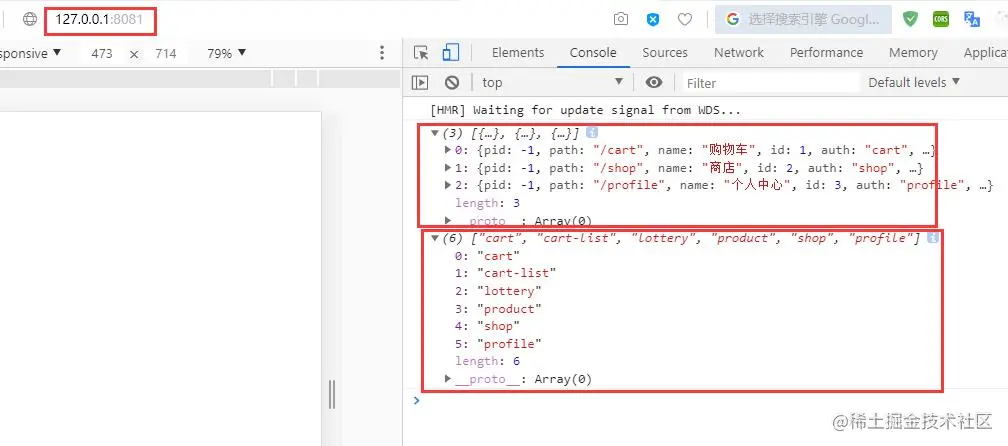
在上面的数据有个auth项,代表有没有这个权限。如果没有这个权限,到时候会把这个菜单从路由规则中删除掉。把所有的auto都过滤出来,如下:

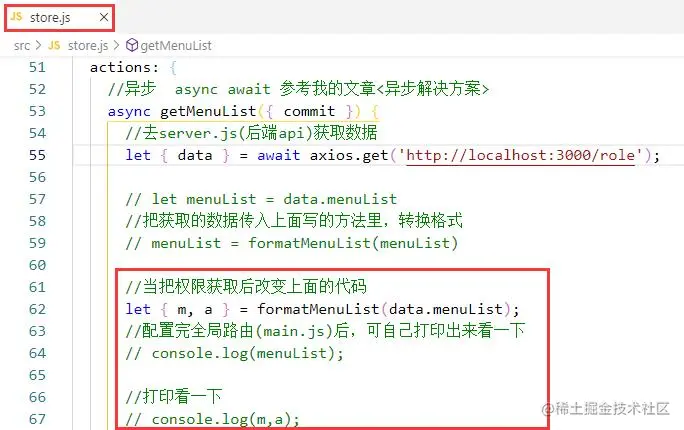
然后在主页面测试如下(记的把上面的console.log代码的注释解开):
如果把后端数据(menuList)改变了,那么重新刷新一下页面,那么就会动态的改变数据,这里就不演示了,自己可以注释一个看一下
接下来渲染菜单数据,
在main.js中 使用element-ui:
- //main.js
- //安装 element-ui 并使用
- import ElementUI from "element-ui"
- //引入element-ui里的样式
- import 'element-ui/lib/theme-chalk/index.css'
- Vue.use(ElementUI)
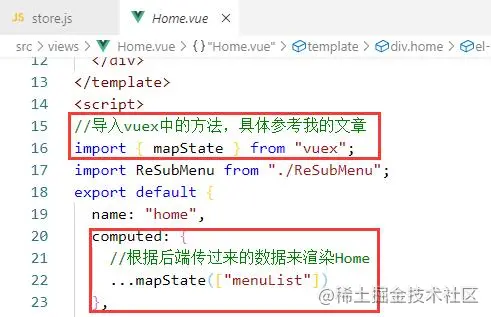
把我们刚才得到的数据渲染到Home上面:
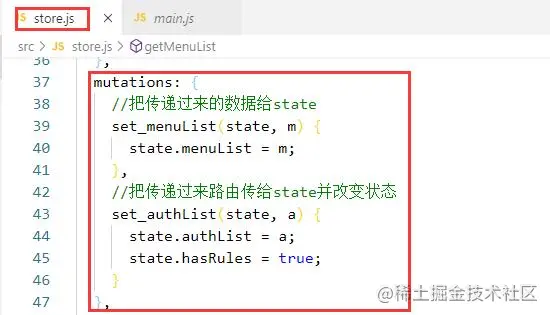
在 Home 中使用mapState方法:
当在我们渲染的时候,我们需要一个递归组件来动态的获取传递过来的数据,动态的进行渲染,所以肯定是不能写死的,递归组件的使用请参考我的文章《Vue 递归组件(构建树形菜单)》,这里不做过多介绍,直接拿来用
在 views 下面添加一个 ReSubMenu 组件,代码如下:
- <template>
- <el-submenu :index="data.path">
- <template slot="title">
- <router-link :to="data.path">{{data.name}}</router-link>
- </template>
- <template v-for="c in data.children">
- <ReSubMenu :key="c.auth" v-if="data.children" :data="c">
- </ReSubMenu>
- <el-menu-item :key="c.auth" v-else :index="c.path">
- {{c.name}}
- </el-menu-item>
- </template>
- </el-submenu>
- </template>
- <script>
- export default {
- name:"ReSubMenu",
- props:{
- data:{
- type:Object,
- default:()=>({})
- }
- }
- }
- </script>
然后再 Home 中使用这个组件
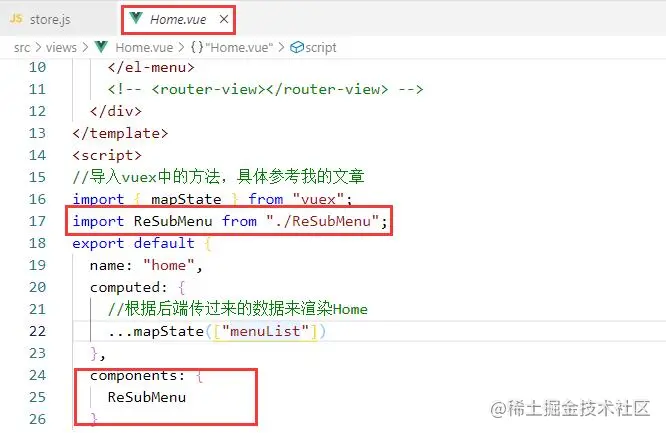
template 中的代码如下:
- <template>
- <div class='home'>
- <!-- <router-view></router-view> -->
- <el-menu default-active="2" class="el-menu-vertical-demo" :router="true">
- <template v-for="m in menuList">
- <!-- 渲染肯定是不能写死的,所以我使用之前封装过的递归组件,具体内容参考我的文章<Vue 递归组件(构建树形菜单)> -->
- <ReSubMenu :data="m" :key="m.auth" v-if="m.children"></ReSubMenu>
- <el-menu-item v-else :key="m.auth" :index="m.path">{{m.name}}</el-menu-item>
- </template>
- </el-menu>
- <!-- <router-view></router-view> -->
- </div>
- </template>
效果图:

这样就能根据传递过来的数据动态的生成我们需要的结构
但是如果后端没有给我们返回profile,也是拦不住的,如下:
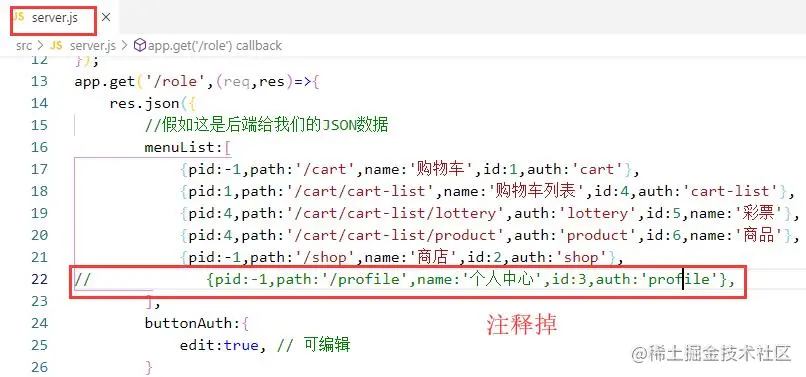
这样也是可以访问到 profile 的,如下:

这样是不行的,因为后端并没有给我们返回 profile
如何解决?
答:根据权限动态添加路由 (我们的路由要分成两部分 一部分是有权限 另一部分是没权限的)
修改 router.js 中的代码如下:
- import Vue from 'vue'
- import Router from 'vue-router'
- //引入组件
- import Home from "./views/Home.vue"
-
- Vue.use(Router)
-
- let defaultRoutes = [
- {
- //访问'/'时,重定向到home页面
- path:'/',
- redirect:'/home'
- },
- {
- path:'/home',
- name:'home',
- component:Home
- },
- {
- path:'*',
- component:()=>import('@/views/404.vue')
- }
- ]
-
- export let authRoutes = [
- {
- path:'/cart',
- name:'cart',
- //使用懒加载,当使用这个组件的时候再加载资源,当组件资源较大时,不建议使用,可能会出现白屏现象
- //而且最好使用绝对路径,@是绝对路径的意思,相当于src下
- component:()=>import('@/components/menu/cart.vue'),
- //配置子路由
- children:[
- {
- //当配置子路由时,最好不要在前面加'/',比如:'/cart-list'
- path:'cart-list',
- name:'cart-list',
- component:()=>import('@/components/menu/cart-list.vue'),
- //配置子路由
- children:[
- {
- path:'lottery',
- name:'lottery',
- component:()=>import('@/components/menu/lottery.vue')
- },
- {
- path:'product',
- name:'product',
- component:()=>import('@/components/menu/product.vue')
- }
- ]
- }
- ]
- },
- {
- path:'/profile',
- name:'profile',
- component:()=>import('@/components/menu/profile.vue')
- },
- {
- path:'/shop',
- name:'shop',
- component:()=>import('@/components/menu/shop.vue')
- }
- ]
-
- //需要查看用户权限来动态添加路由
- export default new Router({
- mode: 'history',
- base: process.env.BASE_URL,
- //默认可以访问的路由
- routes: defaultRoutes
- })
-
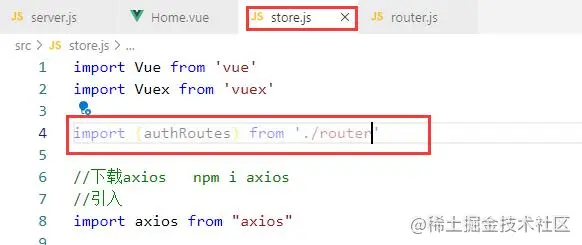
在stroe.js中导入:
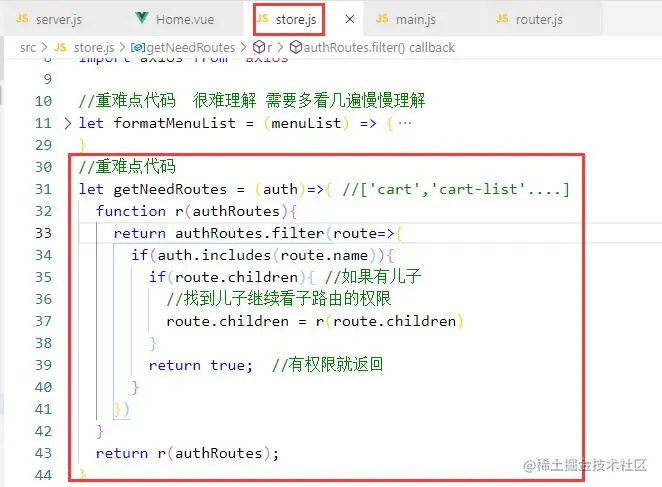
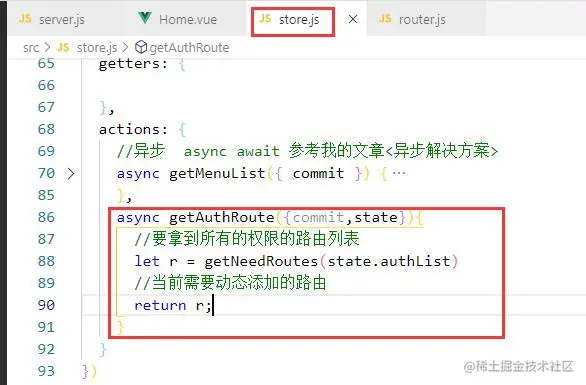
在store.js中添加代码:
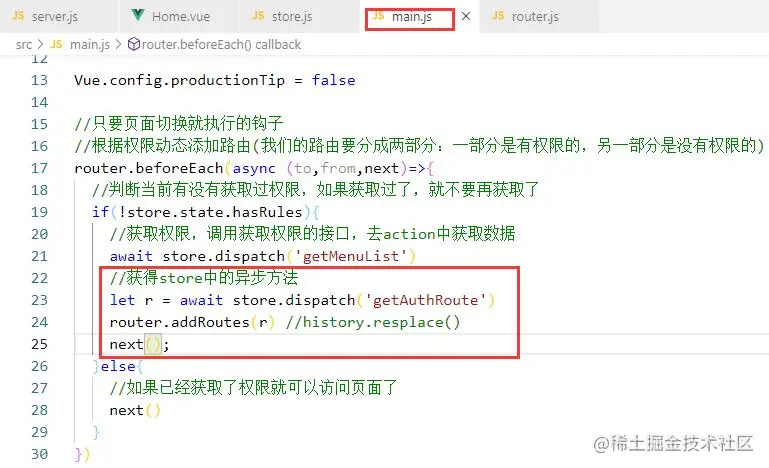
修改main.js中的代码(重点):
测试ok:
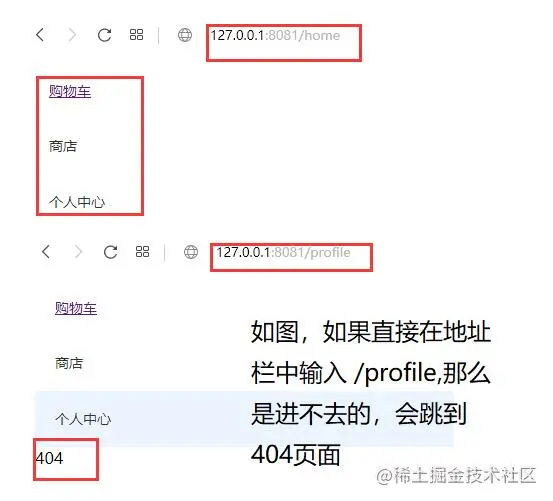
当然你也可以再注释一个测试一下
所以这个路由是由后端返回的,如果没有权限
作者:YXi
链接:https://juejin.cn/post/6844903916870565901
来源:稀土掘金
著作权归作者所有。商业转载请联系作者获得授权,非商业转载请注明出处。


