
热门标签
热门文章
- 1引入阿里Druid数据库连接池(maven ssm框架)_maven导入druid
- 2android x86 精简版,逆天!Windows7终极纯净版x86,仅239MB | 殁漂遥
- 3进程切换和是Linux2.6内核中进程调度的算法
- 4CentOs基础操作指令(文件所属管理和权限管理)_centos需要查看名为folder文件夹所属者及相关权限信息用什么指令
- 5SELinux audit2allow命令使用
- 62021-01-19_java实现使用采集地址,自动采集第一话和最后一话漫画内容。
- 7opencv中的Mat与数组互转_cv::mat 指向一个buffer
- 8c 语言中的封装_c语言封装函数
- 9C# 如何提取字符串中的数字_c# 正则表达式 提取数字
- 10Springboot+SpringSecurity一篇看会_springboot security
当前位置: article > 正文
Django 单元测试、全文检索_from django.test import testcase
作者:IT领航者 | 2024-01-29 19:36:30
赞
踩
from django.test import testcase
1.Django 单元测试
Django 框架自带单元测试工具,在 Django 框架创建的应用中默认有一个用于单元测试的 test.py 文件,我们将单元测试代码写在 test.py 文件中。
(1)编写一个简单的测试案例
- from django.test import TestCase
-
- # Create your tests here.
- def add(a,b):
- return a + b
-
- if __name__ == '__main__':
- c = add(1,2)
- assert c == 3
-
- c = add(1.0,2)
- assert c == 3.0
-
- c = add(3,5)
- assert c == 9.0
点击运行该文件,用例不通过会报错:

(2)使用 unittest 模块
- from django.test import TestCase
- import unittest
-
- # Create your tests here.
- def add(a,b):
- return a + b
-
- class AddTest(unittest.TestCase):
- def test_init(self):
- self.assertEqual(add(1,2),3)
-
- def test_float(self):
- self.assertEqual(add(1.0, 2), 3.0)
-
- def test_err(self):
- self.assertEqual(add(3,5),9.0)
-
- if __name__ == '__main__':
- unittest.main()

点击运行:

(3)使用 django 内置的单元测试
- from django.test import TestCase
- from .models import User
-
- # Create your tests here.
- class simpleTest(TestCase):
- # 测试前
- def setUp(self):
- User.objects.create(username='admin',password='123456',email='2309485764@qq.com',is_active=True)
-
- def test_createModelTest(self):
- user = User.objects.get(username='admin')
- print(user.username,user.password,user.email,user.is_active)
- self.assertIsNot(user,None)
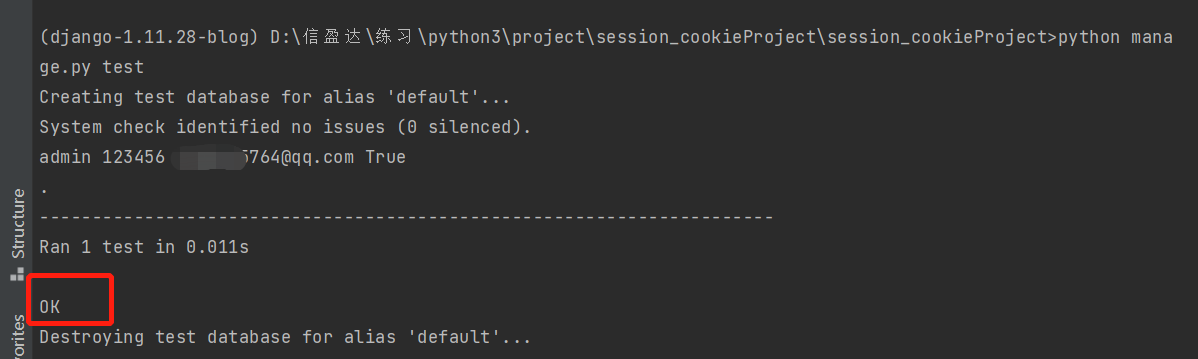
在项目目录下,运行:python manage.py test;
2.全文检索-搜索
以之前做的博客项目为例,实现页面上方输入关键字搜索出相关的商品的功能。
(1)准备
Haystack 是 django 的开源全文搜索框架(全文检索不同于特
声明:本文内容由网友自发贡献,不代表【wpsshop博客】立场,版权归原作者所有,本站不承担相应法律责任。如您发现有侵权的内容,请联系我们。转载请注明出处:https://www.wpsshop.cn/article/detail/44613
推荐阅读

相关标签

