
热门标签
热门文章
- 1STM32 开发常见问题汇总_stm32 开发的时候遇到的问题
- 2Linux之基础指令大全【痛苦的开始】
- 3C++常见的质数判断算法_c++判断质数
- 4【目标检测】Flask+Docker在服务器部署YOLOv5应用
- 5【32单片机学习】(11)STM32启动过程详解_stm32g0系列的启动配置
- 6【uni-app】 动态设置 tabBar_uniapp动态设置tabbar
- 7记录:初学者如何安装gdal、rasterio、geopandas(中秋快乐(超大声)_rasterio和geopandas兼容版本
- 8安装spacy+zh_core_web_sm避坑指南
- 9Java刷力扣技巧总结-思想与技巧_力扣怎么刷java题
- 10【ACDC数据集】:预处理ACDC心脏3D MRI影像数据集到VOC数据集格式,nii转为jpg,label转为png
当前位置: article > 正文
30分钟你也能搭建一个vue3.2+vite+pinia+Ts+element plus+axios的后台管理系统
作者:代码优化者 | 2024-02-04 13:43:54
赞
踩
30分钟你也能搭建一个vue3.2+vite+pinia+Ts+element plus+axios的后台管理系统
demo

最下面有相关文档链接, 此文章提供大致步骤与部分封装
开始
第一步初始化项目
//初始化项目
1、npm init vue@latest

2、选装 (空格输入yes或者no, 一路yes即可)

// 初始化包
3、npm install

//运行
4、npm run dev

//安装axios
5、npm install axios -D

//安装 element plus
6、npm install element-plus -D

//按需动态引入element 组件的([推荐,也可以全局安装](https://element-plus.gitee.io/zh-CN/guide/quickstart.html))
7、npm install unplugin-vue-components unplugin-auto-import unplugin-icons -D

//安装less (也可以安装scss)
8、npm install --save less

//mitt 使用  (兄弟组件通信)
9、npm install mitt -S

如遇安装失败 请改为cnpm安装

- 1
- 2
- 3
- 4
- 5
- 6
- 7
- 8
- 9
- 10
- 11
- 12
- 13
- 14
- 15
- 16
- 17
- 18
- 19
- 20
- 21
- 22
- 23
- 24
- 25
- 26
- 27
第二步删除修改乱七八糟没用的内容
- 删空 compoents里自带的组件(测试文件想要就要)
- views里的 两个文件里面的内容改成 (为了提高效率,可在vscode里添加代码片段)
//设置/用户代码片段
{
   "Print to console": {
   	"prefix": "sc1",
   	"body": [
   		"<template>",
   		"  <div>",
   		"  </div>",
   		"</template>",
   		"",
   		"<script  lang='ts' setup>",
   		"import { onMounted } from 'vue';",
   		"onMounted(() => {",
   		"});",
   		"</script>",
   		"<style lang='less' scoped>",
   		"",
   		"</style>"
   	],
   	"description": "Log output to console"
   }
}
- 1
- 2
- 3
- 4
- 5
- 6
- 7
- 8
- 9
- 10
- 11
- 12
- 13
- 14
- 15
- 16
- 17
- 18
- 19
- 20
- 21
- 22
在AboutView.vue/HomeView.vue里 输入sc1 ,点击tab
<template>
  <div>{{ name }}</div>
</template>
<script lang="ts" setup>
import { onMounted, ref } from "vue";
const name = ref<string>("home");
onMounted(() => {});
</script>
<style lang="less" scoped></style>
- 1
- 2
- 3
- 4
- 5
- 6
- 7
- 8
- 9
- 10
- app.vue 改成
<template>
 <router-view></router-view>
</template>
- 1
- 2
- 3
- router/index.ts 路由模式改成hash 引入统一改异步
import { createRouter,createWebHashHistory } from 'vue-router'

const router = createRouter({
 history: createWebHashHistory(import.meta.env.BASE_URL),
 routes: [
   {
     path: '/',
     name: 'home',
     component: () => import('../views/HomeView.vue')
   },
   {
     path: '/about',
     name: 'about',
     component: () => import('../views/AboutView.vue')
   }
 ]
})

export default router
- 1
- 2
- 3
- 4
- 5
- 6
- 7
- 8
- 9
- 10
- 11
- 12
- 13
- 14
- 15
- 16
- 17
- 18
- 19
- 20
- vite.config.js 改成
import { fileURLToPath, URL } from 'node:url'

import { defineConfig  } from 'vite'
import vue from '@vitejs/plugin-vue'
import vueJsx from '@vitejs/plugin-vue-jsx'
import AutoImport from 'unplugin-auto-import/vite';
import Components from 'unplugin-vue-components/vite';
import { ElementPlusResolver } from 'unplugin-vue-components/resolvers';

// https://vitejs.dev/config/
export default defineConfig({
//配置根目录, 跨域
 base: './',
 server: {
   proxy: {
     '/api': {
       target: 'http://httpbin.org',
       changeOrigin: true,
       rewrite: (path) => path.replace(/^\/api/, '')
     }
   }
 },
 plugins: [
   vue(),
   //动态按需引入element plus组件
   AutoImport({
     resolvers: [
       ElementPlusResolver(),
     ],
   }),
   Components({
     resolvers: [
       ElementPlusResolver(),
     ],
   }),
   vueJsx(),
 ],
 resolve: {
   alias: {
     '@': fileURLToPath(new URL('./src', import.meta.url))
   }
 },
 //打包配置
 build: {
   emptyOutDir: true,
 }
})
- 1
- 2
- 3
- 4
- 5
- 6
- 7
- 8
- 9
- 10
- 11
- 12
- 13
- 14
- 15
- 16
- 17
- 18
- 19
- 20
- 21
- 22
- 23
- 24
- 25
- 26
- 27
- 28
- 29
- 30
- 31
- 32
- 33
- 34
- 35
- 36
- 37
- 38
- 39
- 40
- 41
- 42
- 43
- 44
- 45
- 46
- 47
- 48
main.ts改为
import { createApp } from 'vue'
import { createPinia } from 'pinia'

import App from './App.vue'
import router from './router'

import './assets/base.css'
import 'element-plus/dist/index.css'

const app = createApp(App)
// 全局引入 element icons
import * as Icons from "@element-plus/icons-vue";
// 引入mitt
import mitt from 'mitt'

// 注册element Icons组件
for (const [key, component] of Object.entries(Icons)) {
 app.component(key, component)
}

// 注册Mit
const Mit = mitt()
declare module "vue" {
 export interface ComponentCustomProperties {
     $Bus: typeof Mit
 }
}
//挂载全局API
app.config.globalProperties.$Bus = Mit

app.use(createPinia())
app.use(router)

app.mount('#app')
- 1
- 2
- 3
- 4
- 5
- 6
- 7
- 8
- 9
- 10
- 11
- 12
- 13
- 14
- 15
- 16
- 17
- 18
- 19
- 20
- 21
- 22
- 23
- 24
- 25
- 26
- 27
- 28
- 29
- 30
- 31
- 32
- 33
- 34
- 35
公共样式assets/base.css添加
/* fade-transform */
.fade-transform-leave-active,
.fade-transform-enter-active {
   transition: all 0.2s;
}
.fade-transform-enter-from {
   opacity: 0;
   transition: all 0.2s;
   transform: translateX(-30px);
}
.fade-transform-leave-to {
   opacity: 0;
   transition: all 0.2s;
   transform: translateX(30px);
}
*{
 padding:0px;
 margin:0px;
}
.fl{
 float: left;
}
.fr{
 float: right;
}
.overflow{
 overflow: hidden;
}
.mb20{
 margin-bottom: 20px;
}
.mt20{
 margin-top: 20px;
}
.mr20{
 margin-right: 20px;
}
- 1
- 2
- 3
- 4
- 5
- 6
- 7
- 8
- 9
- 10
- 11
- 12
- 13
- 14
- 15
- 16
- 17
- 18
- 19
- 20
- 21
- 22
- 23
- 24
- 25
- 26
- 27
- 28
- 29
- 30
- 31
- 32
- 33
- 34
- 35
- 36
- 37
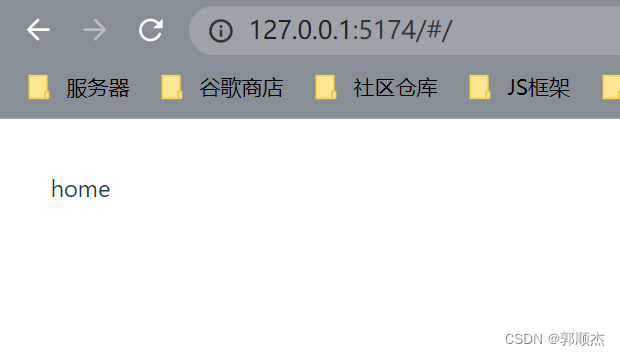
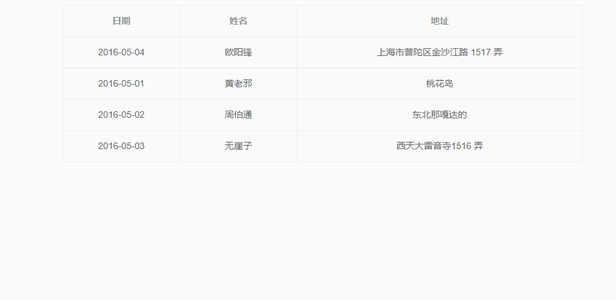
至此初始化完成, 现在打开运行的项目应该是这样的
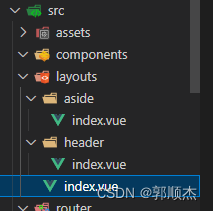
第三步菜单配置
- 新建layouts文件夹内容如下
layouts/index.vue
<template>
  <div class="common-layout">
    <el-container>
      <el-aside><Aside></Aside></el-aside>
      <el-container>
        <el-header><Header></Header></el-header>
        <el-main>
          <router-view v-slot="{ Component, route }">
            <transition appear name="fade-transform" mode="out-in">
              <component :is="Component" :key="route.path" />
            </transition>
          </router-view>
        </el-main>
      </el-container>
    </el-container>
  </div>
</template>

<script lang="ts" setup>
import { RouterView } from "vue-router";
import Header from "./header/index.vue";
import Aside from "./aside/index.vue";
</script>
<style lang="less" scoped>
.el-aside {
  width: auto;
}
.common-layout {
  height: 100vh !important;
}
.el-header {
  padding: 0 !important;
  width: 100%;
}
</style>
- 1
- 2
- 3
- 4
- 5
- 6
- 7
- 8
- 9
- 10
- 11
- 12
- 13
- 14
- 15
- 16
- 17
- 18
- 19
- 20
- 21
- 22
- 23
- 24
- 25
- 26
- 27
- 28
- 29
- 30
- 31
- 32
- 33
- 34
- 35
stores文件删除没用的自带ts,新建index.ts
import { defineStore } from 'pinia'
// 建议抽出去写,然后在这里面import
interface GlobalState {
	token: any;
}
export const GlobalStore = defineStore('GlobalStore', {
  state: (): GlobalState => ({
    // 所有这些属性都将自动推断其类型
    token: localStorage.getItem("_vue3_token") != null ? localStorage.getItem("_vue3_token") : "",
  }),
  getters: {
  },
  actions: {
    setToken(token: string) {
      localStorage.setItem('_vue3_token', token)
      this.token = token
    },
    logOut() {
      localStorage.removeItem("_vue3_token")
      this.token = ""
    }
  },
})
- 1
- 2
- 3
- 4
- 5
- 6
- 7
- 8
- 9
- 10
- 11
- 12
- 13
- 14
- 15
- 16
- 17
- 18
- 19
- 20
- 21
- 22
- 23
- 24
左侧菜单aside/index.vue
<template>
  <div>
    <el-menu
      :default-active="activeMenu"
      class="el-menu-vertical-demo"
      background-color="#293c55"
      text-color="rgba(255,255,255,0.45)"
      active-text-color="#f9f9f9"
      :collapse="isCollapse"
      router
    >
      <el-menu-item style="text-align: center; display: block" index="0"
        >LOGO</el-menu-item
      >
      <el-menu-item index="/home">
        <el-icon><Coffee /></el-icon>
        <template #title>home</template>
      </el-menu-item>
      <el-menu-item index="/about">
        <el-icon><Coffee /></el-icon>
        <template #title>about</template>
      </el-menu-item>
    </el-menu>
  </div>
</template>

<script lang="ts" setup>
import { useRoute } from "vue-router";
import { ref, getCurrentInstance, computed } from "vue";
const route = useRoute();
const instance = getCurrentInstance();
const activeMenu = computed(() => route.path);
const isCollapse = ref<boolean>(false);
instance?.proxy?.$Bus.on("isCollapse", (data: any) => {
  isCollapse.value = data.value;
});
</script>
<style lang="less" scoped>
.logo {
  height: 60px;
  background-color: #545c64;
  line-height: 60px;
  text-align: center;
  width: 200px;
}
.el-menu-vertical-demo:not(.el-menu--collapse) {
  width: 200px;
  height: 100vh;
}
.el-menu-vertical-demo {
  height: 100vh;
}
</style>
- 1
- 2
- 3
- 4
- 5
- 6
- 7
- 8
- 9
- 10
- 11
- 12
- 13
- 14
- 15
- 16
- 17
- 18
- 19
- 20
- 21
- 22
- 23
- 24
- 25
- 26
- 27
- 28
- 29
- 30
- 31
- 32
- 33
- 34
- 35
- 36
- 37
- 38
- 39
- 40
- 41
- 42
- 43
- 44
- 45
- 46
- 47
- 48
- 49
- 50
- 51
- 52
- 53
- 54
顶部导航header/index.vue
<template>
  <div class="header overflow">
    <div class="expand fl" @click="collapseChange">
      <el-icon v-if="!isCollapse"><Fold /></el-icon>
      <el-icon v-else><Expand /></el-icon>
    </div>
    <div class="item_style mr20">
      <el-dropdown trigger="click" @command="handleCommand">
        <div style="width: 60px">
          {{ store.token }}
        </div>
        <template #dropdown>
          <el-dropdown-menu>
            <el-dropdown-item
              v-for="item in dropdownList"
              :key="item.value"
              :command="item.value"
              >{{ item.label }}</el-dropdown-item
            >
          </el-dropdown-menu>
        </template>
      </el-dropdown>
    </div>
  </div>
</template>

<script lang="ts" setup>
import { ref, getCurrentInstance, onMounted, reactive } from "vue";
import { ElMessage, ElMessageBox } from "element-plus";
import { useRouter } from "vue-router";
import { GlobalStore } from "@/stores";
const isCollapse = ref<boolean>(false);
const instance = getCurrentInstance();
const collapseChange = () => {
  isCollapse.value = !isCollapse.value;
  instance?.proxy?.$Bus.emit("isCollapse", isCollapse);
};
const router = useRouter();
const store = GlobalStore();
const dropdownList = reactive<any>([
  {
    label: "退出登录",
    value: "logout",
  },
]);
const logout = () => {
  store.logOut();
  router.replace({
    path: "/login",
  });
  ElMessage({
    type: "success",
    message: "退出成功",
  });
};
const handleCommand = (command: string | number | object) => {
  switch (command) {
    case "logout":
      ElMessageBox.confirm("确认退出吗?", "Warning", {
        type: "warning",
      })
        .then(() => {
          logout();
        })
        .catch(() => {});
      break;

    default:
      break;
  }
};
onMounted(() => {});
</script>
<style lang="less" scoped>
.header {
  height: 60px;
  box-shadow: 0 2px 8px rgb(0 0 0 / 15%);
  line-height: 60px;
  .expand {
    width: 60px;
    text-align: center;
  }
  .item_style {
    float: right;
    height: 60px;
    text-align: center;
    line-height: 60px;
    text-align: center;
    cursor: pointer;
  }
}
.el-dropdown {
  line-height: 60px;
}
</style>
- 1
- 2
- 3
- 4
- 5
- 6
- 7
- 8
- 9
- 10
- 11
- 12
- 13
- 14
- 15
- 16
- 17
- 18
- 19
- 20
- 21
- 22
- 23
- 24
- 25
- 26
- 27
- 28
- 29
- 30
- 31
- 32
- 33
- 34
- 35
- 36
- 37
- 38
- 39
- 40
- 41
- 42
- 43
- 44
- 45
- 46
- 47
- 48
- 49
- 50
- 51
- 52
- 53
- 54
- 55
- 56
- 57
- 58
- 59
- 60
- 61
- 62
- 63
- 64
- 65
- 66
- 67
- 68
- 69
- 70
- 71
- 72
- 73
- 74
- 75
- 76
- 77
- 78
- 79
- 80
- 81
- 82
- 83
- 84
- 85
- 86
- 87
- 88
- 89
- 90
- 91
- 92
- 93
- 94
- 95
- 96
修改router/index.ts
import { createRouter, createWebHashHistory } from 'vue-router'
import Layouts from '@/layouts/index.vue'
import { GlobalStore } from '../stores'

const router = createRouter({
  history: createWebHashHistory(import.meta.env.BASE_URL),
  routes: [
    {
      path: '/login',
      name: 'login',
      component: () => import('@/views/login.vue')
    },
    {
      path: '/',
      name: '首页',
      component: Layouts,
      redirect: '/home',
      children: [
        {
          path: '/home',
          name: 'home',
          component: () => import('../views/HomeView.vue')
        },
        {
          path: '/about',
          name: 'about',
          component: () => import('../views/AboutView.vue')
        }
      ]
    },
    {
      path: '/:pathMatch(.*)*',
      name: 'notFound',
      component: () => import('@/views/notFound.vue')
    }
  ]
})
router.beforeEach(async (to, from, next) => {

  // 1.如果访问登录页,直接过
  if (to.path == '/login') return next();

  // 2.如果没有token,重定向到login
  const globalStore = GlobalStore()
  if (!globalStore.token) return next({
    path: '/login',
    replace: true
  })

  // 3.如果没有菜单列表,就重新请求菜单列表并添加动态路由
  // 4.正常访问页面
	next();
})
export default router
- 1
- 2
- 3
- 4
- 5
- 6
- 7
- 8
- 9
- 10
- 11
- 12
- 13
- 14
- 15
- 16
- 17
- 18
- 19
- 20
- 21
- 22
- 23
- 24
- 25
- 26
- 27
- 28
- 29
- 30
- 31
- 32
- 33
- 34
- 35
- 36
- 37
- 38
- 39
- 40
- 41
- 42
- 43
- 44
- 45
- 46
- 47
- 48
- 49
- 50
- 51
- 52
- 53
- 54
- 55
- 56
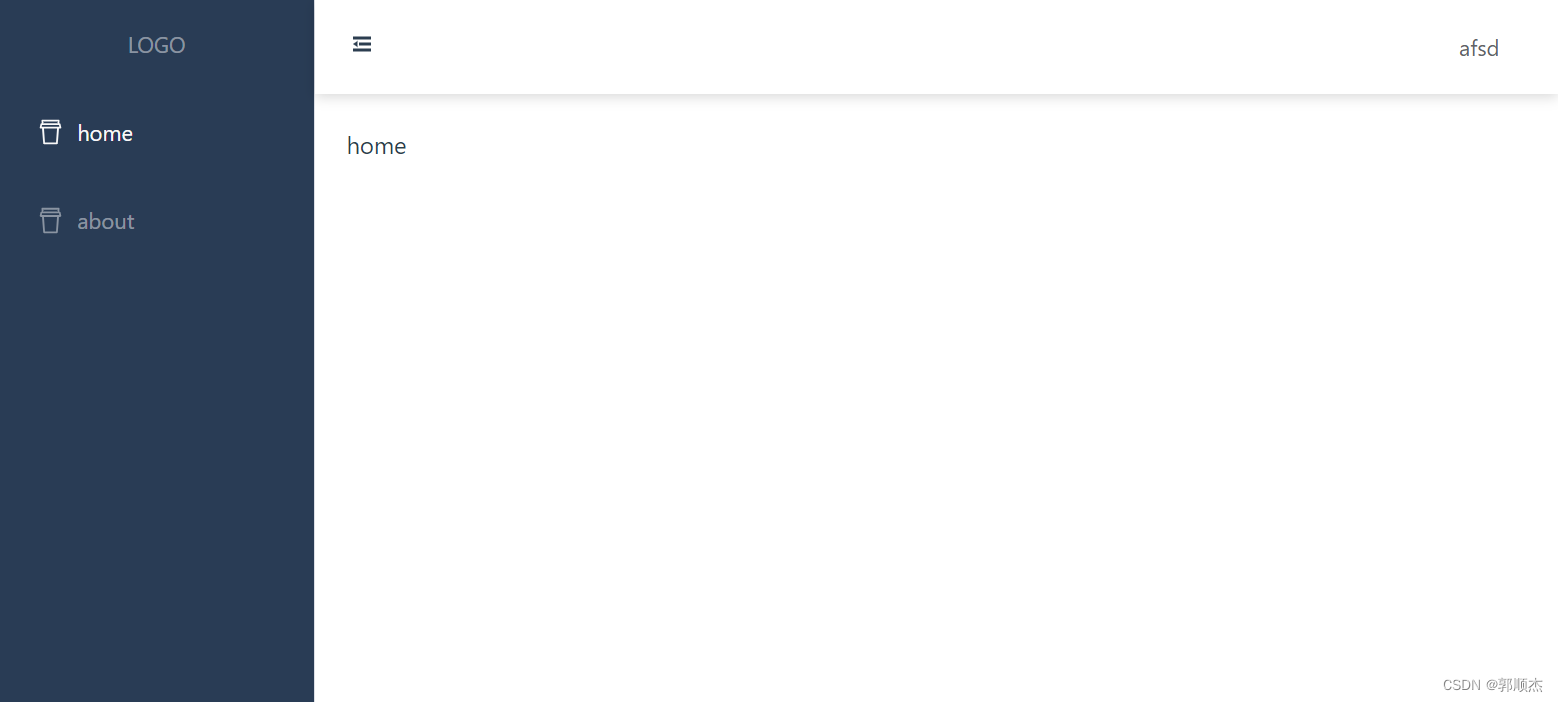
至此你的项目应该是这样
第四步添加登录
src下新建utils/snow.ts, 新建登录login.vue 404 notFound,vue

utils/snow.ts
export default function snow() {
  let canvas:any = document.getElementById('snow'),
    // 初始化画笔
    context = canvas.getContext('2d'),
    // 定义画布宽高
    w = window.innerWidth,
    h = window.innerHeight,
    // 定义雪花数量和位置及大小集合
    num = 200,
    snows: any[] = [];
  // 设置画布大小
  canvas.width = w;
  canvas.height = h-5;
  // 随机雪花位置及大小
  for (let i = 0; i < num; i++) {
    snows.push({
      x: Math.random() * w,
      y: Math.random() * h,
      r: Math.random() * 5+1
    })
  }
  // 半径[1,6), 大于6 从左往右飘,小于6从又往左飘, 上下推荐大于10
  let move = () => {
    for (let i = 0; i < num; i++) {
      let snow = snows[i];
      snow.y += (10-snow.r)/5
      snow.x += (8-snow.r)/5
      if (snow.x > w) snow.x = 0
      if (snow.y > h) snow.y = 0
    }
  }
  let draw = () => {
    context.clearRect(0, 0, w, h);
    context.beginPath();
    context.fillStyle = "rgba(255,255,255,.5)";
    context.shadowColor = "rgba(255,255,255,.5)";
    context.shadowBlur = 10;
    for (let i = 0; i < num; i++) {
      let snow = snows[i];
      context.moveTo(snow.x, snow.y)
      context.arc(snow.x, snow.y, snow.r, 0, Math.PI * 2)
    }
    context.fill();
    context.closePath();
    move()
  }
  draw()
  let timer = setInterval(draw, 50)
  return {
    timer:timer
  }
}
- 1
- 2
- 3
- 4
- 5
- 6
- 7
- 8
- 9
- 10
- 11
- 12
- 13
- 14
- 15
- 16
- 17
- 18
- 19
- 20
- 21
- 22
- 23
- 24
- 25
- 26
- 27
- 28
- 29
- 30
- 31
- 32
- 33
- 34
- 35
- 36
- 37
- 38
- 39
- 40
- 41
- 42
- 43
- 44
- 45
- 46
- 47
- 48
- 49
- 50
- 51
- 52
login.vue
<template>
  <div class="view">
    <canvas id="snow"></canvas>
    <div class="content">
      <div class="login">
        <img class="logo" src="@/assets/logo.svg" alt="" />
        <h2>H-Admin</h2>
      </div>
      <el-form
        :model="ruleForm"
        :rules="rules"
        ref="ruleFormRef"
        class="demo-ruleForm"
        :size="formSize"
        status-icon
      >
        <el-form-item prop="name">
          <el-input v-model="ruleForm.name" placeholder="用户名:密码:随便">
            <template #prefix>
              <el-icon class="el-input__icon"><user /></el-icon>
            </template>
          </el-input>
        </el-form-item>
        <el-form-item prop="password">
          <el-input
            v-model="ruleForm.password"
            placeholder="密码:随便"
            show-password
            @keyup.enter.native="login(ruleFormRef)"
          >
            <template #prefix>
              <el-icon class="el-input__icon"><lock /></el-icon>
            </template>
          </el-input>
        </el-form-item>
        <el-form-item>
          <el-button
            style="width: 100%"
            type="primary"
            @click="login(ruleFormRef)"
            >登录</el-button
          >
        </el-form-item>
      </el-form>
    </div>
  </div>
</template>

<script lang="ts" setup>
import { onMounted, onUnmounted, reactive, ref } from "vue";
import type { FormInstance, FormRules } from "element-plus";
import { useRouter } from "vue-router";
import { GlobalStore } from "@/stores";
import { ElMessage } from "element-plus";
import snow from "@/utils/snow";
const timer = ref<any>(null);
const router = useRouter();
const store = GlobalStore();
const formSize = ref("large");
const ruleFormRef = ref<FormInstance>();
interface userForm {
  name: string;
  password: string;
}
const ruleForm = reactive<userForm>({
  name: "",
  password: "",
});
const rules = reactive<FormRules>({
  name: [{ required: true, message: "请输入账号", trigger: "blur" }],
  password: [{ required: true, message: "请输入密码", trigger: "blur" }],
});
const login = async (formEl: FormInstance | undefined) => {
  if (!formEl) return;
  await formEl.validate(async (valid, fields) => {
    if (valid) {
      // store.token = ruleForm.name;
      store.setToken(ruleForm.name);
      // 2.后续可在此添加动态路由
      ElMessage.success("登录成功");
      router.push({
        path: "/",
      });
    }
  });
};
onMounted(() => {
//使用雪花飘落背景
  timer.value = snow().timer;
});
//组件销毁时 关闭,清楚定时器
onUnmounted(() => {
  clearInterval(timer.value);
  timer.value = null;
});
</script>
<style lang="less" scoped>
.view {
  // background-color: #293c55;
  background: url("../assets/snow.png") no-repeat;
  background-size: cover;
  height: 100vh;
}
.content {
  position: absolute;
  left: 50%;
  top: 50%;
  margin-left: -200px;
  margin-top: -200px;
  width: 320px;
  padding: 40px 40px 30px;
  background-color: #fff;
  border-radius: 10px;
  box-shadow: 2px 3px 7px rgb(0 0 0 / 20%);
  .login {
    margin-bottom: 20px;
    display: flex;
    justify-content: center;
    align-items: center;
    .logo {
      width: 50px;
      margin-right: 10px;
    }
  }
}
</style>
- 1
- 2
- 3
- 4
- 5
- 6
- 7
- 8
- 9
- 10
- 11
- 12
- 13
- 14
- 15
- 16
- 17
- 18
- 19
- 20
- 21
- 22
- 23
- 24
- 25
- 26
- 27
- 28
- 29
- 30
- 31
- 32
- 33
- 34
- 35
- 36
- 37
- 38
- 39
- 40
- 41
- 42
- 43
- 44
- 45
- 46
- 47
- 48
- 49
- 50
- 51
- 52
- 53
- 54
- 55
- 56
- 57
- 58
- 59
- 60
- 61
- 62
- 63
- 64
- 65
- 66
- 67
- 68
- 69
- 70
- 71
- 72
- 73
- 74
- 75
- 76
- 77
- 78
- 79
- 80
- 81
- 82
- 83
- 84
- 85
- 86
- 87
- 88
- 89
- 90
- 91
- 92
- 93
- 94
- 95
- 96
- 97
- 98
- 99
- 100
- 101
- 102
- 103
- 104
- 105
- 106
- 107
- 108
- 109
- 110
- 111
- 112
- 113
- 114
- 115
- 116
- 117
- 118
- 119
- 120
- 121
- 122
- 123
- 124
- 125
- 126
notFound.vue
<template>
  <div class="notFound">
    <h1>404</h1>
    <h4 class="mt20">抱歉,您访问的页面不存在</h4>
    <el-button class="mt20" type="primary" @click="router.push('/')"
      >返回首页</el-button
    >
  </div>
</template>

<script lang="ts" setup>
import { useRouter } from "vue-router";
const router = useRouter();
</script>
<style lang="less" scoped>
.notFound {
  margin-top: 200px;
  text-align: center;
}
</style>
- 1
- 2
- 3
- 4
- 5
- 6
- 7
- 8
- 9
- 10
- 11
- 12
- 13
- 14
- 15
- 16
- 17
- 18
- 19
- 20
第五步添加axios
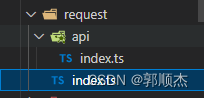
src下新建request文件,api文件用来放接口,index.ts封装axiso
requers/index.ts
import axios from 'axios'
import router from '@/router'
import { GlobalStore } from "../stores";
import { ref } from 'vue'
import { ElMessage, ElLoading  } from 'element-plus'
const store = GlobalStore();

// 创建一个 axios 实例
const service = axios.create({
	baseURL: '/api', // 所有的请求地址前缀部分
	timeout: 60*1000, // 请求超时时间毫秒
	withCredentials: true, // 异步请求携带cookie
	headers: {
		// 设置后端需要的传参类型
		'Content-Type': 'application/json',
		'token': store.token||'',
		'X-Requested-With': 'XMLHttpRequest',
	},
})
// 全局加载
const ElLoadingNum = ref<any>(0)
const Loading = ref<any>("");

function startElLoading() {
  if (ElLoadingNum.value == 0) {
    Loading.value  = ElLoading.service({
      lock: true,
      text: "Loading",
      background: "rgba(0, 0, 0, 0.7)"
    });
  }
  ElLoadingNum.value++;
}

function endElLoading() {
  ElLoadingNum.value--;
  if (ElLoadingNum.value <= 0) {
    Loading.value.close();
  }
}
const toLogin = () => {
  router.replace({
    path: '/login'
  });
}
const errorHandle = (status:any, other:any) => {
  // 状态码判断
  switch (status) {
    // 401: 未登录状态,跳转登录页
    case 401:
      toLogin();
      break;
      // 清除token并跳转登录页
    case 403:
      ElMessage.error('登录过期,请重新登录');
      store.logOut();
      setTimeout(() => {
        toLogin();
      }, 1000);
      break;
    case 404:
      ElMessage.error('请求的资源不存在');
      break;
    case 405:
      ElMessage.error('请求405');
      break;
    case 504:
      ElMessage.error('请求504');
      break;
    default:
      ElMessage(other);
  }
}
// 添加请求拦截器
service.interceptors.request.use(
  (config) => {
    startElLoading()
		// 在发送请求之前做些什么
		return config
	},
	(error) => {
    startElLoading()
		// 对请求错误做些什么
		return Promise.reject(error)
	}
)

// 添加响应拦截器
service.interceptors.response.use(
  (response) => {
    // 对响应成功做点什么
    endElLoading()
    return Promise.resolve(response.data)
	},
  (error) => {
    endElLoading()
    if (error) {
      // 对响应错误做点什么
      errorHandle(error.response.status, error.message);
      return Promise.reject(error)
    } else {
        // 处理断网的情况
        if (!window.navigator.onLine) {
          ElMessage.error('网络异常');
        } else {
          ElMessage.error('数据加载失败,请稍后重试');
          return Promise.reject(error);
        }
    }
	}
)

export default service
- 1
- 2
- 3
- 4
- 5
- 6
- 7
- 8
- 9
- 10
- 11
- 12
- 13
- 14
- 15
- 16
- 17
- 18
- 19
- 20
- 21
- 22
- 23
- 24
- 25
- 26
- 27
- 28
- 29
- 30
- 31
- 32
- 33
- 34
- 35
- 36
- 37
- 38
- 39
- 40
- 41
- 42
- 43
- 44
- 45
- 46
- 47
- 48
- 49
- 50
- 51
- 52
- 53
- 54
- 55
- 56
- 57
- 58
- 59
- 60
- 61
- 62
- 63
- 64
- 65
- 66
- 67
- 68
- 69
- 70
- 71
- 72
- 73
- 74
- 75
- 76
- 77
- 78
- 79
- 80
- 81
- 82
- 83
- 84
- 85
- 86
- 87
- 88
- 89
- 90
- 91
- 92
- 93
- 94
- 95
- 96
- 97
- 98
- 99
- 100
- 101
- 102
- 103
- 104
- 105
- 106
- 107
- 108
- 109
- 110
- 111
- 112
- 113
api/index.ts
// 导入axios实例
import httpRequest from '../index'

// 定义接口的传参
interface UserInfoParam {
	userID: string,
}
// 获取用户信息
export function getUserInfo(param: UserInfoParam) {
    return httpRequest({
		url: '/post',
		method: 'post',
		data: param,
	})
}
- 1
- 2
- 3
- 4
- 5
- 6
- 7
- 8
- 9
- 10
- 11
- 12
- 13
- 14
- 15
修改HomeView.vue 来做测试
<template>
  <div>
    <div>{{ name }}</div>
    <el-button @click="getData" type="success">接口</el-button>
    {{ info.data }}
  </div>
</template>

<script lang="ts" setup>
import { onMounted, ref, reactive } from "vue";
import { getUserInfo } from "@/request/api/index";
import { ElMessage } from "element-plus";
const name = ref<string>("home");
const info = reactive({
  data: {},
});
const getData = () => {
  const param = {
    userID: "10001",
  };
  getUserInfo(param).then((res: any) => {
    info.data = res.data;
    ElMessage.success("请求成功");
  });
};
onMounted(() => {});
</script>
<style lang="less" scoped></style>
- 1
- 2
- 3
- 4
- 5
- 6
- 7
- 8
- 9
- 10
- 11
- 12
- 13
- 14
- 15
- 16
- 17
- 18
- 19
- 20
- 21
- 22
- 23
- 24
- 25
- 26
- 27
- 28
- 29
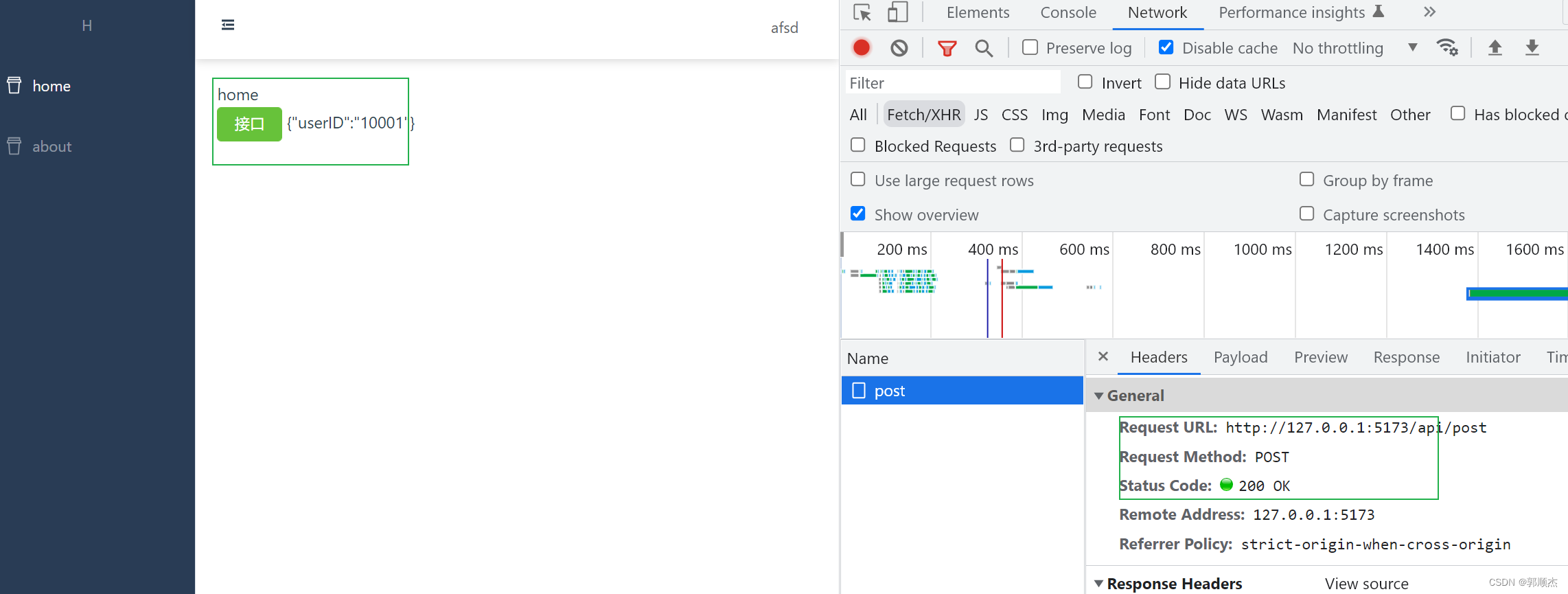
第六步多环境配置
根目录新建 .env.development .env.production , 等多个配置文件
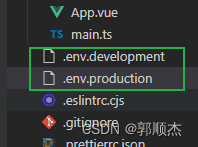
.env.development
# 本地接口请求地址
VITE_BASE_API='/api'
- 1
- 2
.env.production
#生产
#接口请求地址
VITE_BASE_API=http://httpbin.org
- 1
- 2
- 3
你还可以继续建test测试啥的
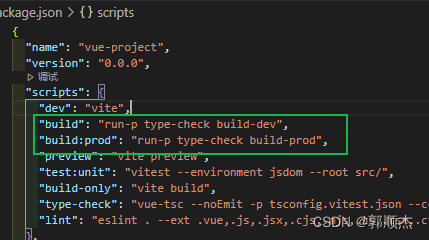
package.json对应添加
 "build": "run-p type-check build-dev",
 "build:prod": "run-p type-check build-prod",
  .....
- 1
- 2
- 3
requerst/index.ts对应修改
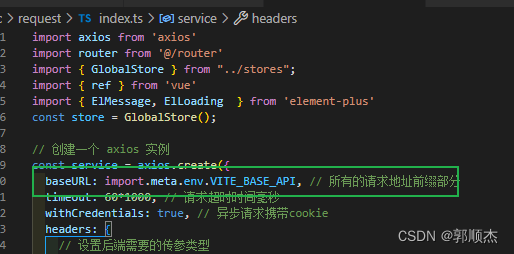
build不通命令打包不同环境
总结
- 至此一个基础的vue3.2+vite+pinia+Ts+element plus+axios后台管理系统搭建结束
- demo已放到github
- 至于动态路由,i8n,全屏放大,面包屑,历史导航,皮肤切换等封装,可参考主页有写vue2.0的封装,可直接修改使用即可
- vue3语法使用, 主页也有写过一个vue3.0的一二三四五,里面有个人总结, 现在文档比较完善建议直接去看文档
- 有找不到文档具体在哪写着的可留言讨论
- 摸鱼一下午专门从零到1 新起一个项目,做一步写一步觉得有用的点个赞呗支持下,感谢
笔记
声明:本文内容由网友自发贡献,不代表【wpsshop博客】立场,版权归原作者所有,本站不承担相应法律责任。如您发现有侵权的内容,请联系我们。转载请注明出处:https://www.wpsshop.cn/article/detail/58839
推荐阅读


相关标签

