
- 1*++p、++*p、(*p)++、*(p++)、*p++的区别
- 2Docker Compose部署Spring Cloud微服务项目
- 3whl 文件怎么安装_whl文件怎么安装
- 4写给Android工程师的 Github CI 快速指北
- 5Ubuntu22.04安装配置Fcitx5中文输入法(详细)_安装fcitx5
- 6Java时间戳转换为日期_java 时间戳转日期
- 7如何做一名有全局观的程序员/软件开发人员_不谋全局者,不足以谋一域在软件工程中的体现
- 8树莓派安装Python3.8 64bit_树莓派 miniconda python3.8 torch
- 9python -- PyQt5(designer)中文详细教程(五)对话框_qtdesigner 显示dialog对话框的方法
- 10vue+element UI 学习总结笔记(一)_vue+elementui一点
微服务统一认证中心_微服务认证中心
赞
踩
在微服务架构中,由于不同的业务会拆分成不同的微服务,传统的单体项目一般是通过过滤器进行拦截校验,而微服务显然不可能分发到各个服务进行用户认证,这就需要由一个统一的地方来管理所有服务的认证信息,实现只登录一次,即可在各个服务的授权范围内进行操作;本文采用springcloud-oauth2来实现多个微服务的统一认证,废话不多说,先来个架构图:
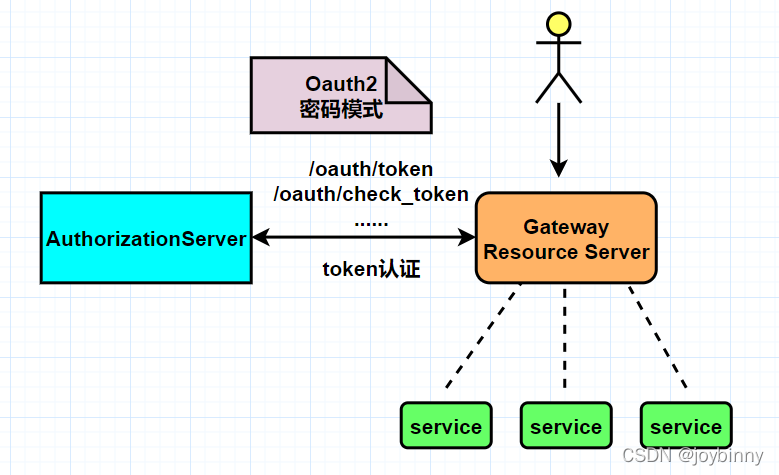
OAuth 2 有四种授权模式:
-
授权码模式(authorization code)
-
简化模式(implicit)
-
密码模式(resource owner password credentials)
-
客户端模式(client credentials)
具体 OAuth2 是什么,可以参考这篇文章:http://www.ruanyifeng.com/blog/2014/05/oauth_2_0.html
什么情况下需要用 OAuth2
首先大家最熟悉的就是几乎每个人都用过的,比如用微信登录、用 QQ 登录、用微博登录、用 Google 账号登录、用 github 授权登录等等,这些都是典型的 OAuth2 使用场景。假设我们做了一个自己的服务平台,如果不使用 OAuth2 登录方式,那么我们需要用户先完成注册,然后用注册号的账号密码或者用手机验证码登录。而使用了 OAuth2 之后,相信很多人使用过、甚至开发过公众号网页服务、小程序,当我们进入网页、小程序界面,第一次使用就无需注册,直接使用微信授权登录即可,大大提高了使用效率。因为每个人都有微信号,有了微信就可以马上使用第三方服务,这体验不要太好了。而对于我们的服务来说,我们也不需要存储用户的密码,只要存储认证平台返回的唯一ID 和用户信息即可。
以上是使用了 OAuth2 的授权码模式,利用第三方的权威平台实现用户身份的认证。当然了,如果你的公司内部有很多个服务,可以专门提取出一个认证中心,这个认证中心就充当上面所说的权威认证平台的角色,所有的服务都要到这个认证中心做认证
这样一说,发现没,这其实就是个单点登录的功能。这就是另外一种使用场景,对于多服务的平台,可以使用 OAuth2 实现服务的单点登录,只做一次登录,就可以在多个服务中自由穿行,当然仅限于授权范围内的服务和接口。
OAuth2 其实是一个关于授权的网络标准,它制定了设计思路和运行流程,利用这个标准我们其实是可以自己实现 OAuth2 的认证过程的。今天要介绍的 spring-cloud-starter-oauth2 ,其实是 Spring Cloud 按照 OAuth2 的标准并结合 spring-security 封装好的一个具体实现。接下来看一下系统架构说明:
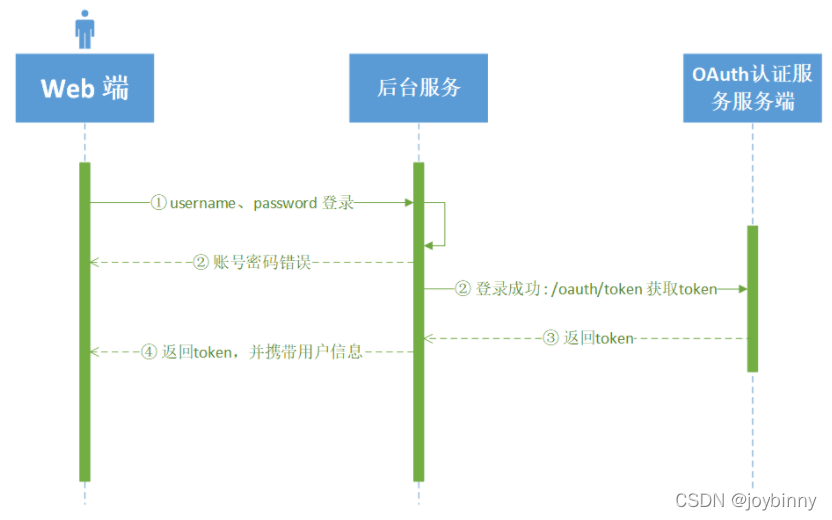
【登录时序图】
【接口调用时序图】
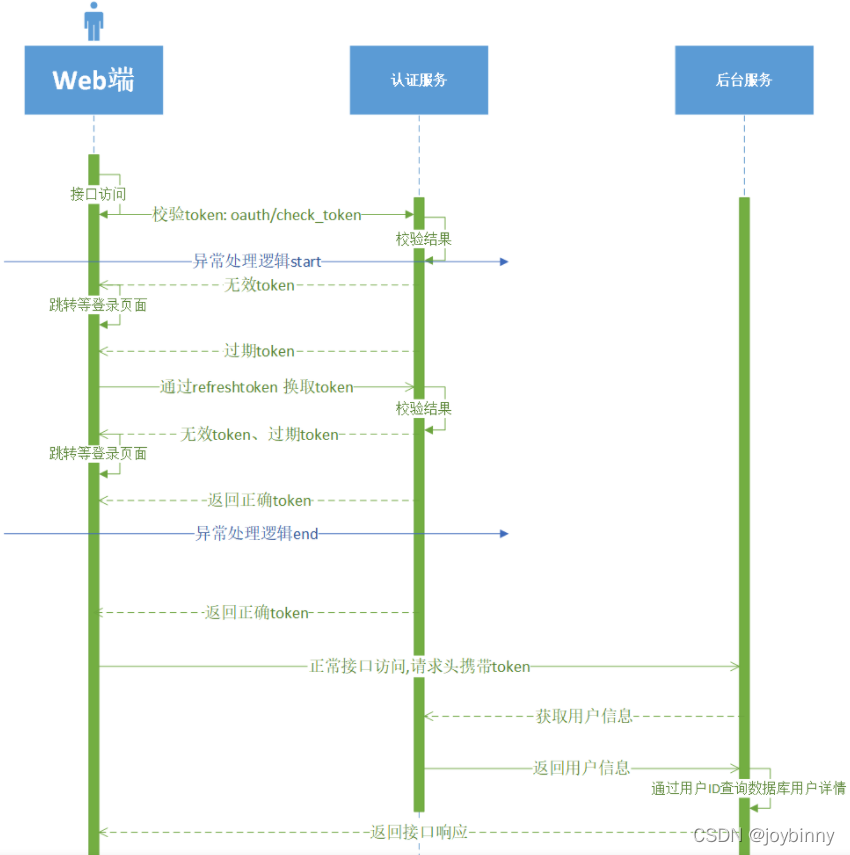
认证服务:OAuth2 主要实现端,Token 的生成、刷新、验证都在认证中心完成。
后台服务: 接收到请求后会到认证中心验证(微服务入口一般是网关)
前端:认证服务、后台服务之间的联调
上图描述了使用了 前端与OAuth2 认证服务、微服务间的请求过程。大致的过程就是前端用用户名和密码到后台服务登录,成功后后台服务到认证服务端换取 token,返回给前端,前端拿着 token 去各个微服务请求数据接口,一般这个 token 是放到 header 中的。当微服务接到请求后,先要拿着 token 去认证服务端检查 token 的合法性,如果合法,再根据用户所属的角色及具有的权限动态的返回数据。
接下来,正式进入实战阶段 !~
1. 搭建认证中心auth-center
- <dependency>
- <groupId>org.springframework.cloud</groupId>
- <artifactId>spring-cloud-starter-oauth2</artifactId>
- <version>2.2.2.RELEASE</version>
- </dependency>
启动类开启feign和服务发现注解:
- @MapperScan("com.example.dao")
- @SpringBootApplication
- @EnableFeignClients
- @EnableDiscoveryClient
- public class AppAuthCenter {
- public static void main(String[] args) {
- SpringApplication.run(AppAuthCenter.class, args);
- }
-
- }
- server:
- port: 8080
-
- spring:
- application:
- name: auth-center
- cloud:
- nacos:
- discovery:
- server-addr: 127.0.0.1:8848
- redis:
- database: 2
- host: 127.0.0.1
- port: 6379
- password: 123456
- datasource:
- type: com.zaxxer.hikari.HikariDataSource
- driver-class-name: "com.mysql.cj.jdbc.Driver"
- url: jdbc:mysql://127.0.0.1:3306/security?characterEncoding=utf8&characterSetResults=utf8&autoReconnect=true&failOverReadOnly=false
- username: root
- password: 123456
- hikari:
- minimum-idle: "0"
- auto-commit: "true" # 此属性控制从池返回的连接的默认自动提交行为,默认值:true
- pool-name: "springcloud-security-oauth2-jwt" # 连接池名称
- max-lifetime: "1800000" # 此属性控制池中连接的最长生命周期,值0表示无限生命周期,默认1800000即30分钟
- connection-timeout: "30000" # 数据库连接超时时间,默认30秒,即30000
- connection-test-query: "SELECT 1"
-
- mybatis-plus:
- enabled: true #mybatis plus开启 如果没有此配置那么com.cnnho.redfish.common.config.MybatisPlusConfig 配置不起作用
- mapper-locations: classpath:mapper/*Mapper.xml
- global-config:
- db-config:
- field-strategy: not-empty #字段策略 0:"忽略判断",1:"非 NULL 判断"),2:"非空判断"
- id-type: auto
- db-type: mysql
- refresh-mapper: "true"
- configuration:
- cache-enabled: true
- map-underscore-to-camel-case: true
- log-impl: org.apache.ibatis.logging.stdout.StdOutImpl
- auto-mapping-unknown-column-behavior: none

1.1 spring security 基础配置:
- package com.example.config;
-
- import org.springframework.context.annotation.Bean;
- import org.springframework.security.authentication.AuthenticationManager;
- import org.springframework.security.config.annotation.web.builders.HttpSecurity;
- import org.springframework.security.config.annotation.web.configuration.EnableWebSecurity;
- import org.springframework.security.config.annotation.web.configuration.WebSecurityConfigurerAdapter;
- import org.springframework.security.crypto.bcrypt.BCryptPasswordEncoder;
- import org.springframework.security.crypto.password.PasswordEncoder;
-
- /**
- * @author: joybinny
- */
- @EnableWebSecurity
- public class WebSecurityConfig extends WebSecurityConfigurerAdapter {
-
- @Bean
- public PasswordEncoder passwordEncoder() {
- return new BCryptPasswordEncoder();
- }
-
- @Bean
- @Override
- public AuthenticationManager authenticationManagerBean() throws Exception {
- return super.authenticationManagerBean();
- }
-
- /**
- * 允许匿名访问所有接口 主要是 oauth 接口
- * @param http
- * @throws Exception
- */
- @Override
- protected void configure(HttpSecurity http) throws Exception {
- http.authorizeRequests()
- .antMatchers("/**").permitAll();
- }
- }
使用 @EnableWebSecurity 注解修饰,并继承自 WebSecurityConfigurerAdapter 类。 这个类的重点就是声明 PasswordEncoder 和 AuthenticationManager两个 Bean。稍后会用到。其中 BCryptPasswordEncoder是一个密码加密工具类,它可以实现不可逆的加密,AuthenticationManager是为了实现 OAuth2 的 password 模式必须要指定的授权管理 Bean。
1.2 实现 UserDetailsService
如果你之前用过 Security 的话,那肯定对这个类很熟悉,它是实现用户身份验证的一种方式,也是最简单方便的一种。另外还有结合 AuthenticationProvider的方式,有机会讲 Security 的时候再展开来讲吧。 UserDetailsService的核心就是 loadUserByUsername方法,它要接收一个字符串参数,也就是传过来的用户名,返回一个 UserDetails对象。
- import com.baomidou.mybatisplus.core.conditions.query.QueryWrapper;
- import com.example.dao.UserDao;
- import com.example.entity.UserPo;
- import io.micrometer.core.instrument.util.StringUtils;
- import org.springframework.beans.factory.annotation.Autowired;
- import org.springframework.security.core.userdetails.UserDetails;
- import org.springframework.security.core.userdetails.UserDetailsService;
- import org.springframework.security.core.userdetails.UsernameNotFoundException;
- import org.springframework.stereotype.Component;
-
- import java.util.ArrayList;
-
- @Component(value = "kiteUserDetailsService")
- public class KiteUserDetailsService implements UserDetailsService {
-
- @Autowired
- private UserDao userDao;
-
- /**
- * Security的登录,User赋予权限
- *
- * @param username
- * @return
- * @throws UsernameNotFoundException
- */
- @Override
- public UserDetails loadUserByUsername(String username) throws UsernameNotFoundException {
- if (StringUtils.isBlank(username)) {
- throw new UsernameNotFoundException("Username is not null");
- }
- QueryWrapper queryWrapper = new QueryWrapper();
- queryWrapper.eq("user_name", username);
- /** 只做认证,不做鉴权(如做鉴权,参考下面注释的代码..) */
- UserPo user = userDao.selectOne(queryWrapper);
- if (null == user) { //校验用户是否存在
- throw new UsernameNotFoundException("User is not exist");
- }
- return new org.springframework.security.core.userdetails.User(username, user.getOauthPassword(), new ArrayList<>());//返回null访问/oauth/token会报错Unauthorized
-
-
- /* 认证 + 鉴权
- String role = user.getRole();
- List<SimpleGrantedAuthority> authorities = new ArrayList<>();
- authorities.add(new SimpleGrantedAuthority(role));
- return new org.springframework.security.core.userdetails.User(username, user.getOauthPassword(), authorities);*/
-
- }
- }
1.3 Oauth2配置文件
- package com.example.config;
-
- import org.springframework.beans.factory.annotation.Autowired;
- import org.springframework.context.annotation.Configuration;
- import org.springframework.security.authentication.AuthenticationManager;
- import org.springframework.security.core.userdetails.UserDetailsService;
- import org.springframework.security.crypto.password.PasswordEncoder;
- import org.springframework.security.oauth2.config.annotation.builders.JdbcClientDetailsServiceBuilder;
- import org.springframework.security.oauth2.config.annotation.configurers.ClientDetailsServiceConfigurer;
- import org.springframework.security.oauth2.config.annotation.web.configuration.AuthorizationServerConfigurerAdapter;
- import org.springframework.security.oauth2.config.annotation.web.configuration.EnableAuthorizationServer;
- import org.springframework.security.oauth2.config.annotation.web.configurers.AuthorizationServerEndpointsConfigurer;
- import org.springframework.security.oauth2.config.annotation.web.configurers.AuthorizationServerSecurityConfigurer;
- import org.springframework.security.oauth2.provider.token.TokenEnhancer;
- import org.springframework.security.oauth2.provider.token.TokenEnhancerChain;
- import org.springframework.security.oauth2.provider.token.TokenStore;
- import org.springframework.security.oauth2.provider.token.store.JwtAccessTokenConverter;
-
- import javax.sql.DataSource;
- import java.util.ArrayList;
- import java.util.List;
-
- @Configuration
- @EnableAuthorizationServer
- public class AuthorizationServerConfig extends AuthorizationServerConfigurerAdapter {
-
- /**
- * 指定密码的加密方式
- */
- @Autowired
- public PasswordEncoder passwordEncoder;
-
- /**
- * 该对象为刷新token提供支持
- */
- @Autowired
- public UserDetailsService kiteUserDetailsService;
-
- /**
- * 该对象用来支持password模式
- */
- @Autowired
- private AuthenticationManager authenticationManager;
-
- @Autowired
- private TokenStore jwtTokenStore;
- @Autowired
- private JwtAccessTokenConverter jwtAccessTokenConverter;
- @Autowired
- private TokenEnhancer jwtTokenEnhancer;
- @Autowired
- private DataSource dataSource;
-
-
- /**
- * 密码模式下配置认证管理器 AuthenticationManager,并且设置 AccessToken的存储介质tokenStore,如 果不设置,则会默认使用内存当做存储介质。
- * 而该AuthenticationManager将会注入 2个Bean对象用以检查(认证)
- * 1、ClientDetailsService的实现类 JdbcClientDetailsService (检查 ClientDetails 对象)
- * 2、UserDetailsService的实现类 KiteUserDetailsService (检查 UserDetails 对象)
- */
- @Override
- public void configure(final AuthorizationServerEndpointsConfigurer endpoints) throws Exception {
- /** jwt 增强模式 */
- TokenEnhancerChain enhancerChain = new TokenEnhancerChain();
- List<TokenEnhancer> enhancerList = new ArrayList<>();
- enhancerList.add(jwtTokenEnhancer);
- enhancerList.add(jwtAccessTokenConverter);
- enhancerChain.setTokenEnhancers(enhancerList);
- endpoints.tokenStore(jwtTokenStore)
- .userDetailsService(kiteUserDetailsService)
- // 支持 password 模式
- .authenticationManager(authenticationManager)
- .tokenEnhancer(enhancerChain)
- .accessTokenConverter(jwtAccessTokenConverter);
- }
-
- /**
- * 配置 oauth_client_details【client_id和client_secret等】信息的认证【检查ClientDetails的合 法性】服务
- * 设置 认证信息的来源:数据库 (可选项:数据库和内存,使用内存一般用来作测试)
- * 自动注入:ClientDetailsService的实现类 JdbcClientDetailsService (检查 ClientDetails 对 象)
- * 1.inMemory 方式存储的,将配置保存到内存中,相当于硬编码了。正式环境下的做法是持久化到数据库中,比如 mysql 中。
- * 2. secret加密是client_id:secret 然后通过base64编码后的字符串
- */
- @Override
- public void configure(ClientDetailsServiceConfigurer clients) throws Exception {
- JdbcClientDetailsServiceBuilder jcsb = clients.jdbc(dataSource);
- jcsb.passwordEncoder(passwordEncoder);
- }
- // @Override
- // public void configure(ClientDetailsServiceConfigurer clients) throws Exception {
- // //添加客户端信息
- // //使用内存存储OAuth客服端信息
- // clients.inMemory()
- // // client_id 客户单ID
- // .withClient("order_client")
- // // client_secret 客户单秘钥
- // .secret(passwordEncoder.encode("order6666"))
- // // 该客户端允许的授权类型,不同的类型,则获取token的方式不一样
- // .authorizedGrantTypes("refresh_token", "authorization_code", "password")
- // // token 有效期
- // .accessTokenValiditySeconds(EXPIRE_TIME)
- // // 允许的授权范围
- // .scopes("all")
- // .and()
- // .withClient("user_client")
- // .secret(passwordEncoder.encode("user8888"))
- // .authorizedGrantTypes("refresh_token", "authorization_code", "password")
- // .accessTokenValiditySeconds(EXPIRE_TIME)
- // .scopes("all");
- // }
-
-
- /**
- * 配置:安全检查流程
- * 默认过滤器:BasicAuthenticationFilter
- * 1、oauth_client_details表中clientSecret字段加密【ClientDetails属性secret】
- * 2、CheckEndpoint类的接口 oauth/check_token 无需经过过滤器过滤,默认值:denyAll()
- */
- @Override
- public void configure(AuthorizationServerSecurityConfigurer security) throws Exception {
- ///允许客户表单认证
- security.allowFormAuthenticationForClients();
- //对于CheckEndpoint控制器[框架自带的校验]的/oauth/check端点允许所有客户端发送器请求而不会被 Spring-security拦截
- security.checkTokenAccess("permitAll()");
- security.tokenKeyAccess("permitAll()");
-
- }
-
-
- }
认证信息的来源采用数据库的方式,放弃内存模式;这就需要我们提前在数据库生成一张固定模板的表结构:
- CREATE TABLE `oauth_client_details` (
- `client_id` varchar(256) CHARACTER SET utf8mb4 COLLATE utf8mb4_unicode_ci NOT NULL,
- `resource_ids` varchar(256) CHARACTER SET utf8mb4 COLLATE utf8mb4_unicode_ci NULL DEFAULT NULL,
- `client_secret` varchar(256) CHARACTER SET utf8mb4 COLLATE utf8mb4_unicode_ci NULL DEFAULT NULL,
- `scope` varchar(256) CHARACTER SET utf8mb4 COLLATE utf8mb4_unicode_ci NULL DEFAULT NULL,
- `authorized_grant_types` varchar(256) CHARACTER SET utf8mb4 COLLATE utf8mb4_unicode_ci NULL DEFAULT NULL,
- `web_server_redirect_uri` varchar(256) CHARACTER SET utf8mb4 COLLATE utf8mb4_unicode_ci NULL DEFAULT NULL,
- `authorities` varchar(256) CHARACTER SET utf8mb4 COLLATE utf8mb4_unicode_ci NULL DEFAULT NULL,
- `access_token_validity` int(11) NULL DEFAULT NULL,
- `refresh_token_validity` int(11) NULL DEFAULT NULL,
- `additional_information` varchar(4096) CHARACTER SET utf8mb4 COLLATE utf8mb4_unicode_ci NULL DEFAULT NULL,
- `autoapprove` varchar(256) CHARACTER SET utf8mb4 COLLATE utf8mb4_unicode_ci NULL DEFAULT NULL,
- PRIMARY KEY (`client_id`) USING BTREE
- ) ENGINE = InnoDB CHARACTER SET = utf8mb4 COLLATE = utf8mb4_unicode_ci COMMENT = 'https://blog.csdn.net/wangxuelei036/article/details/109491215' ROW_FORMAT = Dynamic;
-
- -- ----------------------------
- -- Records of oauth_client_details
- -- ----------------------------
- INSERT INTO `oauth_client_details` VALUES ('order-client', NULL, '$2a$10$lU.YisICL1MQORkGMX6OUuggYZVj2PKZetd8j7PfJgEnQJXZzw9dS', 'all', 'authorization_code,refresh_token,password', NULL, NULL, 60, 36000, NULL, '1');
- INSERT INTO `oauth_client_details` VALUES ('user-client', NULL, '$2a$10$ZgTwua6DPOhnI6Q1519AP.YkZsDZThST5qlqu5Wa1kJ7biXzXERvO', 'all', 'authorization_code,refresh_token,password', NULL, NULL, 120, 36000, NULL, '1');
其中密码是用 PasswordEncoder 加密生成,关于该表的详细说明可参考该文章:https://blog.csdn.net/wangxuelei036/article/details/109491215
配置jwt增强器,通过 oAuth2Authentication 可以拿到用户名等信息,通过这些我们可以在这里查询数据库或者缓存获取更多的信息,而这些信息都可以作为 JWT 扩展信息加入其中。
- package com.example.config.jwt;
-
- import com.baomidou.mybatisplus.core.conditions.query.QueryWrapper;
- import com.example.dao.UserDao;
- import com.example.entity.UserPo;
- import org.springframework.beans.factory.annotation.Autowired;
- import org.springframework.security.core.userdetails.User;
- import org.springframework.security.oauth2.common.DefaultOAuth2AccessToken;
- import org.springframework.security.oauth2.common.OAuth2AccessToken;
- import org.springframework.security.oauth2.provider.OAuth2Authentication;
- import org.springframework.security.oauth2.provider.token.TokenEnhancer;
-
- import java.util.HashMap;
- import java.util.Map;
-
- public class JWTokenEnhancer implements TokenEnhancer {
-
- @Autowired
- private UserDao userDao;
-
- /**
- *
- * @param oAuth2AccessToken
- * @param oAuth2Authentication 根据它获取用户token
- * @return
- */
- @Override
- public OAuth2AccessToken enhance(OAuth2AccessToken oAuth2AccessToken, OAuth2Authentication oAuth2Authentication) {
- Map<String, Object> info = new HashMap<>();
- info.put("jwt-ext", "JWT 扩展信息");
- User user = (User) oAuth2Authentication.getPrincipal();
- if(user != null){
- QueryWrapper queryWrapper = new QueryWrapper();
- queryWrapper.eq("user_name", user.getUsername());
- /** 只做认证,不做鉴权 */
- UserPo userEntity = userDao.selectOne(queryWrapper);
- info.put("userPo", userEntity); //也可以只把userId放在附加信息里面
- }
- ((DefaultOAuth2AccessToken) oAuth2AccessToken).setAdditionalInformation(info);
- return oAuth2AccessToken;
- }
-
- }
添加JwtConfig配置类
- package com.example.config.jwt;
-
- import org.springframework.context.annotation.Bean;
- import org.springframework.context.annotation.Configuration;
- import org.springframework.security.oauth2.provider.token.TokenStore;
- import org.springframework.security.oauth2.provider.token.store.JwtAccessTokenConverter;
- import org.springframework.security.oauth2.provider.token.store.JwtTokenStore;
-
- @Configuration
- public class JwtTokenConfig {
-
- @Bean
- public TokenStore jwtTokenStore() {
- return new JwtTokenStore(jwtAccessTokenConverter());
- }
-
- @Bean
- public JwtAccessTokenConverter jwtAccessTokenConverter() {
- JwtAccessTokenConverter accessTokenConverter = new JwtAccessTokenConverter();
- accessTokenConverter.setSigningKey("mysecret"); //签名秘钥
- return accessTokenConverter;
- }
-
- }
JwtAccessTokenConverter 是为了做 JWT 数据转换,这样做是因为 JWT 有自身独特的数据格式。如果没有了解过 JWT ,可以参考本人之前博客:https://blog.csdn.net/AkiraNicky/article/details/99307713
1.4 其它配置
配置全局统一异常处理:
- @RestControllerAdvice
- public class MyExceptionHandler {
-
- @ExceptionHandler(value = InvalidGrantException.class)
- public Result exceptionHandler(InvalidGrantException e) {
- return Result.error("用户名密码错误");
- }
-
- }
重写check_token:
- package com.example.controller;
-
- import com.alibaba.fastjson.JSON;
- import com.alibaba.fastjson.JSONObject;
- import org.springframework.beans.factory.annotation.Autowired;
- import org.springframework.security.oauth2.common.exceptions.InvalidTokenException;
- import org.springframework.security.oauth2.provider.endpoint.CheckTokenEndpoint;
- import org.springframework.web.bind.annotation.RequestMapping;
- import org.springframework.web.bind.annotation.RequestParam;
- import org.springframework.web.bind.annotation.RestController;
-
- import java.util.Map;
-
- /**
- * 重写check_token接口
- */
- @RestController
- @RequestMapping("/oauth")
- public class TokenEndpointController {
-
- @Autowired
- private CheckTokenEndpoint checkTokenEndpoint;
-
-
- @RequestMapping("/check_token")
- public String checkToken(@RequestParam("token") String token) {
- Map<String, ?> stringMap;
- try {
- stringMap = checkTokenEndpoint.checkToken(token);
- } catch (InvalidTokenException e) {
- JSONObject err = new JSONObject();
- err.put("error", "invalid_token");
- err.put("error_description", "Token has expired");
- return JSON.toJSONString(err);
- }
- return JSON.toJSONString(stringMap);
- }
-
- }
添加切面,/oauth/token端点请求的结果进行拦截封装处理:
- package com.example.aspect;
-
- import com.example.entity.Result;
- import org.aspectj.lang.ProceedingJoinPoint;
- import org.aspectj.lang.annotation.Around;
- import org.aspectj.lang.annotation.Aspect;
- import org.springframework.http.HttpStatus;
- import org.springframework.http.ResponseEntity;
- import org.springframework.security.authentication.InsufficientAuthenticationException;
- import org.springframework.security.core.Authentication;
- import org.springframework.security.oauth2.common.OAuth2AccessToken;
- import org.springframework.security.oauth2.common.util.OAuth2Utils;
- import org.springframework.stereotype.Component;
-
- import java.security.Principal;
- import java.util.Map;
-
- /**
- * 原理就是通过切面编程实现对/oauth/token端点请求的结果进行拦截封装处理,由于/oauth/token是Spring Cloud OAuth2的内部端点,因此需要对相关的Spring源码进行分析。最终定位到
- * org.springframework.security.oauth2.provider.endpoint.TokenEndpoint.postAccessToken()
- */
- @Component
- @Aspect
- public class AccessTokenAspect {
-
- @Around("execution(* org.springframework.security.oauth2.provider.endpoint.TokenEndpoint.postAccessToken(..))")
- public Object handleControllerMethod(ProceedingJoinPoint joinPoint) throws Throwable {
- Object[] args = joinPoint.getArgs();
- Principal principal = (Principal) args[0];
- if (!(principal instanceof Authentication)) {
- throw new InsufficientAuthenticationException("There is no client authentication. Try adding an appropriate authentication filter.");
- }
- Map<String, String> parameters = (Map<String, String>) args[1];
- String grantType = parameters.get(OAuth2Utils.GRANT_TYPE);
- Object proceed = joinPoint.proceed();
- if ("authorization_code".equals(grantType)) {
- //如果使用 @EnableOAuth2Sso 注解不能修改返回格式,否则授权码模式可以统一改
- return proceed;
- } else {
- ResponseEntity<OAuth2AccessToken> responseEntity = (ResponseEntity<OAuth2AccessToken>) proceed;
- OAuth2AccessToken body = responseEntity.getBody();
- return ResponseEntity.status(HttpStatus.OK).body(Result.success(body));
- }
- }
-
- }
2. 搭建网关Gateway
- <dependency>
- <groupId>org.springframework.cloud</groupId>
- <artifactId>spring-cloud-starter-gateway</artifactId>
- <version>2.2.8.RELEASE</version>
- </dependency>
-
- <dependency>
- <groupId>org.springframework.cloud</groupId>
- <artifactId>spring-cloud-starter-openfeign</artifactId>
- <version>2.2.2.RELEASE</version>
- </dependency>
- server:
- port: 8090
-
- spring:
- application:
- name: gateway
- cloud:
- nacos:
- discovery:
- server-addr: 127.0.0.1:8848
- gateway:
- discovery:
- locator:
- enabled: true
- lower-case-service-id: true
- routes:
- - id: auth
- uri: lb://auth-center
- predicates:
- - Path=/auth/**
- filters:
- - StripPrefix=1
- - id: order
- uri: lb://service-order
- predicates:
- - Path=/order/**
- filters:
- - StripPrefix=1
- whitelist:
- token: "/auth/oauth/token,/user/user/getAuthentication,/order/order/testOrderWithoutToken,/auth/oauth/check_token"
- param-sign: ""
- blacklist:
- token: ""
- param-sign: ""
- package com.example.config;
-
-
- import org.springframework.beans.factory.ObjectProvider;
- import org.springframework.boot.SpringBootConfiguration;
- import org.springframework.boot.autoconfigure.condition.ConditionalOnMissingBean;
- import org.springframework.boot.autoconfigure.http.HttpMessageConverters;
- import org.springframework.context.annotation.Bean;
- import org.springframework.http.converter.HttpMessageConverter;
-
- import java.util.stream.Collectors;
-
- /**
- * feign response 返回数据解析配置
- */
- @SpringBootConfiguration
- public class FeignMessageConfig {
-
- @Bean
- @ConditionalOnMissingBean
- public HttpMessageConverters messageConverters(ObjectProvider<HttpMessageConverter<?>> converters) {
- return new HttpMessageConverters(converters.orderedStream().collect(Collectors.toList()));
- }
-
- }
- @FeignClient(value = "auth-center")
- @Component
- public interface VerifyTokenFeign {
-
- @RequestMapping(value = "/oauth/check_token", method = RequestMethod.POST)
- String verifyToken(@RequestParam(value="token") String token);
-
- }
- package com.example.filter;
-
- import com.alibaba.fastjson.JSON;
- import com.alibaba.fastjson.JSONObject;
- import com.example.feign.VerifyTokenFeign;
- import io.netty.buffer.UnpooledByteBufAllocator;
- import org.apache.commons.lang3.StringUtils;
- import org.springframework.beans.factory.annotation.Autowired;
- import org.springframework.beans.factory.annotation.Value;
- import org.springframework.cloud.gateway.filter.GatewayFilterChain;
- import org.springframework.cloud.gateway.filter.GlobalFilter;
- import org.springframework.core.Ordered;
- import org.springframework.core.io.buffer.NettyDataBufferFactory;
- import org.springframework.http.HttpHeaders;
- import org.springframework.http.HttpStatus;
- import org.springframework.http.server.reactive.ServerHttpRequest;
- import org.springframework.http.server.reactive.ServerHttpResponse;
- import org.springframework.stereotype.Component;
- import org.springframework.util.AntPathMatcher;
- import org.springframework.web.server.ServerWebExchange;
- import reactor.core.publisher.Flux;
- import reactor.core.publisher.Mono;
-
- import java.nio.charset.StandardCharsets;
-
- /**
- * 请求token全局过滤
- */
- @Component
- public class GlobalTokenFilter implements GlobalFilter, Ordered {
-
- private AntPathMatcher antPathMatcher = new AntPathMatcher();
-
- @Autowired
- private VerifyTokenFeign verifyTokenFeign;
-
- // 白名单
- @Value(value = "${whitelist.token}")
- private String whitelist;
-
- @Override
- public Mono<Void> filter(ServerWebExchange exchange, GatewayFilterChain chain) {
- ServerHttpRequest request = exchange.getRequest();
- String urlPath = request.getPath().toString();
- boolean action = false;
- String[] whitelistArray = whitelist.split(",");
- for (String url : whitelistArray) {
- if (antPathMatcher.match(url, urlPath)) {
- action = true;
- break;
- }
- }
- if (action) return chain.filter(exchange); //白名单,放行
-
- String token = request.getHeaders().getFirst(HttpHeaders.AUTHORIZATION);
- if (StringUtils.isNotBlank(token)) {
- // token = token.substring(7);
- String verifyToken = verifyTokenFeign.verifyToken(token);
- if (StringUtils.isNotBlank(verifyToken)) {
- JSONObject verifyTokenJson = JSON.parseObject(verifyToken);
- if (verifyTokenJson.containsKey("active") && verifyTokenJson.getBoolean("active")) { //JWT验证Token固定格式
- return chain.filter(exchange);
- }
- }
- }
- return unAuthorized(exchange);
- }
-
- /**
- * 认证未通过
- */
- public Mono<Void> unAuthorized(ServerWebExchange exchange) {
- ServerHttpResponse response = exchange.getResponse();
- response.setStatusCode(HttpStatus.OK);
- response.getHeaders().add("Content-Type", "application/json;charset=UTF-8");
- JSONObject message = new JSONObject();
- message.put("code", "-2");
- message.put("msg", "登录失效,请重新登录");
- return response.writeWith(Flux.create(sink -> {
- sink.next(new NettyDataBufferFactory(new UnpooledByteBufAllocator(false)).wrap(message.toJSONString().getBytes(StandardCharsets.UTF_8)));
- sink.complete();
- }));
- }
-
- @Override
- public int getOrder() {
- return 0;
- }
- }
3. 测试
新开个order服务,写个测试接口 :
- package com.example.controller;
-
- import com.example.entity.Result;
- import io.swagger.annotations.Api;
- import io.swagger.annotations.ApiOperation;
- import org.springframework.web.bind.annotation.PostMapping;
- import org.springframework.web.bind.annotation.RequestMapping;
- import org.springframework.web.bind.annotation.RestController;
-
-
- @Api(tags = "订单模块")
- @RestController
- @RequestMapping("/order/")
- public class OrderController {
-
- @ApiOperation("测试订单-验证token")
- @PostMapping("testOrder")
- public Result testOrder(){
- return Result.success("testOrder");
- }
-
-
- @ApiOperation("测试订单-不验证token")
- @PostMapping("testOrderWithoutToken")
- public Result testOrderWithoutToken(){
- return Result.success("testOrderWithoutToken");
- }
-
- }
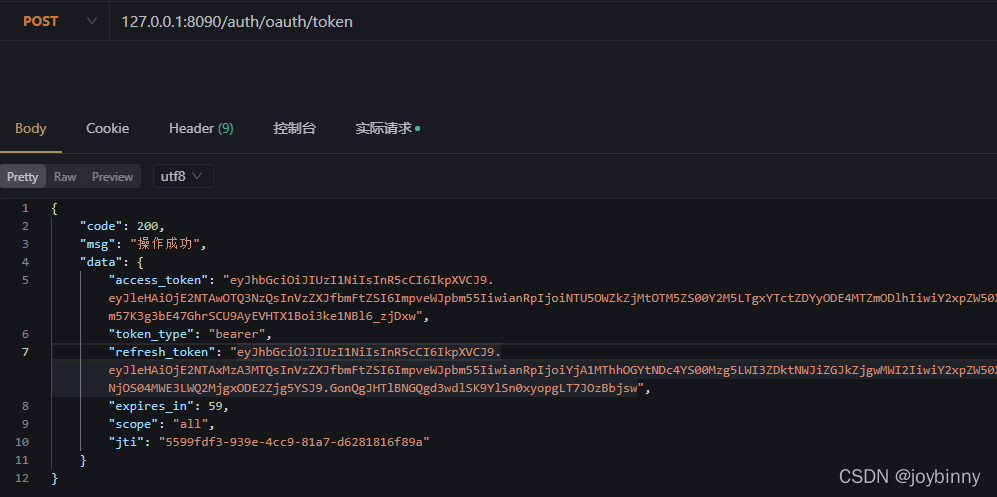
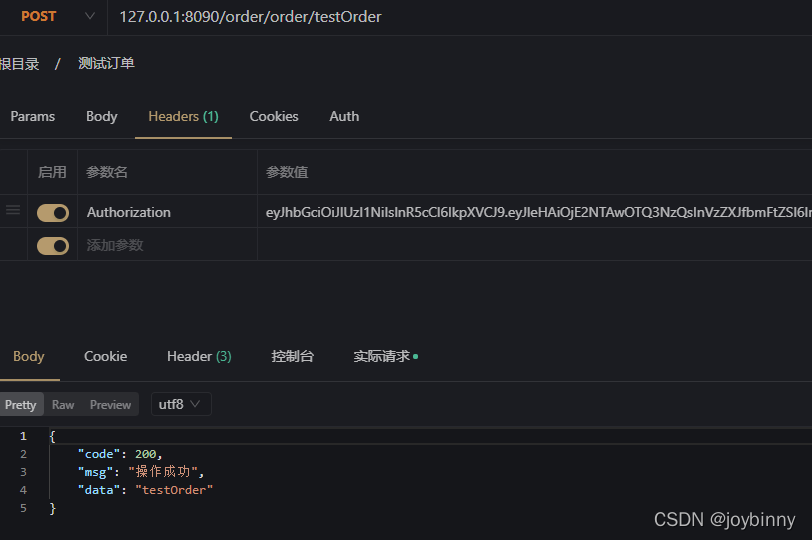
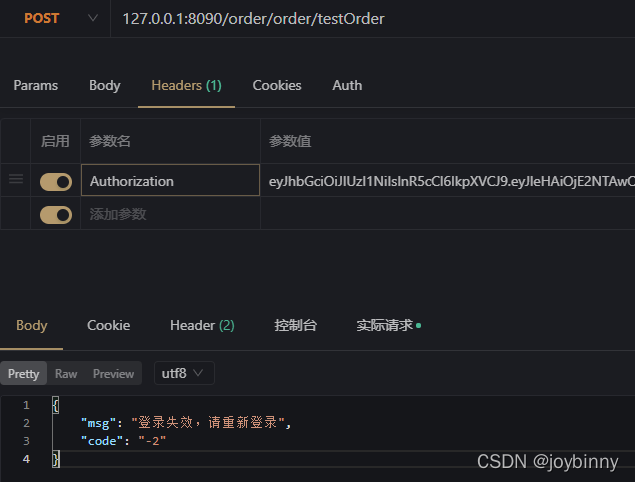
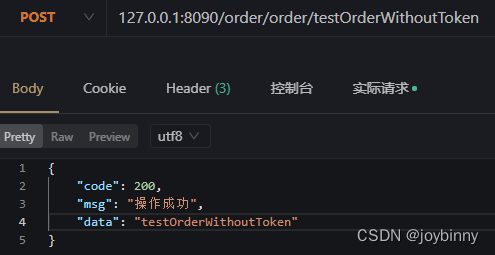
由于我在数据库设置的order-client过期时间为一分钟,所以一分钟之内携带token是可以随意请求testOrder的,但是token一旦失效则返回“登录失效,请重新登录”。而testOrderWithoutToken接口在白名单中,gateway过滤器不会校验token,所以不需要token也可以访问:
关于用户无感知刷新token
用户登录,后端验证用户成功之后生成两个token,这两个token分别是access_token(访问接口使用的token)、refresh_token(access_token过期后用于刷续期的token,注意设置refresh_token的过期时间需比access_token的过期时间长),后端将用户信息和这两个token存放到redis中并返回给前端并存储。
为什么需要刷新令牌?
如果access token超时时间很长,比如14天,由于第三方软件获取受保护资源都要带着access token,这样access token的攻击面就比较大。如果access token超时时间很短,比如1个小时,那其超时之后就需要用户再次授权,这样的频繁授权导致用户体验不好。引入refresh token,就解决了该矛盾。
什么时候使用刷新令牌呢?
在第三方软件收到访问令牌的同时,也会收到访问令牌的过期时间expires_in。一个设计良好的第三方应用,应该将expires_in值保存下来并定时检测;如果发现expires_in即将过期,则需要利用refresh_token去重新请求授权服务,以便获取新的、有效的访问令牌。
比如第三方软件访问受保护资源的时候,突然收到一个访问令牌失效的响应,此时第三方软件立即使用refresh_token来请求一个访问令牌,以便继续代表用户使用他的数据。
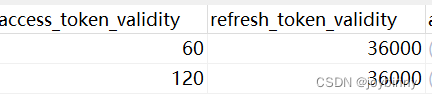
由于order-client在数据库配置的access_token过期时间为60秒,refresh_token过期时间为36000秒,所以token过期后将请求不到后台资源,此时可以用refresh_token去重新获取token,客户端重新保存token即可,如果refresh_token也过期,让用户重新登录即可。
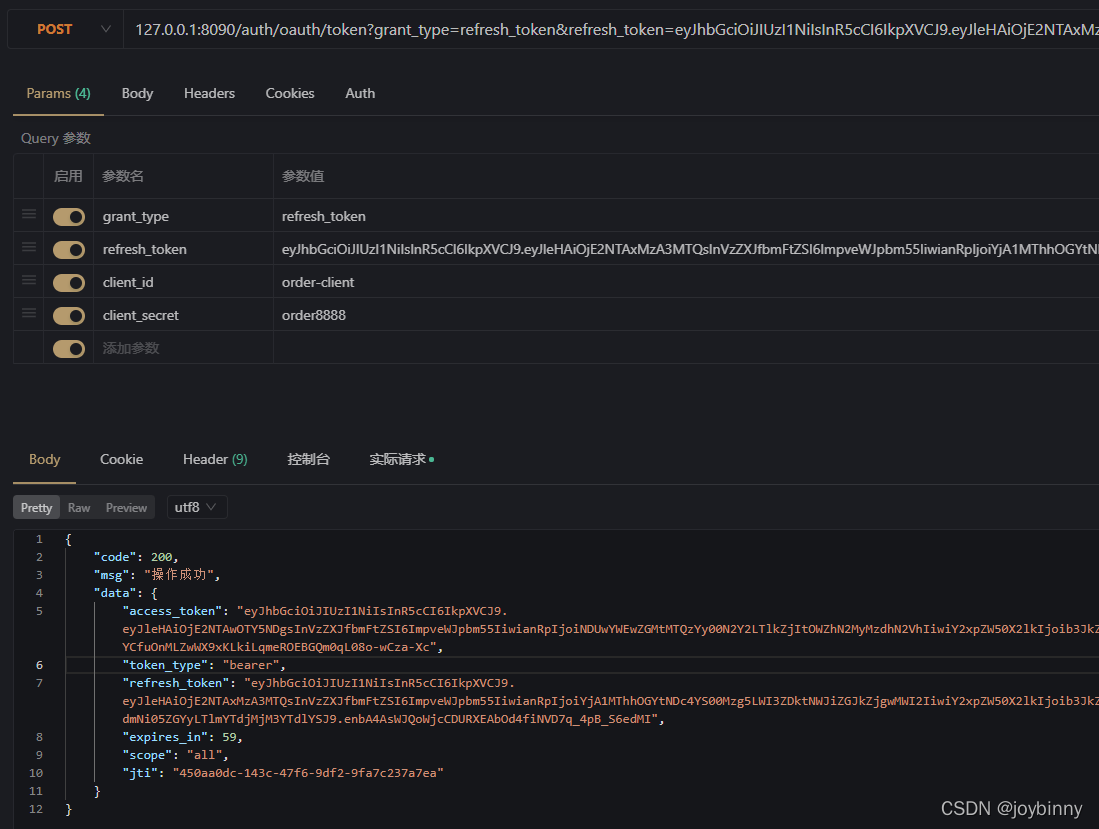
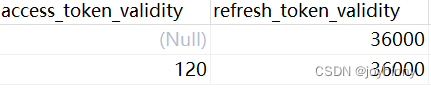
注意:如果不设置access_token_validity和refresh_token_validity,则会采用默认值:access_token_validity默认60 * 60 * 12 秒(12小时),refresh_token_validity默认默认60 *60 * 24 * 30秒 (30天)
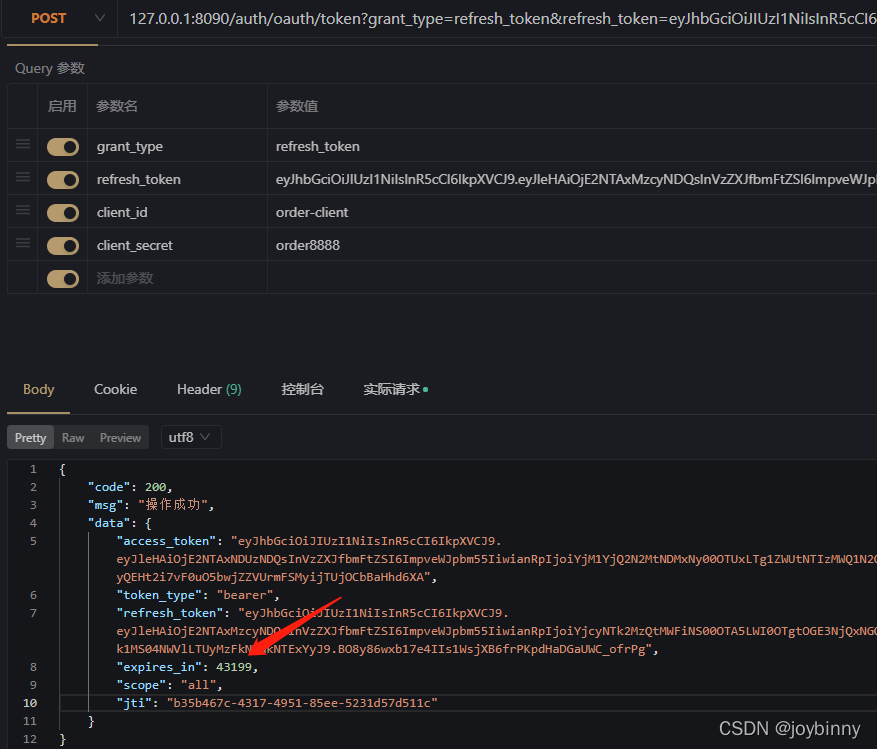
在使用刷新令牌的时候,也是需要应用传递它的app_id和app_sercet的。

