
热门标签
当前位置: article > 正文
maven配置阿里云镜像的两种方式_阿里云maven镜像
作者:算法研究专家 | 2024-02-03 19:34:49
赞
踩
阿里云maven镜像
maven配置阿里云镜像的两种方式
配置方式
第一种方式(settings.xml文件)
在mirrors节点下加入一个新的mirror节点,配置阿里镜像地址,完整配置如下:
<mirrors>
 	 <mirror>
      <id>alimaven</id>
      <name>aliyun maven</name>
      <url>http://maven.aliyun.com/nexus/content/groups/public/</url>
      <mirrorOf>central</mirrorOf>
    </mirror>
  </mirrors>
- 1
- 2
- 3
- 4
- 5
- 6
- 7
- 8
第二种方式(pom.xml方式)
修改项目pom.xml,在repositories节点下加入repository节点,配置阿里镜像地址,完整配置如下:
此配置参考renren-genertor项目的pom.xml配置,项目网址:https://gitee.com/renrenio/renren-generator
<repositories>
		<repository>
			<id>public</id>
			<name>aliyun nexus</name>
			<url>http://maven.aliyun.com/nexus/content/groups/public/</url>
			<releases>
				<enabled>true</enabled>
			</releases>
		</repository>
	</repositories>
	<pluginRepositories>
		<pluginRepository>
			<id>public</id>
			<name>aliyun nexus</name>
			<url>http://maven.aliyun.com/nexus/content/groups/public/</url>
			<releases>
				<enabled>true</enabled>
			</releases>
			<snapshots>
				<enabled>false</enabled>
			</snapshots>
		</pluginRepository>
	</pluginRepositories>

- 1
- 2
- 3
- 4
- 5
- 6
- 7
- 8
- 9
- 10
- 11
- 12
- 13
- 14
- 15
- 16
- 17
- 18
- 19
- 20
- 21
- 22
- 23
- 24
区别
第一种方式是全局的方式配置
第二种方式只能当前项目生效
解决的问题
问题在线
最近公司配置了maven私服仓库,导致我们项目所需要的依赖需要从私服中拉取,我idea配置maven仓库地址也是私服的,加上如果是内网开发,那么自己笔记本又不是只在公司使用,如果自己学习还要切换maven仓库,相当麻烦
示例测试
我们新建一个springboot项目,定义一个本地没有的springboot版本,在外网使用私服仓库地址打包
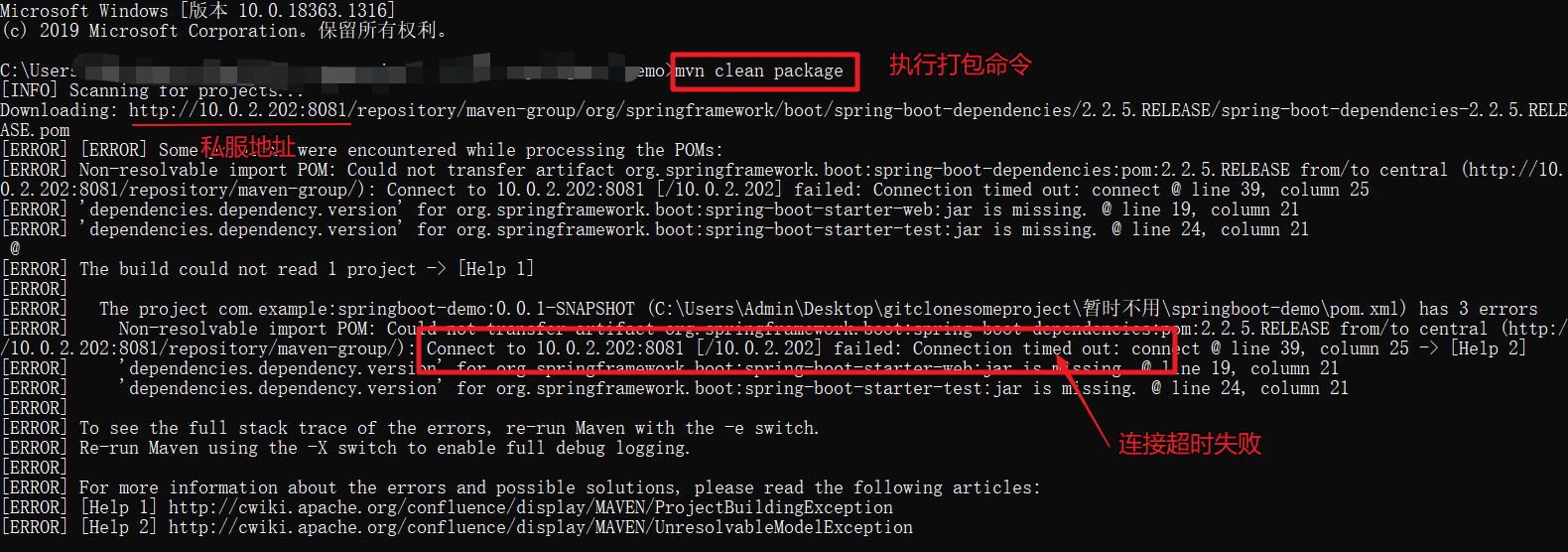
报错原因:因为我们使用的外网,所以不能拉去私服仓库依赖
解决方案
适应以上的第二种方式(pom.xml方式)
在pom.xml中配置阿里云镜像
pom.xml配置如下:
<?xml version="1.0" encoding="UTF-8"?>
<project xmlns="http://maven.apache.org/POM/4.0.0" xmlns:xsi="http://www.w3.org/2001/XMLSchema-instance"
    xsi:schemaLocation="http://maven.apache.org/POM/4.0.0 https://maven.apache.org/xsd/maven-4.0.0.xsd">
    <modelVersion>4.0.0</modelVersion>
    <groupId>com.example</groupId>
    <artifactId>springboot-demo</artifactId>
    <version>0.0.1-SNAPSHOT</version>
    <name>springboot-demo</name>
    <description>Demo project for Spring Boot</description>

    <properties>
        <java.version>1.8</java.version>
        <project.build.sourceEncoding>UTF-8</project.build.sourceEncoding>
        <project.reporting.outputEncoding>UTF-8</project.reporting.outputEncoding>
        <spring-boot.version>2.2.5.RELEASE</spring-boot.version>
    </properties>

    <dependencies>
       省略。。。
    </dependencies>

    <dependencyManagement>
        <dependencies>
            <dependency>
                <groupId>org.springframework.boot</groupId>
                <artifactId>spring-boot-dependencies</artifactId>
                <version>${spring-boot.version}</version>
                <type>pom</type>
                <scope>import</scope>
            </dependency>
        </dependencies>
    </dependencyManagement>

    <build>
        <plugins>
            <plugin>
                <groupId>org.apache.maven.plugins</groupId>
                <artifactId>maven-compiler-plugin</artifactId>
                <version>3.8.1</version>
                <configuration>
                    <source>1.8</source>
                    <target>1.8</target>
                    <encoding>UTF-8</encoding>
                </configuration>
            </plugin>
            <plugin>
                <groupId>org.springframework.boot</groupId>
                <artifactId>spring-boot-maven-plugin</artifactId>
                <version>2.3.7.RELEASE</version>
                <configuration>
                    <mainClass>com.example.springbootdemo.SpringbootDemoApplication</mainClass>
                </configuration>
                <executions>
                    <execution>
                        <id>repackage</id>
                        <goals>
                            <goal>repackage</goal>
                        </goals>
                    </execution>
                </executions>
            </plugin>
        </plugins>
    </build>
<repositories>
		<repository>
			<id>public</id>
			<name>aliyun nexus</name>
			<url>http://maven.aliyun.com/nexus/content/groups/public/</url>
			<releases>
				<enabled>true</enabled>
			</releases>
		</repository>
	</repositories>
	<pluginRepositories>
		<pluginRepository>
			<id>public</id>
			<name>aliyun nexus</name>
			<url>http://maven.aliyun.com/nexus/content/groups/public/</url>
			<releases>
				<enabled>true</enabled>
			</releases>
			<snapshots>
				<enabled>false</enabled>
			</snapshots>
		</pluginRepository>
	</pluginRepositories>

</project>
- 1
- 2
- 3
- 4
- 5
- 6
- 7
- 8
- 9
- 10
- 11
- 12
- 13
- 14
- 15
- 16
- 17
- 18
- 19
- 20
- 21
- 22
- 23
- 24
- 25
- 26
- 27
- 28
- 29
- 30
- 31
- 32
- 33
- 34
- 35
- 36
- 37
- 38
- 39
- 40
- 41
- 42
- 43
- 44
- 45
- 46
- 47
- 48
- 49
- 50
- 51
- 52
- 53
- 54
- 55
- 56
- 57
- 58
- 59
- 60
- 61
- 62
- 63
- 64
- 65
- 66
- 67
- 68
- 69
- 70
- 71
- 72
- 73
- 74
- 75
- 76
- 77
- 78
- 79
- 80
- 81
- 82
- 83
- 84
- 85
- 86
- 87
- 88
- 89
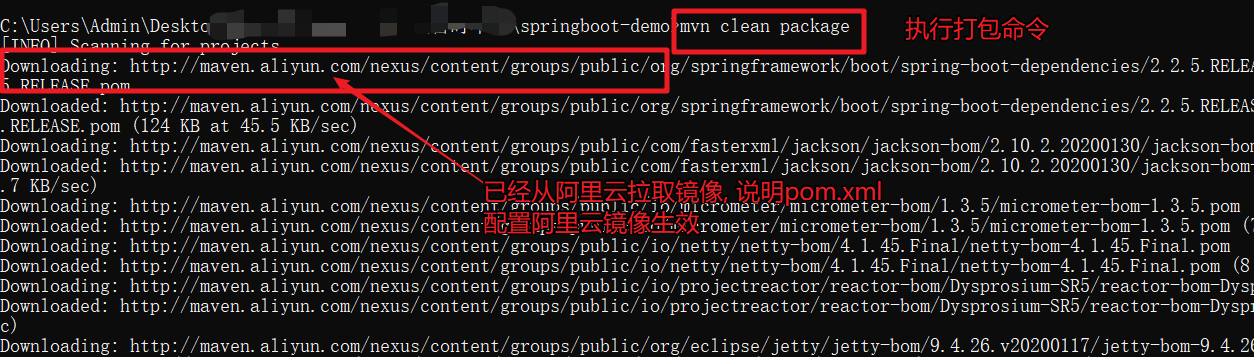
打包过程:
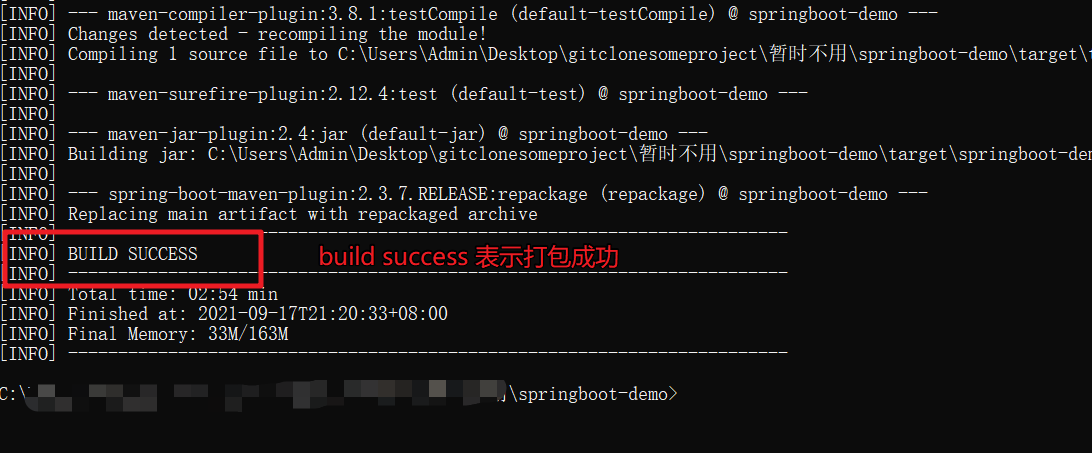
打包结束
总结
1.如果工作电脑公司和自己两用,我们自己学习可以在pom.xml配置阿里云镜像,不过每个项目都要配置
2.如果电脑只是自己学习使用,我们在settings.xml中配置全局阿里云镜像即可,一劳永逸
个人csdn博客网址:https://blog.csdn.net/shaoming314

个人博客网址:www.shaoming.club

本文内容由网友自发贡献,转载请注明出处:https://www.wpsshop.cn/article/detail/57859
推荐阅读
相关标签

