
- 1JS 正则表达式 控制文本框只能输入中文、英文、数字与指定特殊符号_正则表达式 允许中英文 不允许特殊符号
- 2自己动手实现简易的springmvc_如何实现springmvc
- 3pip3 install命令执行时指定源+指定版本_pip3 install -i
- 4产品经理面试必问5大问题(附答题攻略)_产品经理面试可以发对方prd
- 5Mybatis源码学习(十):二级缓存_mybatis二级缓存源码
- 6【运维必看】2023年常见运维面试题汇总,助你拿下offer!_ceph运维面试题
- 7蓝桥杯嵌入式第七届真题(完成) STM32G431
- 8软考刷题(包括软考python)
- 9Redis集群搭建与springboot整合_springboot redis 集群搭建
- 10scale和translate会导致移动图片时模糊或闪黑屏_前端使用transition-group 会导致页面黑屏
springMVC
赞
踩
springMVC技术与servlet技术相同,均属于web层开发技术。
springMVC是一种基于Java实现MVC模型的轻量级web框架。springMVC中的bean仅仅指的是表现层的bean,不包括数据层和业务逻辑层的bean,为了避免springConfig错误的加载到springMVC的bean,我们需要在springConfig加载控制的bean时去掉springMVC控制的bean,也就是表现层的bean。
springConfig去掉表现层的bean的方法有俩种:
法一:不加载表现层的bean
- package org.example.config;
-
- import org.springframework.context.annotation.ComponentScan;
- import org.springframework.context.annotation.Configuration;
- import org.springframework.context.annotation.FilterType;
- import org.springframework.stereotype.Controller;
-
- @Configuration
- //在spring加载控制bean时,去掉加载的springMVC控制的bean
- //法一:不加载表现层的bean
- @ComponentScan({"org.example.dao","org.example.service"})
- public class springConfig {
- }
法二:把表现层的bean从扫描的范围中去掉
- package org.example.config;
-
- import org.springframework.context.annotation.ComponentScan;
- import org.springframework.context.annotation.Configuration;
- import org.springframework.context.annotation.FilterType;
- import org.springframework.stereotype.Controller;
-
- @Configuration
- //在spring加载控制bean时,去掉加载的springMVC控制的bean
- //法二:把表现层的bean从扫描范围中去掉
- @ComponentScan(value = "org.example",
- excludeFilters = @ComponentScan.Filter(
- type = FilterType.ANNOTATION, //按注解排除扫描的bean
- classes = Controller.class //告诉它排除什么注解的bean
- )
- )
- public class springConfig {
- }

然后是springMVCConfig的配置
- package org.example.config;
-
- import org.springframework.context.annotation.ComponentScan;
- import org.springframework.context.annotation.Configuration;
- import org.springframework.web.servlet.config.annotation.EnableWebMvc;
-
- @Configuration
- @ComponentScan("org.example.Controller")
-
- @EnableWebMvc
- public class springMVCConfig {
- }
@EnableWebMvc 接收json数据时,开启json数据转换为我们需要的数据类型对象 这仅仅是该注解的功能之一。
然后是Controller层的代码:
- package org.example.Controller;
-
- import org.springframework.stereotype.Controller;
- import org.springframework.web.bind.annotation.RequestMapping;
-
- @Controller
- @RequestMapping("/postman")
- public class userRequest {
-
- }
@Controller 注解 表示该类为表现层的bean
@RequestMapping("/postman") 该注解用于声明访问该类的路径http://localhost:8080/postman/* 可以访问该类中的所有方法。
表现层的方法:
传入简单类型的数据:
- package org.example.Controller;
-
- import org.example.pojo.user;
- import org.springframework.stereotype.Controller;
- import org.springframework.web.bind.annotation.RequestBody;
- import org.springframework.web.bind.annotation.RequestMapping;
- import org.springframework.web.bind.annotation.ResponseBody;
-
- @Controller
- @RequestMapping("/postman")
- public class userRequest {
-
- @RequestMapping("/postman1")
- @ResponseBody //作用是把return的返回值作为响应数据
- public String postman1(String name,int age){ //将get请求的参数作为形参输入就可以接收了。
- System.out.println("name==>"+name);
- System.out.println("age==>"+age);
- return "{'module':'postman1'}";
- }
- }
@RequestMapping("/postman1")注解是声明该方法的访问路径,http://localhost:3306/postman/postman1?name=zhangsan&age=18 就可以访问到该类中的该方法。并把参数传入,注意访问路径中的参数与方法中形参的名字要一致。
@ResponseBody 注解是把return的返回值作为响应数据。
请求路径参数名与形参名不一致时
- @RequestMapping("/postman2")
- @ResponseBody
- public String postman2(@RequestParam("name") String username, int age){
-
- System.out.println("name==>"+username);
- System.out.println("age==>"+age);
- return"{'module':'postman2'}";
- }
@RequestParam注解是把请求路径参数name的值对应到该形参。
传入引用类型的数据:对引用类型数据的默认处理是先把引用类型数据创建出一个对象,然后把获取的数据参数insert到对象中。
- @RequestMapping("/postman3")
- @ResponseBody
- public String postman3(user user){
- System.out.println("user==>"+user);
- return "{'module':'postman3'}";
- }
如果user对象中的有引用类型的数据时需要按图中所例进行传参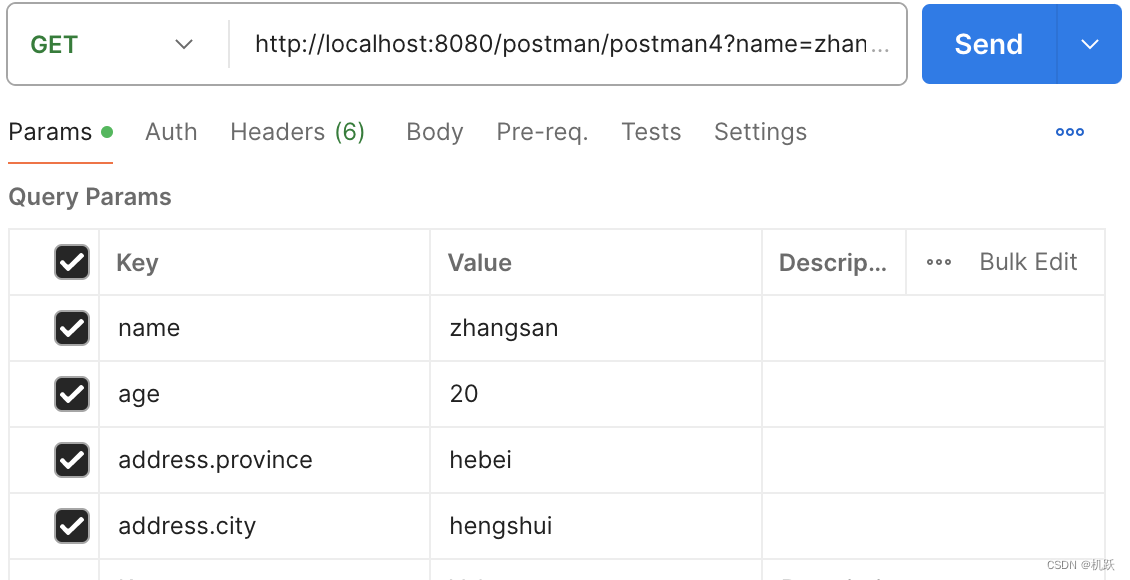
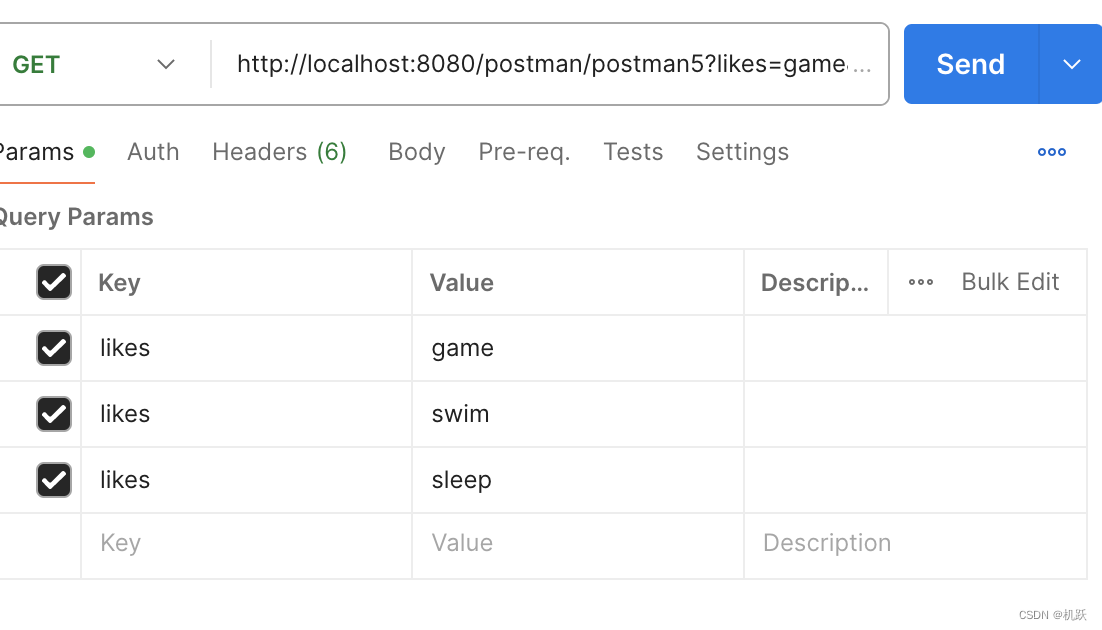
传入数组数据
- //数组参数
- @RequestMapping("/postman5")
- @ResponseBody
- public String postman5(String[] likes){
- System.out.println("likes==>"+ Arrays.toString(likes));
- return "{'module':'postman5'}";
- }
传入集合对象
- @RequestMapping("/postman6")
- @ResponseBody
- public String postman6(@RequestParam List<String> likes){
- System.out.println("likes==>"+likes);
- return "{'module':'postman6'}";
- }
因为引用类型数据list集合是个接口,没有构造方法所以不能创建对象,所以不能用默认的方法,
解决办法:加上@RequestParam注解,告诉它,是把获取的请求参数放入list集合中,而不是作为list集合的属性。
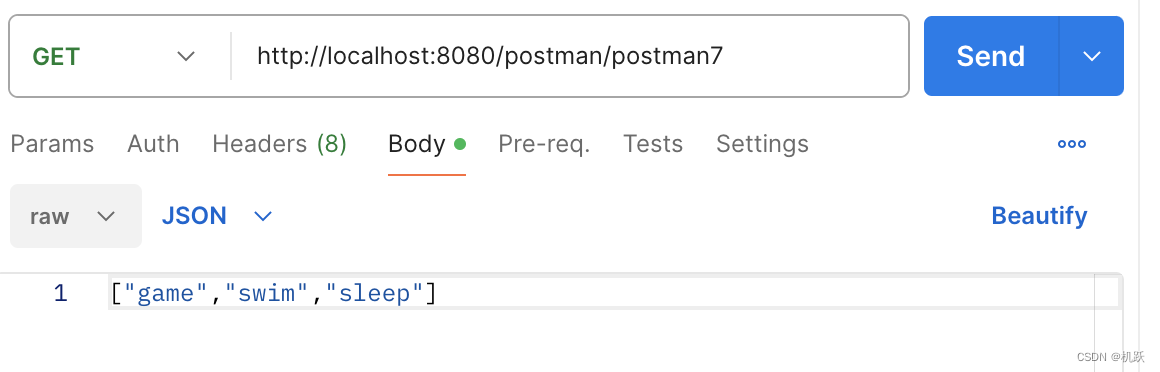
传入json格式的集合
- @RequestMapping("/postman7")
- @ResponseBody
- public String postman7(@RequestBody List<String> likes){
- System.out.println("likes==>"+likes);
- return "'module':'postman7'";
- }
因为此时数据我们写在了请求体中,不能用requestParam了,需要换成requestBody。
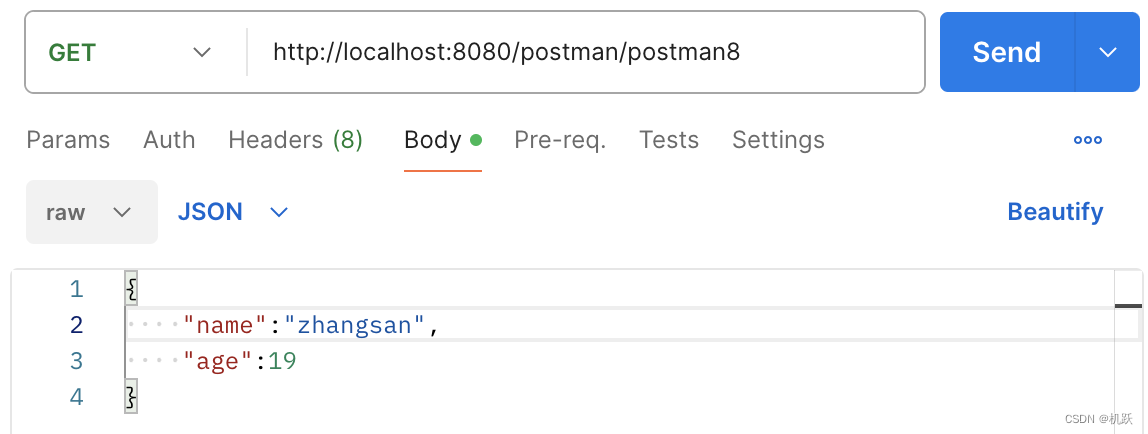
传入json格式的引用类型数据:
- @RequestMapping("/postman8")
- @ResponseBody
- public String postman8(@RequestBody user user){
- System.out.println("user==>"+user);
- return "'module':'postman8'";
- }
传入日期类型数据:
- @RequestMapping("/postman10")
- @ResponseBody
- public String postman10(Date date,
- @DateTimeFormat(pattern = "yyyy-MM-dd") Date date1,
- @DateTimeFormat(pattern = "yyyy-MM-dd HH:mm:ss") Date date2){
- System.out.println("date==>"+date);
- System.out.println("date1==>"+date1);
- System.out.println("date2==>"+date2);
- return "{;module':'postman10'}";
- }
日期,年月日之间的分隔符,/ 可以直接用; - 因为格式不匹配,需要加@DateTimeFormat注解来配格式。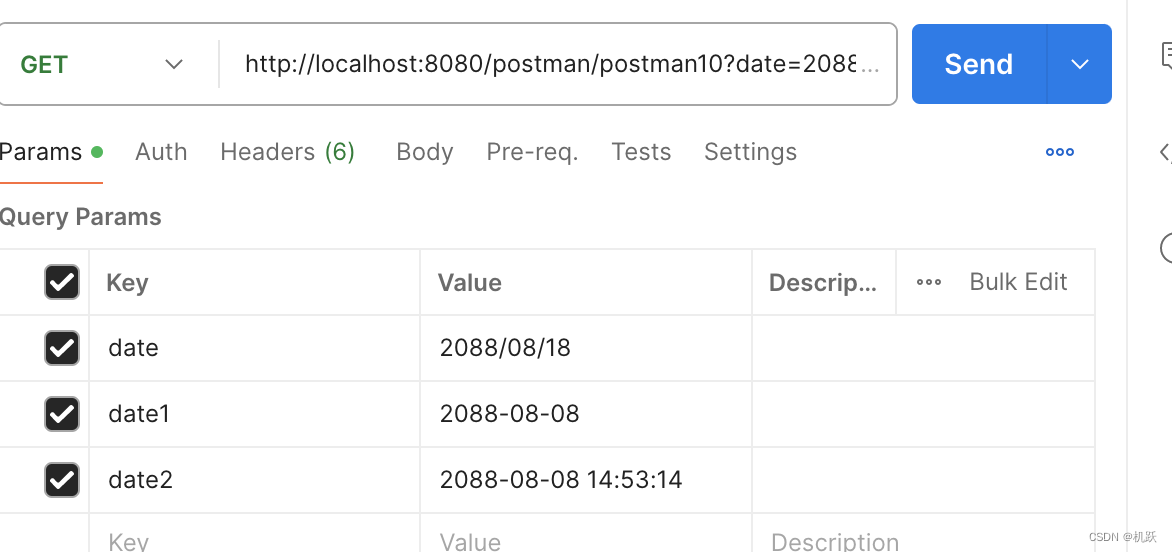

![[ 云计算 | AWS 实践 ] Java 如何重命名 Amazon S3 中的文件和文件夹_jav](https://img-blog.csdnimg.cn/direct/f6b4b45ef01445aa9a147e7c5f1a8f15.png?x-oss-process=image/resize,m_fixed,h_300,image/format,png)

