
热门标签
热门文章
- 1如何去反编译一个ipa包_ipa反编译
- 2Linux的DHCP工作原理和dns服务器
- 3C++的类和对象_c++类和对象
- 4Atcoder Beginner Contest 184 F Programming Contest(暴力枚举+二分)_高桥将参加一个编程比赛,比赛持续t分钟,提出n个问题。 凭着他的超感知觉,他已经知
- 5敏捷开发-互联网时代的软件开发方式
- 6cudnn 安装_cudnn安装
- 7跟着pink老师前端入门教程-day12
- 8在Docker Desktop | Kubernetes 环境 通过 ingress-nginx 为 Kubernetes Dashboard 2.6.1 提供 Chrome 支持的 HTTPS 访问_docker desktop kubernetes dashboard
- 9spring boot微服务项目打包、部署(docker)_springboot docker打包
- 10python visual studio 14_python安装jpype1、pyhanlp时出现的“Microsoft Visual C++ 14.0 is required.”问题解决...
当前位置: article > 正文
Android系统添加信任凭证CA证书_安卓怎么信任证书
作者:键盘狂人 | 2024-02-02 22:02:31
赞
踩
安卓怎么信任证书
错误描述
红色警告:您的连接不是私密连接
错误代码:NET::ERR_CERT_AUTHORITY_INVALID
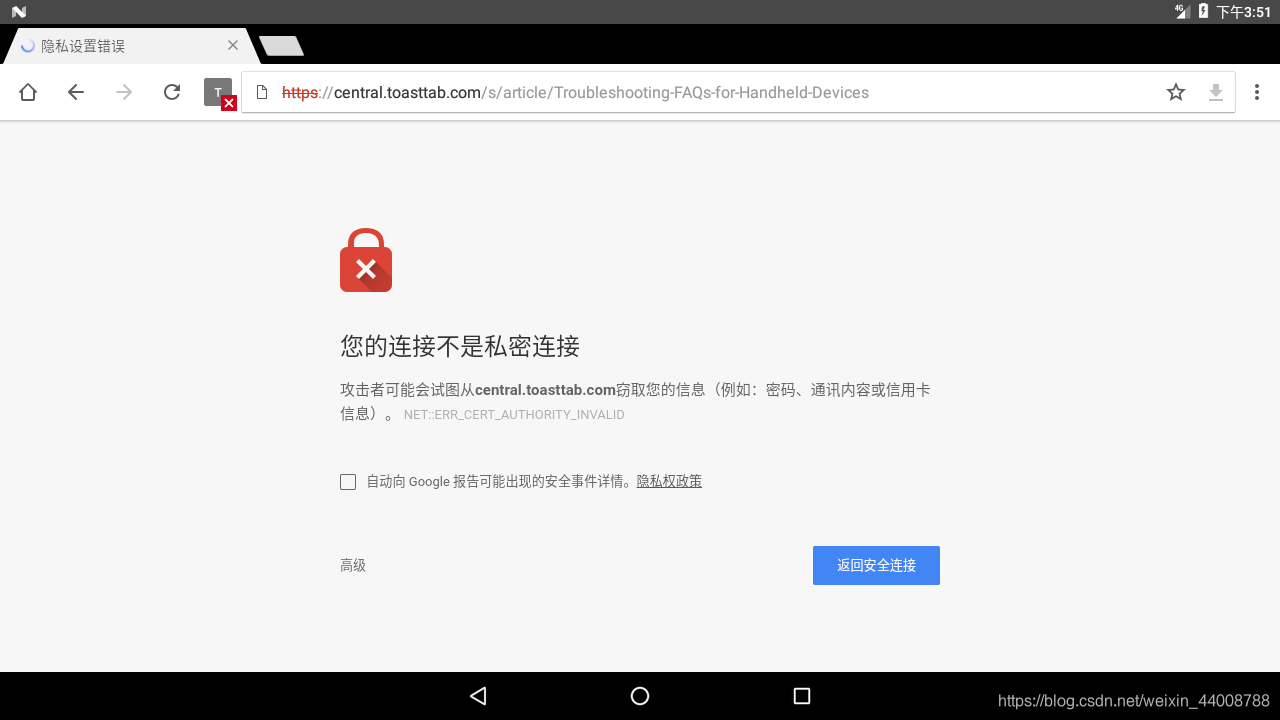
log报错:
I/X509Util( 6441): Failed to validate the certificate chain, error: java.security.cert.CertPathValidatorException: Trust anchor for certification path not found.
- 1
解决方案:Android系统添加信任凭证CA证书
因为没有系统浏览器源码,所以为Android系统添加该网站的CA证书。
网上大部分解决方案是:忽略https的证书校验,需要在获取sslParams时,修改并自定义TrustManager为trustAllCerts,在继承的Application类里面onCreate()方法中调用下面方法忽略https的证书校验
//注意:需要在connection创建之前调用该方法
trustAllHttpsCertificates();
HostnameVerifier hv = new HostnameVerifier() {
       public boolean verify(String urlHostName, SSLSession session) {
           return true;
       }
   };
HttpsURLConnection.setDefaultHostnameVerifier(hv);
connection = (HttpURLConnection) url.openConnection();
- 1
- 2
- 3
- 4
- 5
- 6
- 7
- 8
- 9
预置SSL Certificates到系统
- 打开该网站https://www.ssllabs.com/ssltest/,输入网站地址进行检测
- 下拉检查报告,找到Additional Certificates点击下载,复制其内容,保存为*.pem文件

- 在linux系统执行命令,可以得到*.0文件的文件名,如:
3b9729e0
openssl x509 -subject_hash_old -in ssl.pem
- 1
- 在linux系统执行命令,可以得到
3b9729e0.0文件
cat ssl.pem > 3b9729e0.0
- 1
- 将
3b9729e0.0文件复制到/system/ca-certificates/files,重新编译即可
通过adb导入证书
- 查看预置证书
C:\Users\Admin>adb shell
msm8953_64:/ $ cd system/etc/security/cacerts/
msm8953_64:/system/etc/security/cacerts $ ls
00673b5b.0 1dac3003.0 33815e15.1 450c6e38.0 60afe812.0 82223c44.0 9772ca32.0 b0f3e76e.0 d16a5865.0 e775ed2d.0
02756ea4.0 1dcd6f4c.0 343eb6cb.0 455f1b52.0 6187b673.0 8470719d.0 9ab62355.0 b3fb433b.0 d18e9066.0 e8651083.0
- 1
- 2
- 3
- 4
- 5
- 导入证书
adb root
adb remount
adb push 3b9729e0.0 /system/etc/security/cacerts/
- 1
- 2
- 3
- 验证
开机后查看设置-安全-信任的凭证-系统,可找到加入的证书。使用浏览器访问,直接连通不会出现“您的连接不是私密连接”警告。
- 证书格式以及后缀名
| Certificate格式 | 后缀 | 格式鉴别方式 | 用户安装支持 | 系统默认支持 |
|---|---|---|---|---|
| PEM | .pem / .crt /.cer /.key | Base64 encoded certificate ASCII files contain"-----BEGIN CERTIFICATE-----" and"-----END CERTIFICATE-----" statements | .crt和.cer格式支持 | MD5/SHA1 filenaming. 支持(65445551d.0) |
- 一些工具
SSL 工具:https://www.myssl.cn/tools/downloadchain.html
服务器工具:http://web.chacuo.net/nethttpsslcheck
SSL配置检查网站:https://www.geocerts.com/ssl-checker
查询域名是否加入Preload List:https://hstspreload.org
检查网站证书是否有效:https://www.ssllabs.com/ssltest/
- 参考文章
https://blog.csdn.net/u014311799/article/details/79037717
https://blog.csdn.net/ch853199769/article/details/87861933
推荐阅读
相关标签

