
热门标签
热门文章
- 1Ubuntu18.04 Realsense D435i驱动安装与配置_源码安装udevadm
- 2字节跳动岗位薪酬体系曝光,看完才知道:自己差这么多..._字节3-1月薪
- 3SpringBoot使用poi将word转换为PDF并且展示
- 42023年云计算的发展趋势如何?还值得学习就业吗?_2023云计算,大数据,人工智能学那个
- 5C语言之指针基础_c语言中ardd0的意思
- 6整理jdk几个版本的新特性_jdk版本
- 7【VScode】安装配置、插件及远程SSH连接_vscode ssh
- 8PyTorch快速入门教程【小土堆】-神经网络-完整的模型训练套路_with torch.no_grad():小土堆
- 9如何用 Python 发送通知到微信?
- 10Stable Diffusion完整入门指南,保姆级教程!干货满满,建议收藏!
当前位置: article > 正文
Android Firebase (FCM)推送接入
作者:数据结构灵魂 | 2024-01-16 14:49:48
赞
踩
Android Firebase (FCM)推送接入
官方文档:
向后台应用发送测试消息 | Firebase Cloud Messaging
1、根级(项目级)Gradlegradle的dependencies中添加:
- dependencies {
- ...
-
- // Add the dependency for the Google services Gradle plugin
- classpath 'com.google.gms:google-services:4.3.10'
- }
2、模块(应用级)Gradle 中添加 Google 服务插件:
- plugins {
- id 'com.android.application'
-
- // Add the Google services Gradle plugin
- id 'com.google.gms.google-services'
- ...
- }
- 或者
- apply {
- plugin 'com.android.application'
-
- // Add the Google services Gradle plugin
- plugin "com.google.gms.google-services"
- }
添加 Firebase Cloud Messaging Android 库的依赖项:(按官方的应该也是可以的)
- implementation(platform("com.google.firebase:firebase-bom:32.3.1"))
- implementation("com.google.firebase:firebase-analytics-ktx")
- // implementation("com.google.firebase:firebase-auth-ktx")
- implementation("com.google.firebase:firebase-firestore-ktx")
- implementation("com.google.firebase:firebase-messaging")
- // Firebase Cloud Messaging (Kotlin)
- implementation("com.google.firebase:firebase-messaging-ktx")
3、消息接收
AndroidManifest.xml中添加,接受类
- <service
- android:name=".BillionFirebaseMessagingService"
- android:exported="true">
- <intent-filter>
- <action android:name="com.google.firebase.MESSAGING_EVENT" />
- </intent-filter>
- </service>
-
- import android.app.Notification;
- import android.app.NotificationChannel;
- import android.app.NotificationManager;
- import android.app.PendingIntent;
- import android.content.Intent;
- import android.content.pm.PackageManager;
- import android.os.Build;
- import android.util.Log;
-
- import androidx.annotation.NonNull;
- import androidx.core.app.NotificationCompat;
- import androidx.core.app.NotificationManagerCompat;
- import androidx.core.content.ContextCompat;
-
- import com.game.base.sdk.BaseSDK;
- import com.game.base.sdk.Events;
- import com.google.firebase.messaging.FirebaseMessagingService;
- import com.google.firebase.messaging.RemoteMessage;
- import com.google.gson.Gson;
-
- import org.json.JSONArray;
- import org.json.JSONException;
- import org.json.JSONObject;
-
- import java.util.Locale;
- import java.util.Map;
- import java.util.jar.JarException;
- import java.lang.Boolean;
-
- import game.billion.block.blast.bbb.MainActivity;
- import game.billion.block.blast.bbb.R;
- import kotlin.Pair;
-
- public class BillionFirebaseMessagingService extends FirebaseMessagingService {
- private String channelID = "game.puzzle.block.billion.pro.notification";
- private String channelName = "messageName";
- int notifyID = 101010;
-
- //监控令牌的生成
- @Override
- public void onNewToken(@NonNull String token) {
- super.onNewToken(token);
-
- Log.d("BillionFirebaseMessagingService", "onNewToken:"+token);
- }
-
- //监控推送的消息
- @Override
- public void onMessageReceived(@NonNull RemoteMessage mge) {
- super.onMessageReceived(mge);
-
- Log.d("BillionFirebaseMessagingService", "From:"+mge.getFrom());
- Log.d("BillionFirebaseMessagingService", "data:"+mge.getData());
- Map<String,String> dt = mge.getData();
-
- String ti =dt.get("title"); //标题(多语言),JSON字符串
- try {
- if (ti != null && !ti.isEmpty())
- {
- JSONObject json =new JSONObject(ti);
- String language = Locale.getDefault().getLanguage();
- if (language=="pt")
- {
- //获取巴西语
- String resTitle = json.getString("pt");
- if (resTitle != null && !resTitle.isEmpty())
- {
- //显示通知
- addNotification(resTitle);
- }
- }else {
- String resTitle = json.getString("en");
- if (resTitle != null && !resTitle.isEmpty())
- {
- //显示通知
- addNotification(resTitle);
- }
- }
- }
- } catch (JSONException e) {
-
- }
-
- String mgeId = mge.getMessageId();
- String intent =dt.get("intent");
- String strId =dt.get("sid");
-
- Pair<String, String>[] params = new Pair[3];
- params[0] = new Pair<>("message_id", mgeId);
- params[1] = new Pair<>("type", intent);
- params[2] = new Pair<>("sid", strId);
- Events.push("100410", params);
- }
-
- //添加提示
- private void addNotification(String resTitle )
- {
- if (ContextCompat.checkSelfPermission(this, android.Manifest.permission.POST_NOTIFICATIONS) == PackageManager.PERMISSION_GRANTED) {
- NotificationManagerCompat managerCompat = NotificationManagerCompat.from(this);
-
- NotificationChannel nc=newNotificationChannel(channelID, channelName);
- if (nc!=null)
- {
- if (Build.VERSION.SDK_INT >= Build.VERSION_CODES.O) {
- managerCompat.createNotificationChannel(nc);
- }
- }
-
- Intent nfIntent = new Intent(this, MainActivity.class);
-
- PendingIntent pendingIntent ;
- if (Build.VERSION.SDK_INT >= Build.VERSION_CODES.S) {
- pendingIntent=PendingIntent.getActivity(this, 0, nfIntent, PendingIntent.FLAG_IMMUTABLE);
- } else {
- pendingIntent=PendingIntent.getActivity(this, 0, nfIntent, PendingIntent.FLAG_IMMUTABLE | PendingIntent.FLAG_UPDATE_CURRENT);
- }
-
- NotificationCompat.Builder builder = new NotificationCompat.Builder(this, channelID);
- builder.setContentIntent(pendingIntent); // 设置PendingIntent
- builder.setSmallIcon(R.drawable.notification); // 设置状态栏内的小图标
- builder.setVisibility(NotificationCompat.VISIBILITY_PUBLIC);
- builder.setStyle(new NotificationCompat.BigTextStyle());
- builder.setContentTitle(getString(R.string.app_name));
- builder.setContentText(resTitle);
- builder.setWhen(System.currentTimeMillis());
- builder.setAutoCancel(true);
-
- managerCompat.notify(notifyID, builder.build());
- }
- }
- private NotificationChannel newNotificationChannel(String cId, String cName)
- {
- if (Build.VERSION.SDK_INT >= Build.VERSION_CODES.O) {
- NotificationChannel channel =new NotificationChannel(cId, channelName, NotificationManager.IMPORTANCE_HIGH);
- channel.setSound(null, null);
- channel.setLockscreenVisibility(Notification.VISIBILITY_PUBLIC);
- return channel;
- }
-
- return null;
- }
- }

4、测试(google-services.json 记得放应用级中)
a、获取tokn
- //在firebase中检查google版本是否有问题
- GoogleApiAvailability.getInstance().makeGooglePlayServicesAvailable(this).addOnCompleteListener(new OnCompleteListener<Void>() {
- @Override
- public void onComplete(@NonNull Task<Void> task) {
- if (task.isSuccessful()) {
- Log.d("Firebase", "onComplete: Play services OKAY");
- //firebase 推送 (FCM)获取token(FCM令牌)
- FirebaseMessaging.getInstance().getToken().addOnCompleteListener(new OnCompleteListener<String>() {
- @Override
- public void onComplete(@NonNull Task<String> task) {
- if (!task.isSuccessful())
- {
- Log.w("Firebase", "Fetching FCM registration token failed", task.getException());
- return;
- }
- // Get new FCM registration token
- String ss= task.getResult();
- Log.d("Firebase", "onComplete:token getResult "+ss);
- }
- });
-
- } else {
- // Show the user some UI explaining that the needed version
- // of Play services Could not be installed and the app can't run.
- }
- }
- });
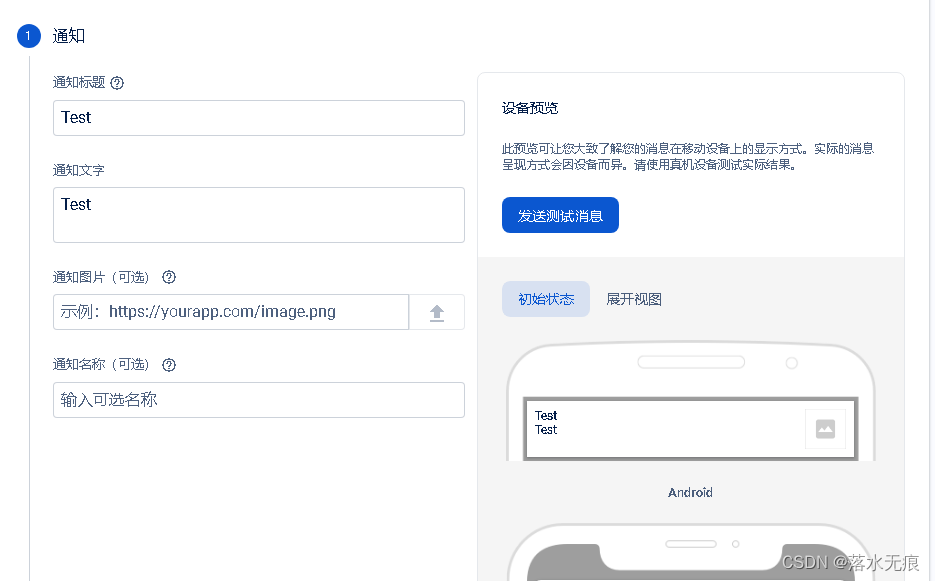
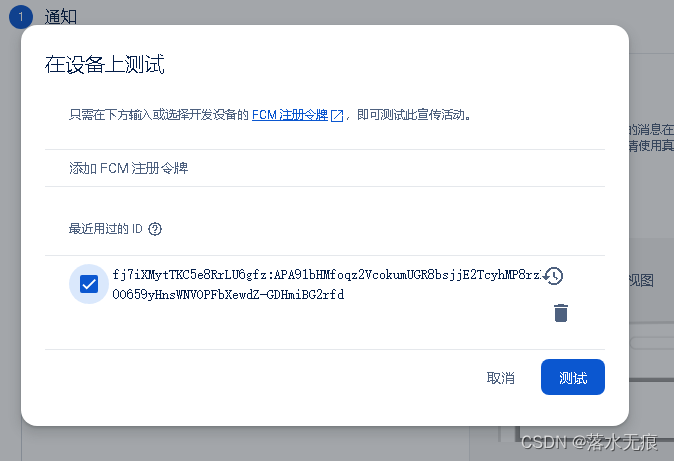
b、用tokn就能对固定手机发送消息
声明:本文内容由网友自发贡献,不代表【wpsshop博客】立场,版权归原作者所有,本站不承担相应法律责任。如您发现有侵权的内容,请联系我们。转载请注明出处:https://www.wpsshop.cn/article/detail/40400
推荐阅读
![Android Termux安装MySQL,并使用cpolar实现公网安全远程连接[内网穿透]](https://img-blog.csdnimg.cn/fabd1c92d58f4f5b8946e9b8f6b49f50.jpeg?x-oss-process=image/resize,m_fixed,h_300,image/format,png)


相关标签

