
- 1使用Map集合统计一个字符串中每个字符出现的个数_用map集合统计字符串中各个字符的数量
- 2【配置】Ubuntu上配置pytorch图文全流程(包括探索过程)_ubuntu pytorch 环境配置
- 3教你如何在Mac上搭建自己的服务器——Nginx_mac 搭建自己的服务器
- 4系统排错_/mnt/sysimage为空
- 5关于hibernate的看法_如何评价hibernate
- 6VSCode连接远程服务器调试代码详细流程_vscode连接服务器运行代码
- 7Jmeter使用篇(十八) : Jmeter压测tcp(socket协议)方法_jmeter发送socket协议
- 8消息中间件(MQ)对比:RabbitMQ、Kafka、ActiveMQ 和 RocketMQ
- 92020大学生就业报告:IT行业人才缺口巨大,好就业_计算机将会是下一个“夕阳”专业,现在加入it行业
- 10RestHighLevelClient Java操作ES实现CRUD (_java resthightleve
adb常用命令总结_adb shell dumpsys activity
赞
踩
1 前言
ADB(Android Debug Bridge)即 Android 调试桥,采用监听 Socket TCP 端口的方式通讯。连接手机有2种方式:有线连接、无线连接。
(1)有线连接
使用数据线连接手机后,在【开发人员选项】中开启【USB 调试】,并在【选择 USB 配置】中选择【MTP (多媒体传输)】。
(2)无线连接
adb connect ip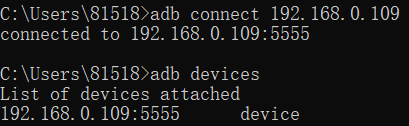
注意事项:
- 手机和 PC 需要连接同一个局域网
- 需要开启【USB 调试】,并选择【MTP (多媒体传输)】
若报如下错误:
cannot connect to 192.168.0.109:5555: 由于目标计算机积极拒绝,无法连接。 (10061)按照如下步骤可以连接上手机:
- 使用数据线连接手机和 PC,执行命令:adb tcpip 5555
- 拔掉数据线,开启【USB 调试】,并选择【MTP (多媒体传输)】
- 执行命令:adb connect 192.168.0.109
2 常用命令
2.1 基础命令
- ::查看设备
- adb devices
- ::查看详细设备信息(含型号)
- adb devices -l
-
- ::查看手机信息(品牌、型号、版本等)
- adb shell cat /hw_product/etc/prop/local.prop | findstr product
- adb shell cat /system/build.prop | findstr product
-
- ::重启
- adb reboot
-
- ::查看日志
- adb logcat > log.txt
- adb logcat | findstr "matched_string"
-
- ::安装/卸载
- adb install xxx.apk
- adb uninstall package_name
-
- ::拉取/推送
- adb remount
- adb pull /sdcard/a.mp4 C:\Users\81518\Desktop\
- adb push C:\Users\81518\Desktop\a.mp4 /sdcard/
-
- ::查看当前界面运行的 activity 及其包名
- adb shell dumpsys window | findstr "mCurrentFocus"
-
- ::查看指定命令的参数
- adb command --help
- adb shell command --help

打印方法调用堆栈:
android.util.Log.d("TAG", android.util.Log.getStackTraceString(new Throwable()));2.2 截屏/录制
- ::截屏
- adb shell screencap -p /sdcard/1.png
- adb pull /sdcard/1.png C:\Users\81518\Desktop\
-
- ::录屏
- adb shell screenrecord /sdcard/1.mp4
说明:截屏时,可以通过【-d】指定 display id,默认是 0
2.3 查看/修改系统参数
- ::查看系统参数值
- adb shell getprop system_prams
-
- ::设置系统参数值
- adb shell setprop system_prams params_value
-
- ::查看手机型号
- adb shell getprop ro.product.model
-
- ::查看手机固件构建时间
- adb shell getprop ro.build.date
2.4 模拟输入
- ::查看模拟输入命令
- adb shell input --help
-
- ::点击指定坐标位置
- adb shell input tap <x> <y>
-
- ::滑动
- adb shell input swipe <x1> <y1> <x2> <y2>
-
- ::按键事件
- adb shell input keyevent <keycode>
说明:通过 -d 属性可以指定 displayId,应用如下:
- ::点击指定display的指定坐标位置
- adb shell input -d 1 tap 100 200
常用<keycode>如下:
2.5 adb shell settings
(1)查看属性
- ::查看系统/全局/安全属性
- adb shell settings list system
- adb shell settings list global
- adb shell settings list secure
-
- ::获取自动锁屏时间(单位:毫秒 ms)
- adb shell settings list system | findstr "screen_off_timeout"
- adb shell settings get system screen_off_timeout
-
- ::获取当前屏幕亮度
- adb shell settings get system screen_brightness
-
- ::获取默认输入法(com.baidu.input_huawei/.ImeService)
- adb shell settings get secure default_input_method
(2)设置属性
- ::设置自动锁屏时间(单位:毫秒 ms,此处为:1天)
- adb shell settings put system screen_off_timeout 86400000
-
- ::设置当前屏幕亮度
- adb shell settings put system screen_brightness 100
-
- ::跳过开机导航
- adb shell settings put global device_provisioned 1 && adb reboot
2.6 adb shell am
am 即 ActivityManager,主要用于启动 activity、service,发送 broadcast 等。
- ::打开记事本
- adb shell am start com.huawei.notepad
-
- ::关闭 QQ
- adb shell am force-stop com.tencent.mobileqq
-
- ::拉起服务
- adb shell am startservice -a com.example.test.DemoService
-
- ::发送广播
- adb shell am broadcast -a com.example.text.ACTION
-
- ::恢复出厂设置
- adb shell am broadcast -a android.intent.action.MASTER_CLEAR
2.7 adb shell wm
wm 即 WindowManager,主要用于窗口管理。
- ::查看手机分辨率:Physical size: 1080x2340
- adb shell wm size
-
- ::查看物理密度:Physical density: 480
- adb shell wm density
2.8 adb shell pm
pm 即 PackageManager,主要作用有:
- 安装、卸载应用
- 查询已安装应用
- 查询、增加、删除 permission
- 查询 Application 相关信息(application、activity、service、receiver、provider及相应属性等)
- 清除用户数据、缓存等
- ::安装应用(安装包在手机上)
- adb shell pm install package_path
-
- ::卸载应用
- adb shell pm uninstall package_name
-
- ::查询已安装应用包名
- adb shell pm list packages [-s:系统包] [-3:三方包]
-
- ::获取指应用的apk路径
- adb shell pm path com.example.test
-
- ::获取指定应用的安装路径
- adb shell pm get-install-location
-
- ::授予权限
- adb shell pm grant com.example.test android.permission.READ_EXTERNAL_STORAGE
-
- ::撤销权限
- adb shell pm revoke com.example.test android.permission.WRITE_EXTERNAL_STORAGE
-
- ::列出所有用户
- adb shell pm list users
-
- ::创建用户
- adb shell pm create-user "user_name"
-
- ::删除有用户
- adb shell pm remove-user user_id
-
- ::清除指定应用的所有数据
- adb shell pm clear com.example.test
2.9 进程操作
- ::查看进程
- adb shell ps | findstr "com.tencent.mobileqq"
-
- ::kill进程
- adb shell kill pid
- adb shell am force-stop package_name
-
- ::关闭/启动 adb 服务
- adb kill-server
- adb start-server
2.10 adb shell uiautomator
dump 布局
- adb shell uiautomator dump --compressed /data/local/tmp/uidump.xml
- adb pull /data/local/tmp/uidump.xml
2.11 dumpsys
(1)adb shell dumpsys activity
- ::查看Activity组件信息
- adb shell dumpsys activity activities
- adb shell dumpsys activity activities | findstr /C:"* Hist"
-
- ::查看Service组件信息
- adb shell dumpsys activity services
-
- ::查看ContentProvider组件信息
- adb shell dumpsys activity providers
-
- ::查看BraodcastReceiver信息
- db shell dumpsys activity broadcasts
-
- ::查看Intent信息
- adb shell dumpsys activity intents
-
- ::查看进程信息
- adb shell dumpsys activity processes
(2)adb shell dumpsys window
- ::查看窗口信息
- adb shell dumpsys window windows
- adb shell dumpsys window windows | findstr /C:"Window #"
-
- ::查看屏幕信息
- adb shell dumpsys window displays
-
- ::查看策略信息
- adb shell dumpsys window policy
-
- ::查看动画信息
- adb shell dumpsys window animator
-
- ::查看会话信息
- adb shell dumpsys window sessions
-
- ::查看 tokens 信息
- adb shell dumpsys window tokens
-
- ::查看 trace 信息
- adb shell dumpsys window trace
(3)其他
- ::查看输入信息
- adb shell dumpsys input
-
- ::查看内存信息
- adb shell dumpsys meminfo
-
- ::查看电源管理信息
- adb shell dumpsys power
-
- ::查看电池信息,【即当前电量、电池状态、电池温度等】
- adb shell dumpsys battery
-
- ::查看渲染信息
- adb shell dumpsys SurfaceFlinger
3 拓展
(1)批量 push
有时需要批量 push 某文件夹下的带特定后缀的文件,这时可以使用如下脚本:
- set source_path=E:\android\jar\
- set target_path=/system/framework/
-
- cd %source_path%
-
- for %%s in (*.jar) do (
- adb push %%s %target_path%
- )
-
- pause
注意:以上代码需放在 bat 脚本文件中,若在命令行中输入以上命令,则将 %%s 改为 %s。
(2)追加属性
- adb pull hw_product/etc/prop/local.prop
- echo xxx_prop = true >> local.prop
- adb push local.prop hw_product/etc/prop/local.prop
(3) 模拟点击
- @echo off
- setlocal EnableDelayedExpansion
-
- set /a loop_times=10
- adb remount
- for /l %%i in (1,1,!loop_times!) do (
- echo **********%%i**********
- call :loop
- )
- pause
-
- ::循环体
- :loop
- adb shell input tap 500 500
- :wait 3
- adb shell input swipe 500 1000 500 0
- :wait 3
- call :screenshot
- :wait 2
- goto:eof
-
- ::截屏
- :screenshot
- adb shell screencap -p /sdcard/1.png
- adb pull /sdcard/1.png 1.png
- set date_temp=%date:~0,10%
- set time_temp=%time:~0,12%
- set time_temp=%time_temp::=-%
- set time_temp=%time_temp:.=-%
- set t=%date_temp:/=-%_%time_temp: =0%
- echo %t%
- set filename=%t%.png
- ren 1.png %filename%
- goto:eof
-
- ::等待
- :wait
- choice /T %1 /C ync /CS /D y /n
- ::ping 127.0.0.1 -n 1 >nul
- goto:eof

