
热门标签
热门文章
- 1Codeforces 160D Edges in MST(最小生成树+tarjan)_codeforces tarjan
- 2Unity3D LOD Group_unity lodgroup.getlods
- 3基于机器学习的梯度检验技术验证神经网络的反向传播是否正常运行_如何判断网络梯度是否正确传播
- 4面向对象三大特性---继承_面向对象程序设计继承性
- 5adb命令从电脑传输文件到手机上以后是0kb且无法删除_无法删除手机的文件,文件是0kb
- 6java 数组_java基础类型数组 统一接收
- 7碳排放预测 | Matlab实现LSTM多输入单输出未来碳排放预测,预测新数据
- 8C#开发PHP类库(一)
- 9了解视频编解码的基础知识
- 102024年美赛赛前复习大纲
当前位置: article > 正文
Error: 1307. Verify that you have sufficient privileges to modify the security permissions for this
作者:算法编织者2 | 2024-02-02 19:59:55
赞
踩
verify that you have sufficient privileges
报错信息
安装一个msi包installer-windows.msi,报错信息如下:
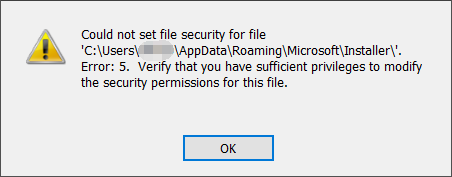
Could not set file security for file
'C:\Users\Administrator\AppData]Roaming\Microsoft\Installer\'
Error: 1307. Verify that you have sufficient privileges to  modify the security permissions for this file.
- 1
- 2
- 3
原因分析
msi安装过程需要读写'C:\Users\用户名\AppData]Roaming\Microsoft\Installer\'这个文件夹。由于没有权限所以报错了。
首先尝试右键安装包管理员权限运行,发现没这个选项,msi包不能右键管理员权限运行。
尝试过修改Installer这个文件夹的权限,发现就算给Everyone完全控制权限都不行。
想起来msi安装是调用C:\Windows\System32\msiexec.exe进行的,可能是我之前整了些乱七八糟的导致msiexec.exe没有权限。
解决方法
- 右键windows打开管理员模式的命令提示符(或者管理员模式的PowerShell应该也行)
- 输入
msiexec /i D:\安装包位置\installer-windows.msi执行安装。 - 安装成功
声明:本文内容由网友自发贡献,不代表【wpsshop博客】立场,版权归原作者所有,本站不承担相应法律责任。如您发现有侵权的内容,请联系我们。转载请注明出处:https://www.wpsshop.cn/article/detail/56185?site
推荐阅读

相关标签

