- 15.8 Bootstrap 弹出框(Popover)插件_弹出框插件
- 2Python 使用和高性能技巧总结_python高性能编程心得
- 3UE4 HTTP 请求插件说明(DTHttpRequest)_ue4http头添加修改的方式
- 4【从零开始学习Redis | 第七篇】利用Redis构造全局唯一ID(含其他构造方法)
- 5Unity编辑器下打开沙盒路径_unity 编辑器下 读取沙盒
- 6Unity创建 .asset配置文件的方式_unity c# asset 配置
- 7c#学习笔记(一)c#注册与登录界面_c# 注册登录远吗
- 8Unity物体上有碰撞体组件但是不响应鼠标点击事件_unity物体的点击碰撞体被其他碰撞体覆盖
- 9加密芯片ATSHA204之使用
- 10Linux系统虚拟机中挂载及使用光盘_linux虚拟机挂盘安装软件包并摘盘
mongodb常用增删改语句、多表关联查询_mongo remove 多个表
赞
踩
下载安装mongodb参考:
https://www.runoob.com/mongodb/mongodb-window-install.html
展示所有数据库
show dbs;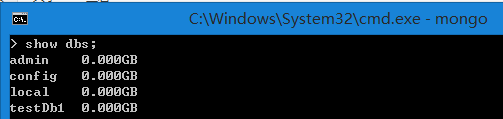
新建或进入数据库myNewDb
use myNewDb;
展示数据myNewDb的所有表
show tables; 或者 show collections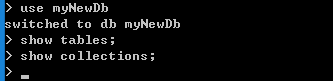
创建一个表/集合party
db.createCollection("party");
新增记录
- db.party.insert({"_id":1,"name":"张三","age":20,"address":"苏州"});
-
- db.getCollection("party").insert({"name":"李四","age":21,"birth":"1997-01-01"});

查询所有记录(格式化)
db.party.find({}).pretty();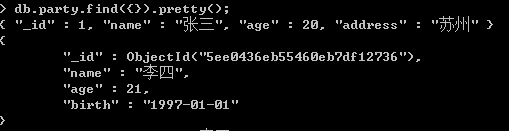
条件查询,并返回指定字段之外的字段(除了name的字段)
db.party.find({"_id":1},{"name":0});
条件查询,并返回指定字段的字段(name,address的字段)
db.party.find({"_id":1},{"name":1,"address":1});
模糊查询,查询name字段的值含有’张’字的记录
db.party.find({"name":/张/})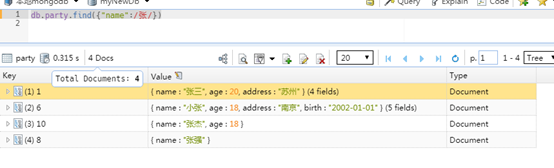
查询name中以‘张’为开头的记录
db.party.find({"name":/^张/})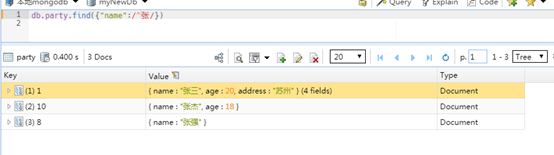
mongoDB中将某个字段(如id)升序排序查询
db.party.find({})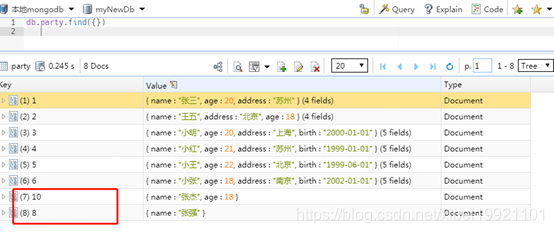
排序(将id升序):
db.party.find({}).sort({ _id:1 })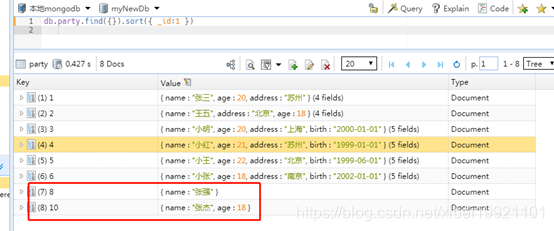
分页查询(结合skip和limit函数):
db.party.find({}).sort({ _id:1 }).skip(5).limit(5)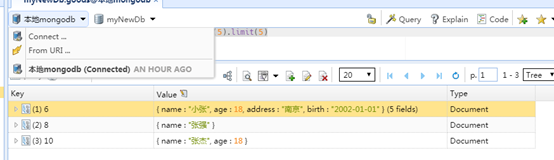
tips:注意mongoDB分页的时候直接使用skip是一条一条逐步跳的,当数据量过大,会引发性能上问题,可以通过条件查询+排序+限制返回记录,即边查询,边排序,排序之后,抽取上一页中的最后一条记录,作为当前分页的查询条件,从而避免了skip效率低下的问题
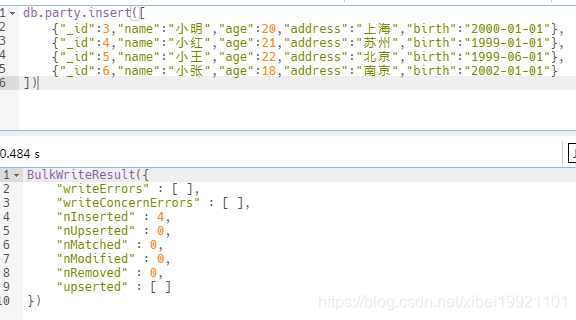
批量插入
- db.party.insert([
- {"_id":3,"name":"小明","age":20,"address":"上海","birth":"2000-01-01"},
- {"_id":4,"name":"小红","age":21,"address":"苏州","birth":"1999-01-01"},
- {"_id":5,"name":"小王","age":22,"address":"北京","birth":"1999-06-01"},
- {"_id":6,"name":"小张","age":18,"address":"南京","birth":"2002-01-01"}
- ])
修改语句:
db.party.update({"_id":ObjectId("5ee0436eb55460eb7df12736")},{$set: {"name":"李四2"}})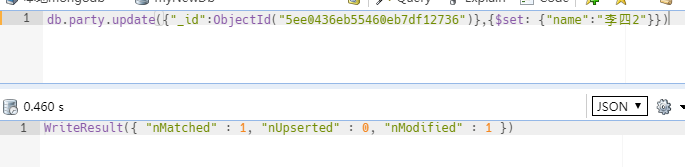
删除
remove方法
mongoDB多表关联查询
数据库常用的查询少不了多表关联查询,MongoDB在3.2版本中新增$lookup的高级查询
1.主要功能:
将每个输入待处理的文档,经过$lookup 阶段的处理,输出的新文档中会包含一个新生成的数组列(户名可根据需要命名新key的名字 )。数组列存放的数据 是 来自 被Join 集合的适配文档,如果没有,集合为空(即 为[ ])
2.基本使用语法:
- {
- $lookup:
- {
- from: <collection to join>,
- localField: <field from the input documents>,
- foreignField: <field from the documents of the "from" collection>,
- as: <output array field>
- }
- }
3.语法的解释说明
| 语法值 | 解释说明 |
| from | 同一个数据库下等待被Join的集合 |
| localField | 源集合中的match值,如果输入的集合中,某文档没有loaclField这个key(Field),在处理的过程中,会默认为此文档含有localField:null的键值对 |
| foreignField | 待Join的集合的match值,如果待Join的集合中,文档没有foreignField值,在处理的过程中,会默认为此文档含有foreignField:null的键值对 |
| as | 为输出文档的新增值命名。如果输入的集合中已存在该值,则会覆盖掉 |
| 语法值 | 解释说明 |
| from | 同一个数据库下等待被Join的集合 |
| localField | 源集合中的match值,如果输入的集合中,某文档没有loaclField这个key(Field),在处理的过程中,会默认为此文档含有localField:null的键值对 |
| foreignField | 待Join的集合的match值,如果待Join的集合中,文档没有foreignField值,在处理的过程中,会默认为此文档含有foreignField:null的键值对 |
| as | 为输出文档的新增值命名。如果输入的集合中已存在该值,则会覆盖掉 |
(注:null=null此为真)
其语法语句可以类似的理解为sql语句:
- SELECT *, <output array field>
- FROM collection
- WHERE <output array field> IN (SELECT * FROM <collection to join>
- WHERE <foreignField>=<collection.localField>);
举例:
例1:
假设有订单集合orders,存储如下数据:
- db.orders.insert([
- { "_id" : 1, "item" : "纯净水", "price" : 2, "quantity" : 2 },
- { "_id" : 2, "item" : "可乐", "price" : 3, "quantity" : 1 },
- { "_id" : 3 }
- ])
有商品集合goods(集合中的goodname对应订单表中的item),存储如下数据:
- db.goods.insert([
- { "_id" : 1, "goodname" : "纯净水", description: "水是生命的源泉", "num" : 120 },
- { "_id" : 2, "goodname" : "面包", description: "蓬松法式软面包", " num " : 80 },
- { "_id" : 3, "goodname" : "雪碧", description: "酷爽一夏", " num " : 60 },
- { "_id" : 4, "goodname" : "可乐", description: "可口可乐", " num " : 70 },
- { "_id" : 5, "goodname": null, description: "待定" },
- { "_id" : 6 }
- ])
在这种模式设计下,如果要查询订单表对应商品的信息情况:
常规的sql语句应该是:
select * from orders o left join goods g on o.item = g.goodname;而此处是MongoDb,那么可以写成:
- db.orders.aggregate([
- {
- $lookup: {
- from: "goods",
- localField: "item",
- foreignField: "goodname",
- as: "goods_docs"
- }
- }
- ])
返回的执行结果:
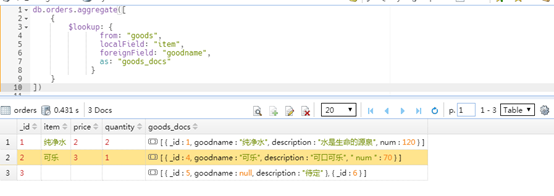
返回的结果json值如下:
- {
- "_id" : 1,
- "item" : "纯净水",
- "price" : 2,
- "quantity" : 2,
- "goods_docs" : [
- {
- "_id" : 1,
- "goodname" : "纯净水",
- "description" : "水是生命的源泉",
- "num" : 120
- }
- ]
- },
-
- /* 2 */
- {
- "_id" : 2,
- "item" : "可乐",
- "price" : 3,
- "quantity" : 1,
- "goods_docs" : [
- {
- "_id" : 4,
- "goodname" : "可乐",
- "description" : "可口可乐",
- " num " : 70
- }
- ]
- },
-
- /* 3 */
- {
- "_id" : 3,
- "goods_docs" : [
- {
- "_id" : 5,
- "goodname" : null,
- "description" : "待定"
- },
- {
- "_id" : 6
- }
- ]
- }

根据上面的查询语句以及结果,可以将上面的处理过程,描述如下:
从集合orders中逐个获取文档处理,拿到一个文档后,会根据localField值遍历被Join的goods集合(from:"goods"),看goods集合文档中foreignField值是否与之相等。如果相等,就把符合条件的goods文档整体内嵌到聚合框架新生成的文档中,并且新key统一命名为goods_docs。考虑到符合条件的文档不唯一,这个Key对应的Value是个数组形式。原集合中Key对应的值为Null值或不存在时,需特别注意。
例2:
接下来复杂些,多表关联后肯定有条件限制,如:
查询订单表中id为1对应商品名的所对应商品库存大于100的信息情况:
常规的sql语句应该是:
select * from orders o left join goods g on o.item = g.goodname where o.id =1 and g.num>100;那么对应的mongoDB的查询语句:
- db.orders.aggregate([
- {$match: {"_id":1}},
- {
- $lookup: {
- from: "goods",
- localField: "item",
- foreignField: "goodname",
- as: "goods_docs"
- }
- },
- {$match: {"goods_docs.num":{$gt: 100}}}
- ])
对应的结果的json值:
- {
- "_id" : 1,
- "item" : "纯净水",
- "price" : 2,
- "quantity" : 2,
- "goods_docs" : [
- {
- "_id" : 1,
- "goodname" : "纯净水",
- "description" : "水是生命的源泉",
- "num" : 120
- }
- ]
- }
例3:
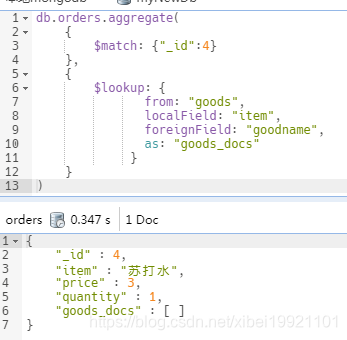
源表(orders)中比较列为某一个值,而此值在待比较表(goods)的所有文档中都不存在
orders集合在现有数据的基础上,再被insert一条记录,这个订单的商品为苏打水,在库存商品goods集合中根本没有此数据。
- db.orders.insert(
- {"_id" : 4, "item" : "苏打水", "price" : 3, "quantity" : 1 }
- )
再次执行查询:
select * from orders o left join goods g on o.item = g.goodname where o.id = 4;执行对应的mongoDB的查询语句:
- db.orders.aggregate(
- {
- $match: {"_id":4}
- },
- {
- $lookup: {
- from: "goods",
- localField: "item",
- foreignField: "goodname",
- as: "goods_docs"
- }
- }
- )
例4:
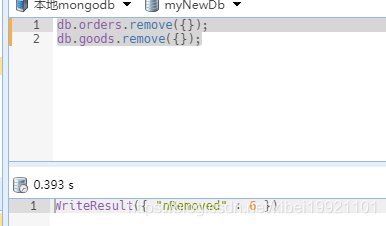
上述例子比较单一,只是单纯的key/value,下面比较数组,首先先将orders以及goods集合里的数据清空
- db.orders.remove({});
- db.goods.remove({});
再向orders中插入数据:
- db.orders.insert(
- { "_id" : 1, "item" : "MON1003", "price" : 350, "quantity" : 2, "remark" :[ "27 inch", "Retina display", "1920x1080" ], "type" : "Monitor" }
- )
注:插入的记录中remark是数组格式
向goods插入数据:
- db.goods.insert([
- { "_id" : 1, "goodname" : "MON1003", "type" : "Monitor", "num" : 120,"size" : "27 inch", "resolution" : "1920x1080" },
- { "_id" : 2, "goodname" : "MON1012", "type" : "Monitor", "num" : 85,"size" : "23 inch", "resolution" : "1280x800" },
- { "_id" : 3, "goodname" : "MON1031", "type" : "Monitor", "num" : 60,"size" : "23 inch", "display_type" : "LED" }
- ])
此时关联orders中的remark与goods中的size
- db.orders.aggregate([
- {
- $unwind: "$remark"
- },
- {
- $lookup:
- {
- from: "goods",
- localField: "remark",
- foreignField: "size",
- as: "goods_docs"
- }
- }
- ])
执行返回的结果:
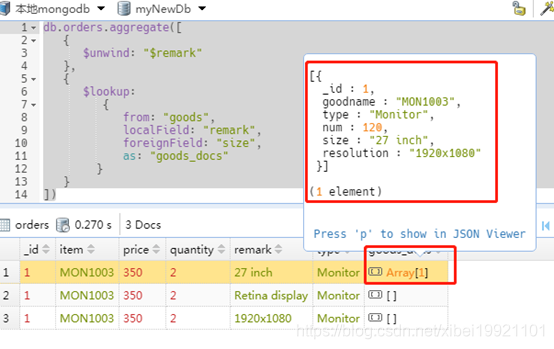
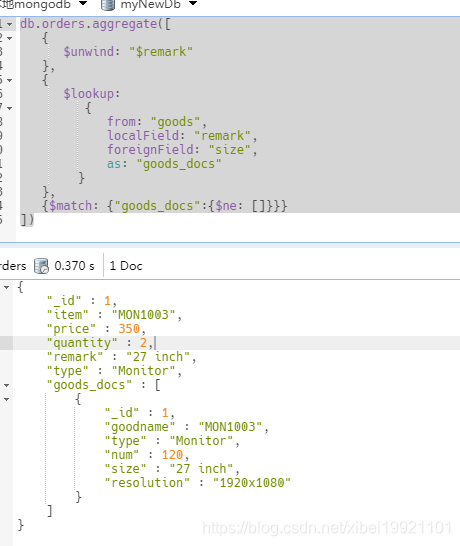
根据结果可以看到{$unwind: "$specs"}将数据每个值都遍历了,将上述查询语句改成(条件筛选不为空的):
- db.orders.aggregate([
- {
- $unwind: "$remark"
- },
- {
- $lookup:
- {
- from: "goods",
- localField: "remark",
- foreignField: "size",
- as: "goods_docs"
- }
- },
- {$match: {"goods_docs":{$ne: []}}}
- ]);
执行返回的结果:
例5:
mongodb 集合间关联后更新,借助 forEach 功能
需求:集合orders和orderInfo关联,筛选符合条件,然后更新orders的数据。
- db.orders.aggregate([
- {$match:{"status" : 2}},
- {$match:{"disabled" : 0}},
- {$match:{"consumer" : "小王"}},
- {
- $lookup:
- {
- from: "orderInfo",
- localField: " orderId ",
- foreignField: "orderInfoId",
- as: "orderInfo_docs"
- }
- },
- { $match : {"orderInfo _docs" : [ ]} }
- ]).forEach(function(item){
- db.orders.update({"_id":item._id},{$set:{"status":1 }})
- })
例6:
拓展一下,多张表(两张以上关联)的时候:
举例user(用户),orders(订单),products(商品)表
- db.orders.aggregate([{
- $lookup:
- {
- from: "products",
- localField: "pid",
- foreignField: "_id",
- as: " products_docs"
- }
- },{
- $lookup:
- {
- from: "user",
- localField: "uid",
- foreignField: "_id",
- as: "user_docs"
- }
- }]);
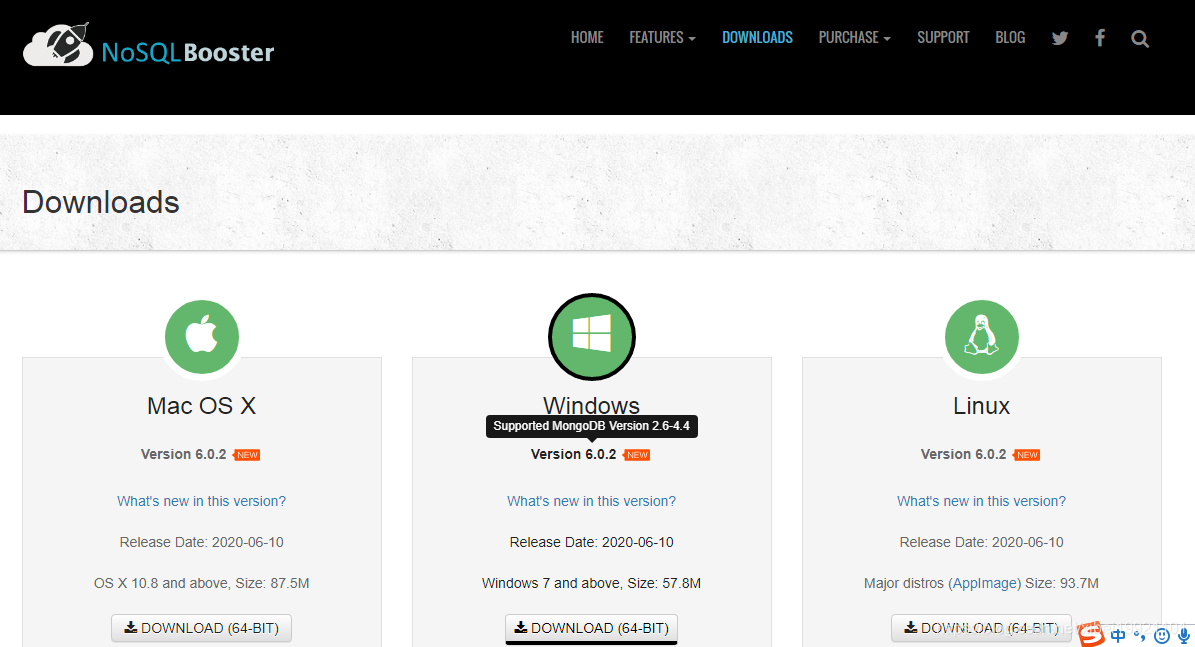
最后推荐一个mongodb的桌面管理工具,官网下载地址:
https://nosqlbooster.com/downloads