
热门标签
热门文章
- 1【知识---图像特征提取算法--方向梯度直方图(Histogram of Oriented Gradients, HOG)原理、特点、应用场合及代码】
- 2插头dp。_插头dp csdn
- 3遗传算法-交叉算子讲解_遗传算法交叉操作
- 4【服务器数据恢复】某品牌StorageWorks服务器raid数据恢复案例_服务器数据恢复图片
- 5Nexus数据的备份与恢复_nexus3 备份和还原
- 6共同随机数(Common random number)算法及衍生的社群(association)随机选举算法_共享随机数
- 7通过js下载文件到本地的方法a标签_js 文件 下载到本地
- 8Vue权限管理的实现流程_vue权限管理怎么实现
- 9C语言函数参数传递详解_c语言参数传递
- 10CSS 实用工具: Google Fonts API 引入免费字体库
当前位置: article > 正文
SpringBoot-40-使用spring boot+dubbo+zookeeper创建demo_springboot与zookeeper集成demo
作者:逻辑思维 | 2024-02-01 14:11:56
赞
踩
springboot与zookeeper集成demo
11.5 spring boot+dubbo+zookeeper
-
创建一个maven项目,删除src目录将其作物父项目
-
分别创建demo-provider(服务方),demo-consumer(消费方)两个springBoot项目,创建的时候需要配置热部署和web依赖
-
集成步骤:前提zookeeper的服务一定要打开
-
服务方:
-
- 导入依赖
<!--导入依赖dubbo+zookeeper-->
<dependency>
    <groupId>org.apache.dubbo</groupId>
    <artifactId>dubbo-spring-boot-starter</artifactId>
    <version>3.0.10</version>
</dependency>
<!--导入依赖zkclient客户端-->
<dependency>
    <groupId>com.github.sgroschupf</groupId>
    <artifactId>zkclient</artifactId>
    <version>0.1</version>
</dependency>
<!--导入依赖zkclient服务端-->
<dependency>
    <groupId>org.apache.curator</groupId>
    <artifactId>curator-framework</artifactId>
    <version>5.3.0</version>
</dependency>
<dependency>
    <groupId>org.apache.curator</groupId>
    <artifactId>curator-recipes</artifactId>
    <version>5.3.0</version>
</dependency>
<dependency>
    <groupId>org.apache.curator</groupId>
    <artifactId>curator-x-discovery</artifactId>
    <version>5.3.0</version>
</dependency>
<!--排除zookeeper自己的日志-->
<dependency>
    <groupId>org.apache.zookeeper</groupId>
    <artifactId>zookeeper</artifactId>
    <version>3.8.0</version>
    <exclusions>
        <exclusion>
            <groupId>org.slf4j</groupId>
            <artifactId>slf4j-log4j12</artifactId>
        </exclusion>
    </exclusions>
</dependency>
- 1
- 2
- 3
- 4
- 5
- 6
- 7
- 8
- 9
- 10
- 11
- 12
- 13
- 14
- 15
- 16
- 17
- 18
- 19
- 20
- 21
- 22
- 23
- 24
- 25
- 26
- 27
- 28
- 29
- 30
- 31
- 32
- 33
- 34
- 35
- 36
- 37
- 38
- 39
- 40
-
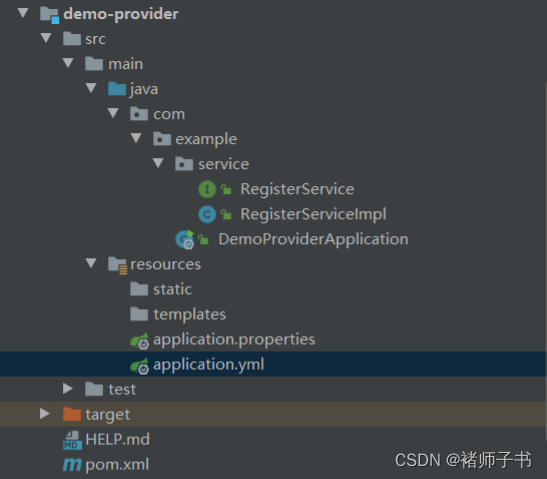
- 项目结构
-
- 开发服务service和实现类
public interface RegisterService { String sayHello(String name); }- 1
- 2
- 3
- 4
package com.example.service;

import org.apache.dubbo.config.annotation.DubboService;
import org.apache.dubbo.rpc.RpcContext;

/**
 * @author CNCLUKZK
 * @create 2022/8/21-23:00
 */
//服务的注册于发现
@DubboService
public class RegisterServiceImpl implements RegisterService{

    @Override
    public String sayHello(String name) {
        System.out.println(name+"hello!"+", request from consumer: "+ RpcContext.getServerContext().getRemoteAddress());
        return name+"hello!";
    }
}
- 1
- 2
- 3
- 4
- 5
- 6
- 7
- 8
- 9
- 10
- 11
- 12
- 13
- 14
- 15
- 16
- 17
- 18
- 19
@DubboService 服务的注册于发现, 早先版本是@Service注意是Dubbo的
- 配置注册中心的地址,以及服务发现名,和要扫描的包,application.yml
server:
  port: 8081
#应用名称
dubbo:
  application:
    name: demo-provider
  protocol:
    name: dubbo
    port: -1
  #服务注册中心地址
  registry:
    id: zk-registry
    address: zookeeper://127.0.0.1:2181
  config-center:
    address: zookeeper://127.0.0.1:2181
  metadata-report:
    address: zookeeper://127.0.0.1:2181
  #那些服务被注册
  scan:
    base-packages: com.example.service
- 1
- 2
- 3
- 4
- 5
- 6
- 7
- 8
- 9
- 10
- 11
- 12
- 13
- 14
- 15
- 16
- 17
- 18
- 19
- 20
注意:生产者的启动类需要用@EnableDubbo注解标注,说明要启动Dubbo通信功能
@SpringBootApplication
@EnableDubbo
public class DemoProviderApplication {

    public static void main(String[] args) {
        SpringApplication.run(DemoProviderApplication.class, args);
        System.out.println("dubbo service started");
    }

}
- 1
- 2
- 3
- 4
- 5
- 6
- 7
- 8
- 9
- 10
-
消费者消费
-
- 导入依赖(和服务方一样)
- 项目结构
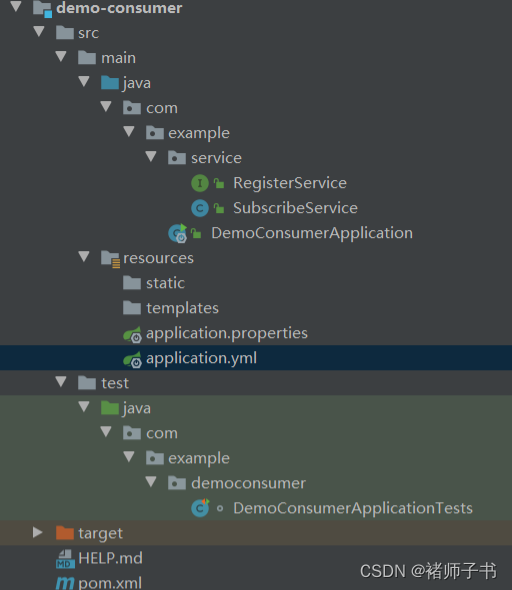
- 配置注册中心的地址,配置自己的服务名,不需配置那些服务被注册
dubbo:
  application:
    name: demo-consumer
  protocol:
    name: dubbo
    port: -1
  #到服务注册中心地址
  registry:
    id: zk-registry
    address: zookeeper://127.0.0.1:2181
  config-center:
    address: zookeeper://127.0.0.1:2181
  metadata-report:
    address: zookeeper://127.0.0.1:2181
- 1
- 2
- 3
- 4
- 5
- 6
- 7
- 8
- 9
- 10
- 11
- 12
- 13
- 14
- 远程调用服务
package com.example.service;

import org.apache.dubbo.config.annotation.DubboReference;
import org.springframework.stereotype.Service;

/**
 * @author CNCLUKZK
 * @create 2022/8/21-23:02
 */
@Service //需要将组件放到spring容器中
public class SubscribeService {
    //拿到注册中心的服务
    //方式1:引用pom坐标
    //方式2:可以定义和服务方相同路径的接口名
    @DubboReference
    RegisterService registerService;

    public void sayHelloConsumer() {
        String name = registerService.sayHello("张三");
        System.out.println("远程执行的方法:"+name);
    }
}
- 1
- 2
- 3
- 4
- 5
- 6
- 7
- 8
- 9
- 10
- 11
- 12
- 13
- 14
- 15
- 16
- 17
- 18
- 19
- 20
- 21
- 22
@Service //需要将组件放到spring容器中,是import org.springframework.stereotype.Service;
@DubboReference:需要可以定义和服务方相同路径的接口名,这样才能引用到,实际开发不会用这种方式来调用
消费者的启动类需要用@EnableDubbo注解标注,说明要启动Dubbo通信功能
@SpringBootApplication
@EnableDubbo
public class DemoConsumerApplication {

    public static void main(String[] args) {
        SpringApplication.run(DemoConsumerApplication.class, args);
    }

}
- 1
- 2
- 3
- 4
- 5
- 6
- 7
- 8
- 9
-
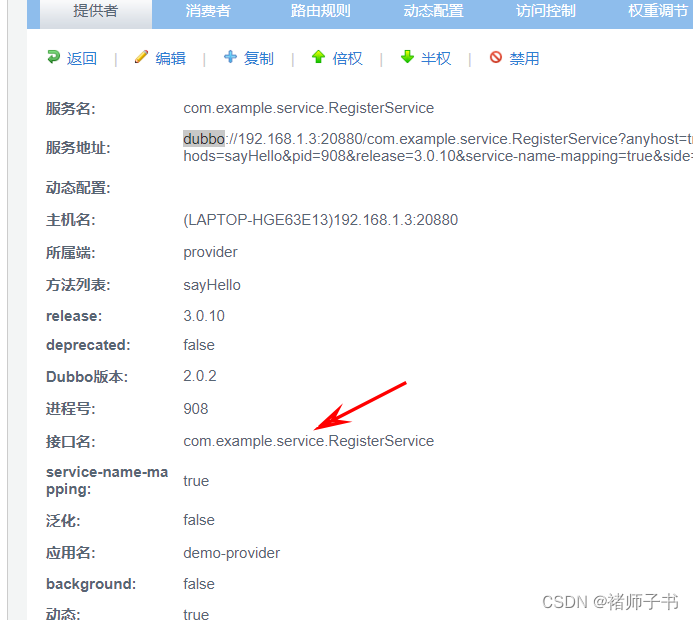
然后访问http://localhost:7001/输入登录账户和密码root/root进入dubbo-admin,进行查看服务注册信息
-
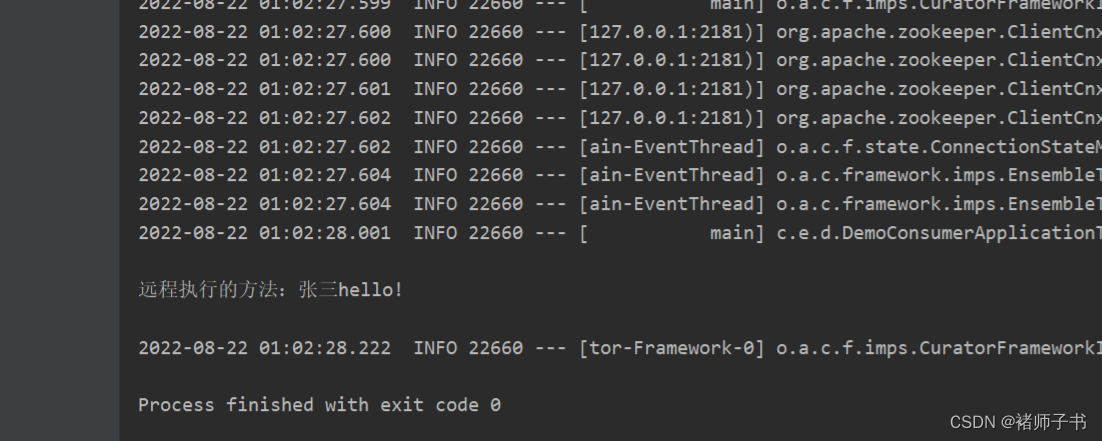
测试时,zookeeper的服务打开后,接着将dubbo-admin监控平台打开,之后将服务方demo-provider程序启动,最后在消费方进行测试使用
package com.example.democonsumer;

import com.example.service.SubscribeService;
import org.apache.dubbo.config.spring.context.annotation.EnableDubbo;
import org.junit.jupiter.api.Test;
import org.springframework.beans.factory.annotation.Autowired;
import org.springframework.boot.test.context.SpringBootTest;

@SpringBootTest
@EnableDubbo
class DemoConsumerApplicationTests {

    @Autowired
    SubscribeService subscribeService;

    @Test
    void contextLoads() {
        subscribeService.sayHelloConsumer();
    }

}
- 1
- 2
- 3
- 4
- 5
- 6
- 7
- 8
- 9
- 10
- 11
- 12
- 13
- 14
- 15
- 16
- 17
- 18
- 19
- 20
- 21
- 调用结果
下一篇:SpringBoot-41-默认异常处理机制
声明:本文内容由网友自发贡献,不代表【wpsshop博客】立场,版权归原作者所有,本站不承担相应法律责任。如您发现有侵权的内容,请联系我们。转载请注明出处:https://www.wpsshop.cn/article/detail/53981
推荐阅读


相关标签

