
热门标签
热门文章
- 1dubbo负载均衡-RandomLoadBalance
- 2机器学习笔记(4)——多变量线性回归
- 3Android Studio App开发实战项目之实现淘宝电商App首页界面(附源码,可用于大作业参考)_android 淘宝代码
- 4鸿蒙harmonyOS 在DevEco Studio 安装应用时出现 INSTALL_PARSE_FAILED_USESDK_ERROR
- 5Tool-X 工具汇总
- 6STM32学习记录——光敏传感器的使用_stm32光敏传感器
- 7关于目标检测中按照比例将数据集随机划分成训练集和测试集
- 8yolov5 部署jetson nano(通用) 保姆级教学_yolov5部署到nano保姆级教程
- 9Android开发-网络请求框架okhttp3的使用_android okhttp3
- 10【物联网】液滴即信息:雨滴探测传感器实验解析降雨的密码_ps2操作杆实验目的
当前位置: article > 正文
青锋开源架构-springboot2.6.x+vue3-antdesign-vite之springsecurity实现访问权限控制_vue带有权限的框架开源
作者:数据灵魂 | 2024-02-01 13:49:01
赞
踩
vue带有权限的框架开源
框架开源地址:
权限访问控制讲解
GrantedAuthority接口
Spring Security中有一些概念和实现,例如GrantedAuthority用于获得授权来授权/控制访问权限的接口。
我希望对允许的操作(例如userList或user:del)进行允许,这些操作将允许管理员(具有role ROLE_ADMIN)使用。
通过查看org.springframework.security.core.userdetails.UserDetails了身份验证提供程序引用的DAO中使用的接口,该接口消耗了User(请注意最后的GrantedAuthority):
- public User(String username,
- String password,
- boolean enabled,
- boolean accountNonExpired,
- boolean credentialsNonExpired,
- boolean accountNonLocked,
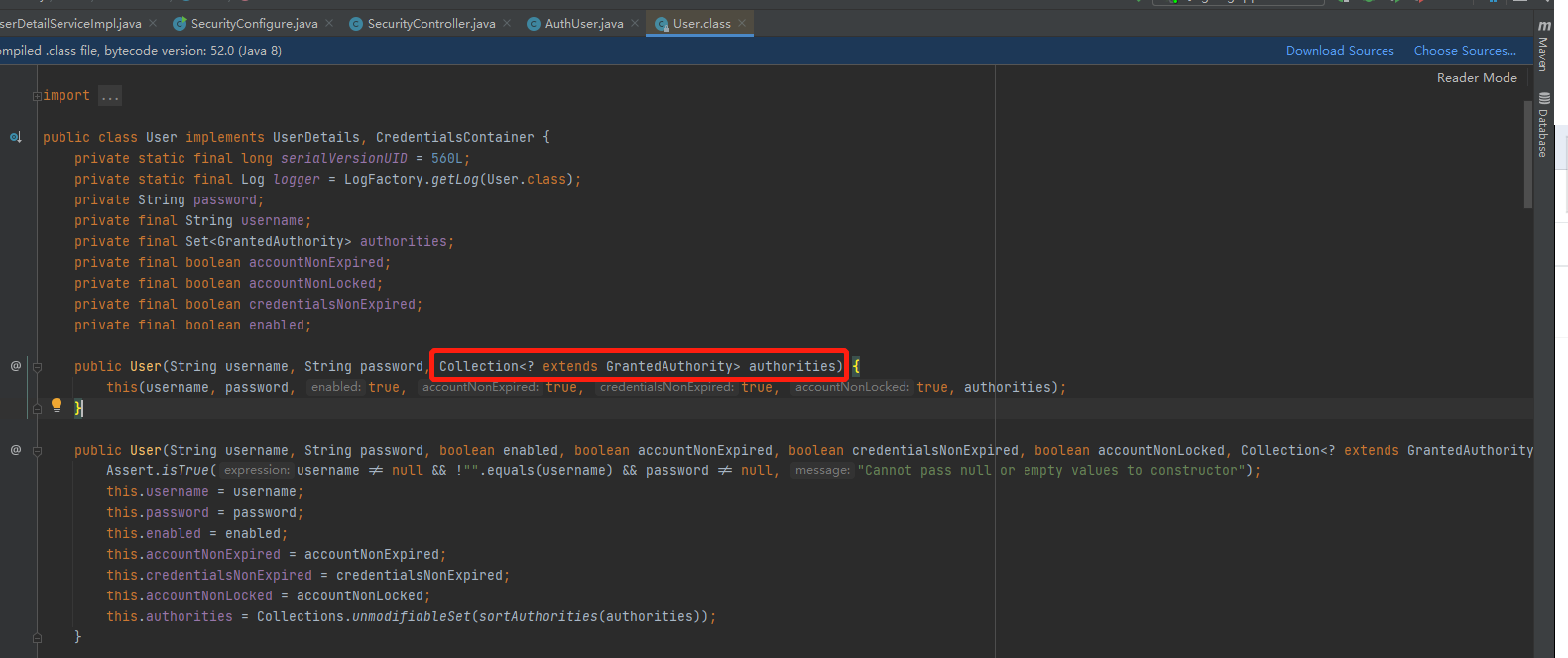
- Collection<? extends GrantedAuthority> authorities)
当用户执行登录验证之后,查询对应的权限集合authorities,将权限集合返回到User对象中。
获取用户权限集合
我们可以通过userDetailsService.loadUserByUsername("admin").getAuthorities()获取用户的权限信息,这里的权限信息就是上面讲解的authorities设置的权限信息。
userDetailsService.loadUserByUsername("admin").getAuthorities()项目中如何使用?
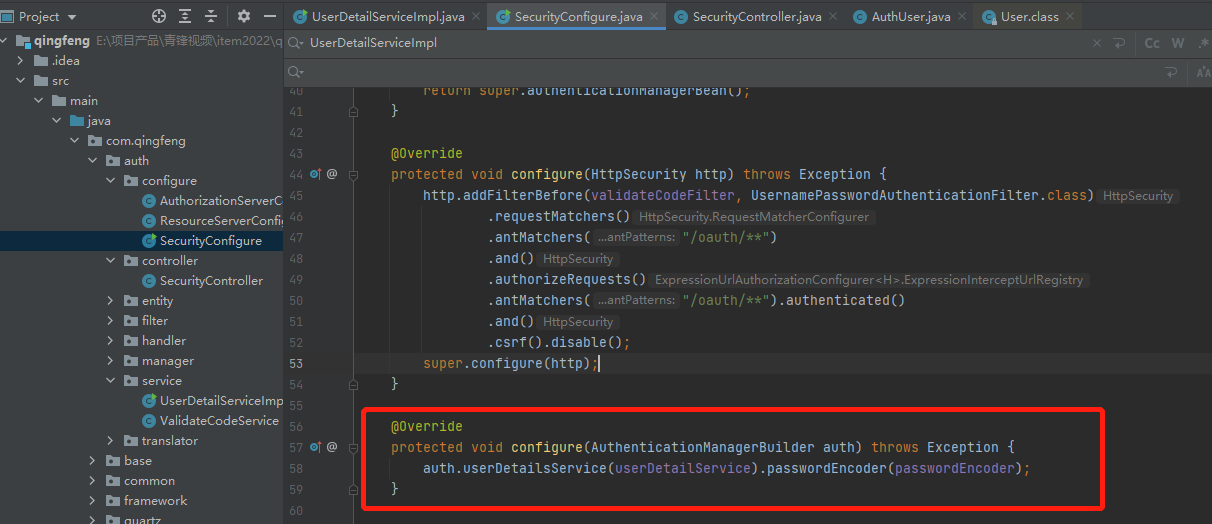
配置权限身份认证
我们在SecurityConfigure中设置权限的身份认证,如下:
- @Override
- protected void configure(AuthenticationManagerBuilder auth) throws Exception {
- auth.userDetailsService(userDetailService).passwordEncoder(passwordEncoder);
- }
加载用户权限
我们通过查询当前登录用户的权限信息,并将权限信息返回到User中。
- List<GrantedAuthority> grantedAuthorityList = AuthorityUtils.commaSeparatedStringToAuthorityList(permissions);
- AuthUser authUser = new AuthUser(uPd.get("login_name").toString()+":"+uPd.get("id").toString()+":"+organize_id, uPd.get("login_password").toString(), true, true, true, notLocked,
- grantedAuthorityList);
AuthUser继承了User接口,我们通过查看User构造方法如下:
详细代码如下:
- @Override
- public UserDetails loadUserByUsername(String username) throws UsernameNotFoundException {
- PageData pd = new PageData();
- if(username.contains(":")){
- pd.put("login_name",username.split(":")[0]);
- }else{
- pd.put("login_name",username);
- }
- PageData uPd = userManager.findUserInfo(pd);
- System.out.println(uPd);
- if(Verify.verifyIsNotNull(uPd)){
- System.out.println(uPd.get("status"));
- if(uPd.get("status").equals("2")){
- throw new UsernameNotFoundException("账号已休眠,请联系管理员");
- }else{
- if(uPd.get("status").equals("0")){
- //查询当前用户组织
- pd.put("user_id",uPd.get("id"));
- PageData orgPd = userManager.findUserOrganizeInfo(pd);
- String organize_id = "";
- if(Verify.verifyIsNotNull(orgPd)){
- organize_id = orgPd.get("organize_id")+"";
- }
- //登录成功
- pd.put("user_id",uPd.get("id"));
- String permissions = userManager.findUserPermissions(pd);
- // System.out.println("===================================查询出来数据权限==============================");
- // System.out.println(permissions);
- boolean notLocked = false;
- if (StringUtils.equals("0", uPd.get("status").toString()))
- notLocked = true;
-
- List<GrantedAuthority> grantedAuthorityList = AuthorityUtils.commaSeparatedStringToAuthorityList(permissions);
- AuthUser authUser = new AuthUser(uPd.get("login_name").toString()+":"+uPd.get("id").toString()+":"+organize_id, uPd.get("login_password").toString(), true, true, true, notLocked,
- grantedAuthorityList);
- return transToAuthUser(authUser,uPd);
- }else if(uPd.getString("status").equals("1")){
- throw new UsernameNotFoundException("账号已禁用,请联系管理员");
- }else if(uPd.getString("status").equals("2")){
- throw new UsernameNotFoundException("账号已休眠,请联系管理员");
- }
- }
- return null;
- }else{
- throw new UsernameNotFoundException("登录名称不存在,请重新输入。");
- }
- }

权限SQL数据
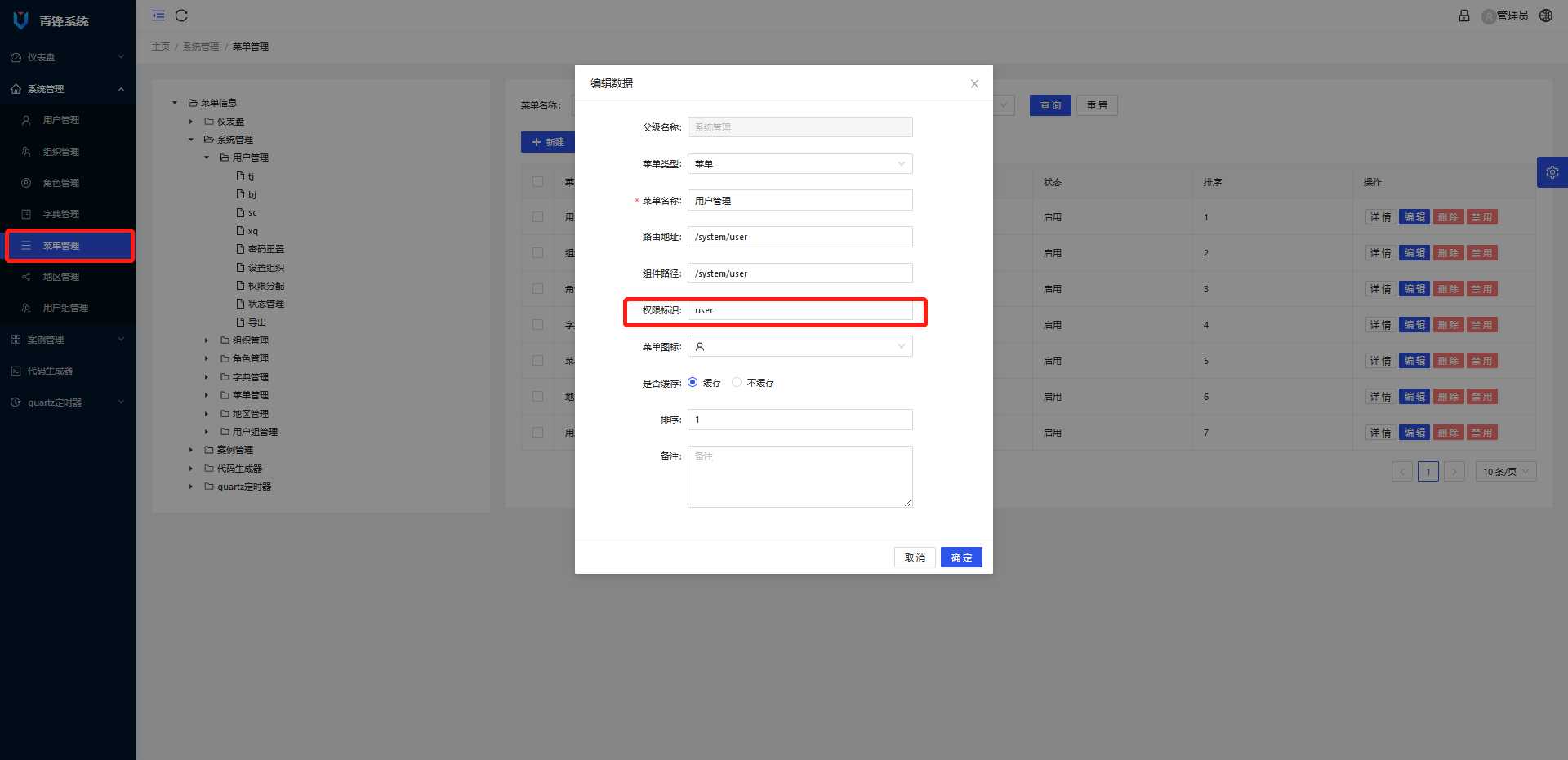
通过SQL可以看到,数据权限perms的权限是通过父节点菜单的权限标识符:按钮功能权限标识符,比如用户的查看、新增、编辑、删除方法:
- user:info
- user:add
- user:edit
- user:del

请求方法增加权限控制
请求方法中,通过增加注解:@PreAuthorize("hasAnyAuthority('xxx:xxx')")进行权限控制:
@PreAuthorize("hasAnyAuthority('xxx:xxx')")下面以系统用户权限控制方法进行讲解:
- /**
- * @title listPage
- * @description 查询数据分页列表
- * @author Administrator
- * @updateTime 2022/1/19 0019 23:41
- */
- @GetMapping("/listPage")
- @PreAuthorize("hasAnyAuthority('user:info')")
- public MyResponse listPage(QueryRequest queryRequest, Area area) {
- String userParams = SecurityContextHolder.getContext().getAuthentication().getName();
- return new MyResponse().data(dataTable);
- }
-
- /**
- * @title save
- * @description 保存数据
- * @author Administrator
- * @updateTime 2022/1/19 0019 23:41
- */
- @PostMapping
- @PreAuthorize("hasAnyAuthority('user:add')")
- public void save(@Valid @RequestBody Area area,HttpServletResponse response) throws Exception {
- this.writeJson(response,json);
- }
-
- /**
- * @title update
- * @description 更新数据
- * @author Administrator
- * @updateTime 2022/1/19 0019 23:41
- */
- @PutMapping
- @PreAuthorize("hasAnyAuthority('user:edit')")
- public void update(@Valid @RequestBody Area area,HttpServletResponse response) throws Exception {
- Json json = new Json();
- this.writeJson(response,json);
- }
-
- /**
- * @title delete
- * @description 删除数据
- * @author Administrator
- * @updateTime 2022/1/19 0019 23:41
- */
- @DeleteMapping("/{ids}")
- @PreAuthorize("hasAnyAuthority('user:del')")
- public void delete(@NotBlank(message = "{required}") @PathVariable String ids,HttpServletResponse response) throws Exception {
- Json json = new Json();
- this.writeJson(response,json);
- }
-
- /**
- * @title updateStatus
- * @description 更新状态
- * @author Administrator
- * @updateTime 2022/1/19 0019 23:41
- */
- @PostMapping("/updateStatus")
- @PreAuthorize("hasAnyAuthority('user:status')")
- public void updateStatus(@Valid @RequestBody Area area,HttpServletResponse response) throws Exception {
- Json json = new Json();
- this.writeJson(response,json);
- }
菜单和按钮权限标识设置
看到这里,大家可能会有疑问,上面提到的user:add,用户菜单user和添加按钮add在哪里设置的呢?
本文内容由网友自发贡献,转载请注明出处:【wpsshop博客】
推荐阅读


相关标签

