
热门标签
热门文章
- 1Flask框架开发博客网站_flask开发的网站有哪些
- 2Kubernetes Ingress诡异的502、503、504等奇葩问题(二)
- 32023十大编程语言及未来展望_编程语言排行榜2010-2023
- 4Kong工作原理 - 健康检查和断路器 - 定义健康和不健康
- 5关于ROS在一个回调函数中处理两个订阅话题消息(多话题回调、多参数回调问题)_ros 服务 回调函数多参数
- 6【送书福利-第二十五期】《机器学习高级实践》
- 7如何区分一个项目是react还react native_怎样查看项目是vue的还是react
- 8MySQL 实现多张无关联表查询数据并分页_mysql将三个表的数据一起查出来分页
- 9python云南昆明旅游景点数据可视化大屏全屏系统设计与实现(django框架)_利用django铺盖整个屏幕
- 10支持上亿物联网终端设备接入的MQTT集群
当前位置: article > 正文
如何利用GPU训练keras模型_keras使用gpu训练模型
作者:数据可视化灵魂 | 2024-02-01 12:14:29
赞
踩
keras使用gpu训练模型
1、keras-gpu环境搭建
anaconda+tensorflow-gpu参考文档(tensorflow-gpu.docx)
安装与tensorflow-gpu相兼容的keras版本,如本次实验环境为python3.6,tensorflow-gpu=1.14.0,keras=2.25,cuda=10.0,cudnn=7.6

2、keras基础知识
(1)数据预处理(图片、文本、序列数据)、网络层(模型构建)、数据集
(2)激活函数、损失函数、评价指标、优化方式、回调函数
(3)API使用(Sequential 顺序模型、MODEL)
(4)可视化方式(tensorboard与history)
(5)GPU
参考自Keras中文文档https://keras.io/zh/
3、tensorboard使用
from keras.callbacks import TensorBoard
tbCallBack = TensorBoard(log_dir="./model", histogram_freq=1,write_grads=True)
history=model.fit(x_train, y_train, batch_size=batch_size, epochs=epochs, shuffle=True, verbose=2, validation_split=0.2,callbacks=[tbCallBack])
- 1
- 2
- 3
参考自https://blog.csdn.net/qq_27825451/article/details/90229983
4、gpu使用
(1)数量设置:
from keras.utils import multi_gpu_model
model = multi_gpu_model(model, 2)  #GPU个数为2
- 1
- 2
如果没有在程序里面设定GPU的使用个数,即便在命令行或者os参数里设置了多个GPU,也不会使用多个GPU
(2)设备设置
方式一:命令行指定:
# 只使用第二块GPU(GPU编号从0开始)。在demo_code.py中,机器上的第二块GPU的
# 名称变成/gpu:0,不过在运行时所有/gpu:0的运算将被放在第二块GPU上。
CUDA_VISIBLE_DEVICES=1 python demo_code.py
# 只使用第一块和第二块GPU。
CUDA_VISIBLE_DEVICES=0, 1 python demo_code.py
- 1
- 2
- 3
- 4
- 5
方式二:py代码行指定
import os
# 只使用第三块GPU。
os.environ["CUDA_VISIBLE_DEVICES"] = "2"
- 1
- 2
- 3
5、结果展示
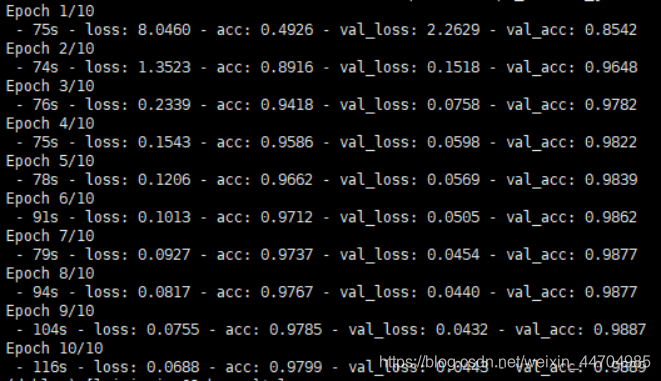
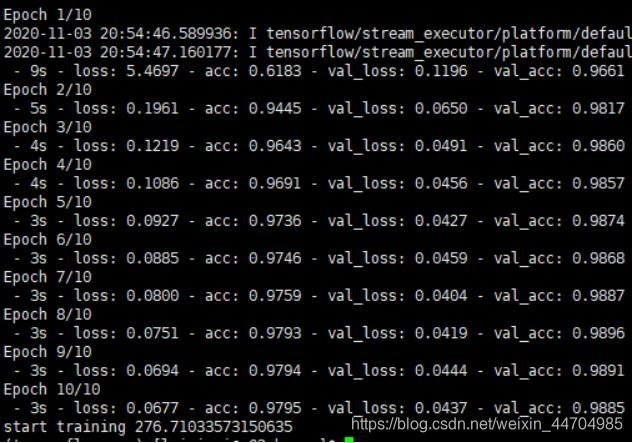
本例用在MNIST数据集的训练和测试,结果如下
CPU:26-28核,时间为928.59s
GPU:时间为276.71s
GPU运行前的状态

GPU运行后的状态

6、测试代码
import numpy as np

from keras.models import Sequential  # 采用贯序模型
from keras.layers import Input, Dense, Dropout, Activation,Conv2D,MaxPool2D,Flatten
from keras.optimizers import SGD
from keras.datasets import mnist
from keras.utils import to_categorical
from keras.callbacks import TensorBoard
import time

# 指定GPU训练
import os
# 使用第一张与第三张GPU卡
os.environ["CUDA_VISIBLE_DEVICES"] = "0, 2"

def create_model():
    model = Sequential()
    model.add(Conv2D(32, (5,5), activation='relu', input_shape=[28, 28, 1])) #第一卷积层
    model.add(Conv2D(64, (5,5), activation='relu'))                          #第二卷积层
    model.add(MaxPool2D(pool_size=(2,2)))                                    #池化层
    model.add(Flatten())                                                     #平铺层
    model.add(Dropout(0.5))
    model.add(Dense(128, activation='relu'))
    model.add(Dropout(0.5))
    model.add(Dense(10, activation='softmax'))
    return model

def compile_model(model):
    #sgd = SGD(lr=0.01, decay=1e-6, momentum=0.9, nesterov=True) # 优化函数,设定学习率(lr)等参数
    #多GPU训练
    from keras.utils import multi_gpu_model
    model = multi_gpu_model(model, 2)  #GPU个数为2
    model.compile(loss='categorical_crossentropy', optimizer="adam",metrics=['acc'])
    return model

def train_model(model,x_train,y_train,batch_size=128,epochs=10):

    #构造一个tensorboard类的对象
    #tbCallBack = TensorBoard(log_dir="./model", histogram_freq=1, write_graph=True, write_images=True,update_freq="epoch")

    tbCallBack = TensorBoard(log_dir="./model", histogram_freq=1,write_grads=True)
    history=model.fit(x_train, y_train, batch_size=batch_size, epochs=epochs, shuffle=True, verbose=2, validation_split=0.2,callbacks=[tbCallBack])
    return history,model


if __name__=="__main__":
    (x_train,y_train),(x_test,y_test) = mnist.load_data()  #mnist的数据我自己已经下载好了的
    print(np.shape(x_train),np.shape(y_train),np.shape(x_test),np.shape(y_test))

    x_train=np.expand_dims(x_train,axis=3)
    x_test=np.expand_dims(x_test,axis=3)
    y_train=to_categorical(y_train,num_classes=10)
    y_test=to_categorical(y_test,num_classes=10)
    print(np.shape(x_train),np.shape(y_train),np.shape(x_test),np.shape(y_test))

    model=create_model()
    model=compile_model(model)
    print("start training")
    ts = time.time()
    history,model=train_model(model,x_train,y_train)
    print("start training",time.time()-ts)

- 1
- 2
- 3
- 4
- 5
- 6
- 7
- 8
- 9
- 10
- 11
- 12
- 13
- 14
- 15
- 16
- 17
- 18
- 19
- 20
- 21
- 22
- 23
- 24
- 25
- 26
- 27
- 28
- 29
- 30
- 31
- 32
- 33
- 34
- 35
- 36
- 37
- 38
- 39
- 40
- 41
- 42
- 43
- 44
- 45
- 46
- 47
- 48
- 49
- 50
- 51
- 52
- 53
- 54
- 55
- 56
- 57
- 58
- 59
- 60
- 61
声明:本文内容由网友自发贡献,不代表【wpsshop博客】立场,版权归原作者所有,本站不承担相应法律责任。如您发现有侵权的内容,请联系我们。转载请注明出处:https://www.wpsshop.cn/article/detail/53743
推荐阅读
相关标签

