
热门标签
热门文章
- 1本地搭建Linux DataEase数据可视化分析工具并实现公网访问
- 2Error: Could not create the Java Virtual Machine. Error: A fatal exception has occurred……
- 3百度智能云正式上线Python SDK版本并全面开源
- 4【目标检测实验系列】AutoDL线上GPU服务器租用流程以及如何用Pycharm软件远程连接服务器进行模型训练 (以Pycharm远程训练Yolov5项目为例子 超详细)
- 5【自动化测试】几种常见的自动化测试框架
- 6万万没想到,我用文心一言开发了一个儿童小玩具
- 7JDBC 连接 MySQL_jdbc连接mysql
- 8Python在金融大数据分析中的AI应用实战
- 9华为OD机试题中 动态规划和贪心算法例题_华为od 梦想橡皮擦
- 10使用DockerUI结合内网穿透工具轻松实现公网访问和管理docker容器_docker内网穿透插件
当前位置: article > 正文
测试D3D压缩纹理进显存的速度_d3d 解码降低显存
作者:编程谜题解决者 | 2024-02-01 11:52:51
赞
踩
d3d 解码降低显存
硬件环境:NVIDIA GeForce 1050 ti
视频:手上有一个hap-q的视频,大小为:5760*4320。通过CPU解码出来以后,数据大小为:24883200(字节),相当于RGBA裸数据的1/4.
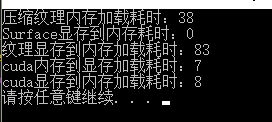
1.通过D3DXLoadSurfaceFromMemory函数加载这个数据需要38ms.
2.通过cuda将同样大小数据送入显存只需要:7ms.
测试结果:
源代码如下:
- #include "pch.h"
- #include <iostream>
- #include <windows.h>
- #include <d3d9.h>
- #include <d3dx9.h>
- #include <cuda_runtime.h>
-
- #pragma comment(lib,"d3d9.lib")
- #pragma comment(lib,"d3dx9.lib")
- #pragma comment(lib,"Winmm.lib")
-
-
- int main()
- {
- IDirect3D9Ex *pd3d;
- IDirect3DDevice9Ex *pd3dDevice;
- Direct3DCreate9Ex(D3D_SDK_VERSION, &pd3d);
- D3DPRESENT_PARAMETERS m_d3dPrtPar;
- ZeroMemory(&m_d3dPrtPar, sizeof(m_d3dPrtPar));
- m_d3dPrtPar.Windowed = TRUE;
- m_d3dPrtPar.SwapEffect = D3DSWAPEFFECT_DISCARD;
- m_d3dPrtPar.BackBufferFormat = D3DFMT_UNKNOWN;
- m_d3dPrtPar.BackBufferWidth = 0;
- m_d3dPrtPar.BackBufferHeight = 0;
- m_d3dPrtPar.BackBufferCount = 1;
- m_d3dPrtPar.hDeviceWindow = GetDesktopWindow();
- m_d3dPrtPar.MultiSampleType = D3DMULTISAMPLE_NONE;
- m_d3dPrtPar.PresentationInterval = D3DPRESENT_INTERVAL_DEFAULT;
- m_d3dPrtPar.EnableAutoDepthStencil = false;//如果要启用深度缓冲区,则必须创建一个大的深度缓冲区,否则目标渲染区域大于深度缓冲区则渲染不出来。
- m_d3dPrtPar.AutoDepthStencilFormat = D3DFMT_D16;
- DWORD vp = D3DCREATE_HARDWARE_VERTEXPROCESSING | D3DCREATE_MULTITHREADED;
- pd3d->CreateDeviceEx(
- 0,
- D3DDEVTYPE_HAL,
- GetDesktopWindow(),
- vp,
- &m_d3dPrtPar,
- NULL,
- &pd3dDevice);
-
- int width =5760, height = 4320;
-
- LPDIRECT3DTEXTURE9 pTexture = NULL;
- D3DFORMAT format = D3DFMT_DXT5;
- pd3dDevice->CreateTexture(width, height,
- 1, 0, format, D3DPOOL_DEFAULT, &pTexture, NULL);
-
- int dataLen = width * height * 4;
- dataLen = 24883200;
- byte *pData = new byte[dataLen];
- ZeroMemory(pData, dataLen);
- int srcPitch = width*4;
-
- RECT rc = { 0 };
- rc.right = width;
- rc.bottom = height;
-
-
- LPDIRECT3DSURFACE9 pSurface;
- pTexture->GetSurfaceLevel(0, &pSurface);
- int timeBegin = timeGetTime();
- D3DXLoadSurfaceFromMemory(pSurface, NULL, NULL, pData, format, srcPitch, NULL, &rc, D3DX_DEFAULT, 0);
- int timeEnd = timeGetTime();
- pSurface->Release();
- printf("压缩纹理内存加载耗时:%d\n", timeEnd - timeBegin);
-
- LPDIRECT3DSURFACE9 pOffSurface = NULL;
- pd3dDevice->CreateOffscreenPlainSurface(width, height, D3DFMT_A8R8G8B8, D3DPOOL_DEFAULT, &pOffSurface, NULL);
- D3DLOCKED_RECT rect;
- timeBegin = timeGetTime();
- pOffSurface->LockRect(&rect, NULL, 0);
- //ZeroMemory(rect.pBits, width*height);
- pOffSurface->UnlockRect();
- timeEnd = timeGetTime();
- printf("Surface显存到内存耗时:%d\n", timeEnd - timeBegin);
-
- LPDIRECT3DTEXTURE9 pTextureRGB = NULL;
- LPDIRECT3DTEXTURE9 pTextureRGB2 = NULL;
- format = D3DFMT_A8R8G8B8;
- pd3dDevice->CreateTexture(width, height,
- 1, D3DUSAGE_RENDERTARGET, format, D3DPOOL_DEFAULT, &pTextureRGB, NULL);
- pd3dDevice->CreateTexture(width, height,
- 1, 0, format, D3DPOOL_SYSTEMMEM, &pTextureRGB2, NULL);
- LPDIRECT3DSURFACE9 pTexSuf1, pTexSuf2;
- pTextureRGB->GetSurfaceLevel(0, &pTexSuf1);
- pTextureRGB2->GetSurfaceLevel(0, &pTexSuf2);
- HRESULT hr = pd3dDevice->GetRenderTargetData(pTexSuf1, pTexSuf2);
-
- timeBegin = timeGetTime();
- //pTextureRGB->LockRect(0,&rect, NULL, D3DLOCK_DISCARD);
- //((char*)rect.pBits)[0] = 1;
- //pTextureRGB->UnlockRect(0);
-
- pTexSuf2->LockRect(&rect, NULL, 0);
- pTexSuf2->UnlockRect();
- timeEnd = timeGetTime();
- printf("纹理显存到内存加载耗时:%d\n", timeEnd - timeBegin);
-
- byte *dev_c = NULL;
- cudaMalloc((void**)&dev_c, dataLen);
- timeBegin = timeGetTime();
- cudaMemcpy(dev_c, pData, dataLen, cudaMemcpyHostToDevice);
- timeEnd = timeGetTime();
- printf("cuda内存到显存加载耗时:%d\n", timeEnd - timeBegin);
-
- timeBegin = timeGetTime();
- cudaMemcpy( pData,dev_c, dataLen, cudaMemcpyDeviceToHost);
- timeEnd = timeGetTime();
- printf("cuda显存到内存加载耗时:%d\n", timeEnd - timeBegin);
-
- system("pause");
- }

测试demo:demo
声明:本文内容由网友自发贡献,不代表【wpsshop博客】立场,版权归原作者所有,本站不承担相应法律责任。如您发现有侵权的内容,请联系我们。转载请注明出处:https://www.wpsshop.cn/article/detail/53678
推荐阅读
相关标签

