
热门标签
热门文章
- 12022年最新最全的Java零基础入门,零基础入门springboot,MySQL的学习_编程小石头源码百度云
- 2正则表达式-限定位数的正数_正则表达式限制位数
- 3SpringBoot集成Druid连接池,配置多数据源_druiddatasourcebuilder.create().build()
- 4如何在Win10上安装docker_docker安装win10
- 5Python中yield详解与使用_python yield
- 6【ArcGIS】土地利用变化分析详解(栅格篇)_栅格地类进一步
- 7vue3.axios+python.Flask,解决一些问题_vue3登录界面,链接python
- 8如何在Midjourney使用种子(指南)_midjourney seed怎么用
- 9地理信息系统(GIS)在城市智能交通信息系统中的应用_gis框架在智能交通指示系统中的应用
- 10【华为OD机试真题 Java】篮球比赛分组_华为机试题目分两队
当前位置: article > 正文
从永远到永远-Idea将未加入版本控制的项目上传到远程Git仓库_idea 未进行版本管理的文件
作者:编程革命者 | 2024-02-01 15:52:03
赞
踩
idea 未进行版本管理的文件
1、环境
- 默认已安装Git、Idea,且Idea已经集成Git。
- 远程Git仓库选用Gitee,且默认已有Gitee账号。
- 本地项目指的是本地开发的项目,但是没有加入版本控制。
2、创建Gitee远程仓库
1.新建仓库

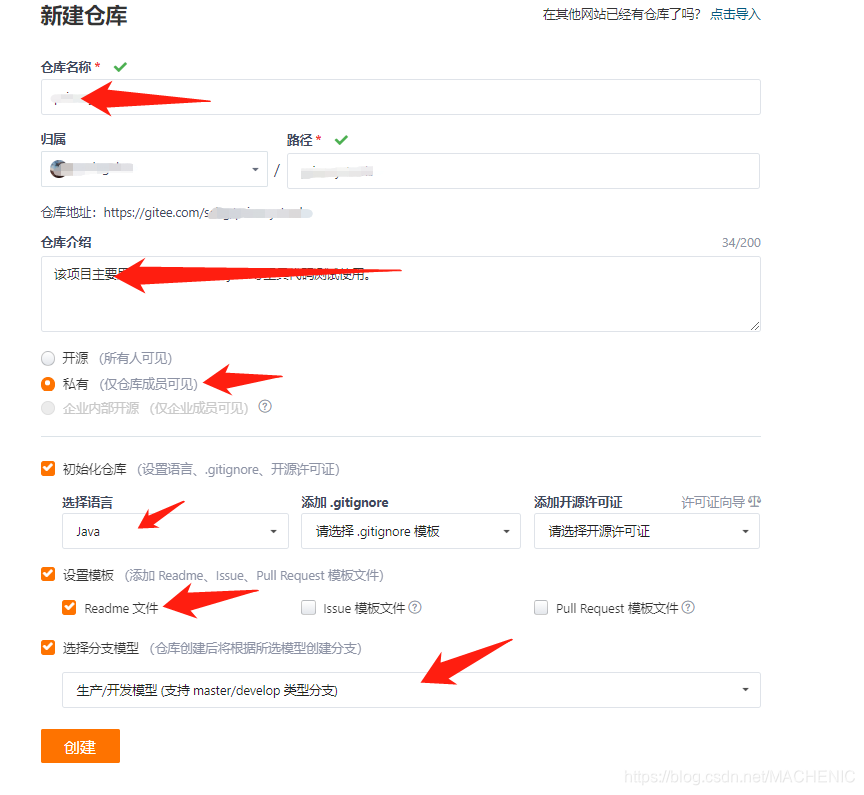
2、填写仓库信息
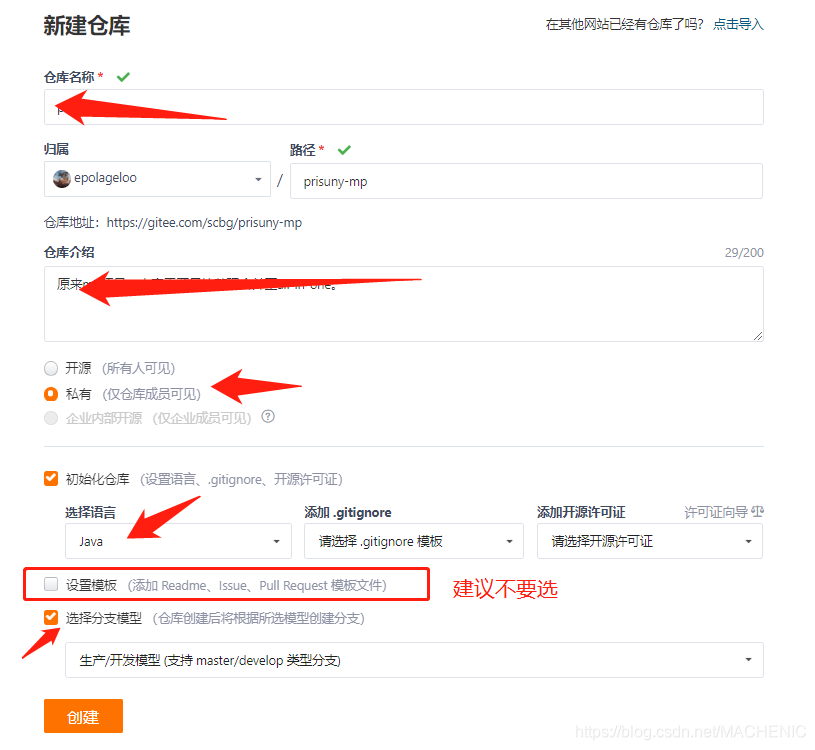 如果选了模板,比如使用了Readme.md文件,可能出现4的问题
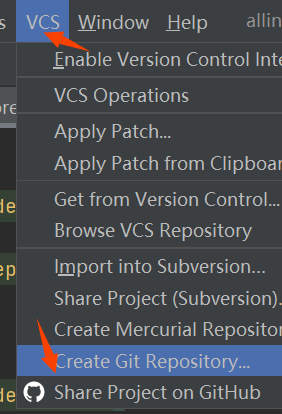
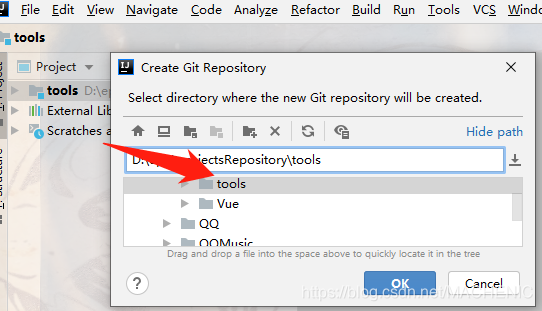
3、创建本地仓库(默认使用idea)
1、选择项目目录,设置为本地仓库
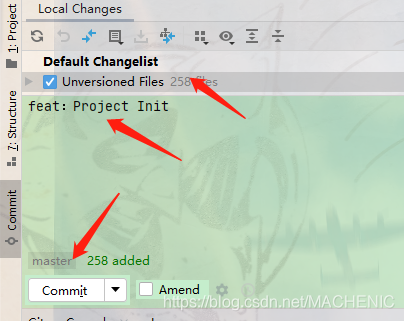
2、提交代码

选中要提交的内容,填写提交信息,提交
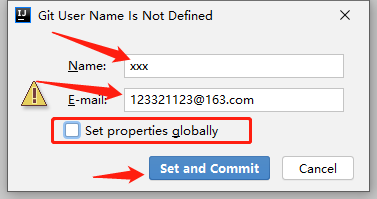
 正常会弹出填写Git用户信息提示,Name、E-mail都可以随意填写,实际工作中最好真实填写,不然容易挨打。红框慎填,个人不建议。如果填了,下次再有类似操作,这里都不弹框提示了。默认的Git用户信息都会使用这次填入的(当然可以手动处理,如果有人没弹出这个框,应该就是这个原因)。
正常commit完,代码已经提交到本地仓库。
3、推送到远程仓库
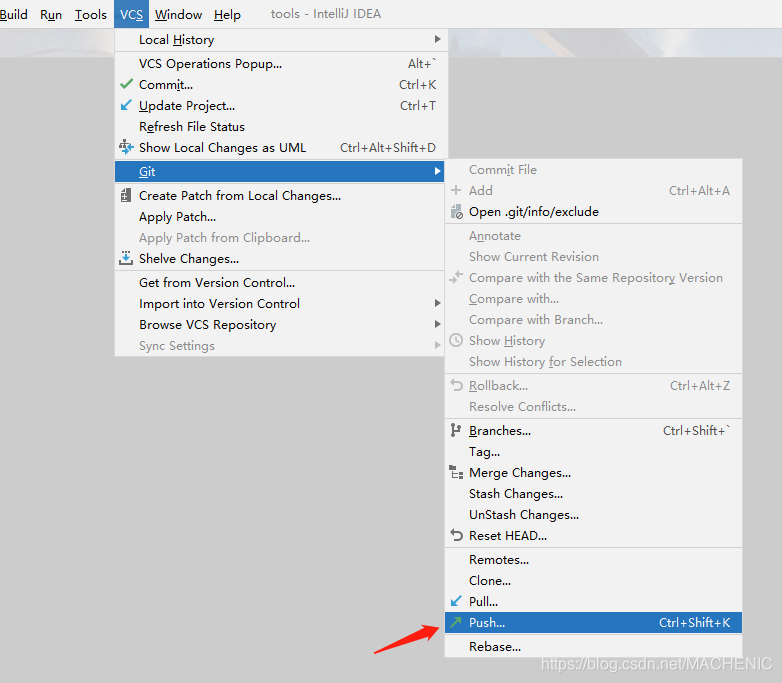 填入远程仓库地址
 上图地址在Gitee创建的仓库中复制即可,如图

之后push推送,代码即上传到远程仓库中。

华丽出错
推送被拒绝

控制台报错
error: failed to push some refs to 'https://gitee.com/xxxx/xxxx.git'
hint: Updates were rejected because the remote contains work that you do
To https://gitee.com/xxxx/xxxx.git
!	refs/heads/master:refs/heads/master	[rejected] (fetch first)
hint: not have locally. This is usually caused by another repository pushing
Done
hint: to the same ref. You may want to first integrate the remote changes
hint: (e.g., 'git pull ...') before pushing again.
hint: See the 'Note about fast-forwards' in 'git push --help' for details.
- 1
- 2
- 3
- 4
- 5
- 6
- 7
- 8
- 9
关键词:(fetch first)、 not have locally. This is usually caused by another repository pushing
Done、e.g., ‘git pull …’
其他仓库推送了内容,而这部分内容本地没有,所以建议先集成远程仓库的变更。其实想一下,就能知道原因。
在创建远程库的时候,远程库生成的一些文件,本地是没有的。
既然建议让(fetch first),那就fetch。
关于fetch,我看过好多网友的解释,最近也在看官方文档,感觉解释完之后,依然很费解!我个人理解,这个fetch,最大的作用,就是将远程库的内容拉取到本地仓库,但是不会做合并。当然还有其他,比如对commitID的影响等,个人感觉在将项目刚刚引入版本控制时,其他的影响可以忽略不计。
在当前项目中,fetch之后,本地idea可以看到远程库创建的几个分支及初始化项目的提交内容,但是并没有将代码合并到本地。
- 1
- 2

在上步操作后,远程库代码并没有合并到本地,所以执行下pull操作(rebase操作)。
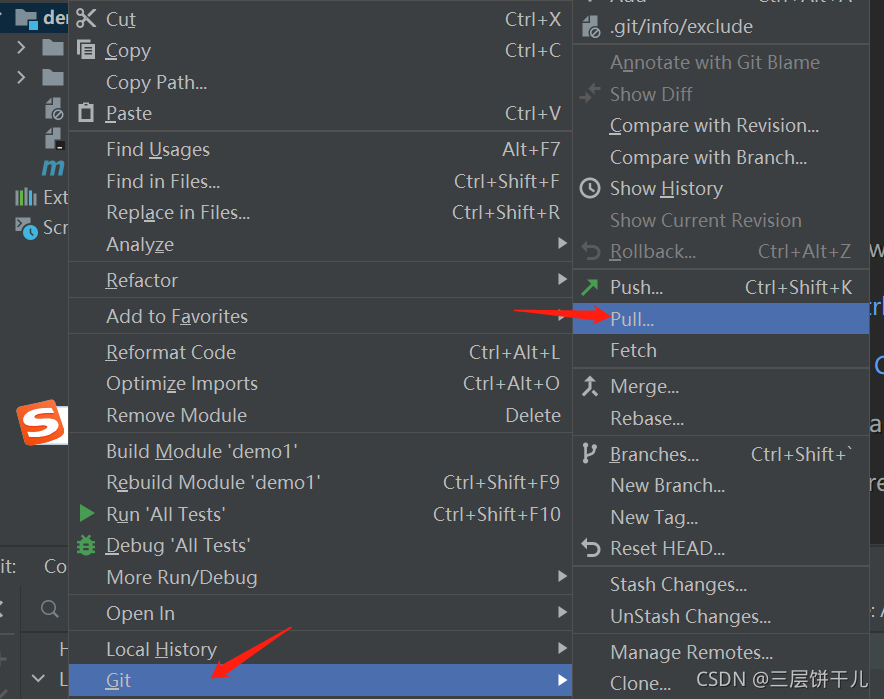

远程库代码已经拉到本地,之后重新push即可。
4、网络上其他方法
也能实现,只不过我觉得idea这么智能,还非得打开命令行实现,多少是有点。
git remote add origin 远程仓库地址
git pull origin master --allow-unrelated-histories
git branch --set-upstream-to=origin/master master
git push
- 1
- 2
- 3
- 4
声明:本文内容由网友自发贡献,转载请注明出处:【wpsshop博客】
推荐阅读
相关标签

