- 1python OSError: [Errno 24] Too many open files_scrapy to many open file
- 2C++变量的存储类别(动态存储、静态存储、自动变量、寄存器变量、外部变量)_c++动态变量和静态变量
- 3论文笔记:多任务学习模型:渐进式分层提取(PLE)含pytorch实现
- 4React中的虚拟DOM和diff算法_react dom diff
- 5自动化运维环境搭建过程_eipwork/etcd-host
- 6python中安装缺少Microsoft Visual C++ 环境解决方案_error: no microsoft visual c++ version found
- 7金融行业现场故障处理实录
- 8react hooks的useContext
- 9让python程序开机自启动(可自行扩展到其他程序)(附带取消控制台显示)_python bat写入软件自启动
- 10【网络安全 -> 防御与保护】信息安全概述
Linux下安装PHP_linux安装php
赞
踩
1、安装前的准备,安装依赖
yum -y install gcc openssl openssl-devel curl curl-devel libjpeg libjpeg-devel libpng libpng-devel freetype freetype-devel pcre pcre-devel libxslt libxslt-devel bzip2 bzip2-devel sqlite-devel
2、编译
./configure --prefix=/usr/local/php --with-config-file-path=/usr/local/php/etc --with-pdo-mysql --with-mysqli --with-gd --with-zlib --with-mcrypt --enable-fpm
./configure --prefix=/usr/local/php7.2 --with-config-file-path=/usr/local/php7.2/etc --with-curl --with-gd --with-gettext --with-iconv-dir --with-kerberos --with-libdir=lib64 --with-libxml-dir --with-openssl --with-pcre-regex --with-pdo-sqlite --with-pear --with-xmlrpc --with-xsl --with-zlib --enable-fpm --enable-bcmath --enable-libxml --enable-inline-optimization --enable-mbregex --enable-mbstring --enable-opcache --enable-pcntl --enable-shmop --enable-soap --enable-sockets --enable-sysvsem --enable-xml --enable-zip --enable-static --with-mysqli=mysqlnd --with-pdo-mysql=mysqlnd --with-freetype-dir --with-jpeg-dir --with-png-dir --disable-debug --disable-fileinfo
3、安装
make && make install
4、配置文件
需要复制相关配置文件:php.ini php-fpm.conf www.conf
5、设置环境变量:export:查看环境变量
/etc/profile文件中进行添加:

6、 配置ngnix.conf
location ~ \.php$ {
root F:\phpproject;
fastcgi_pass 127.0.0.1:9000;
fastcgi_index index.php;
fastcgi_param SCRIPT_FILENAME $document_root$fastcgi_script_name;
fastcgi_param SCRIPT_NAME $fastcgi_script_name;
include fastcgi_params;
}
当ngnix和php安装在不同的服务器上时,可以ngnix可以配置远程php-fpm,fastcgi_pass配置成远程php-fpm,同时php-fpm的配置监听需要用:例:0.0.0.0:9001
location ~ \.php$ {
root /http/www/test/;
fastcgi_pass 192.168.30.47:9001;
fastcgi_index index.php;
fastcgi_param SCRIPT_FILENAME $document_root$fastcgi_script_name;
fastcgi_param SCRIPT_NAME $fastcgi_script_name;
include fastcgi_params;
}
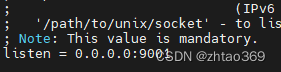
7、设置开机自启动php-fpm
第一种方式:在/etc/init.d文件夹中,新建一个php-fpm文件,内容如下:
- #!/bin/bash
- # php-fpm startup script for the php-fpm
- # description: php-fpm is very good
- # processname: php-fpm
- # pidfile: /var/run/php-fpm.pid
- # config: /usr/local/php/etc/php-fpm.conf
-
- php_command=/usr/local/php/sbin/php-fpm #设置成自己的路径
- php_config=/usr/local/php/etc/php-fpm.conf #设置成自己的路径
- php_pid=/usr/local/php/var/run/php-fpm.pid #设置成自己的路径
- RETVAL=0
- prog="php-fpm"
-
- #start function
- php_fpm_start() {
- /usr/local/php/sbin/php-fpm #设置成自己的路径
- }
-
- start(){
- if [ -e $php_pid ]
- then
- echo "php-fpm already start..."
- exit 1
- fi
- php_fpm_start
- }
-
- stop(){
- if [ -e $php_pid ]
- then
- parent_pid=`cat $php_pid`
- all_pid=`ps -ef | grep php-fpm | awk '{if('$parent_pid' == $3){print $2}}'`
- for pid in $all_pid
- do
- kill $pid
- done
- kill $parent_pid
- fi
- exit 1
- }
-
- restart(){
- stop
- start
- }
-
- # See how we were called.
- case "$1" in
- start)
- start
- ;;
- stop)
- stop
- ;;
- restart)
- stop
- start
- ;;
- status)
- status $prog
- RETVAL=$?
- ;;
- *)
- echo $"Usage: $prog {start|stop|restart|status}"
- exit 1
- esac
- exit $RETVAL

将脚本设置为可执行文件:chmod 775 /etc/init.d/php-fpm
添加为服务:chkconfig --add /etc/init.d/php-fpm
设置开机启动服务:chkconfig php-fpm on   //设置开机启动
第二种方式:在目录/lib/systemd/system下新建文件php-fpm.service,内容如下:
- [Unit]
- Description=php-fpm
- After=network.target
- [Service]
- Type=forking
- ExecStart=/usr/local/php/sbin/php-fpm
- PrivateTmp=true
- [Install]
- WantedBy=multi-user.target
设置开机自启动:systemctl enable php-fpm
8、添加扩展------可在php解压后的目录下找到ext文件夹(~/php8/ext/),里面有一些相关的扩展
安装完成后,扩展文件夹下没有任何的扩展文件,这时需要进行各种安装
使用phpize命令时,需要依赖于prel autoconf m4 必须先进行安装,
安装:yum install autoconf m4 prel
phpize命令执行后,会生成configure文件
./configure --with-php-config=/usr/local/php/bin/php-config
make && make install
9、安装composer
php -r "copy('https://install.phpcomposer.com/installer', 'composer-setup.php');"会生成composer-setup.php文件
注:可能会出现如下错误:

则需要安装ca-certificates yum install ca-certificates
php composer-setup.php会生成一个composer.phar文件,可以将这个文件复制到相关目录下,如:/usr /local/bin
删除前面生成的安装文件
php -r "unlink('composer-setup.php');"注:
1) 安装mysqli扩展时需要先安装mysql-devel,编译时,需要多加一个参数
./configure --with-php-config=/usr/local/php/bin/php-config --with-mysqli=/usr/bin/mysql_config
2) 安装openssl扩展时,需要先安装openssl和openssl-devel,将config0.m4复制一个config.m4文件,再phpize, 再进行编译----------实现非对称加密
./configure --with-php-config=/usr/local/php/bin/php-config --with-openssl
3)安装snmp扩展,需要先安装net-snmp、 php-snmp、 net-snmp-devel依赖----简单网络管理协议
./configure --with-php-config=/usr/local/php/bin/php-config --with-snmp
4)安装pdo-odbc扩展,需要先安装unixODBC 和unixODBC-devel依赖
./configure --with-php-config=/data/apps/php/bin/php-config --with-pdo-odbc=unixODBC,/usr/
5)安装ldap扩展,需要先安装openldap和openldap-devel依赖-------轻量目录访问协议
创建软链接: ln -sv /usr/lib64/libldap* /usr/lib/ 有办法可以不创建软链吗?
./configure --with-php-config=/data/apps/php/bin/php-config --with-ldap
6)安装curl扩展和mbstring扩展时,由于gcc标准的问题会导致报错,需要根据报错路径去修改源码

7) 安装odbc扩展,
8)安装imap扩展,需要先安装libc-client 和libc-client-devel 不然会报错
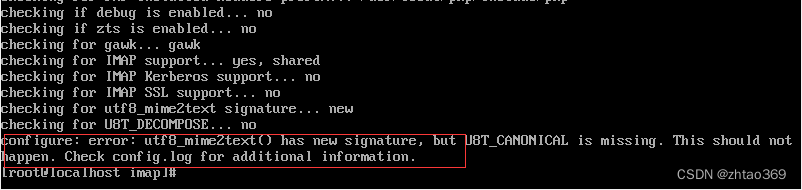
./configure --with-php-config=/data/apps/php/bin/php-config --with-imap-ssl
php-fpm.d/*.conf中可以配置user和group,用来控制php生成的目录或文件的归属人和组