当前位置:   article > 正文

用 tensorflow.js 做了一个动漫分类的功能(一)_tensorflow页面的示例动画

tensorflow页面的示例动画
前言:

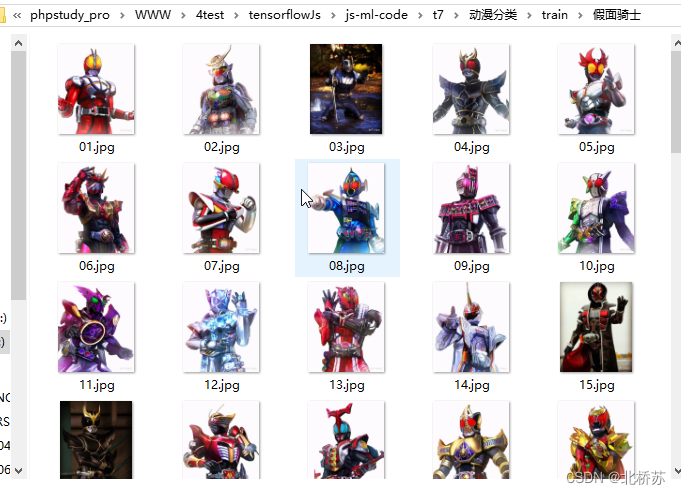
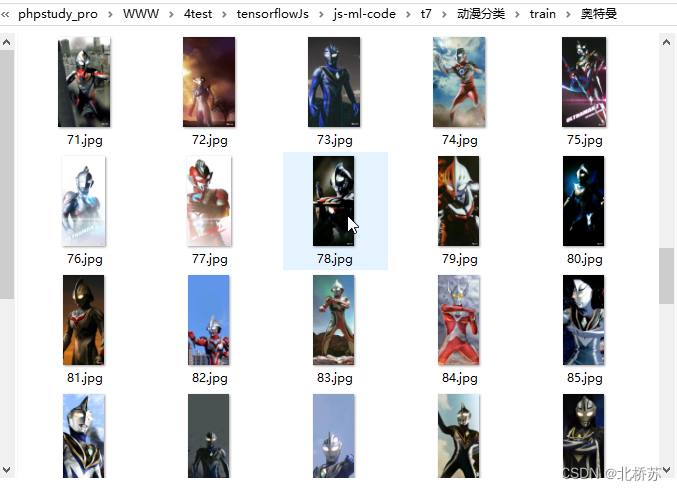
浏览某乎网站时发现了一个分享各种图片的博主,于是我顺手就保存了一些。但是一张一张的保存实在太麻烦了,于是我就想要某虫的手段来处理。这样保存的确是很快,但是他不识图片内容,最近又看了 mobileNet 的预训练模型,想着能让程序自己对图片分类,以下就通过例子从内容采集到分类的过程。

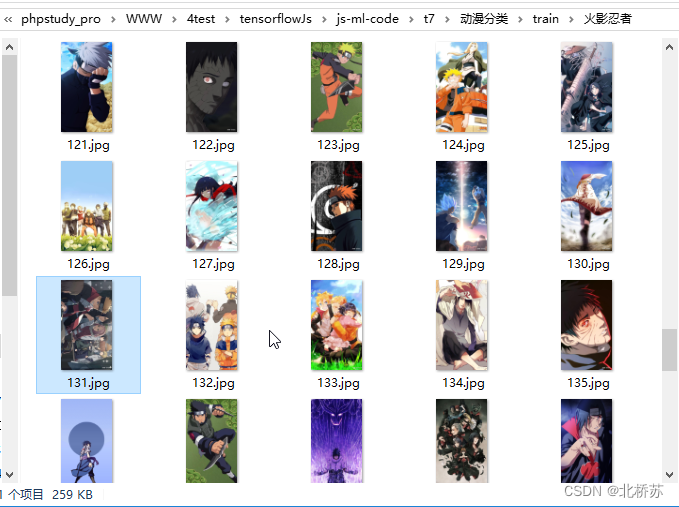
内容和资源的采集,反手就是某虫了。在网络上,经过近几年的营销渲染,可能首选是用 Python 做脚本。而这次是用 PHP 的 QueryList 来做采集,下面也就是采集的编码过程和踩坑解决方法,最后再对采集图片进行标注和训练。
环境:

PHP7.4

QueryList4.0

QueryList-CurlMulti
编码:

以下例子是基于 TP5.1,所以只需要安装上面两个依赖包。采集启动通过自定义命令实现,接下来分别以普通采集和多线程采集两种方式展示。

1. 普通采集

  1. <?php/**
  2. * @Notes: 公众号:ZERO开发
  3. * @Interface getCondition
  4. * @Return mixed
  5. * @Author: bqs
  6. * @Time: 2021/4/19 15:28
  7. */namespaceapp\common\command;
  8. usethink\console\Command;
  9. usethink\console\Input;
  10. usethink\console\Output;
  11. usethink\console\input\Argument;
  12. usethink\console\input\Option;
  13. usethink\Db;
  14. usethink\facade\Hook;
  15. usethink\facade\Log;
  16. useQL\QueryList;
  17. classQueryListSpiderSingleextendsCommand{
  18. protectedfunctionconfigure(){
  19. $this->setName('querylist:single')
  20. ->setDescription('采集');
  21. }
  22. protectedfunctionexecute(Input $input, Output $output){
  23. ini_set('memory_limit', '512M');
  24. $output->writeln("=========date:" . date('Y-m-d H:i:s') . "===============");
  25. // 北桥苏奥特曼//$slImgsUrl = "https://zhuanlan.zhihu.com/p/377571373";
  26. $slImgsUrl = "https://zhuanlan.zhihu.com/p/344680014";
  27. // 原生query_list
  28. $list = QueryList::get($slImgsUrl)->find('.RichText')->find('noscript')->find('img')->attrs('src');
  29. $path = 'E:\2setsoft\1dev\phpstudy_pro\WWW\4test\tensorflowJs\js-ml-code\t7\动漫分类\train\奥特曼\\';
  30. foreach($list as $key => $value) {
  31. $index = $key + 1 + 42;
  32. $filename = $index < 10 ? str_pad($index, 2, "0", STR_PAD_LEFT) : $index;
  33. $filend = pathinfo($value, PATHINFO_EXTENSION);
  34. $file = file_get_contents($value);
  35. file_put_contents($path . $filename . "." . $filend, $file);
  36. $output->writeln($index . "--" . $value . "已保存--");
  37. }
  38. $output->writeln("============date:" .date("Y-m-d H:i:s") . "采集完成==============");
  39. }
  40. }

2. 多线程采集

  1. <?php/**
  2. * @Notes: 文件描述
  3. * @Interface getCondition
  4. * @Return mixed
  5. * @Author: bqs
  6. * @Time: 2021/4/19 15:28
  7. */namespaceapp\common\command;
  8. usethink\console\Command;
  9. usethink\console\Input;
  10. usethink\console\Output;
  11. usethink\console\input\Argument;
  12. usethink\console\input\Option;
  13. usethink\Db;
  14. usethink\facade\Hook;
  15. usethink\facade\Log;
  16. useQL\QueryList;
  17. useQL\Ext\CurlMulti;
  18. classQueryListSpiderextendsCommand{
  19. protectedfunctionconfigure(){
  20. $this->setName('query:list')
  21. ->setDescription('采集');
  22. }
  23. protectedfunctionexecute(Input $input, Output $output){
  24. ini_set('memory_limit', '512M');
  25. $output->writeln("=========date:" . date('Y-m-d H:i:s') . "===============");
  26. // 地址与目录映射
  27. $dirMap = [
  28. "假面骑士" => "https://zhuanlan.zhihu.com/p/376119915",
  29. "龙珠" => "https://zhuanlan.zhihu.com/p/340048917",
  30. "火影忍者" => ["https://zhuanlan.zhihu.com/p/352717188", "https://zhuanlan.zhihu.com/p/393213201", "https://zhuanlan.zhihu.com/p/358228745"],
  31. "海贼王" => ["https://zhuanlan.zhihu.com/p/357683518", "https://zhuanlan.zhihu.com/p/338160632"]
  32. ];
  33. // 采集地址
  34. $multiArr = [];
  35. $multiArr = array_reduce(array_values($dirMap), function($res, $value){
  36. $res = array_merge($res, (array)$value);
  37. return $res;
  38. }, []);
  39. // 采集映射
  40. $multiMap = [];
  41. foreach($dirMap as $key => $value) {
  42. if (!is_array($value)) {
  43. $multiMap[$value] = $key;
  44. } else {
  45. $temp = array_fill_keys($value, $key);
  46. $multiMap = array_merge($multiMap, $temp);
  47. }
  48. }
  49. // 开始使用多线程采集
  50. $ql = QueryList::use (CurlMulti::class);
  51. $ql->curlMulti($multiArr)
  52. ->success(function(QueryList $ql, CurlMulti $curl, $r)use($multiMap){
  53. $path = 'E:\2setsoft\1dev\phpstudy_pro\WWW\4test\tensorflowJs\js-ml-code\t7\动漫分类\train\\';
  54. $queryUrl = $r['info']['url'];
  55. $className = $multiMap[$queryUrl] ?? "";
  56. $targetDir = $path . $className;
  57. $path = $targetDir . '\\';
  58. $endFileIndex = 0;
  59. $existFileList = $this->scanFile($targetDir);
  60. if ($existFileList) {
  61. // 取出所有数字文件名最大值
  62. $endFileName = max($existFileList);
  63. $endFileIndex = explode(".", $endFileName)[0];
  64. }
  65. $data = $ql->find('.RichText')->find('noscript')->find('img')->attrs('src');
  66. foreach($data as $key => $value) {
  67. $index = $key + 1 + $endFileIndex;
  68. $filename = $index < 10 ? str_pad($index, 2, "0", STR_PAD_LEFT) : $index;
  69. $filend = pathinfo($value, PATHINFO_EXTENSION);
  70. $file = file_get_contents($value);
  71. file_put_contents($path . $filename . "." . $filend, $file);
  72. }
  73. })
  74. // 每个任务失败回调
  75. ->error(function($errorInfo, CurlMulti $curl){
  76. echo"Current url:{$errorInfo['info']['url']} \r\n";
  77. print_r($errorInfo['error']);
  78. })
  79. ->start([
  80. // 最大并发数'maxThread' => 10,
  81. // 错误重试次数'maxTry' => 5,
  82. ]);
  83. $output->writeln("============date:" . date("Y-m-d H:i:s") . "采集完成==============");
  84. }
  85. // 扫描目录下所有文件protectedfunctionscanFile($path){
  86. $result = [];
  87. $files = scandir($path);
  88. foreach ($files as $file) {
  89. if ($file != '.' && $file != '..') {
  90. if (is_dir($path . '/' . $file)) {
  91. $this->scanFile($path . '/' . $file);
  92. } else {
  93. $result[] = basename($file);
  94. }
  95. }
  96. }
  97. return $result;
  98. }
  99. }
问题解决:

由于普通采集的请求使用 GuzzleHttp 客户端,而多线程采集是 CURL,所以运行时报 curl 状态码 60 错误。
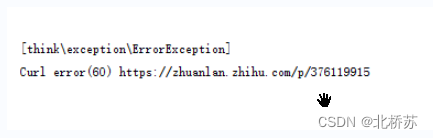
1. 解决方法:

(1). 下载 cacert

下载地址:https://curl.haxx.se/ca/cacert.pem

(2). 修改 php.ini , 并重启

在 php.ini 中找到 curl.cainfo 改为文件的绝对路径如:curl.cainfo =E:\2setsoft\1dev\phpstudy_pro\Extensions\php\php7.4.3nts\cacert.pem

图片训练:

以上的图片已经采集的差不多了,因为博主的图片有限,我也没有再去其他地方找,整个文件夹下的图片在 200 张左右。按理说图片当然是越多越好,但是整个分类标注起来耗时(看文章的配图,应该已经知道有哪几类了吧),所以就这样了。最后就是读取图片转换 Tensor 进行训练,后一篇再具体介绍吧,提醒一下。下一篇需要提前安装 Node, Http-Server,Parcel 工具。
声明:本文内容由网友自发贡献,不代表【wpsshop博客】立场,版权归原作者所有,本站不承担相应法律责任。如您发现有侵权的内容,请联系我们。转载请注明出处:https://www.wpsshop.cn/article/detail/53531
推荐阅读
相关标签
  

闽ICP备14008679号