
- 1Windows10 Docker 容器使用,每个步骤作者亲测,细节记录最全教程_win10系统的容器
- 2⭐算法入门⭐《递推 - 二维》简单01 —— LeetCode 118. 杨辉三角_二维递推
- 3springboot014校园管理系统的设计与实现_基于springboot的班级管理系统的设计与实现
- 4Java MongoDB:(十三)MongoDB 的文档操作-Limit 函数与 Skip 函数_java集成mongo分页查询的skip和limit有什么区别
- 5Matlab常用求解数学规划模型代码_matlab数学模型代码
- 6基于树莓派4B与STM32的UART串口通信实验(代码开源)_树莓派4b串口波特率
- 7【图论·习题】走廊泼水节(Kruscal算法逆推)
- 8力扣hot100 柱状图中最大的矩形 单调栈
- 9MSB 和 LSB_spi msb
- 10Spring-Boot导入配置文件与取值
JDK8的新特性_jdk8新特性
赞
踩
1JDK8的新特性
1. lambda表达式
2. 函数式接口。
3. 方法引用。
4. Stream流
5. 日期时间类
2 .lambda表达式
概念: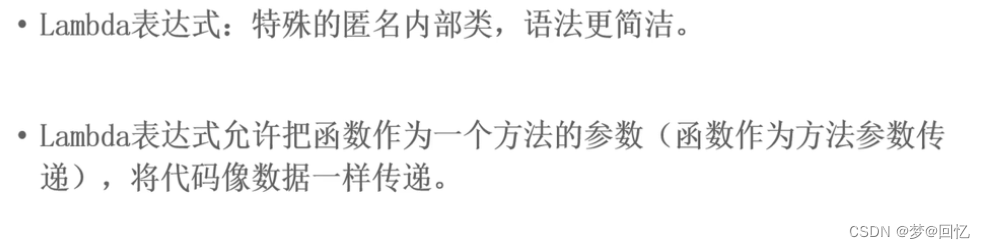
语法: 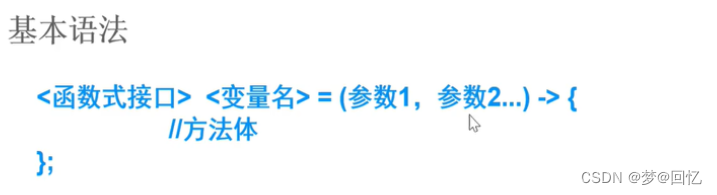
注意: 函数式接口:接口中只有一个抽象方法。
(参数1,参数2): 抽象方法的参数
->: 分隔符
{}:表示抽象方法的实现
例子:
- public class Test01 {
- public static void main(String[] args) {
-
- //该构造方法需要传递一个线程任务对象。Runnable类型
- My task=new My();
- Thread t1=new Thread(task);
- t1.start();
-
-
- //匿名内部类
- Runnable task02=new Runnable() {
- @Override
- public void run() {
- System.out.println("这时匿名内部类方式的任务对象");
- }
- };
- Thread t2=new Thread(task02);
- t2.start();
- }
- }
- class My implements Runnable{
-
- @Override
- public void run() {
- System.out.println("自定义任务接口类");
- }
- }

分析代码:
Thread 类需要 Runnable 接口作为参数,其中的抽象 run 方法是用来指定线程任务内容的核心
为了指定 run 的方法体,不得不需要 Runnable 接口的实现类
为了省去定义一个 Runnable 实现类的麻烦,不得不使用匿名内部类
必须覆盖重写抽象 run 方法,所以方法名称、方法参数、方法返回值不得不再写一遍,且不能写错
而实际上,似乎只有方法体才是关键所在
这时可以使用lambda表示完成上面的要求。
- //lambda表达式
- Runnable task03 = ()-> {
- System.out.println("这是使用Lambda表达式完成的");
- };
-
- Thread t3=new Thread(task03);
- t3.start();
前提:必须是函数式接口。
简化匿名内部类的使用,语法更加简单。
2.1 无参无返回值
- public class Test02 {
- public static void main(String[] args) {
-
- //匿名内部类
- Swimmable swimmable=new Swimmable() {
- @Override
- public void swimming() {
- System.out.println("这时使用匿名内部类的方式");
- }
- };
- fun(swimmable);
-
- //lambda表达式
- // Swimmable swimmable1=()->{
- // System.out.println("使用lambda表达式");
- // };
- fun(()->{System.out.println("使用lambda表达式");});
- }
-
- public static void fun(Swimmable w){
- w.swimming();
- }
- }
- //函数式接口
- interface Swimmable{
- public void swimming();
- }
2.2 练习有参数有返回值的Lambda
下面举例演示 java.util.Comparator 接口的使用场景代码,其中的抽象方法定义为:
-
public abstract int compare(T o1, T o2);
当需要对一个对象集合进行排序时, Collections.sort 方法需要一个 Comparator 接口实例来指定排序的规则。
- public class Test03 {
- public static void main(String[] args) {
- List<Person> personList=new ArrayList<>();
- personList.add(new Person("刘德华",50,175));
- personList.add(new Person("张学友",55,178));
- personList.add(new Person("杨紫琼",45,170));
- personList.add(new Person("闫克起",18,185));
- //对集合中的元素进行排序 按照年龄从大到小。
- //传统做法:Comparator: 排序规则接口
- //Comparator<Person> comparator = new Comparator<Person>() {
- // //int: 0表示新加的元素和集合中原来的比对的相同
- // //1: o2比o1小
- // //-1: o2比o1大
- // @Override
- // public int compare(Person o1, Person o2) {
- // return o2.getAge()-o1.getAge();
- // }
- // };
- // Collections.sort(personList,comparator);
- // for (Person p:personList){
- // System.out.println(p);
- // }
- System.out.println("===============================lambda==========================="); Comparator<Person> comparator1 = (Person o1, Person o2)->{
- return o1.getAge()-o2.getAge();
- };
- Collections.sort(personList,comparator1);
- for (Person p : personList) {
- System.out.println(p);
- }
- }}
- class Person {
- private String name;
- private int age;
- private int height;
- @Override
- public String toString() {
- return "Person{" +
- "name='" + name + '\'' +
- ", age=" + age +
- ", height=" + height +
- '}';
- }
- public Person(String name, int age, int height) {
- this.name = name;
- this.age = age;
- this.height = height;
- }
- public String getName() {
- return name;
- }
- public void setName(String name) {
- this.name = name;
- }
- public int getAge() {
- return age;
- }
- public void setAge(int age) {
- this.age = age;
- }
- public int getHeight() {
- return height;
- } public void setHeight(int height) {
- this.height = height;
- }}
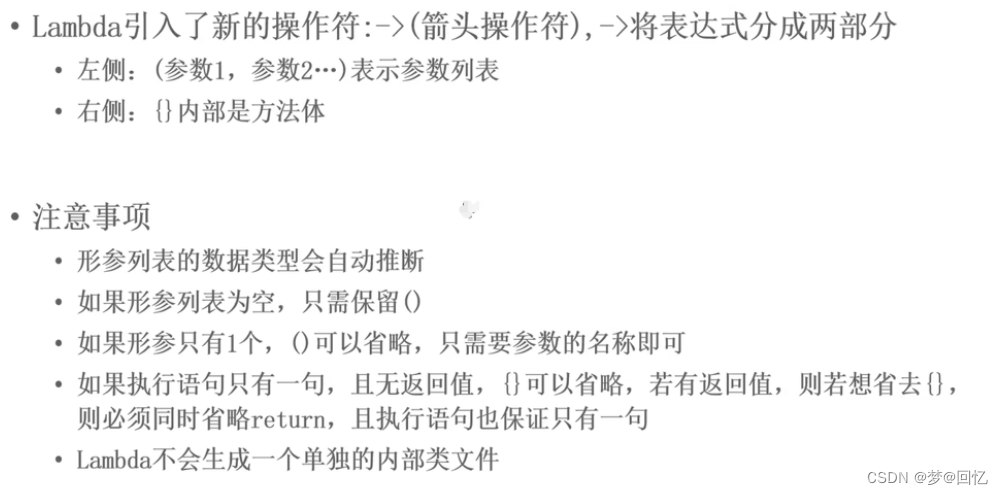
2.3 详细介绍lambda表达式
3. 函数式接口
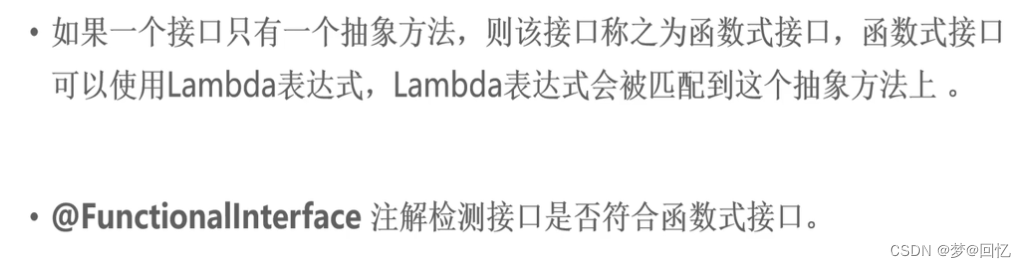
内置函数式接口的由来
- public class Test03 {
-
- public static void main(String[] args) {
- Operater o=arr -> {
- int sum=0;
- for(int n:arr){
- sum+=n;
- }
- System.out.println("数组的和为:"+sum);
- };
-
- fun(o);
- }
-
- public static void fun(Operater operater){
- int[] arr={2,3,4,5,6,7,11};
- operater.getSum(arr);
- }
-
- }
- @FunctionalInterface
- interface Operater{
- //求数组的和
- public abstract void getSum(int[] arr);
- }
分析
我们知道使用Lambda表达式的前提是需要有函数式接口。而Lambda使用时不关心接口名,抽象方法名,只关心抽 象方法的参数列表和返回值类型。因此为了让我们使用Lambda方便,JDK提供了大量常用的函数式接口。
常见得函数式接口
java.util.function保存
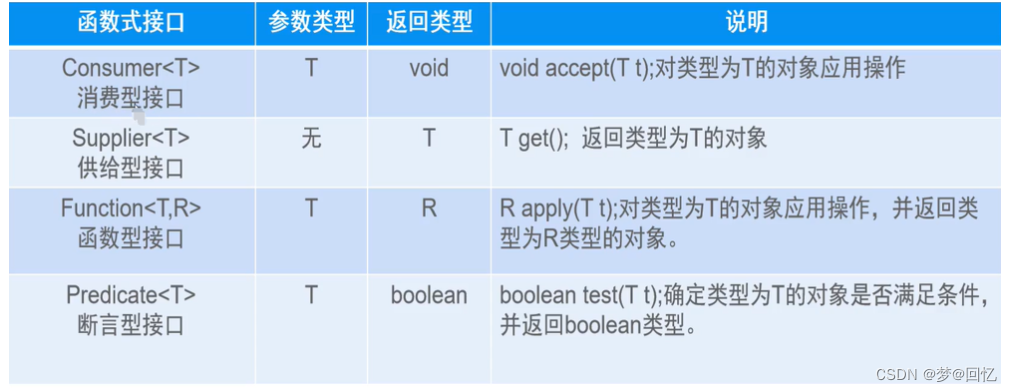
3.1Consumer<T>
有参数,无返回值。
- public class Test {
- public static void main(String[] args) {
-
- Consumer<Double> c= t->{
- System.out.println("洗脚花费了:"+t);
- };
-
-
- fun01(c,200);
- }
-
-
- //调用某个方法时,该方法需要的参数为接口类型,这时就应该能想到使用lambda
- public static void fun01(Consumer<Double> consumer,double money){
- consumer.accept(money);
- }
- }
3.2 Supplier<T>供给型函数式接口
T:表示返回结果的泛型
无参,想有返回结果的函数式接口时
T get();- public class Test02 {
- public static void main(String[] args) {
- //Supplier<Integer> supplier=()->new Random().nextInt(10);
-
- fun(()->new Random().nextInt(10));
- }
-
- public static void fun(Supplier<Integer> supplier){
- Integer result = supplier.get();
- System.out.println("内容为:"+result);
- }
- }
3.3 Function<T,R> 函数型函数式接口
T: 参数类型的泛型
R: 函数返回结果的泛型
有参,有返回 值时。
例子: 传入一个字符串把小写转换为大写。
- public class Test03 {
- public static void main(String[] args) {
-
- fun((t)->{
- return t.toUpperCase();
-
- },"hello world");
- }
-
- //传入一个字符串,返回字符串的长度。
-
- public static void fun(Function<String,String> function,String msg){
- String s = function.apply(msg);
-
- System.out.println("结果为:"+s);
- }
- }
3.4 Predicated<T>
T: 参数的泛型
boolean test(T t);当传入一个参数时,需要对该参数进行判断时,则需要这种函数。
- public class Test04 {
- public static void main(String[] args) {
-
- fun(n->{
- return n.length()>3?true:false;
- },"栗毅");
-
- }
- public static void fun(Predicate<String> predicate,String name ){
- boolean b = predicate.test(name);
-
- System.out.println("该名称的长度是否长啊:"+b);
- }
- }
4. 方法引用。
4.1 lambda表达式的冗余
- package demo05;
-
- import java.util.function.Consumer;
-
- /**
- * @program: qy151-jdk8
- * @description:
- * @author: 闫克起2
- * @create: 2022-07-19 16:56
- **/
- public class Test01 {
-
- public static void main(String[] args) {
- Consumer<Integer[]> c=arr->{
- int sum=0;
- for(int b:arr){
- sum+=b;
- }
- System.out.println("数组的和为:"+sum);
- };
- fun(c);
- }
-
-
- public static void fun(Consumer<Integer[]> consumer){
- Integer[] arr={1,2,3,4,5};
- consumer.accept(arr);
- }
-
- public static void sum(Integer[] arr){
- int sum=0;
- for (int a:arr){
- sum+=a;
- }
- System.out.println("数组的和为:"+sum);
- }
-
- }
分析:
如果我们在Lambda中所指定的功能,已经有其他方法存在相同方案,那是否还有必要再写重复逻辑?可以直接“引 用”过去就好了:---方法引用。
- package demo05;
-
- import java.util.function.Consumer;
-
- /**
- * @program: qy151-jdk8
- * @description:
- * @author: 闫克起2
- * @create: 2022-07-19 16:56
- **/
- public class Test01 {
-
- public static void main(String[] args) {
-
- Consumer<Integer[]> c=Test01::sum;
-
- fun(c);
- }
-
-
- public static void fun(Consumer<Integer[]> consumer){
- Integer[] arr={1,2,3,4,5};
- consumer.accept(arr);
- }
-
- public static void sum(Integer[] arr){
- int sum=0;
- for (int a:arr){
- sum+=a;
- }
- System.out.println("数组的和为:"+sum);
- }
-
- }
请注意其中的双冒号 :: 写法,这被称为“方法引用”,是一种新的语法。
4.2 什么是方法引用

方法引用的分类
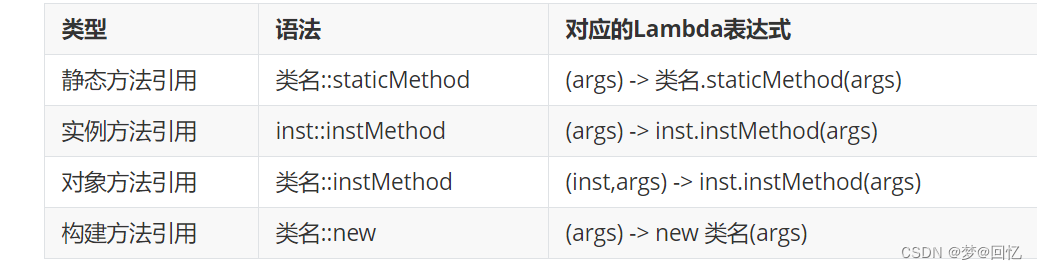
4.3 实例方法引用
实例方法引用,顾名思义就是调用已经存在的实例的方法,与静态方法引用不同的是类要先实例化,静态方法引用类无需实例化,直接用类名去调用。
- public class Test03 {
- public static void main(String[] args) {
- //[3]对象方法引用: 类名::实例方法. (参数1,参数2)->参数1.实例方法(参数2)
-
- // Function<String,Integer> function=(str)->{
- // return str.length();
- // };
- // Function<String,Integer> function=String::length;
- //
- // Integer len = function.apply("hello");
- // System.out.println(len);
-
- //比较两个字符串的内容是否一致.T, U, R
- // R apply(T t, U u);
- // BiFunction<String,String,Boolean> bi=(t,u)->{
- // return t.equals(u);
- // };
- // BiFunction<String,String,Boolean> bi=String::equals;
- // Boolean aBoolean = bi.apply("hello", "world");
- // System.out.println(aBoolean);
-
- // [4]构造方法引用: 类名::new (参数)->new 类名(参数)
- // Supplier<String> supplier=()->{
- // return new String("hello");
- // };
- // Supplier<People> supplier=People::new;
- // Function<String,People> function=(n)->new People(n);
- Function<String,People> function= People::new;
-
- People s = function.apply("张三");
- System.out.println(s);
-
- }
- }
- class People{
- private String name;
-
- public People() {
- }
-
- public People(String name) {
- this.name = name;
- }
-
- @Override
- public String toString() {
- return "People{" +
- "name='" + name + '\'' +
- '}';
- }
- }
5.Stream流
Java8的两个重大改变,一个是Lambda表达式,另一个就是本节要讲的Stream API表达式。==Stream 是Java8中处理集合的关键抽象概念==,它可以对集合进行非常复杂的查找、过滤、筛选等操作.
5.1 为什么使用Stream流
当我们需要对集合中的元素进行操作的时候,除了必需的添加、删除、获取外,最典型的就是集合遍历。我们来体验 集合操作数据的弊端,需求如下:
一个ArrayList集合中存储有以下数据:张无忌,周芷若,赵敏,张强,张三丰,何线程
需求:1.拿到所有姓张的 2.拿到名字长度为3个字的 3.打印这些数据
代码如下:
- public class My {
- public static void main(String[] args) {
- // 一个ArrayList集合中存储有以下数据:张无忌,周芷若,赵敏,张强,张三丰
- // 需求:1.拿到所有姓张的 2.拿到名字长度为3个字的 3.打印这些数据
- ArrayList<String> list = new ArrayList<>();
- Collections.addAll(list, "张无忌", "周芷若", "赵敏", "张强", "张三丰");
- // 1.拿到所有姓张的
- ArrayList<String> zhangList = new ArrayList<>(); // {"张无忌", "张强", "张三丰"}
- for (String name : list) {
- if (name.startsWith("张")) {
- zhangList.add(name);
- }
- }
- // 2.拿到名字长度为3个字的
- ArrayList<String> threeList = new ArrayList<>(); // {"张无忌", "张三丰"}
- for (String name : zhangList) {
- if (name.length() == 3) {
- threeList.add(name);
- }
- }
- // 3.打印这些数据
- for (String name : threeList) {
- System.out.println(name);
- }
- }
- }
分析:
这段代码中含有三个循环,每一个作用不同:
首先筛选所有姓张的人;
然后筛选名字有三个字的人;
最后进行对结果进行打印输出。
每当我们需要对集合中的元素进行操作的时候,总是需要进行循环、循环、再循环。这是理所当然的么?不是。循环 是做事情的方式,而不是目的。每个需求都要循环一次,还要搞一个新集合来装数据,如果希望再次遍历,只能再使 用另一个循环从头开始。
那Stream能给我们带来怎样更加优雅的写法呢?
Stream的更优写法
- public class Test {
- public static void main(String[] args) {
- ArrayList<String> list = new ArrayList<>();
- Collections.addAll(list, "张无忌", "周芷若", "赵敏", "张强", "张三丰","何线程");
- list.stream()
- .filter(item->item.startsWith("张"))
- .filter(item->item.length()==3)
- .forEach(item-> System.out.println(item));
- }
- }
对集合的操作语法简洁:性能比传统快。
5.2 Stream流的原理
注意:Stream和IO流(InputStream/OutputStream)没有任何关系,请暂时忘记对传统IO流的固有印象!
Stream流式思想类似于工厂车间的“生产流水线”,Stream流不是一种==数据结构==,==不保存数据==,而是对数据进行==加工 处理==。Stream可以看作是流水线上的一个工序。在流水线上,通过多个工序让一个原材料加工成一个商品。
Stream不存在数据,只对数据进行加工处理。
5.3 如何获取Stream流对象。
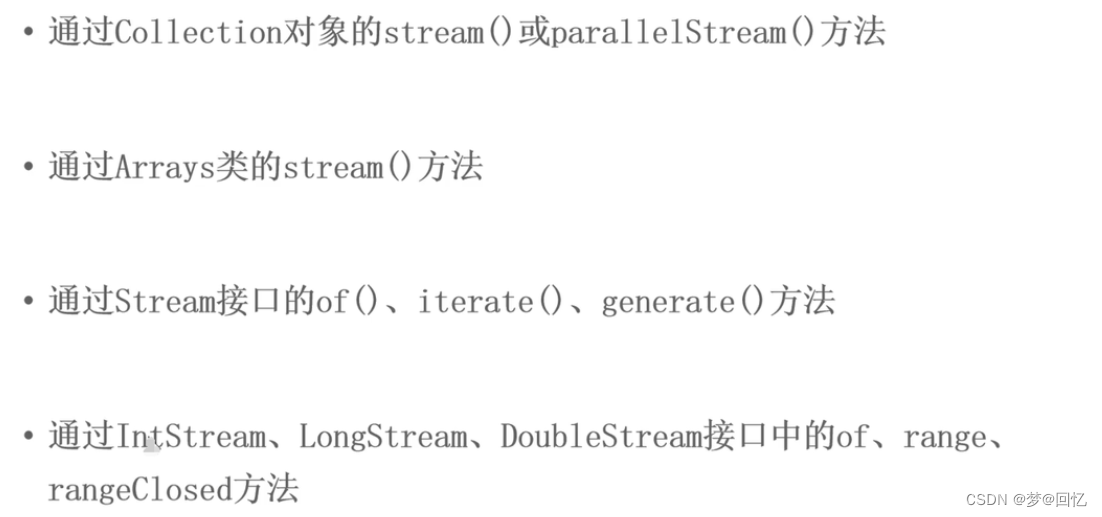
- public class Test02 {
- public static void main(String[] args) {
- //通过集合对象调用stream()获取流
- List<String> list=new ArrayList<>();
- list.add("闫克起");
- list.add("何线程");
- list.add("杨坤");
- list.add("王地");
- Stream<String> stream = list.stream();
-
- //通过Arrays数组工具类获取Stream对象
- int[] arr={3,4,5,63,2,34};
- IntStream stream1 = Arrays.stream(arr);
-
- //使用Stream类中of方法
- Stream<String> stream2 = Stream.of("hello", "world", "spring", "java");
-
- //LongStream
- LongStream range = LongStream.range(1, 10);
-
- //上面都是获取的串行流。还可以获取并行流。如果流中的数据量足够大,并行流可以加快处速度。
- Stream<String> stringStream = list.parallelStream();
-
- //
- // stringStream.forEach(item-> System.out.println(item));
- stringStream.forEach(System.out::println);
- }
- }
5.4 Stream流中常见的api
中间操作api: 一个操作的中间链,对数据源的数据进行操作。而这种操作的返回类型还是一个Stream对象。
终止操作api: 一个终止操作,执行中间操作链,并产生结果,返回类型不在是Stream流对象。
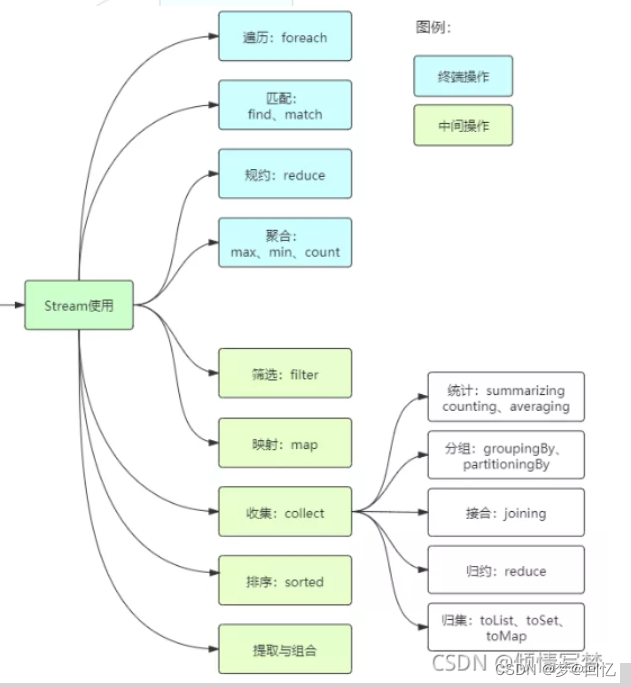
(1)filter / foreach / count
- static List<Person> personList = new ArrayList<Person>();
- private static void initPerson() {
- personList.add(new Person("张三", 8, 3000));
- personList.add(new Person("李四", 18, 5000));
- personList.add(new Person("王五", 28, 7000));
- personList.add(new Person("孙六", 38, 9000));
- }
-
- class Person {
- private String name;
- private Integer age;
- private String country;
- private char sex;
-
- public Person(String name, Integer age, String country, char sex) {
- this.name = name;
- this.age = age;
- this.country = country;
- this.sex = sex;
- }
- }
- List<Person> personList = new ArrayList<>();
- personList.add(new Person("欧阳雪",18,"中国",'F'));
- personList.add(new Person("Tom",24,"美国",'M'));
- personList.add(new Person("Harley",22,"英国",'F'));
- personList.add(new Person("向天笑",20,"中国",'M'));
- personList.add(new Person("李康",22,"中国",'M'));
- personList.add(new Person("小梅",20,"中国",'F'));
- personList.add(new Person("何雪",21,"中国",'F'));
- personList.add(new Person("李康",22,"中国",'M'));
(2) map | sorted
map--接收Lambda,将元素转换成其他形式或提取信息。接收一个函数作为参数,该函数会被应用到每个元素上,并将其映射成一个新的元素。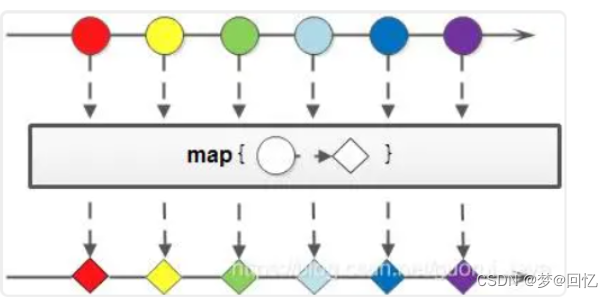
- //对流中元素排序
- personList.stream()
- .sorted((o1,o2)->o1.getAge()-o2.getAge())
- .forEach(System.out::println);
-
-
- //集合中每个元素只要名.map--->原来流中每个元素转换为另一种格式。
- // personList.stream()
- // .map(item->{
- // Map<String,Object> m=new HashMap<>();
- // m.put("name",item.getName());
- // m.put("age",item.getAge());
- // return m;
- // })
- // .forEach(System.out::println);
(3) min max
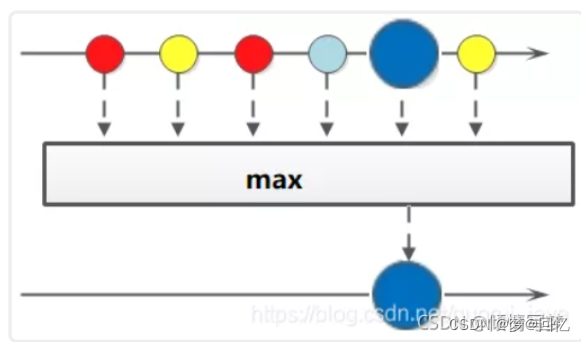
获取员工中年龄最大的人
- //查找最大年龄的人. max终止操作
- Optional<Person> max = personList.stream()
- .max((o1, o2) -> o1.getAge() - o2.getAge());
- System.out.println(max.get());
获取员工中年龄最小的人-- 省略
(4)规约reduce
- //求集合中所有人的年龄和。
- Optional<Integer> reduce = personList.stream()
- .map(item -> item.getAge())
- .reduce((a, b) -> a + b);
- System.out.println(reduce.get());
-
-
- Integer reduce = personList.stream()
- .map(item -> item.getAge())
- .reduce(10, (a, b) -> a + b);
- System.out.println(reduce);
(5)collect搜集 match find
- //findFirst match
- // Optional<Person> first = personList.parallelStream().filter(item -> item.getSex() == 'F').findAny();
- boolean b = personList.parallelStream().filter(item -> item.getSex() == 'F').noneMatch(item -> item.getAge() >= 20);
-
- System.out.println(b);
- //搜集方法 collect 它属于终止方法
- //年龄大于20且性别为M
- // List<Person> collect = personList.stream()
- // .filter(item -> item.getAge() > 20)
- // .filter(item -> item.getSex() == 'M')
- // .collect(Collectors.toList());
- //
- // System.out.println(collect);
6. 新增了日期时间类
旧的日期时间的缺点:
设计比较乱: Date日期在java.util和java.sql也有,而且它的时间格式转换类在java.text包。
线程不安全。
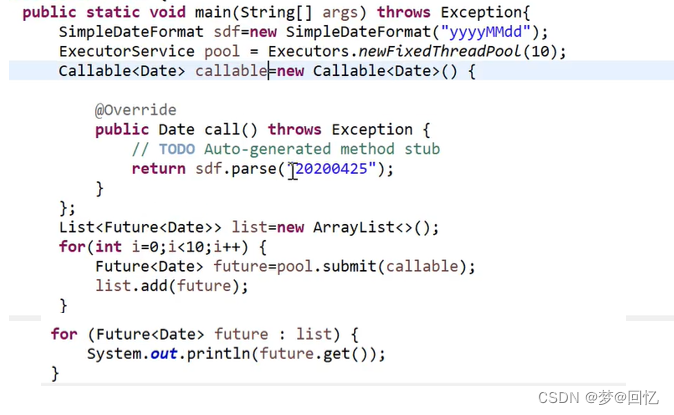
新增加了哪些类?
LocalDate: 表示日期类。yyyy-MM-dd
LocalTime: 表示时间类。 HH:mm:ss
LocalDateTime: 表示日期时间类 yyyy-MM-dd t HH:mm:ss sss
DatetimeFormatter:日期时间格式转换类。
Instant: 时间戳类。
Duration: 用于计算两个日期类
- package demo10;
-
- import java.time.Duration;
- import java.time.LocalDate;
- import java.time.LocalDateTime;
- import java.time.LocalTime;
- import java.time.format.DateTimeFormatter;
-
- /**
- * @program: qy151-jdk8
- * @description:
- * @author: 闫克起2
- * @create: 2022-07-20 17:22
- **/
- public class Test {
- public static void main(String[] args) {
- LocalDate now = LocalDate.now(); //获取当前日期
- LocalDate date = LocalDate.of(2022, 8, 23);//指定日期
-
-
-
-
- LocalTime now1 = LocalTime.now();//当前时间
- LocalTime of = LocalTime.of(17, 30, 20, 600);
-
- LocalDateTime now2 = LocalDateTime.now();//获取当前日期时间
- LocalDateTime now3 = LocalDateTime.of(2022,6,20,17,45,20);
- Duration between = Duration.between(now2, now3);
- System.out.println(between.toHours());
-
-
- DateTimeFormatter dateTimeFormatter=DateTimeFormatter.ofPattern("yyyy-MM-dd");
-
- LocalDate parse = LocalDate.parse("1999-12-12", dateTimeFormatter);//把字符串转换为日期格式
-
- String format = parse.format(dateTimeFormatter);
-
-
-
-
- }
- }

